Understanding Python's yield — From the Difference with return to Streaming Input Patterns for AI Agents

This page has been translated by machine translation. View original
Introduction
Have you ever encountered this question while building AI agents?
"I want to inject new information while an agent is running. But recreating the session every time is way too inefficient..."
Digging into this question led me to Python's yield mechanism. It looks like a simple keyword at first glance, but once you understand it, it turns out to be an important concept directly tied to AI agent architecture design. This article covers everything from the basics of yield to the "streaming input" pattern for agents.
return vs yield — A Fundamental Difference in Control Flow
return is "Exit Immediately"
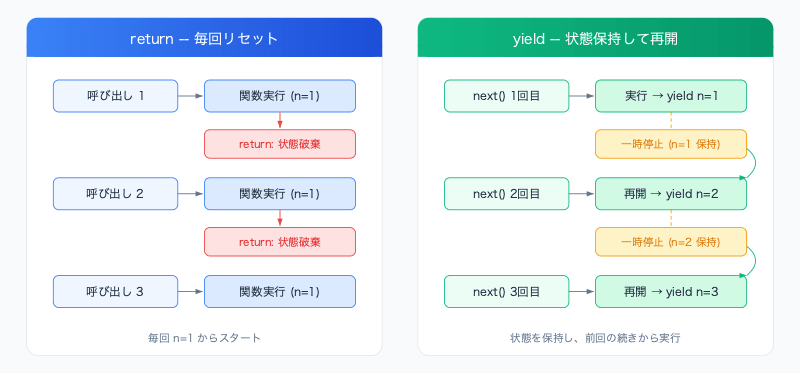
return returns the final output of a function and terminates the function on the spot. All local variables inside the function are discarded, and the next call starts over from the first line.
def get_greeting():
    name = "Alice"
    return f"Hello, {name}"
    # The function ends completely here. name is also discarded.

result = get_greeting()  # Executed from scratch every time
yield is "Pause and Resume"
Using yield turns a function into a generator. It returns a value while keeping all of the function's state (variables, execution position) intact in a paused state. The next time a value is requested, execution resumes from the line where it paused.
def count_up():
    n = 1
    while True:
        yield n       # Returns n and pauses
        n += 1        # On resume, continues from here

counter = count_up()
print(next(counter))  # 1
print(next(counter))  # 2 (remembers the state where n=1)
print(next(counter))  # 3
Summary Comparison
| Characteristic | return |
yield |
|---|---|---|
| Function termination | Terminates immediately | Pauses (resumable) |
| State retention | Discarded | Retained |
| Call model | Executes from the beginning each time | Resumes from the previous pause point |
| Analogy | Sending a letter (self-contained) | Making a phone call (keeps the line open) |
Streaming Input to Agents — The async iterator Pattern
The characteristic of yield — returning values sequentially while retaining state — directly connects to input patterns for long-running AI agents.
Problem: The Limitations of One-Shot Requests
With conventional API calls, all inputs must be ready at the time of the request.
# Traditional: Pass all inputs upfront
response = await client.query(prompt="Analyze this data")
However, with long-running agents, there are situations where you want to inject new information mid-execution. Recreating the session every time requires resending the entire conversation history, which is inefficient.
Solution: Streaming Input via Async Generators
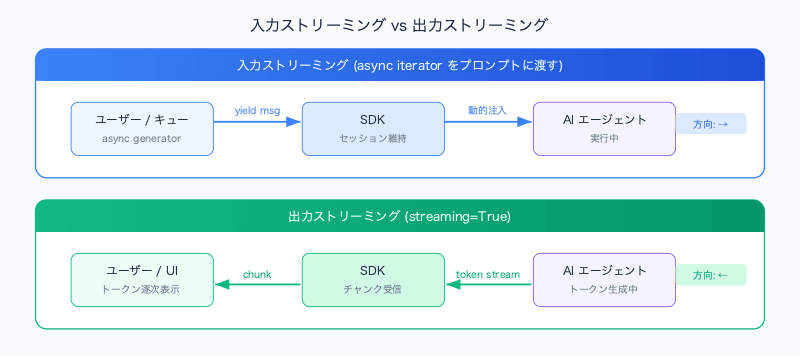
By passing a Python async generator as a prompt, the SDK keeps the session in an "open" state and allows messages arriving later to be dynamically fed in.
import asyncio

async def message_streamer():
    # Send the initial instruction
    yield "Starting the agent. Please analyze the S3 logs."

    # Wait for events from an external queue (SQS, etc.) and inject them as they arrive
    while True:
        event = await queue.get()
        yield event.message
        if event.is_last:
            break

# Pass the iterator to the SDK — the session is maintained (pseudocode)
response = await client.query(prompt=message_streamer())
The key point is that thanks to yield, the function does not terminate and enters a "waiting state" until an event arrives in the queue. When an event arrives, it resumes and sends the new message to the agent.
Note the Difference from streaming=True
The streaming=True option seen in many SDKs is a setting for streaming output (responses). On the other hand, passing an async iterator as a prompt is a mechanism for streaming input. The direction is opposite, so be careful not to confuse them.
| Setting | Direction | Use Case |
|---|---|---|
streaming=True |
Output streaming | Receive responses sequentially, token by token |
| Passing async iterator as prompt | Input streaming | Dynamically inject messages into a running agent |
Use Cases — When Is Streaming Input Needed?
1. Human-in-the-Loop (HITL)
In situations where an agent asks for confirmation like "Is it okay to delete this file?", you can wait for a human response while keeping the session alive.
async def hitl_streamer():
    yield "Please start cleaning up the production database."

    # When the agent asks for confirmation, receive the human's response from the UI
    approval = await wait_for_human_approval()
    yield f"Approval: {approval}"
The benefit is being able to insert human judgment while keeping the agent in a "warm" state.
2. Real-Time External Event Injection
A case where, while a support bot is analyzing a customer's issue, a system event such as "the customer upgraded their plan" is injected.
async def event_injector():
    yield "Please analyze support ticket for customer #12345."

    async for event in system_event_stream:
        yield f"[SYSTEM EVENT: {event.description}]"
The agent receives the event and can adjust the direction of its response in real time.
3. Adding Instructions Incrementally
A case where, while analyzing a 100-page document, you inject an instruction like "actually, please add this perspective too." Since there is no need to recreate the session, the analysis context accumulated up to that point is preserved.
Implementation in Node.js — async function*
The same pattern can be used not only in Python but also in Node.js. The syntax is async function* (with an asterisk) and yield.
// Async generator in Node.js
async function* messageStreamer() {
    yield "Initializing agent...";

    while (true) {
        const event = await waitForNextEvent();
        yield event.text;

        if (event.type === 'close') break;
    }
}

// Pass the iterator to the SDK (pseudocode)
const client = new AgentClient();
await client.query({ prompt: messageStreamer() });
Python vs Node.js Comparison
| Item | Python | Node.js |
|---|---|---|
| Syntax | async def func(): + yield |
async function* func() + yield |
| Consumption method | async for item in gen: |
for await (const item of gen) |
| Generator detection | Auto-detected by presence of yield |
Explicitly indicated by * in function* |
| Ecosystem | asyncio-based | EventEmitter / Promise-based |
One difference from Python is that in Node.js you need to append * to the function declaration, but the concept is identical. In both languages, the behavior of "sending out values sequentially without terminating the function, while retaining state" remains the same.
Summary
yieldreturns a value without terminating the function. Ifreturnis a "letter," thenyieldis a "phone call" — you can exchange information while keeping the line open.- Directly applicable to streaming input for long-running agents. By passing an async iterator as a prompt, you can dynamically inject messages into a running agent.
- Enables frequently-occurring patterns in practice such as HITL, external event injection, and incremental instruction addition. The overhead of recreating sessions can be avoided.
- The same concept can be used in both Python and Node.js. There are syntax differences, but the design philosophy is shared.
yield is not merely a language feature — it is the foundation supporting AI agent design patterns. When building long-running agents, consider exploring the streaming input pattern.