
Visualize the reference KB articles of a RAG chatbot using Cloud Logging → BigQuery → Data Studio

This page has been translated by machine translation. View original
Introduction
While operating a Google Chat bot using Vertex AI RAG Engine, I ran into this question:
"Can we even trace which KB article the bot referenced to answer a user's question from the logs?"
The structured logs recorded the query text, response text, RAG similarity scores, latency, and so on, but I realized that the referenced KB file name was not being recorded. This meant that even when receiving negative feedback, we had no way of knowing "which article should be improved."
This article walks through the process of adding source file information to the structured logs of a RAG pipeline and making it analyzable with BigQuery views and Data Studio.
Prerequisites & Environment
- Google Cloud Functions (2nd gen) + Cloud Run
- Vertex AI RAG Engine (knowledge base search)
- Cloud Logging → BigQuery log sink (automatic forwarding of structured logs)
- Data Studio (dashboard)
- Python 3.14
Overall Architecture
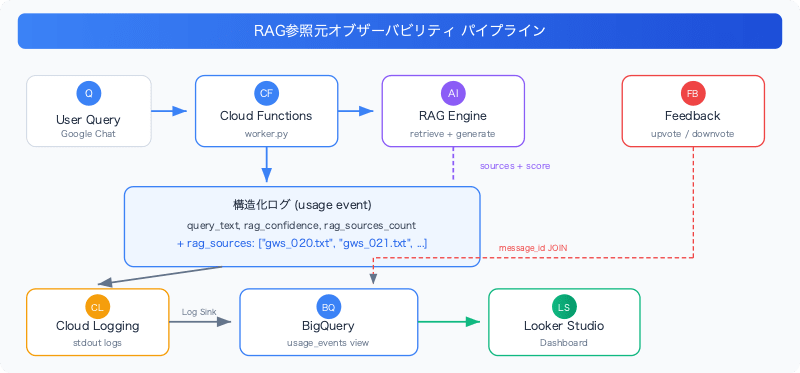
Current Problem: Source Files Are Not Being Recorded
The retrieve_context() function in the RAG pipeline was returning {text, score, source} for each retrieved chunk. The source field contains a GCS URI (e.g., gs://bucket/kb_drive_export/gws_020.txt) obtained from context.source_uri.
However, the usage event log output only recorded the following two fields, meaning the source URI was being completely discarded:
rag_confidence: the score of the highest-scoring chunkrag_sources_count: the number of retrieved chunks
# Before: source is unused
best_score = contexts[0]["score"] if contexts else None
log_event(
    severity, "usage",
    rag_confidence=best_score,
    rag_sources_count=len(contexts),
    # ← rag_sources is missing!
)
RAG observability best practices recommend recording chunk-level attributes (chunk_id, similarity_score, source_url) in retrieval spans. Without source tracking, it's impossible to link feedback to information sources for quality improvement.
Implementation: Adding Source Files to the Usage Event
Changes to Log Output
I added a rag_sources field to _emit_usage_event():
best_score = contexts[0]["score"] if contexts else None
rag_sources = list(dict.fromkeys(
    ctx["source"].rsplit("/", 1)[-1]
    for ctx in contexts if ctx.get("source")
))
log_event(
    severity, "usage",
    rag_confidence=best_score,
    rag_sources_count=len(contexts),
    rag_sources=rag_sources,  # ← added
    # ...
)
Let me explain a few key points.
Extracting only the filename
rsplit("/", 1)[-1] extracts just the filename from the GCS URI. gs://your-bucket/kb_drive_export/foo_020.txt → foo_020.txt. Using the full path would work too, but since the bucket name and prefix are fixed, it would just make the logs verbose.
Deduplication
dict.fromkeys() removes duplicates while preserving the order of appearance (= order of similarity scores). Since RAG often returns multiple chunks from the same document, deduplication is important. Using dict.fromkeys() instead of set() preserves the order in which items first appear (= the most relevant ones first).
Recording for all queries
Source information is recorded for all queries regardless of the is_answerable value. Even for cases where a response couldn't be provided (fallback), knowing "which articles were retrieved but were insufficient" is an important signal for KB improvement.
Example of the Output Log
{
  "severity": "INFO",
  "event_type": "usage",
  "query_text": "I want to apply to use Claude Code",
  "rag_confidence": 0.193,
  "rag_sources_count": 5,
  "rag_sources": [
    "claude_020.txt",
    "boo_021.txt",
    "office_001.txt",
    "foo_035.txt",
    "workflow_022.txt"
  ],
  "is_fallback": false,
  "message_id": "spaces/xxx/messages/yyy"
}
Linking with Feedback
Feedback events (upvote/downvote) include message_id as a JOIN key. By adding source information to usage events as well, the following analyses are now possible in BigQuery:
- Identifying KB articles referenced in responses that received negative ratings
- Identifying articles that were retrieved in fallback queries but did not lead to a response
- Correlating the frequency with which specific KB articles are referenced against their ratings
Updating the BigQuery Views
With the log sink from Cloud Logging to BigQuery, structured logs are automatically stored in BigQuery tables. Since rag_sources is a JSON array, it is stored in BigQuery as a REPEATED STRING type.
usage_events view
Just add rag_sources to the existing view... or so I thought — there was a pitfall here.
Since logs written before the deployment do not have the rag_sources field, trying to update the view would produce a Field name rag_sources does not exist in STRUCT error. I was unable to update the view until at least one log entry had been written.
After deployment, I sent one test query and waited for the log to reach BigQuery, then updated the view:
SELECT
  timestamp,
  jsonPayload.user_id,
  jsonPayload.space_id,
  jsonPayload.message_id,
  jsonPayload.query_text,
  CAST(jsonPayload.query_length AS INT64) AS query_length,
  jsonPayload.response_text,
  CAST(jsonPayload.response_length AS INT64) AS response_length,
  jsonPayload.rag_confidence,
  CAST(jsonPayload.rag_sources_count AS INT64) AS rag_sources_count,
  ARRAY_TO_STRING(jsonPayload.rag_sources, ', ') AS rag_source_files,
  CAST(jsonPayload.latency_ms AS INT64) AS latency_ms,
  jsonPayload.is_fallback,
  severity
FROM `PROJECT_ID.chat_analytics.run_googleapis_com_stdout_*`
WHERE jsonPayload.event_type = "usage"
feedback_with_context view
Also added rag_source_files to the view that JOINs usage and feedback on message_id:
SELECT
  u.timestamp AS query_timestamp,
  f.timestamp AS feedback_timestamp,
  u.user_id,
  u.message_id,
  u.query_text,
  u.response_text,
  u.rag_confidence,
  u.rag_source_files,
  u.latency_ms,
  u.is_fallback,
  f.vote,
  f.reason_category,
  f.comment_text
FROM `PROJECT_ID.chat_analytics.usage_events` u
JOIN `PROJECT_ID.chat_analytics.feedback_events` f
  ON u.message_id = f.message_id
This makes it easy to see at a glance "which KB articles were referenced in responses that received negative ratings":
-- Display negatively rated responses and the source KB articles referenced
SELECT query_text, response_text, rag_source_files, reason_category, comment_text
FROM `PROJECT_ID.chat_analytics.feedback_with_context`
WHERE vote = 'down'
ORDER BY feedback_timestamp DESC
Compatibility with Data Studio: The REPEATED Type Trap
After updating the BigQuery view and trying to add it to the dashboard in Data Studio, the following error occurred:
Values referenced in UNNEST must be arrays.
UNNEST contains expression of type STRING
Cause
BigQuery's REPEATED STRING type (array) cannot be displayed directly in Data Studio's table component. Data Studio automatically attempts to UNNEST columns of REPEATED type, but when the view has already converted it to STRING using ARRAY_TO_STRING(), a type mismatch error occurs.
What makes this even trickier is that Data Studio caches the data source schema. Even if you update the view definition, unless you perform "Refresh Fields" on the Data Studio side, queries will still be generated using the old schema (REPEATED type).
Solution
Two fixes were ultimately necessary:
1. Rename the column
Keeping the name rag_sources (the same as the original REPEATED type) meant the cache sometimes persisted even after refreshing fields. Renaming the column to rag_source_files caused Data Studio to recognize it as a "new field."
-- NG: same name as the original REPEATED type
ARRAY_TO_STRING(jsonPayload.rag_sources, ', ') AS rag_sources

-- OK: use a different name
ARRAY_TO_STRING(jsonPayload.rag_sources, ', ') AS rag_source_files
2. Refresh fields in Data Studio
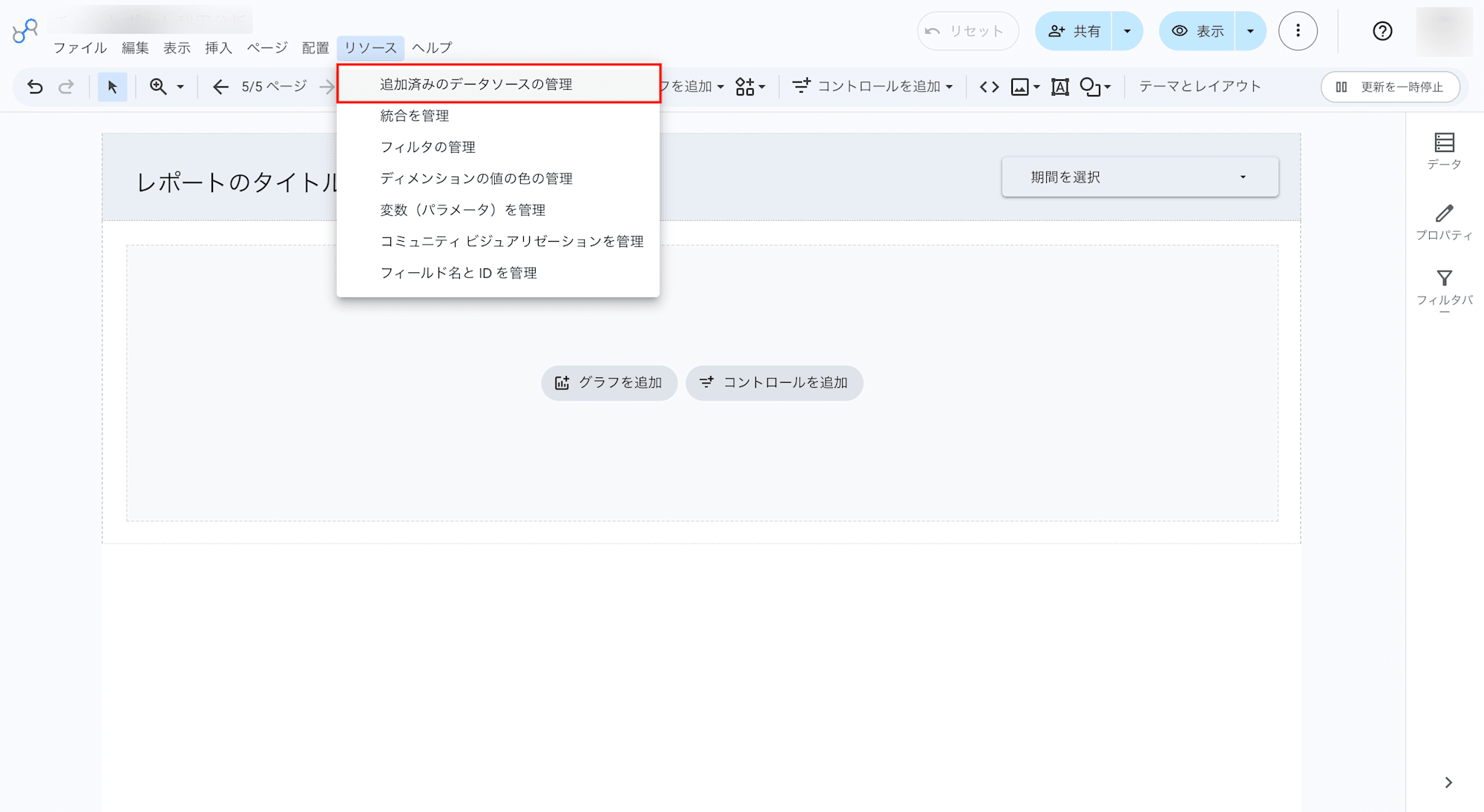
-
Resource → Manage added data sources
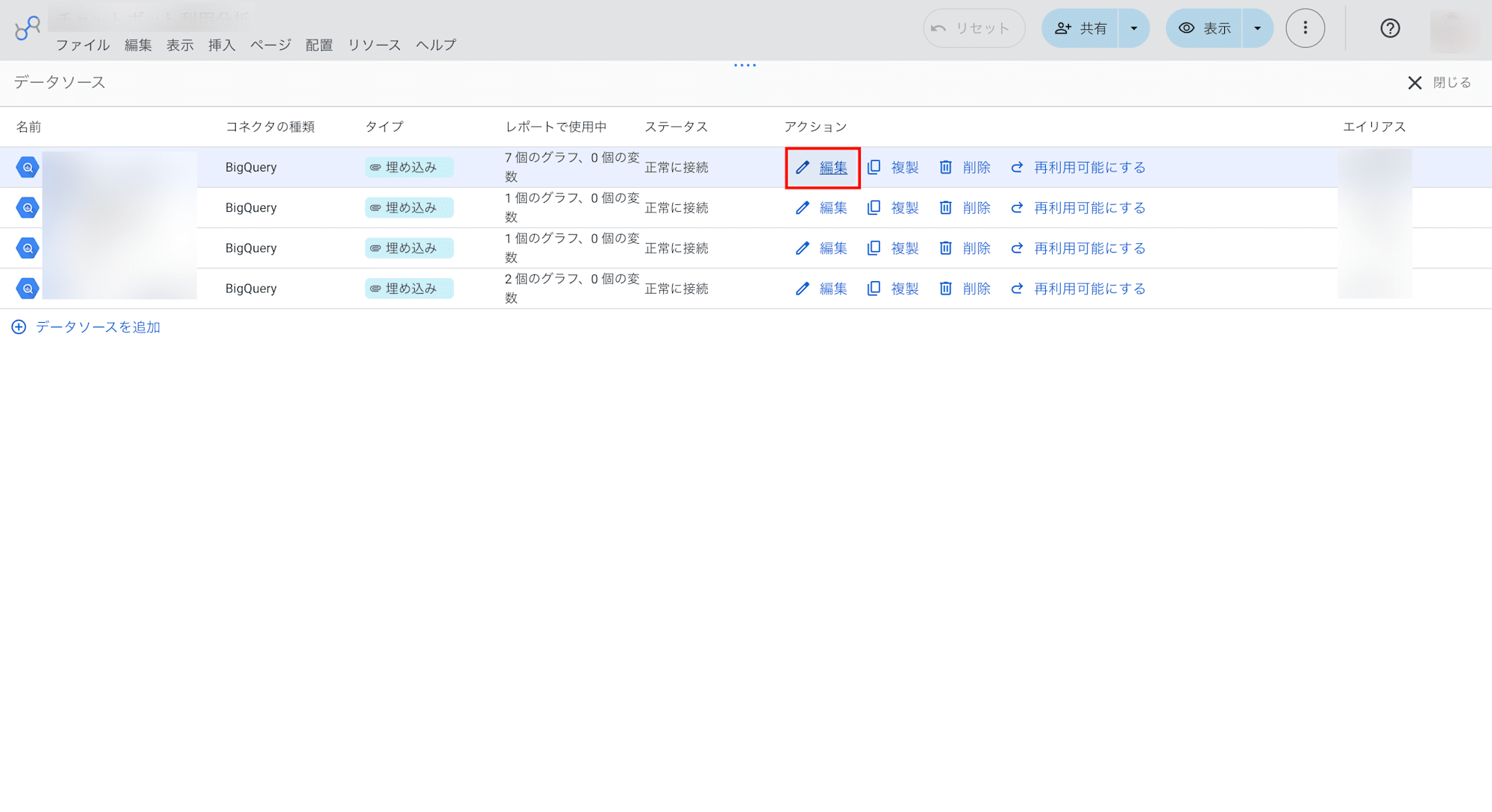
-
Click Edit for the target data source
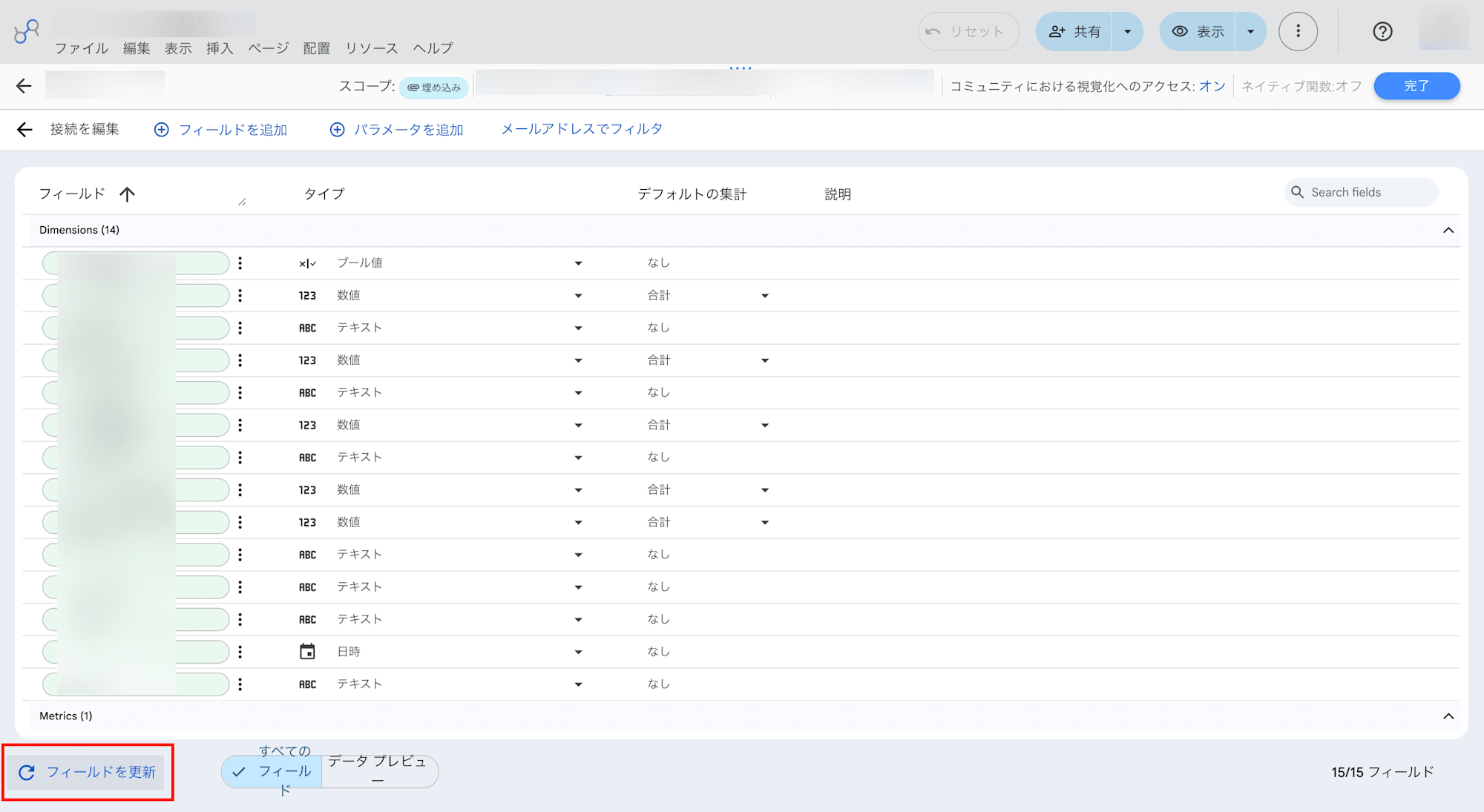
-
Click Refresh Fields at the bottom left
-
Done
This operation is required for each data source. It must be performed for both the usage_events and feedback_with_context data sources.
Summary
The key to improving RAG chatbot operations is being able to track which KB articles were used to generate each response. Here are the key takeaways from this work:
- Always log RAG source references:
source_uriis available at the retrieval stage. Not including it in logs is a loss of information - Record for all queries: Source references matter even for fallback queries (unanswerable). This lets you distinguish between "the article exists but is insufficient" and "the article doesn't exist"
- Deduplication should preserve order: Use
dict.fromkeys()to maintain the order from most to least relevant - BigQuery REPEATED types don't play well with Data Studio: The safest approach is to convert to STRING with
ARRAY_TO_STRING()and also rename the column - Watch out for Data Studio's schema cache: After changing a view, always perform "Refresh Fields." This must be done for each data source