Not all combinations of "1 year / 3 years" and "no upfront / partial upfront / full upfront" are supported for Amazon RDS Reserved Instances.

This page has been translated by machine translation. View original
Good evening, this is Chiba (Ko).
As methods to reduce the running costs of Amazon RDS DB instances, there are Database Savings Plans (DB SP) and Amazon RDS Reserved Instances (RDS RI). Both are mechanisms that provide discounts in exchange for committing to usage over a fixed period.
Organizing the "commitment period" and "payment options" for both looks like this:
| Period | Payment Option | DB SP | RDS RI |
|---|---|---|---|
| 1 Year | No Upfront | ⚫︎ | ⚫︎ |
| Partial Upfront | ー | ⚫︎ | |
| All Upfront | ー | ⚫︎ | |
| 3 Years | No Upfront | ー | ⚫︎ |
| Partial Upfront | ー | ⚫︎ | |
| All Upfront | ー | ⚫︎ |
DB SP only supports 1-year no upfront, while RDS RI supports 6 types of purchase options.
That said, it doesn't mean that all 6 options are always available with RDS RI. Depending on conditions such as the DB instance class, the available purchase options may be limited.
This time, we'll focus on RDS RI and introduce how to check the available purchase options for each combination of "region" and "DB engine," as well as the results of checking differences across different combinations.
Summary First
- The only available purchase option for DB SP is "1-year no upfront"
- For RDS RI...
- Purchasing with "3-year no upfront" is almost not possible (only available in very limited cases)
- Within the same region and same DB engine, there are generally no differences in available purchase options based on the following criteria (though there are some exceptions)
- Whether Multi-AZ or not
- Size differences within the same DB instance class
- As of August 2026, the following trends are common for 7th and 8th generation DB instance classes (not all cases)
db.m7i/db.m8g/db.r7i/db.r8g: Purchasing with a 3-year term is not availabledb.m7g/db.r7g: Purchasing with 3-year partial upfront/all upfront is available
The vague feeling of the second line onwards reflects the complexity of RDS RI.
Terminology for DB Instance Classes
In this blog, we use terms as follows:

From https://dev.classmethod.jp/articles/rds-dont-have-db-instance-family/
Using db.r6g.2xlarge as an example, each term refers to the following parts:
- DB instance class:
db.r6g.2xlarge - DB instance class type:
db.r6g - Size:
2xlarge
The terminology is slightly different from EC2 instance types, which can be confusing. You might be tempted to say "DB instance family," but that is not an official term.
Verification Environment
The commands listed in this blog were executed in the following environment. They may not work correctly in other environments.
- macOS
- Zsh version:
zsh 5.9 (arm64-apple-darwin25.0) - AWS CLI version:
aws-cli/2.36.19 Python/3.14.6 Darwin/25.5.0 exe/arm64 - Jq version:
jq-1.6
Retrieving a List of RDS RI Offers for a Specific Region and DB Engine
Details on what RDS RI purchase options are available can be retrieved as offer information using the following AWS CLI command:
Information is returned in the following format:
{
    "ReservedDBInstancesOfferings": [
        {
            "CurrencyCode": "USD",
            "UsagePrice": 0.0,
            "ProductDescription": "oracle-se2(li)",
            "ReservedDBInstancesOfferingId": "005bdee3-9ef4-4182-aa0c-58ef7cb6c2f8",
            "MultiAZ": true,
            "DBInstanceClass": "db.m4.xlarge",
            "OfferingType": "Partial Upfront",
            "RecurringCharges": [
                {
                    "RecurringChargeAmount": 0.594,
                    "RecurringChargeFrequency": "Hourly"
                }
            ],
            "FixedPrice": 4089.0,
            "Duration": 31536000
        },
    ...some output truncated...
}
Without filtering, an enormous amount of output will be generated, so it is better to limit the output by region and DB engine.
This time, we'll set the targets as environment variables in the following form:
REGION=ap-northeast-1
ENGINE=mysql
The DB engine types can be confirmed from the results of the following command, for example:
% aws rds describe-reserved-db-instances-offerings \
  --region ap-northeast-1 \
  --output json \
| jq -r '[.ReservedDBInstancesOfferings[].ProductDescription] | unique[]'
The execution result for the Tokyo region as of 2026/08/28 is as follows:
aurora-mysql
aurora-postgresql
custom-sqlserver-ee(byol)
custom-sqlserver-ee(li)
custom-sqlserver-se(byol)
custom-sqlserver-se(li)
custom-sqlserver-web(li)
db2-ae(byol)
db2-ae(mpl)
db2-se(byol)
db2-se(mpl)
mariadb
mysql
oracle-ee(byol)
oracle-se2 (byol)
oracle-se2(li)
postgresql
sqlserver-ee(li)
sqlserver-ex(li)
sqlserver-se(li)
sqlserver-web(li)
Here is an example command to retrieve results by specifying MySQL in the Tokyo region. The variable declarations at the beginning are included as well.
REGION=ap-northeast-1
ENGINE=mysql
TS=$(date +%Y%m%d_%H%M%S)

aws rds describe-reserved-db-instances-offerings \
  --product-description "$ENGINE" \
  --region "$REGION" \
  --output json \
| jq -r --arg eng "$ENGINE" '
  ["1yr_NoUpfront","1yr_PartialUpfront","1yr_AllUpfront","3yr_NoUpfront","3yr_PartialUpfront","3yr_AllUpfront"] as $cols
  | [
      .ReservedDBInstancesOfferings[]
      | select(.ProductDescription == $eng)
      | . as $o
      | ($o.Duration/3600) as $hours
      | (($o.RecurringCharges // []) | map(select(.RecurringChargeFrequency=="Hourly") | .RecurringChargeAmount) | add // 0) as $rec
      | (((($o.FixedPrice/$hours) + $rec) * 10000) | round / 10000) as $eff
      | {
          class: $o.DBInstanceClass,
          az: (if $o.MultiAZ then "Multi-AZ" else "Single-AZ" end),
          col: ((if $o.Duration==31536000 then "1yr" else "3yr" end) + "_" + ($o.OfferingType | gsub(" ";""))),
          val: $eff
        }
    ]
  | group_by([.class, .az])
  | map({
      class: .[0].class,
      az: .[0].az,
      cols: (map({key: .col, value: .val}) | from_entries)
    })
  | sort_by(.class, .az)
  | ( [["DBInstanceClass","MultiAZ"] + $cols]
      + map(. as $row | [$row.class, $row.az] + ($cols | map($row.cols[.] // "-"))) )[]
  | @csv
' > rds_ri_${ENGINE}_${REGION}_effective_hourly_usd_${TS}.csv

echo "rds_ri_${ENGINE}_${REGION}_effective_hourly_usd_${TS}.csv"
The process overview is as follows:
- Set the region, DB engine name, and timestamp as variables, and retrieve the RI offering list in JSON format using
describe-reserved-db-instances-offerings - Group offerings by the combination of instance class and AZ type (Single-AZ/Multi-AZ)
- Convert the contents of each group into an object keyed by the 6 purchase options, and sort by instance class and AZ
- Assemble the header row and each data row and convert to a CSV format string
- Save as a CSV file with a timestamp-based filename and display the filename on screen
The "effective cost per hour" is calculated by dividing FixedPrice (upfront payment amount) by the total hours of the contract period to convert it to an hourly equivalent, then adding the hourly usage RecurringCharges.
Here is an image of the output CSV:
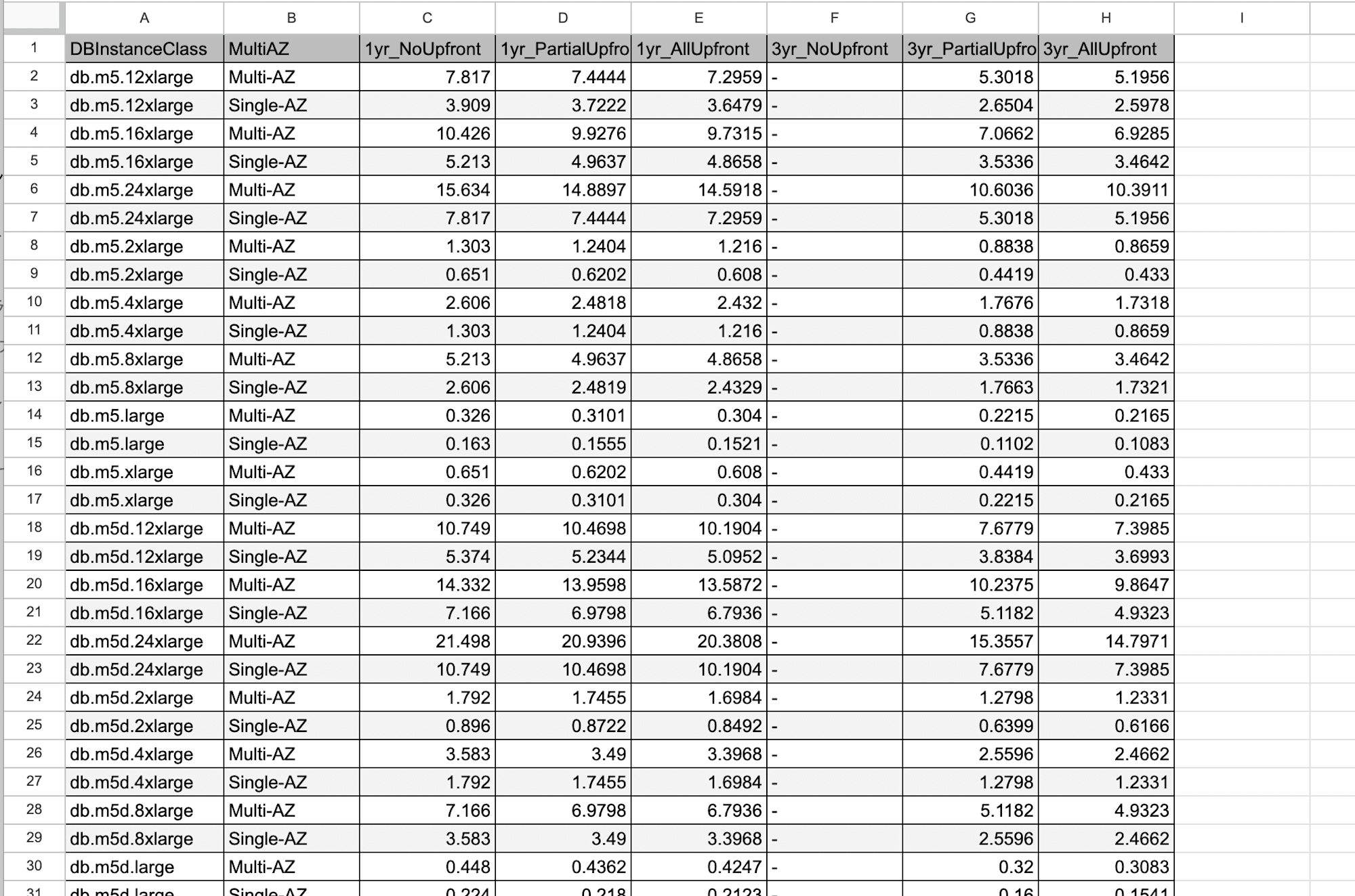
I'd like to paste the full output here, but since the results were 405 rows with nearly 27,000 characters, I'll skip that.
Can We Create a More Simplified Comparison Table?
Even when limited to a specific region and DB engine, results can run into the hundreds of rows. It would be nice to have a more simplified version to see the overall trends.
If there are no differences from the following perspectives, a more compact table could be created:
- Whether Multi-AZ affects the available purchase options
- Whether size within the same DB instance class type affects the available purchase options
We'll define the following function and run it with a CSV file as an argument to check:
check_diff() {
  local SRC="$1"
  tail -n +2 "$SRC" | awk -F, '
    {
      cls=$1; az=$2
      gsub(/"/,"",cls); gsub(/"/,"",az)
      split(cls,p,".")
      classtype=p[1]"."p[2]
      bits=""
      for(i=3;i<=NF;i++){ v=$i; gsub(/"/,"",v); bits = bits (v=="-" ? "0" : "1") }

      if (az=="Single-AZ") single[cls]=bits
      else multi[cls]=bits
      classlist[cls]=1

      if (!(classtype in ctPattern)) { ctPattern[classtype]=bits; ctRef[classtype]=cls }
      else if (ctPattern[classtype]!=bits) { ctDiffFlag[classtype]=1; ctDiff[classtype]=ctDiff[classtype]" "cls"("az")="bits }
    }
    END {
      print "=== Differences by AZ configuration ==="
      az_diff_found=0
      for (c in classlist) {
        if ((c in single) && (c in multi) && single[c]!=multi[c]) {
          print c"\tSingle="single[c]"\tMulti="multi[c]
          az_diff_found=1
        }
      }
      if (!az_diff_found) print "None"

      print "=== Differences within DB instance class type ==="
      ct_diff_found=0
      for (t in ctDiffFlag) {
        print t": "ctRef[t]"="ctPattern[t]" differs ->"ctDiff[t]
        ct_diff_found=1
      }
      if (!ct_diff_found) print "None"
    }
  '
}
- Process each row of the CSV by DB instance class (e.g.,
db.m5.large) and AZ configuration (Single-AZ/Multi-AZ), converting the 6 purchase option columns into a 6-digit bit string of 0s and 1s - Compare the bit strings for Single-AZ and Multi-AZ of the same DB instance class
- Use the first bit string encountered for each DB instance class type (e.g.,
db.m5) as the reference, and record any subsequent differences - After reading all rows, output the AZ configuration differences and DB instance class type differences respectively
Here is an example of the output when there are no differences:
% check_diff rds_ri_mysql_ap-northeast-1_effective_hourly_usd_20260828_135435.csv
=== Differences by AZ configuration ===
None
=== Differences within DB instance class type ===
None
Here is an example of the output when there are differences:
% check_diff rds_ri_sqlserver-ee_li_ap-northeast-1_effective_hourly_usd_20260828_135435.csv
=== Differences by AZ configuration ===
db.r5.12xlarge	Single=111011	Multi=011011
db.r5.24xlarge	Single=111011	Multi=011011
db.r5.8xlarge	Single=111011	Multi=011011
db.r5.xlarge	Single=111011	Multi=011011
db.r5.2xlarge	Single=111011	Multi=011011
db.r5.16xlarge	Single=111011	Multi=011011
db.r5.4xlarge	Single=111011	Multi=011011
=== Differences within DB instance class type ===
r5: db.r5.12xlarge=011011 differs -> db.r5.12xlarge(Single-AZ)=111011 db.r5.16xlarge(Single-AZ)=111011 db.r5.24xlarge(Single-AZ)=111011 db.r5.2xlarge(Single-AZ)=111011 db.r5.4xlarge(Single-AZ)=111011 db.r5.8xlarge(Single-AZ)=111011 db.r5.xlarge(Single-AZ)=111011
Here is a summary of the difference check results (without distinguishing the content of differences) for each engine in the Tokyo region, Osaka region, and Northern Virginia region:
○: No difference×: Difference presentN/A: Engine not supported
| Engine | Tokyo | Osaka | Northern Virginia |
|---|---|---|---|
| aurora-mysql | ○ | ○ | × |
| aurora-postgresql | ○ | ○ | ○ |
| custom-sqlserver-ee(byol) | ○ | N/A | ○ |
| custom-sqlserver-ee(li) | ○ | N/A | ○ |
| custom-sqlserver-se(byol) | ○ | N/A | ○ |
| custom-sqlserver-se(li) | ○ | N/A | ○ |
| custom-sqlserver-web(li) | ○ | N/A | ○ |
| db2-ae(byol) | ○ | ○ | ○ |
| db2-ae(mpl) | ○ | ○ | ○ |
| db2-se(byol) | ○ | ○ | ○ |
| db2-se(mpl) | ○ | ○ | ○ |
| mariadb | ○ | ○ | ○ |
| mysql | ○ | ○ | ○ |
| oracle-ee(byol) | ○ | ○ | ○ |
| oracle-se2(byol) | ○ | ○ | ○ |
| oracle-se2(li) | ○ | ○ | ○ |
| postgresql | ○ | ○ | ○ |
| sqlserver-ee(li) | × |
○ | × |
| sqlserver-ex(li) | ○ | ○ | ○ |
| sqlserver-se(li) | ○ | ○ | ○ |
| sqlserver-web(li) | ○ | ○ | ○ |
It was found that there are generally no differences in available purchase options based on "whether Multi-AZ or not" or "size within the same DB instance class type."
As one notable exception, for aurora-mysql in Northern Virginia, only certain sizes of db.r5 had restrictions on available purchase options:
○: Available for purchase×: Not available for purchase
| DB Instance Class | 1yr No | 1yr Partial | 1yr All | 3yr No | 3yr Partial | 3yr All |
|---|---|---|---|---|---|---|
db.r5.large〜16xlarge |
○ | ○ | ○ | × |
○ | ○ |
db.r5.24xlarge |
× |
○ | × |
× |
○ | × |
Only partial upfront purchases are available. That's unusual. (Note that for Aurora, there is no concept of purchasing RDS RI with Multi-AZ.)
Creating a Simplified RDS RI Purchase Option Comparison Table
Through the steps so far, we were able to check whether there are no differences based on "whether Multi-AZ or not" and "size within the same DB instance class type." For cases with no differences, we'd like to create a simplified version.
We'll define the following function and run it with a CSV as an argument to create a simplified table:
make_simple() {
  local SRC="$1"
  local OUT="${SRC/_effective_hourly_usd_/_simple_}"

  {
    head -1 "$SRC" | awk -F, '{h="ClassType"; for(i=3;i<=NF;i++){v=$i; gsub(/"/,"",v); gsub(/Upfront$/,"",v); gsub(/Partial/,"Part",v); gsub(/_/,"",v); h=h","v}; print h}'
    tail -n +2 "$SRC" | awk -F, '
      { cls=$1; gsub(/"/,"",cls); split(cls,p,"."); classtype=p[1]"."p[2]
        if (classtype in seen) next
        seen[classtype]=1
        line=classtype
        for(i=3;i<=NF;i++){ v=$i; gsub(/"/,"",v); line=line","(v=="-"?"×":"○") }
        print line
      }' | sort -t, -k1,1
  } > "$OUT"

  echo "$OUT"
}
- Create the output filename by replacing
_effective_hourly_usd_with_simple_in the input CSV path - Shorten the header row column names and create a new header of
ClassType+ 6 shortened column names - Extract the DB instance class type (e.g.,
db.m5) from the 1st and 2nd dot-separated parts ofDBInstanceClassin each data row, skipping rows after the first occurrence of the same type - Convert the 6 columns of remaining rows from
-to×/ value present to○ - Sort by type name, combine with header, and save to the output file
Here is an example of the execution:
% make_simple rds_ri_mysql_ap-northeast-1_effective_hourly_usd_20260828_135435.csv
rds_ri_mysql_ap-northeast-1_simple_20260828_135435.csv
The table for the Tokyo region MySQL retrieved at the beginning has been simplified to this:
○: Available for purchase×: Not available for purchase
| ClassType | 1yrNo | 1yrPart | 1yrAll | 3yrNo | 3yrPart | 3yrAll |
|---|---|---|---|---|---|---|
| db.m5 | ○ | ○ | ○ | × |
○ | ○ |
| db.m5d | ○ | ○ | ○ | × |
○ | ○ |
| db.m6g | ○ | ○ | ○ | × |
○ | ○ |
| db.m6gd | ○ | ○ | ○ | × |
○ | ○ |
| db.m6i | ○ | ○ | ○ | × |
○ | ○ |
| db.m6id | ○ | ○ | ○ | × |
○ | ○ |
| db.m6idn | ○ | ○ | ○ | × |
○ | ○ |
| db.m6in | ○ | ○ | ○ | × |
○ | ○ |
| db.m7g | ○ | ○ | ○ | × |
○ | ○ |
| db.m7i | ○ | ○ | ○ | × |
× |
× |
| db.m8g | ○ | ○ | ○ | × |
× |
× |
| db.r5 | ○ | ○ | ○ | × |
○ | ○ |
| db.r5b | ○ | ○ | ○ | × |
○ | ○ |
| db.r5d | ○ | ○ | ○ | × |
○ | ○ |
| db.r6g | ○ | ○ | ○ | × |
○ | ○ |
| db.r6gd | ○ | ○ | ○ | × |
○ | ○ |
| db.r6i | ○ | ○ | ○ | × |
○ | ○ |
| db.r6id | ○ | ○ | ○ | × |
○ | ○ |
| db.r6idn | ○ | ○ | ○ | × |
○ | ○ |
| db.r6in | ○ | ○ | ○ | × |
○ | ○ |
| db.r7g | ○ | ○ | ○ | × |
○ | ○ |
| db.r7i | ○ | ○ | ○ | × |
× |
× |
| db.r8g | ○ | ○ | ○ | × |
× |
× |
| db.t3 | ○ | ○ | ○ | × |
○ | ○ |
| db.t4g | ○ | ○ | ○ | × |
○ | ○ |
The 3-year no upfront (3yrNo) is not supported (unavailable for purchase) in all rows. m7i/m8g/r7i/r8g cannot be purchased with a 3-year term. This might be because they are newer types, but it's notable that m7g/r7g can be purchased with a 3-year term.
Are There Differences in Availability Across Regions?
We compared differences in the Tokyo region, Osaka region, and Northern Virginia region for each engine based on the simplified tables.
- Match: The simplified table contents match
- Cannot determine: The simplified table cannot be created for one or both regions
- N/A: Engine not offered in Osaka region
- {Tokyo/Virginia} only: A DB instance class is only supported in one of the regions
- Pattern difference: There is a difference in patterns
※The prefix db. for DB instance class types is omitted
| Engine | Tokyo vs Osaka | Tokyo vs Northern Virginia |
|---|---|---|
| aurora-mysql | Match | Cannot determine |
| aurora-postgresql | Tokyo only: r6gd, r6id |
Virginia only: x2g |
| custom-sqlserver-ee/se/web(byol/li) | N/A (not offered in Osaka) | Match |
| db2-ae/se(byol/mpl) | Tokyo only: m6idn, m6in, r6idn, r6in |
Match |
| mariadb | Tokyo only: m6gd, m6id, m6idn, m6in, m7i, m8g, r5b, r6gd, r6id, r6idn, r6in, r7i |
Virginia only: x2g, x2iedn |
| mysql | Tokyo only: m6gd, m6id, m6idn, m6in, m7i, m8g, r5b, r6gd, r6id, r6idn, r6in |
Virginia only: x2g, x2iedn |
| oracle-ee(byol) | Tokyo only: m6id, m6in, m8i, r5b, r6id, r6in, r8i, x2idn, x2iezn, z1d |
Match |
| oracle-se2(byol) | Tokyo only: m6id, m6in, m8i, r5b, r6id, r6in, r8i, z1d |
Match |
| oracle-se2(li) | Tokyo only: m8i, r6i, r8i |
Virginia only: x2iedn |
| postgresql | Tokyo only: m6gd, m6id, m6idn, m6in, m7i, m8g, r5b, r6gd, r6id, r6idn, r6in |
Virginia only: x2g |
| sqlserver-ee(li) | Cannot determine | Cannot determine |
| sqlserver-ex(li) | Match | Match |
| sqlserver-se(li) | Tokyo only: r5b, x1, x2iedn, z1d / Pattern difference: m6i |
Match |
| sqlserver-web(li) | Tokyo only: r5b, z1d / Pattern difference: m6i |
Match |
We can see that DB engines that match between regions are in the minority. However, most of the differences are due to DB instance class types that exist only in one region. Even for items listed as {Tokyo/Virginia} only, no differences were observed for DB instance class types that are common to both regions.
As a minor difference, for sqlserver-se/web(li), the available purchase patterns for m6i differed between the Tokyo and Osaka regions:
○: Available for purchase×: Not available for purchase
| Region | 1yrNo | 1yrPart | 1yrAll | 3yrNo | 3yrPart | 3yrAll |
|---|---|---|---|---|---|---|
| Tokyo | ○ | ○ | ○ | × |
× |
× |
| Osaka | ○ | ○ | ○ | × |
○ | ○ |
In the Osaka region, 3-year partial upfront/all upfront options are supported, which are not available in the Tokyo region. That's quite an unusual pattern.
This time we only picked up and compared 3 regions, but there seem to be a fair number of differences between regions, so it would be best to retrieve the information for the specific region you are considering purchasing in.
RDS RI Purchase Option Table for Northern Virginia Region (Simplified Version)
Since the Northern Virginia region supports more DB instance class types compared to the Tokyo region, here is a simplified RDS RI purchase option table for the main DB engines. Use this to check trends.
○: Available for purchase×: Not available for purchase
To state the results upfront, the trend seen with Tokyo region MySQL — "purchasing with a 3-year term is not available for m7i/m8g/r7i/r8g, while it is available for m7g/r7g" — was the same in Northern Virginia as well.
aurora-mysql
| ClassType | 1yrNo | 1yrPart | 1yrAll | 3yrNo | 3yrPart | 3yrAll |
|---|---|---|---|---|---|---|
| db.r5(other than 24xlarge) | ○ | ○ | ○ | × |
○ | ○ |
| db.r5(24xlarge) | × |
○ | × |
× |
○ | × |
| db.r6g | ○ | ○ | ○ | × |
○ | ○ |
| db.r6i | ○ | ○ | ○ | × |
○ | ○ |
| db.r7g | ○ | ○ | ○ | × |
○ | ○ |
| db.r7i | ○ | ○ | ○ | × |
× |
× |
| db.r8g | ○ | ○ | ○ | × |
× |
× |
| db.t3 | ○ | ○ | ○ | × |
○ | ○ |
| db.t4g | ○ | ○ | ○ | × |
○ | ○ |
| db.x2g | ○ | ○ | ○ | × |
○ | ○ |
aurora-postgresql
| ClassType | 1yrNo | 1yrPart | 1yrAll | 3yrNo | 3yrPart | 3yrAll |
|---|---|---|---|---|---|---|
| db.r5 | ○ | ○ | ○ | × |
○ | ○ |
| db.r6g | ○ | ○ | ○ | × |
○ | ○ |
| db.r6gd | ○ | ○ | ○ | × |
○ | ○ |
| db.r6i | ○ | ○ | ○ | × |
○ | ○ |
| db.r6id | ○ | ○ | ○ | × |
○ | ○ |
| db.r7g | ○ | ○ | ○ | × |
○ | ○ |
| db.r7i | ○ | ○ | ○ | × |
× |
× |
| db.r8g | ○ | ○ | ○ | × |
× |
× |
| db.t3 | ○ | ○ | ○ | × |
○ | ○ |
| db.t4g | ○ | ○ | ○ | × |
○ | ○ |
| db.x2g | ○ | ○ | ○ | × |
○ | ○ |
Including MySQL-compatible, RDS RIs purchasable on Aurora tend to lean toward memory-optimized DB instance class types. (More precisely, the DB instance class types selectable in Aurora are already like that to begin with.)
mariadb
| ClassType | 1yrNo | 1yrPart | 1yrAll | 3yrNo | 3yrPart | 3yrAll |
|---|---|---|---|---|---|---|
| db.m5 | ○ | ○ | ○ | × |
○ | ○ |
| db.m5d | ○ | ○ | ○ | × |
○ | ○ |
| db.m6g | ○ | ○ | ○ | × |
○ | ○ |
| db.m6gd | ○ | ○ | ○ | × |
○ | ○ |
| db.m6i | ○ | ○ | ○ | × |
○ | ○ |
| db.m6id | ○ | ○ | ○ | × |
○ | ○ |
| db.m6idn | ○ | ○ | ○ | × |
○ | ○ |
| db.m6in | ○ | ○ | ○ | × |
○ | ○ |
| db.m7g | ○ | ○ | ○ | × |
○ | ○ |
| db.m7i | ○ | ○ | ○ | × |
× |
× |
| db.m8g | ○ | ○ | ○ | × |
× |
× |
| db.r5 | ○ | ○ | ○ | × |
○ | ○ |
| db.r5b | ○ | ○ | ○ | × |
○ | ○ |
| db.r6g | ○ | ○ | ○ | × |
○ | ○ |
| db.r6gd | ○ | ○ | ○ | × |
○ | ○ |
| db.r6i | ○ | ○ | ○ | × |
○ | ○ |
| db.r6id | ○ | ○ | ○ | × |
○ | ○ |
| db.r6idn | ○ | ○ | ○ | × |
○ | ○ |
| db.r6in | ○ | ○ | ○ | × |
○ | ○ |
| db.r7g | ○ | ○ | ○ | × |
○ | ○ |
| db.r7i | ○ | ○ | ○ | × |
× |
× |
| db.r8g | ○ | ○ | ○ | × |
× |
× |
| db.t3 | ○ | ○ | ○ | × |
○ | ○ |
| db.t4g | ○ | ○ | ○ | × |
○ | ○ |
| db.x2g | ○ | ○ | ○ | × |
○ | ○ |
| db.x2iedn | ○ | ○ | ○ | × |
○ | ○ |
mysql
| ClassType | 1yrNo | 1yrPart | 1yrAll | 3yrNo | 3yrPart | 3yrAll |
|---|---|---|---|---|---|---|
| db.m5 | ○ | ○ | ○ | × |
○ | ○ |
| db.m5d | ○ | ○ | ○ | × |
○ | ○ |
| db.m6g | ○ | ○ | ○ | × |
○ | ○ |
| db.m6gd | ○ | ○ | ○ | × |
○ | ○ |
| db.m6i | ○ | ○ | ○ | × |
○ | ○ |
| db.m6id | ○ | ○ | ○ | × |
○ | ○ |
| db.m6idn | ○ | ○ | ○ | × |
○ | ○ |
| db.m6in | ○ | ○ | ○ | × |
○ | ○ |
| db.m7g | ○ | ○ | ○ | × |
○ | ○ |
| db.m7i | ○ | ○ | ○ | × |
× |
× |
| db.m8g | ○ | ○ | ○ | × |
× |
× |
| db.r5 | ○ | ○ | ○ | × |
○ | ○ |
| db.r5b | ○ | ○ | ○ | × |
○ | ○ |
| db.r5d | ○ | ○ | ○ | × |
○ | ○ |
| db.r6g | ○ | ○ | ○ | × |
○ | ○ |
| db.r6gd | ○ | ○ | ○ | × |
○ | ○ |
| db.r6i | ○ | ○ | ○ | × |
○ | ○ |
| db.r6id | ○ | ○ | ○ | × |
○ | ○ |
| db.r6idn | ○ | ○ | ○ | × |
○ | ○ |
| db.r6in | ○ | ○ | ○ | × |
○ | ○ |
| db.r7g | ○ | ○ | ○ | × |
○ | ○ |
| db.r7i | ○ | ○ | ○ | × |
× |
× |
| db.r8g | ○ | ○ | ○ | × |
× |
× |
| db.t3 | ○ | ○ | ○ | × |
○ | ○ |
| db.t4g | ○ | ○ | ○ | × |
○ | ○ |
| db.x2g | ○ | ○ | ○ | × |
○ | ○ |
| db.x2iedn | ○ | ○ | ○ | × |
○ | ○ |
oracle-se2(li)
| ClassType | 1yrNo | 1yrPart | 1yrAll | 3yrNo | 3yrPart | 3yrAll |
|---|---|---|---|---|---|---|
| db.m5 | ○ | ○ | ○ | × |
○ | ○ |
| db.m8i | ○ | ○ | ○ | ○ | × |
× |
| db.r5 | ○ | ○ | ○ | × |
○ | ○ |
| db.r6i | ○ | ○ | ○ | × |
○ | ○ |
| db.r8i | ○ | ○ | ○ | ○ | × |
× |
| db.t3 | ○ | ○ | ○ | × |
○ | ○ |
| db.x2iedn | ○ | ○ | ○ | × |
○ | ○ |
Surprisingly, db.m8i/db.r8i allow purchasing with no upfront payment for 3 years. In exchange, 3-year partial upfront/all upfront are not supported.
postgresql
| ClassType | 1yrNo | 1yrPart | 1yrAll | 3yrNo | 3yrPart | 3yrAll |
|---|---|---|---|---|---|---|
| db.m5 | ○ | ○ | ○ | × |
○ | ○ |
| db.m5d | ○ | ○ | ○ | × |
○ | ○ |
| db.m6g | ○ | ○ | ○ | × |
○ | ○ |
| db.m6gd | ○ | ○ | ○ | × |
○ | ○ |
| db.m6i | ○ | ○ | ○ | × |
○ | ○ |
| db.m6id | ○ | ○ | ○ | × |
○ | ○ |
| db.m6idn | ○ | ○ | ○ | × |
○ | ○ |
| db.m6in | ○ | ○ | ○ | × |
○ | ○ |
| db.m7g | ○ | ○ | ○ | × |
○ | ○ |
| db.m7i | ○ | ○ | ○ | × |
× |
× |
| db.m8g | ○ | ○ | ○ | × |
× |
× |
| db.r5 | ○ | ○ | ○ | × |
○ | ○ |
| db.r5b | ○ | ○ | ○ | × |
○ | ○ |
| db.r5d | ○ | ○ | ○ | × |
○ | ○ |
| db.r6g | ○ | ○ | ○ | × |
○ | ○ |
| db.r6gd | ○ | ○ | ○ | × |
○ | ○ |
| db.r6i | ○ | ○ | ○ | × |
○ | ○ |
| db.r6id | ○ | ○ | ○ | × |
○ | ○ |
| db.r6idn | ○ | ○ | ○ | × |
○ | ○ |
| db.r6in | ○ | ○ | ○ | × |
○ | ○ |
| db.r7g | ○ | ○ | ○ | × |
○ | ○ |
| db.r7i | ○ | ○ | ○ | × |
× |
× |
| db.r8g | ○ | ○ | ○ | × |
× |
× |
| db.t3 | ○ | ○ | ○ | × |
○ | ○ |
| db.t4g | ○ | ○ | ○ | × |
○ | ○ |
| db.x2g | ○ | ○ | ○ | × |
○ | ○ |
sqlserver-se(li)
| ClassType | 1yrNo | 1yrPart | 1yrAll | 3yrNo | 3yrPart | 3yrAll |
|---|---|---|---|---|---|---|
| db.m5 | ○ | ○ | ○ | × |
× |
× |
| db.m5d | ○ | ○ | ○ | × |
× |
× |
| db.m6i | ○ | ○ | ○ | × |
× |
× |
| db.r5 | ○ | ○ | ○ | × |
○ | ○ |
| db.r5b | ○ | ○ | ○ | × |
○ | ○ |
| db.r5d | ○ | ○ | ○ | × |
○ | ○ |
| db.r6i | ○ | ○ | ○ | × |
○ | ○ |
| db.t3 | ○ | ○ | ○ | × |
○ | ○ |
| db.x1 | ○ | ○ | ○ | × |
○ | ○ |
| db.x2iedn | ○ | ○ | ○ | × |
○ | ○ |
| db.z1d | ○ | ○ | ○ | × |
○ | ○ |
It is somewhat unusual that 3-year purchases are not available for M-series DB instance classes.
Summary (reprinted)
- The only purchase option available with DB SP is "1-year no upfront"
- For RDS RIs...
- Purchasing with "3-year no upfront" is mostly not available (possible for a very limited subset)
- Within the same region and same DB engine, there are generally no differences in available purchase options based on the following criteria (though there are some exceptions)
- Whether Multi-AZ or not
- Differences by size within the same DB instance class
- As of August 2026, the following trends are common for 7th and 8th generation DB instance classes (not necessarily all)
db.m7i/db.m8g/db.r7i/db.r8g: 3-year term purchases are not availabledb.m7g/db.r7g: Purchases with 3-year partial upfront/all upfront are available
Closing
We examined various patterns of purchase options for Amazon RDS Reserved Instances.
We learned that not all purchase methods are universally available, and that supported DB instance class types differ by DB engine and region.
We hope this serves as a helpful reference for those considering purchasing RDS RIs.
That's all from チバユキ (@batchicchi).
