
# Two Pitfalls in React During IME Composition — Enter to Submit and Debounce Auto-Search

This page has been translated by machine translation. View original
Introduction
Have you ever experienced a form being submitted the moment you press Enter to confirm a kanji conversion while using an IME (Input Method Editor) to type text into a form?
I encountered exactly this problem in a chat UI built with Next.js + React. When typing a message in Japanese, the message would be unintentionally sent the moment I pressed Enter during the conversion phase (while candidates were displayed with an underline).
This article explains everything from identifying the cause to the fix.
Environment
- Next.js 15
- React 19
- TypeScript
Root Cause
IME Conversion Flow and Keyboard Events
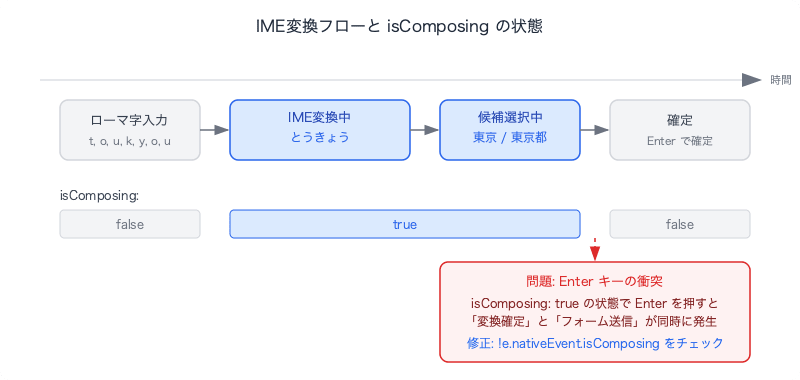
When entering Japanese, Chinese, or Korean (CJK) text, the OS's IME (Input Method Editor) is involved. For example, when typing "東京":
- Type the romaji keys
t,o,k,y,o - The IME displays the reading "とうきょう" (with an underline)
- Press the Space key to show conversion candidates
- Press Enter to confirm the conversion
The problem is the collision between the Enter key in step 4 — "Enter to confirm conversion" — and "Enter to submit the form."
How Browsers Distinguish the Two
Browsers indicate whether an IME conversion is in progress via the KeyboardEvent.isComposing property.
| State | isComposing |
|---|---|
| Normal key input | false |
| Key input during IME composition | true |
Problematic Code
function handleKeyDown(e: KeyboardEvent<HTMLTextAreaElement>) {
  if (e.key === "Enter" && !e.shiftKey) {
    e.preventDefault();
    handleSubmit(); // Also fires on Enter to confirm conversion
  }
}
Because this code does not check isComposing, handleSubmit() is called even when confirming a kanji conversion (isComposing: true).
The Fix
Simply add e.nativeEvent.isComposing to the condition.
function handleKeyDown(e: KeyboardEvent<HTMLTextAreaElement>) {
  if (e.key === "Enter" && !e.shiftKey && !e.nativeEvent.isComposing) {
    e.preventDefault();
    handleSubmit();
  }
}
e.nativeEvent is the property used to access the native DOM event from React's SyntheticEvent. Since isComposing does not exist on React's SyntheticEvent, you retrieve it via e.nativeEvent.isComposing.
The Same Applies to <input>
The same problem occurs not only with <textarea> but also with <input type="text">. The fix is identical:
function handleKeyDown(e: KeyboardEvent<HTMLInputElement>) {
  if (e.key === "Enter" && !e.shiftKey && !e.nativeEvent.isComposing) {
    e.preventDefault();
    submitFreeText();
  }
}
Advanced: Conflict Between Debounced Auto-Search and IME Composition
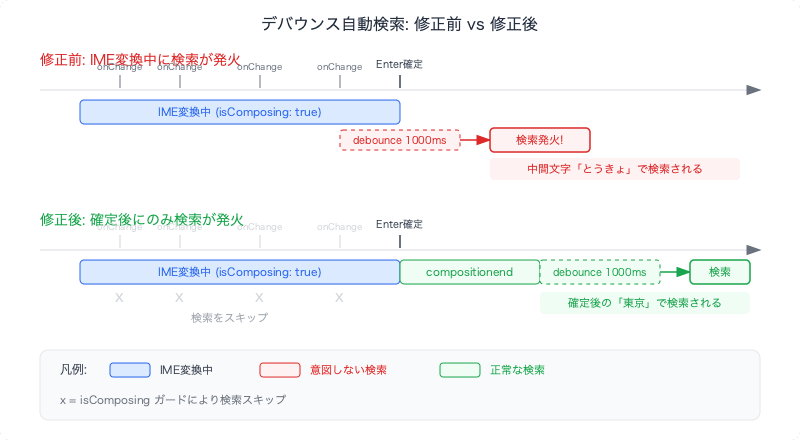
Even after fixing the Enter key issue, there is another tricky case: a UI that fires an auto-search with debounce while the user is typing.
The Problem
It is common to implement a search form that runs an auto-search with debounce (e.g., 1000ms) on every keystroke. However, during Japanese input, onChange (or onValueChange provided by components such as shadcn/ui's CommandInput) fires each time an IME intermediate character (underlined, uncommitted text) is entered. This means the debounce callback fires before the conversion is confirmed, and the search executes with the intermediate state.
// Problematic code
const handleChange = (value: string) => {
  setQuery(value);
  // Also fires during IME composition
  searchDebounce(() => executeSearch(), 1000);
};
Solution: Two Approaches
Approach 1: Track IME Composition State with useRef
Use compositionstart / compositionend events to manage a composing flag with useRef, and guard the debounced search with it.
// hooks
const isComposingRef = useRef(false);

const handleChange = useCallback(
  (value: string) => {
    setQuery(value);
    if (!isComposingRef.current) {
      searchDebounce(() => executeSearch(), DEBOUNCE_MS);
    }
  },
  [searchDebounce, executeSearch],
);
// component
<input
  onChange={(e) => handleChange(e.target.value)}
  onCompositionStart={() => { isComposingRef.current = true; }}
  onCompositionEnd={() => {
    isComposingRef.current = false;
    searchDebounce(() => executeSearch(), DEBOUNCE_MS);
  }}
/>
Approach 2: Directly Check isComposing on the onInput Event
Without using useRef, directly check the native InputEvent.isComposing inside the event handler.
// hooks — remove searchDebounce from handleChange
const handleChange = useCallback(
  (value: string) => {
    setQuery(value);
  },
  [],
);

const triggerSearch = useCallback(() => {
  searchDebounce(() => executeSearch(), DEBOUNCE_MS);
}, [searchDebounce, executeSearch]);
// component
<input
  onChange={(e) => handleChange(e.target.value)}
  onInput={(e: React.FormEvent<HTMLInputElement>) => {
    if (!(e.nativeEvent as InputEvent).isComposing) {
      triggerSearch();
    }
  }}
  onCompositionEnd={() => {
    triggerSearch();
  }}
/>
Comparison of the Two Approaches
| useRef | onInput event | |
|---|---|---|
| Lines changed | ~10 lines | ~15 lines |
| Scope of impact | Small — just adds a guard to the existing flow | Medium — moves responsibility for triggering search to the component side |
| Accuracy | No race conditions since the ref is updated synchronously | No issues on modern browsers. There are reports that on some versions of Safari 16 and earlier, isComposing may remain true on the input event immediately after compositionend (compensated for by onCompositionEnd) |
| Testability | Easy to mock the ref | Requires simulating native InputEvent + CompositionEvent |
Watch Out for Conflicts with Form Watchers (e.g., form.watch)
When using something like react-hook-form's form.watch to monitor the entire form for changes and trigger auto-search, setValue on a text field will also trigger the watch, causing a search to fire even during IME composition. This is because even if you control the debounce for text input with the approaches above, watch triggers the search through a separate path.
You need to check the field name inside the watch callback and skip changes from the text input.
useEffect(() => {
  const subscription = form.watch((_values, { type, name }) => {
    if (type !== "change" || !name) return;
    // Skip changes from text input — those are controlled via onInput/onCompositionEnd
    if (name === "query") return;
    searchDebounce(() => executeSearch(), DEBOUNCE_MS);
  });
  return () => subscription.unsubscribe();
}, [form, searchDebounce, executeSearch]);
Summary
The Enter Key Problem
| Before fix | After fix | |
|---|---|---|
| Enter to confirm conversion | Form is submitted | Conversion only |
| Normal Enter | Form is submitted | Form is submitted |
The fix is just one addition:
&& !e.nativeEvent.isComposing
The Debounced Auto-Search Problem
| Before fix | After fix | |
|---|---|---|
| Input during IME composition | Search fires after debounce | Search is skipped |
| After confirming conversion | Search fires after debounce | Search fires after debounce |
Either approach can fix this, but if you want to minimize the scope of impact, go with useRef; if you prefer to avoid side effects and work directly with event information, go with the onInput event approach.
In web apps that handle CJK languages, you need to account for IME composition state not only for Enter key handling but also for any debounce-based auto-execution.