
Correctly Understanding useEffect Cleanup Functions and the exhaustive-deps Rule

This page has been translated by machine translation. View original
Introduction
Have you ever come across a line like this in a React code review?
useEffect(() => () => clearDebounce(), [clearDebounce]);
At first glance it is hard to read because of all the arrows, but this is a concise way of writing React's useEffect cleanup pattern.
In this article, using the code of an actual debounce hook as a starting point, we will dig into the following questions.
- How does the cleanup function of
useEffectwork? - What happens to the timer when the component is unmounted?
- What does the
react-hooks/exhaustive-depsrule protect us from? - What exactly is a "reactive value" in the first place?
How the useEffect Cleanup Function Works
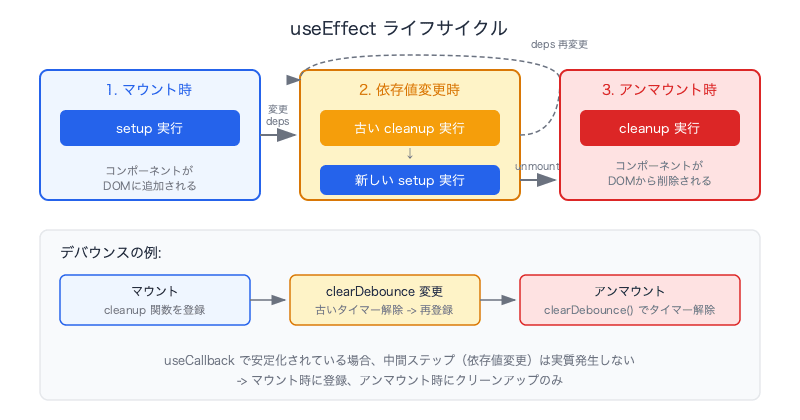
Basic Structure: setup and cleanup
The function you pass to useEffect is called the setup function. The function that this function returns is the cleanup function.
useEffect(() => {
  // setup: runs on mount (and when the dependency array changes)
  return () => {
    // cleanup: runs on unmount (and before the next setup runs)
  };
}, [依存値]);
There are two times when React runs the cleanup.
- When the component is unmounted
- Right before the effect re-runs because a value in the dependency array changed (the old cleanup is run first, and then the new setup is run)
Expanding the Code at the Beginning
Expanding the one-liner at the beginning gives the following.
useEffect(() => {
  // setup: does nothing
  return () => clearDebounce(); // cleanup: clear the debounce timer
}, [clearDebounce]);
() => () => clearDebounce() is a shorthand for the pattern "the setup function returns a cleanup function." Nothing is done in setup, and the cleanup (clearDebounce()) is run on unmount (or when a dependency value changes).
Timer Cleanup on Unmount
The Problem: The Callback Fires After Unmount
Let's consider a scenario where debounce is used.
- The user types text into a search field
- The debounce timer starts counting down 1 second
- Before the 1 second elapses, for some reason the component containing that field is unmounted
Without cleanup, the timer keeps running. After 1 second the callback fires and tries to run a search for a component that no longer exists.
The Solution: Dispose of the Timer in useEffect's cleanup
useEffect(() => () => clearDebounce(), [clearDebounce]);
If you build this pattern into the useDebounce hook, timer cleanup on unmount happens automatically in every component that uses the hook. There is no need to write cleanup logic individually in each component.
The react-hooks/exhaustive-deps Rule
What This Rule Protects
react-hooks/exhaustive-deps is an ESLint rule that checks whether the dependency array of useEffect, useCallback, and useMemo includes all the reactive values used inside.
// NG: lint error — count is not included in the dependency array
const [count, setCount] = useState(0);
useEffect(() => {
  console.log(count);
}, []);

// OK
useEffect(() => {
  console.log(count);
}, [count]);
Why It Is Needed: The Stale Closure Problem
If you forget to put a value in the dependency array, a stale closure occurs. The effect keeps capturing an old value and is never updated, which causes bugs.
useEffect(() => {
  const id = setInterval(() => {
    console.log(count); // keeps outputting 0 forever (never updated)
  }, 1000);
  return () => clearInterval(id);
}, []); // count is not in the dependency array → stale closure
The Dependency Array in the Code at the Beginning
useEffect(() => () => clearDebounce(), [clearDebounce]);
Since clearDebounce is used inside the effect, it is included in the dependency array in accordance with the rule. Because clearDebounce is created with useCallback, its reference is stable, and in practice the effect will almost never re-run. It is included in the dependency array not for the sake of runtime behavior, but for compliance with the rule.
The Origin of the Rule Name: "exhaustive"
"Exhaustive" means "comprehensive." Rather than "putting in only the dependencies that seem important," it requires you to put in all the reactive values you use. The dependency array must be a complete enumeration.
// uses 3 reactive values → put all 3 in the dependency array
useEffect(() => {
  fetchData(userId, token, locale);
}, [userId, token, locale]); // exhaustive (comprehensive)
When You Are Tempted to Disable the Rule, and Why You Should Avoid It
A common case is the intention to "run it only once on mount."
// intention: "I want to fetch only on mount"
useEffect(() => {
  fetchUser(userId);
  // eslint-disable-next-line react-hooks/exhaustive-deps
}, []);
However, this hides a bug where it won't re-fetch even if userId changes. Instead of disabling the rule, you should reconsider the structure of the effect itself.
- If you truly want it to run only the first time: fix the value with
useRef - If you want to skip only some changes: split the effect, or put a conditional branch inside it
When you feel like disabling the rule, it is a sign that you should reconsider the design of the effect.
What Are Reactive Values?
The "reactive values" that should go in the dependency array are values that can change between renders.
Reactive Values (Include in the Dependency Array)
| Kind | Examples |
|---|---|
useState values |
count, isOpen |
useReducer values |
state |
| Props | props.onChange, props.userId |
| Variables and functions derived from the above | Computed values and functions defined inside the component |
Return values of useCallback / useMemo |
Stable references, but include them in the dependency array |
Non-Reactive Values (No Need to Include in the Dependency Array)
| Kind | Examples | Reason |
|---|---|---|
| Constants outside the component | const API_URL = "..." |
Do not change across renders |
.current of useRef |
timerRef.current |
Changing it does not cause a re-render |
setState / dispatch |
setCount, dispatch |
React guarantees a stable reference |
What is important is that not only variables but also functions can be reactive values. A function defined inside a component gets a new reference on every render (unless stabilized with useCallback).
Summary
| Concept | Key Point |
|---|---|
useEffect cleanup |
The returned function runs on unmount and when dependency values change |
| Debounce cleanup | By building the cleanup into the hook, the consumer no longer needs to be aware of it |
exhaustive-deps |
By putting all the reactive values you use into the dependency array, you prevent stale closures |
| Reactive values | Values that can change between renders. Includes both variables and functions |
| Disabling the rule | In most cases it can be handled by reconsidering the effect's design. Disabling is a last resort |
The dependency array of useEffect is not an "optimization hint" but an "accurate declaration." By following the exhaustive-deps rule and listing all the reactive values you use, you can write predictable and safe components.