![[Update] Regional NAT Gateway Now Supports Integration with AWS Transit Gateway, So I Tried Consolidating Outbound Internet Traffic](https://images.ctfassets.net/ct0aopd36mqt/wp-thumbnail-50706ca4b3af64b50895745fa3ba1180/47af3f43efd69adb20976f201c9c3366/amazon-vpc?w=3840&fm=webp)
[Update] Regional NAT Gateway Now Supports Integration with AWS Transit Gateway, So I Tried Consolidating Outbound Internet Traffic

This page has been translated by machine translation. View original
I Want to Consolidate Internet Outbound Traffic from Multiple VPCs Using Regional NAT Gateway and Transit Gateway
Hi, this is Nonpi (@non____97).
Have you ever wanted to consolidate internet outbound traffic from multiple VPCs using Regional NAT Gateway and Transit Gateway? I have.
As introduced in the article below, when Regional NAT Gateway first became GA, combining it with Transit Gateway to consolidate internet outbound traffic from multiple VPCs was not something I could recommend in terms of availability, latency, or operational burden.
The cause was that it was not possible to configure a route targeting a Transit Gateway in the Regional NAT Gateway route table.
But lo and behold, it has quietly become supported.
Regional NAT gateways support AWS Transit Gateway as a valid route in the regional NAT gateway route table. Regional NAT gateways do not support private NAT. If you need private NAT, use a zonal NAT gateway instead.
Regional NAT gateways for automatic multi-AZ expansion - Amazon Virtual Private Cloud
This is great news.
The number of scenarios where you have to give up on adopting Regional NAT Gateway has decreased.
Checking the relevant official AWS documentation on the Internet Archive, this wording was not there as of 2026/3/14, but it had appeared in the archive as of 2026/4/12, so I imagine support was added in between.
Let's actually try it out.
Summary Up Front
- It is now possible to adopt a combination of Regional NAT Gateway and Transit Gateway for consolidating outbound traffic to the internet
- Associate the Transit Gateway with all AZs used in the VPC
Trying It Out
Test Environment
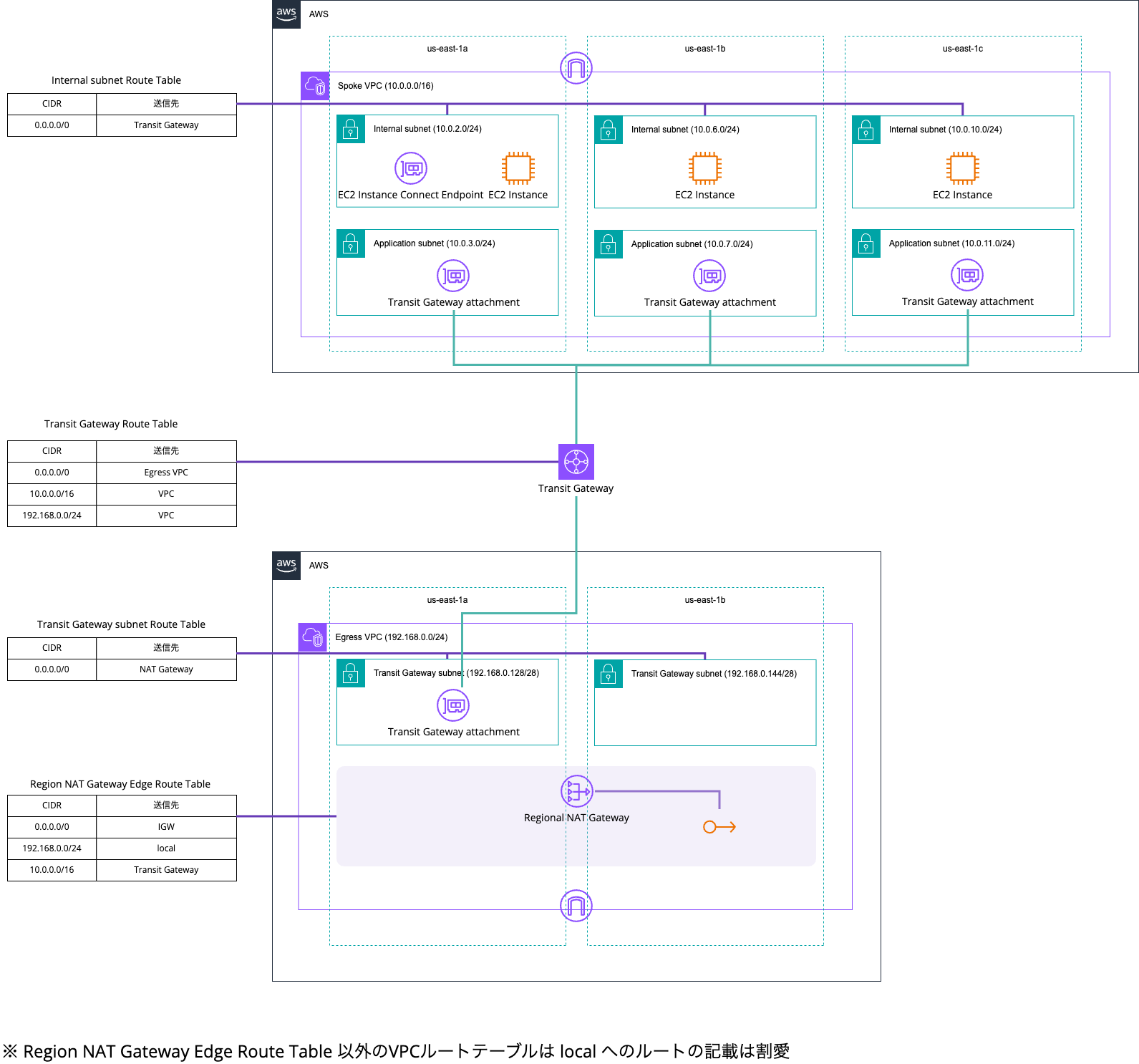
The test environment is as follows.
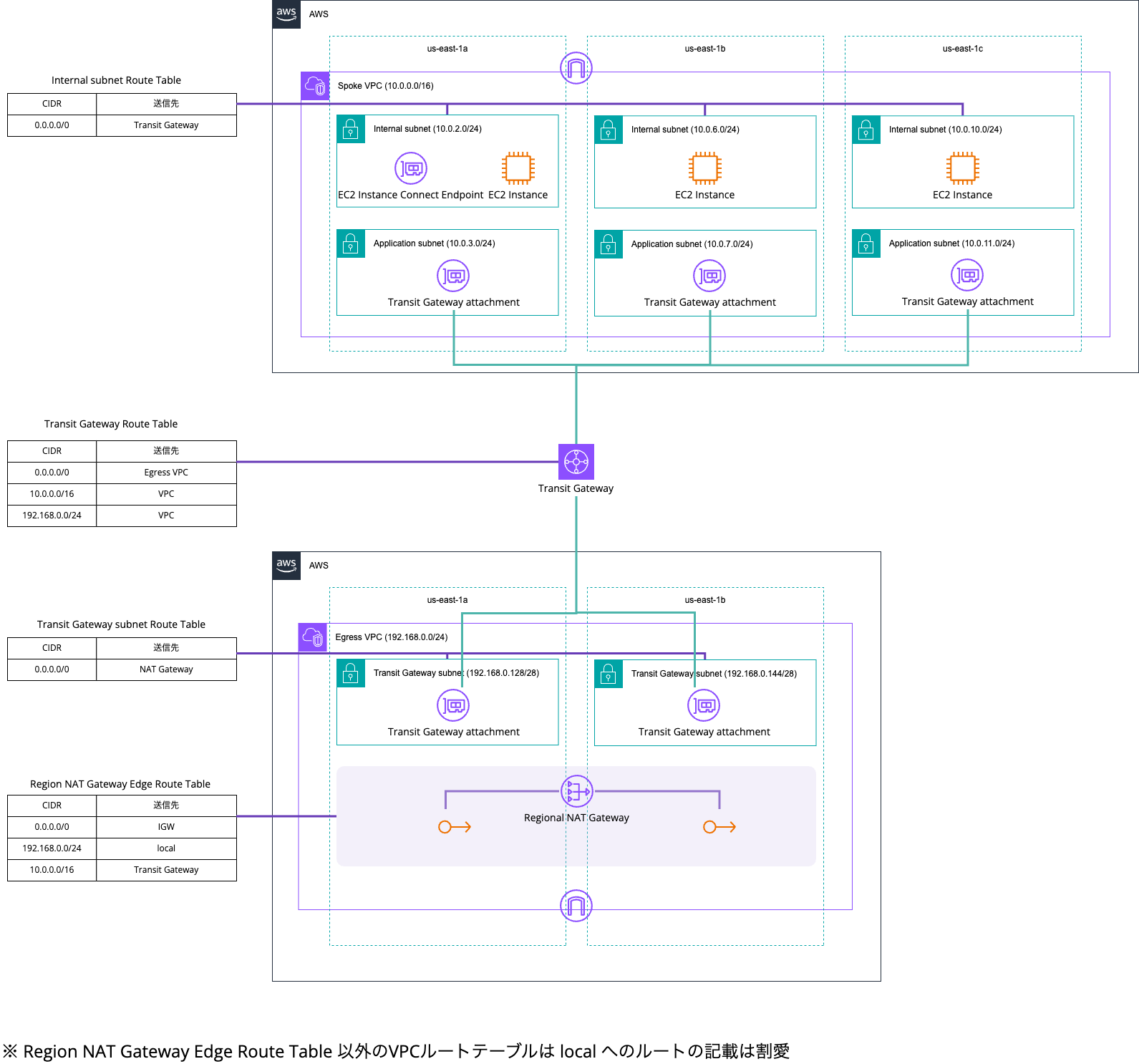
The Regional NAT Gateway and Transit Gateway have already been created, and the route table settings other than the Regional NAT Gateway route table are also complete.
By the way, the Regional NAT Gateway was created with the AWS CLI as shown below. EIPs that had been prepared in advance were assigned manually.
> aws ec2 create-nat-gateway \
    --availability-mode regional \
    --vpc-id vpc-03e01ad6b5702f616 \
    --availability-zone-addresses '[
      {"AvailabilityZone":"us-east-1a","AllocationIds":["eipalloc-068a38024d6b72052"]},
      {"AvailabilityZone":"us-east-1b","AllocationIds":["eipalloc-099df8796179fc8cf"]}
    ]'
{
    "ClientToken": "5173d9ed-db10-49b5-b366-8746c1d9127d",
    "NatGateway": {
        "CreateTime": "2026-05-08T05:51:57+00:00",
        "NatGatewayAddresses": [
            {
                "AllocationId": "eipalloc-099df8796179fc8cf",
                "Status": "associating",
                "AvailabilityZone": "us-east-1b",
                "AvailabilityZoneId": "use1-az1"
            },
            {
                "AllocationId": "eipalloc-068a38024d6b72052",
                "Status": "associating",
                "AvailabilityZone": "us-east-1a",
                "AvailabilityZoneId": "use1-az6"
            }
        ],
        "NatGatewayId": "nat-1b3241d29dde921a3",
        "State": "pending",
        "VpcId": "vpc-03e01ad6b5702f616",
        "ConnectivityType": "public",
        "AvailabilityMode": "regional",
        "AutoScalingIps": "disabled",
        "AutoProvisionZones": "disabled"
    }
}

> aws ec2 describe-nat-gateways --nat-gateway-ids nat-1b3241d29dde921a3
{
    "NatGateways": [
        {
            "CreateTime": "2026-05-08T05:51:57+00:00",
            "NatGatewayAddresses": [
                {
                    "AllocationId": "eipalloc-099df8796179fc8cf",
                    "PublicIp": "34.206.250.38",
                    "AssociationId": "eipassoc-0c44398ce197dc5a6",
                    "Status": "succeeded",
                    "AvailabilityZone": "us-east-1b",
                    "AvailabilityZoneId": "use1-az1"
                },
                {
                    "AllocationId": "eipalloc-068a38024d6b72052",
                    "PublicIp": "35.174.131.105",
                    "AssociationId": "eipassoc-0c53b93329e3c7914",
                    "Status": "succeeded",
                    "AvailabilityZone": "us-east-1a",
                    "AvailabilityZoneId": "use1-az6"
                }
            ],
            "NatGatewayId": "nat-1b3241d29dde921a3",
            "State": "available",
            "VpcId": "vpc-03e01ad6b5702f616",
            "Tags": [],
            "ConnectivityType": "public",
            "AvailabilityMode": "regional",
            "AutoScalingIps": "disabled",
            "AutoProvisionZones": "disabled",
            "RouteTableId": "rtb-0fc072322246c649c"
        }
    ]
}
Set the Target to Transit Gateway in the Regional NAT Gateway Route Table
Now, let's configure a route targeting the Transit Gateway in the Regional NAT Gateway route table.
Checking from the AWS Management Console, it does indeed look like it can be configured.
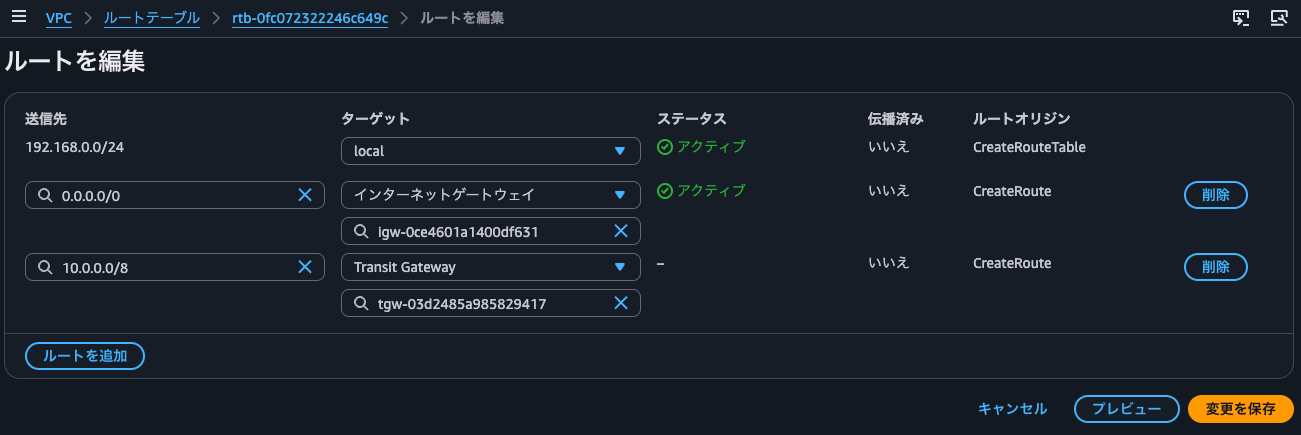
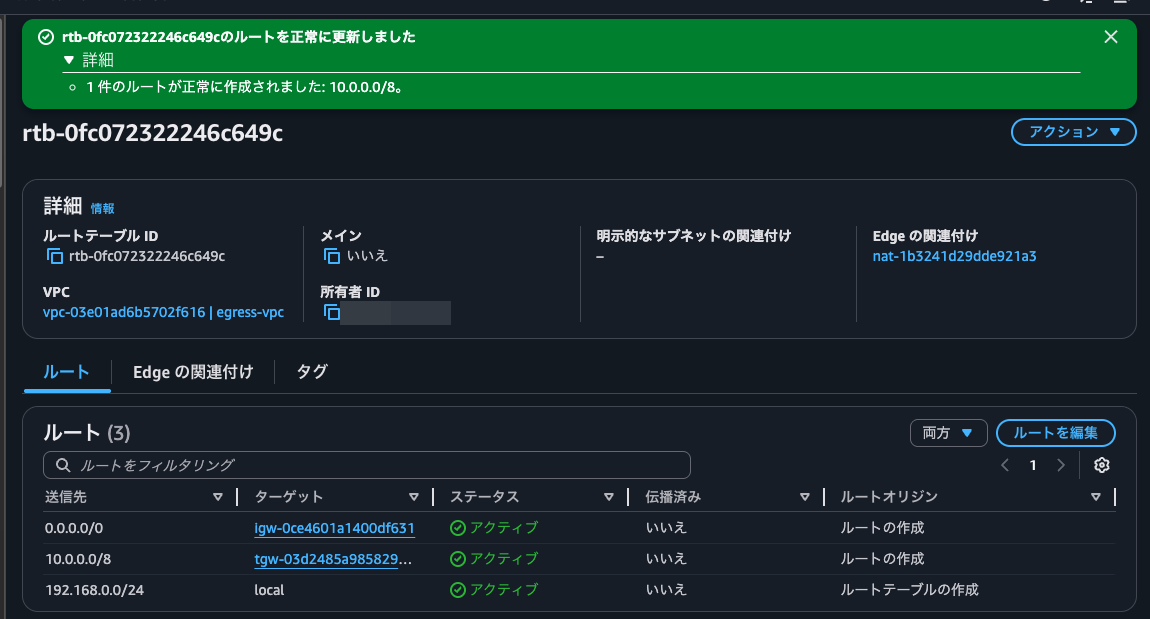
When I clicked Save changes as is, the route was added successfully.
Verifying Operation
Let's verify operation. From the EC2 instance in each AZ of the Spoke VPC, I run curl against http://checkip.amazonaws.com.
$ TOKEN=$(curl -s -X PUT "http://169.254.169.254/latest/api/token" -H "X-aws-ec2-metadata-token-ttl-seconds: 21600")
$ curl -s -H "X-aws-ec2-metadata-token: $TOKEN" http://169.254.169.254/latest/meta-data/placement/availability-zone
us-east-1a

$ hostname -i
10.0.2.139

$ curl http://checkip.amazonaws.com
35.174.131.105

$ for i in $(seq 100); do curl -s http://checkip.amazonaws.com; done | sort | uniq -c | sort -rn
    100 35.174.131.105
$ TOKEN=$(curl -s -X PUT "http://169.254.169.254/latest/api/token" -H "X-aws-ec2-metadata-token-ttl-seconds: 21600")
$ curl -s -H "X-aws-ec2-metadata-token: $TOKEN" http://169.254.169.254/latest/meta-data/placement/availability-zone
us-east-1b

$ hostname -i
10.0.6.186

$ curl http://checkip.amazonaws.com
34.206.250.38

$ for i in $(seq 100); do curl -s http://checkip.amazonaws.com; done | sort | uniq -c | sort -rn
    100 34.206.250.38
$ TOKEN=$(curl -s -X PUT "http://169.254.169.254/latest/api/token" -H "X-aws-ec2-metadata-token-ttl-seconds: 21600")
$ curl -s -H "X-aws-ec2-metadata-token: $TOKEN" http://169.254.169.254/latest/meta-data/placement/availability-zone
us-east-1c

$ hostname -i
10.0.10.12

$ curl http://checkip.amazonaws.com
34.206.250.38

$ for i in $(seq 100); do curl -s http://checkip.amazonaws.com; done | sort | uniq -c | sort -rn
     55 34.206.250.38
     45 35.174.131.105
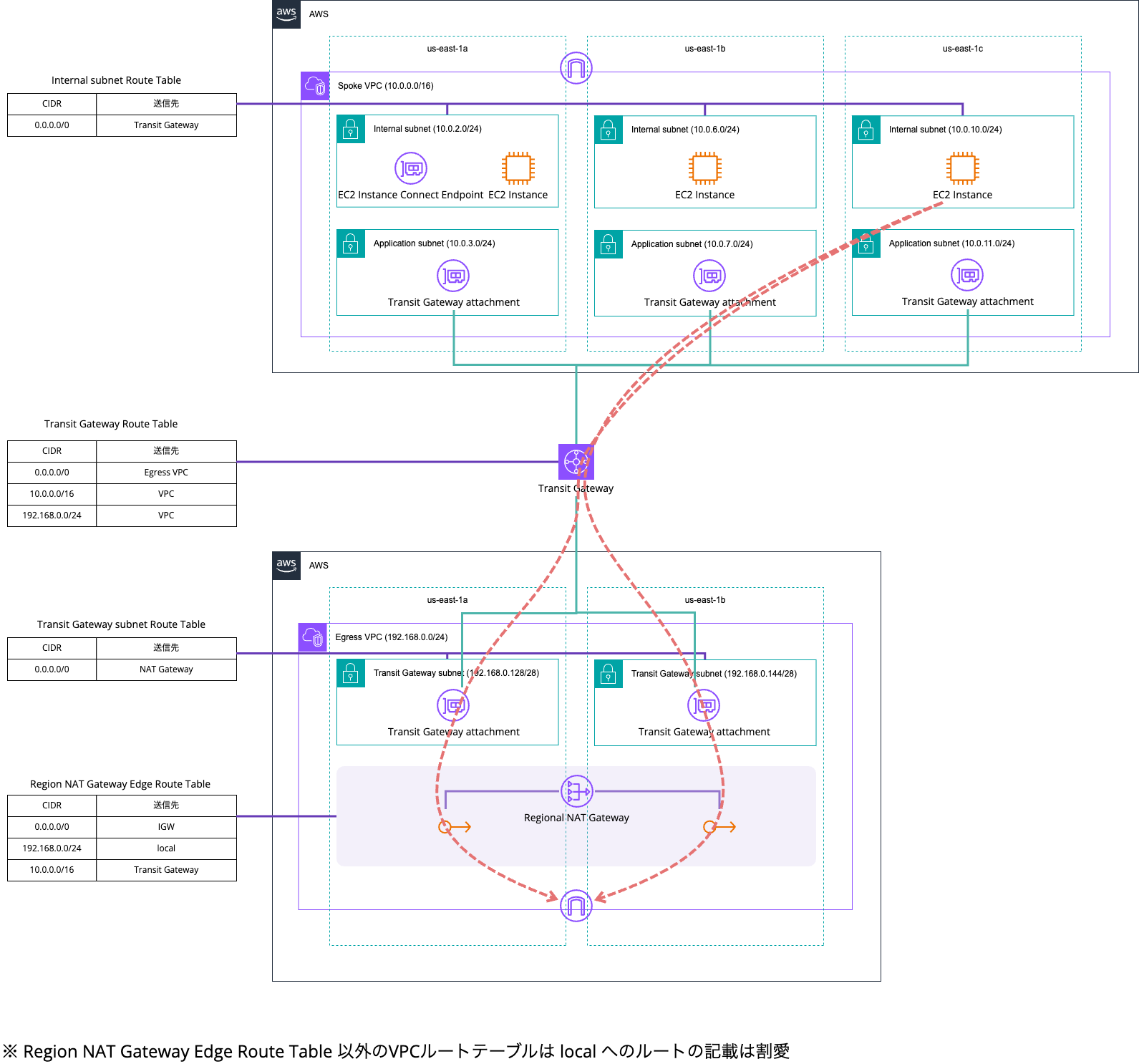
You can see that traffic from us-east-1a and us-east-1b always goes out to the internet via the EIP in the same AZ.
This is illustrated below.
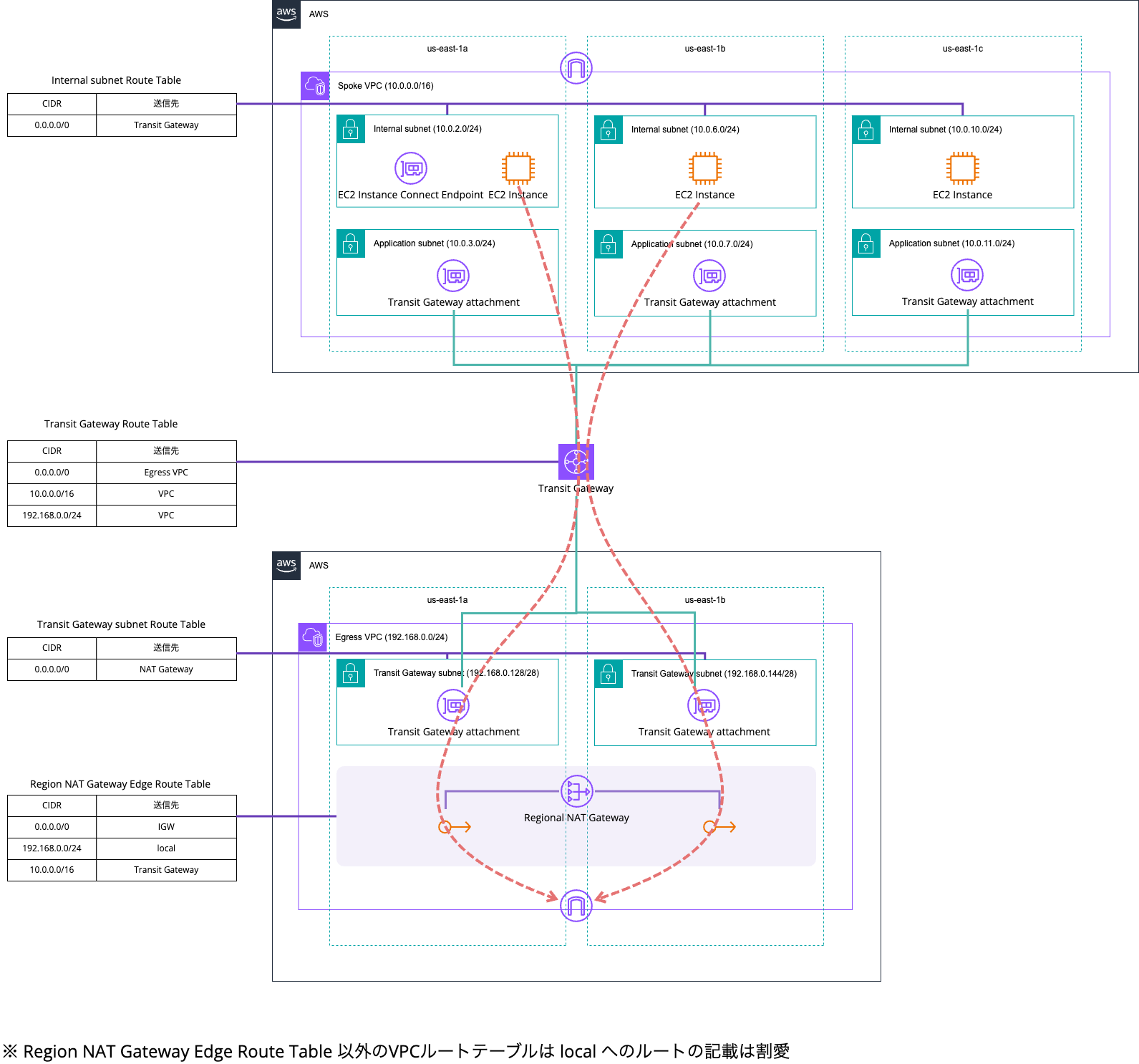
This is because inter-VPC communication via Transit Gateway, in principle, goes through the ENI in the same AZ as the source.
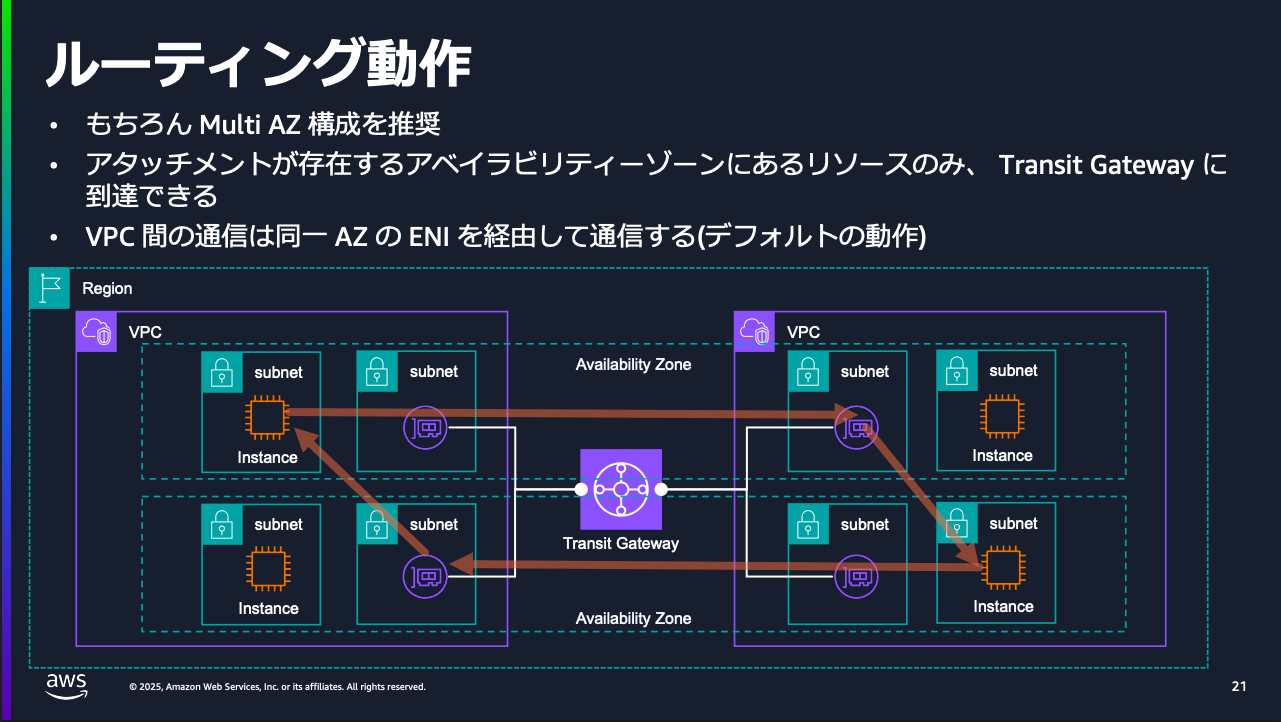
Excerpt: AWS Black Belt Online Seminar AWS Transit Gateway deep dive P.21
On the other hand, for us-east-1c, since there is no ENI in us-east-1c in the association between the Egress VPC and the Transit Gateway, you can see that traffic is round-robined between us-east-1a and us-east-1b.
This is illustrated below.
This is because, in inter-VPC communication via Transit Gateway, if there is no ENI in the same AZ as the source, traffic goes through one of the other ENIs.
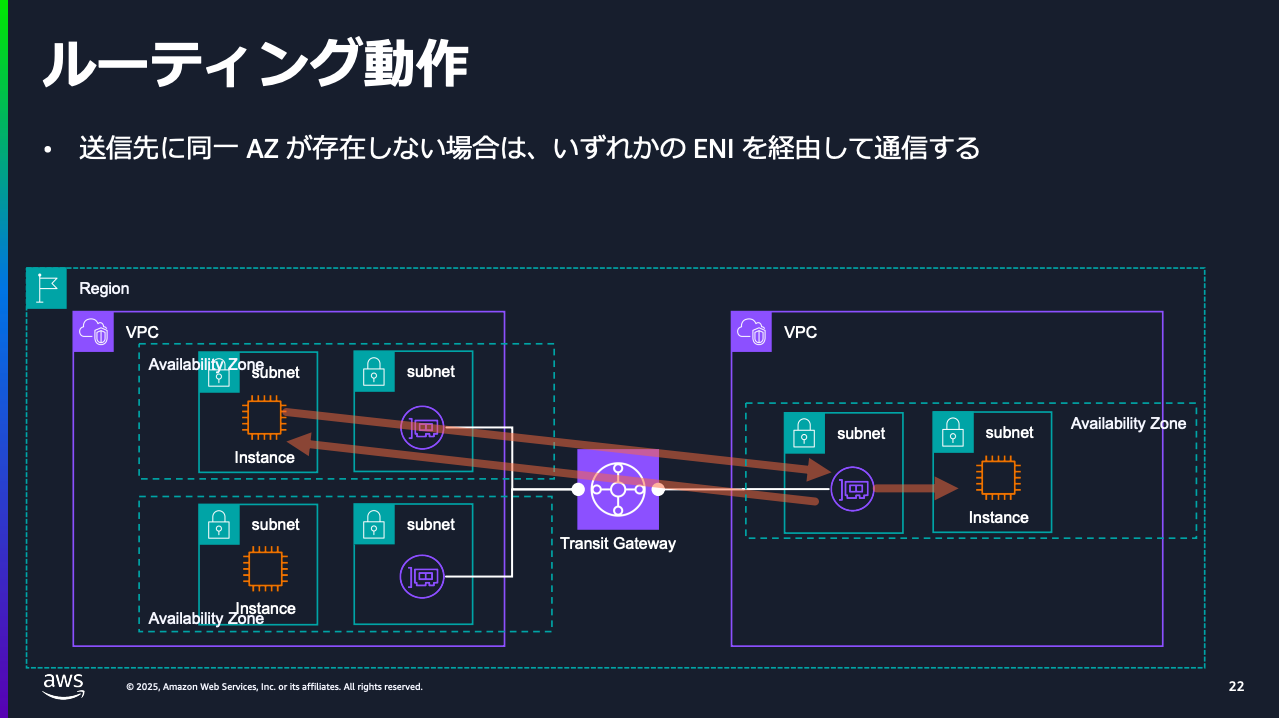
Excerpt: AWS Black Belt Online Seminar AWS Transit Gateway deep dive P.22
When Disassociating the Transit Gateway Attachment for a Specific AZ in the Egress VPC
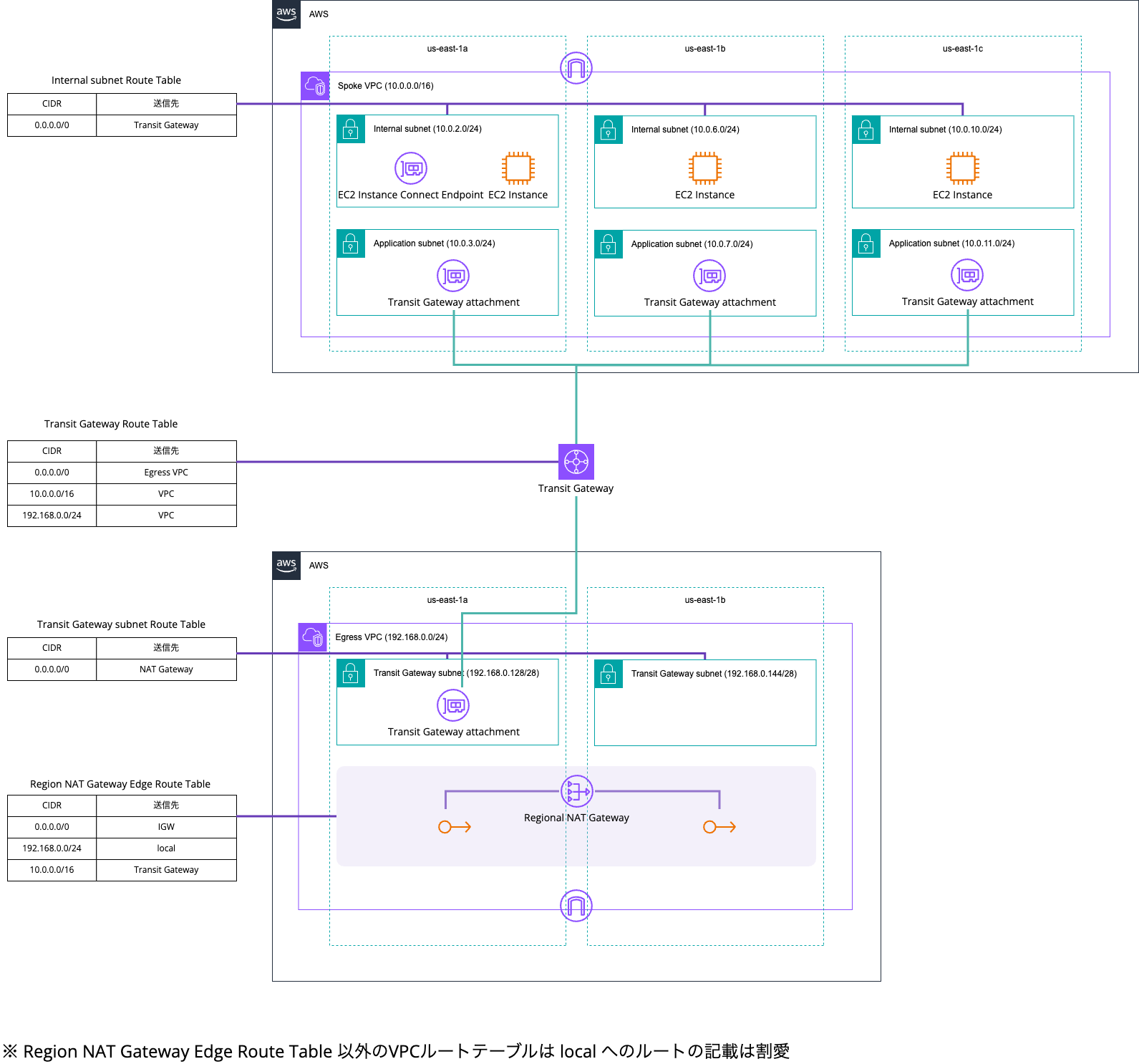
Next, let's try communication when the association with us-east-1b of the Transit Gateway is removed in the Egress VPC.
This is illustrated below.
As shown below, I removed the us-east-1b association from the Egress VPC's Transit Gateway attachment.
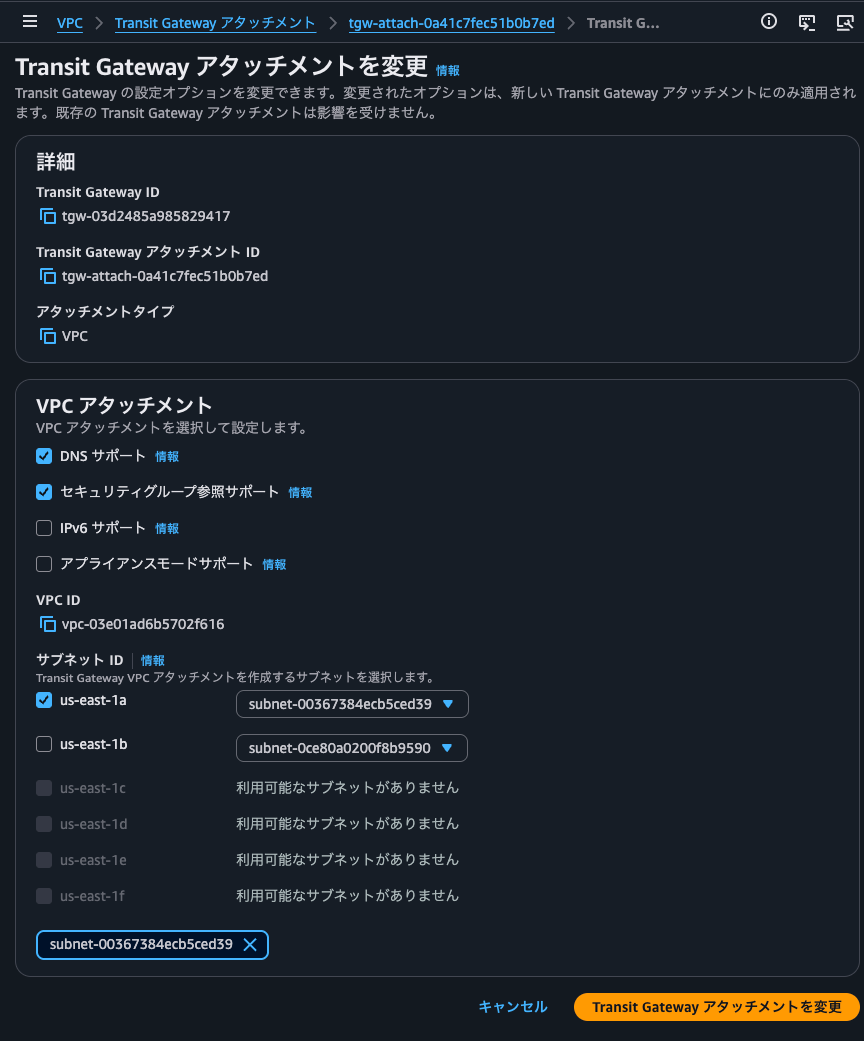
Let's verify operation in this state.
$ hostname -i
10.0.2.139

$ for i in $(seq 100); do curl -s http://checkip.amazonaws.com; done | sort | uniq -c | sort -rn
    100 35.174.131.105
$ hostname -i
10.0.6.186

$ for i in $(seq 100); do curl -s http://checkip.amazonaws.com; done | sort | uniq -c | sort -rn
    100 35.174.131.105
$ hostname -i
10.0.10.12

$ for i in $(seq 100); do curl -s http://checkip.amazonaws.com; done | sort | uniq -c | sort -rn
    100 35.174.131.105
Yes, all traffic now goes out through the EIP in us-east-1a. Even if a specific AZ of the Egress VPC's Transit Gateway attachment is malfunctioning, it looks like communication can continue.
When Disassociating the EIP of a Specific AZ in Regional NAT Gateway
Finally, let's check the behavior when the EIP of us-east-1a is disassociated from the Regional NAT Gateway.
This is illustrated below.
> aws ec2 disassociate-nat-gateway-address \
    --nat-gateway-id nat-1b3241d29dde921a3 \
    --association-ids eipassoc-0c53b93329e3c7914
{
    "NatGatewayId": "nat-1b3241d29dde921a3",
    "NatGatewayAddresses": [
        {
            "AllocationId": "eipalloc-068a38024d6b72052",
            "PublicIp": "35.174.131.105",
            "AssociationId": "eipassoc-0c53b93329e3c7914",
            "Status": "disassociating",
            "AvailabilityZone": "us-east-1a",
            "AvailabilityZoneId": "use1-az6"
        }
    ]
}

> aws ec2 describe-nat-gateways --nat-gateway-ids nat-1b3241d29dde921a3
{
    "NatGateways": [
        {
            "CreateTime": "2026-05-08T05:51:57+00:00",
            "NatGatewayAddresses": [
                {
                    "AllocationId": "eipalloc-099df8796179fc8cf",
                    "PublicIp": "34.206.250.38",
                    "AssociationId": "eipassoc-0c44398ce197dc5a6",
                    "Status": "succeeded",
                    "AvailabilityZone": "us-east-1b",
                    "AvailabilityZoneId": "use1-az1"
                },
                {
                    "AllocationId": "eipalloc-068a38024d6b72052",
                    "PublicIp": "35.174.131.105",
                    "AssociationId": "eipassoc-0c53b93329e3c7914",
                    "Status": "disassociating",
                    "AvailabilityZone": "us-east-1a",
                    "AvailabilityZoneId": "use1-az6"
                }
            ],
            "NatGatewayId": "nat-1b3241d29dde921a3",
            "State": "available",
            "VpcId": "vpc-03e01ad6b5702f616",
            "Tags": [],
            "ConnectivityType": "public",
            "AvailabilityMode": "regional",
            "AutoScalingIps": "disabled",
            "AutoProvisionZones": "disabled",
            "RouteTableId": "rtb-0fc072322246c649c"
        }
    ]
}

> aws ec2 describe-nat-gateways --nat-gateway-ids nat-1b3241d29dde921a3
{
    "NatGateways": [
        {
            "CreateTime": "2026-05-08T05:51:57+00:00",
            "NatGatewayAddresses": [
                {
                    "AllocationId": "eipalloc-099df8796179fc8cf",
                    "PublicIp": "34.206.250.38",
                    "AssociationId": "eipassoc-0c44398ce197dc5a6",
                    "Status": "succeeded",
                    "AvailabilityZone": "us-east-1b",
                    "AvailabilityZoneId": "use1-az1"
                }
            ],
            "NatGatewayId": "nat-1b3241d29dde921a3",
            "State": "available",
            "VpcId": "vpc-03e01ad6b5702f616",
            "Tags": [],
            "ConnectivityType": "public",
            "AvailabilityMode": "regional",
            "AutoScalingIps": "disabled",
            "AutoProvisionZones": "disabled",
            "RouteTableId": "rtb-0fc072322246c649c"
        }
    ]
}
Let's verify operation in this state.
$ hostname -i
10.0.2.139

$ curl -v -m 5 http://checkip.amazonaws.com
* Host checkip.amazonaws.com:80 was resolved.
* IPv6: (none)
* IPv4: 18.214.81.101, 107.22.174.34, 98.88.227.245, 34.198.9.7, 54.161.5.8, 3.208.250.44, 34.226.231.9, 18.235.123.226
*   Trying 18.214.81.101:80...
*   Trying 107.22.174.34:80...
*   Trying 98.88.227.245:80...
*   Trying 34.198.9.7:80...
*   Trying 54.161.5.8:80...
*   Trying 3.208.250.44:80...
*   Trying 34.226.231.9:80...
*   Trying 18.235.123.226:80...
* Connection timed out after 5000 milliseconds
* closing connection #0
curl: (28) Connection timed out after 5000 milliseconds
$ hostname -i
10.0.6.186

$ curl -v -m 5 http://checkip.amazonaws.com
* Host checkip.amazonaws.com:80 was resolved.
* IPv6: (none)
* IPv4: 44.219.78.34, 98.88.227.245, 34.234.160.105, 3.217.138.21, 34.226.231.9, 54.161.5.8, 34.198.9.7, 3.208.250.44
*   Trying 44.219.78.34:80...
*   Trying 98.88.227.245:80...
*   Trying 34.234.160.105:80...
*   Trying 3.217.138.21:80...
*   Trying 34.226.231.9:80...
*   Trying 54.161.5.8:80...
*   Trying 34.198.9.7:80...
*   Trying 3.208.250.44:80...
* Connection timed out after 5001 milliseconds
* closing connection #0
curl: (28) Connection timed out after 5001 milliseconds
$ hostname -i
10.0.10.12

$ curl -v -m 5 http://checkip.amazonaws.com
* Host checkip.amazonaws.com:80 was resolved.
* IPv6: (none)
* IPv4: 98.88.227.245, 3.208.250.44, 54.161.5.8, 18.214.81.101, 32.193.185.179, 3.217.138.21, 34.226.231.9, 18.235.123.226
*   Trying 98.88.227.245:80...
*   Trying 3.208.250.44:80...
*   Trying 54.161.5.8:80...
*   Trying 18.214.81.101:80...
*   Trying 32.193.185.179:80...
*   Trying 3.217.138.21:80...
*   Trying 34.226.231.9:80...
*   Trying 18.235.123.226:80...
* Connection timed out after 5001 milliseconds
* closing connection #0
curl: (28) Connection timed out after 5001 milliseconds
Yes, communication became impossible from all of them.
This happens because there is no Transit Gateway attachment ENI in the same AZ as the Regional NAT Gateway's EIP. This is because Transit Gateway can only communicate with resources in the same AZ where a Transit Gateway attachment is associated.
Only resources in an Availability Zone where there is a transit gateway attachment can reach the transit gateway.
This is illustrated below.
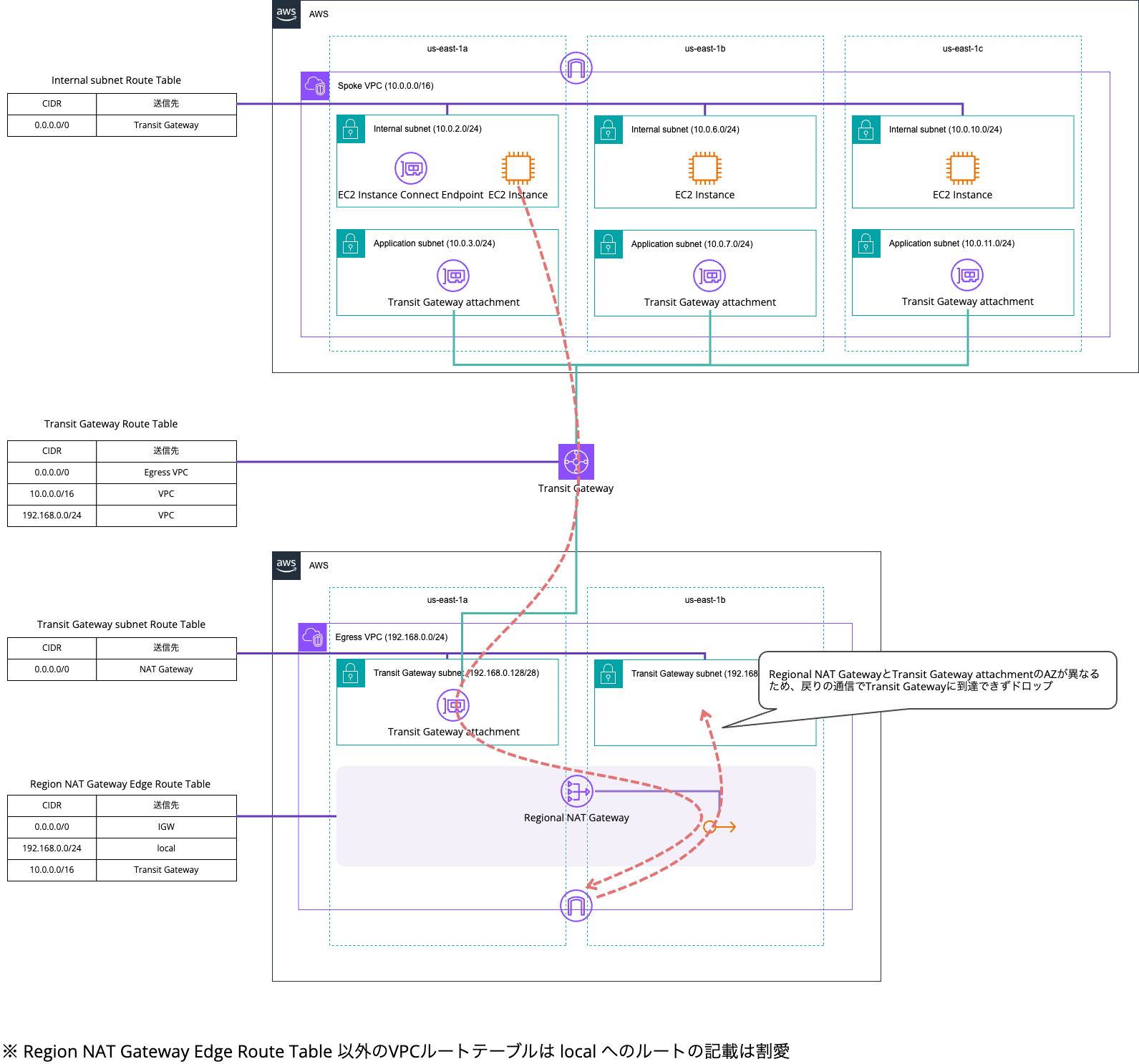
So, if you associate the Regional NAT Gateway with an AZ for which the Transit Gateway attachment is not associated, this kind of communication failure will occur. Since the charges do not particularly change with the number of AZs the Transit Gateway attachment is associated with, let's associate it with all AZs used in the VPC.
By the way, if you also associate us-east-1b in the Egress VPC's Transit Gateway attachment, communication works again.
$ hostname -i
10.0.2.139

$ for i in $(seq 100); do curl -s http://checkip.amazonaws.com; done | sort | uniq -c | sort -rn
    100 34.206.250.38
$ hostname -i
10.0.6.186

$ for i in $(seq 100); do curl -s http://checkip.amazonaws.com; done | sort | uniq -c | sort -rn
    100 34.206.250.38
$ hostname -i
10.0.10.12

$ for i in $(seq 100); do curl -s http://checkip.amazonaws.com; done | sort | uniq -c | sort -rn
    100 34.206.250.38
Though it depends greatly on the degree of the failure, even if a specific AZ is malfunctioning in Regional NAT Gateway, it looks like communication can continue well.
Regional NAT Gateway Will Likely Be Used Except with Network Firewall Proxy
I introduced the update where Regional NAT Gateway supports integration with AWS Transit Gateway.
This lowers one hurdle to adopting Regional NAT Gateway.
Personally, my understanding is that Regional NAT Gateway will end up being used in all cases other than Network Firewall Proxy.
I hope this article helps someone.
This was Nonpi (@non____97) from the Consulting Department, Cloud Business Unit!
