Ladybird's Alpha Version Is Out, So I Compared It to Chrome and Safari on macOS

This page has been translated by machine translation. View original
Introduction
Hello, I'm Shimada from the Manufacturing Business Technology Department at Classmethod.
Ladybird is a browser developed without using existing browser engines such as Chromium or WebKit.
It is developed by a nonprofit organization with donations, and its first Alpha version was released on 2026-11-23.
When I think of Ladybird, the first thing I remember is Jxck's article "Why one browser engine isn't enough? Or, expectations for Ladybird".
The article introduces Ladybird as follows.
Ladybird is a new browser engine that declared it would not fork any other browser engine, would not rely on deals with companies, and would be built with donations alone.
The article's argument is that building consensus in standardization requires multiple independent engines, and that only three remain today: Gecko, WebKit, and Chromium.
Even when browsers such as Edge and Brave increase, they use Chromium as their engine, so the number of engines does not increase.
On 2026-11-19, Andreas Kling, the creator of Ladybird, posted "soon" along with a screenshot of the macOS installer.
Four days later, the Alpha version was released.
In this article, I install the Alpha version on macOS, and write up the results and my impressions from comparing the display of sites I use every day and the Speedometer score with Chrome and Safari.
What is Ladybird?
Ladybird was originally an HTML viewer included in an OS called SerenityOS.
In June 2024, it split off from SerenityOS and became an independent project.
The supported OSes are Linux and macOS, and the FAQ states that Windows support will be postponed.
It is run by the Ladybird Browser Initiative, a US 501(c)(3) nonprofit organization.
Its funding comes only from donations and sponsorships, and the FAQ states that "sponsors cannot interfere with the technical roadmap or product direction."
Most of the code is C++.
In February 2026, it was announced that Rust would be adopted as the successor language to C++, and subsystems are being rewritten in Rust bit by bit.
The FAQ in the repository contains the following roadmap.
This Alpha version corresponds to the first item.
- 2026: Alpha for Linux and macOS. Intended for developers and early adopters to use day to day
- 2027: Beta. A downloadable app for Linux and macOS
- 2028: Stable version for the general public
Web Platform Tests pass counts
One measure of how much of the web standards a browser implements is Web Platform Tests (WPT).
WPT is a test suite of web standards jointly maintained by browser vendors.
The more tests a browser passes, the wider the range in which it implements the specifications.
According to the October 2026 newsletter, on October 26 Ladybird surpassed Safari Technology Preview in the number of WPT passes.
Safari Technology Preview is a preview version of Safari that Apple distributes to developers, and new features are added to it before regular Safari.
The subtest pass counts as of the end of October are as follows.
| Browser | Passed subtests |
|---|---|
| Chrome | 2,244,397 |
| Firefox | 2,189,315 |
| Ladybird | 2,184,722 |
| Safari Technology Preview | 2,172,990 |
Even the difference between the highest, Chrome, and the lowest, Safari Technology Preview, is only about 3%.
According to the newsletter, most of the increase in October came during a 5-day period starting around October 22, when AI coding agents were assigned to unimplemented features.
However, the number of subtests varies greatly from one test file to another, so a difference in the numbers does not translate directly into a difference on real sites.
Whether real sites render without breaking and run fast cannot be determined from these numbers alone.
So I opened the sites I use every day in the Alpha version.
Installing the Alpha version
Download the macOS DMG from the download page.
For macOS there is only an Apple silicon (arm64) version, and macOS 14.4 or later is required.
For Linux, package repositories for Ubuntu and Fedora are provided.
The SHA-256 of the DMG matched the value listed in the distributor's releases.json.
The app is signed with the Developer ID of the Ladybird Browser Initiative and has already been notarized by Apple.
shasum -a 256 ladybird-2026.47.7-macOS-arm64.dmg
# d3647babc442aca475354b19158045cd5b5f40f4be92fe55762be8eb90727ed8

spctl -a -vv -t exec /Volumes/Ladybird/Ladybird.app
# /Volumes/Ladybird/Ladybird.app: accepted
# source=Notarized Developer ID
Copy Ladybird.app to /Applications and you can launch it.
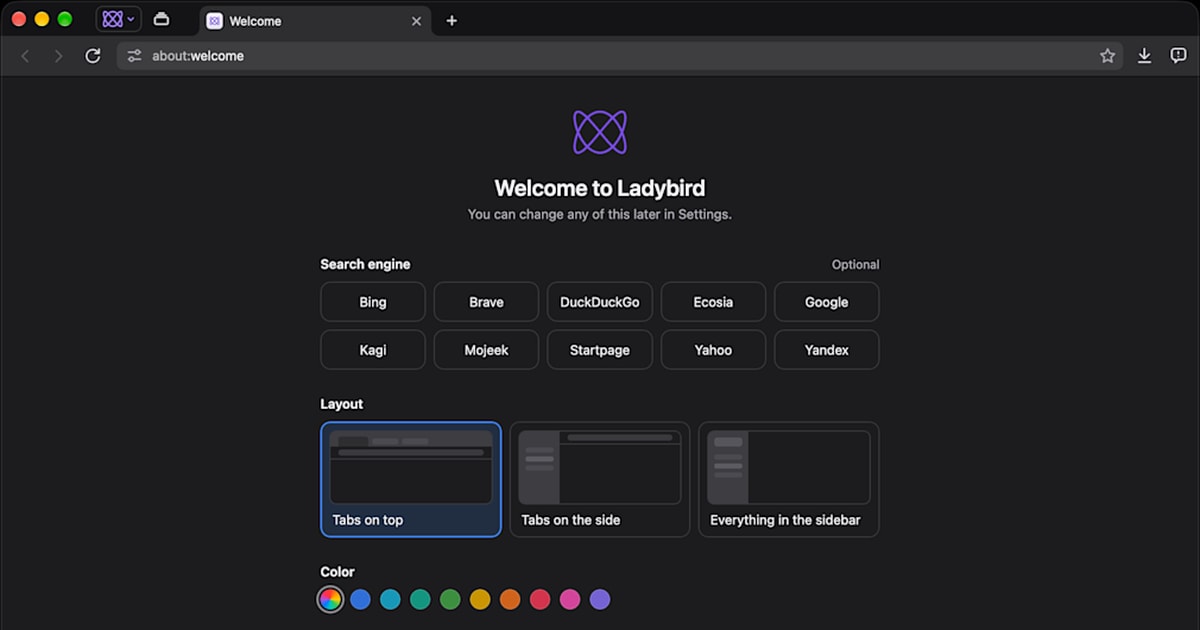
On first launch, a screen appears for choosing the search engine, tab layout, colors, ad blocking, and so on.
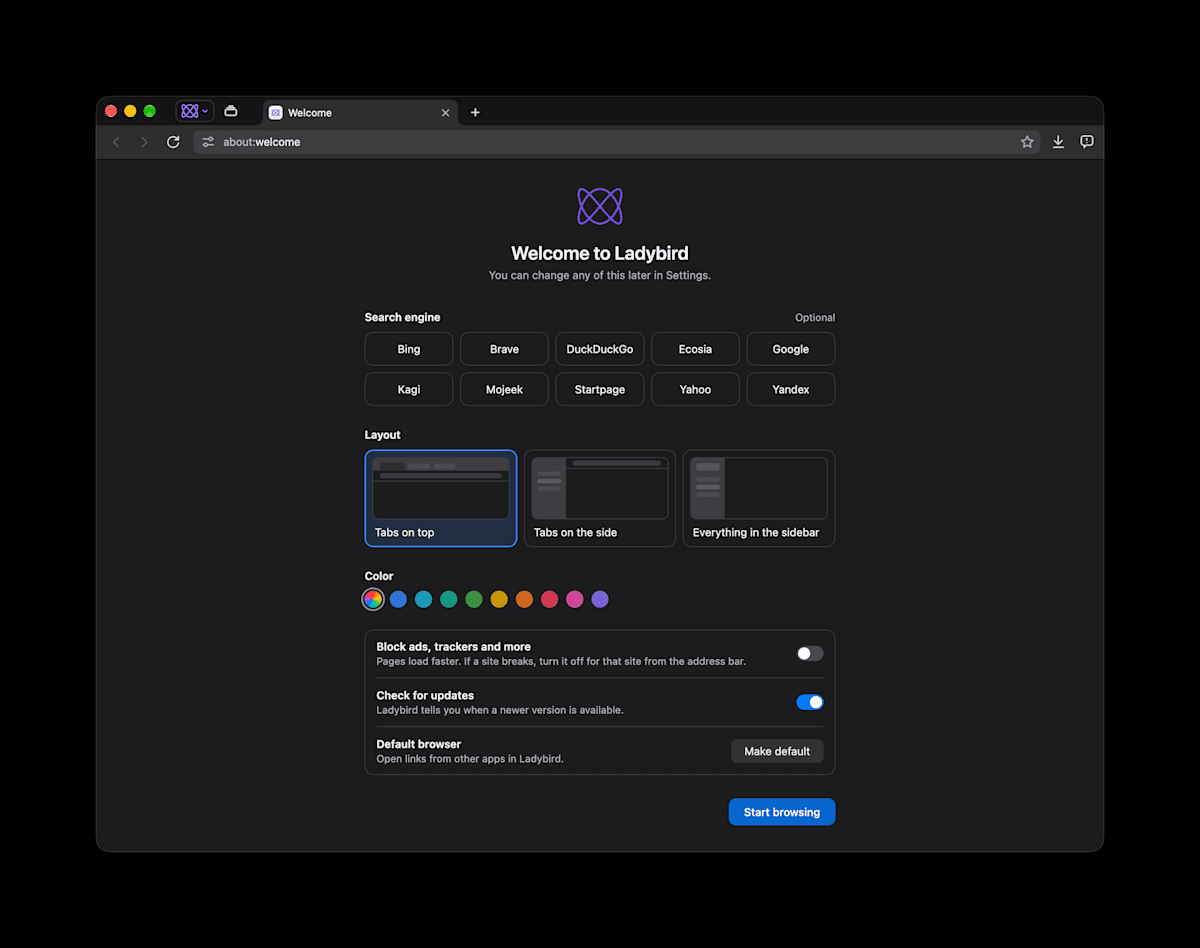
The screen when launching the Ladybird Alpha for the first time
The release notes say the following about the Alpha version.
- Some sites don't work, and it crashes from time to time. Broken sites can be reported from within the browser
- No promises are made yet about security
- The Alpha version is delivered continuously, and the app updates itself periodically
- It supports Firefox's DevTools protocol, so pages can be inspected with Firefox's developer tools
If you build from source
On 2026-11-20, before the Alpha version came out, I built the pre-alpha source (commit 143885c556d) following the official Build Instructions.
Xcode 26 or later, Rust, and build tools installed with Homebrew are required.
brew install autoconf autoconf-archive automake ccache cmake libtool make nasm ninja pkg-config
Even if Xcode is installed, if the developer tools location points to the Command Line Tools, xcodebuild stops with the following error.
xcode-select: error: tool 'xcodebuild' requires Xcode, but active developer directory '/Library/Developer/CommandLineTools' is a command line tools instance
Switch with sudo xcode-select -s, or specify Xcode with the environment variable DEVELOPER_DIR.
I used DEVELOPER_DIR, which avoids changing system settings.
export DEVELOPER_DIR=/Applications/Xcode.app/Contents/Developer
git clone https://github.com/LadybirdBrowser/ladybird.git
cd ladybird
./Meta/ladybird.py build
./Meta/ladybird.py run --no-build
The first time, the dependency libraries are also built from source with vcpkg, so it took about 40 minutes.
The Build directory came to 15 GB in total.
Comparing with Chrome and Safari
How I compared
Ladybird has a headless mode that renders a page without showing a window and saves a screenshot.
/Applications/Ladybird.app/Contents/MacOS/Ladybird \
  --headless --temporary-profile \
  --window-width 1280 --window-height 3000 \
  --screenshot-delay 15 --screenshot-path out.png \
  https://ja.wikipedia.org/wiki/Ladybird
Ladybird.app also includes a WebDriver server.
With WebDriver, you can perform operations such as opening a page and running JavaScript and receiving the result from a script.
/Applications/Ladybird.app/Contents/MacOS/WebDriver --headless --port 4444
I used these two for checking the display and measuring speed in this section.
I operated Chrome the same way, running it headless via the DevTools Protocol, and Safari via safaridriver, which is included with macOS.
safaridriver must be enabled beforehand with sudo safaridriver --enable.
Display
I opened the following pages, mainly Japanese sites.
| Page | Ladybird's rendering |
|---|---|
| Wikipedia (Japanese edition) | No breakage |
| DevelopersIO top page | No breakage |
| GitHub repository page | No breakage |
| Zenn top page | No breakage |
| Google Maps | Map, search box, and buttons displayed |
| Apple (Japan) top page | No breakage |
| YouTube video page | No breakage. The video also plays (described later) |
| Yahoo! JAPAN top page | Main body not broken. Garbled text in one of the ad slots |
Most pages rendered to the point that I couldn't tell the difference even when placed side by side with Chrome.
Japanese text also displayed without breaking, except in the Yahoo! JAPAN ad slot.
When I captured the whole page as a single image, the images lower on the page were sometimes empty on DevelopersIO and Apple.
Both are pages that load images as you scroll, and it was because the images outside the viewport hadn't been loaded yet.
When I widened the viewport height to 3,000 pixels and captured, both displayed down to the images.
The clearly broken part was the ad slot on the right side of Yahoo! JAPAN.
The Japanese in the ad appeared as a sequence of accented Latin letters and symbols such as 〠and æ.
The image part of the ad and the Japanese in the article list and so on of the same page were displayed correctly.
It was garbled in the same way in the pre-alpha build, and it hadn't been fixed in the Alpha version.
The ads shown in this slot change each time the page is opened.
When I reopened it three times, it was garbled in the 2 cases where an ad format with a headline and advertiser name under the image appeared, and not garbled in the 1 case where an image-only ad appeared.
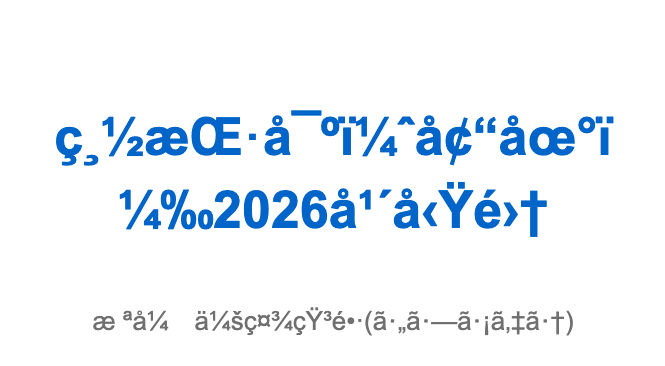
The headline and advertiser name portion of the Yahoo! JAPAN ad slot opened in the Ladybird Alpha. Both are garbled
When I investigated with WebDriver, this ad slot was an iframe that receives its HTML through the srcdoc attribute.
The srcdoc string passed by the parent page was correct Japanese, but Ladybird was reading the document inside the iframe as windows-1252, a single-byte character encoding.
It read the UTF-8 Japanese as separate characters one byte at a time, which resulted in a sequence of accented Latin letters.
The HTML specification says that a srcdoc document is to be treated as UTF-8.
The same garbling occurred with the following HTML, unrelated to ads.
<!doctype html>
<meta charset="utf-8">
<iframe srcdoc="<p>日本語のテキスト</p>"></iframe>
In Ladybird, document.characterSet inside the iframe was windows-1252, and 日本語ã®ãƒ†ã‚スト was displayed.
In Chrome 158, it was UTF-8, and 日本語のテキスト was displayed.
The result was the same when setting srcdoc with JavaScript.
This bug was reported as an issue to Ladybird's repository on 2026-11-24.
It is a report about apostrophes being garbled in an EPUB reader, but the cause is the same way of reading srcdoc.
For YouTube, I opened a video page with WebDriver and read the currentTime of the video element every 5 seconds.
The playback position advanced by 5 seconds every 5 seconds, and there were no errors.
The video's src was a blob: URL, so it plays even with the method where YouTube passes video data through Media Source Extensions.
Because headless can't verify video and audio, I also played it in the GUI version of Ladybird.
Both video and audio came out without any problems.
Speed
A benchmark that measures how responsive web apps are in a browser is Speedometer.
It automatically operates web apps such as TODO apps and editors, and turns their speed into a score.
A higher score indicates faster.
I ran Speedometer 3.1 three times each on the three browsers, back to back on the same day.
I opened the URL with ?startAutomatically=true appended, and read the score when the results screen appeared.
| Browser | 1st | 2nd | 3rd | Median |
|---|---|---|---|---|
| Ladybird Alpha 2026.47.7 | 20.7 | 22.1 | 21.7 | 21.7 |
| Safari 27.2 | 51.3 | 55.6 | 50.8 | 51.3 |
| Chrome 158 | 60.6 | 62.2 | 59.8 | 60.6 |
Ladybird's score was about 40% of Safari's and about one third of Chrome's.
Safari has no headless mode, so only Safari was measured with a window open.
The October newsletter says that LibJS (Ladybird's JavaScript engine) now compiles commonly executed JavaScript into machine code on macOS and Linux.
Speedometer measures not only JavaScript execution but also DOM manipulation and layout, so it's not clear from this score which part accounts for the largest difference.
The result was that in the speed of running web apps, the gap with Chrome and Safari is still large.
On the other hand, within the range of opening and scrolling everyday sites in the GUI, I didn't feel as large a difference as the score suggests.
Features as a browser
Ladybird does not yet have a mechanism for incorporating extensions (WebExtensions).
The repository's FAQ says that it supports user-configured content blocker lists, and that an issue is open for supporting uBlock via extensions.
People who rely on extensions in Chrome or Safari can't switch yet.
Security is also not yet at a stage suitable for daily use.
The release notes say that no promises are made about security yet.
On 2026-09-08, Andreas Kling also posted that once the Alpha is out, Ladybird will probably be hacked many times, and that this is expected.
He also said he knows there are already people who have found vulnerabilities and are waiting to disclose them, and that he welcomes them.
At present, operations such as entering credentials on Ladybird are likely to be risky.
For DevTools, you enable them from Ladybird's "Inspect" menu and then connect Firefox's DevTools to use them.
A separate browser window opens, which feels a little odd, but the same panels as Firefox, such as the inspector, are lined up, and it seemed usable without feeling inferior to the DevTools of other browsers.
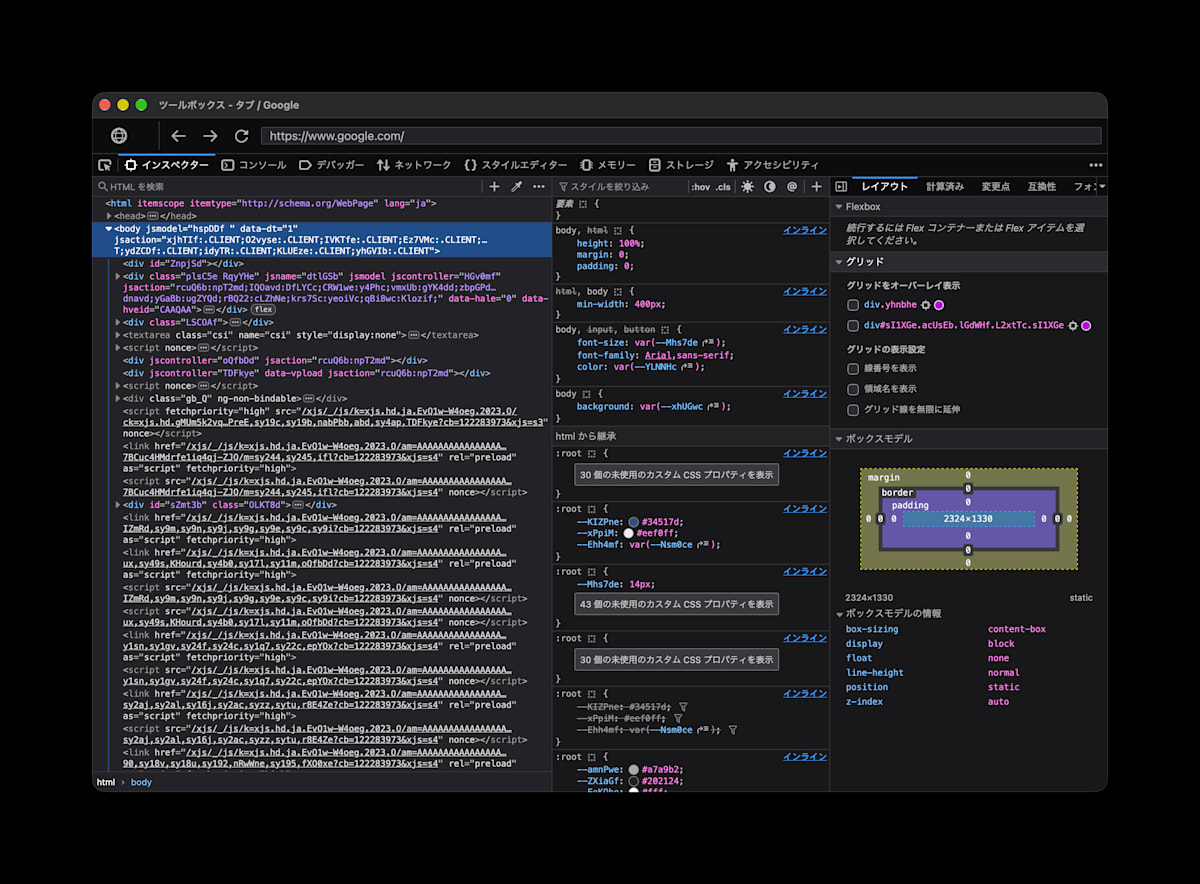
Firefox's DevTools connected to a Ladybird tab
Impressions from trying it
The Alpha version of Ladybird falls far short of Chrome and Safari in Speedometer score, and it still makes no promises about security.
It doesn't support extensions yet either, so it can't replace the browser you use every day right away.
Even so, the sites I tried displayed with almost no breakage, and YouTube videos also played.
Within the range of viewing everyday sites, the speed didn't bother me either.
Jxck's article mentioned at the start says that multiple independent engines are needed to decide standards.
Now that most browsers use Chromium, I felt there is value in itself in an engine that is neither Chromium nor WebKit being able to display ordinary sites this well.
Conclusion
I installed the Ladybird Alpha on macOS and compared the display of sites I use every day and the Speedometer score with Chrome and Safari.
Most of the pages I tried displayed with almost no breakage, and YouTube videos also played with video and audio.
When I first heard that they were developing an original browser engine from scratch without using Chromium or WebKit, I wondered when I'd ever be able to use that browser properly.
However, using AI has greatly raised the speed of development, and I'm surprised that the chance came much sooner than I expected.
On the other hand, as I wrote in this article, there are still quite a few challenges.
I hope that Ladybird's progress will lead to the progress of existing browser engines such as Gecko, WebKit, and Chromium, and of the web.
References
- Why one browser engine isn't enough? Or, expectations for Ladybird | blog.jxck.io
- Ladybird
- Ladybird alpha | LadybirdBrowser/ladybird
- Download | Ladybird
- Ladybird forks from SerenityOS | Ladybird
- Ladybird adopts Rust, with help from AI (2026-02-23) | Ladybird
- Ladybird newsletter (October 2026)
- iframe: srcdoc text decoded as windows-1252, and very wide iframes render blurry | LadybirdBrowser/ladybird
- Build Instructions | LadybirdBrowser/ladybird