Running Claude Code and Codex on Their Subscriptions Inside an NVIDIA OpenShell Sandbox

This page has been translated by machine translation. View original
Introduction
Hello, I'm Shimada from the Manufacturing Business Technology Department at Classmethod.
Letting Claude Code or Codex work without asking for confirmation makes things go faster.
On the other hand, an agent can read the tokens at hand and communicate with any destination.
If you put the agent in a sandbox and manage the allowed destinations and tokens outside the sandbox, you have fewer things to worry about even when you reduce confirmations.
NVIDIA OpenShell is a tool that provides a sandbox for this purpose.
In this article, I ran Claude Code and Codex in an OpenShell sandbox using subscription OAuth.
I did not use API keys.
This article covers the following:
- The steps to get it running, and where I got stuck
- The mechanism that lets you avoid placing tokens in the sandbox, and a check that communication that should be denied is actually denied
- A policy that opens only the destinations needed for everyday work such as clone, package retrieval, and MCP
- A repository that gathers the steps
OpenShell architecture
OpenShell consists of a gateway that runs on the host and sandboxes that the gateway creates.
In this article, I used the Docker driver, which creates sandboxes as Docker containers.
The Docker driver creates two containers per sandbox.
The workload container where the agent runs has no network, and all outbound communication goes through the proxy in the neighboring supervisor container.
On my machine as well, I confirmed with docker ps that each sandbox has two containers and that the workload side's network is none.
Following the policy, the proxy inspects the destination host and port, the binary that initiated the communication, and the HTTP method and path, and denies communication that is not allowed.
The policy also contains filesystem and process restrictions.
Tokens are registered in the gateway as providers.
In a sandbox with a provider attached, the agent's environment variables contain a placeholder like openshell:resolve:env:… instead of the real token.
The supervisor holds the real token, and the proxy replaces the placeholder with the real token only when the placeholder is included in communication to an allowed destination.
Therefore, even if the agent's process reads the environment variables, all it obtains is the placeholder.
For each provider type, a provider profile describes which environment variable is sent in which header, and which binaries may send to which destinations.
The destinations and binaries written in the profile are added as a network policy named _provider_<name> in a sandbox with the provider attached.
Installation
I installed a specified version using the official install.sh.
curl -fsSL https://raw.githubusercontent.com/NVIDIA/OpenShell/main/install.sh | OPENSHELL_VERSION=v0.1.7 sh
On macOS, install.sh creates a formula in a local Homebrew tap and runs brew install, then keeps the gateway resident at 127.0.0.1:17670 via brew services.
If openshell status shows Connected, the gateway is running.
The sandbox won't start on macOS
The first sandbox failed to start with ControlSupervisorStartFailed partway through creation.
The log showed failed to connect to OpenShell server.
With the Docker driver, the supervisor inside the sandbox connects to the gateway and receives its configuration.
By default, the supervisor uses host networking and tries to connect to https://127.0.0.1:17670.
However, on Docker Desktop for Mac, unless host networking is enabled, 127.0.0.1 as seen from the container points to Docker's Linux VM.
As a result, the supervisor could not reach the gateway.
When I changed the supervisor's network to bridge in the gateway's configuration file, the supervisor was able to reach the gateway via host.docker.internal.
[openshell]
version = 2

[openshell.gateway]

[openshell.drivers.docker]
supervisor_network_mode = "bridge"
After the change, restart the gateway with brew services restart openshell.
The OpenShell documentation also says that to keep using host mode on Docker Desktop, you need to enable host networking.
I chose to switch to bridge and did not try enabling host networking.
Where using the base image as-is gets you stuck
The base image distributed by OpenShell-Community includes Claude Code, Codex, and a policy for agents.
Using this image as-is, I got stuck on the following three points.
The first is that the bundled policy becomes invalid in v0.1.7.
The sandbox waited 300 seconds and then failed with ConfigurationInvalid, and the log gave no reason.
When I passed the same policy explicitly with --policy, the reason was displayed.
network policy 'claude_code': endpoint 0: unknown tls value 'terminate'
Since v0.1.0, OpenShell rejects unknown or deprecated fields in a policy.
Removing the tls: terminate line made it pass.
The second is that destinations to which tokens are attached must be configured for L7 inspection, otherwise they are rejected as soon as the provider is attached.
credentialed endpoint 'api.openai.com:443' in rule 'codex' uses L4-only; configure L7 inspection or explicitly set allow_uninspected_credentials: true
The bundled policy's rule for Codex was an L4 rule that specified only the host and port.
Adding protocol: rest to inspect at L7 makes it pass.
This constraint also extends to other rules that specify the same host as a destination declared by a provider profile.
For example, when I attached the GitHub provider, github.com, which was written as L4 in the rule for package retrieval, produced the same error.
The third is that the bundled Codex is old, at 0.117.0.
Authentication succeeded, but every model I could specify with a ChatGPT account resulted in model_not_found.
So I built an image that adds version-pinned Claude Code and Codex on top of the base image.
The Docker driver uses local images in the same Docker daemon as-is, so all you need to do is pass the image name you built with docker build to openshell sandbox create --from.
ARG BASE_IMAGE=ghcr.io/nvidia/openshell-community/sandboxes/base:latest
FROM ${BASE_IMAGE}
USER root
ARG CODEX_VERSION=0.165.0
ARG CLAUDE_VERSION=2.1.318
RUN npm install -g @openai/codex@${CODEX_VERSION} && codex --version
RUN curl -fsSL https://claude.ai/install.sh | bash -s ${CLAUDE_VERSION} \
    && cp -L /root/.local/bin/claude /usr/local/bin/claude \
    && chmod 755 /usr/local/bin/claude && /usr/local/bin/claude --version
COPY codex-in-openshell /usr/local/bin/codex-in-openshell
RUN chmod 755 /usr/local/bin/codex-in-openshell
USER sandbox
Running Claude Code with subscription OAuth
The OpenShell repository has examples of provider profiles, and providers/claude-code.yaml for Claude Code sends an API key in the x-api-key header.
To use a subscription, I wrote a provider profile that sends the long-lived OAuth token issued by claude setup-token as Authorization: Bearer.
id: claude-code-oauth
display_name: Claude Code (OAuth)
description: Claude Code CLI with a subscription OAuth token
category: agent
inference_capable: true
credentials:
  - name: oauth_token
    description: Long-lived OAuth token from `claude setup-token`
    env_vars: [CLAUDE_CODE_OAUTH_TOKEN]
    required: true
    auth_style: bearer
    header_name: authorization
discovery:
  credentials: [oauth_token]
endpoints:
  - { host: api.anthropic.com, port: 443, protocol: rest, access: read-write, enforcement: enforce }
  - { host: platform.claude.com, port: 443, protocol: rest, access: read-write, enforcement: enforce }
binaries: [/usr/local/bin/claude, /usr/bin/claude]
platform.claude.com was required when starting in interactive mode (described later).
Because binaries contains only claude, curl or node inside the sandbox cannot reach these destinations.
Register the profile and create the token as a provider.
To avoid leaving the token on screen or in the shell history, I received it with read -s and passed it via an environment variable.
openshell provider profile import -f profiles/claude-code-oauth.yaml
read -rs CLAUDE_CODE_OAUTH_TOKEN   # Paste the output of claude setup-token
CLAUDE_CODE_OAUTH_TOKEN="$CLAUDE_CODE_OAUTH_TOKEN" \
  openshell provider create --name claude --type claude-code-oauth --credential CLAUDE_CODE_OAUTH_TOKEN
When I created a sandbox with this provider attached, CLAUDE_CODE_OAUTH_TOKEN inside was the openshell:resolve:env:… placeholder.
Running claude -p "reply with exactly: OK from openshell" in that state returned OK from openshell.
Subscription OAuth is intended for Anthropic's apps such as Claude Code, and using it from other tools is not permitted.
This time I used the Claude Code binary distributed by Anthropic as-is, and authenticated with my own subscription's token.
Claude Code's Legal and compliance says that signing in to an unmodified Claude Code with your own subscription is not restricted, even when it runs in an environment that hosts Claude Code.
claude setup-token is also a method described in Authentication for CI and scripts.
Running Codex with ChatGPT OAuth
Codex reads its token from ~/.codex/auth.json.
So I registered the access_token as a provider, and put into the image a script that builds auth.json inside the sandbox using the placeholder and then starts Codex.
This is the same approach as the Codex script in the OpenShell repository itself.
: "${CODEX_AUTH_ACCESS_TOKEN:?provider codex is not attached}"
: "${CODEX_ACCOUNT_ID:?pass --env CODEX_ACCOUNT_ID=...}"
# Write ~/.codex/auth.json with the placeholder access_token and account_id (omitted)
exec codex "$@"
Only account_id could not be a placeholder.
Codex also uses this value for local comparisons, so it won't match if it stays a placeholder.
The Codex script in OpenShell itself also stops with "must be a literal identifier" when account_id is a placeholder.
Since account_id is not a token, I passed it in plaintext with --env CODEX_ACCOUNT_ID=… when creating the sandbox.
Codex's own sandbox cannot start inside a container, and Codex asks for approval for each command.
So I disabled Codex's sandbox with --sandbox danger-full-access (-c sandbox_mode="danger-full-access" in interactive mode) and left the restrictions to OpenShell.
In this state, passing the same prompt to codex exec returned OK from openshell.
Leaving token refresh to the gateway
The access_token has an expiry.
The Codex profile example in the OpenShell repository (providers/codex.yaml) also passes the refresh_token to the sandbox.
I decided not to pass the refresh_token to the sandbox, and instead have the gateway hold it and perform the refresh.
The aim is to consolidate refreshing in a single place, the gateway, so that processes inside the sandbox never handle the refresh token.
OpenShell's gateway has a feature that uses the refresh token to fetch a new access_token before expiry and write it back to the provider.
Add the refresh method to the profile's access_token.
credentials:
  - name: access_token
    env_vars: [CODEX_AUTH_ACCESS_TOKEN]
    auth_style: bearer
    header_name: authorization
    refresh:
      strategy: oauth2_refresh_token
      token_url: https://auth.openai.com/oauth/token
      scopes: [openid, profile, email]
      material:
        - { name: client_id, required: true }
        - { name: refresh_token, required: true, secret: true }
After creating the provider, pass the refresh token and Codex's OAuth client ID to the gateway.
CODEX_REFRESH_TOKEN="…" openshell provider refresh configure codex \
  --credential-key CODEX_AUTH_ACCESS_TOKEN \
  --strategy oauth2-refresh-token \
  --material client_id="<access_token の client_id>" \
  --secret-material-env refresh_token=CODEX_REFRESH_TOKEN \
  --credential-expires-at <access_token の期限(ミリ秒)>
The refresh token used here was obtained by logging in again exclusively for the gateway, and is separate from the one in the host's ~/.codex.
With OAuth, a refresh token may be replaced with a new one each time it is used.
If you share the same one with the host's Codex, the host's Codex login may be invalidated once the gateway refreshes it (I have not confirmed whether OpenAI's refresh token rotates).
If you set CODEX_HOME to a separate directory and run codex login, it becomes a login separate from the host's.
I forced the refresh three times with openshell provider refresh rotate, and all three came back as refreshed.
Running codex exec in the sandbox after the refresh returned a response, and even when I kept refreshing without recreating the sandbox, the next Codex I started still worked.
The host's Codex login also remained usable as is.
Note that when I attached a provider to an already-running sandbox and started Codex without waiting for it to take effect, it was rejected with credential_unavailable.
According to the documentation, adding --wait to openshell sandbox provider attach makes it wait until the change is applied before returning.
Checking the boundaries
After confirming that the agents work, I directly tried, using openshell sandbox exec, whether communication that should be denied is actually denied.
| What I tried | Result |
|---|---|
Tokens in the sandbox's environment variables and auth.json |
Both are placeholders |
From curl to api.anthropic.com |
Connection refused (curl is not an allowed binary) |
To chatgpt.com with the Claude placeholder |
403 (the placeholder's destination is different) |
To api.anthropic.com with the Codex placeholder |
403 |
From curl to example.com |
Connection refused |
touch /etc/x |
Permission denied |
Denied communication appears in openshell logs <sandbox name>.
NET:OPEN [MED] DENIED /usr/local/bin/claude(0) -> example.com:443 [reason:transparent_tcp_policy_denied]
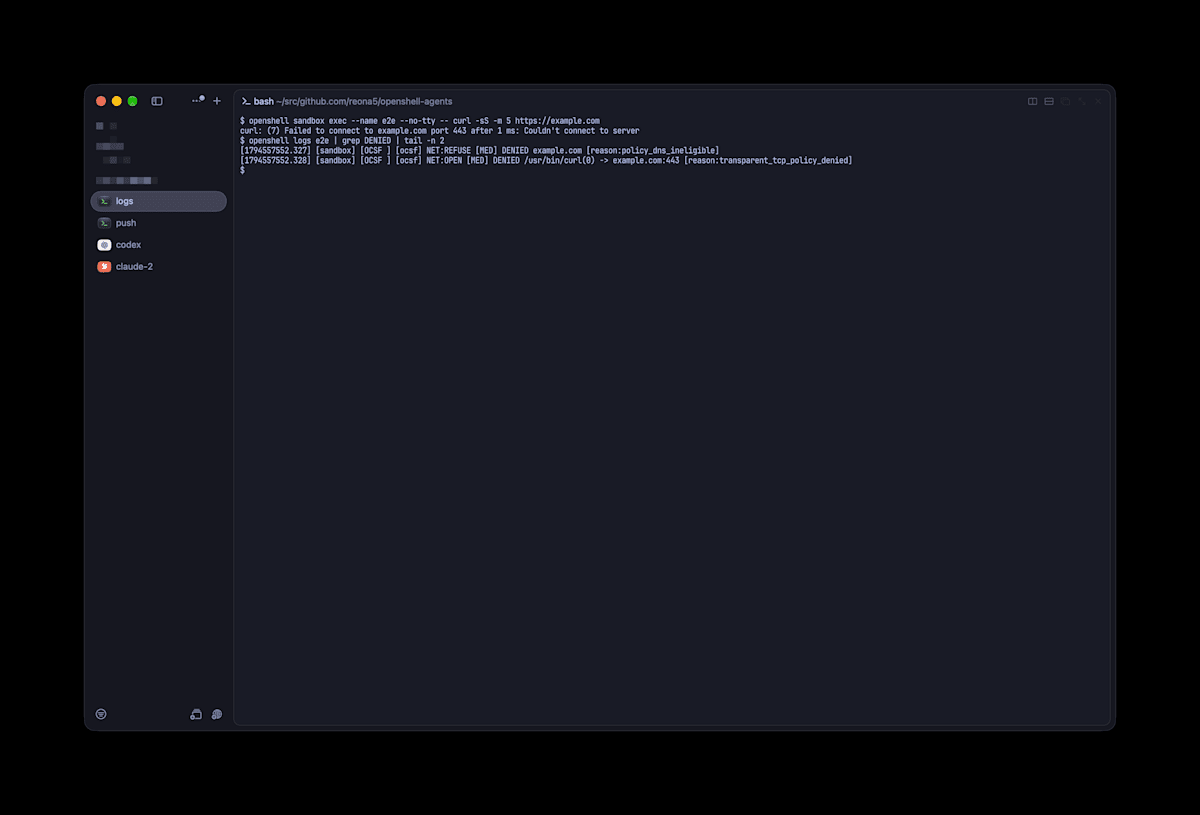
Communication to a destination that is not allowed is recorded in the proxy's log together with the reason for denial
Even when Claude Code was made to use tools, destinations that were not allowed were denied.
When I had it open example.com with WebFetch, it resulted in connect EACCES, and the telemetry to Datadog that Claude Code sends also showed up in the denial log.
Using it for everyday work
Using my public repository as the subject, I tried the operations from clone to push inside the sandbox.
GitHub
For GitHub, I used the profile example providers/github.yaml from the OpenShell repository as-is.
This profile allows clone and fetch, and does not allow push.
Register the value of gh auth token in the provider, and run gh auth setup-git inside the sandbox to pass the placeholder to git as well.
GH_TOKEN=$GITHUB_TOKEN gh auth setup-git
With this, gh api user, git clone, and git fetch went through, and git push got a 403.
In the log, the _provider_github rule denies it at L7.
HTTP:POST [MED] DENIED POST https://github.com/<user>/<repo>/git-receive-pack [policy:_provider_github engine:l7]
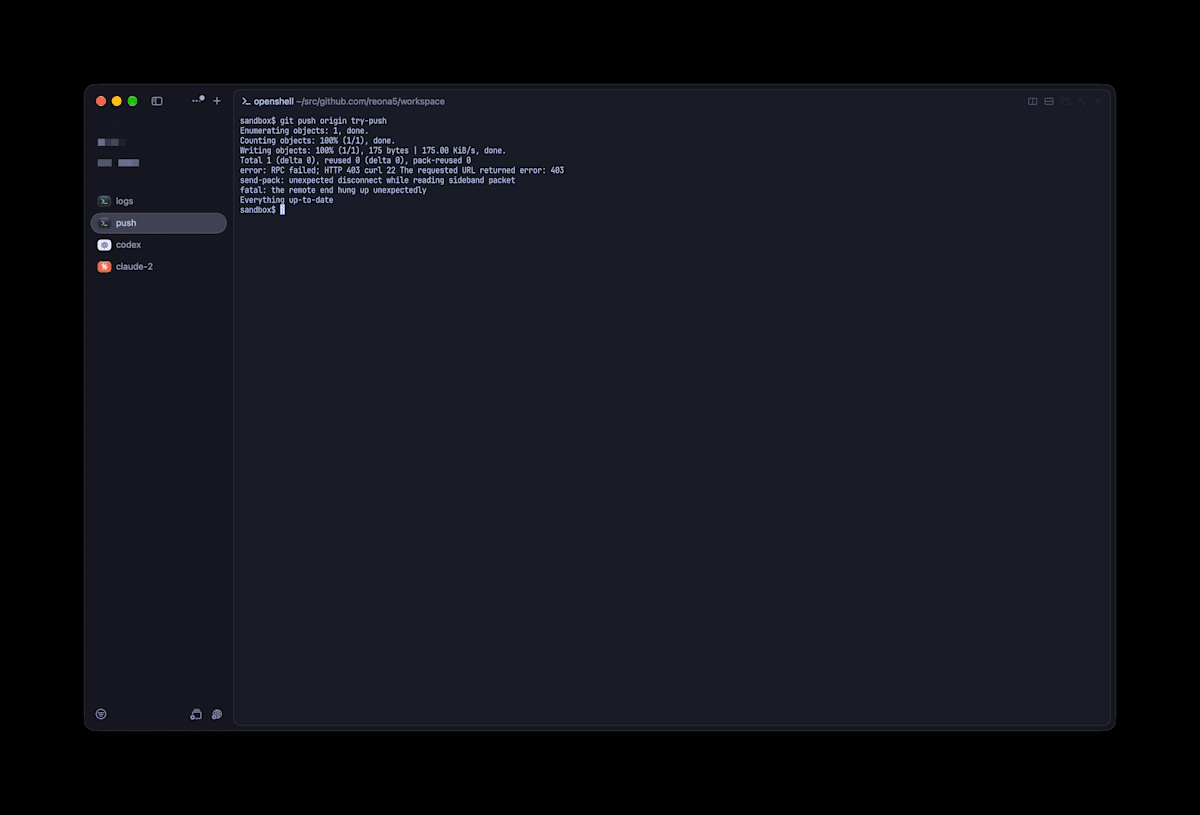
clone and fetch go through, but push is stopped by the proxy with a 403
If you want to allow push, the OpenShell tutorial "Grant GitHub Push Access to a Sandboxed Agent" has steps to allow writes only to a specific repository.
I have not tried these steps.
Also, when I sent a host repository with openshell sandbox upload, .git was not sent because of the .gitignore filter.
The upload destination path is also treated as a parent directory, so upload <name> dir /x/dir places it at /x/dir/dir.
Adding --no-git-ignore sends it without the filter, but I decided to clone inside the sandbox (I have not tried --no-git-ignore).
MCP
When you add an HTTP MCP server to Claude Code, at first it cannot connect because of ECONNREFUSED.
Adding one destination with openshell policy update loaded the new policy within a few seconds without recreating the sandbox, and the connection worked.
openshell policy update <sandbox 名> \
  --add-endpoint mcp.context7.com:443:read-write:rest:enforce \
  --binary /usr/local/bin/claude \
  --rule-name context7-mcp --wait
Skills could be used from Claude Code by placing them at /sandbox/.claude/skills/<name>/SKILL.md.
How to find the Agent Skills distributed by NVIDIA is summarized in Mori-san's article "A Summary of How to Use and Find the Agent Skills NVIDIA Distributes".
Using interactive mode
Up to this point I had been verifying with claude -p and codex exec.
When I used interactive mode, a different problem appeared.
First, nothing responded when I entered with openshell sandbox connect.
connect is not a command that opens a new shell, but a command that attaches to the sandbox's main process.
I had created the sandbox with -- sleep infinity, so what I attached to was sleep.
If you create it without passing a command, the main process becomes bash -l and connect becomes usable.
To open a separate shell, use openshell sandbox exec --name <sandbox name> --tty -- bash -l.
Next, Claude Code stopped at startup.
Unable to connect to Anthropic services ... ECONNREFUSED
Interactive mode checks the connection to platform.claude.com at startup, and it does not proceed if this is blocked.
I added platform.claude.com to the provider profile's destinations.
I also dealt with the following two points.
- Every time a sandbox is created, the first-time theme selection and folder trust confirmation appear. Write
hasCompletedOnboardinginto the image's~/.claude.json, and set folder trust right after the clone, only for the cloned directory - Because
/usris read-only, auto-update fails andAuto-update failedappears at the bottom of the screen. Stop it withDISABLE_AUTOUPDATER=1and pin the version in the image
I first wrote DISABLE_AUTOUPDATER in the Dockerfile's ENV.
However, the image's ENV was not passed to the sandbox's processes.
When I passed it with openshell sandbox create --env DISABLE_AUTOUPDATER=1, Auto-update failed no longer appeared.
With this, prompts sent from the TUI now get responses too.
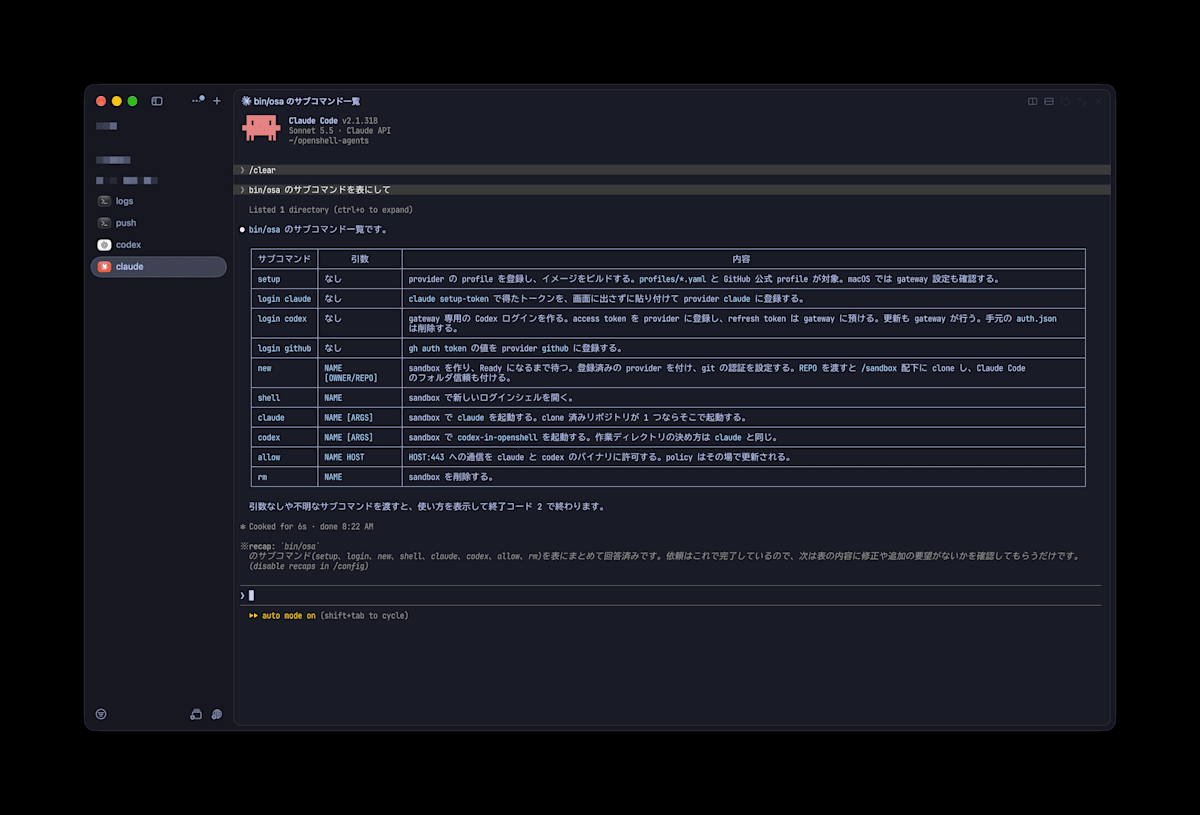
Claude Code inside the sandbox can be used in interactive mode just as usual
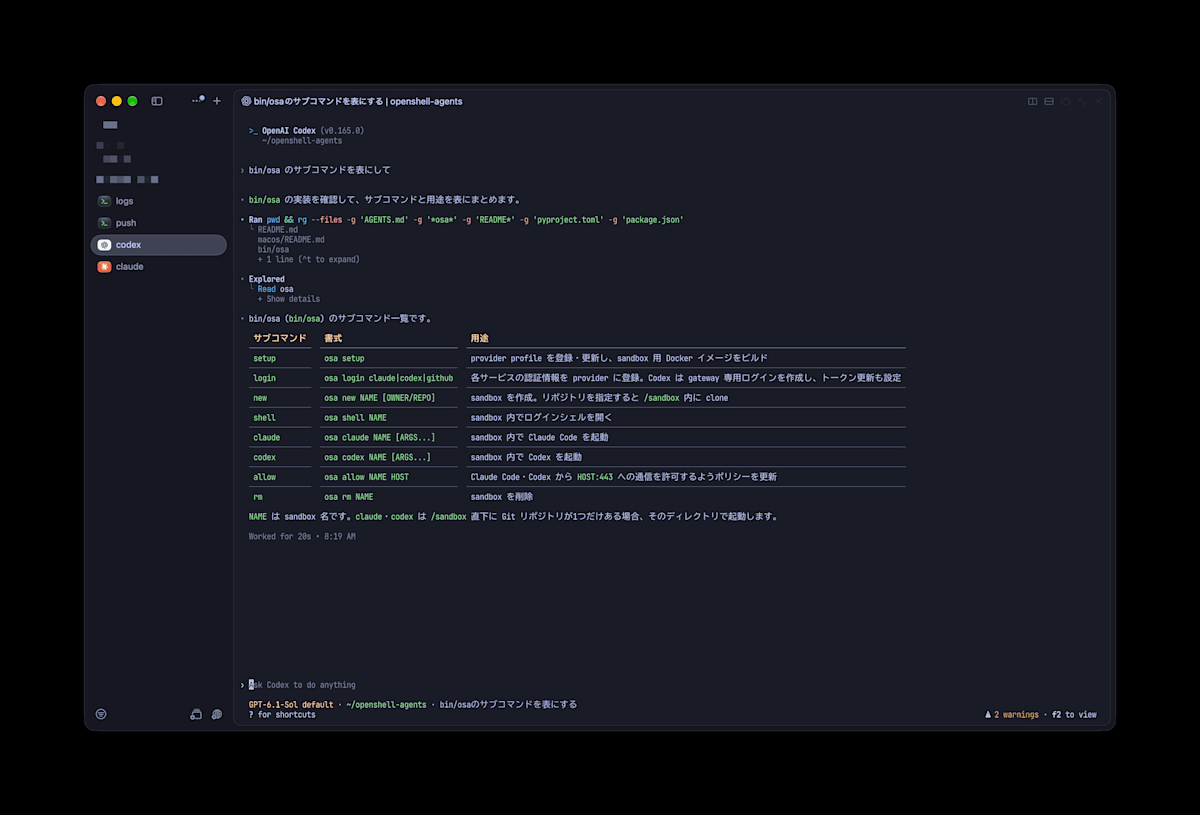
Codex also runs in interactive mode inside the same sandbox
Narrowing the policy
The base image's policy allowed /usr/bin/node in its rules for Claude Code and Codex.
In this case, any node script inside the sandbox can communicate with the agents' APIs with the token attached.
When I actually made requests from node to api.anthropic.com and chatgpt.com with the placeholder attached, both returned 200.
So I decided to write the destinations to which tokens are attached only in the provider profiles, and to write only the filesystem and the package registries that don't need tokens in the policy.
The provider profile's destinations are added automatically as _provider_<name> rules, so there is no need to write Anthropic or OpenAI destinations in the policy.
network_policies:
  pypi:
    name: pypi
    endpoints:
      - { host: pypi.org, port: 443, protocol: rest, enforcement: enforce, access: read-only }
      - { host: files.pythonhosted.org, port: 443, protocol: rest, enforcement: enforce, access: read-only }
    binaries:
      - { path: /sandbox/.venv/bin/python }
      - { path: /sandbox/.venv/bin/python3 }
      - { path: /sandbox/.venv/bin/pip }
      - { path: /usr/local/bin/uv }
      - { path: "/sandbox/.uv/python/**" }

  npm_registry:
    name: npm-registry
    endpoints:
      - { host: registry.npmjs.org, port: 443, protocol: rest, enforcement: enforce, access: read-only }
    binaries:
      # npm runs on node, so node is allowed, but the destination is read-only access to the registry
      - { path: /usr/bin/node }
I recreated the sandbox with this policy and ran the same checks.
| Check | Result |
|---|---|
claude -p |
A response is returned |
codex exec |
A response is returned (works even without node in the profile's binaries) |
gh api user |
My own username is returned |
git clone |
Succeeds |
uv pip install six |
Succeeds |
npm view left-pad |
1.3.0 |
From node to api.anthropic.com with the placeholder |
EACCES (200 before narrowing) |
From node to chatgpt.com with the placeholder |
EACCES (200 before narrowing) |
GET from node to registry.npmjs.org |
200 |
POST from node to registry.npmjs.org |
403 (read-only) |
From curl to example.com |
Connection refused |
A repository that gathers the steps
I gathered the configuration so far into a repository.
bin/osa is a thin wrapper around the openshell command.
bin/osa setup                    # Register provider profiles and build the image
bin/osa login claude             # Paste the claude setup-token token (not displayed)
bin/osa login codex              # Run codex login exclusively for the gateway and leave refreshing to the gateway
bin/osa login github             # Register the gh auth token

bin/osa new work owner/repo      # Create a sandbox and clone owner/repo inside it
bin/osa claude work              # Start Claude Code
bin/osa codex work               # Start Codex
bin/osa shell work               # Open a shell
bin/osa allow work mcp.example.com   # Open one destination
bin/osa rm work
Providers you did not register with login are not attached to the sandbox, so you can also set it up to use only Claude Code.
On macOS, the gateway.toml change described earlier is separately required.
Remaining issues
- For Codex refresh, I have only verified the three forced runs via
rotate, and have never run automatic expiry-based refresh over a long period - Codex's
account_idis passed as a plaintext environment variable - The binary paths allowed by
osa allowassume the install locations in this image
Conclusion
In an OpenShell sandbox, I was able to run Claude Code and Codex while keeping subscription OAuth.
What the agent's process can see is only placeholders, and the token is attached only to communication from allowed binaries to allowed destinations.
Operations you don't want to let through, such as push, could be denied with L7 rules.
Most of the points where I got stuck were due to the stricter policy inspection in the v0.1 series and the base image not having caught up with it.
Gathering the destinations to which tokens are attached in provider profiles and keeping the policy small made it easier to read what is being allowed.
References
- NVIDIA/OpenShell
- NVIDIA/OpenShell providers/github.yaml(v0.1.7)
- Grant GitHub Push Access to a Sandboxed Agent(OpenShell v0.1.7)
- Legal and compliance - Claude Code Docs
- Authentication - Claude Code Docs
- A Summary of How to Use and Find the Agent Skills NVIDIA Distributes | DevelopersIO
- reona5/openshell-agents