
I tried running eBPF programs on Lambda MicroVMs

This page has been translated by machine translation. View original
This is Iwata from the Retail App Co-Creation Division @ Osaka.
One of the features of Lambda MicroVMs is the ability to specify Linux capabilities.
Normal Lambda Functions can only run in environments where Linux capabilities are restricted, but with Lambda MicroVMs, you can specify that all Linux capabilities are available at image build time. The official documentation mentions that this feature also enables running eBPF programs.
By default, Lambda MicroVMs run with a standard set of Linux capabilities. You can grant elevated Linux capabilities using the additionalOsCapabilities field when creating or updating a MicroVM image. The only supported value is ["ALL"]. Elevated capabilities enable operations such as mounting filesystems, creating network namespaces, or running eBPF programs. Capabilities are applied within the VM isolation boundary and do not affect the host or other MicroVMs.
In this blog, I actually verified that eBPF programs work on a MicroVM.
Let's Try It
Let's actually get started.
This time, I'll use the programs published in the libbpf-bootstrap repository for testing.
Building the MicroVM Image
First, let's build a MicroVM image that includes an eBPF program. I wrote the Dockerfile as follows.
FROM public.ecr.aws/amazonlinux/amazonlinux:2023 AS builder

RUN dnf install -y git clang elfutils-libelf elfutils-libelf-devel zlib-devel \
    && git clone https://github.com/libbpf/libbpf-bootstrap.git --recurse-submodules \
    && cd libbpf-bootstrap/examples/c \
    && make

FROM public.ecr.aws/lambda/microvms:al2023-minimal
RUN dnf install -y elfutils-libelf
COPY --from=builder /libbpf-bootstrap/examples/c/sockfilter /usr/local/sbin/sockfilter

CMD ["tail", "-f", "/dev/null"]
Using a multi-stage build, I build the eBPF program in a build container image, then copy a binary called sockfilter from among the generated eBPF programs into the container image that will actually run. Since I want to connect to the MicroVM shell later to verify operation, I specified tail -f /dev/null as a dummy process in CMD.
I zip this Dockerfile, upload it to an appropriate S3 bucket, and build the MicroVM image. The key point is to check "Enable all operating system capabilities" in the build settings. All other settings were left at their default values.
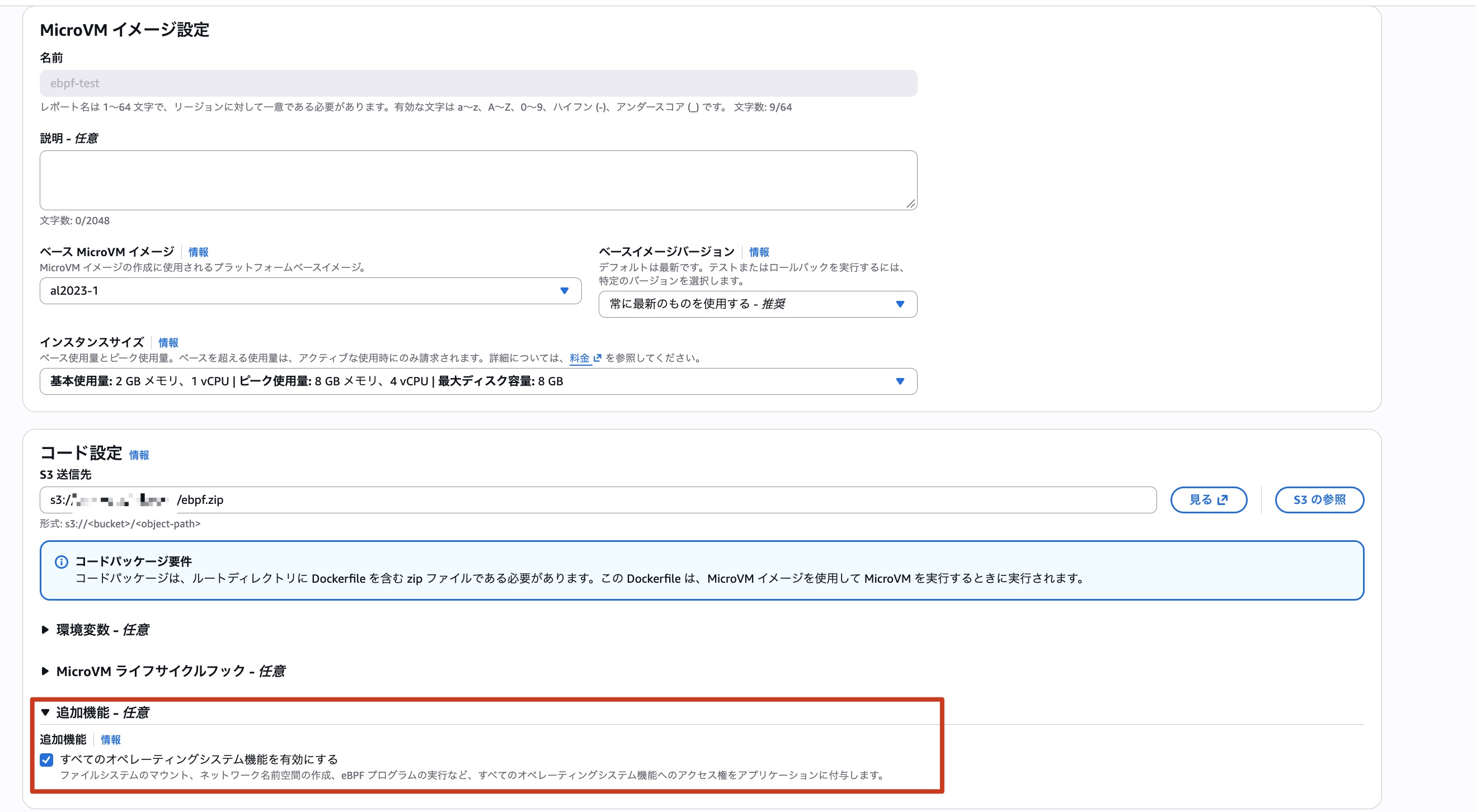
After waiting a while, the MicroVM image build completes.
Running the eBPF Program
Now that the image is built, let's launch the MicroVM. At this point, I'll specify a shell for the ingress network interface to make verification easier.

Once it's running, I connect to the MicroVM shell from the management console and try running uname -a for starters. The output was as follows.
Linux localhost 6.1.166-24.303.amzn2023.aarch64 #1 SMP Wed Mar 25 10:39:29 UTC 2026 aarch64 aarch64 aarch64 GNU/Linux
This will vary depending on the base MicroVM image specified at image build time and the base image version. The version at the time of this verification was as shown above.
Now let's actually run the eBPF program. Launch the sockfilter binary with the following command.
/usr/local/sbin/sockfilter -i eth0 &
The following output appears, and then sockfilter continues running in the background. Incidentally, this sockfilter is a program that monitors packets and outputs the protocol and source/destination IP addresses and port numbers to standard output.
libbpf: loading object 'sockfilter_bpf' from buffer
libbpf: elf: section(2) .symtab, size 192, link 1, flags 0, type=2
libbpf: elf: section(3) socket, size 584, link 0, flags 6, type=1
libbpf: sec 'socket': found program 'socket_handler' at insn offset 0 (0 bytes), code size 73 insns (584 bytes)
libbpf: elf: section(4) license, size 13, link 0, flags 3, type=1
libbpf: license of sockfilter_bpf is Dual BSD/GPL
libbpf: elf: section(5) .maps, size 16, link 0, flags 3, type=1
libbpf: elf: section(6) .relsocket, size 16, link 2, flags 40, type=9
libbpf: elf: section(7) .BTF, size 2421, link 0, flags 0, type=1
libbpf: elf: section(8) .BTF.ext, size 608, link 0, flags 0, type=1
libbpf: looking for externs among 8 symbols...
libbpf: collected 0 externs total
libbpf: map 'rb': at sec_idx 5, offset 0.
libbpf: map 'rb': found type = 27.
libbpf: map 'rb': found max_entries = 262144.
libbpf: sec '.relsocket': collecting relocation for section(3) 'socket'
libbpf: sec '.relsocket': relo #0: insn #22 against 'rb'
libbpf: prog 'socket_handler': found map 0 (rb, sec 5, off 0) for insn #22
libbpf: object 'sockfilter_bpf': failed (-22) to create BPF token from '/sys/fs/bpf', skipping optional step...
libbpf: map 'rb': created successfully, fd=3
Now let's run the curl command.
curl https://dev.classmethod.jp -s -o /dev/null
The sockfilter output was then displayed on standard output.
interface: eth0     protocol: UDP   169.254.169.253:53(src) -> 169.254.0.2:53531(dst)
interface: eth0 protocol: UDP   169.254.169.253:53(src) -> 169.254.0.2:53530(dst)
interface: eth0 protocol: TCP   18.65.214.47:443(src) -> 169.254.0.2:37304(dst)
interface: eth0 protocol: TCP   18.65.214.47:443(src) -> 169.254.0.2:37304(dst)
interface: eth0 protocol: TCP   18.65.214.47:443(src) -> 169.254.0.2:37304(dst)
interface: eth0 protocol: TCP   18.65.214.47:443(src) -> 169.254.0.2:37304(dst)
interface: eth0 protocol: TCP   18.65.214.47:443(src) -> 169.254.0.2:37304(dst)
interface: eth0 protocol: TCP   18.65.214.47:443(src) -> 169.254.0.2:37304(dst)
...omitted
We can see that after resolving the name dev.classmethod.jp, it's communicating via HTTPS. I was able to successfully confirm that the eBPF program runs!
What Happens When "Enable All Operating System Capabilities" Is Turned OFF?
We've confirmed that eBPF programs work, but now let's try turning off "Enable all operating system capabilities" and building a MicroVM image to see what happens.
Running the sockfilter binary in the same way as before resulted in the following error.
libbpf: loading object 'sockfilter_bpf' from buffer
libbpf: elf: section(2) .symtab, size 192, link 1, flags 0, type=2
libbpf: elf: section(3) socket, size 584, link 0, flags 6, type=1
libbpf: sec 'socket': found program 'socket_handler' at insn offset 0 (0 bytes), code size 73 insns (584 bytes)
libbpf: elf: section(4) license, size 13, link 0, flags 3, type=1
libbpf: license of sockfilter_bpf is Dual BSD/GPL
libbpf: elf: section(5) .maps, size 16, link 0, flags 3, type=1
libbpf: elf: section(6) .relsocket, size 16, link 2, flags 40, type=9
libbpf: elf: section(7) .BTF, size 2421, link 0, flags 0, type=1
libbpf: elf: section(8) .BTF.ext, size 608, link 0, flags 0, type=1
libbpf: looking for externs among 8 symbols...
libbpf: collected 0 externs total
libbpf: map 'rb': at sec_idx 5, offset 0.
libbpf: map 'rb': found type = 27.
libbpf: map 'rb': found max_entries = 262144.
libbpf: sec '.relsocket': collecting relocation for section(3) 'socket'
libbpf: sec '.relsocket': relo #0: insn #22 against 'rb'
libbpf: prog 'socket_handler': found map 0 (rb, sec 5, off 0) for insn #22
libbpf: object 'sockfilter_bpf': failed (-22) to create BPF token from '/sys/fs/bpf', skipping optional step...
libbpf: Failed to bump RLIMIT_MEMLOCK (err = -EPERM), you might need to do it explicitly!
libbpf: Error in bpf_object__probe_loading(): -EPERM. Couldn't load trivial BPF program. Make sure your kernel supports BPF (CONFIG_BPF_SYSCALL=y) and/or that RLIMIT_MEMLOCK is set to big enough value.
libbpf: failed to load BPF skeleton 'sockfilter_bpf': -EPERM
Failed to open and load BPF skeleton
It looks like Linux capabilities are having an effect. So let's compare how the output of capsh --print changes depending on whether "Enable all operating system capabilities" is checked or not.
First, with the checkbox ON:
Current: =ep
Bounding set =cap_chown,cap_dac_override,cap_dac_read_search,cap_fowner,cap_fsetid,cap_kill,cap_setgid,cap_setuid,cap_setpcap,cap_linux_immutable,cap_net_bind_service,cap_net_broadcast,cap_net_admin,cap_net_raw,cap_ipc_lock,cap_ipc_owner,cap_sys_module,cap_sys_rawio,cap_sys_chroot,cap_sys_ptrace,cap_sys_pacct,cap_sys_admin,cap_sys_boot,cap_sys_nice,cap_sys_resource,cap_sys_time,cap_sys_tty_config,cap_mknod,cap_lease,cap_audit_write,cap_audit_control,cap_setfcap,cap_mac_override,cap_mac_admin,cap_syslog,cap_wake_alarm,cap_block_suspend,cap_audit_read,cap_perfmon,cap_bpf,cap_checkpoint_restore
Ambient set =
Current IAB:
Securebits: 00/0x0/1'b0 (no-new-privs=1)
 secure-noroot: no (unlocked)
 secure-no-suid-fixup: no (unlocked)
 secure-keep-caps: no (unlocked)
 secure-no-ambient-raise: no (unlocked)
uid=0(root) euid=0(root)
gid=0(root)
groups=
Guessed mode: HYBRID (4)
Next, with the checkbox OFF:
Current: cap_chown,cap_dac_override,cap_fowner,cap_fsetid,cap_kill,cap_setgid,cap_setuid,cap_setpcap,cap_net_bind_service,cap_net_raw,cap_sys_chroot,cap_mknod,cap_audit_write,cap_setfcap=ep
Bounding set =cap_chown,cap_dac_override,cap_fowner,cap_fsetid,cap_kill,cap_setgid,cap_setuid,cap_setpcap,cap_net_bind_service,cap_net_raw,cap_sys_chroot,cap_mknod,cap_audit_write,cap_setfcap
Ambient set =
Current IAB: !cap_dac_read_search,!cap_linux_immutable,!cap_net_broadcast,!cap_net_admin,!cap_ipc_lock,!cap_ipc_owner,!cap_sys_module,!cap_sys_rawio,!cap_sys_ptrace,!cap_sys_pacct,!cap_sys_admin,!cap_sys_boot,!cap_sys_nice,!cap_sys_resource,!cap_sys_time,!cap_sys_tty_config,!cap_lease,!cap_audit_control,!cap_mac_override,!cap_mac_admin,!cap_syslog,!cap_wake_alarm,!cap_block_suspend,!cap_audit_read,!cap_perfmon,!cap_bpf,!cap_checkpoint_restore
Securebits: 00/0x0/1'b0 (no-new-privs=1)
 secure-noroot: no (unlocked)
 secure-no-suid-fixup: no (unlocked)
 secure-keep-caps: no (unlocked)
 secure-no-ambient-raise: no (unlocked)
uid=0(root) euid=0(root)
gid=0(root)
groups=
Guessed mode: HYBRID (4)
When the checkbox is ON, Current: =ep is shown, indicating that all capabilities have been granted. We can also see cap_bpf in the Bounding set.
However, Many eBPF Programs Cannot Be Executed
Now, while I've confirmed that eBPF programs work up to this point, there are actually many restrictions in practice. I tried various sample programs published in the libbpf-bootstrap repository besides sockfilter, but none of the programs other than sockfilter worked. Let me introduce the actual errors that appeared.
First, bootstrap failed with the following error and could not be executed. ※ The -v option was added to output detailed logs.
libbpf: loading object 'bootstrap_bpf' from buffer
libbpf: elf: section(2) .symtab, size 360, link 1, flags 0, type=2
libbpf: elf: section(3) tp/sched/sched_process_exec, size 504, link 0, flags 6, type=1
libbpf: sec 'tp/sched/sched_process_exec': found program 'handle_exec' at insn offset 0 (0 bytes), code size 63 insns (504 bytes)
libbpf: elf: section(4) tp/sched/sched_process_exit, size 680, link 0, flags 6, type=1
libbpf: sec 'tp/sched/sched_process_exit': found program 'handle_exit' at insn offset 0 (0 bytes), code size 85 insns (680 bytes)
libbpf: elf: section(5) license, size 13, link 0, flags 3, type=1
libbpf: license of bootstrap_bpf is Dual BSD/GPL
libbpf: elf: section(6) .rodata, size 8, link 0, flags 2, type=1
libbpf: elf: section(7) .maps, size 48, link 0, flags 3, type=1
libbpf: elf: section(8) .reltp/sched/sched_process_exec, size 48, link 2, flags 40, type=9
libbpf: elf: section(9) .reltp/sched/sched_process_exit, size 80, link 2, flags 40, type=9
libbpf: elf: section(10) .BTF, size 27584, link 0, flags 0, type=1
libbpf: elf: section(11) .BTF.ext, size 1356, link 0, flags 0, type=1
libbpf: looking for externs among 15 symbols...
libbpf: collected 0 externs total
libbpf: map 'exec_start': at sec_idx 7, offset 0.
libbpf: map 'exec_start': found type = 1.
libbpf: map 'exec_start': found key [8], sz = 4.
libbpf: map 'exec_start': found value [11], sz = 8.
libbpf: map 'exec_start': found max_entries = 8192.
libbpf: map 'rb': at sec_idx 7, offset 32.
libbpf: map 'rb': found type = 27.
libbpf: map 'rb': found max_entries = 262144.
libbpf: map 'bootstra.rodata' (global data): at sec_idx 6, offset 0, flags 480.
libbpf: map 2 is "bootstra.rodata"
libbpf: sec '.reltp/sched/sched_process_exec': collecting relocation for section(3) 'tp/sched/sched_process_exec'
libbpf: sec '.reltp/sched/sched_process_exec': relo #0: insn #10 against 'exec_start'
libbpf: prog 'handle_exec': found map 0 (exec_start, sec 7, off 0) for insn #10
libbpf: sec '.reltp/sched/sched_process_exec': relo #1: insn #14 against 'min_duration_ns'
libbpf: prog 'handle_exec': found data map 2 (bootstra.rodata, sec 6, off 0) for insn 14
libbpf: sec '.reltp/sched/sched_process_exec': relo #2: insn #19 against 'rb'
libbpf: prog 'handle_exec': found map 1 (rb, sec 7, off 32) for insn #19
libbpf: sec '.reltp/sched/sched_process_exit': collecting relocation for section(4) 'tp/sched/sched_process_exit'
libbpf: sec '.reltp/sched/sched_process_exit': relo #0: insn #9 against 'exec_start'
libbpf: prog 'handle_exit': found map 0 (exec_start, sec 7, off 0) for insn #9
libbpf: sec '.reltp/sched/sched_process_exit': relo #1: insn #20 against 'min_duration_ns'
libbpf: prog 'handle_exit': found data map 2 (bootstra.rodata, sec 6, off 0) for insn 20
libbpf: sec '.reltp/sched/sched_process_exit': relo #2: insn #26 against 'exec_start'
libbpf: prog 'handle_exit': found map 0 (exec_start, sec 7, off 0) for insn #26
libbpf: sec '.reltp/sched/sched_process_exit': relo #3: insn #29 against 'min_duration_ns'
libbpf: prog 'handle_exit': found data map 2 (bootstra.rodata, sec 6, off 0) for insn 29
libbpf: sec '.reltp/sched/sched_process_exit': relo #4: insn #35 against 'rb'
libbpf: prog 'handle_exit': found map 1 (rb, sec 7, off 32) for insn #35
libbpf: object 'bootstrap_bpf': failed (-22) to create BPF token from '/sys/fs/bpf', skipping optional step...
libbpf: kernel BTF is missing at '/sys/kernel/btf/vmlinux', was CONFIG_DEBUG_INFO_BTF enabled?
libbpf: failed to find valid kernel BTF
libbpf: Error loading vmlinux BTF: -ESRCH
libbpf: failed to load BPF skeleton 'bootstrap_bpf': -ESRCH
Failed to load and verify BPF skeleton
The cause is exactly as indicated by the message kernel BTF is missing at '/sys/kernel/btf/vmlinux', was CONFIG_DEBUG_INFO_BTF enabled? — the kernel compile option CONFIG_DEBUG_INFO_BTF is disabled. This bootstrap sample program uses BPF CO-RE (Compile Once Run Anywhere), which enables eBPF programs to run even on a different kernel version than the one used to build the eBPF program. Supporting this Compile Once Run Anywhere characteristic requires the CONFIG_DEBUG_INFO_BTF option to be enabled in the kernel of the execution environment, but it appears this option is disabled in the Lambda MicroVMs kernel. Therefore, this sample program cannot be executed. For other sample programs as well, they failed to launch successfully due to various factors, and the only one I could confirm working was sockfilter.
Summary
I tried running eBPF programs on Lambda MicroVMs. Since all Linux capabilities can be granted via the option at image build time, there's no shortage of capabilities, but due to factors such as kernel compile options, running eBPF programs is not straightforward.
Rather than using Lambda MicroVMs as a testing environment for eBPF programs, it might be better to think of it as: if there's some workload you want to run on Lambda MicroVMs, there may be cases where eBPF programs can also be run in a supplementary capacity.