
Security Hub automatically creates IAM Access Analyzer unused analyzers that cannot have archive rules configured, so let's try suppressing them with Security Hub automation rules

This page has been translated by machine translation. View original
Introduction
Hello everyone, I'm Akaike.
I had the opportunity to look into archive rules for unused access analyzers automatically created by Security Hub, but I noticed that archive rules cannot actually be configured.
So this time, I'll summarize how to suppress unused access analyzer detections using Security Hub's automation rules.
Note ①
For details on the unused access analyzers automatically created by Security Hub, please refer to the following article.
Note ②
"Security Hub" in this article refers to the new Security Hub that appeared in 2025 (the one that handles Findings in OCSF format).
Please note that it is different from the conventional Security Hub CSPM.
Prerequisites
- Security Hub must be enabled
- A Security Hub delegated administrator must be configured
About the Unused Access Analyzer Created by Security Hub
First, as a prerequisite, when you enable Security Hub, an unused access analyzer for IAM Access Analyzer is automatically created.
The specifications of the created analyzer are as follows.
| Item | Details | Notes |
|---|---|---|
| Activation method | Automatically created when Security Hub is enabled (service-linked analyzer) | Available at no additional cost |
| Creation unit | Per account | Automatically created in us-east-1 for each account |
| Tracking period | 90 days (fixed) | Cannot be changed |
| Detection targets | Unused IAM roles / Unused IAM user access keys / Unused IAM user passwords / Unused IAM permissions | |
| Execution region | us-east-1 (Northern Virginia) of each account only | Because IAM is a global service. Findings are replicated and displayed in all regions where Security Hub is enabled |
After actually enabling Security Hub, if you check the IAM Access Analyzer console, you will probably find an analyzer that you don't recognize has been created.
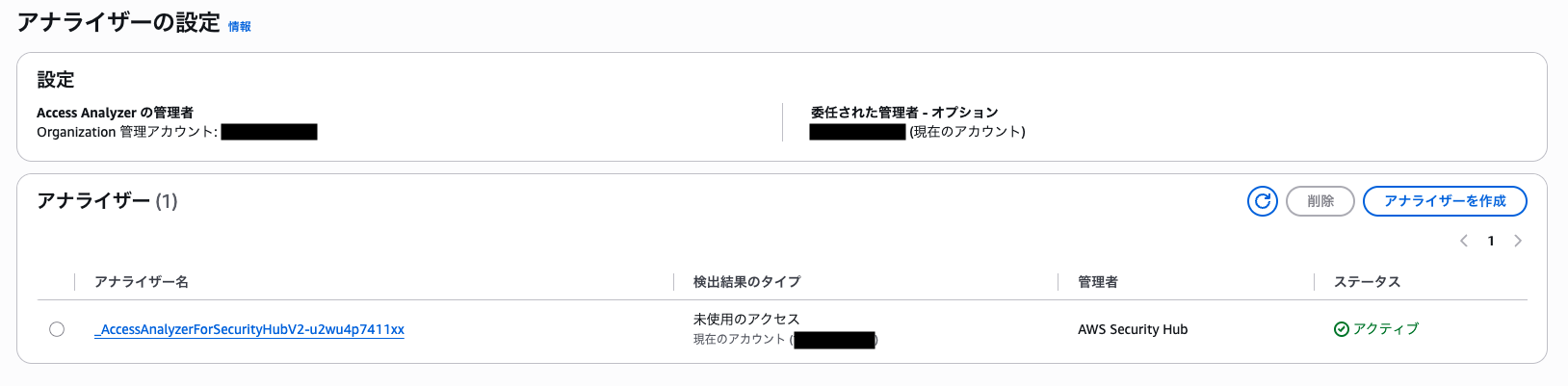
The unused access detection itself is a welcome feature since it can be used at no additional cost, but during operation, resources that you want to exclude from detection will come up.
For example, management IAM roles created by Control Tower in each account are rarely used under normal circumstances, so they are often detected as unused IAM roles.
In such cases, you would normally configure an archive rule, but archive rules cannot be set for this unused access analyzer that is automatically created by Security Hub...
Why Archive Rules Cannot Be Configured
The unused access analyzer automatically created by Security Hub is treated specially as a service-linked analyzer.
You can view it from the IAM Access Analyzer console, but it cannot be modified or deleted while Security Hub is enabled.
When you actually check from the console, you can see that the archive rule configuration items that appear for regular analyzers cannot be operated for this analyzer.
- In the case of a service-linked analyzer
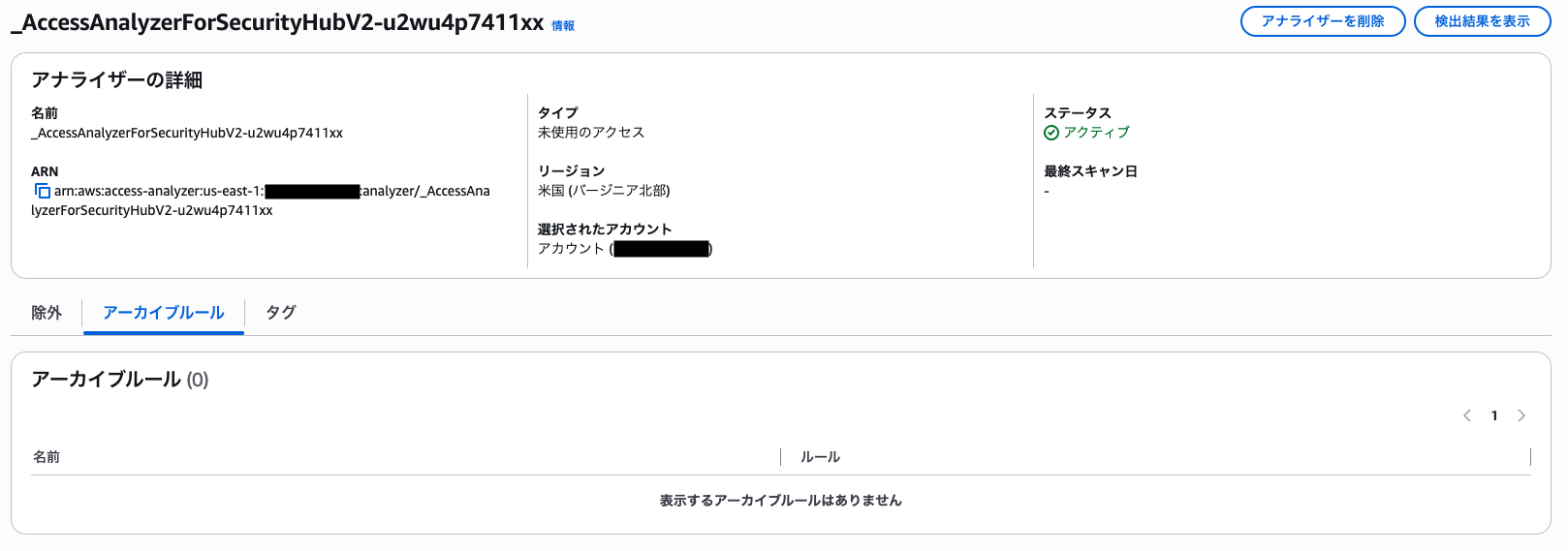
Comparing with a regular analyzer, you can see that the button to create archive rules is not present at all.
- In the case of a regular analyzer
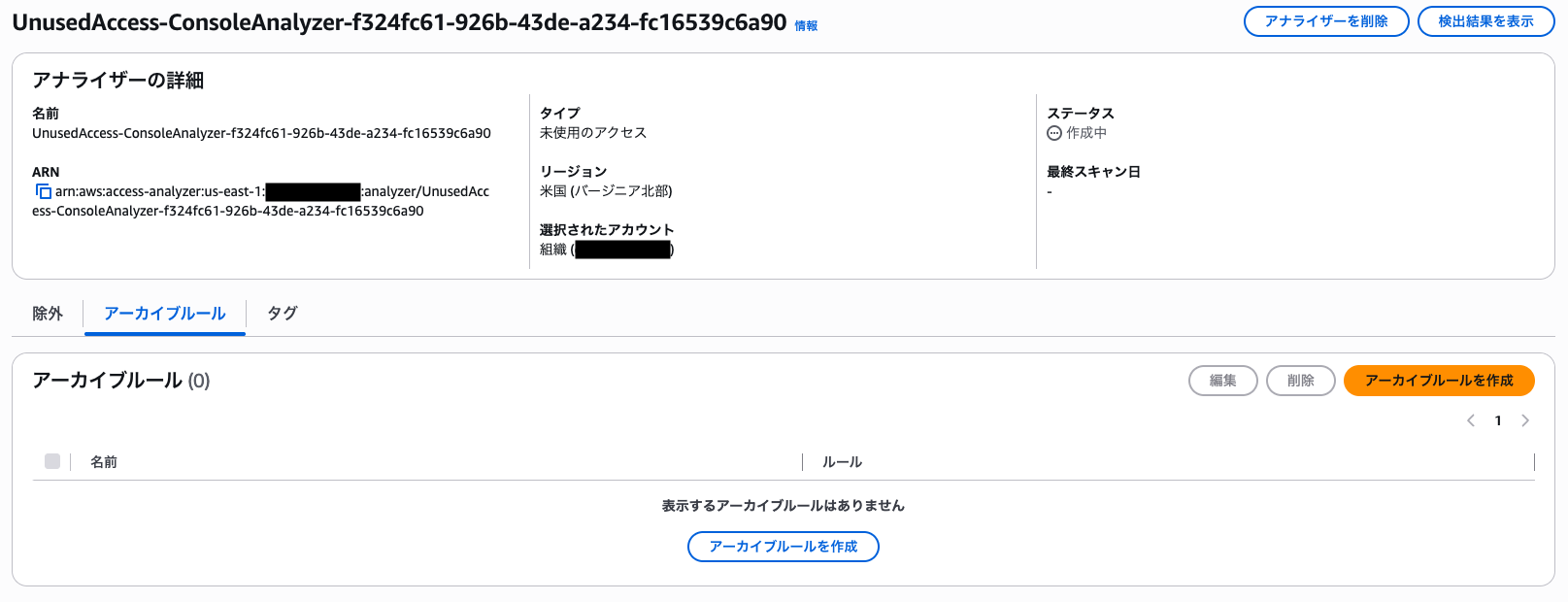
Please refer to the following documentation for details.
The IAM Access Analyzer that Security Hub creates is a service-linked analyzer.
You can view it in the IAM Access Analyzer console, but you cannot modify or delete it while Security Hub is enabled.
In conclusion, since suppressing detections on the analyzer side is not possible, it is necessary to suppress them on the Security Hub side, which is where Findings are aggregated.
Suppressing with Security Hub Automation Rules
Security Hub's automation rules are a feature that can automatically execute actions such as updating the status or severity of Findings that match specified conditions.
This time, we'll use this feature to update the status of Findings we want to suppress to Suppressed.
As an example, let's create a rule to suppress unused access detections for management IAM roles created by Control Tower and CloudFormation StackSets (roles with the aws-controltower- prefix, AWSControlTowerExecution, and AWSCloudFormationStackSetExecutionRole).
These roles cannot be deleted because they are necessary for operations, but since they are not used under normal circumstances, they are often detected as unused IAM roles or unused IAM permissions.
Examples of Findings to be Suppressed
First, let's check the actual findings that are targets for suppression.
Based on the fields included in these findings, we will think about the conditions for the automation rules described later.
Unused IAM Role
Finding
{
  "activity_id": 2,
  "activity_name": "Update",
  "category_name": "Findings",
  "category_uid": 2,
  "class_name": "IAM Analysis Finding",
  "class_uid": 2008,
  "cloud": {
    "account": {
      "name": "example-account",
      "uid": "XXXXXXXXXXXX"
    },
    "provider": "AWS",
    "region": "ap-northeast-1"
  },
  "finding_info": {
    "analytic": {
      "type": "Rule",
      "type_id": 1,
      "uid": "arn:aws:access-analyzer:us-east-1:XXXXXXXXXXXX:analyzer/_AccessAnalyzerForSecurityHubV2-xxxxxxxxxxxx"
    },
    "created_time": 1779729050157,
    "created_time_dt": "2026-05-25T17:10:50.157Z",
    "desc": "AWS::IAM::Role/arn:aws:iam::XXXXXXXXXXXX:role/AWSCloudFormationStackSetExecutionRole/ contains unused iam role",
    "last_seen_time": 1787714685421,
    "last_seen_time_dt": "2026-08-26T03:24:45.421Z",
    "modified_time": 1787714685421,
    "modified_time_dt": "2026-08-26T03:24:45.421Z",
    "title": "AWSIAMRole/arn:aws:iam::XXXXXXXXXXXX:role/AWSCloudFormationStackSetExecutionRole/ is unused",
    "types": [
      "Posture Management",
      "Software and Configuration Checks/AWS Security Best Practices/Unused IAM Role"
    ],
    "uid": "arn:aws:access-analyzer:us-east-1:XXXXXXXXXXXX:analyzer/_AccessAnalyzerForSecurityHubV2-xxxxxxxxxxxx/unusedaccess/finding/xxxxxxxx-xxxx-xxxx-xxxx-xxxxxxxxxxxx"
  },
  "identity_activity_metrics": {
    "last_seen_time": 1763689304000,
    "last_seen_time_dt": "2025-11-21T01:41:44.000Z"
  },
  "metadata": {
    "product": {
      "name": "Security Hub",
      "uid": "arn:aws:securityhub:ap-northeast-1::productv2/aws/securityhub",
      "vendor_name": "AWS"
    },
    "profiles": [
      "cloud",
      "datetime",
      "incident"
    ],
    "uid": "xxxxxxxxxxxxxxxxxxxxxxxxxxxxxxxxxxxxxxxxxxxxxxxxxxxxxxxxxxxxxxxx",
    "version": "1.8.0"
  },
  "remediation": {
    "desc": "If the IAM role isn't required, delete the role through the IAM console to refine access to your account. Once you delete the role, the status of the finding changes to Resolved."
  },
  "resources": [
    {
      "cloud_partition": "aws",
      "owner": {
        "account": {
          "name": "example-account",
          "uid": "XXXXXXXXXXXX"
        },
        "org": {
          "uid": "o-xxxxxxxxxx"
        }
      },
      "provider": "AWS",
      "region": "global",
      "role": "Target",
      "role_id": 1,
      "type": "AWS::IAM::Role",
      "uid": "AROAXXXXXXXXXXXXXXXXX",
      "uid_alt": "arn:aws:iam::XXXXXXXXXXXX:role/AWSCloudFormationStackSetExecutionRole"
    }
  ],
  "severity": "Low",
  "severity_id": 2,
  "status": "New",
  "status_id": 1,
  "time": 1787714685421,
  "time_dt": "2026-08-26T03:24:45.421Z",
  "type_name": "IAM Analysis Finding: Update",
  "type_uid": 200802,
  "vendor_attributes": {
    "severity": "Low",
    "severity_id": 2
  }
}
Unused IAM Permissions
Finding
{
  "activity_id": 1,
  "activity_name": "Create",
  "category_name": "Findings",
  "category_uid": 2,
  "class_name": "IAM Analysis Finding",
  "class_uid": 2008,
  "cloud": {
    "account": {
      "name": "example-account",
      "uid": "XXXXXXXXXXXX"
    },
    "provider": "AWS",
    "region": "ap-northeast-1"
  },
  "finding_info": {
    "analytic": {
      "type": "Rule",
      "type_id": 1,
      "uid": "arn:aws:access-analyzer:us-east-1:XXXXXXXXXXXX:analyzer/_AccessAnalyzerForSecurityHubV2-xxxxxxxxxxxx"
    },
    "created_time": 1787676826659,
    "created_time_dt": "2026-08-25T16:53:46.659Z",
    "desc": "AWS::IAM::Role/arn:aws:iam::XXXXXXXXXXXX:role/AWSControlTowerExecution/ contains unused service and action-level permissions",
    "last_seen_time": 1787676826659,
    "last_seen_time_dt": "2026-08-25T16:53:46.659Z",
    "modified_time": 1787676826659,
    "modified_time_dt": "2026-08-25T16:53:46.659Z",
    "title": "AWSIAMRole/arn:aws:iam::XXXXXXXXXXXX:role/AWSControlTowerExecution/ contains unused permissions",
    "types": [
      "Posture Management",
      "Software and Configuration Checks/AWS Security Best Practices/Unused Permission"
    ],
    "uid": "arn:aws:access-analyzer:us-east-1:XXXXXXXXXXXX:analyzer/_AccessAnalyzerForSecurityHubV2-xxxxxxxxxxxx/unusedaccess/finding/xxxxxxxx-xxxx-xxxx-xxxx-xxxxxxxxxxxx"
  },
  "metadata": {
    "product": {
      "name": "Security Hub",
      "uid": "arn:aws:securityhub:ap-northeast-1::productv2/aws/securityhub",
      "vendor_name": "AWS"
    },
    "profiles": [
      "cloud",
      "datetime",
      "incident"
    ],
    "uid": "xxxxxxxxxxxxxxxxxxxxxxxxxxxxxxxxxxxxxxxxxxxxxxxxxxxxxxxxxxxxxxxx",
    "version": "1.8.0"
  },
  "remediation": {
    "desc": "If the unused permissions aren't required, delete the permissions to refine access to your account. Use the IAM console to modify or remove the policy that grants the unused permissions. If all the unused permissions are removed, the status of the finding changes to Resolved."
  },
  "resources": [
    {
      "cloud_partition": "aws",
      "owner": {
        "account": {
          "name": "example-account",
          "uid": "XXXXXXXXXXXX"
        },
        "org": {
          "uid": "o-xxxxxxxxxx"
        }
      },
      "provider": "AWS",
      "region": "global",
      "role": "Target",
      "role_id": 1,
      "type": "AWS::IAM::Role",
      "uid": "AROAXXXXXXXXXXXXXXXXX",
      "uid_alt": "arn:aws:iam::XXXXXXXXXXXX:role/AWSControlTowerExecution"
    }
  ],
  "severity": "Low",
  "severity_id": 2,
  "status": "New",
  "status_id": 1,
  "time": 1787676826659,
  "time_dt": "2026-08-25T16:53:46.659Z",
  "type_name": "IAM Analysis Finding: Create",
  "type_uid": 200801,
  "vendor_attributes": {
    "severity": "Low",
    "severity_id": 2
  }
}
Automation Rule Configuration
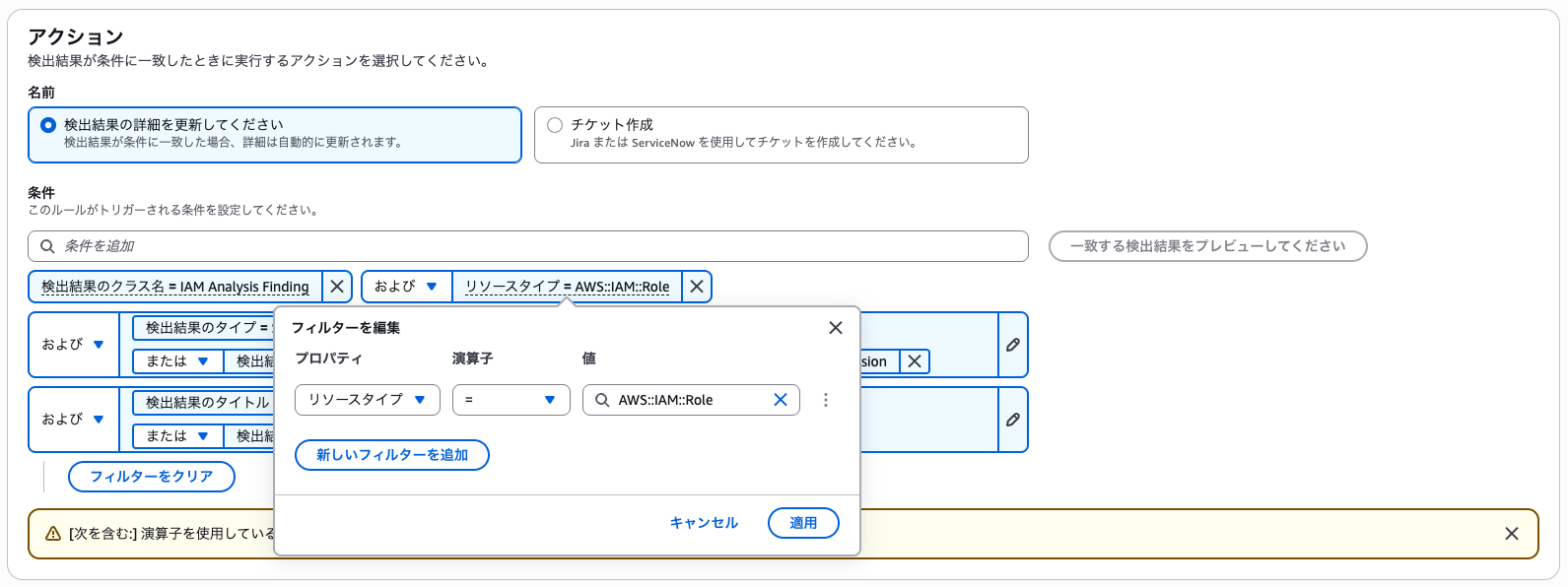
Based on the findings above, the conditions to set in the automation rule this time are as follows.
- Finding class name (
class_name)IAM Analysis Finding
- Resource type (
resources.type)AWS::IAM::Role
- Finding type (
finding_info.types)Software and Configuration Checks/AWS Security Best Practices/Unused IAM RoleSoftware and Configuration Checks/AWS Security Best Practices/Unused Permission
- Finding title (
finding_info.title) ※ Specified with "contains"AWSCloudFormationStackSetExecutionRoleAWSControlTowerExecution
The key points are as follows.
- Finding class name
- By specifying
IAM Analysis Finding, we narrow down to Findings originating from IAM Access Analyzer
- By specifying
- Finding type
- Specify two detection types: unused IAM roles and unused IAM permissions
- If you want to expand the suppression targets, you can also add types for unused access keys and unused passwords
- Finding title
- Narrowing down by the target role name is done by partial matching of the title that contains the role ARN.
- There is also a
resources.namefield in the findings, but at the time of writing it could not be selected as a condition in the management console, so the title is used as a substitute (thefinding_info.descwhich also contains the role ARN can also be used as a substitute)
Here's what it looks like when actually configured in the console.
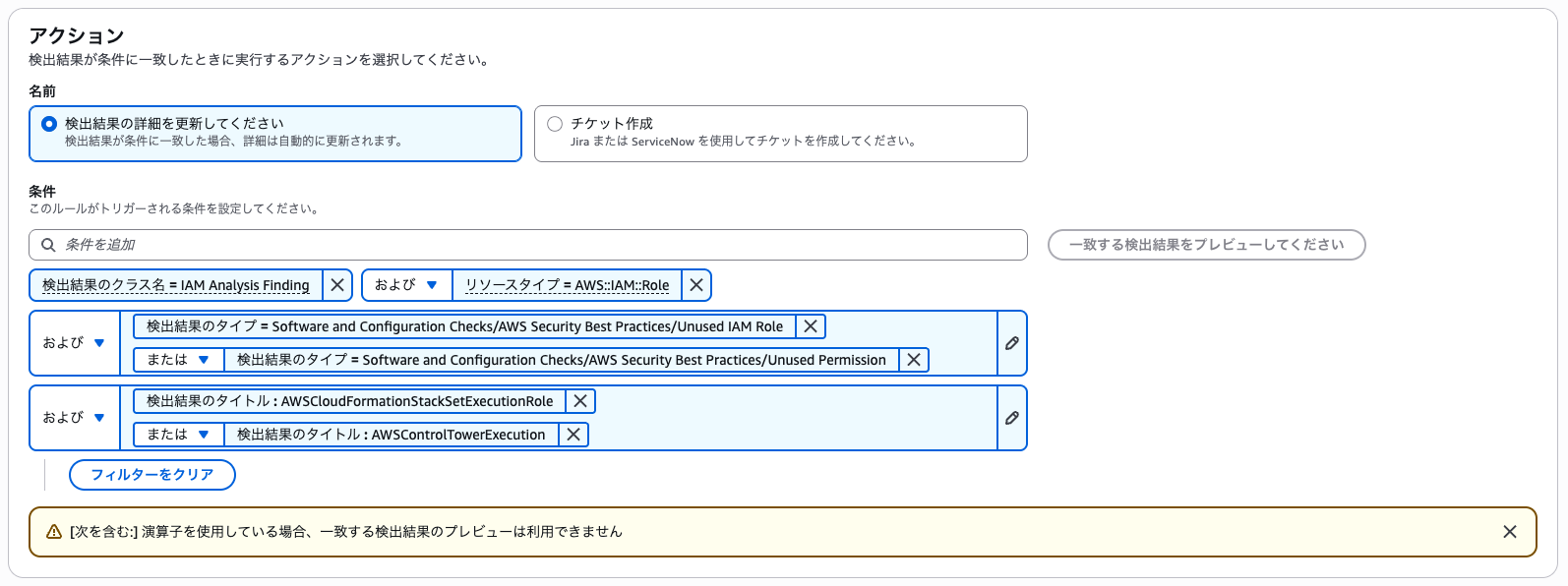
Note that when you want to set multiple properties for a single filter, clicking on the configured condition will bring up a screen to add filters, where you can add them.
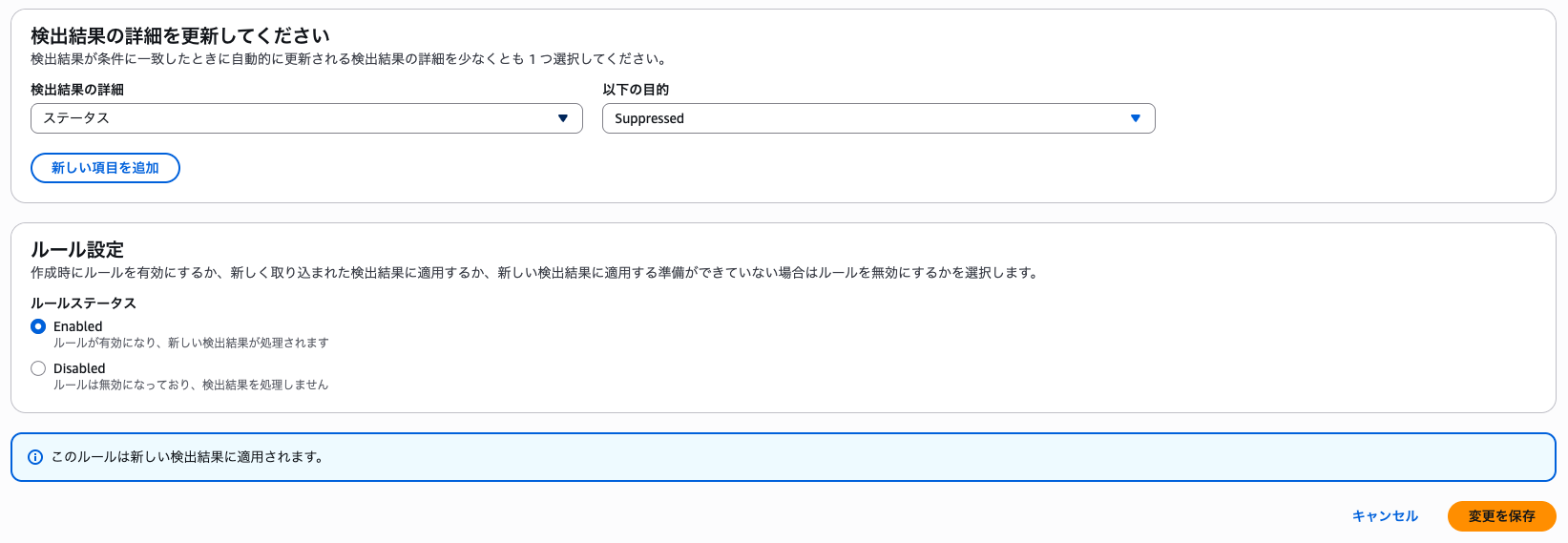
For the action, select "Update finding details" and specify "Suppressed" for the status.
Verification
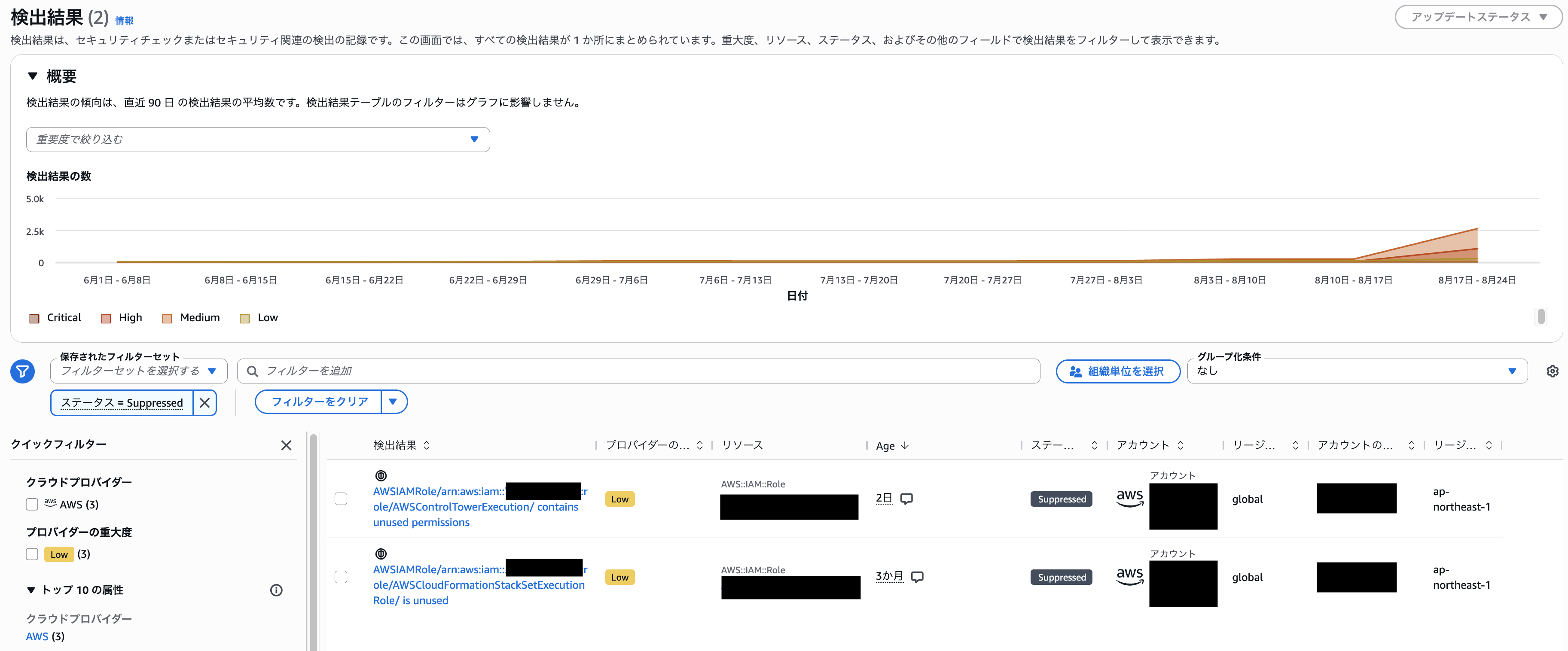
After creating the rule, when a Finding matching the conditions is generated, the status is automatically updated to Suppressed.
Note that rescanning existing resources occurs at the timing of periodic scans (every 24 hours), so please check again the next day or so.
(In my environment, it had been Suppressed the day after setting the automation rule)
When checking the findings in the Security Hub console, you can see that the status of the target Findings has been changed to Suppressed.
Conclusion
That's all for how to suppress detections from the unused access analyzer automatically created by Security Hub using Security Hub's automation rules.
It was a welcome update that unused access detection became available at no additional cost, but due to constraints stemming from being a service-linked analyzer, some ingenuity was required in implementing suppression.
I hope this is helpful for those who were struggling because archive rules could not be configured.
