
I tried out Snowflake's aggregation policy mechanism that prevents viewing individual records while returning only aggregated results

This page has been translated by machine translation. View original
This is Kawabata.
When sharing data or granting access to analysts, if you want to allow aggregated results but not individual records, Snowflake's Aggregation Policy is effective. When an aggregation policy is applied to a table, queries must aggregate to groups of a certain size or larger using GROUP BY or scalar aggregate functions, and SELECT statements that return individual records are restricted. I tried to see if this requirement could be solved with an aggregation policy.
In addition to the basic aggregation policy, I also tried entity-level privacy, which prevents information from being inferred from multiple rows of the same entity (such as a user or household), so I'll summarize the steps and verification results.
Background and Problem
When you grant SELECT privileges on a table to analysts in Snowflake, they can view individual records with SELECT * FROM table. For example, there are cases where you want to analyze employee salary data aggregated by department, but it's not acceptable for individual salaries to be visible.
When trying to address this with existing methods, the following limitations arise.
- Masking Policy: Can mask column values, but the existence of rows is still visible. The number of rows and other columns can still be checked with
SELECT * - Providing pre-aggregated views: You can publish only pre-aggregated views, but analysts lose the ability to
GROUP BYon arbitrary dimensions. This significantly reduces analytical flexibility - Row Access Policy: Can control access at the row level, but doesn't match the granularity of the requirement to "show only aggregated results"
The desired goal is to implement control that allows analysts to "submit aggregate queries on any dimension, but cannot retrieve individual records".
Technical Approach
Overview of Aggregation Policies
An Aggregation Policy is a schema-level object. When applied to a table, queries on that table must aggregate to a certain size or larger using a GROUP BY clause or scalar aggregate functions (such as COUNT(*)), and the group size must be at least the specified minimum value (MIN_GROUP_SIZE).
CREATE AGGREGATION POLICY <name>
  AS () RETURNS AGGREGATION_CONSTRAINT ->
  AGGREGATION_CONSTRAINT(MIN_GROUP_SIZE => <n>);
- Groups containing rows below
MIN_GROUP_SIZEare consolidated into a Remainder Group with NULL keys, preventing individual values from being exposed - It is also possible to switch constraints depending on the role (using
CURRENT_ROLE()as a condition) - Only the following aggregate functions are permitted: AVG, COUNT, COUNT(DISTINCT), HLL, SUM
Entity-Level Privacy
With the basic aggregation policy, MIN_GROUP_SIZE is evaluated based on "number of rows." However, when one customer has multiple rows of purchase history, the number of rows may be large but effectively represent only one person's data.
With entity-level privacy, by specifying an ENTITY KEY, MIN_GROUP_SIZE is evaluated based on "the number of unique entities."
ALTER TABLE <table_name>
  SET AGGREGATION POLICY <policy_name>
  ENTITY KEY (<column_name>);
Additionally, there is a mechanism called Deferred Aggregation, where if the GROUP BY in a subquery matches the entity key, the policy check is deferred to the outer query.
Limitations
- Cannot be applied to external tables
GROUP BY ROLLUP/CUBE/GROUPING SETScannot be used- Window functions cannot be used
- For set operators, only
UNION ALLis permitted (UNION,INTERSECT,EXCEPTare not allowed) - Recursive CTEs cannot be used
- Limitations exist for correlated subqueries and lateral joins
- Only one aggregation policy can be associated with a table or view (refer to the official documentation for constraints when handling multiple entity keys with entity-level privacy)
- The same aggregation policy cannot be used for both row-level privacy and entity-level privacy. Only one policy can be used for row-level privacy
- This feature is intended for trusted partners, and attacks where malicious users attempt to infer values through multiple queries are not within scope
Prerequisites
- Snowflake: This verification was performed using a trial account of the Enterprise edition
- Required privileges: ACCOUNTADMIN role (for verification). For production use, the
CREATE AGGREGATION POLICYprivilege on the target schema is required to create a policy, and the account-levelAPPLY AGGREGATION POLICYprivilege (orAPPLYprivilege on the target policy +OWNERSHIPprivilege on the target table) is required to apply the policy
Preparation
Creating verification data
Creating the verification database and schema
USE ROLE ACCOUNTADMIN;

CREATE DATABASE IF NOT EXISTS agg_policy_test;
USE DATABASE agg_policy_test;
CREATE SCHEMA IF NOT EXISTS hr;
USE SCHEMA hr;
Creating the employee salary table (for basic aggregation policy verification)
We'll create varying numbers of employees per department to observe the difference between departments that fall into the remainder group and those that don't based on the MIN_GROUP_SIZE threshold.
CREATE OR REPLACE TABLE employees (
    employee_id INT COMMENT 'Employee ID',
    employee_name VARCHAR COMMENT 'Name',
    department VARCHAR COMMENT 'Department',
    position VARCHAR COMMENT 'Position',
    salary NUMBER(10, 2) COMMENT 'Monthly salary',
    hire_date DATE COMMENT 'Hire date'
);
-- Inserting verification data (25 records)
-- Engineering: 8, Sales: 7, Marketing: 5, HR: 3, Finance: 2
-- HR (3 people) and Finance (2 people) are intentionally small to verify they fall into the remainder group with MIN_GROUP_SIZE=5
INSERT INTO employees VALUES
    (1, 'Taro Tanaka', 'Engineering', 'Senior Engineer', 850000, '2020-04-01'),
    (2, 'Hanako Sato', 'Engineering', 'Engineer', 650000, '2021-06-15'),
    (3, 'Ichiro Suzuki', 'Engineering', 'Lead Engineer', 950000, '2019-01-10'),
    (4, 'Misaki Takahashi', 'Engineering', 'Engineer', 600000, '2022-04-01'),
    (5, 'Kenta Ito', 'Engineering', 'Junior Engineer', 450000, '2023-10-01'),
    (6, 'Naomi Watanabe', 'Engineering', 'Engineer', 700000, '2020-09-01'),
    (7, 'Manabu Yamamoto', 'Engineering', 'Senior Engineer', 880000, '2018-07-01'),
    (8, 'Yoko Nakamura', 'Engineering', 'Engineer', 620000, '2022-01-15'),
    (9, 'Makoto Kobayashi', 'Sales', 'Sales Manager', 780000, '2019-04-01'),
    (10, 'Yuji Kato', 'Sales', 'Sales Rep', 520000, '2021-07-01'),
    (11, 'Mari Yoshida', 'Sales', 'Sales Rep', 480000, '2022-10-01'),
    (12, 'Daisuke Matsumoto', 'Sales', 'Senior Sales', 650000, '2020-01-15'),
    (13, 'Sakura Inoue', 'Sales', 'Sales Rep', 500000, '2023-04-01'),
    (14, 'Takuya Kimura', 'Sales', 'Sales Rep', 490000, '2023-07-01'),
    (15, 'Miho Hayashi', 'Sales', 'Sales Rep', 470000, '2024-01-15'),
    (16, 'Shota Shimizu', 'Marketing', 'Marketing Manager', 720000, '2020-04-01'),
    (17, 'Megumi Saito', 'Marketing', 'Content Creator', 480000, '2022-06-01'),
    (18, 'Kenichi Maeda', 'Marketing', 'Designer', 550000, '2021-10-01'),
    (19, 'Yuko Fujii', 'Marketing', 'Analyst', 530000, '2023-01-15'),
    (20, 'Ryuichi Okada', 'Marketing', 'Content Creator', 460000, '2023-09-01'),
    (21, 'Yumi Ishikawa', 'HR', 'HR Manager', 680000, '2019-04-01'),
    (22, 'Kenji Miura', 'HR', 'Recruiter', 450000, '2022-04-01'),
    (23, 'Akari Nishida', 'HR', 'HR Specialist', 500000, '2021-07-01'),
    (24, 'Koji Ueda', 'Finance', 'CFO', 1100000, '2018-01-10'),
    (25, 'Mayu Kono', 'Finance', 'Accountant', 520000, '2021-04-01');
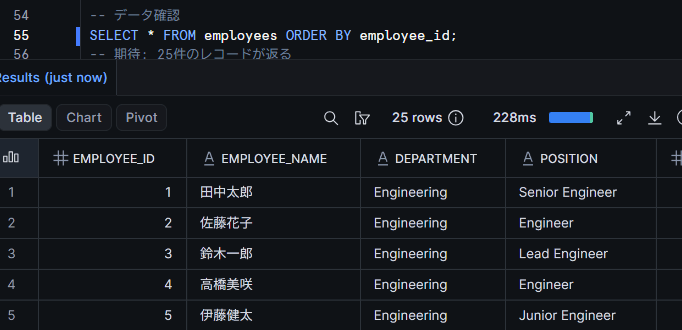
SELECT the table contents and verify that 25 records have been correctly inserted.
SELECT * FROM employees ORDER BY employee_id;
Creating the purchase history table (for entity-level privacy verification)
We'll use a data structure where one customer makes multiple purchases to observe the difference between number of rows and number of entities.
Creating the purchase history table
CREATE OR REPLACE TABLE purchase_history (
    purchase_id INT COMMENT 'Purchase ID',
    customer_id VARCHAR COMMENT 'Customer ID',
    customer_name VARCHAR COMMENT 'Customer name',
    product_category VARCHAR COMMENT 'Product category',
    amount NUMBER(10, 2) COMMENT 'Purchase amount',
    purchase_date DATE COMMENT 'Purchase date'
);
-- Purchase history for 7 customers (25 records)
-- C001: 6 purchases, C002: 5, C003: 4, C004: 4, C005: 3, C006: 2, C007: 1
-- The number of purchases per customer is intentionally varied to show that the number of entities (customers) differs from the number of rows
INSERT INTO purchase_history VALUES
    (1, 'C001', 'Taro Tanaka', 'Electronics', 45000, '2026-06-01'),
    (2, 'C001', 'Taro Tanaka', 'Books', 3200, '2026-06-03'),
    (3, 'C001', 'Taro Tanaka', 'Electronics', 28000, '2026-06-10'),
    (4, 'C001', 'Taro Tanaka', 'Food', 5600, '2026-06-15'),
    (5, 'C001', 'Taro Tanaka', 'Clothing', 12000, '2026-06-20'),
    (6, 'C001', 'Taro Tanaka', 'Electronics', 8500, '2026-06-25'),
    (7, 'C002', 'Hanako Sato', 'Clothing', 15000, '2026-06-02'),
    (8, 'C002', 'Hanako Sato', 'Food', 3800, '2026-06-08'),
    (9, 'C002', 'Hanako Sato', 'Books', 2400, '2026-06-12'),
    (10, 'C002', 'Hanako Sato', 'Clothing', 9200, '2026-06-18'),
    (11, 'C002', 'Hanako Sato', 'Electronics', 32000, '2026-06-22'),
    (12, 'C003', 'Ichiro Suzuki', 'Food', 7200, '2026-06-04'),
    (13, 'C003', 'Ichiro Suzuki', 'Books', 4500, '2026-06-11'),
    (14, 'C003', 'Ichiro Suzuki', 'Food', 2800, '2026-06-19'),
    (15, 'C003', 'Ichiro Suzuki', 'Electronics', 18000, '2026-06-26'),
    (16, 'C004', 'Misaki Takahashi', 'Clothing', 22000, '2026-06-05'),
    (17, 'C004', 'Misaki Takahashi', 'Electronics', 55000, '2026-06-13'),
    (18, 'C004', 'Misaki Takahashi', 'Books', 1800, '2026-06-21'),
    (19, 'C004', 'Misaki Takahashi', 'Food', 4200, '2026-06-27'),
    (20, 'C005', 'Kenta Ito', 'Electronics', 12000, '2026-06-06'),
    (21, 'C005', 'Kenta Ito', 'Food', 6500, '2026-06-14'),
    (22, 'C005', 'Kenta Ito', 'Clothing', 8800, '2026-06-23'),
    (23, 'C006', 'Naomi Watanabe', 'Books', 5200, '2026-06-07'),
    (24, 'C006', 'Naomi Watanabe', 'Electronics', 15000, '2026-06-16'),
    (25, 'C007', 'Manabu Yamamoto', 'Food', 3400, '2026-06-09');
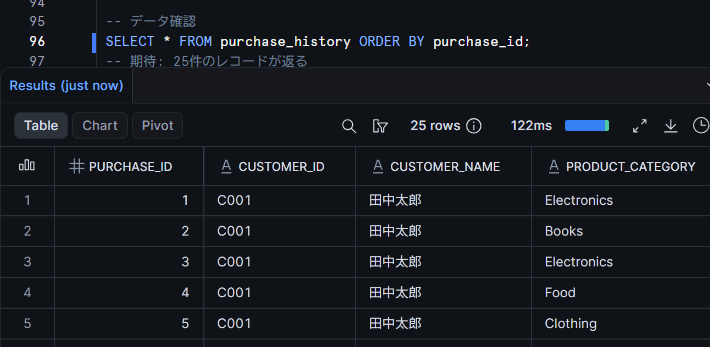
SELECT the table contents and verify that 25 records have been correctly inserted.
SELECT * FROM purchase_history ORDER BY purchase_id;
Let's Try It
Creating a basic aggregation policy and applying it to a table
Create an aggregation policy. By setting MIN_GROUP_SIZE => 5, we impose a constraint that aggregated results are only returned for groups of 5 or more rows.
CREATE OR REPLACE AGGREGATION POLICY agg_policy_test.hr.min_group_5
  AS () RETURNS AGGREGATION_CONSTRAINT ->
  AGGREGATION_CONSTRAINT(MIN_GROUP_SIZE => 5);
Apply the created aggregation policy to the employees table.
ALTER TABLE agg_policy_test.hr.employees
  SET AGGREGATION POLICY agg_policy_test.hr.min_group_5;
After applying, attempt to SELECT individual records.
SELECT * FROM employees;
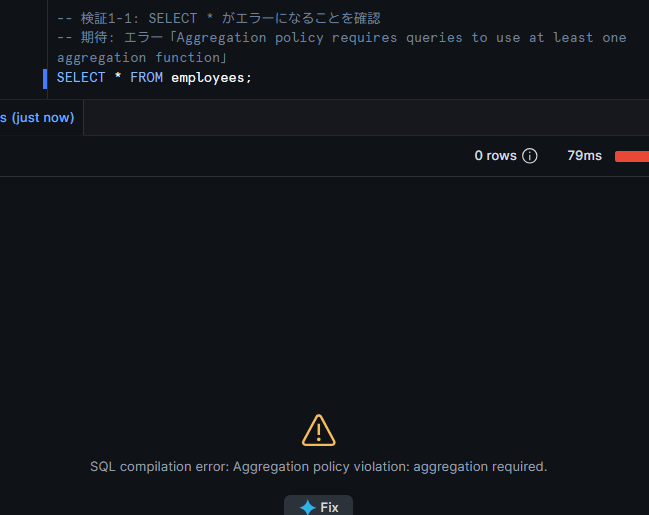
When you execute SELECT * (without aggregation) on a table with an aggregation policy applied, an error is returned. If an error message like SQL compilation error: Aggregation policy violation: aggregation required. is displayed, everything is working correctly.
Executing aggregate queries and checking results
Aggregate average and total salary by department.
SELECT
    department,
    COUNT(*) AS employee_count,
    AVG(salary) AS avg_salary,
    SUM(salary) AS total_salary
FROM employees
GROUP BY department;
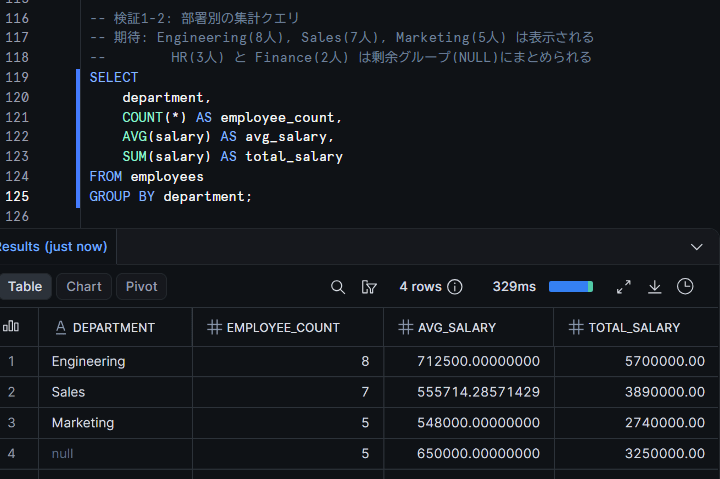
The following results indicate everything is working correctly.
- Engineering (8 people), Sales (7 people), Marketing (5 people): Since they have 5 or more employees (
MIN_GROUP_SIZE=5), the department name and aggregated values are displayed as-is - HR (3 people) and Finance (2 people): Since they have fewer than
MIN_GROUP_SIZE=5employees, they are consolidated into a remainder group (wheredepartmentisNULL). The remainder group'semployee_countis 5 (3+2), andavg_salaryandtotal_salaryare combined values for HR + Finance
Due to the remainder group mechanism, the breakdown of 3 people in HR and 2 people in Finance becomes indistinguishable. The key point is that individual information for small departments is protected.
Next, let's verify the behavior when filtering to a small department using a WHERE clause.
SELECT
    department,
    COUNT(*) AS employee_count,
    AVG(salary) AS avg_salary
FROM employees
WHERE department = 'HR'
GROUP BY department;
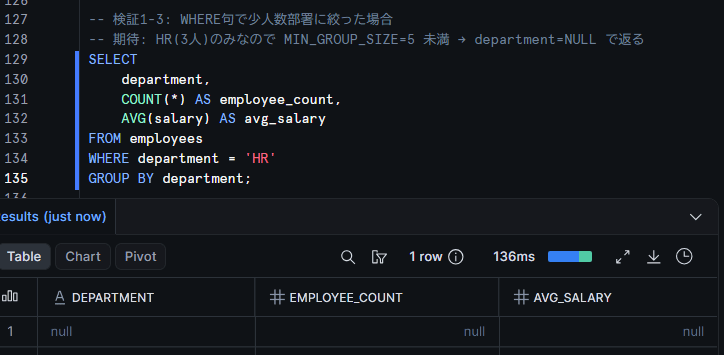
Since filtering to only the HR department yields only 3 people, it falls below MIN_GROUP_SIZE=5. In this case, department becomes NULL, confirming that details of the small group are not displayed. Note that when there are not enough rows to form a remainder group, the official documentation states that each field in the result becomes NULL.
Role-based control
By using CURRENT_ROLE() as a condition in the policy's CASE expression, you can configure the policy to impose no restrictions on the admin role while enforcing aggregation only for other roles.
-- Remove the existing policy
ALTER TABLE agg_policy_test.hr.employees
  UNSET AGGREGATION POLICY;

-- Create a role-based aggregation policy
CREATE OR REPLACE AGGREGATION POLICY agg_policy_test.hr.role_based_agg_policy
  AS () RETURNS AGGREGATION_CONSTRAINT ->
  CASE
    WHEN CURRENT_ROLE() = 'ACCOUNTADMIN'
    THEN NO_AGGREGATION_CONSTRAINT()
    ELSE AGGREGATION_CONSTRAINT(MIN_GROUP_SIZE => 5)
  END;

-- Apply to the table
ALTER TABLE agg_policy_test.hr.employees
  SET AGGREGATION POLICY agg_policy_test.hr.role_based_agg_policy;
The ACCOUNTADMIN role can execute all queries including SELECT *, while other roles are required to aggregate. Note that since the return value of CURRENT_ROLE() is compared as a string, it is case-sensitive. Role names created without quotes are typically stored in uppercase.
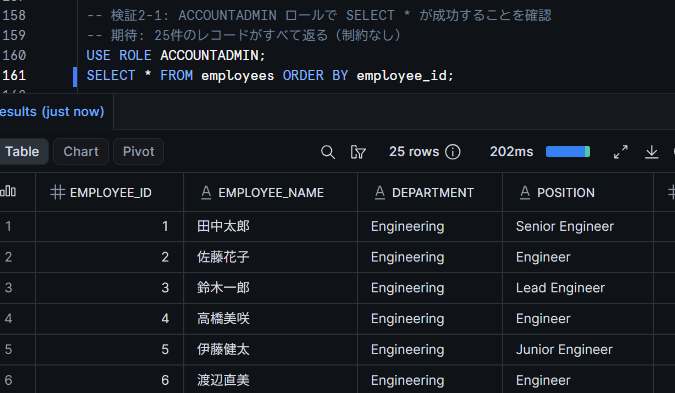
Everything is working correctly if SELECT * FROM employees returns results normally under the ACCOUNTADMIN role.
Trying entity-level privacy
Next, let's verify entity-level privacy with the purchase history table. We'll have MIN_GROUP_SIZE evaluated based on "number of unique customers" rather than "number of rows."
Create an aggregation policy and apply it to the table specifying the ENTITY KEY.
CREATE OR REPLACE AGGREGATION POLICY agg_policy_test.hr.entity_agg_policy
  AS () RETURNS AGGREGATION_CONSTRAINT ->
  AGGREGATION_CONSTRAINT(MIN_GROUP_SIZE => 3);

ALTER TABLE agg_policy_test.hr.purchase_history
  SET AGGREGATION POLICY agg_policy_test.hr.entity_agg_policy
  ENTITY KEY (customer_id);
First, confirm that a SELECT of individual records results in an error.
SELECT * FROM purchase_history;
Everything is working correctly if an error is returned.
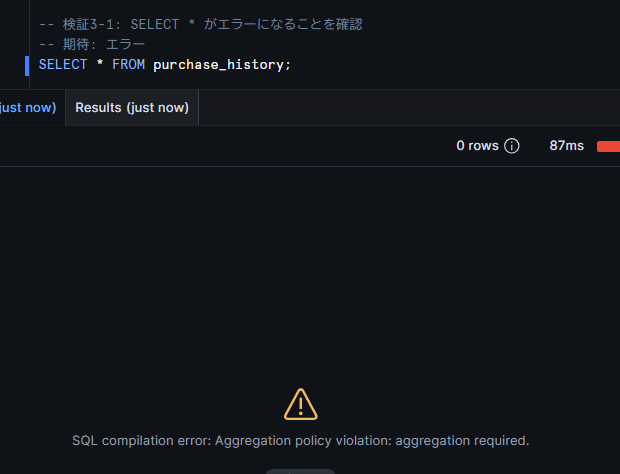
Next, run aggregation by product category.
SELECT
    product_category,
    COUNT(*) AS purchase_count,
    SUM(amount) AS total_amount,
    AVG(amount) AS avg_amount
FROM purchase_history
GROUP BY product_category;
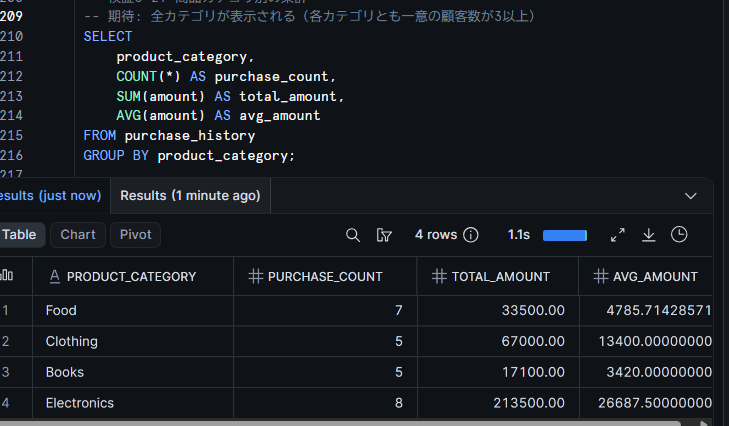
This is the key point of entity-level privacy. MIN_GROUP_SIZE => 3 is evaluated not as "3 or more rows" but as "3 or more unique customers." The number of customers per category is as follows:
| Category | Row count | Unique customers | Judgment |
|---|---|---|---|
| Electronics | 8 | 6 (C001, C002, C003, C004, C005, C006) | Displayed |
| Food | 7 | 6 (C001, C002, C003, C004, C005, C007) | Displayed |
| Books | 5 | 5 (C001, C002, C003, C004, C006) | Displayed |
| Clothing | 5 | 4 (C001, C002, C004, C005) | Displayed |
Since all categories have 3 or more unique customers, results for all categories should be displayed.
Next, let's try aggregating by customer.
SELECT
    customer_id,
    COUNT(*) AS purchase_count,
    SUM(amount) AS total_amount
FROM purchase_history
GROUP BY customer_id;
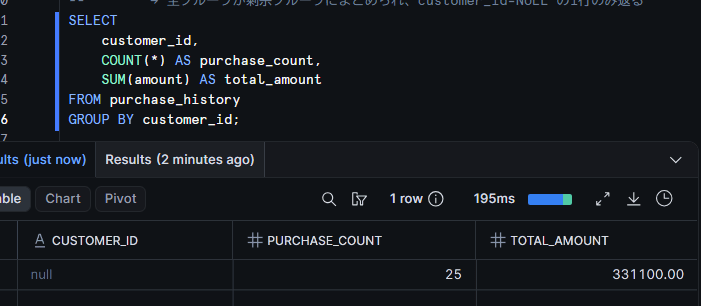
Since the number of entities in each group is 1 (each group contains only the customer themselves), it falls below MIN_GROUP_SIZE=3, and all groups are consolidated into the remainder group. Everything is working correctly if only one row with a NULL customer_id is returned. This prevents individual purchase amounts from being identified.
Verifying the behavior of Deferred Aggregation
Entity-level privacy has a mechanism called Deferred Aggregation. When the GROUP BY in a subquery matches the entity key, the policy check is deferred to the outer query rather than the subquery.
In the following query, the subquery calculates the total purchases per customer_id (= entity key), and the outer query aggregates by category.
SELECT
    product_category,
    AVG(customer_total) AS avg_customer_total
FROM (
    SELECT
        customer_id,
        product_category,
        SUM(amount) AS customer_total
    FROM purchase_history
    GROUP BY customer_id, product_category
)
GROUP BY product_category;
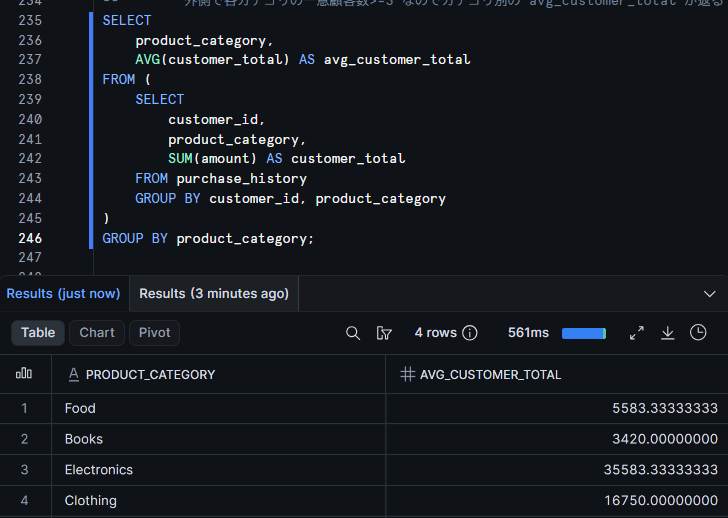
The subquery's GROUP BY is customer_id, product_category, which is a set that includes customer_id, the entity key. Therefore, the entity-level policy check is deferred from the subquery to the outer query. MIN_GROUP_SIZE=3 is applied to the outer query's GROUP BY product_category, and results are returned if the number of unique customers per category is 3 or more. Everything is working correctly if avg_customer_total (average total purchases per customer) is displayed by category.
Closing
We were able to confirm the control that allows aggregate queries while preventing individual records from being viewed, using aggregation policies. Groups that fall below the MIN_GROUP_SIZE threshold are consolidated into a remainder group (NULL key), so details of small groups are not exposed.
We also confirmed that entity-level privacy can prevent information from being inferred from multiple rows of the same entity. The fact that evaluation is based on the number of unique entities rather than row count is particularly effective for tables with one-to-many data structures.
As a note of caution, there are limitations such as the inability to use GROUP BY ROLLUP / CUBE or window functions, so it is necessary to verify these against your analytical requirements in advance. Also, aggregation policies do not guarantee complete prevention of attacks where malicious users attempt to infer individual values by running many queries. They are recommended for use with trusted partners and customers.
Combining with masking policies and row access policies enables more rigorous data governance. However, when other policies are applied to a table with aggregation constraints, queries must satisfy all policy requirements, so it is necessary to check the constraints of combinations in advance.
I hope this article is helpful in some way!