I tried verifying masking policies for LLM responses in Snowflake Cortex Code with AI Observability

This page has been translated by machine translation. View original
This is Kawabata.
In Snowflake's Cortex Code in Snowsight, LLM inputs and outputs are recorded in an event table as AI Observability. Since Cortex Code can access table data and execute SQL, if you have it analyze a table containing PII (Personally Identifiable Information), the LLM responses may also contain PII.
I will describe what I verified using AI Observability logs.
What is AI Observability
AI Observability is a feature for evaluating, tracing, and comparing generative AI applications running on Snowflake. Applications that are general evaluation targets for AI Observability are represented on Snowflake as External Agent objects. On the other hand, in Cortex Code in Snowsight, even without users explicitly creating External Agents, Cortex Code interactions are recorded as spans in SNOWFLAKE.LOCAL.AI_OBSERVABILITY_EVENTS.
The main original use cases are the following three.
| Use Case | Overview |
|---|---|
| Evaluation | Automatically calculates quality metrics using LLM-as-a-judge. Five types: Context Relevance (relevance of search results), Groundedness (whether the answer is based on search results), Answer Relevance (relevance of the answer), Correctness (degree of match with correct answers), Coherence (logical consistency) |
| Tracing | Records latency, token usage, and cost for each step of input → search → LLM inference → output |
| Comparison | Parallel evaluation of different models, prompts, and parameter configurations to identify the optimal combination |
What I focus on this time is the tracing mechanism. As part of tracing, AI Observability records trace information such as conversation history and inputs/outputs for each step of Cortex Code in Snowsight in the SNOWFLAKE.LOCAL.AI_OBSERVABILITY_EVENTS table. When you have appropriate permissions, you can check these raw contents (unredacted body text) with SQL. Using this mechanism, I verify whether masking policies are also reflected in LLM responses through Observability logs.
Feature Overview (Cortex Code in Snowsight × Observability)
In Cortex Code in Snowsight, AI Observability events are automatically recorded. The structure of recorded spans is as follows.
Span Name (RECORD:name) |
Granularity | Recorded Content |
|---|---|---|
CodingAgentRun |
Session level | 1 span per conversation turn |
CodingAgent.Step-0 |
Individual model call | User prompt, model response, token count, tool selection, latency, request_id |
These data are stored in the SNOWFLAKE.LOCAL.AI_OBSERVABILITY_EVENTS table. The main columns of the event table are as follows.
| Column | Content |
|---|---|
TIMESTAMP |
Event occurrence time |
RECORD_TYPE |
Record type (for spans, 'SPAN') |
RECORD |
Metadata such as span name (obtain span name with RECORD:name::STRING) |
RECORD_ATTRIBUTES |
Attributes such as model name, latency, status, request_id, conversation messages (snow.ai.observability.agent.planning.messages). For SPAN records, LLM input/output data is stored in this column |
RESOURCE_ATTRIBUTES |
Session information such as username and role name |
VALUE |
Payload for LOG / METRIC records. NULL for SPAN records (OpenTelemetry specification) |
TRACE |
Trace ID (used for grouping by conversation unit with TRACE['trace_id']) |
Limitations
- AI Observability itself does not have a dedicated feature for automatically detecting or blocking PII in Cortex Code in Snowsight responses. In this article, I verify using a combination of masking policies and Observability logs
- The effectiveness of masking policies depends on the role used by Cortex Code. Since Cortex Code in Snowsight uses the user's default role at session start, the design must ensure that masking is applied to the default role
- Without the
READ UNREDACTED AI OBSERVABILITY EVENTS TABLEprivilege, raw content (unredacted body text) of sensitive fields may not be viewable via system table functions or related paths - This information is as of June 23, 2026
Prerequisites
- Snowflake: AWS Tokyo region, Enterprise edition
- Cross-region inference: Enabled in this verification environment
Preparation
AI Observability Permission Settings
Grant application roles and permissions to view the AI Observability event table.
USE ROLE ACCOUNTADMIN;

-- Grant AI Observability read role
GRANT APPLICATION ROLE SNOWFLAKE.AI_OBSERVABILITY_READER
  TO ROLE SYSADMIN;

-- For referencing SNOWFLAKE.ACCOUNT_USAGE such as Usage History
GRANT IMPORTED PRIVILEGES ON DATABASE SNOWFLAKE
  TO ROLE SYSADMIN;

-- Required when reading unredacted raw content
GRANT READ UNREDACTED AI OBSERVABILITY EVENTS TABLE ON ACCOUNT
  TO ROLE SYSADMIN;

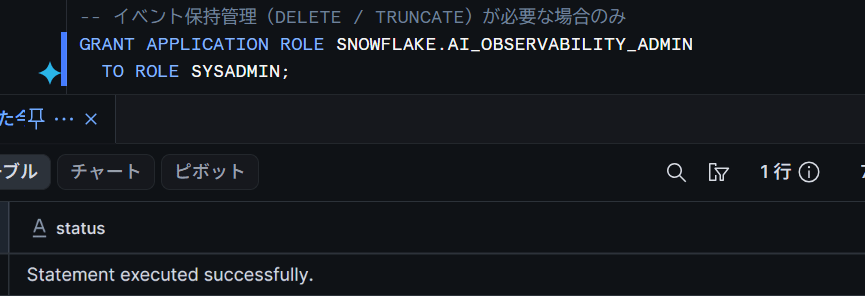
-- Only when event retention management (DELETE / TRUNCATE) is needed
GRANT APPLICATION ROLE SNOWFLAKE.AI_OBSERVABILITY_ADMIN
  TO ROLE SYSADMIN;
If Statement executed successfully is displayed without errors, there is no problem.
Preparation of Verification Table (Dummy Data Containing PII)
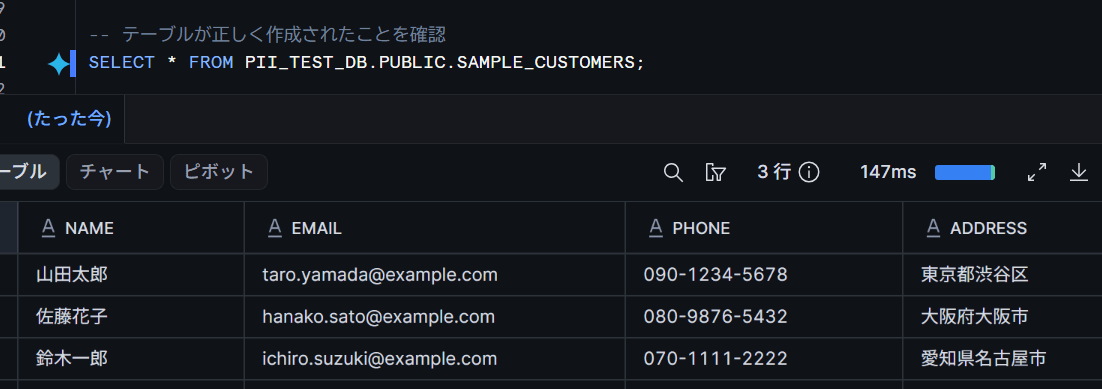
Create a verification table containing PII for comparative verification of masking policies.
USE ROLE SYSADMIN;

CREATE DATABASE IF NOT EXISTS PII_TEST_DB;

CREATE OR REPLACE TABLE PII_TEST_DB.PUBLIC.SAMPLE_CUSTOMERS AS
SELECT *
FROM VALUES
    ('山田太郎', 'taro.yamada@example.com', '090-1234-5678', '東京都渋谷区'),
    ('佐藤花子', 'hanako.sato@example.com', '080-9876-5432', '大阪府大阪市'),
    ('鈴木一郎', 'ichiro.suzuki@example.com', '070-1111-2222', '愛知県名古屋市')
    AS t(name, email, phone, address);
What I Tried
Requesting Table Analysis from Cortex Code Without Masking
First, I request table analysis from Cortex Code without applying a masking policy.
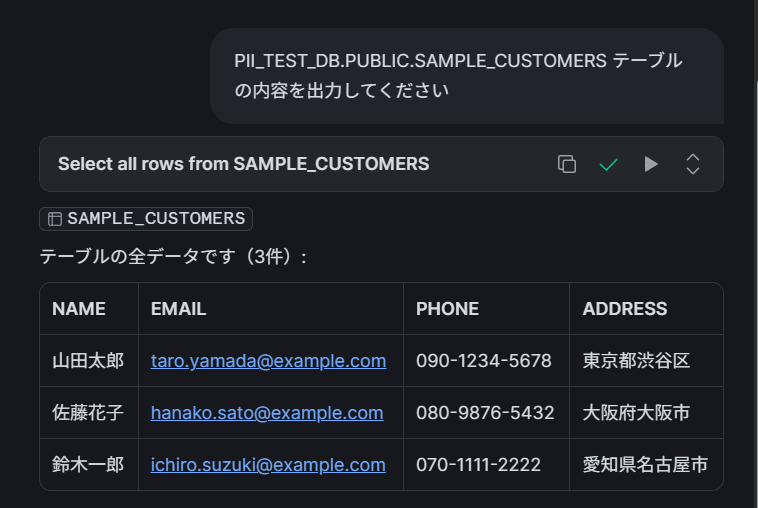
I opened Cortex Code in Snowsight and sent the following prompt.
Please output the contents of the PII_TEST_DB.PUBLIC.SAMPLE_CUSTOMERS table
Cortex Code returned a response that directly included the table contents (row data including email addresses and phone numbers).
Checking LLM Responses Without Masking in Observability Logs
I check in the Observability logs whether the LLM response contains PII.
USE ROLE SYSADMIN;

-- Detect PII in messages (regular expressions + known name list)
SELECT
    TIMESTAMP,
    RESOURCE_ATTRIBUTES['snow.user.name']::STRING AS user_name,
    RESOURCE_ATTRIBUTES['snow.session.role.primary.name']::STRING AS role_name,
    RECORD_ATTRIBUTES['snow.ai.observability.agent.planning.request_id']::STRING AS request_id,
    -- Email address (regular expression)
    REGEXP_SUBSTR(
        RECORD_ATTRIBUTES['snow.ai.observability.agent.planning.messages']::STRING,
        '[a-zA-Z0-9._%+-]+@[a-zA-Z0-9.-]+\\.[a-zA-Z]{2,}'
    ) AS detected_email,
    -- Phone number (regular expression)
    REGEXP_SUBSTR(
        RECORD_ATTRIBUTES['snow.ai.observability.agent.planning.messages']::STRING,
        '0[7-9]0-[0-9]{4}-[0-9]{4}'
    ) AS detected_phone,
    -- Address (regular expression: prefecture pattern)
    REGEXP_SUBSTR(
        RECORD_ATTRIBUTES['snow.ai.observability.agent.planning.messages']::STRING,
        '(東京都|北海道|京都府|大阪府|.{2,3}県)[^ \\n\",.]{1,10}'
    ) AS detected_address,
    -- Name (match with known PII values)
    CASE
        WHEN RECORD_ATTRIBUTES['snow.ai.observability.agent.planning.messages']::STRING ILIKE '%山田太郎%' THEN '山田太郎'
        WHEN RECORD_ATTRIBUTES['snow.ai.observability.agent.planning.messages']::STRING ILIKE '%佐藤花子%' THEN '佐藤花子'
        WHEN RECORD_ATTRIBUTES['snow.ai.observability.agent.planning.messages']::STRING ILIKE '%鈴木一郎%' THEN '鈴木一郎'
    END AS detected_name
FROM SNOWFLAKE.LOCAL.AI_OBSERVABILITY_EVENTS
WHERE RECORD_TYPE = 'SPAN'
  AND RECORD:name::STRING = 'CodingAgent.Step-0'
  AND (
    RECORD_ATTRIBUTES['snow.ai.observability.agent.planning.messages']::STRING
        RLIKE '.*[a-zA-Z0-9._%+-]+@[a-zA-Z0-9.-]+\\.[a-zA-Z]{2,}.*'
    OR RECORD_ATTRIBUTES['snow.ai.observability.agent.planning.messages']::STRING
        RLIKE '.*0[7-9]0-[0-9]{4}-[0-9]{4}.*'
    OR RECORD_ATTRIBUTES['snow.ai.observability.agent.planning.messages']::STRING
        ILIKE '%山田太郎%'
    OR RECORD_ATTRIBUTES['snow.ai.observability.agent.planning.messages']::STRING
        ILIKE '%佐藤花子%'
    OR RECORD_ATTRIBUTES['snow.ai.observability.agent.planning.messages']::STRING
        ILIKE '%鈴木一郎%'
  )
ORDER BY TIMESTAMP DESC
LIMIT 10;
I was able to confirm that email addresses (such as taro.yamada@example.com) and phone numbers (such as 090-1234-5678) were included as-is. Without a masking policy, the PII in the table is recorded as-is in the Observability logs via the LLM response.
For names, which are difficult to handle with regular expressions, I think there is also a method of detection using Cortex functions.
※This time I am using a method of detecting by name directly.

Creating and Applying Masking Policies
Next, I apply masking policies to PII columns (email, phone). By setting the masked value to a fixed string ***MASKED***, it becomes possible to determine "if anything other than this fixed value is included, it is a PII leak" in the Observability logs, improving detection accuracy.
USE ROLE SYSADMIN;

-- Masking policy for email addresses (fixed value)
CREATE OR REPLACE MASKING POLICY PII_TEST_DB.PUBLIC.EMAIL_MASK
  AS (val STRING) RETURNS STRING ->
  CASE
    WHEN CURRENT_ROLE() IN ('ACCOUNTADMIN') THEN val
    ELSE '***MASKED***'
  END;

-- Masking policy for phone numbers (fixed value)
CREATE OR REPLACE MASKING POLICY PII_TEST_DB.PUBLIC.PHONE_MASK
  AS (val STRING) RETURNS STRING ->
  CASE
    WHEN CURRENT_ROLE() IN ('ACCOUNTADMIN') THEN val
    ELSE '***MASKED***'
  END;

-- Apply policies to columns
ALTER TABLE PII_TEST_DB.PUBLIC.SAMPLE_CUSTOMERS
  MODIFY COLUMN EMAIL SET MASKING POLICY PII_TEST_DB.PUBLIC.EMAIL_MASK;

ALTER TABLE PII_TEST_DB.PUBLIC.SAMPLE_CUSTOMERS
  MODIFY COLUMN PHONE SET MASKING POLICY PII_TEST_DB.PUBLIC.PHONE_MASK;
After applying, SELECT the table with the SYSADMIN role to confirm that it is masked.
SELECT * FROM PII_TEST_DB.PUBLIC.SAMPLE_CUSTOMERS;
It is OK if both email and phone display ***MASKED***.

Requesting Table Analysis from Cortex Code With Masking
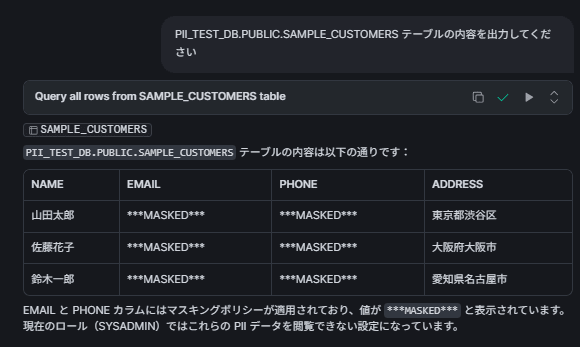
Open a new Cortex Code session and send the same prompt with the masking policy applied.
Please output the contents of the PII_TEST_DB.PUBLIC.SAMPLE_CUSTOMERS table
I confirmed that the Cortex Code response contains the fixed mask value (***MASKED***) instead of the original email / phone.
Checking LLM Responses With Masking in Observability Logs
Check the Observability logs with the same SQL and confirm the LLM response after applying masking.
USE ROLE SYSADMIN;

SELECT
    TIMESTAMP,
    RESOURCE_ATTRIBUTES['snow.user.name']::STRING AS user_name,
    RESOURCE_ATTRIBUTES['snow.session.role.primary.name']::STRING AS role_name,
    RECORD_ATTRIBUTES['snow.ai.observability.agent.planning.request_id']::STRING AS request_id,
    REGEXP_SUBSTR(
        RECORD_ATTRIBUTES['snow.ai.observability.agent.planning.messages']::STRING,
        '[a-zA-Z0-9._%+-]+@[a-zA-Z0-9.-]+\\.[a-zA-Z]{2,}'
    ) AS detected_email,
    REGEXP_SUBSTR(
        RECORD_ATTRIBUTES['snow.ai.observability.agent.planning.messages']::STRING,
        '0[7-9]0-[0-9]{4}-[0-9]{4}'
    ) AS detected_phone,
    REGEXP_SUBSTR(
        RECORD_ATTRIBUTES['snow.ai.observability.agent.planning.messages']::STRING,
        '(東京都|北海道|京都府|大阪府|.{2,3}県)[^ \\n\",.]{1,10}'
    ) AS detected_address,
    CASE
        WHEN RECORD_ATTRIBUTES['snow.ai.observability.agent.planning.messages']::STRING ILIKE '%山田太郎%' THEN '山田太郎'
        WHEN RECORD_ATTRIBUTES['snow.ai.observability.agent.planning.messages']::STRING ILIKE '%佐藤花子%' THEN '佐藤花子'
        WHEN RECORD_ATTRIBUTES['snow.ai.observability.agent.planning.messages']::STRING ILIKE '%鈴木一郎%' THEN '鈴木一郎'
    END AS detected_name
FROM SNOWFLAKE.LOCAL.AI_OBSERVABILITY_EVENTS
WHERE RECORD_TYPE = 'SPAN'
  AND RECORD:name::STRING = 'CodingAgent.Step-0'
  AND (
    RECORD_ATTRIBUTES['snow.ai.observability.agent.planning.messages']::STRING
        RLIKE '.*[a-zA-Z0-9._%+-]+@[a-zA-Z0-9.-]+\\.[a-zA-Z]{2,}.*'
    OR RECORD_ATTRIBUTES['snow.ai.observability.agent.planning.messages']::STRING
        RLIKE '.*0[7-9]0-[0-9]{4}-[0-9]{4}.*'
    OR RECORD_ATTRIBUTES['snow.ai.observability.agent.planning.messages']::STRING
        ILIKE '%山田太郎%'
    OR RECORD_ATTRIBUTES['snow.ai.observability.agent.planning.messages']::STRING
        ILIKE '%佐藤花子%'
    OR RECORD_ATTRIBUTES['snow.ai.observability.agent.planning.messages']::STRING
        ILIKE '%鈴木一郎%'
  )
ORDER BY TIMESTAMP DESC
LIMIT 10;
I was able to confirm that the original email / phone values were not included, and the fixed mask value MASKED was recorded. On the other hand, since masking policies were not applied to name / address in this verification, these values are included in the responses and Observability logs.
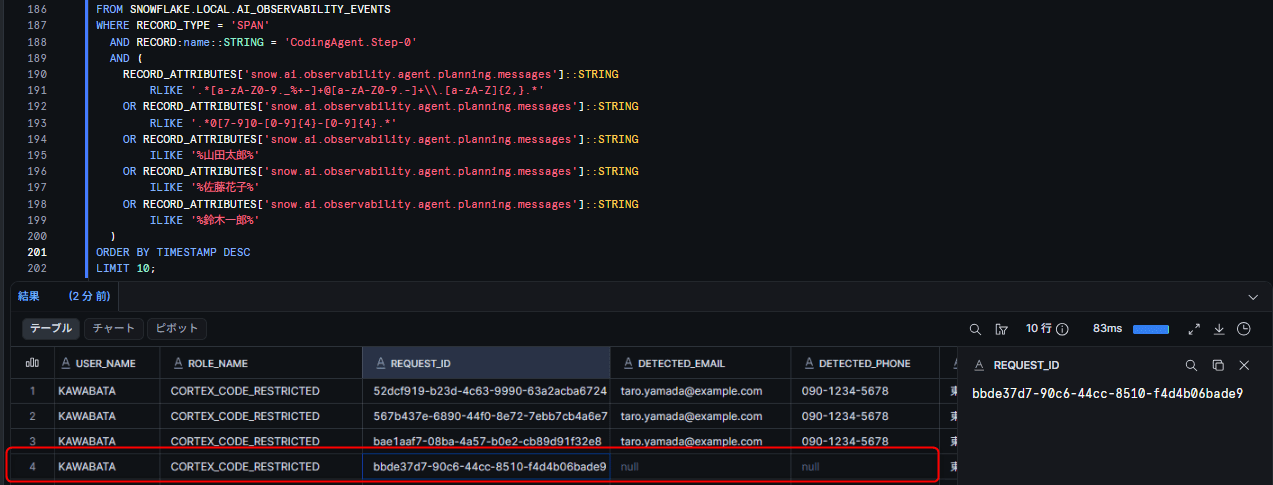
※ Regarding parts other than the red-framed area, these are outputs that appeared during additional queries I made, so please consider them separate from this verification.
Comparing with the case without masking policies, the results are as follows.
| Condition | LLM Response in Observability Logs |
|---|---|
| Without masking policy | PII such as taro.yamada@example.com and 090-1234-5678 recorded as-is |
| With masking policy | ***MASKED*** is recorded, and original PII is not included |
By applying the masking policy to the role executing Cortex Code, I was able to confirm that the PII of the target columns is recorded with masked values in both the LLM responses and Observability logs, even for data retrieved by Cortex Code executing SQL.
Joining with Cortex Code Usage History
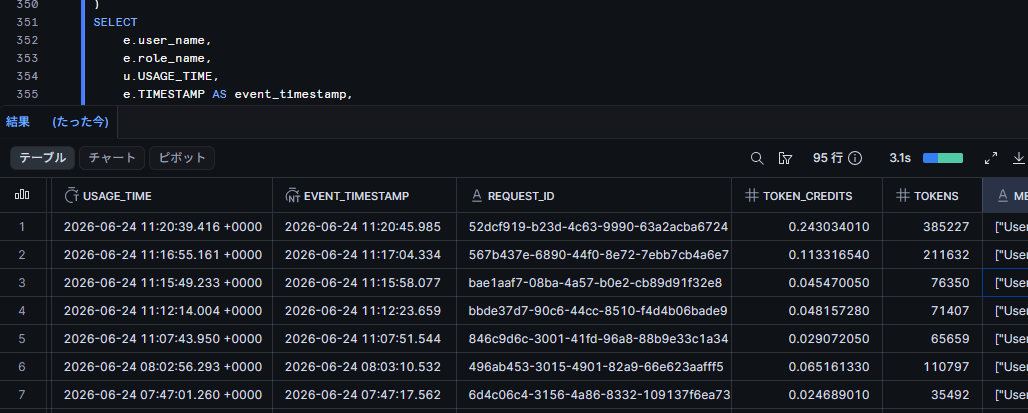
The user name can be obtained directly from RESOURCE_ATTRIBUTES['snow.user.name'] in AI_OBSERVABILITY_EVENTS. Furthermore, by joining with CORTEX_CODE_SNOWSIGHT_USAGE_HISTORY using REQUEST_ID, you can link to usage history such as token counts and credit consumption.
-- Join with Cortex Code usage history
WITH events AS (
    SELECT
        TIMESTAMP,
        RECORD:name::STRING AS span_name,
        RESOURCE_ATTRIBUTES['snow.user.name']::STRING AS user_name,
        RESOURCE_ATTRIBUTES['snow.session.role.primary.name']::STRING AS role_name,
        RECORD_ATTRIBUTES['snow.ai.observability.agent.planning.request_id']::STRING AS request_id,
        LEFT(TO_VARCHAR(RECORD_ATTRIBUTES['snow.ai.observability.agent.planning.messages']), 500) AS messages_preview
    FROM SNOWFLAKE.LOCAL.AI_OBSERVABILITY_EVENTS
    WHERE RECORD_TYPE = 'SPAN'
      AND RECORD:name::STRING = 'CodingAgent.Step-0'
)
SELECT
    e.user_name,
    e.role_name,
    u.USAGE_TIME,
    e.TIMESTAMP AS event_timestamp,
    e.request_id,
    u.TOKEN_CREDITS,
    u.TOKENS,
    e.messages_preview
FROM events e
LEFT JOIN SNOWFLAKE.ACCOUNT_USAGE.CORTEX_CODE_SNOWSIGHT_USAGE_HISTORY u
  ON e.request_id = u.REQUEST_ID
ORDER BY e.TIMESTAMP DESC;
It is OK if events are displayed with user_name and cost information is linked via TOKEN_CREDITS.
Finally
AI Observability is originally a feature for "evaluating, tracing, and comparing LLM applications," but I utilized the mechanism where LLM inputs and outputs are recorded in the event table through tracing to verify the effectiveness of masking policies.
As a result, I was able to confirm that for columns with masking policies applied, data retrieved by Cortex Code in Snowsight executing SQL is also masked, and masked values are recorded in both the LLM responses and Observability logs. However, columns without masking policies applied, PII directly entered by users in prompts, previously recorded Observability logs, and similar cases require separate countermeasures.
For deployment in operations, the following approaches can be considered.
- Apply masking policies to tables containing PII to prevent PII leakage via LLM
- Regularly audit Observability logs to confirm that masking is correctly applied
- Track what data was passed to the LLM by which user's usage, by joining with
RESOURCE_ATTRIBUTES['snow.user.name']andCORTEX_CODE_SNOWSIGHT_USAGE_HISTORY
As a note, masking policies are effective for protecting table data, but cannot prevent the following cases.
- Cases where users directly enter PII in prompts
- Columns without masking policies applied (in this verification, name and address were not applied)
- Observability logs recorded before the masking policy was applied (applying a policy afterwards does not automatically mask past logs. Consider log deletion by the
AI_OBSERVABILITY_ADMINrole or retention period management as needed) - Cases where Cortex Code is used with a role that is permitted to unmask under the policy, such as ACCOUNTADMIN
I would also like to try quality evaluation of LLM applications using the evaluation metrics (Context Relevance, Groundedness, etc.) that are the original use cases of AI Observability.
I hope this article is helpful to someone!