![[New Feature] Data Movement Policies is now generally available, so I tried controlling data unloading, downloading, and fetching](https://images.ctfassets.net/ct0aopd36mqt/wp-refcat-img-3610e3c1ff5961bdb7b464e17f8bf06d/90b168b240005ead852ec1d474bb74fb/snowflake-logo-1200x630-1.png?w=3840&fm=webp)
[New Feature] Data Movement Policies is now generally available, so I tried controlling data unloading, downloading, and fetching

This page has been translated by machine translation. View original
This is Kawabata.
On August 19, 2026, Data Movement Policies became generally available (GA).
Operations such as unloading, downloading, displaying on screen, and fetching data via programs or agents can be controlled in three levels: "allow / allow with alert / block."
This article covers everything from creating policies, applying them to tags and accounts, verifying block and alert behavior, to checking violations in monitoring views.
Overview of Data Movement Policies
A Data Movement Policy is a data exfiltration prevention feature that controls movement and retrieval operations that could lead to data leakage. There are 6 types of movement types subject to control.
| TYPE | Target |
|---|---|
| COPY_INTO_EXTERNAL_STAGE | Unloading to external stages |
| COPY_INTO_INTERNAL_STAGE | Unloading to internal stages |
| SNOWSIGHT_UI | Data access originating from Snowsight (worksheets, etc.) |
| UI_DOWNLOAD | Query result downloads on the relevant Snowsight screen |
| PROGRAMMATIC_FETCH | Fetches via drivers / connectors / SnowSQL / Snowflake CLI / SQL API / stored procedures |
| AGENT_ACCESS | Data access via agents / MCP clients |
Only one primary movement type is evaluated per statement. Classification follows a fixed order of COPY_INTO_EXTERNAL_STAGE > COPY_INTO_INTERNAL_STAGE > AGENT_ACCESS > SNOWSIGHT_UI > PROGRAMMATIC_FETCH, and UI_DOWNLOAD is evaluated independently after query completion. Fetches within stored procedures are classified as PROGRAMMATIC_FETCH even when called from Snowsight.
Data Sharing and replication are not included in the list of supported movement types. The focus of control is "unloading, downloading, and retrieval via programs or agents."
Two-Layer Structure of Rules and Policies
The components are divided into two layers.
- Data Movement Rule: Defines restrictions for one movement type using a SQL expression that returns
MAX_ROWS - Data Movement Policy: Bundles multiple Rules into
ENFORCE_RULES(block on excess) andALERT_RULES(allow on excess but record violation), and applies them to tags or accounts
The meaning of the MAX_ROWS return value is as follows:
| Return Value | Meaning |
|---|---|
| NULL | Unlimited (allow) |
| 0 | Block |
| Positive integer | Maximum number of rows allowed |
Within expressions, SYS_CONTEXT can be used to reference the role, movement type, and connection path (Snowflake CLI, SQL API, etc.), allowing conditional branching such as "allow only specific roles" or "limit row count for specific paths."
Application Units and Priority
Policies are not applied directly to objects, but rather via tags or to the entire account. When multiple policies apply, the more granular unit takes priority.
- Column-level tags
- Table-level tags
- Schema-level tags
- Database-level tags
- Account level (baseline)
Prerequisites
- Enterprise Edition or higher
- Creating Rules / Policies:
CREATE DATA MOVEMENT RULE/CREATE DATA MOVEMENT POLICYprivileges on the schema - Applying to tags / accounts:
APPLY DATA MOVEMENT POLICYprivilege on the account
Verification was conducted between August 20–26, 2026, on an account in the AWS Tokyo region.
Preparation
Create a DB, a dummy salary table (3,000 rows), tags, and an analyst role for verification.
Preparation
USE ROLE ACCOUNTADMIN;

CREATE OR REPLACE DATABASE DMP_TEST_DB;
CREATE SCHEMA DMP_TEST_DB.GOVERNANCE;
CREATE SCHEMA DMP_TEST_DB.HR;

-- Dummy salary table (3,000 rows)
CREATE OR REPLACE TABLE DMP_TEST_DB.HR.EMPLOYEE_SALARY AS
SELECT
  SEQ4() + 1                                        AS EMP_ID,
  'EMP_' || LPAD(TO_VARCHAR(SEQ4() + 1), 5, '0')    AS EMP_NAME,
  'emp' || TO_VARCHAR(SEQ4() + 1) || '@example.com' AS EMAIL,
  UNIFORM(4000000, 12000000, RANDOM())              AS SALARY,
  DECODE(MOD(SEQ4(), 4), 0, 'SALES', 1, 'HR', 2, 'ENGINEERING', 3, 'FINANCE') AS DEPARTMENT
FROM TABLE(GENERATOR(ROWCOUNT => 3000));

-- Table without tags for priority verification (100 rows)
CREATE OR REPLACE TABLE DMP_TEST_DB.HR.OFFICE_LOCATION AS
SELECT
  SEQ4() + 1 AS LOCATION_ID,
  'OFFICE_' || TO_VARCHAR(SEQ4() + 1) AS LOCATION_NAME
FROM TABLE(GENERATOR(ROWCOUNT => 100));

CREATE OR REPLACE TAG DMP_TEST_DB.GOVERNANCE.PII_TAG;

-- Analyst role for verification
CREATE OR REPLACE ROLE DMP_ANALYST;
GRANT USAGE ON WAREHOUSE COMPUTE_WH TO ROLE DMP_ANALYST;
GRANT USAGE ON DATABASE DMP_TEST_DB TO ROLE DMP_ANALYST;
GRANT USAGE ON ALL SCHEMAS IN DATABASE DMP_TEST_DB TO ROLE DMP_ANALYST;
GRANT SELECT ON ALL TABLES IN DATABASE DMP_TEST_DB TO ROLE DMP_ANALYST;
GRANT ROLE DMP_ANALYST TO USER <verification user>;
Creating Rules
Create a Rule for each movement type. Using SYS_CONTEXT('SNOWFLAKE$SESSION', 'ROLE') to determine the executing role, ACCOUNTADMIN is unrestricted (NULL), while all others are restricted.
USE SCHEMA DMP_TEST_DB.GOVERNANCE;

-- Block unloading to internal stages for anyone other than ACCOUNTADMIN
CREATE OR REPLACE DATA MOVEMENT RULE R_COPY_INTERNAL_BLOCK
  TYPE = 'COPY_INTO_INTERNAL_STAGE'
  MAX_ROWS AS () RETURNS INTEGER
  -> (
    CASE WHEN SYS_CONTEXT('SNOWFLAKE$SESSION', 'ROLE') = 'ACCOUNTADMIN' THEN NULL ELSE 0 END
  );

-- Programmatic fetch: unlimited for ACCOUNTADMIN / up to 1,000 rows for others
CREATE OR REPLACE DATA MOVEMENT RULE R_PROG_FETCH_LIMIT
  TYPE = 'PROGRAMMATIC_FETCH'
  MAX_ROWS AS () RETURNS INTEGER
  -> (
    CASE WHEN SYS_CONTEXT('SNOWFLAKE$SESSION', 'ROLE') = 'ACCOUNTADMIN' THEN NULL ELSE 1000 END
  );

-- Block Snowsight download button for anyone other than ACCOUNTADMIN
CREATE OR REPLACE DATA MOVEMENT RULE R_UI_DOWNLOAD_BLOCK
  TYPE = 'UI_DOWNLOAD'
  MAX_ROWS AS () RETURNS INTEGER
  -> (
    CASE WHEN SYS_CONTEXT('SNOWFLAKE$SESSION', 'ROLE') = 'ACCOUNTADMIN' THEN NULL ELSE 0 END
  );

-- Block Snowsight worksheet result display for anyone other than ACCOUNTADMIN
CREATE OR REPLACE DATA MOVEMENT RULE R_SNOWSIGHT_BLOCK
  TYPE = 'SNOWSIGHT_UI'
  MAX_ROWS AS () RETURNS INTEGER
  -> (
    CASE WHEN SYS_CONTEXT('SNOWFLAKE$SESSION', 'ROLE') = 'ACCOUNTADMIN' THEN NULL ELSE 0 END
  );

-- Block all access via agents / MCP clients
CREATE OR REPLACE DATA MOVEMENT RULE R_AGENT_BLOCK
  TYPE = 'AGENT_ACCESS'
  MAX_ROWS AS () RETURNS INTEGER
  -> (0);

-- ALERT: record violation when programmatic fetch exceeds 500 rows (allow the operation)
CREATE OR REPLACE DATA MOVEMENT RULE R_PROG_FETCH_ALERT
  TYPE = 'PROGRAMMATIC_FETCH'
  MAX_ROWS AS () RETURNS INTEGER
  -> (
    CASE WHEN SYS_CONTEXT('SNOWFLAKE$SESSION', 'ROLE') = 'ACCOUNTADMIN' THEN NULL ELSE 500 END
  );
Creating a Policy
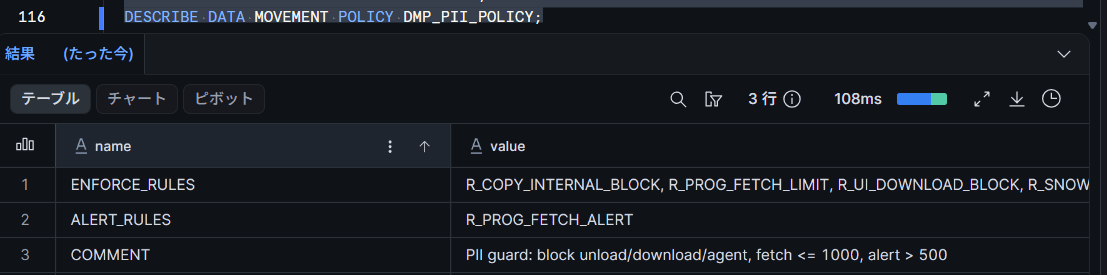
Bundle Rules into ENFORCE_RULES and ALERT_RULES.
CREATE OR REPLACE DATA MOVEMENT POLICY DMP_PII_POLICY
  ENFORCE_RULES = (R_COPY_INTERNAL_BLOCK, R_PROG_FETCH_LIMIT, R_UI_DOWNLOAD_BLOCK, R_SNOWSIGHT_BLOCK, R_AGENT_BLOCK)
  ALERT_RULES = (R_PROG_FETCH_ALERT)
  COMMENT = 'PII guard: block unload/download/agent, fetch <= 1000, alert > 500';

DESCRIBE DATA MOVEMENT POLICY DMP_PII_POLICY;
Testing It Out
Applying to a Tag: A Propagation Mode Including Data Movement Is Required
Set the DMP on the created tag. If you try to set the policy while the tag's propagation mode is at the default (PROPAGATE = NONE), it will be rejected with an error (503509), so set the propagation mode to include data movement first.
ALTER TAG DMP_TEST_DB.GOVERNANCE.PII_TAG SET PROPAGATE = ON_DEPENDENCY_AND_DATA_MOVEMENT;
ALTER TAG DMP_TEST_DB.GOVERNANCE.PII_TAG SET DATA MOVEMENT POLICY DMP_TEST_DB.GOVERNANCE.DMP_PII_POLICY;

-- Apply tag to salary column
ALTER TABLE DMP_TEST_DB.HR.EMPLOYEE_SALARY MODIFY COLUMN SALARY
  SET TAG DMP_TEST_DB.GOVERNANCE.PII_TAG = 'salary';
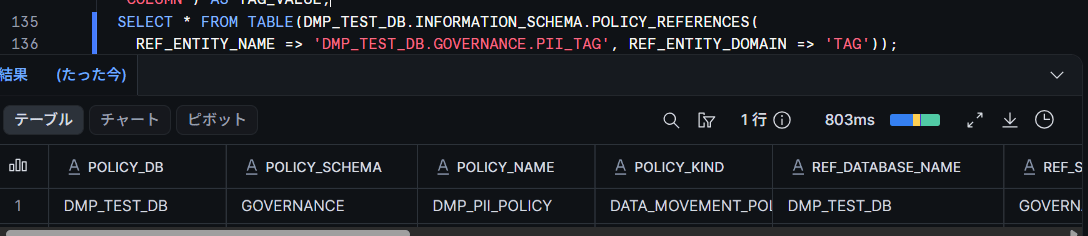
Checking the association between the policy and tag using POLICY_REFERENCES shows ACTIVE.
SELECT POLICY_NAME, REF_ENTITY_NAME, REF_ENTITY_DOMAIN, POLICY_STATUS
FROM TABLE(DMP_TEST_DB.INFORMATION_SCHEMA.POLICY_REFERENCES(
  REF_ENTITY_NAME => 'DMP_TEST_DB.GOVERNANCE.PII_TAG', REF_ENTITY_DOMAIN => 'TAG'));
Block Behavior via Tag
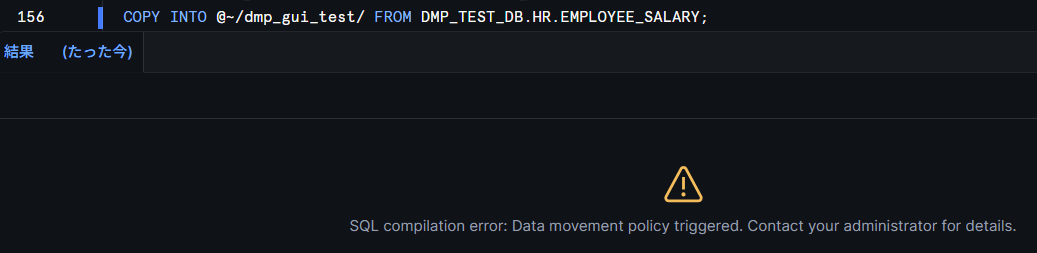
After table tag enforcement begins, try various operations as DMP_ANALYST. First, unloading to an internal stage is blocked.
-- Run as DMP_ANALYST
COPY INTO @~/dmp_test/ FROM DMP_TEST_DB.HR.EMPLOYEE_SALARY;
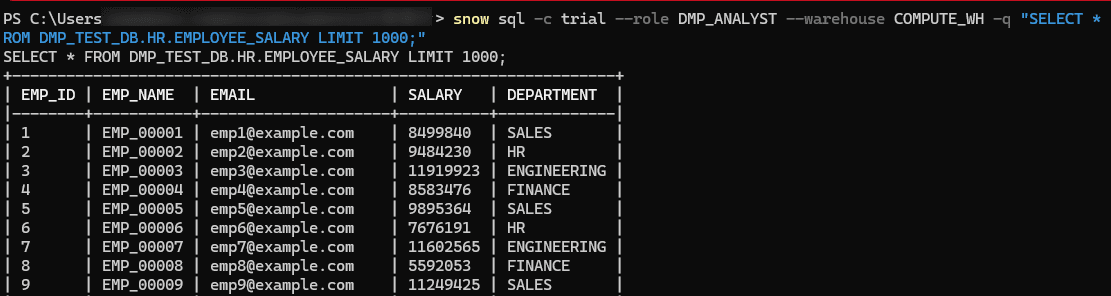
The programmatic fetch row limit (1,000 rows) worked exactly at the boundary.
-- Run as DMP_ANALYST
SELECT * FROM DMP_TEST_DB.HR.EMPLOYEE_SALARY LIMIT 1001;  -- Blocked
SELECT * FROM DMP_TEST_DB.HR.EMPLOYEE_SALARY LIMIT 1000;  -- Success (exactly at limit)

Applying to an Account: Enforced Immediately
Next, verify the baseline policy for the entire account. Create a Rule that blocks all programmatic fetches for anyone other than ACCOUNTADMIN, and apply it to the account.
CREATE OR REPLACE DATA MOVEMENT RULE R_BASELINE_PROG_FETCH_BLOCK
  TYPE = 'PROGRAMMATIC_FETCH'
  MAX_ROWS AS () RETURNS INTEGER
  -> (
    CASE WHEN SYS_CONTEXT('SNOWFLAKE$SESSION', 'ROLE') = 'ACCOUNTADMIN' THEN NULL ELSE 0 END
  );

CREATE OR REPLACE DATA MOVEMENT POLICY DMP_ACCOUNT_BASELINE
  ENFORCE_RULES = (R_BASELINE_PROG_FETCH_BLOCK);

ALTER ACCOUNT SET DATA MOVEMENT POLICY DMP_TEST_DB.GOVERNANCE.DMP_ACCOUNT_BASELINE;
If an account-level policy is already set, append FORCE at the end to replace it.
Caution: Rules in policies applied to the account must include a condition that excludes the admin role used for recovery (ACCOUNTADMIN in this example). If
MAX_ROWS = 0is set for all roles, fetches from your own session will also be blocked. It is safe to keepALTER ACCOUNT UNSET DATA MOVEMENT POLICY;on hand for recovery.
Immediately after applying, querying from Snowflake CLI as the DMP_ANALYST role was instantly blocked.
-- Run as DMP_ANALYST
SELECT * FROM DMP_TEST_DB.HR.OFFICE_LOCATION LIMIT 5;

Since the error is returned as a SQL compilation error, the query is presumably not executed and the warehouse is not consumed. When MAX_ROWS = 0, blocking is uniform regardless of row count, and even an aggregate query returning only 1 row results in the same error.
-- Run as DMP_ANALYST
SELECT COUNT(*) FROM DMP_TEST_DB.HR.OFFICE_LOCATION;

Since the Rule returns NULL (unlimited) for ACCOUNTADMIN, the same query succeeds.
Adding Rules to an Applied Policy
Rules can also be added after the fact to a policy already applied to an account using ALTER. Two ENFORCE Rules for Snowsight and an ALERT Rule for unloading were added.
-- Snowsight worksheet display: up to 100 rows for anyone other than ACCOUNTADMIN
CREATE OR REPLACE DATA MOVEMENT RULE R_BASELINE_SNOWSIGHT_LIMIT
  TYPE = 'SNOWSIGHT_UI'
  MAX_ROWS AS () RETURNS INTEGER
  -> (
    CASE WHEN SYS_CONTEXT('SNOWFLAKE$SESSION', 'ROLE') = 'ACCOUNTADMIN' THEN NULL ELSE 100 END
  );

-- Snowsight download button: block for anyone other than ACCOUNTADMIN
CREATE OR REPLACE DATA MOVEMENT RULE R_BASELINE_UI_DOWNLOAD_BLOCK
  TYPE = 'UI_DOWNLOAD'
  MAX_ROWS AS () RETURNS INTEGER
  -> (
    CASE WHEN SYS_CONTEXT('SNOWFLAKE$SESSION', 'ROLE') = 'ACCOUNTADMIN' THEN NULL ELSE 0 END
  );

-- ALERT: record violation when unloading to internal stage exceeds 50 rows
CREATE OR REPLACE DATA MOVEMENT RULE R_BASELINE_COPY_ALERT
  TYPE = 'COPY_INTO_INTERNAL_STAGE'
  MAX_ROWS AS () RETURNS INTEGER
  -> (
    CASE WHEN SYS_CONTEXT('SNOWFLAKE$SESSION', 'ROLE') = 'ACCOUNTADMIN' THEN NULL ELSE 50 END
  );

ALTER DATA MOVEMENT POLICY DMP_ACCOUNT_BASELINE
  ADD ENFORCE_RULES = (R_BASELINE_SNOWSIGHT_LIMIT, R_BASELINE_UI_DOWNLOAD_BLOCK);
ALTER DATA MOVEMENT POLICY DMP_ACCOUNT_BASELINE
  ADD ALERT_RULES = (R_BASELINE_COPY_ALERT);

ALERT_RULES: Allow the Operation While Recording It as a Violation
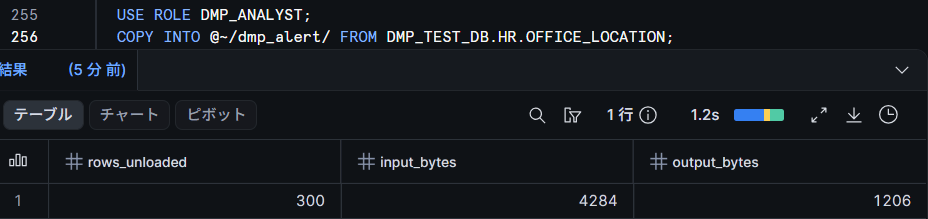
ALERT allows the operation to succeed even when the threshold is exceeded, while recording it as a violation. Unloading 100 rows (exceeding the 50-row threshold) to an internal stage as DMP_ANALYST succeeded.
-- Run as DMP_ANALYST
COPY INTO @~/dmp_alert/ FROM DMP_TEST_DB.HR.OFFICE_LOCATION;
Monitoring: DATA_MOVEMENT_VIOLATIONS View
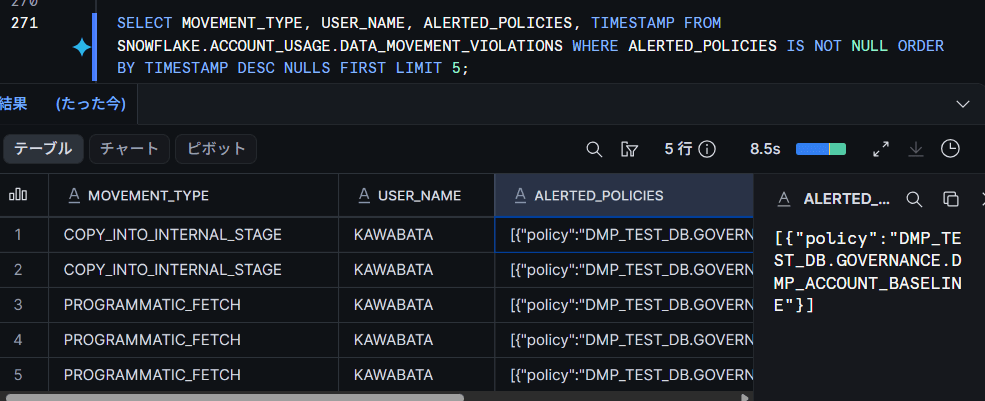
Violations are recorded in the SNOWFLAKE.ACCOUNT_USAGE.DATA_MOVEMENT_VIOLATIONS view. Both queries blocked by ENFORCE and operations allowed by ALERT are included. The following check is filtered to ALERT-matched records; ENFORCE blocks can be confirmed similarly in the ENFORCED_POLICY column. Since TIMESTAMP and other fields may not be reflected immediately after recording, NULLS FIRST is used.
SELECT
  MOVEMENT_TYPE,
  USER_NAME,
  ALERTED_POLICIES,
  TIMESTAMP
FROM SNOWFLAKE.ACCOUNT_USAGE.DATA_MOVEMENT_VIOLATIONS
WHERE ALERTED_POLICIES IS NOT NULL
ORDER BY TIMESTAMP DESC NULLS FIRST
LIMIT 5;
For auditing definition information, you can use the DATA_MOVEMENT_POLICIES / DATA_MOVEMENT_POLICY_RULES / DATA_MOVEMENT_RULE_REFERENCES views. DATA_MOVEMENT_POLICY_RULES even includes the Rule expression (FUNCTION_BODY).
Priority: Tag Policy Takes Precedence Over Baseline
At this point, the account has both a baseline that "blocks all fetches for anyone other than ACCOUNTADMIN" and a tag policy that "allows up to 1,000 rows" applied to the tagged table. Querying both tables as DMP_ANALYST allows the priority to be confirmed.
-- Run as DMP_ANALYST
SELECT * FROM DMP_TEST_DB.HR.EMPLOYEE_SALARY LIMIT 600;  -- Success
SELECT * FROM DMP_TEST_DB.HR.OFFICE_LOCATION LIMIT 5;    -- Blocked
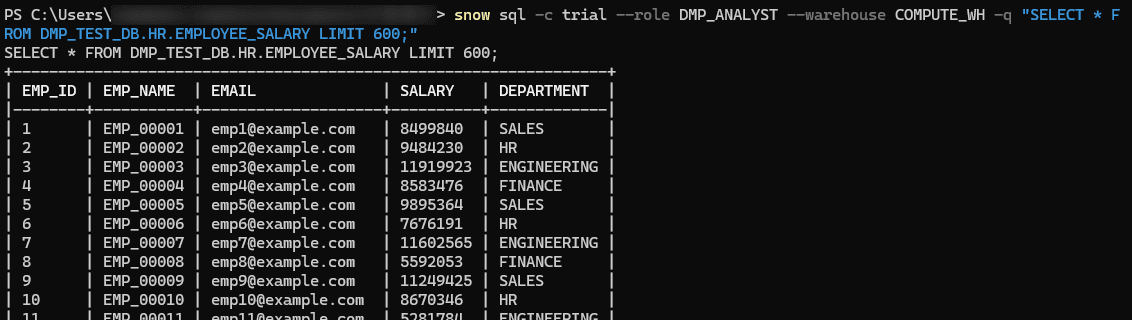

A 600-row fetch from the tagged table should be completely blocked by the baseline, but the more granular table tag policy (allowing up to 1,000 rows) is selected and succeeds. The table without a tag remains subject to the baseline.
However, tag policies do not simply override the baseline; the priority system "selects the most granular policy for each referenced column and object," and if multiple policies remain selected, the strictest MAX_ROWS among them is applied to the entire statement.
In this case, since the entire table is the tag target, the effective policy was narrowed down to one: the tag-side policy.
Note that running the same two SELECTs in Snowsight produces the opposite result.
Since they are evaluated as SNOWSIGHT_UI, the tagged table is blocked by the tag policy's SNOWSIGHT_UI = 0, while the untagged table is displayed within the baseline's 100-row limit.
Be aware that even with the same priority, the evaluated movement type changes depending on the execution path.
SNOWSIGHT_UI / UI_DOWNLOAD: Behavior in Snowsight
Verification was also conducted in Snowsight worksheets as the DMP_ANALYST role. Queries within the limit (100 rows) display results, but the download button is disabled. Hovering over the button shows "Download is disabled: A data movement policy was triggered."
-- Run as DMP_ANALYST (50 rows <= limit of 100 rows)
SELECT * FROM DMP_TEST_DB.HR.OFFICE_LOCATION LIMIT 50;
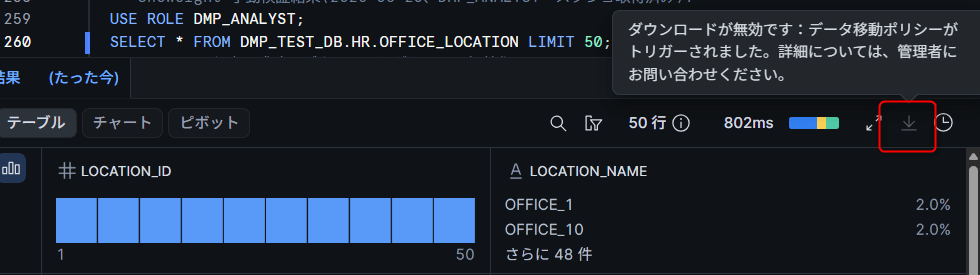
On the other hand, results exceeding the SNOWSIGHT_UI limit (100 rows) do not result in truncated display — instead, the query itself errors out. The same "Data movement policy triggered." message as in the CLI is displayed in the results pane.
-- Run as DMP_ANALYST (300 rows > limit of 100 rows)
SELECT * FROM DMP_TEST_DB.HR.OFFICE_LOCATION;
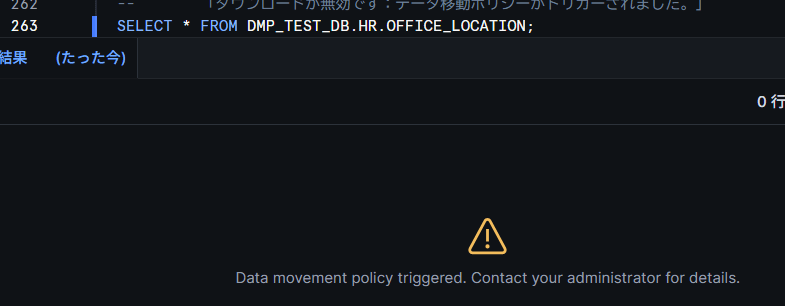
Since the behavior is "don't return results exceeding the limit" rather than "show up to the limit," when setting a positive integer for SNOWSIGHT_UI, users will need to add a LIMIT clause to their queries.
AGENT_ACCESS: Controlling Agent-Based Data Access
Preparation
Creating an agent as preparation
USE ROLE ACCOUNTADMIN;

CREATE DATABASE IF NOT EXISTS KAWABATA_MART_DB;
CREATE SCHEMA IF NOT EXISTS KAWABATA_MART_DB.HR;

-- Dummy salary table
CREATE OR REPLACE TABLE KAWABATA_MART_DB.HR.EMPLOYEE_SALARY AS
SELECT
  SEQ4() + 1                                     AS EMP_ID,
  'EMP_' || LPAD(TO_VARCHAR(SEQ4() + 1), 5, '0') AS EMP_NAME,
  UNIFORM(4000000, 12000000, RANDOM())           AS SALARY,
  DECODE(MOD(SEQ4(), 4), 0, 'SALES', 1, 'HR', 2, 'ENGINEERING', 3, 'FINANCE') AS DEPARTMENT
FROM TABLE(GENERATOR(ROWCOUNT => 100));

-- Semantic view for Cortex Analyst
CREATE OR REPLACE SEMANTIC VIEW KAWABATA_MART_DB.HR.EMPLOYEE_SV
  TABLES (
    employees AS KAWABATA_MART_DB.HR.EMPLOYEE_SALARY
      PRIMARY KEY (EMP_ID)
      WITH SYNONYMS ('社員', '従業員')
      COMMENT = 'Employee salary information'
  )
  DIMENSIONS (
    employees.emp_name AS emp_name COMMENT = 'Employee name',
    employees.department AS department COMMENT = 'Department'
  )
  METRICS (
    employees.avg_salary AS AVG(salary) COMMENT = 'Average salary',
    employees.total_salary AS SUM(salary) COMMENT = 'Total salary'
  )
  COMMENT = 'For AGENT_ACCESS verification';

-- Create agent (with Cortex Analyst tool)
CREATE OR REPLACE AGENT KAWABATA_MART_DB.HR.DMP_AGENT_TEST
  WITH PROFILE = '{"display_name": "DMP AGENT_ACCESS Test"}'
  FROM SPECIFICATION $$
{
  "models": { "orchestration": "auto" },
  "instructions": { "response": "Please answer questions about employee data concisely in Japanese." },
  "tools": [
    {
      "tool_spec": {
        "type": "cortex_analyst_text_to_sql",
        "name": "employee_analyst"
      }
    }
  ],
  "tool_resources": {
    "employee_analyst": { "semantic_view": "KAWABATA_MART_DB.HR.EMPLOYEE_SV" }
  }
}
$$;
Before the policy is applied, output is returned normally.
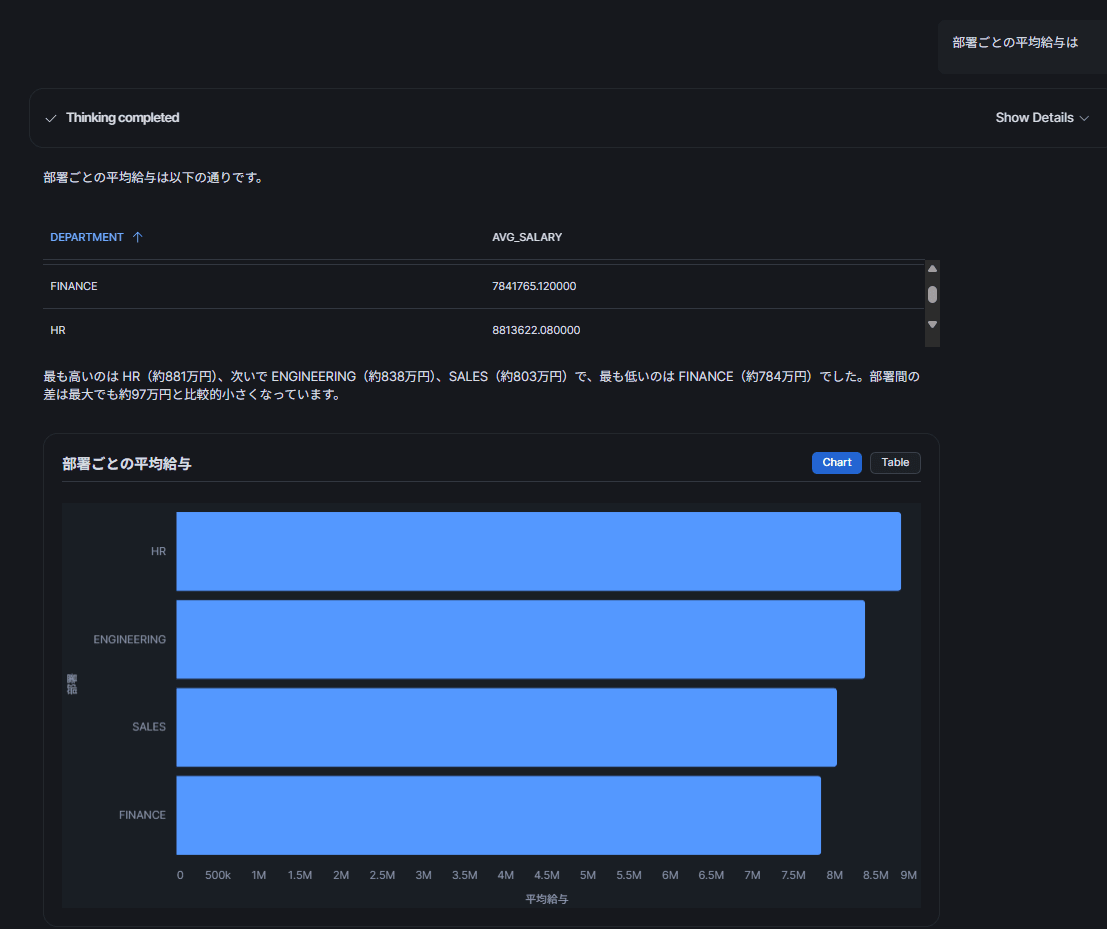
Creating Rule / Policy and Applying to Account
USE ROLE ACCOUNTADMIN;
CREATE SCHEMA IF NOT EXISTS KAWABATA_MART_DB.GOVERNANCE;
USE SCHEMA KAWABATA_MART_DB.GOVERNANCE;

-- Block only the target agent (other agents get NULL = unlimited)
CREATE OR REPLACE DATA MOVEMENT RULE R_AGENT_SCOPED_BLOCK
  TYPE = 'AGENT_ACCESS'
  MAX_ROWS AS () RETURNS INTEGER
  -> (
    CASE
      WHEN SYS_CONTEXT('SNOWFLAKE$DATA_MOVEMENT', 'AGENT_NAME') LIKE '%DMP_AGENT_TEST%' THEN 0
      ELSE NULL
    END
  )
  COMMENT = 'Block data access for the test agent only';

CREATE OR REPLACE DATA MOVEMENT POLICY DMP_AGENT_TEST_POLICY
  ENFORCE_RULES = (R_AGENT_SCOPED_BLOCK)
  COMMENT = 'AGENT_ACCESS verification (temporary)';

ALTER ACCOUNT SET DATA MOVEMENT POLICY KAWABATA_MART_DB.GOVERNANCE.DMP_AGENT_TEST_POLICY;
Since AGENT_NAME contains the qualified name of the called agent, using an exact match on the fully qualified name in production will prevent false matches.
Note that the AGENT_ACCESS verification was conducted on a different account than the previous sections. If testing on the same account, replace the already-applied policy using FORCE or UNSET it before applying. After verification, remove it with ALTER ACCOUNT UNSET DATA MOVEMENT POLICY;.
After applying the above, the same data question was sent to the target agent via Snowsight CoWork as before.
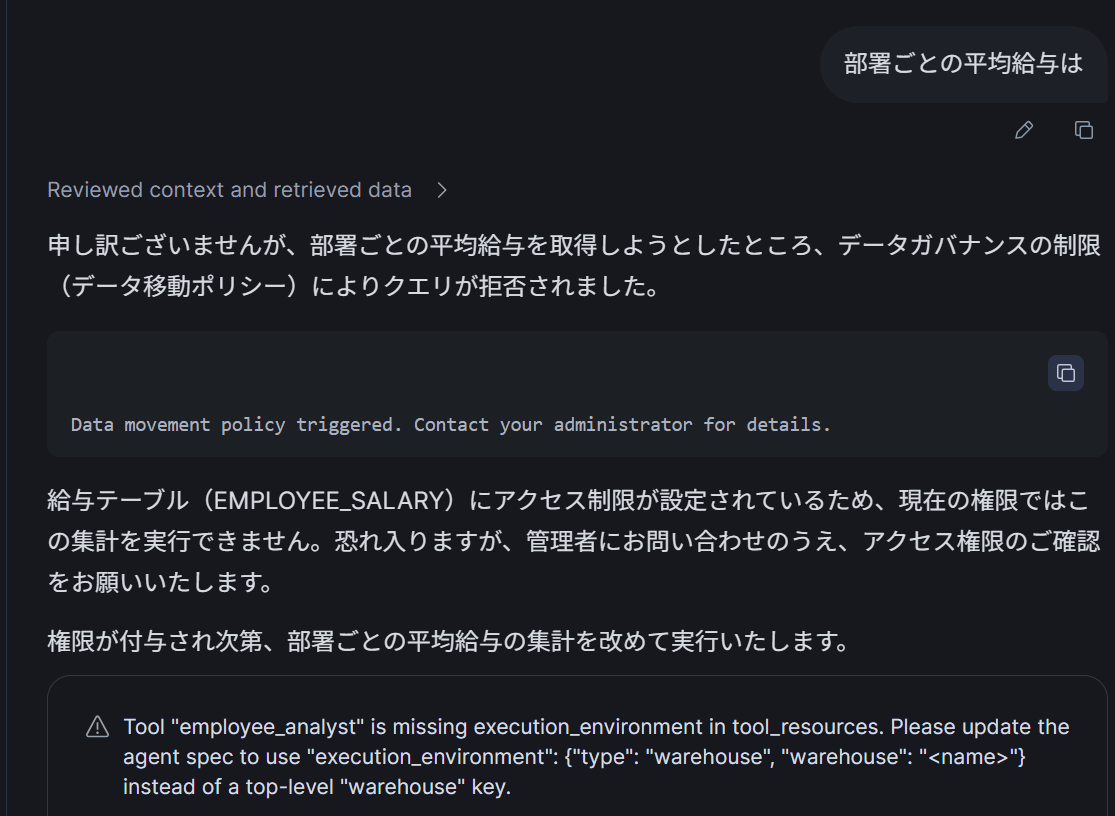
It was confirmed that the data movement policy was applied and the query was rejected.
Unloading with PARTITION BY Is Unconditionally Blocked
The official documentation states that "when DMP is enabled, unloading using PARTITION BY is always blocked." Testing this confirmed that even ACCOUNTADMIN, whose Rules return NULL (unlimited), was blocked.
-- Run as ACCOUNTADMIN
COPY INTO @~/dmp_part/ FROM (
  SELECT LOCATION_NAME, LOCATION_ID FROM DMP_TEST_DB.HR.OFFICE_LOCATION
) PARTITION BY (LOCATION_NAME);
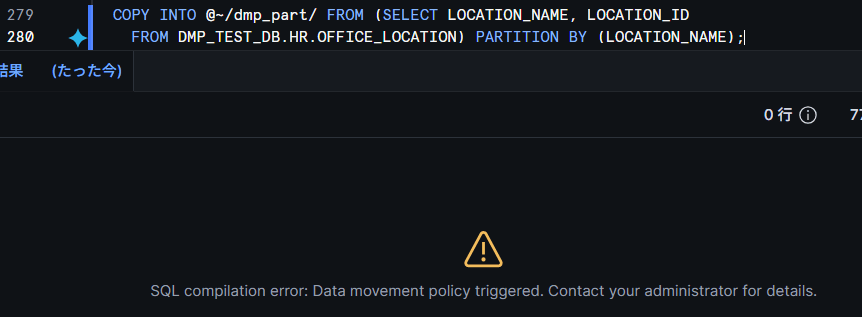
Simply having a policy applied to the account causes blocking regardless of the Rule's content. Environments with existing unload pipelines using PARTITION BY need to assess the impact before introducing DMP.
Limitations and Considerations
Based on verification results as of August 26, 2026, and the official documentation, here is a summary of points to be aware of when implementing.
Limitations and Considerations
- Column tag enforcement alone could not be confirmed (in this verification environment). Table tags were enforced within 1 minute; account-level application was immediate.
MAX_ROWS = 0blocks at compile time (001003); exceeding a positive integer limit blocks at execution time (100168) (observed in testing)- Queries exceeding the limit are judged after execution, so warehouses are likely consumed
- Tags with DMP settings require
PROPAGATE = ON_DEPENDENCY_AND_DATA_MOVEMENTorON_DATA_MOVEMENT(NONE will be rejected with an error) - One primary movement type is assigned per statement.
COPY INTOvia an agent is evaluated as COPY_INTO_, not AGENT_ACCESS, so a COPY_INTO_ Rule is also needed to block unloading - For statements where multiple policies are effective, the strictest
MAX_ROWSis applied to the entire statement (see the priority section for details) - Unloading with
PARTITION BYis always blocked while DMP is applied, regardless of Rule content. This block was not recorded inDATA_MOVEMENT_VIOLATIONS(observed in testing) UI_DOWNLOADcan only be specified inENFORCE_RULESand does not appear in violation records (DATA_MOVEMENT_VIOLATIONS)UI_DOWNLOADtargets include Workspace results, notebook cell, Query History downloads, etc. Streamlit apps, VS Code extension, HTML Export, and CoWork are not included- Only one Rule of the same movement type can be included within the same section of the same policy
- Row threshold evaluation is per statement, so data exfiltration via split queries cannot be detected
- Violation records are best-effort with no completeness guarantee (actual reflection of violations took approximately 5–10 minutes in testing)
- View refresh delays: up to 3 hours for
DATA_MOVEMENT_VIOLATIONS/DATA_MOVEMENT_RULE_REFERENCES, up to 2 hours forDATA_MOVEMENT_POLICIES/DATA_MOVEMENT_POLICY_RULES - Cross-region sharing protection is not supported
Closing Thoughts
In addition to controlling "how data is displayed" through masking and similar features, being able to declaratively control "data exfiltration" itself using SQL expressions is a welcome addition.
Also, the ability to apply this to AGENT_ACCESS seems to broaden the range of use cases significantly.
I hope this article is helpful to someone!