
I tried out the new native control of the Dynamic Table's SCHEDULER attribute via dbt-snowflake's scheduler config

This page has been translated by machine translation. View original
This is Kawabata.
Previously, when trying to control the SCHEDULER attribute of Dynamic Tables in dbt, a workaround using pre_hook/post_hook was required. However, since the dbt-snowflake adapter now natively supports the scheduler config key, I went ahead and verified it in practice.
Background and Problem
Previously, I wrote an article titled Trying Out the SCHEDULER Attribute of Dynamic Tables. Setting SCHEDULER = DISABLE stops the automatic TARGET_LAG-based auto-refresh by Snowflake's built-in scheduler, so the table is no longer refreshed until an external orchestrator such as dbt or Airflow explicitly calls ALTER DYNAMIC TABLE ... REFRESH.
-- Raw SQL example with SCHEDULER = DISABLE
CREATE OR REPLACE DYNAMIC TABLE KAWABATA_MART_DB.PUBLIC.DT_ORDERS_SCHEDULER_DISABLED
  WAREHOUSE = COMPUTE_WH
  REFRESH_MODE = FULL
  INITIALIZE = ON_CREATE
  SCHEDULER = DISABLE
  AS
    SELECT o.ID AS ORDER_ID
    FROM KAWABATA_MART_DB.KAWABATA_RAW.RAW_ORDERS o;
However, as of the article written on March 31, 2026, the dbt-snowflake adapter (v1.9.2) did not natively support the SCHEDULER attribute, target_lag remained mandatory, and running dbt run as-is caused conflicts with ALTER statements. At the time, the workaround was to temporarily restore SCHEDULER = ENABLE via a pre_hook, then manually refresh with a post_hook, and finally switch back to SCHEDULER = DISABLE, as shown below.
-- models/intermediate/int_order_items_dynamic_table.sql (workaround from the previous article)
{{
    config(
        materialized='dynamic_table',
        snowflake_warehouse='COMPUTE_WH',
        target_lag='DOWNSTREAM',
        pre_hook=[
            "ALTER DYNAMIC TABLE IF EXISTS {{ this }} SET SCHEDULER = ENABLE TARGET_LAG = DOWNSTREAM"
        ],
        post_hook=[
            "ALTER DYNAMIC TABLE {{ this }} REFRESH",
            "ALTER DYNAMIC TABLE {{ this }} SET SCHEDULER = DISABLE"
        ]
    )
}}
SELECT
    i.ITEM_ID,
    i.ORDER_ID
FROM {{ ref('stg_items') }} i
JOIN {{ ref('stg_orders') }} o
  ON i.ORDER_ID = o.ORDER_ID;
Because this approach forcefully rewrote the SCHEDULER attribute via hooks, 2–3 extra ALTER statements ran on every dbt run, and getting the hook execution order wrong could cause unintended refreshes, making it cumbersome to manage. The previous article also concluded that "the right approach is to wait for official dbt adapter support," so I was curious whether that support had actually arrived.
Technical Approach
After checking the Snowflake official documentation, I found that the scheduler key has been officially added to the config for materialized='dynamic_table', making it possible to specify ENABLE/DISABLE directly without hooks.
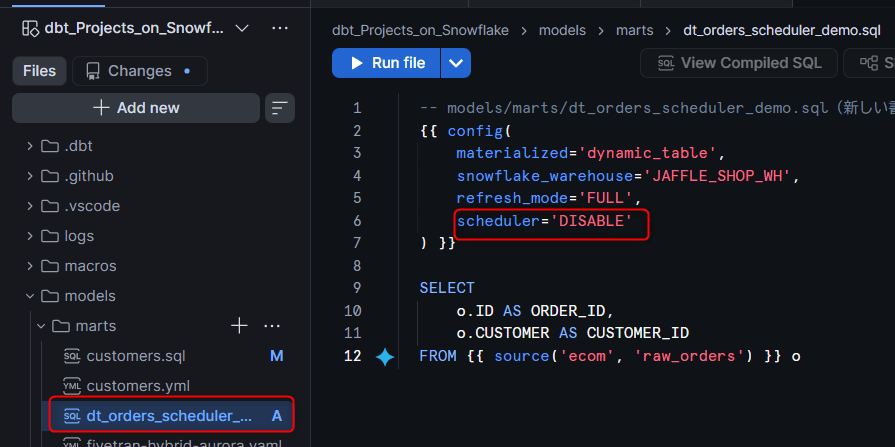
-- models/marts/dt_orders_scheduler_demo.sql (new way of writing)
{{ config(
    materialized='dynamic_table',
    snowflake_warehouse='COMPUTE_WH',
    refresh_mode='FULL',
    scheduler='DISABLE'
) }}

SELECT
    o.ID AS ORDER_ID,
    o.CUSTOMER AS CUSTOMER_ID
FROM {{ source('ecom', 'raw_orders') }} o
In dbt Dynamic Table models, omitting target_lag or specifying scheduler: DISABLE switches to a dbt/external orchestrator-managed refresh mode that does not use Snowflake's automatic scheduling. When SCHEDULER = DISABLE, TARGET_LAG cannot be defined, so target_lag should be removed from the config.
When dbt executes a Dynamic Table model, it creates or modifies the Dynamic Table and also performs an explicit refresh via ALTER DYNAMIC TABLE ... REFRESH. The official documentation also states that subsequent dbt run executions skip the model if the SQL is unchanged, but in my verification environment, the refresh was executed even when running dbt run without any SQL changes (confirmed in the delete propagation verification later). The attribute switching that was previously managed manually with pre_hook/post_hook is now replaced by a single line in the config.
Limitations
Limitations
- dbt-snowflake adapter version v1.11.5 or higher is required
- All base tables that directly or indirectly supply data to the Dynamic Table must have
CHANGE_TRACKING = TRUEexplicitly set. In particular, if upstream tables are operated withCREATE OR REPLACE, change tracking metadata will be lost and incremental refreshes of downstream Dynamic Tables may fail - dbt Model Contracts are not supported
- The
copy_grantsconfig is explicitly listed as unsupported in Snowflake's dbt documentation for Dynamic Tables (grants are reset on everyCREATE OR REPLACE). Do not rely oncopy_grantsfor permissions on Dynamic Tables; instead, plan to re-apply necessary GRANTs after deployment - Changing a Dynamic Table's model SQL (
SELECTstatement) causes dbt to executeCREATE OR REPLACE DYNAMIC TABLE, reinitializing the Dynamic Table. The user does not need to explicitly specify--full-refresh. Conversely, runningdbt run --full-refreshwillCREATE OR REPLACEand reinitialize even models without changes that are included in the selection (--select/--excluderesults), so be careful not to run it without narrowing the target - dbt tests run against the "current state" of the Dynamic Table and are not tests against specific refresh results. If a test runs during a refresh, it reads the state available at that point in time
- Materialized Views, External Tables, Directory Tables, and Streams cannot be referenced as upstream sources for Dynamic Tables
Prerequisites
- dbt-snowflake adapter: v1.11.5 or higher (minimum requirement for using the
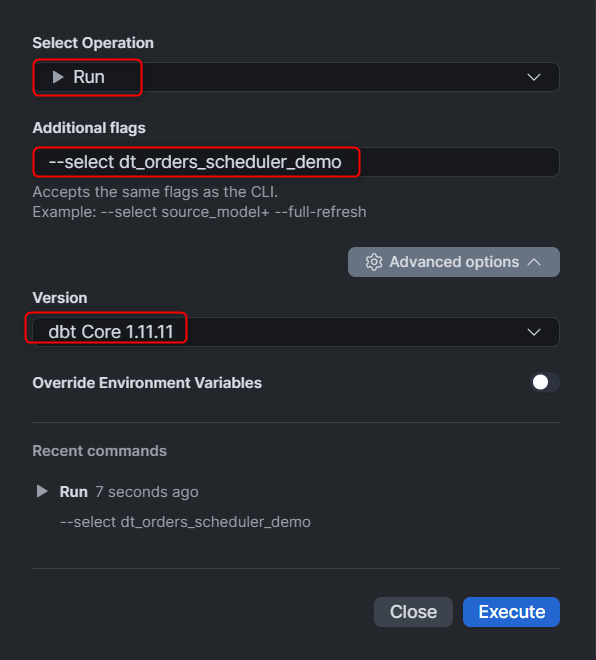
schedulerconfig) - Verification environment: dbt Core 1.11.11, as of July 24, 2026. Execution command:
dbt run --select dt_orders_scheduler_demo - Snowflake: Continuing to use the separately built jaffle-shop environment (
DEV/PROD/RAWschemas inJAFFLE_SHOP_DB,JAFFLE_SHOP_WH,DBT_CICD_ROLE) as-is
Preparation
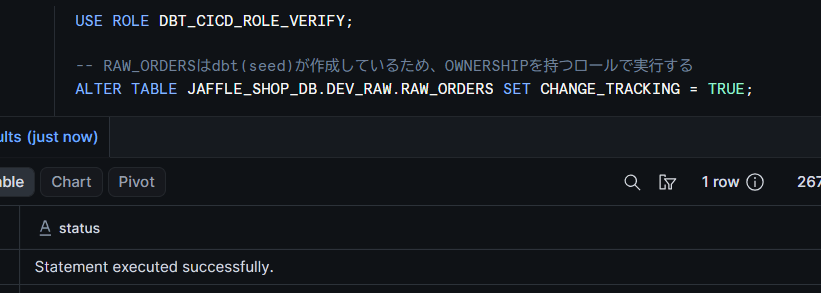
Set CHANGE_TRACKING on the base table
-- RAW_ORDERS is created by dbt (seed), so execute with the role that holds OWNERSHIP

ALTER TABLE JAFFLE_SHOP_DB.RAW.RAW_ORDERS SET CHANGE_TRACKING = TRUE;
Note:
ALTER TABLE ... SET CHANGE_TRACKING = TRUErequiresOWNERSHIPof the target table. In the jaffle-shop environment,RAW.RAW_ORDERSis a table created by the dbt seed underDBT_CICD_ROLE, so execute with that role (or a role higher in the role hierarchy).
Add the dynamic_table model file
Create models/marts/dt_orders_scheduler_demo.sql as a new file and place the model there.
Trying It Out
Run and verify
Run dbt run with scheduler='DISABLE' in the config.
dbt run --select dt_orders_scheduler_demo
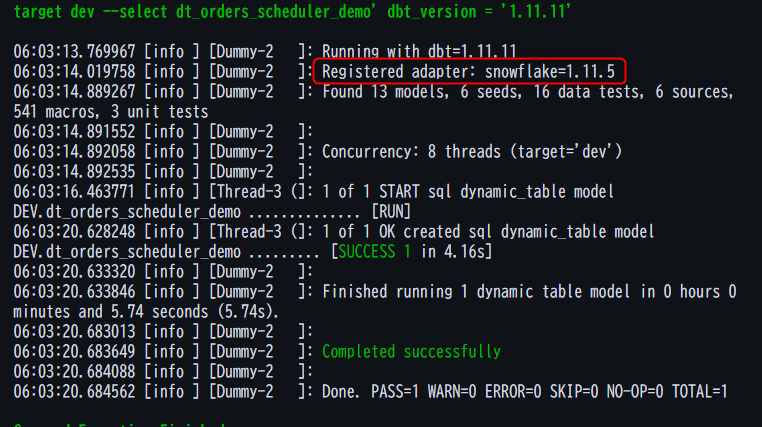
In dbt run, ALTER DYNAMIC TABLE ... REFRESH is issued in addition to the SQL for changing the Dynamic Table settings.
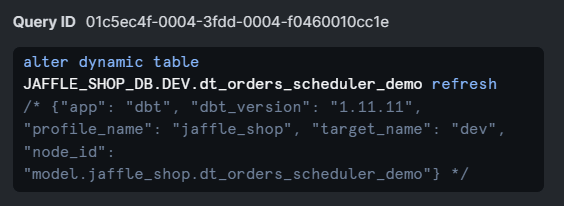
Also verify with SHOW DYNAMIC TABLES that the scheduler column is DISABLE and target_lag is NULL.
SHOW DYNAMIC TABLES LIKE 'DT_ORDERS_SCHEDULER_DEMO' IN DATABASE JAFFLE_SHOP_DB;
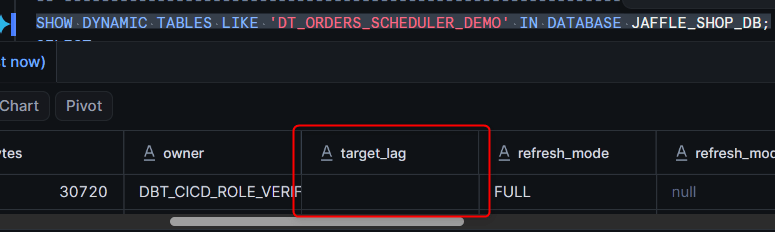
Comparing the behavior of ENABLE and DISABLE yields the following.
| Setting | Refresh Trigger | Behavior When Refresh Is Not Executed |
|---|---|---|
scheduler: ENABLE (default) |
Automatically executed by Snowflake based on target_lag |
Continues to be refreshed automatically |
scheduler: DISABLE |
When dbt creates or modifies the model, or via an explicit ALTER DYNAMIC TABLE ... REFRESH from an external orchestrator |
No automatic refresh by Snowflake; data remains as of the last refresh |
It was confirmed that switching between Snowflake-managed automatic operation based on target_lag and dbt/external orchestrator-managed operation can be done with just a single line change in the config.
Verifying whether deletions on the source side are reflected
When operating with scheduler: DISABLE, one concern is how data changes on the base table side—especially row deletions—are reflected in the Dynamic Table. With dbt incremental models, propagating deletions requires techniques like delete+insert, but since a Dynamic Table is an object that declaratively maintains the result of its query SQL, deletions on the source side should be reflected in the query result once a refresh completes successfully.
Another thing to verify is whether a refresh is executed on a dbt run with no SQL changes. The dbt-managed refresh description in the official documentation states that each dbt run creates or modifies the Dynamic Table and then issues ALTER DYNAMIC TABLE ... REFRESH, while the model example section also says "Subsequent runs detect if the SQL is unchanged and skip the model entirely," presenting different behaviors within the same page. Note that "SQL is unchanged" here refers to the dbt model's SELECT statement and config being unchanged, and is unrelated to data changes in the source table. I will verify which behavior actually occurs.
First, confirm the row count and target rows before deletion.
-- Confirm state before deletion
SELECT COUNT(*) AS CNT FROM JAFFLE_SHOP_DB.RAW.RAW_ORDERS;
SELECT COUNT(*) AS CNT FROM JAFFLE_SHOP_DB.DEV.DT_ORDERS_SCHEDULER_DEMO;
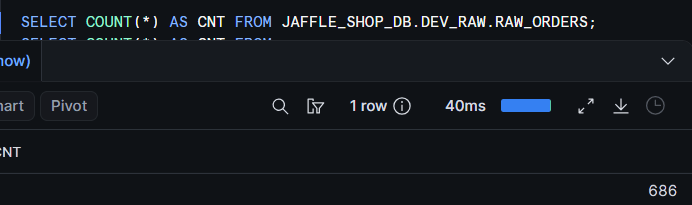
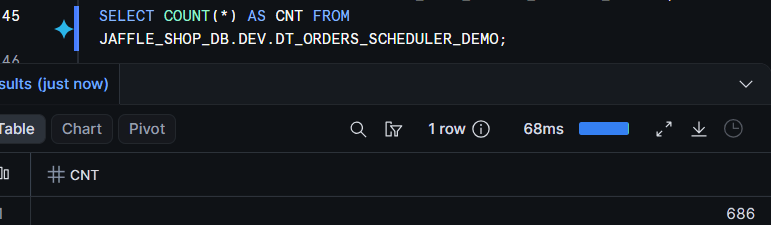
DELETE rows from the base table.
-- Delete rows on the source side
DELETE FROM JAFFLE_SHOP_DB.RAW.RAW_ORDERS
WHERE ID IN (
    SELECT ID FROM JAFFLE_SHOP_DB.RAW.RAW_ORDERS LIMIT 10
);
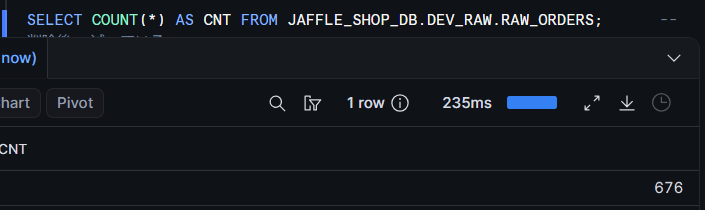
Note: What is being deleted here is source data loaded by seed. After verification, it can be restored by re-running the
seedcommand (with--vars '{load_source_data: true}').
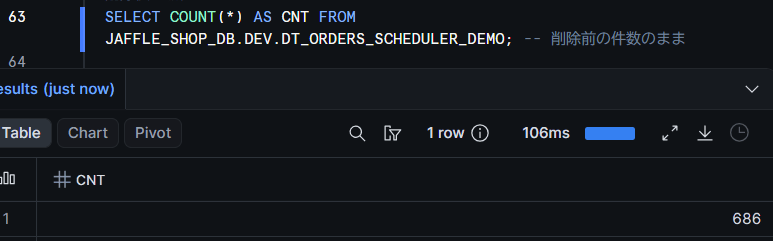
At this point, checking the Dynamic Table side shows that because of scheduler: DISABLE, no automatic refresh by Snowflake has run, and the row count remains as it was before deletion.
-- Immediately after DELETE: not yet reflected in Dynamic Table
SELECT COUNT(*) AS CNT FROM JAFFLE_SHOP_DB.DEV.DT_ORDERS_SCHEDULER_DEMO;
Next, run dbt run without changing the model SQL.
dbt run --select dt_orders_scheduler_demo
-- After dbt run with no SQL changes: deletion is reflected
SELECT COUNT(*) AS CNT FROM JAFFLE_SHOP_DB.DEV.DT_ORDERS_SCHEDULER_DEMO;
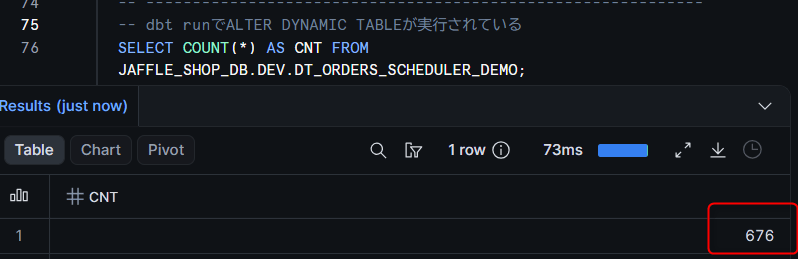
As a result of the verification, the refresh was executed even on a dbt run with no SQL changes, and the source-side deletion was reflected in the Dynamic Table (observed result as of dbt Core 1.11.11, July 24, 2026). This behavior aligns with the dbt-managed refresh description (issuing REFRESH on each dbt run) rather than the model example section's statement that "models are skipped if SQL is unchanged."
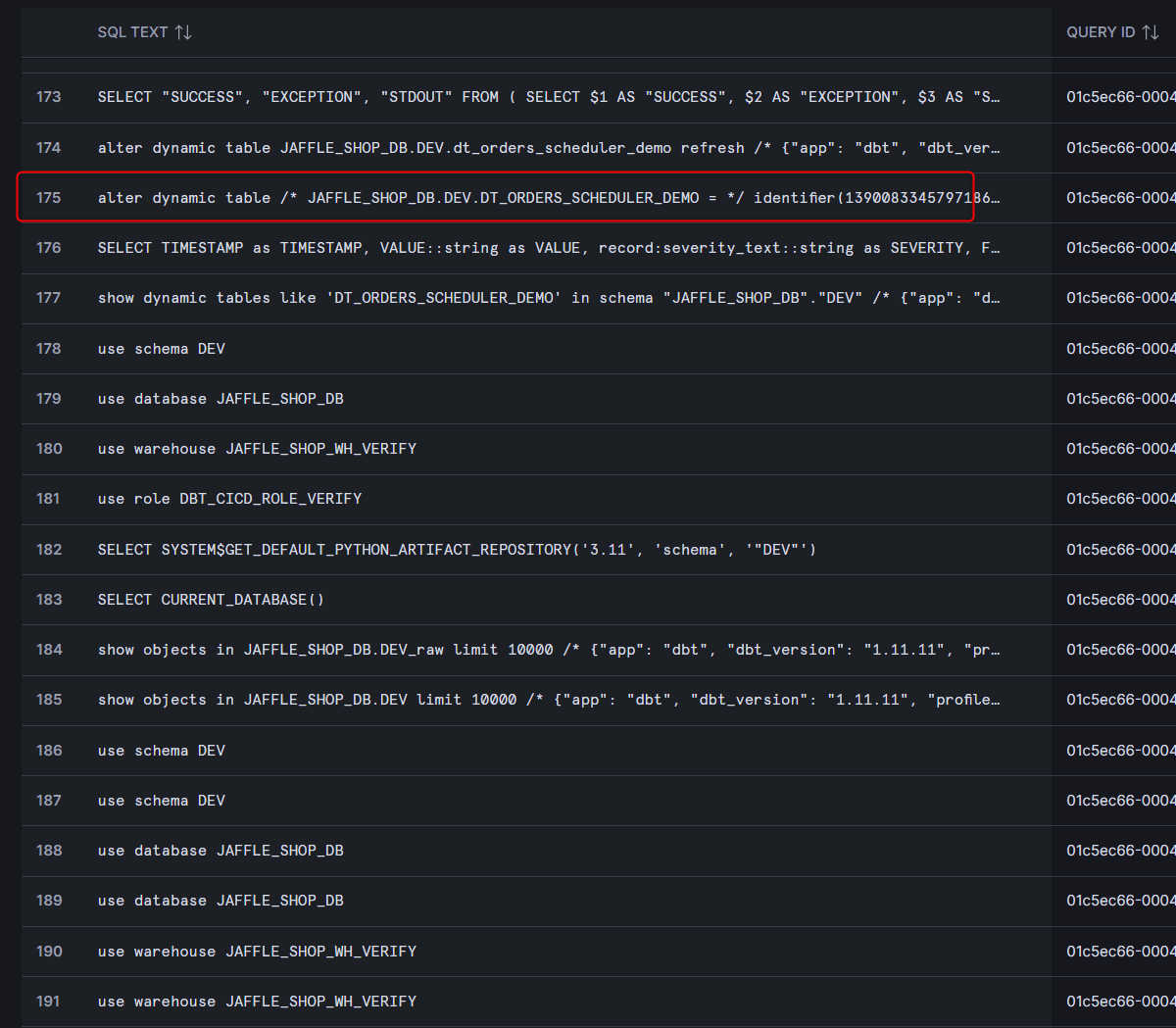
Checking the SQL issued in Query History, this dbt run issued alter dynamic table ... refresh against the existing Dynamic Table, and no CREATE OR REPLACE recreation was performed. This confirms that dbt executes only the refresh for models with unchanged SQL.
Note that if you want to reflect changes without going through dbt, you can explicitly execute a refresh from an orchestrator such as Airflow or Snowflake Tasks.
-- Explicit refresh (when executing directly from an orchestrator)
ALTER DYNAMIC TABLE JAFFLE_SHOP_DB.DEV.DT_ORDERS_SCHEDULER_DEMO REFRESH;
Note on permissions: Executing
ALTER DYNAMIC TABLE ... REFRESHrequiresOPERATE(orOWNERSHIP) privilege on the target Dynamic Table. For roles dedicated to day-to-day refreshes, consider a least-privilege design that usesOPERATErather than granting unnecessaryOWNERSHIP.
The behavior before and after deletion is summarized as follows.
| Timing | Base Table | Dynamic Table (scheduler: DISABLE) |
|---|---|---|
| Immediately after DELETE | Deleted | Not yet reflected (remains as of last refresh) |
After dbt run with no SQL changes |
Deleted | Deletion reflected, matching the base table |
Dynamic Tables naturally reflect source-side deletions in the result once a refresh is executed. There is no need to write your own deletion propagation logic as with incremental models. With scheduler: DISABLE, no automatic refresh is performed by Snowflake, so dbt run or an explicit ALTER DYNAMIC TABLE ... REFRESH is the only trigger for a refresh—confirming the ease of control.
Note: Since the official documentation still contains a statement that models are skipped when SQL is unchanged, behavior may vary depending on the dbt or adapter version. When incorporating this into operations, it is recommended to confirm that REFRESH is being issued in the execution logs of your own environment.
Note: This verification was conducted with
refresh_mode='FULL'. For deletion propagation withINCREMENTAL, it is a prerequisite that the Dynamic Table's query is eligible for incremental refresh and that change tracking information from upstreamCHANGE_TRACKINGis available.
Comparison with the old workaround
Placing the hook-based implementation from the previous article side by side with the new scheduler config specification makes the difference in simplicity clear.
Before (pre_hook/post_hook workaround)
pre_hook=[
    "ALTER DYNAMIC TABLE IF EXISTS {{ this }} SET SCHEDULER = ENABLE TARGET_LAG = DOWNSTREAM"
],
post_hook=[
    "ALTER DYNAMIC TABLE {{ this }} REFRESH",
    "ALTER DYNAMIC TABLE {{ this }} SET SCHEDULER = DISABLE"
]
After (scheduler config)
scheduler='DISABLE'
The implementation that toggled the SCHEDULER attribute back and forth via hooks has been replaced by a single config line, scheduler='DISABLE'. This eliminates unnecessary state transitions and dependencies on execution order caused by hooks, improving the maintainability of the definition.
Note: In current Snowflake,
SCHEDULER = DISABLEandTARGET_LAGcannot be used together. The hook-based implementation from the previous article (a configuration that switches toSCHEDULER = DISABLEwhile keepingTARGET_LAG = DOWNSTREAMset) was presented as the verification result at the time and is not recommended for new adoption. If usingscheduler: DISABLE, removetarget_lagfrom the config.
Closing
I verified the SCHEDULER attribute of Dynamic Tables using dbt's scheduler config. Summarizing the issues from the previous article and the current state:
| Point in Time | SCHEDULER Control in dbt |
|---|---|
| March 31, 2026 (verification at the time of the previous article, dbt-snowflake v1.9.2) | Not supported. A workaround using pre_hook/post_hook was required |
| July 24, 2026 (this verification, dbt Core 1.11.11) | Can be controlled by writing a single line scheduler: ENABLE / DISABLE in the config (requires dbt-snowflake v1.11.5 or higher) |
As I wrote in the previous article, "the right approach is to wait for official support"—and the wait paid off. Since there is no longer any need to forcefully rewrite attributes via hooks, if you want to manage Dynamic Tables under dbt, using the scheduler config straightforwardly is the recommended approach.
Note that when a Dynamic Table with SCHEDULER = DISABLE is manually refreshed on its own, only that Dynamic Table is refreshed and the refresh does not cascade to upstream or downstream Dynamic Tables (with SCHEDULER = ENABLE, a manual refresh cascades to upstream Dynamic Tables, but stops at any table with SCHEDULER = DISABLE). Therefore, when operating a group of Dynamic Tables with dependencies under scheduler: DISABLE, execution order, re-execution on failure, and monitoring must be designed on the orchestrator side using dbt, Airflow, or similar tools. Please make use of this based on your requirements.
I hope this article is helpful to someone!