
[Snowflake] I Tried Reading an Iceberg Table with DuckDB Without Starting a Warehouse

This page has been translated by machine translation. View original
Introduction
This is Kasama from the Data Business Division.
In this post, I'll turn the tables aggregated for a dashboard (hereafter, the gold tables) into Snowflake-managed Iceberg tables and display a dashboard with dbt Charts (DuckDB). I'll also confirm that no Snowflake warehouse runs when the dashboard is displayed.
Prerequisites
Background
When a BI tool is connected live to Snowflake, the BI tool runs queries on Snowflake when the dashboard is opened. A suspended warehouse is started by the query execution, and Snowflake bills a minimum of 60 seconds of credits each time it starts.
If you make the gold tables Iceberg tables, engines outside Snowflake can read the tables through the Iceberg REST catalog of Snowflake Horizon Catalog. DuckDB receives the location of the table metadata and temporary S3 credentials from the Horizon catalog, and reads the Parquet files directly from S3. As a result, no Snowflake warehouse is used to execute queries. Horizon API calls are billed at 0.5 credits per million calls.
Architecture
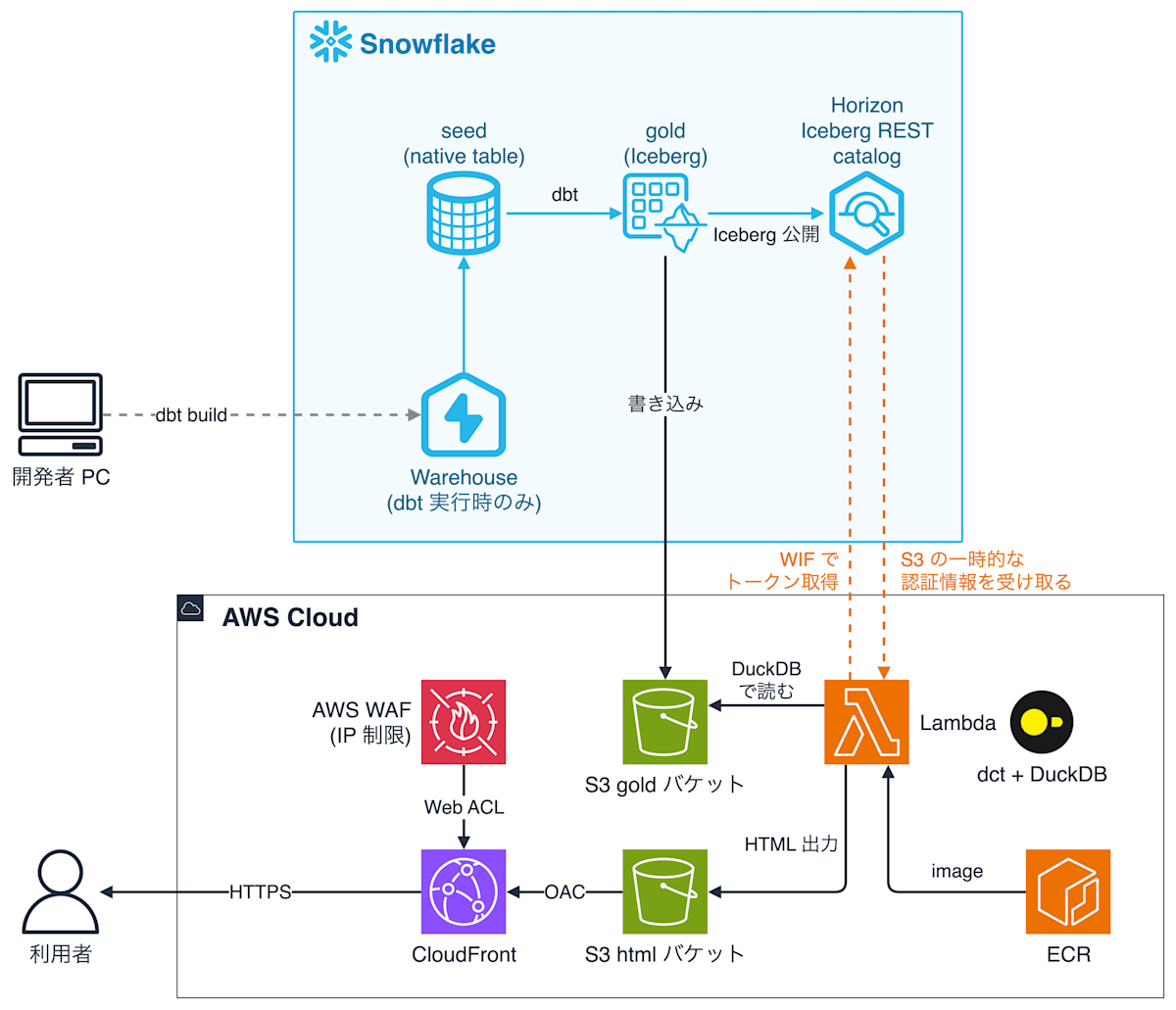
- dbt loads the sample CSVs into Snowflake tables with seed, then aggregates those tables to create the gold Iceberg tables. The data files and metadata of gold are written to the S3 bucket for gold
- Run the Lambda manually. The Lambda obtains a Horizon access token, creates HTML with
dct render, and puts it on S3. The dashboard uses dbt Charts, with DuckDB specified as the connection target - Users open the HTML at the CloudFront URL. The IP addresses of the connection sources are restricted by AWS WAF attached to CloudFront
This time we output static HTML, so no queries are executed when a user opens the dashboard. When the data is updated, re-run the Lambda to regenerate the HTML. The permission to read the gold data is determined per Lambda service user, and everyone who opens the dashboard from an allowed IP address sees the same content.
Lambda authentication
The Lambda authenticates with Snowflake's workload identity federation (WIF). It signs an STS GetCallerIdentity request with the Lambda execution role, sends that signature to the Horizon token endpoint, and receives an access token. On the Snowflake side, the ARN of the Lambda execution role is registered to the service user. To avoid storing secrets, I built the processing that obtains the token via AWS WIF into the Lambda side. For AWS WIF, Snowflake recommends using a JWT issued by AWS outbound identity federation instead of GetCallerIdentity. Outbound identity federation is not enabled in the AWS account used for this verification, so I used the GetCallerIdentity method.
If you want a simpler implementation, there are also methods of obtaining an access token with a PAT or key-pair authentication, whose steps are described in the Horizon documentation.
Requirements
- Terraform 1.10 or later (Snowflake provider 2.22, AWS provider 5.x)
- AWS CLI, Docker (or a compatible CLI), uv, Snowflake CLI
- dbt-core 1.12.5, dbt-snowflake 1.12.4
- dbt Charts (
dbt-charts) 0.10.0
Implementation
The implementation code is stored on GitHub.
74_snowflake_iceberg_gold_dbt_charts/
├── dbt/
│   ├── dbt_project.yml
│   ├── profiles.yml
│   ├── dbt_charts.yml     # dbt Charts の接続先
│   ├── charts/order_overview.yml  # dbt Charts のボード
│   ├── macros/generate_schema_name.sql
│   ├── seeds/             # サンプルの CSV(jaffle_shop の注文・顧客・支払いの一部)
│   └── models/gold/       # order_status_summary, payment_method_summary, customer_orders
├── lambda/
│   ├── Dockerfile
│   └── handler.py
├── sql/
│  └── setup.sql     # ACCOUNTADMIN で実行する(ロール・service user)
└── terraform/
  ├── snow-infra/    # データベース・ウェアハウス・External Volume・ロール・service user
  ├── aws/        # S3・IAM ロール・ECR・Lambda・CloudFront・WAF
  └── modules/      # リソースの種類ごとのモジュール(aws/ と snow/)
setup.sql
setup.sql creates, as ACCOUNTADMIN, the deployment role and service user (key-pair authentication) used by Terraform and dbt.
Terraform
Terraform splits its state into two layers, snow-infra and aws, and applies them in the order snow-infra, then aws. The snow-infra layer assembles the IAM role ARN and creates the Snowflake objects first, and the aws layer creates the IAM role by putting the IAM user and External ID generated by Snowflake into the trust policy. The resource definitions are placed in terraform/modules/ as modules for each resource type.
In storage.tf of the snow-infra layer, the names of the S3 bucket and IAM role are decided, and the External Volume module is called. The aws layer creates the IAM role with this name, so the ARN registered in Snowflake matches the actual role.
The External Volume module defines the S3 location where the files of the gold Iceberg tables are placed.
The reader_role module defines the role the Lambda uses when reading gold. The role CM_KASAMA_ICEBERG_BI_READER is granted only USAGE on the database and the GOLD schema, and SELECT as a future grant on the Iceberg tables in GOLD. Because the gold tables are created by dbt after Terraform's apply, I use a future grant.
The service_user module defines the service user the Lambda uses to log in to Snowflake. The ARN of the Lambda execution role is registered to the service user, so that only the Lambda running with that execution role can log in as this service user.
The lambda_container module of the aws layer defines the ECR repository and the Lambda function. The only permission attached to the Lambda execution role is s3:PutObject to the S3 bucket where the HTML is placed. The Horizon URL, catalog name (the Snowflake database name), and role name are set as environment variables by the aws layer from the outputs of the snow-infra layer.
The cloudfront_site module defines the CloudFront distribution that serves the HTML bucket via OAC, as well as the AWS WAF IP set and Web ACL. The IP addresses from the variable allowed_cidrs are registered in the IP set. The Web ACL allows only requests from IP addresses in the IP set and returns 403 for all other requests. WAF attached to CloudFront must be created in us-east-1. Therefore, I added an AWS provider for us-east-1 (alias = "us_east_1") to versions.tf of the aws layer and passed it to the module.
For the other files (S3 and warehouse), please refer to GitHub.
dbt
In dbt_project.yml, +table_format: iceberg and +external_volume: CM_KASAMA_ICEBERG_BI_GOLD_VOL are specified for the gold models. The seed tables are created as regular tables in the SEED schema.
The seeds are 20 orders, 10 customers, and 23 payments from jaffle_shop. There are three gold models. order_status_summary counts orders by status, and payment_method_summary totals payment amounts by payment method. customer_orders joins customers, orders, and payments, and aggregates the number of orders, the last order date, and the revenue per customer.
In dbt_charts.yml, the Horizon catalog is attached to DuckDB with type: iceberg, and the connection uses the access token in HORIZON_TOKEN. The official dbt Charts documentation has no example of attaching an Iceberg REST catalog in a DuckDB source. dbt Charts turns the secrets and attach settings into DuckDB CREATE SECRET and ATTACH SQL and executes them, so the options of DuckDB's Iceberg extension can be written as they are. This time I confirmed that it works with DuckDB 2.0.0. When access_delegation_mode: vended_credentials is specified, DuckDB receives temporary S3 credentials for reading the gold files from Horizon. For that reason, the Lambda execution role is not granted permission to read the gold bucket.
order_overview.yml is the board definition. The first row has KPIs for revenue, number of orders, and average order value; the second row has a donut chart of revenue by payment method and a bar chart of the number of orders by status; and the third row has a table of revenue by customer.
Lambda
In handler.py, the access token obtained by get_horizon_token() is put into the environment variable HORIZON_TOKEN, and dct render is executed. In the Lambda execution environment, only /tmp is writable, so the board definition files are copied to /tmp/dashboard, and dct is run with HOME=/tmp.
In the Dockerfile, dbt Charts and its dependency packages, along with the DuckDB extensions (iceberg, httpfs, avro), are installed at build time. Together they exceed the size limit of a zip Lambda, so the Lambda is created as a container image.
Deployment
1. Create the role and service user
Create a key pair, and run sql/setup.sql with a connection that can use ACCOUNTADMIN (such as browser SSO). Snowflake CLI applies the SNOWFLAKE_* environment variables to all connections, so run step 1 before the export in step 2. setup.sql creates the role and a service user with the public key registered.
KEY_PATH=~/.snowflake/cm_kasama_iceberg_bi_rsa_key.p8
KEY_PASSPHRASE='<passphrase>'
openssl genrsa 2048 | KEY_PASSPHRASE="$KEY_PASSPHRASE" openssl pkcs8 -topk8 -v2 aes-256-cbc -passout env:KEY_PASSPHRASE -out "$KEY_PATH"
chmod 600 "$KEY_PATH"
PUBLIC_KEY=$(KEY_PASSPHRASE="$KEY_PASSPHRASE" openssl rsa -in "$KEY_PATH" -passin env:KEY_PASSPHRASE -pubout 2>/dev/null | grep -v -- '-----' | tr -d '\n')

snow sql -c <admin-connection> --role ACCOUNTADMIN -D "public_key=${PUBLIC_KEY}" -f sql/setup.sql
2. Create the Snowflake objects and the ECR repository
Apply the snow-infra layer, then create only the ECR repository of the aws layer first. This is because an image is needed in ECR when creating the Lambda.
export AWS_PROFILE='<aws-profile>'
export SNOWFLAKE_ORGANIZATION_NAME='<snowflake-organization-name>'
export SNOWFLAKE_ACCOUNT_NAME='<snowflake-account-name>'
export SNOWFLAKE_USER='CM_KASAMA_ICEBERG_BI_DEPLOY_SVC'
export SNOWFLAKE_AUTHENTICATOR='SNOWFLAKE_JWT'
export SNOWFLAKE_PRIVATE_KEY_PATH="$KEY_PATH"
export SNOWFLAKE_PRIVATE_KEY_PASSPHRASE="$KEY_PASSPHRASE"
export SNOWFLAKE_PRIVATE_KEY="$(cat "$KEY_PATH")"
export TF_VAR_snowflake_account_identifier="${SNOWFLAKE_ORGANIZATION_NAME}-${SNOWFLAKE_ACCOUNT_NAME}"
export TF_VAR_allowed_cidrs='["<your-ip>/32"]'
# dbt Labs と HashiCorp へ利用統計を送信しない
export DO_NOT_TRACK=1
export CHECKPOINT_DISABLE=1

for layer in snow-infra aws; do terraform -chdir="terraform/${layer}" init; done
terraform -chdir=terraform/snow-infra apply
terraform -chdir=terraform/aws apply -target=module.dashboard_lambda.aws_ecr_repository.this
3. Build and push the Lambda image
ECR_URL=$(terraform -chdir=terraform/aws output -raw ecr_repository_url)
aws ecr get-login-password --region ap-northeast-1 | docker login --username AWS --password-stdin "${ECR_URL%%/*}"
docker build --platform linux/arm64 -f lambda/Dockerfile -t "${ECR_URL}:latest" .
docker push "${ECR_URL}:latest"
The Lambda references the image by digest. After rebuilding and pushing the image, re-running terraform -chdir=terraform/aws apply updates the Lambda's image.
4. Create the remaining resources
terraform -chdir=terraform/aws apply
5. Create the seed and gold tables
cd dbt
uv sync
uv run dbt build --profiles-dir .
cd ..
When dbt build finishes, data/ and metadata/ for each table are created under _dbt/GOLD/ in the S3 bucket for gold.
Post-deployment verification
Displaying the dashboard
Run the Lambda to output the HTML, and check the CloudFront URL.
aws lambda invoke --function-name cm-kasama-iceberg-bi-dashboard /dev/stdout
terraform -chdir=terraform/aws output -raw dashboard_url
The Lambda returned {"status": "ok"}, and terraform output displayed the CloudFront URL.
{"status": "ok"}{
    "StatusCode": 200,
    "ExecutedVersion": "$LATEST"
}
https://xxxxxxxxxxxxxx.cloudfront.net/
When I opened the CloudFront URL from an IP address included in allowed_cidrs, the following dashboard was displayed.
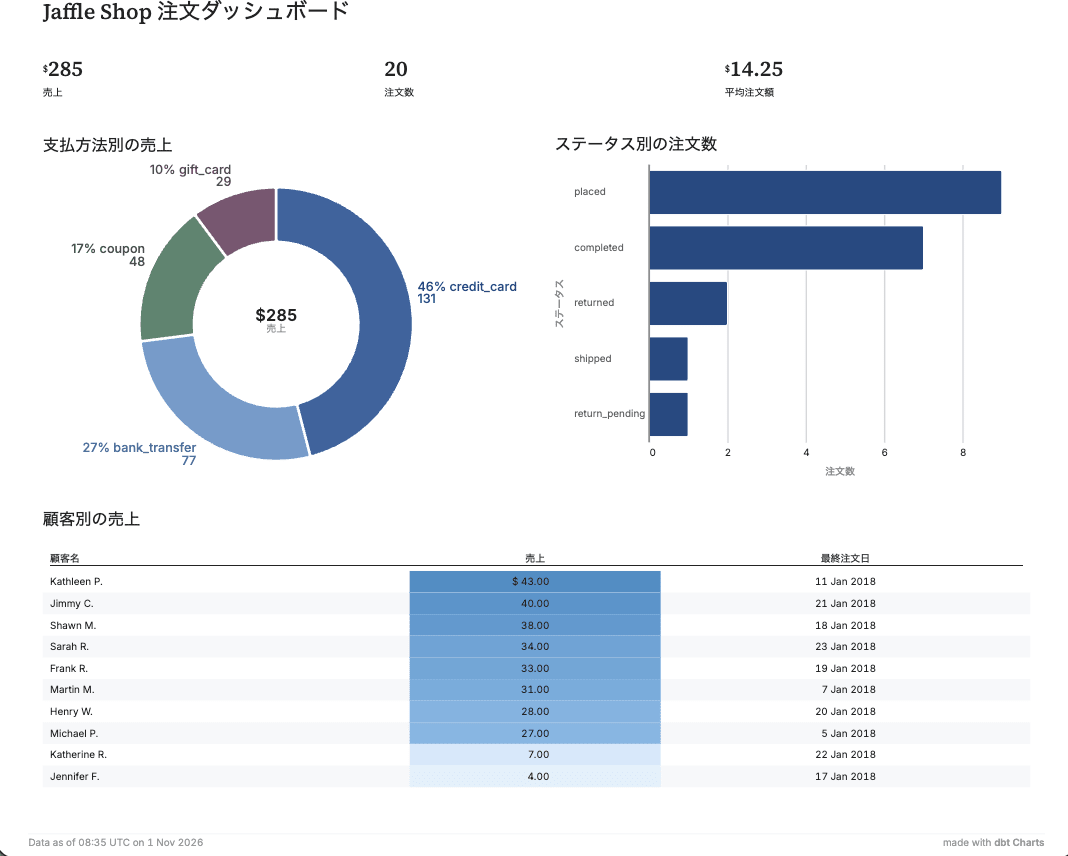
When I sent a request with curl from an IP address that was not allowed, 403 was returned.
curl -s -o /dev/null -w "%{http_code}\n" https://xxxxxxxxxxxxxx.cloudfront.net/
403
Confirming that no warehouse is used
Check the number of logins and the number of query executions of the Lambda's service user in ACCOUNT_USAGE. LOGIN_HISTORY can take up to 2 hours to reflect, so run this some time after the Lambda execution.
USE ROLE ACCOUNTADMIN;
SELECT
  (SELECT COUNT(*) FROM SNOWFLAKE.ACCOUNT_USAGE.LOGIN_HISTORY
   WHERE USER_NAME = 'CM_KASAMA_ICEBERG_BI_DASHBOARD_SVC'
    AND EVENT_TIMESTAMP >= DATEADD(DAY, -1, CURRENT_TIMESTAMP())) AS login_count,
  (SELECT COUNT(*) FROM SNOWFLAKE.ACCOUNT_USAGE.QUERY_HISTORY
   WHERE USER_NAME = 'CM_KASAMA_ICEBERG_BI_DASHBOARD_SVC'
    AND START_TIME >= DATEADD(DAY, -1, CURRENT_TIMESTAMP())) AS all_queries,
  (SELECT COUNT(WAREHOUSE_NAME) FROM SNOWFLAKE.ACCOUNT_USAGE.QUERY_HISTORY
   WHERE USER_NAME = 'CM_KASAMA_ICEBERG_BI_DASHBOARD_SVC'
    AND START_TIME >= DATEADD(DAY, -1, CURRENT_TIMESTAMP())) AS warehouse_queries;
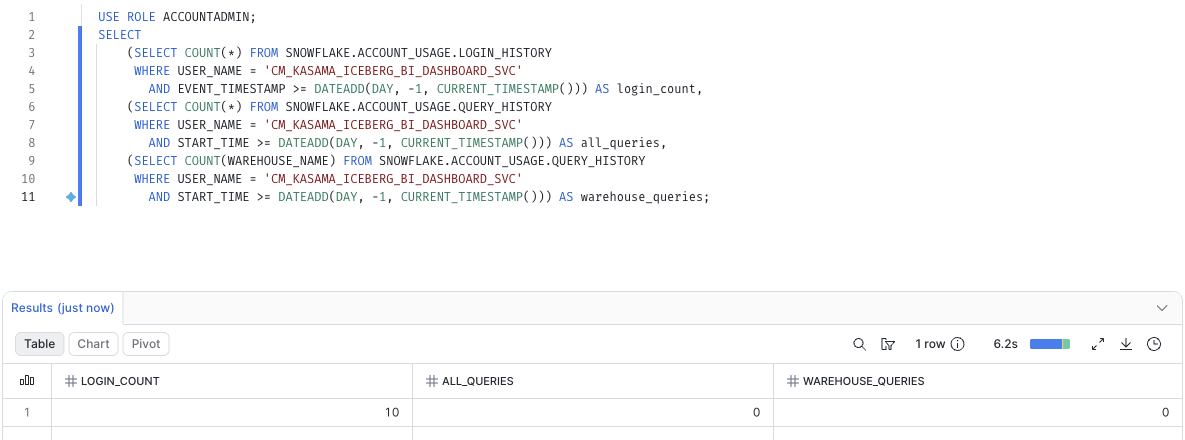
The Lambda's service user had 10 logins recorded, but 0 query executions.
Conclusion
This time I turned the dashboard tables into Snowflake-managed Iceberg tables and output a dashboard with dbt Charts and DuckDB on Lambda. If you want a setup where users can operate filters or see the latest data every time they open the dashboard, run dct serve on something like ECS and execute queries in DuckDB on each operation. With an operation that loads data, such as a BI tool's extract, the warehouse starts only when the extract is refreshed, so the cost this setup can save is small. This setup is a sample for verification, so if you use it in production, please review it according to your permission and operational requirements. I hope this was helpful.