I tried masking PII only when using Snowflake CoCo with Snowflake's IS_AGENT_ACTIVATED

This page has been translated by machine translation. View original
It's Kawabata.
AI agents such as Snowflake CoCo and Snowflake CoWork on Snowsight are increasingly accessing internal data.
IS_AGENT_ACTIVATED can handle cases like "analysts who write SQL directly want to see raw data, but PII should be masked when accessed via agents."
By incorporating this function into masking policy conditions, you can apply masking only when using agents with the same role, without masking during regular SQL analysis.
Since I actually verified the behavior with both Snowflake CoCo and Snowflake CoWork on Snowsight, I'll summarize the steps and results.
Feature Overview
What is IS_AGENT_ACTIVATED
IS_AGENT_ACTIVATED is a context function that determines whether the current session is being executed by an AI agent. It is called via the SYS_CONTEXT function.
-- Determine whether any agent is active
SYS_CONTEXT('SNOWFLAKE$CURRENT', 'IS_AGENT_ACTIVATED')

-- Determine whether a specific agent type is active
SYS_CONTEXT('SNOWFLAKE$CURRENT', 'IS_AGENT_ACTIVATED', 'CORTEX_CODE_SNOWSIGHT')
The return value is VARCHAR type ('TRUE' or 'FALSE'). When treating it as a BOOLEAN value, cast it with ::BOOLEAN.
Supported Agent Types
| Agent Type | Description |
|---|---|
SNOWFLAKE_INTELLIGENCE |
Snowflake CoWork agent |
CORTEX_CODE_SNOWSIGHT |
Snowflake CoCo on Snowsight |
CORTEX_CODE_CLI |
Snowflake CoCo for CLI client |
CORTEX_CODE_DESKTOP |
Snowflake CoCo for desktop client |
Combination with Masking Policies
By using IS_AGENT_ACTIVATED as a condition in the CASE expression of a masking policy, you can achieve control that only masks access via agents.
-- Masking policy targeting all agents
CREATE OR REPLACE MASKING POLICY mask_pii_for_all_agents AS (val STRING)
RETURNS STRING ->
CASE
  WHEN SYS_CONTEXT('SNOWFLAKE$CURRENT', 'IS_AGENT_ACTIVATED')::BOOLEAN = TRUE
  THEN '***MASKED***'
  ELSE val
END;
Simulation with POLICY_CONTEXT
Before applying a masking policy, you can simulate the behavior during agent execution using the POLICY_CONTEXT function. Specify the agent type in the SNOWFLAKE$CURRENT_ACTIVATED_AGENT_TYPES argument.
-- Simulate access from Snowflake CoCo on Snowsight
EXECUTE USING POLICY_CONTEXT(
  SNOWFLAKE$CURRENT_ACTIVATED_AGENT_TYPES => ('CORTEX_CODE_SNOWSIGHT')
)
AS SELECT * FROM masking_test_db.sch.customers;
Limitations
- Filtering by individual agents using
database,schema, andnameparameters is supported only for SNOWFLAKE_INTELLIGENCE. Filter arguments cannot be used with other agent types - Since the return value is VARCHAR type,
::BOOLEANcast is required when treating it as a BOOLEAN value - The constraints of masking policies themselves (such as not being able to set multiple policies on the same column) still apply
Prerequisites
- Snowflake: AWS Tokyo region, Enterprise Edition
- Status of this feature: No Preview notation in official documentation as of June 30, 2026
- Required privileges: ACCOUNTADMIN role (for verification)
- CoCo: Must be available on Snowsight
- Snowflake CoWork: Must be available
Preparation
Creating the Verification Database and Table
Create a verification table containing PII.
Creating the verification table
USE ROLE ACCOUNTADMIN;

-- Verification database
CREATE DATABASE IF NOT EXISTS masking_test_db;
CREATE SCHEMA IF NOT EXISTS masking_test_db.sch;
USE SCHEMA masking_test_db.sch;
CREATE OR REPLACE TABLE customers (
    customer_id NUMBER COMMENT 'Customer ID',
    full_name VARCHAR COMMENT 'Full name',
    email VARCHAR COMMENT 'Email address',
    phone_number VARCHAR COMMENT 'Phone number',
    date_of_birth DATE COMMENT 'Date of birth',
    annual_salary NUMBER(10, 2) COMMENT 'Annual salary',
    notes VARCHAR COMMENT 'Notes (no confidential information)'
);
-- Insert dummy data for verification (20 records)
INSERT INTO customers VALUES
    (1, 'John Smith', 'john.smith@example.com', '+1-555-0101', '1985-03-15', 85000.00, 'VIP customer'),
    (2, 'Jane Doe', 'jane.doe@example.com', '+1-555-0102', '1990-07-22', 72000.00, 'Regular customer'),
    (3, 'Michael Johnson', 'michael.j@example.com', '+1-555-0103', '1978-11-03', 95000.00, NULL),
    (4, 'Emily Williams', 'emily.w@example.com', '+1-555-0104', '1992-01-30', 68000.00, 'New account'),
    (5, 'David Brown', 'david.b@example.com', '+1-555-0105', '1988-05-18', 91000.00, NULL),
    (6, 'Sarah Davis', 'sarah.d@example.com', '+1-555-0106', '1995-09-07', 63000.00, 'Preferred customer'),
    (7, 'Robert Miller', 'robert.m@example.com', '+1-555-0107', '1982-12-25', 78000.00, NULL),
    (8, 'Lisa Wilson', 'lisa.w@example.com', '+1-555-0108', '1993-04-11', 82000.00, 'Corporate account'),
    (9, 'James Moore', 'james.m@example.com', '+1-555-0109', '1975-08-19', 105000.00, NULL),
    (10, 'Amanda Taylor', 'amanda.t@example.com', '+1-555-0110', '1987-02-14', 74000.00, 'Trial period'),
    (11, 'Christopher Anderson', 'chris.a@example.com', '+1-555-0111', '1991-06-28', 88000.00, NULL),
    (12, 'Jennifer Thomas', 'jennifer.t@example.com', '+1-555-0112', '1984-10-05', 71000.00, 'Seasonal buyer'),
    (13, 'Daniel Jackson', 'daniel.j@example.com', '+1-555-0113', '1996-03-20', 66000.00, NULL),
    (14, 'Jessica White', 'jessica.w@example.com', '+1-555-0114', '1989-07-08', 93000.00, 'Loyalty member'),
    (15, 'Matthew Harris', 'matthew.h@example.com', '+1-555-0115', '1980-11-15', 99000.00, NULL),
    (16, 'Ashley Martin', 'ashley.m@example.com', '+1-555-0116', '1994-01-22', 70000.00, 'Student discount'),
    (17, 'Andrew Garcia', 'andrew.g@example.com', '+1-555-0117', '1986-05-30', 110000.00, NULL),
    (18, 'Megan Martinez', 'megan.m@example.com', '+1-555-0118', '1997-09-12', 67000.00, 'Referral program'),
    (19, 'Joshua Robinson', 'joshua.r@example.com', '+1-555-0119', '1983-12-01', 86000.00, NULL),
    (20, 'Lauren Clark', 'lauren.c@example.com', '+1-555-0120', '1990-04-25', 79000.00, 'Premium member');
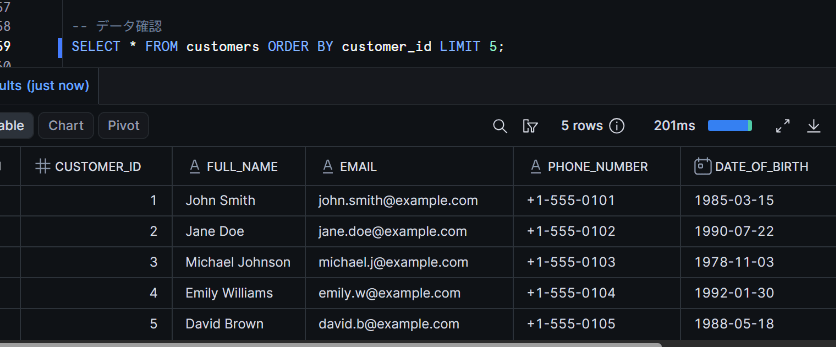
SELECT * FROM customers ORDER BY customer_id LIMIT 5;
Creating Masking Policies
Create two patterns of masking policies.
Creating masking policies
Pattern 1: Targeting all agents
This policy masks access via any agent, regardless of the agent type.
CREATE OR REPLACE MASKING POLICY masking_test_db.sch.mask_pii_for_all_agents AS (val STRING)
RETURNS STRING ->
CASE
  WHEN SYS_CONTEXT('SNOWFLAKE$CURRENT', 'IS_AGENT_ACTIVATED')::BOOLEAN = TRUE
  THEN '***MASKED***'
  ELSE val
END;
Pattern 2: Targeting only Snowflake CoCo on Snowsight
This policy masks only access via Snowflake CoCo on Snowsight, and does not mask access via other agents (such as Snowflake CoWork). We will switch to this for later verification.
CREATE OR REPLACE MASKING POLICY masking_test_db.sch.mask_pii_for_cortex_code_snowsight AS (val STRING)
RETURNS STRING ->
CASE
  WHEN SYS_CONTEXT('SNOWFLAKE$CURRENT', 'IS_AGENT_ACTIVATED', 'CORTEX_CODE_SNOWSIGHT')::BOOLEAN = TRUE
  THEN '***MASKED***'
  ELSE val
END;
Applying Masking Policies
To keep the verification simple in this article, we apply masking policies only to the 2 columns email and phone_number among the PII. First, apply Pattern 1 (targeting all agents).
ALTER TABLE masking_test_db.sch.customers
  ALTER COLUMN email SET MASKING POLICY masking_test_db.sch.mask_pii_for_all_agents;

ALTER TABLE masking_test_db.sch.customers
  ALTER COLUMN phone_number SET MASKING POLICY masking_test_db.sch.mask_pii_for_all_agents;
Creating a Verification Role
Create a verification role MASKING_TEST_ROLE and grant the necessary privileges. By trying both direct SQL and agent-based access with this role, we can confirm that masking results differ depending on the access path even with the same role.
Creating the verification role
USE ROLE ACCOUNTADMIN;

-- Create the verification role
CREATE ROLE IF NOT EXISTS MASKING_TEST_ROLE;

-- Grant necessary privileges
GRANT USAGE ON DATABASE masking_test_db TO ROLE MASKING_TEST_ROLE;
GRANT USAGE ON SCHEMA masking_test_db.sch TO ROLE MASKING_TEST_ROLE;
GRANT SELECT ON ALL TABLES IN SCHEMA masking_test_db.sch TO ROLE MASKING_TEST_ROLE;
GRANT USAGE ON WAREHOUSE <your_warehouse_name> TO ROLE MASKING_TEST_ROLE;

-- Grant the verification role to yourself
GRANT ROLE MASKING_TEST_ROLE TO USER <your_username>;
Let's Try It
Running a Regular SQL Query with the Verification Role (Not Masked)
Switch to MASKING_TEST_ROLE and execute SQL directly from a Snowsight worksheet.
USE ROLE MASKING_TEST_ROLE;

SELECT customer_id, full_name, email, phone_number
FROM masking_test_db.sch.customers
ORDER BY customer_id
LIMIT 5;
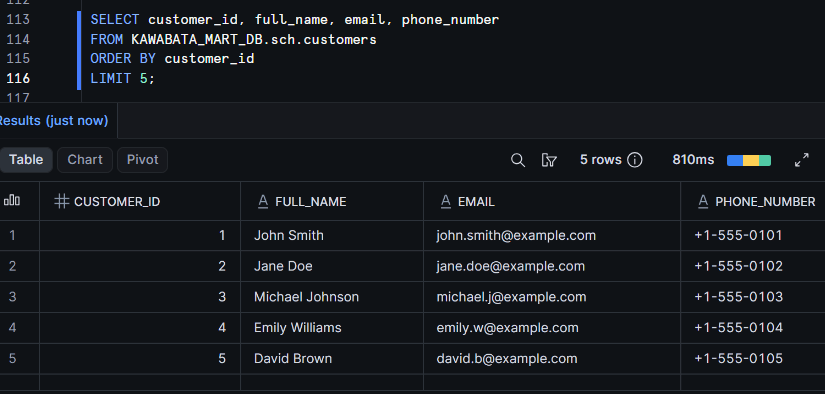
There is no issue if email and phone_number are displayed as raw data. Since it is not via an agent, IS_AGENT_ACTIVATED returns FALSE, and the original values are returned as-is in the ELSE clause of the CASE expression.
Checking via Snowflake CoCo on Snowsight with the Same Role (Masked)
With the same MASKING_TEST_ROLE, query the same table from Snowflake CoCo on Snowsight.
Verify that the role setting for CoCo is set to MASKING_TEST_ROLE.
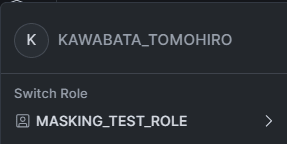
Ask CoCo something like "Please retrieve the customer ID, full name, email address, and phone number for 5 records from the masking_test_db.sch.customers table."
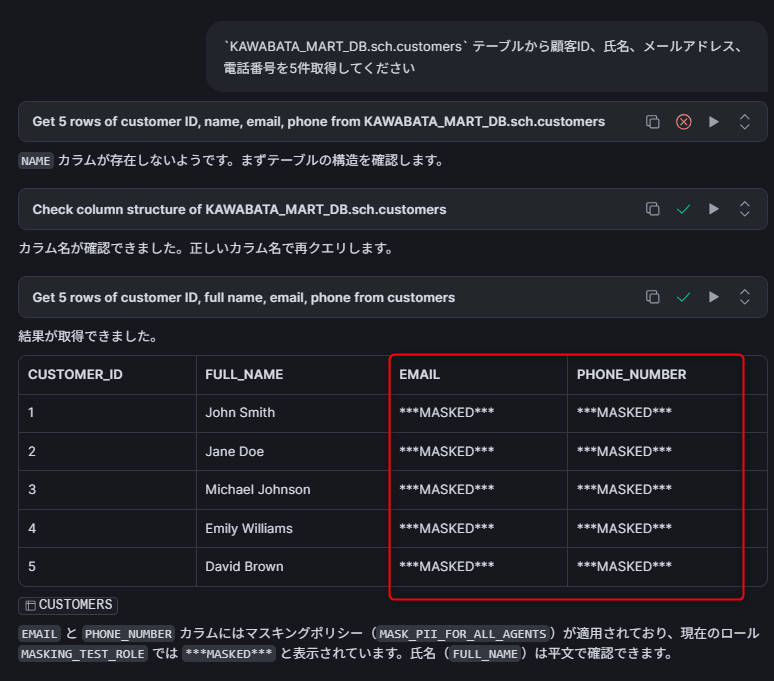
There is no issue if email and phone_number are displayed as ***MASKED***. Even when using the same MASKING_TEST_ROLE, IS_AGENT_ACTIVATED returns TRUE for access via CoCo, and masking is applied.
Checking via Snowflake CoWork with the Same Role (Masked)
With the same MASKING_TEST_ROLE, query the same table from Snowflake CoWork.
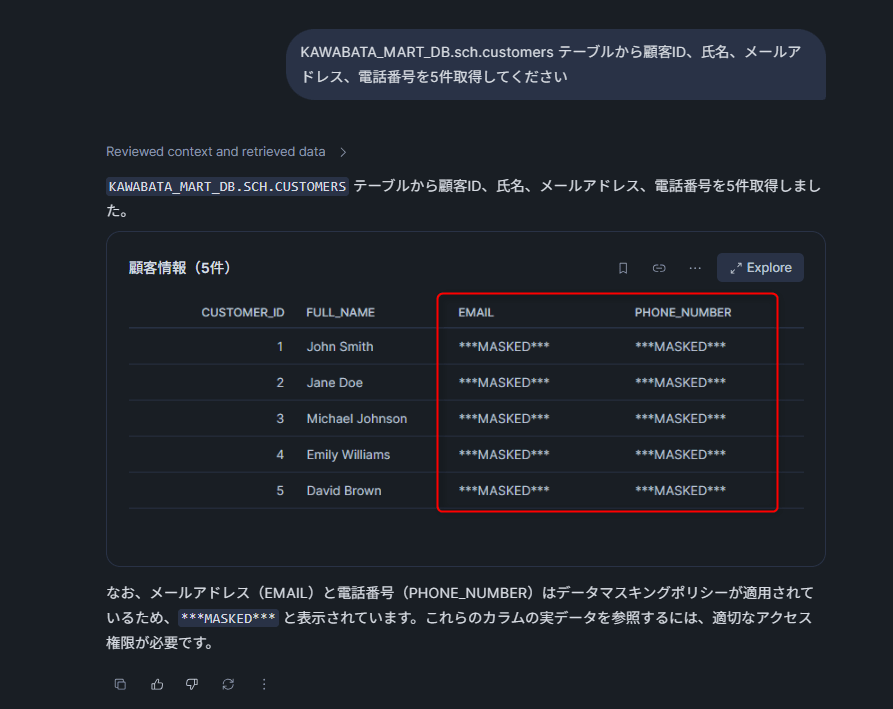
It is also fine if email and phone_number are displayed as ***MASKED***. Since Snowflake CoWork is identified as the SNOWFLAKE_INTELLIGENCE agent type, the masking policy of Pattern 1 (targeting all agents) is applied.
We confirmed that even with the same role (MASKING_TEST_ROLE), raw data is visible with direct SQL, while it is masked when accessed via an agent.
Masking Only a Specific Agent
Next, we remove Pattern 1 (targeting all agents) and switch to Pattern 2 (targeting only Snowflake CoCo on Snowsight). Masking policy changes are made with ACCOUNTADMIN.
USE ROLE ACCOUNTADMIN;

-- Remove Pattern 1
ALTER TABLE masking_test_db.sch.customers
  ALTER COLUMN email UNSET MASKING POLICY;

ALTER TABLE masking_test_db.sch.customers
  ALTER COLUMN phone_number UNSET MASKING POLICY;

-- Apply Pattern 2
ALTER TABLE masking_test_db.sch.customers
  ALTER COLUMN email SET MASKING POLICY masking_test_db.sch.mask_pii_for_cortex_code_snowsight;

ALTER TABLE masking_test_db.sch.customers
  ALTER COLUMN phone_number SET MASKING POLICY masking_test_db.sch.mask_pii_for_cortex_code_snowsight;
Snowflake CoCo on Snowsight → Masked
Query from Snowflake CoCo on Snowsight with MASKING_TEST_ROLE.
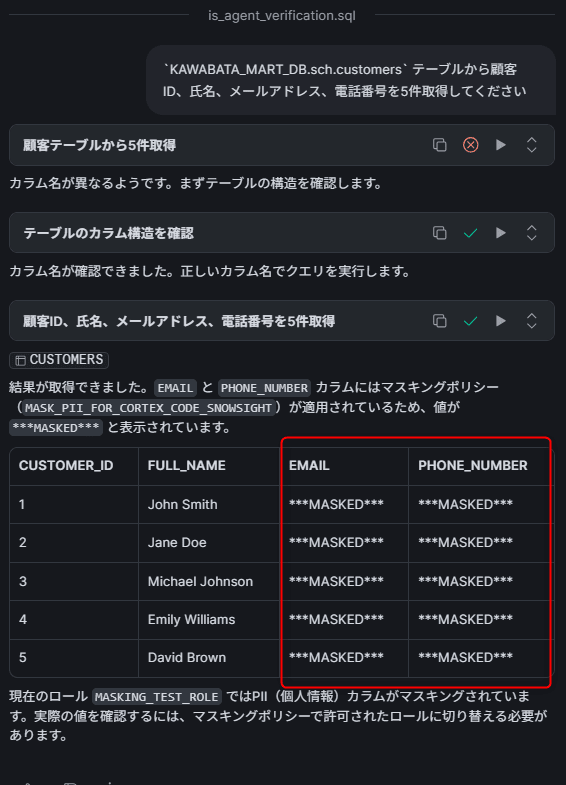
Access via Snowflake CoCo on Snowsight (CORTEX_CODE_SNOWSIGHT) is masked.
Snowflake CoWork → Not Masked
Query from Snowflake CoWork with the same MASKING_TEST_ROLE.
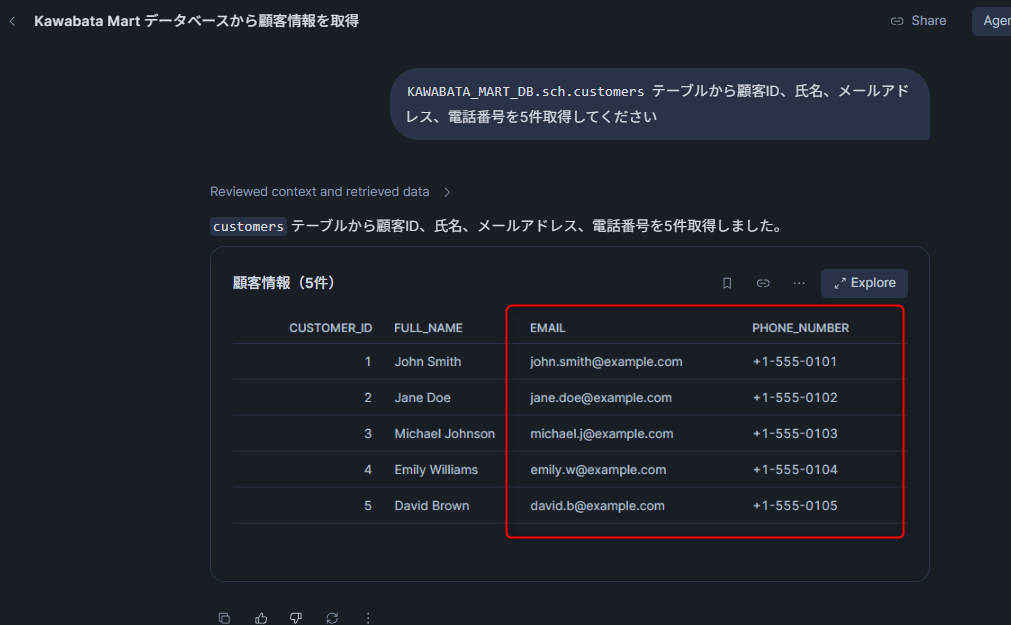
Access via Snowflake CoWork (SNOWFLAKE_INTELLIGENCE) is not masked, and raw data is displayed. Since 'CORTEX_CODE_SNOWSIGHT' is specified as the third argument of IS_AGENT_ACTIVATED, FALSE is returned for other agents.
(Supplement) Pre-simulating Masking Behavior with POLICY_CONTEXT
Before actually running an agent, you can also pre-simulate the masking behavior using the POLICY_CONTEXT function.
USE ROLE ACCOUNTADMIN;

-- Simulate access from Snowflake CoCo on Snowsight
EXECUTE USING POLICY_CONTEXT(
  SNOWFLAKE$CURRENT_ACTIVATED_AGENT_TYPES => ('CORTEX_CODE_SNOWSIGHT')
)
AS
SELECT customer_id, full_name, email, phone_number
FROM masking_test_db.sch.customers
ORDER BY customer_id
LIMIT 5;
Closing
I verified the configuration for masking PII only during agent use, using Snowflake's IS_AGENT_ACTIVATED function.
The key point is that you can differentiate masking results depending on whether it is an agent execution context, without changing role-based access control. In this verification, we confirmed that raw data is visible when direct SQL is executed with the same MASKING_TEST_ROLE, while PII in query results is masked when queried via an agent. This can reduce the risk of sensitive values being passed to agents and LLMs.
Furthermore, by specifying the agent type in the third argument of IS_AGENT_ACTIVATED, fine-grained control is possible, such as masking only Snowflake CoCo on Snowsight while not masking access via Snowflake CoWork. You can use different policies for each agent depending on the use case and risk level.
I hope this article is helpful in some way!