![[New Feature] Snowflake's Multi-party Approval is now generally available, so I tried making approval flows mandatory for critical operations](https://images.ctfassets.net/ct0aopd36mqt/wp-refcat-img-3610e3c1ff5961bdb7b464e17f8bf06d/90b168b240005ead852ec1d474bb74fb/snowflake-logo-1200x630-1.png?w=3840&fm=webp)
[New Feature] Snowflake's Multi-party Approval is now generally available, so I tried making approval flows mandatory for critical operations

This page has been translated by machine translation. View original
This is Kawabata.
With Multi-party Approval (MPA), which became GA on August 4, 2026, you can now require "review and approval by a second approver" for critical operations.
In this article, we verify the entire flow from MPA policy creation to the approval flow, abnormal cases such as rejection and cancellation, and auditing with the Account Usage view, using network policy changes as the protected operation.
Multi-party Approval Overview
MPA is a feature that prevents specified critical operations (protected operations) from being executed by a single administrator alone. When attempting to execute a protected operation, it is temporarily blocked and an approval request is issued. Only after another approver reviews and approves it can the original operation be executed.
The main motivation is that even if an administrator account is compromised in a ransomware attack or similar situation, attackers cannot independently execute fatal operations such as disabling MFA or invalidating Tri-Secret Secure keys.
Protected Operations
Operations that can be protected are divided into the following 3 groups. For each policy rule, you select which operations to protect.
| Group | Operation | Description |
|---|---|---|
| Administrative operations | MODIFY_MULTI_PARTY_APPROVAL | Changes to MPA policies, rules, and application/removal to accounts (required for all policies). Also covers creation, modification, and deletion of SAML2 security integrations |
| Administrative operations | DISABLE_MULTI_FACTOR_AUTHENTICATION | Disabling MFA and resetting user passwords |
| Administrative operations | MODIFY_TRI_SECRET_SECURE | Enabling/disabling Tri-Secret Secure keys |
| Administrative operations | MODIFY_PRIVILEGED_ROLE_GRANTS | Granting/revoking administrator roles |
| Administrative operations | MODIFY_CORTEX_GUARDRAILS | Modifying Cortex AI guardrails |
| Administrative operations | MODIFY_DATA_RETENTION_TIME | Changing Time Travel retention period |
| Policy operations | MODIFY_NETWORK_POLICY | Changes to active network policies and network rules, changes to assignment to accounts/users |
| Policy operations | MODIFY_SESSION_POLICY | Changes to session policy configuration and assignment |
| Policy operations | MODIFY_AUTHENTICATION_POLICY | Changes to authentication policy configuration and assignment |
| Policy operations | MODIFY_PASSWORD_POLICY | Changes to password policy configuration and assignment |
| Security integration operations | MODIFY_OAUTH_INTEGRATION | Changes to OAuth integrations |
| Security integration operations | MODIFY_EXTERNAL_OAUTH_INTEGRATION | Changes to External OAuth integrations |
| Security integration operations | MODIFY_SCIM_INTEGRATION | Changes to SCIM integrations |
The reason MODIFY_MULTI_PARTY_APPROVAL also protects SAML2 security integrations is that modifying SSO settings would allow attackers to manipulate who can be authenticated as an approver.
Note: Protecting MODIFY_TRI_SECRET_SECURE requires Business Critical Edition or higher. Edition requirements for the MPA feature itself are not explicitly stated in the documentation as of August 2026.
Approval Flow
When attempting to execute a protected operation, the following 4-step flow occurs.
- When the requester executes the SQL for the protected operation, it is blocked with an
MPA_APPROVAL_REQUIREDerror and arequest_idis returned - When the requester sends the business justification using
SYSTEM$UPDATE_MULTI_PARTY_APPROVAL_JUSTIFICATION(), the request becomes PENDING and approvers are notified - The approver reviews the request in Snowsight and votes to approve or reject. When the required number of approvals is reached, it becomes APPROVED
- When the requester re-executes the exact same SQL statement that was blocked, it matches the approved request and is executed (within 3 days of approval)
Request status transitions through PENDING / APPROVED / EXECUTED / REJECTED / CANCELLED / EXPIRED. If even one approver rejects, the request becomes REJECTED at that point.
Note that there are 2 patterns for becoming EXPIRED.
- When the required number of approvals is not reached within the validity period (request_duration_days) while remaining PENDING
- When the request becomes APPROVED but is not re-executed within the 3-day replay period
"Once approved, you can re-execute at any time" is not the case.
Policy Components
An MPA policy is a schema-level object with a YAML format definition that can contain multiple rules. The configuration items for each rule are as follows.
| Item | Required/Optional | Default | Range |
|---|---|---|---|
| name (rule name) | Required | - | - |
| operations (protected operations) | Required | - | 1 or more (cannot be empty) |
| approvers.users (approvers) | Required | - | - |
| required_approvals (required number of approvals) | Optional | 2 | 1 to 20. Must be less than or equal to the number of approvers in the list |
| request_duration_days (request validity period) | Optional | 3 days | Maximum 14 days |
| self_approval_allowed (allow self-approval) | Optional | true | true / false |
Note: All policies must have at least 1 rule that includes MODIFY_MULTI_PARTY_APPROVAL in operations. This is a self-protecting rule to prevent a compromised administrator from disabling or modifying MPA itself independently. Also, a single operation can only be included in one rule within the same policy.
Note: self_approval_allowed defaults to true. If the requester is included in the approvers list, they can approve their own request and have it counted toward the required number of approvals. Specifying self_approval_allowed: false prevents the requester's own vote from being counted toward the approval count. On the other hand, even if you set required_approvals to 2 or more while leaving it true, the requester's own vote is still counted. If you require the four-eyes principle (clearly separating requesters and approvers), the appropriate configuration is to explicitly set self_approval_allowed: false and make the approvers different users from the requester.
Approver Requirements
There are conditions for users that can be designated as approvers.
- Must be a local Snowflake user or SCIM-managed user (service users are not allowed)
- Must be enrolled in MFA
- Must have a verified email address
No additional privileges are required for the approval operation itself, and granting ACCOUNTADMIN to approvers is not a mandatory requirement for MPA. From a least privilege perspective, it is desirable not to give approvers unnecessarily strong permissions.
Additionally, users designated as approvers are protected, and login name changes or deprovisioning (deletion) via SCIM will be blocked.
Prerequisites
- ACCOUNTADMIN role must be used to configure and manage MPA policies
- Approvers must be users with MFA enrolled and email address verified (granting ACCOUNTADMIN is not required)
- In this verification, we use 2 users: KAWABATA_ADMIN (using ACCOUNTADMIN) who executes protected operations, and APPROVER_ADMIN as the approver, plus a verification-only user as the network policy assignment target
- Verification is conducted in an environment after the GA on August 4, 2026
Verification Environment
- Verification period: August 5, 2026 – August 11, 2026
- Snowflake trial account, Enterprise edition
- Verification user configuration:
- KAWABATA_ADMIN: Requester who executes protected operations (using ACCOUNTADMIN)
- APPROVER_ADMIN: Approver (MFA enrolled, email verified)
- MPA_TEST_USER: Verification-only user as the network policy assignment target (not used for login)
Preparation
Creating and Activating the Verification Network Policy
We use MODIFY_NETWORK_POLICY for the protected operation verification. The important point here is that the protection scope of MODIFY_NETWORK_POLICY is defined as "changes to active network policies and network rules, changes to assignment to accounts or users." Since a network policy does not become effective just by being created—it becomes active only when assigned to an account or user—changes to a policy not assigned anywhere may not be blocked by MPA.
Therefore, we create a verification-only user that is not used for login, assign the policy to that user to create an active state. We avoid assignment at the account level due to the risk of lockout.
USE ROLE ACCOUNTADMIN;

-- Verification-only user as assignment target (not used for login)
CREATE USER mpa_test_user
  COMMENT = 'MPA verification: network policy assignment target';

-- Verification network policy (no practical restrictions since all IPs are allowed)
CREATE NETWORK POLICY mpa_test_network_policy
  ALLOWED_IP_LIST = ('0.0.0.0/0')
  COMMENT = 'MPA verification test policy';

-- Assign to the verification-only user to make it active
ALTER USER mpa_test_user SET NETWORK_POLICY = mpa_test_network_policy;
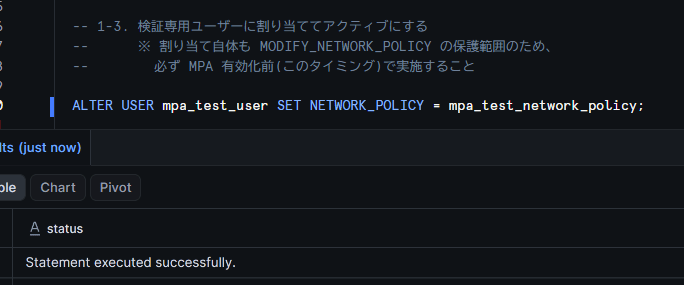
Note: Assigning a network policy to a user is itself within the protection scope of MODIFY_NETWORK_POLICY. If you try to assign it after MPA is enabled, approval will be required, so complete the assignment before enabling MPA.
Note: Even for a verification-only user, creating it with
DISABLED = TRUEas shown below eliminates the possibility of unintended login at the configuration level, making it safer (this verification was conducted without DISABLED).
CREATE USER mpa_test_user
  DISABLED = TRUE
  COMMENT = 'MPA verification: network policy assignment target; login disabled';
Creating the MPA Policy
Prepare a database and schema for storing the policy, then create the MPA policy. Two rules are defined.
- self_protection_rule: A required rule that protects changes to the MPA configuration itself
- network_policy_rule: A verification rule that protects changes to network policies
The approvers are limited to a user different from the requester (APPROVER_ADMIN) only, and self_approval_allowed: false is explicitly specified. This means KAWABATA_ADMIN cannot approve their own requests, and APPROVER_ADMIN's review is always required.
CREATE DATABASE IF NOT EXISTS security_db;
CREATE SCHEMA IF NOT EXISTS security_db.policies;

CREATE MULTI PARTY APPROVAL POLICY security_db.policies.mpa_verification_policy
AS $$
description: 'MPA verification policy'
rules:
  - name: self_protection_rule
    description: 'Protect MPA configuration changes'
    operations: [MODIFY_MULTI_PARTY_APPROVAL]
    approvers:
      users: ['APPROVER_ADMIN']
    required_approvals: 1
    self_approval_allowed: false
  - name: network_policy_rule
    description: 'Protect network policy changes'
    operations: [MODIFY_NETWORK_POLICY]
    approvers:
      users: ['APPROVER_ADMIN']
    required_approvals: 1
    self_approval_allowed: false
$$;
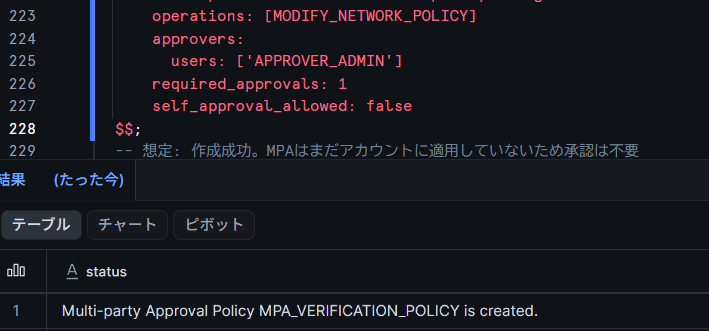
Note: To keep the verification simple, we use 1 approver + required_approvals: 1, but the official best practice recommends 2 or more for all rules. In production, it is desirable to list multiple approvers, with a combination of required_approvals: 2 or more + self_approval_allowed: false (required_approvals must be less than or equal to the number of approvers in the list).
Let's also check the behavior when trying to create a policy without defining a rule containing MODIFY_MULTI_PARTY_APPROVAL.
CREATE MULTI PARTY APPROVAL POLICY security_db.policies.mpa_invalid_policy
AS $$
rules:
  - name: network_policy_only_rule
    operations: [MODIFY_NETWORK_POLICY]
    approvers:
      users: ['APPROVER_ADMIN']
$$;
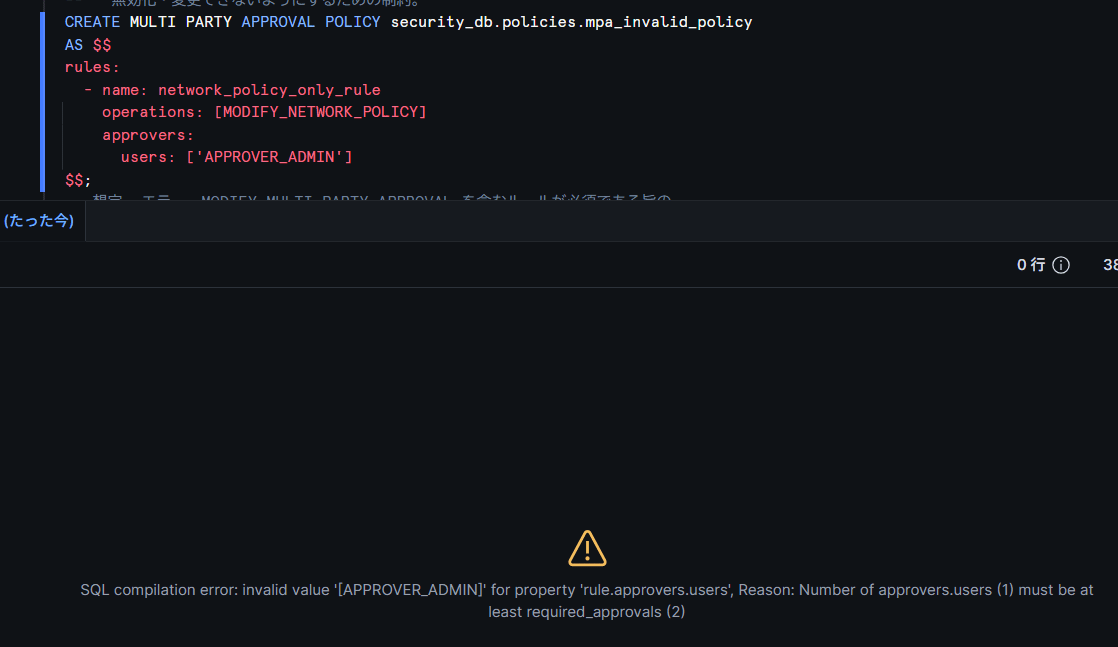
Applying the Policy to the Account (Activation)
Apply the created policy to the account with ALTER ACCOUNT. Since this is the initial application before MPA is enabled, this operation itself is expected not to be blocked (replacement or removal after activation becomes a protected operation under MODIFY_MULTI_PARTY_APPROVAL).
ALTER ACCOUNT SET MULTI PARTY APPROVAL POLICY security_db.policies.mpa_verification_policy;
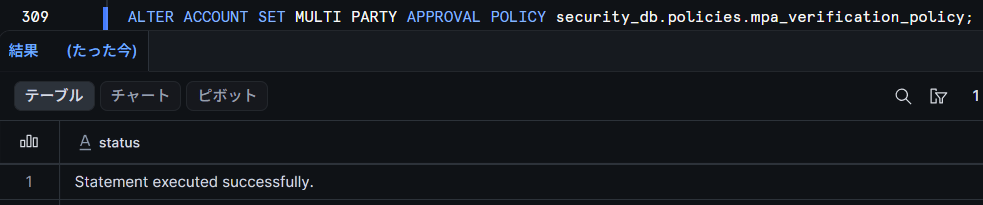
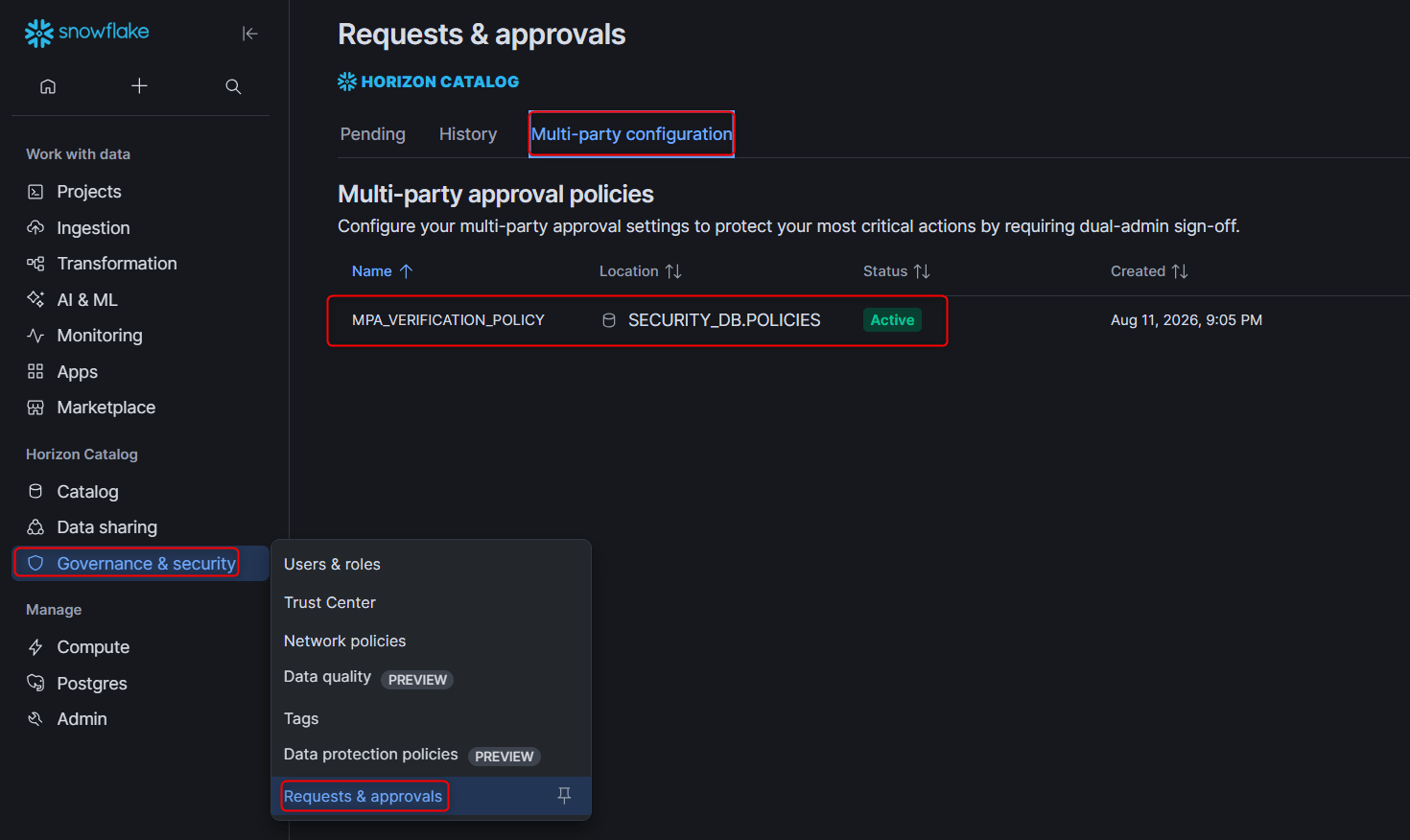
When operating from Snowsight, you can create and activate policies from Governance & Security » Requests & approvals » Multi-party configuration.
Testing the Basic Flow
Confirming That Protected Operations Are Blocked
As the requester (KAWABATA_ADMIN), try executing a change to an active network policy.
ALTER NETWORK POLICY mpa_test_network_policy SET ALLOWED_IP_LIST = ('0.0.0.0/0', '10.0.0.0/8');
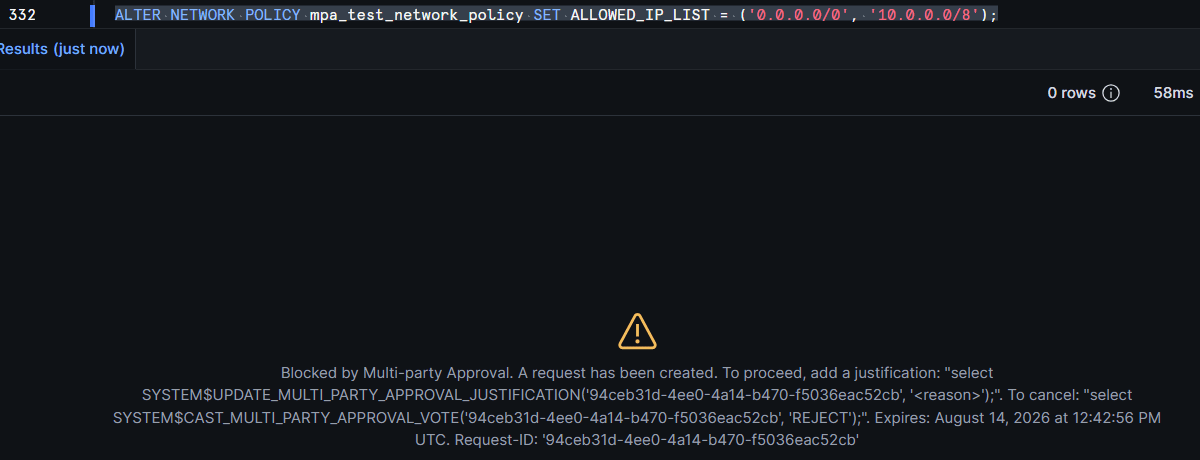
According to the documentation, an error in the following format is returned, with the SQL for registering justification and for cancellation provided directly.
Blocked by Multi-party Approval. A request has been created. To proceed, add a justification: "select SYSTEM$UPDATE_MULTI_PARTY_APPROVAL_JUSTIFICATION('94ceb31d-4ee0-4a14-b470-f5036eac52cb', '<reason>');". To cancel: "select SYSTEM$CAST_MULTI_PARTY_APPROVAL_VOTE('94ceb31d-4ee0-4a14-b470-f5036eac52cb', 'REJECT');". Expires: August 14, 2026 at 12:42:56 PM UTC. Request-ID: '94ceb31d-4ee0-4a14-b470-f5036eac52cb'
Submitting the Justification
Using the request_id included in the error message, submit the business justification for the operation. This transitions the request to PENDING and notifies the approvers.
SELECT SYSTEM$UPDATE_MULTI_PARTY_APPROVAL_JUSTIFICATION(
  '<request_id>',
  'MPA verification: adding 10.0.0.0/8 to the allowed IP list of the test network policy.'
);
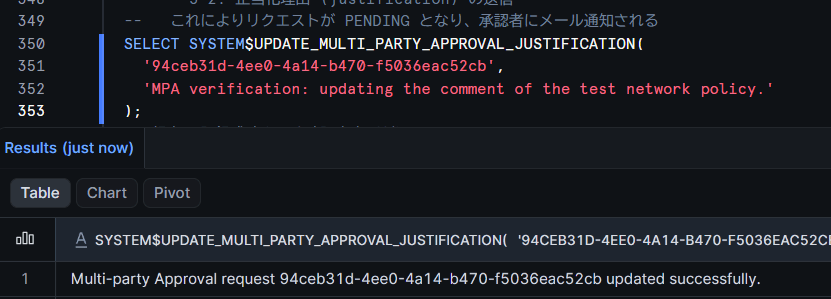
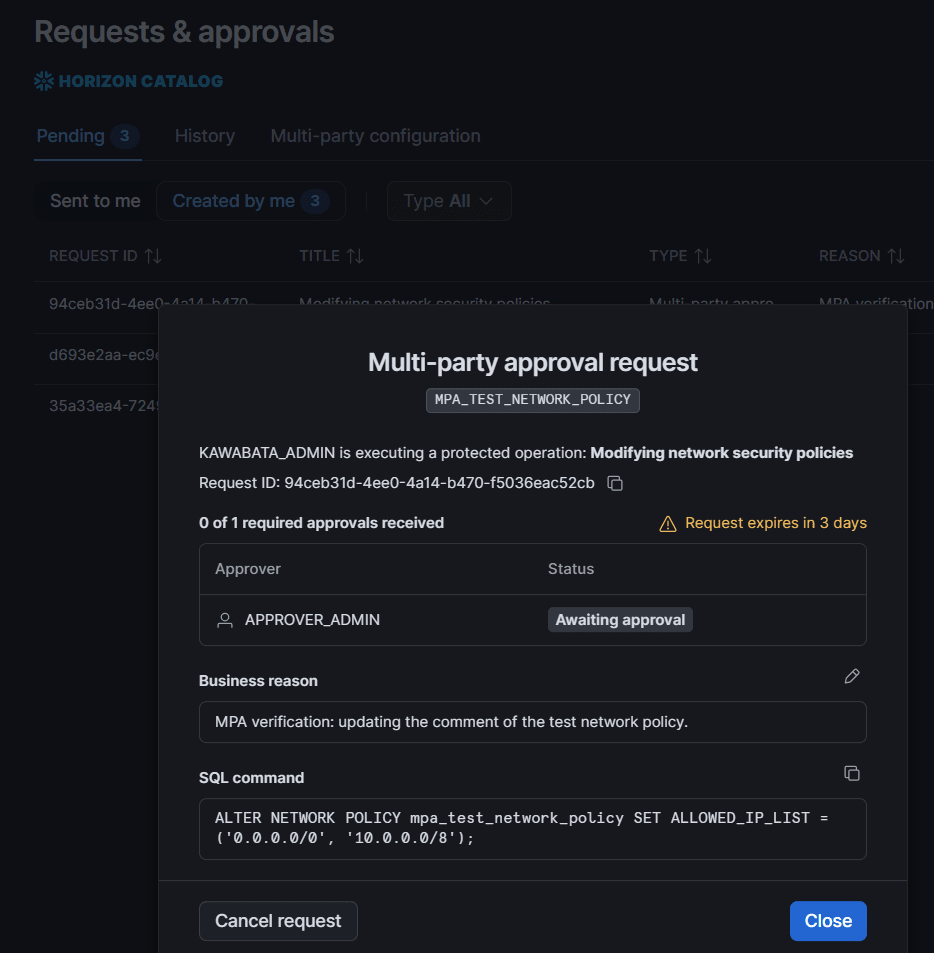
While the request is in PENDING state, the justification can be updated any number of times. The requester can check the status of their own requests from Snowsight at Governance & Security » Requests & approvals » Pending » Created by me.
Approval by the Approver
Log in to Snowsight as the approver (APPROVER_ADMIN) and open Governance & Security » Requests & approvals » Pending » Sent to me to see the pending approval request.
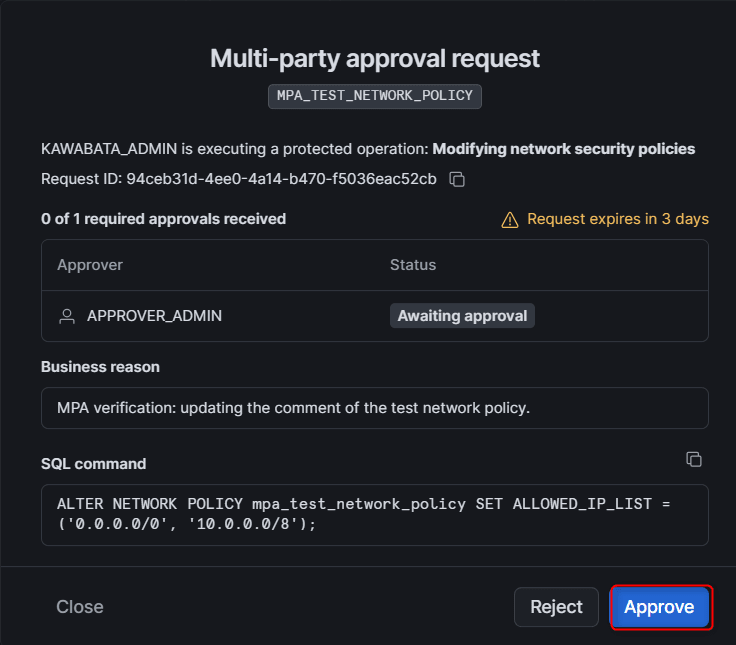
Opening the request allows you to review the target operation, requester, and justification, and select Approve or Reject. Here we select Approve.
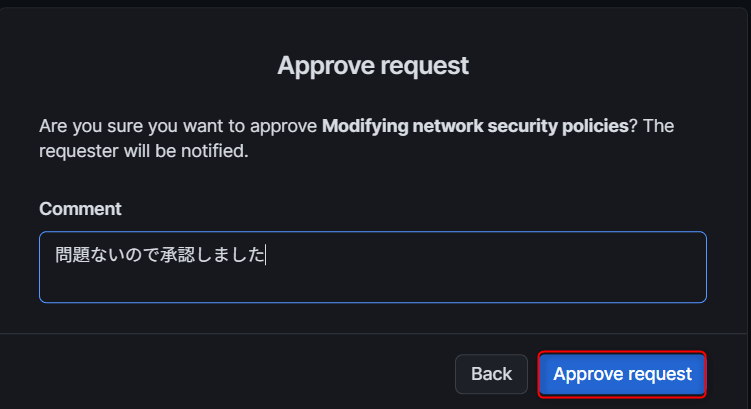
Since required_approvals is set to 1, 1 approval vote transitions the request to APPROVED.
Re-executing the Original SQL
Return to the requester (KAWABATA_ADMIN) and re-execute the SQL that was first blocked. It matches the approved request and this time executes successfully.
ALTER NETWORK POLICY mpa_test_network_policy SET ALLOWED_IP_LIST = ('0.0.0.0/0', '10.0.0.0/8');
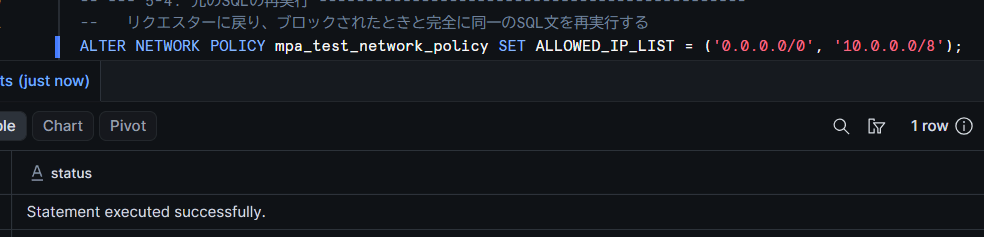
After approval, only the exact same statement that was blocked when the approval request was created can be executed. SQL with a different target object or setting values will not match the approved request and will be treated as a new operation. Let's confirm this by executing an ALTER with a partial change.
ALTER NETWORK POLICY mpa_test_network_policy SET ALLOWED_IP_LIST = ('0.0.0.0/0', '10.0.0.0/9');
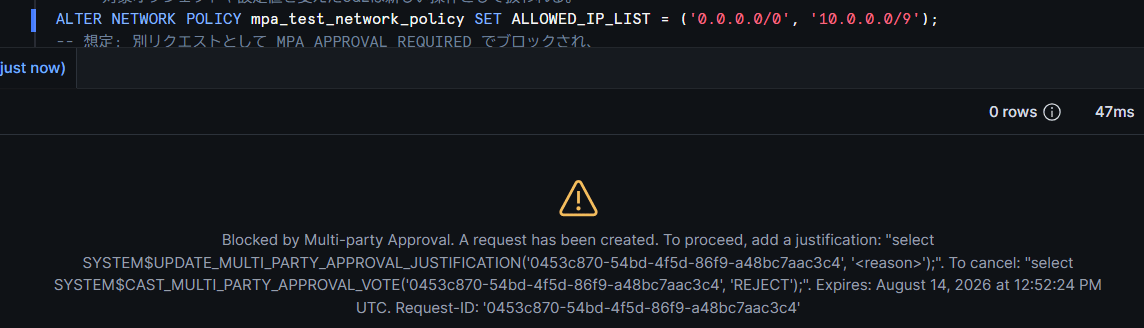
Note: Re-execution must be performed within 3 days of approval. If the deadline passes, the request becomes EXPIRED and you must start over from a new request. Once execution is complete, the request becomes EXECUTED (a terminal state).
Testing Abnormal Cases
Rejection by the Approver (REJECTED)
Create another request for a network policy change, submit a justification, and this time have the approver Reject it. A comment is required for rejection.
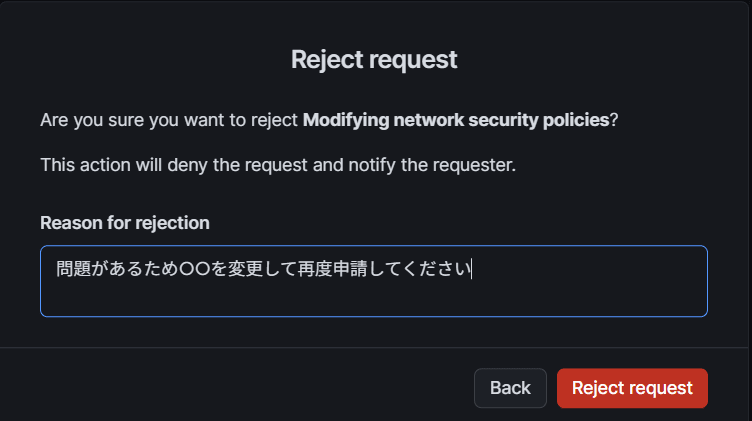
If even one approver rejects, the request becomes REJECTED at that point and ends.
Cancellation by the Requester (CANCELLED)
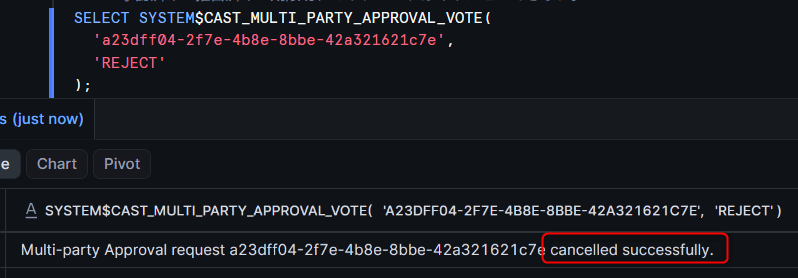
The requester can cancel their own PENDING request by voting REJECT using SYSTEM$CAST_MULTI_PARTY_APPROVAL_VOTE. In this case only, the comment can be omitted. Approved, rejected, or expired requests cannot be cancelled.
SELECT SYSTEM$CAST_MULTI_PARTY_APPROVAL_VOTE(
  '<request_id>',
  'REJECT'
);
Self-approval Behavior (Optional Additional Verification)
Since self_approval_allowed defaults to true, if the requester is included in the approvers list, they can approve their own request. To confirm this behavior, we replace the policy with one where network_policy_rule adds the requester to the approvers and reverts self_approval_allowed to default (true).
Note: This configuration is solely for verifying the self-approval behavior. Since the requester can complete the entire process including approval independently, the four-eyes principle cannot be achieved.
The key point is that replacing the policy itself is a protected operation under MODIFY_MULTI_PARTY_APPROVAL, so this change also requires approval from APPROVER_ADMIN. This also serves as a confirmation that the self-protecting rule is functioning.
ALTER MULTI PARTY APPROVAL POLICY security_db.policies.mpa_verification_policy
AS $$
description: 'MPA verification policy (self approval test)'
rules:
  - name: self_protection_rule
    description: 'Protect MPA configuration changes'
    operations: [MODIFY_MULTI_PARTY_APPROVAL]
    approvers:
      users: ['APPROVER_ADMIN']
    required_approvals: 1
    self_approval_allowed: false
  - name: network_policy_rule
    description: 'Protect network policy changes (self approval test)'
    operations: [MODIFY_NETWORK_POLICY]
    approvers:
      users: ['KAWABATA_ADMIN', 'APPROVER_ADMIN']
    required_approvals: 1
$$;
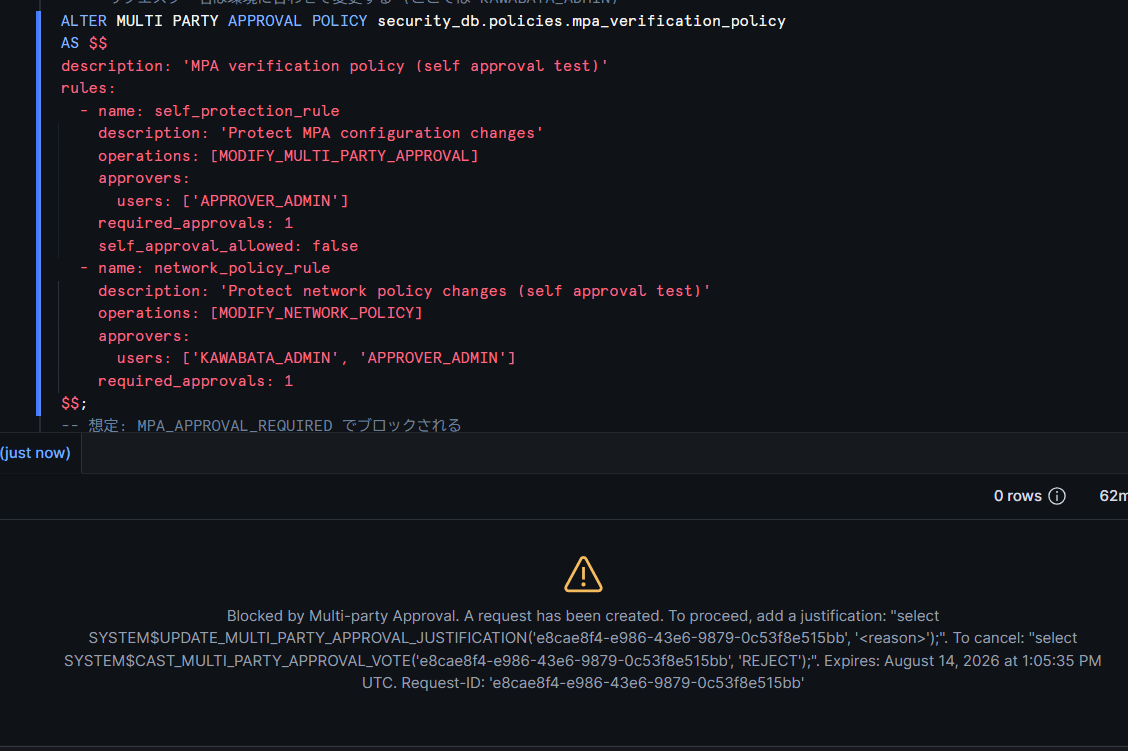
After the replacement, KAWABATA_ADMIN created a network policy change request and registered a justification with SYSTEM$UPDATE_MULTI_PARTY_APPROVAL_JUSTIFICATION. In this verification environment, re-execution of the original SQL succeeded without voting Approve in the Snowsight approval screen.
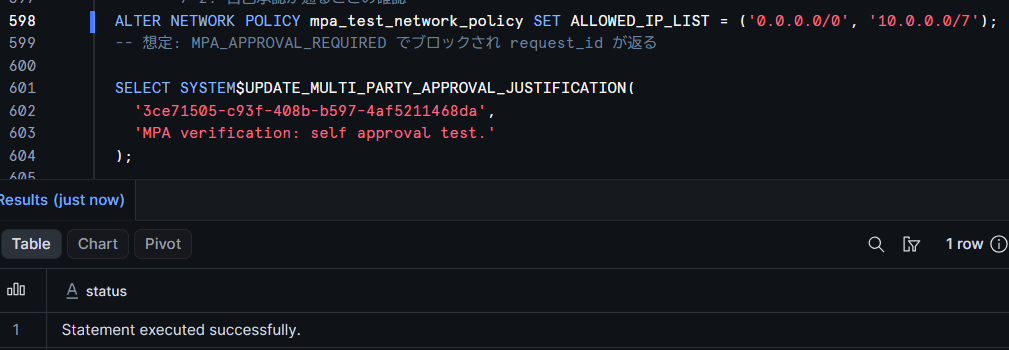
Note: According to the official documentation flow, registering a justification only transitions the request to PENDING, and even when self-approval is allowed, the requester should vote Approve themselves in Snowsight, and re-execute the original SQL after it becomes APPROVED. The behavior observed in this verification—"re-execution succeeds without voting"—differs from this description, so it cannot be determined as the general specification when self-approval is permitted. The same behavior may occur if an approved request for the same SQL remains within the 3-day replay period, so please verify in your own account when trying this.
Note: In actual operation, a combination of self_approval_allowed: false and required_approvals: 2 or more is recommended. A configuration that allows self-approval does not provide defense against the compromise of a single administrator account.
After confirming the self-approval behavior, revert to a safe policy definition (self_approval_allowed: false for both rules). This ALTER itself is also a protected operation under MODIFY_MULTI_PARTY_APPROVAL, so APPROVER_ADMIN's approval is required.
-- After the self-approval test, revert to the safe policy definition
-- This ALTER itself is also subject to MODIFY_MULTI_PARTY_APPROVAL approval
ALTER MULTI PARTY APPROVAL POLICY security_db.policies.mpa_verification_policy
AS $$
description: 'MPA verification policy'
rules:
  - name: self_protection_rule
    description: 'Protect MPA configuration changes'
    operations: [MODIFY_MULTI_PARTY_APPROVAL]
    approvers:
      users: ['APPROVER_ADMIN']
    required_approvals: 1
    self_approval_allowed: false
  - name: network_policy_rule
    description: 'Protect network policy changes'
    operations: [MODIFY_NETWORK_POLICY]
    approvers:
      users: ['APPROVER_ADMIN']
    required_approvals: 1
    self_approval_allowed: false
$$;
How to Check Policies and Requests
SHOW / DESCRIBE Commands
Policy lists and definitions can be checked with SQL.
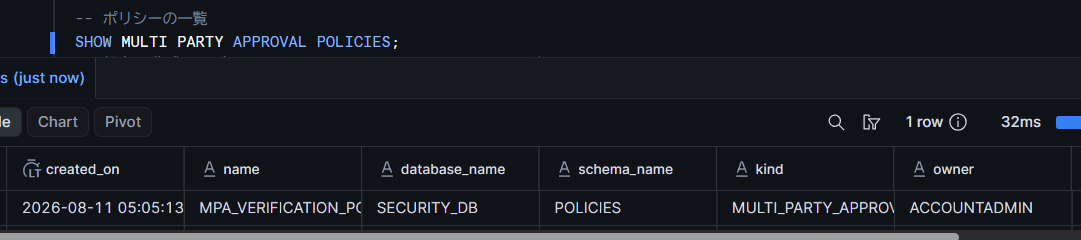
-- List of policies
SHOW MULTI PARTY APPROVAL POLICIES;

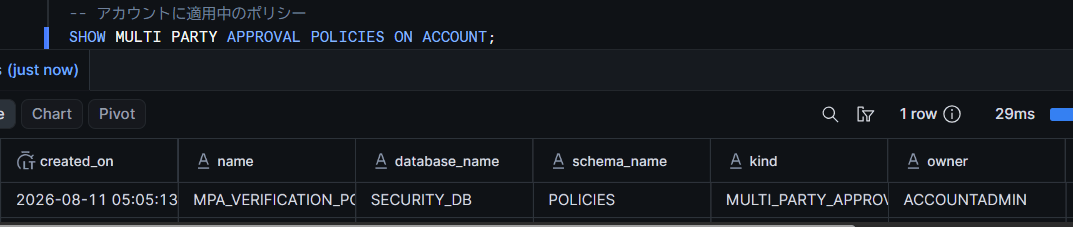
-- Policy currently applied to the account
SHOW MULTI PARTY APPROVAL POLICIES ON ACCOUNT;

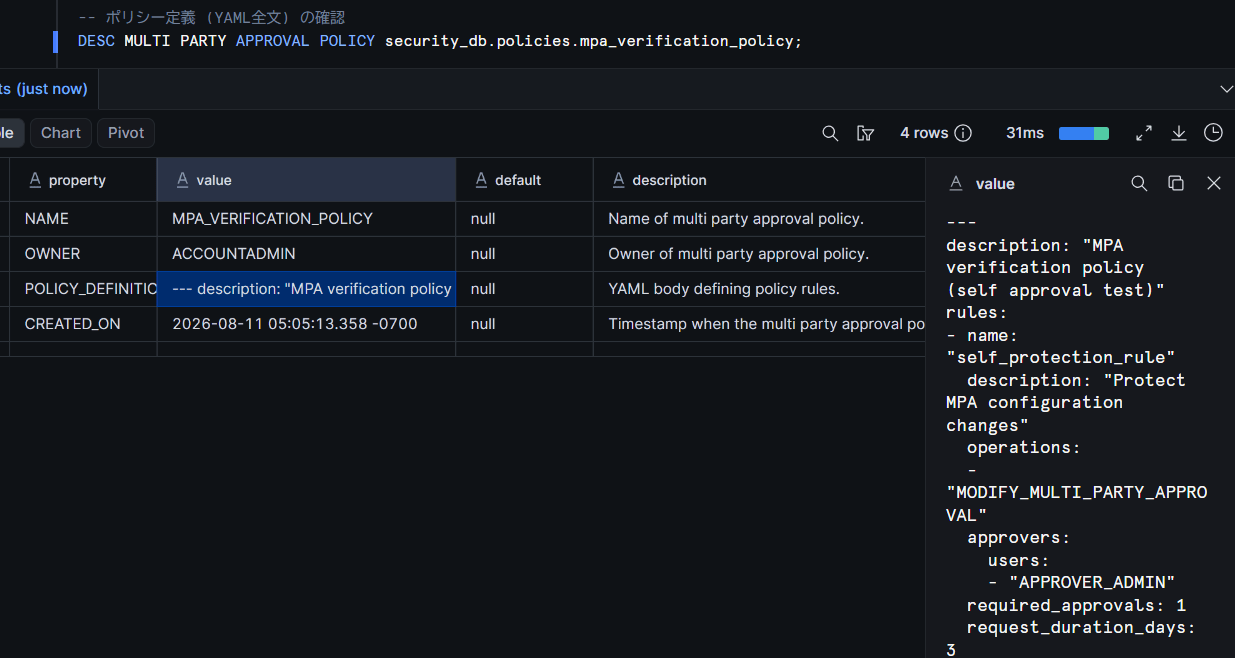
-- Check policy definition (full YAML)
DESC MULTI PARTY APPROVAL POLICY security_db.policies.mpa_verification_policy;
Auditing with Account Usage Views
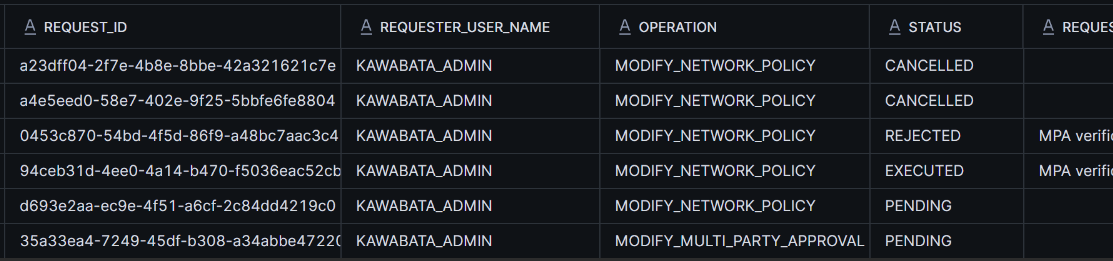
The history of approval requests can be checked in Account Usage views. Since you can track who requested which operation when and who voted, it can also be used for audit purposes.
SELECT
  request_id,
  requester_user_name,
  operation,
  status,
  request_justification,
  required_approvals_count,
  approvers,
  created_time,
  resolved_time
FROM snowflake.account_usage.multi_party_approval_requests
ORDER BY created_time DESC;
The change history of the policy itself can be checked in the MULTI_PARTY_APPROVAL_POLICIES view.
SELECT name, database, schema, policy_definition, created, last_altered, deleted
FROM snowflake.account_usage.multi_party_approval_policies;

Note: Both views have a latency of up to 120 minutes. They may not be reflected immediately after verification.
Limitations and Notes
Here is a summary of the limitations and notes confirmed through verification and the official documentation.
Limitations and Notes
- Approvers must be local Snowflake users or SCIM-managed users with MFA enrolled and email address verified (service users are not allowed). Granting ACCOUNTADMIN is not required
- Approver voting is performed from an active session in Snowsight
- Re-execution after approval must be performed using the exact same SQL statement that was blocked, within 3 days
- Cancellation by the requester is only possible for requests in PENDING state
- A single operation can only be included in one rule within the same policy. Also, required_approvals must be less than or equal to the number of approvers in the list
- self_approval_allowed defaults to true. Specifying false prevents the requester's own vote from being counted toward the approval count. Even if you set required_approvals: 2 or more while leaving it true, independent execution is prevented, but the requester's own vote is counted toward the approvals
- Account Usage view latency is up to 120 minutes
- When a policy is changed, PENDING requests are automatically re-evaluated (reconciled) against the new rule configuration
- In case of a deadlock such as all approvers being unavailable, the response (break glass) is handled through a formal ticket to Snowflake support. It is recommended to have multiple ACCOUNTADMIN users and to periodically review the approvers list
Closing
With Multi-party Approval, the control of "always have two people review critical operations"—which previously could only be enforced through operational rules—can now be enforced as a Snowflake feature. However, note that self_approval_allowed defaults to true, and you need to be mindful of the recommended configuration: self_approval_allowed: false + required_approvals: 2 or more + approvers separated from the requester. As a countermeasure against solo malicious acts or compromise of ACCOUNTADMIN, it seems best to start protection with the self-protection rule + disabling MFA + network policy changes.
I hope this article is helpful in some way!