![[New Feature] Snowflake's Multi-value Tags Have Reached GA, So I Tried Everything from Managing Multiple Values to Merging Tag Propagation](https://images.ctfassets.net/ct0aopd36mqt/wp-refcat-img-3610e3c1ff5961bdb7b464e17f8bf06d/90b168b240005ead852ec1d474bb74fb/snowflake-logo-1200x630-1.png?w=3840&fm=webp)
[New Feature] Snowflake's Multi-value Tags Have Reached GA, So I Tried Everything from Managing Multiple Values to Merging Tag Propagation

This page has been translated by machine translation. View original
This is Kawabata.
On August 25, 2026, Multi-value tags became generally available (GA).
You can assign multiple values to a single tag. This allows you to express cases where multiple classifications apply simultaneously, such as "this table was created from data in both the sales system and the accounting system" or "this column contains both personal information and payment information."
This article covers everything from adding and removing values, to the SYSTEM$TAG_VALUE_CONTAINS verification function, tag propagation merging (ON_CONFLICT = MERGE), and the relationship with masking policies.
Overview of Multi-value Tags
Until now, tags could only hold one value per object. Workarounds such as splitting tags or concatenating values were necessary to express multiple classifications.
Multi-value tags are tags created with MULTI_VALUE = TRUE, allowing multiple values to be assigned to the same object or column.
The differences from single-value tags are as follows:
| Item | Single-value tag | Multi-value tag |
|---|---|---|
| Number of values | 1 value per object (or column) per tag | Multiple values per tag (default limit of 10 values per object) |
| Tag definition | Created without MULTI_VALUE |
Specify MULTI_VALUE = TRUE (conversion of existing tags is also possible) |
| Value assignment | SET TAG / UNSET TAG |
ADD VALUE / DROP VALUE (SET TAG replaces all values) |
| Value verification | SYSTEM$GET_TAG |
SYSTEM$TAG_VALUE_CONTAINS |
| Propagation conflict resolution | Only strategies that select a single winner | ON_CONFLICT = MERGE allows merging of multiple values |
ON_CONFLICT = MERGE is a conflict resolution strategy exclusive to multi-value tags. When tag propagation delivers different values from multiple upstream sources, all values can be passed downstream without narrowing them down to one.
Prerequisites
- Tag creation and assignment itself is available in all editions
- Tag propagation (
PROPAGATE/ON_CONFLICT) and tag-based masking policies covered in this article require Enterprise Edition or higher - Creating tags:
CREATE TAGprivilege on the schema - Assigning tags:
APPLY TAGprivilege on the account, orAPPLYprivilege on the target tag and ownership of the target object
Testing was conducted on August 27, 2026, on an account in the AWS Tokyo region, using ACCOUNTADMIN.
Setup
Create a DB for testing, along with tables for basic operations (CUSTOMERS), column operations (ORDERS), and tag propagation (SALES_DATA / SUPPORT_DATA).
Setup
USE ROLE ACCOUNTADMIN;

CREATE OR REPLACE DATABASE MVT_TEST_DB;
CREATE SCHEMA MVT_TEST_DB.GOVERNANCE;
CREATE SCHEMA MVT_TEST_DB.SALES;

-- For table-level verification
CREATE OR REPLACE TABLE MVT_TEST_DB.SALES.CUSTOMERS AS
SELECT
  SEQ4() + 1                                         AS CUSTOMER_ID,
  'user' || TO_VARCHAR(SEQ4() + 1) || '@example.com' AS EMAIL,
  '090-0000-' || LPAD(TO_VARCHAR(SEQ4() + 1), 4, '0') AS PHONE
FROM TABLE(GENERATOR(ROWCOUNT => 10));

-- For column-level and masking policy verification
CREATE OR REPLACE TABLE MVT_TEST_DB.SALES.ORDERS AS
SELECT
  SEQ4() + 1                                         AS ORDER_ID,
  'user' || TO_VARCHAR(SEQ4() + 1) || '@example.com' AS CUSTOMER_EMAIL,
  UNIFORM(1000, 100000, RANDOM())                    AS AMOUNT
FROM TABLE(GENERATOR(ROWCOUNT => 10));

-- For tag propagation verification
CREATE OR REPLACE TABLE MVT_TEST_DB.SALES.SALES_DATA AS
SELECT SEQ4() + 1 AS ID, 'sales_note_' || TO_VARCHAR(SEQ4() + 1) AS SALES_NOTE
FROM TABLE(GENERATOR(ROWCOUNT => 10));

CREATE OR REPLACE TABLE MVT_TEST_DB.SALES.SUPPORT_DATA AS
SELECT SEQ4() + 1 AS ID, 'support_note_' || TO_VARCHAR(SEQ4() + 1) AS SUPPORT_NOTE
FROM TABLE(GENERATOR(ROWCOUNT => 10));
Testing It Out
Creating a tag with MULTI_VALUE = TRUE
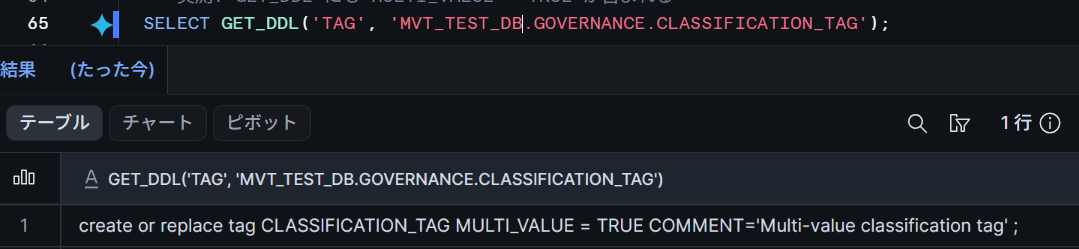
Simply add MULTI_VALUE = TRUE to CREATE TAG.
CREATE OR REPLACE TAG MVT_TEST_DB.GOVERNANCE.CLASSIFICATION_TAG MULTI_VALUE = TRUE
  COMMENT = 'Multi-value classification tag';

SHOW TAGS IN SCHEMA MVT_TEST_DB.GOVERNANCE;
The output of SHOW TAGS has an added multi_value column, which displays true. The result of GET_DDL also includes MULTI_VALUE = TRUE.
Adding and removing values with ADD VALUE / DROP VALUE
Use ADD VALUE / DROP VALUE instead of SET TAG for value operations. The first value can also be added with ADD VALUE.
ALTER TABLE MVT_TEST_DB.SALES.CUSTOMERS
  ADD VALUE 'PII' FOR TAG MVT_TEST_DB.GOVERNANCE.CLASSIFICATION_TAG;
ALTER TABLE MVT_TEST_DB.SALES.CUSTOMERS
  ADD VALUE 'FINANCIAL' FOR TAG MVT_TEST_DB.GOVERNANCE.CLASSIFICATION_TAG;
Checking with TAG_REFERENCES returns one row per value.
SELECT TAG_NAME, TAG_VALUE
  FROM TABLE(MVT_TEST_DB.INFORMATION_SCHEMA.TAG_REFERENCES('MVT_TEST_DB.SALES.CUSTOMERS', 'TABLE'));
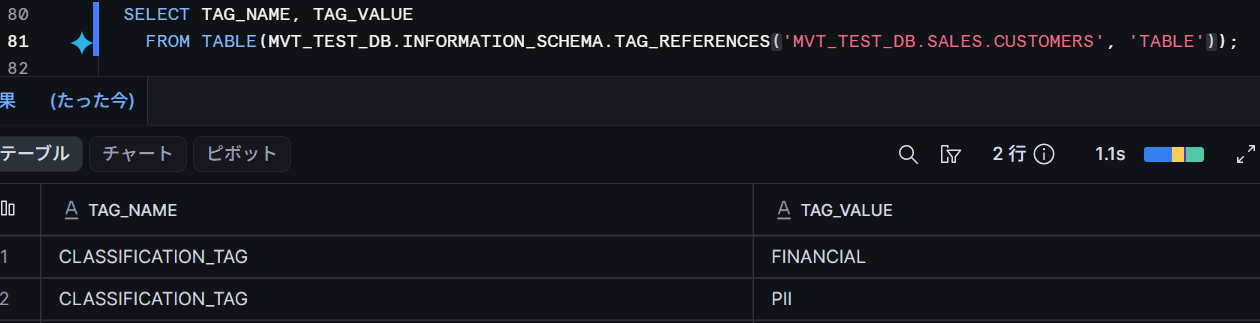
I also checked some detailed behaviors, and none of them resulted in errors.
ADD VALUEwith a duplicate value does not increase the number of valuesDROP VALUEfor a non-existent value also does nothing- Dropping all values with
DROP VALUEremoves the tag assignment itself
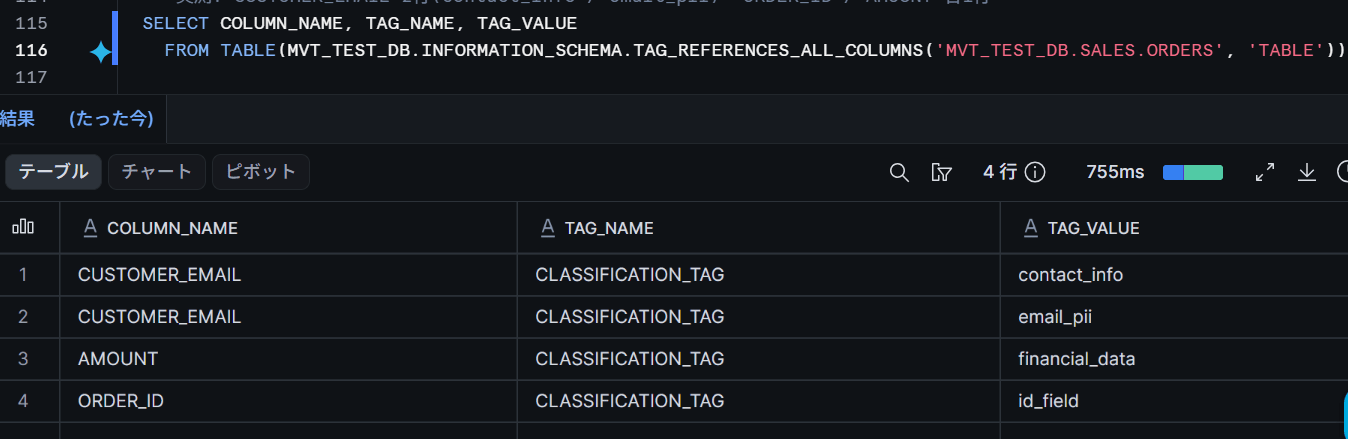
Column-level operations are performed with MODIFY COLUMN. Simultaneous operations on multiple columns are also possible.
ALTER TABLE MVT_TEST_DB.SALES.ORDERS MODIFY COLUMN CUSTOMER_EMAIL
  ADD VALUE 'email_pii' FOR TAG MVT_TEST_DB.GOVERNANCE.CLASSIFICATION_TAG;
ALTER TABLE MVT_TEST_DB.SALES.ORDERS MODIFY COLUMN CUSTOMER_EMAIL
  ADD VALUE 'contact_info' FOR TAG MVT_TEST_DB.GOVERNANCE.CLASSIFICATION_TAG;

-- Operate on multiple columns in a single statement
ALTER TABLE MVT_TEST_DB.SALES.ORDERS MODIFY
  COLUMN ORDER_ID ADD VALUE 'id_field' FOR TAG MVT_TEST_DB.GOVERNANCE.CLASSIFICATION_TAG,
  COLUMN AMOUNT   ADD VALUE 'financial_data' FOR TAG MVT_TEST_DB.GOVERNANCE.CLASSIFICATION_TAG;
Checking for value presence with SYSTEM$TAG_VALUE_CONTAINS
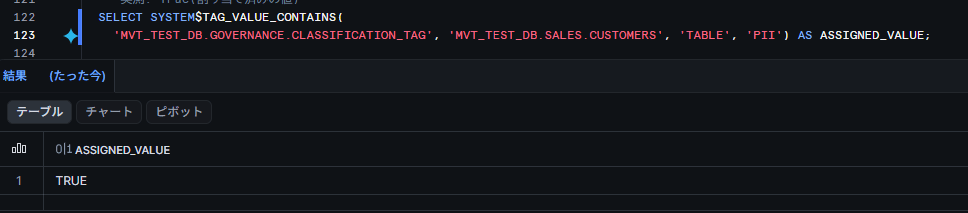
Use the new system function SYSTEM$TAG_VALUE_CONTAINS to check multi-value tag values. It returns TRUE if the specified value is assigned, and FALSE if not.
It can also be used with single-value tags, but the key difference from SYSTEM$GET_TAG is that it does not error even when multiple values are set.
-- An assigned value
SELECT SYSTEM$TAG_VALUE_CONTAINS(
  'MVT_TEST_DB.GOVERNANCE.CLASSIFICATION_TAG', 'MVT_TEST_DB.SALES.CUSTOMERS', 'TABLE', 'PII');

-- An unassigned value
SELECT SYSTEM$TAG_VALUE_CONTAINS(
  'MVT_TEST_DB.GOVERNANCE.CLASSIFICATION_TAG', 'MVT_TEST_DB.SALES.CUSTOMERS', 'TABLE', 'HIPAA');

-- Value comparison is case-sensitive
SELECT SYSTEM$TAG_VALUE_CONTAINS(
  'MVT_TEST_DB.GOVERNANCE.CLASSIFICATION_TAG', 'MVT_TEST_DB.SALES.CUSTOMERS', 'TABLE', 'pii');

-- For columns, use <table>.<column> format and COLUMN as the domain
SELECT SYSTEM$TAG_VALUE_CONTAINS(
  'MVT_TEST_DB.GOVERNANCE.CLASSIFICATION_TAG', 'MVT_TEST_DB.SALES.ORDERS.CUSTOMER_EMAIL', 'COLUMN', 'email_pii');

-- No error even for objects without a tag assigned
SELECT SYSTEM$TAG_VALUE_CONTAINS(
  'MVT_TEST_DB.GOVERNANCE.CLASSIFICATION_TAG', 'MVT_TEST_DB.SALES.SALES_DATA', 'TABLE', 'PII');
SYSTEM$GET_TAG errors when multiple values are assigned
Using the conventional SYSTEM$GET_TAG on a tag with multiple values results in an error.
-- CLASSIFICATION_TAG is in a state with 2 values ('PII', 'FINANCIAL')
SELECT SYSTEM$GET_TAG('MVT_TEST_DB.GOVERNANCE.CLASSIFICATION_TAG', 'MVT_TEST_DB.SALES.CUSTOMERS', 'TABLE');
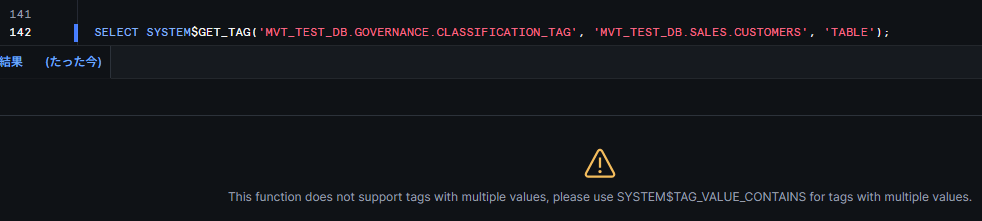
On the other hand, SYSTEM$GET_TAG returned the value normally for a multi-value tag that had only one value assigned.
Whether an error occurs depends not on the tag definition, but on the "number of values currently assigned."
If you have existing operational scripts that depend on SYSTEM$GET_TAG, they will break the moment a second value is added. It is safer to switch all references to multi-valued tags over to SYSTEM$TAG_VALUE_CONTAINS.
Converting existing tags is easy, but reverting is not possible
Attempting ADD VALUE on a single-value tag results in an error. To convert an existing tag to multi-value, use ALTER TAG.
CREATE OR REPLACE TAG MVT_TEST_DB.GOVERNANCE.SENSITIVITY_TAG;
ALTER TABLE MVT_TEST_DB.SALES.CUSTOMERS
  SET TAG MVT_TEST_DB.GOVERNANCE.SENSITIVITY_TAG = 'HIGH';

-- SENSITIVITY_TAG was created as a single-value tag with value 'HIGH' set
ALTER TAG MVT_TEST_DB.GOVERNANCE.SENSITIVITY_TAG SET MULTI_VALUE = TRUE;

ALTER TABLE MVT_TEST_DB.SALES.CUSTOMERS
  ADD VALUE 'MEDIUM' FOR TAG MVT_TEST_DB.GOVERNANCE.SENSITIVITY_TAG;
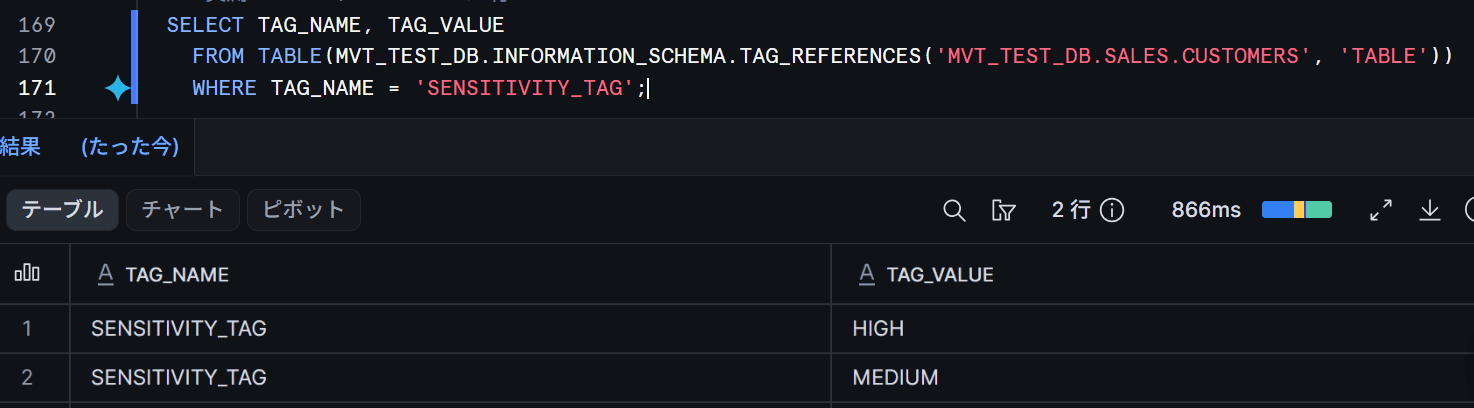
The existing value 'HIGH' was retained after conversion, and adding 'MEDIUM' resulted in 2 values.
The reverse conversion results in an error.
ALTER TAG MVT_TEST_DB.GOVERNANCE.SENSITIVITY_TAG SET MULTI_VALUE = FALSE;
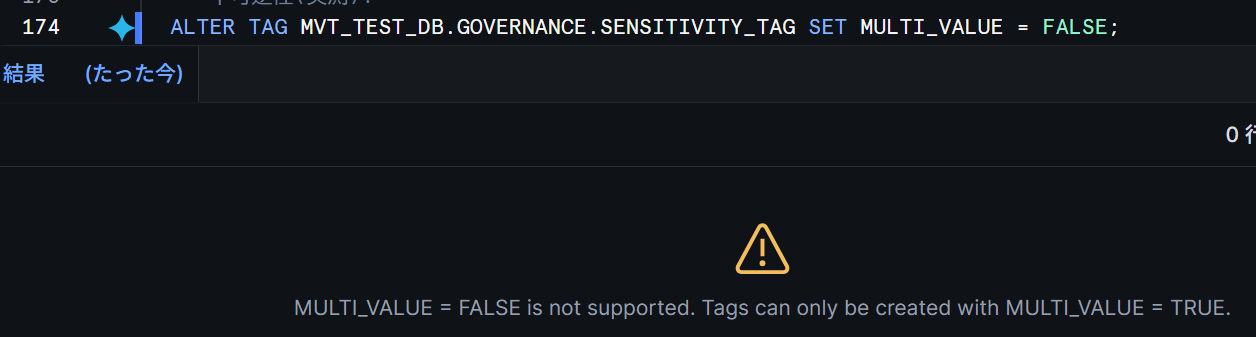
Explicitly specifying CREATE TAG ... MULTI_VALUE = FALSE also resulted in the same error. Single-value tags can only be created by "omitting MULTI_VALUE," and once converted to multi-value, they cannot be reverted.
SET TAG replaces all values
The conventional SET TAG syntax can still be used with multi-value tags, but it replaces all values rather than appending.
ALTER TABLE MVT_TEST_DB.SALES.CUSTOMERS
  ADD VALUE 'FINANCIAL' FOR TAG MVT_TEST_DB.GOVERNANCE.CLASSIFICATION_TAG;

-- Executed from a state with 2 values: 'FINANCIAL', 'PII'
ALTER TABLE MVT_TEST_DB.SALES.CUSTOMERS
  SET TAG MVT_TEST_DB.GOVERNANCE.CLASSIFICATION_TAG = 'GDPR';
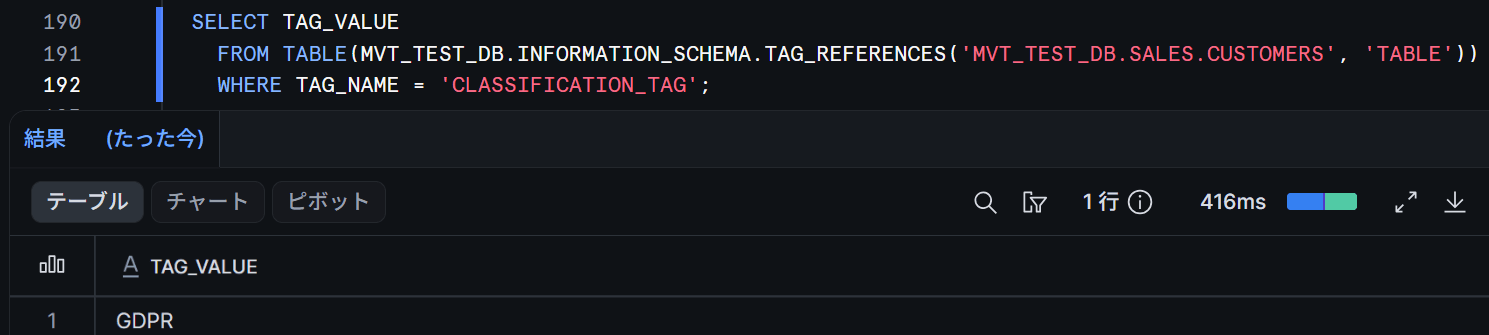
After execution, the values were replaced with just the single value 'GDPR'.
If you accidentally use SET TAG when you intend to add values, your previous settings will be lost.
ON_CONFLICT = MERGE: A view receives merged values from multiple sources
Combining with tag propagation. ON_CONFLICT = MERGE is exclusive to multi-value tags, and specifying it on a single-value tag results in an error.
CREATE OR REPLACE TAG MVT_TEST_DB.GOVERNANCE.DATA_SOURCE_TAG
  MULTI_VALUE = TRUE
  PROPAGATE = ON_DEPENDENCY_AND_DATA_MOVEMENT
  ON_CONFLICT = MERGE;

-- Set different values on two source tables
ALTER TABLE MVT_TEST_DB.SALES.SALES_DATA
  SET TAG MVT_TEST_DB.GOVERNANCE.DATA_SOURCE_TAG = 'sales_system';
ALTER TABLE MVT_TEST_DB.SALES.SUPPORT_DATA
  SET TAG MVT_TEST_DB.GOVERNANCE.DATA_SOURCE_TAG = 'support_system';

-- Create a view that JOINs both tables
CREATE OR REPLACE VIEW MVT_TEST_DB.SALES.V_COMBINED AS
SELECT s.ID, s.SALES_NOTE, t.SUPPORT_NOTE
FROM MVT_TEST_DB.SALES.SALES_DATA s
JOIN MVT_TEST_DB.SALES.SUPPORT_DATA t ON s.ID = t.ID;

SELECT
  SYSTEM$TAG_VALUE_CONTAINS('MVT_TEST_DB.GOVERNANCE.DATA_SOURCE_TAG',
    'MVT_TEST_DB.SALES.V_COMBINED', 'TABLE', 'sales_system')   AS FROM_SALES,    -- True
  SYSTEM$TAG_VALUE_CONTAINS('MVT_TEST_DB.GOVERNANCE.DATA_SOURCE_TAG',
    'MVT_TEST_DB.SALES.V_COMBINED', 'TABLE', 'support_system') AS FROM_SUPPORT;  -- True
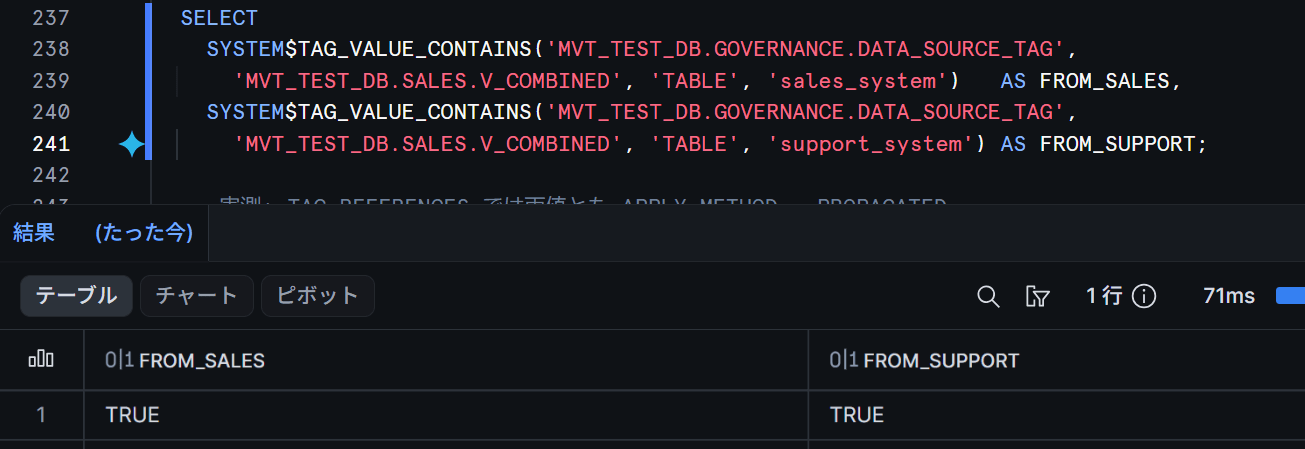
Immediately after creating the view, both source values were TRUE upon verification.
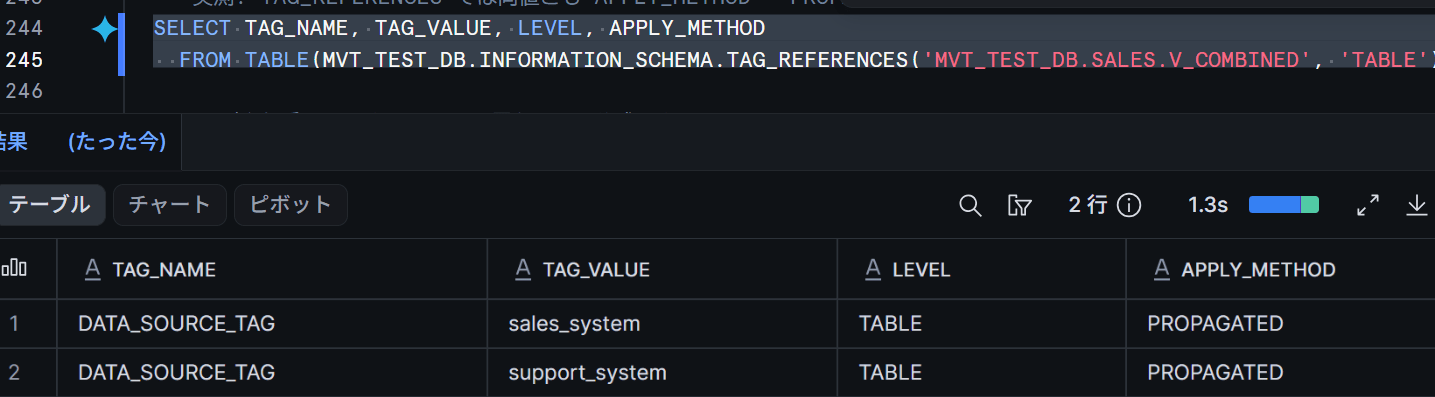
With single-value tag propagation, conflicts are resolved to just one value, but with MERGE, you can retain the information that "this view originates from both sales and support."
TAG_REFERENCES has an APPLY_METHOD column, and values assigned through propagation are displayed as PROPAGATED. This allows you to distinguish them from manually assigned values (MANUAL).
SELECT TAG_NAME, TAG_VALUE, LEVEL, APPLY_METHOD
  FROM TABLE(MVT_TEST_DB.INFORMATION_SCHEMA.TAG_REFERENCES('MVT_TEST_DB.SALES.V_COMBINED', 'TABLE'));
Exceeding 10 values results in an error
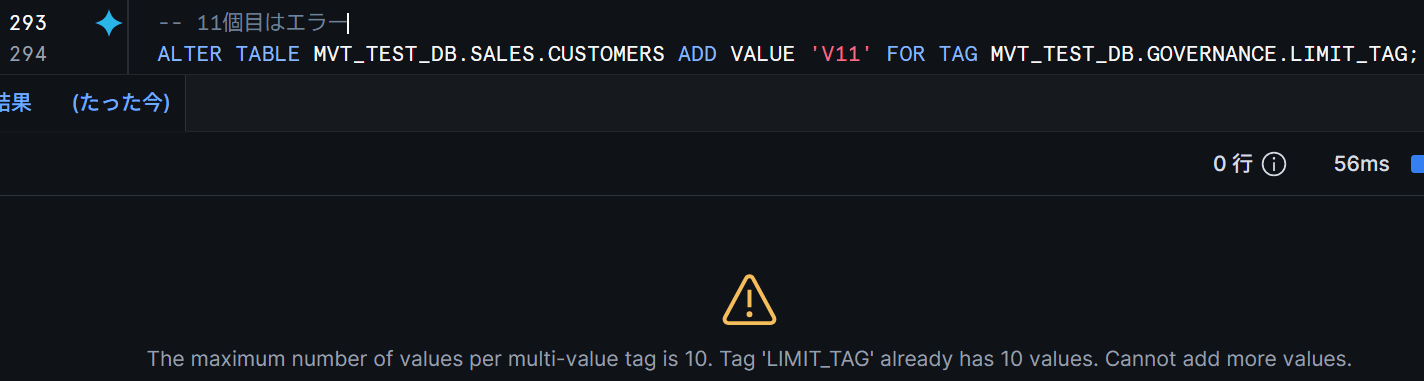
The value limit is 10 values per object (by default). The 11th ADD VALUE resulted in an upper-limit error.
-- Executed after already adding 10 values V01 through V10
ALTER TABLE MVT_TEST_DB.SALES.CUSTOMERS ADD VALUE 'V11' FOR TAG MVT_TEST_DB.GOVERNANCE.LIMIT_TAG;
Masking policies: A policy that references tag values fails the entire query when a second value is added
SYSTEM$GET_TAG_ON_CURRENT_COLUMN, which branches masking behavior based on tag values, does not support multiple values. I verified what actually happens.
CREATE OR REPLACE TAG MVT_TEST_DB.GOVERNANCE.MASK_TEST_TAG MULTI_VALUE = TRUE;

CREATE OR REPLACE MASKING POLICY MVT_TEST_DB.GOVERNANCE.EMAIL_MASK AS (VAL VARCHAR) RETURNS VARCHAR ->
  CASE WHEN SYSTEM$GET_TAG_ON_CURRENT_COLUMN('MVT_TEST_DB.GOVERNANCE.MASK_TEST_TAG') = 'PUBLIC'
       THEN VAL
       ELSE '*** MASKED ***'
  END;

ALTER TABLE MVT_TEST_DB.SALES.ORDERS MODIFY COLUMN CUSTOMER_EMAIL
  SET MASKING POLICY MVT_TEST_DB.GOVERNANCE.EMAIL_MASK;

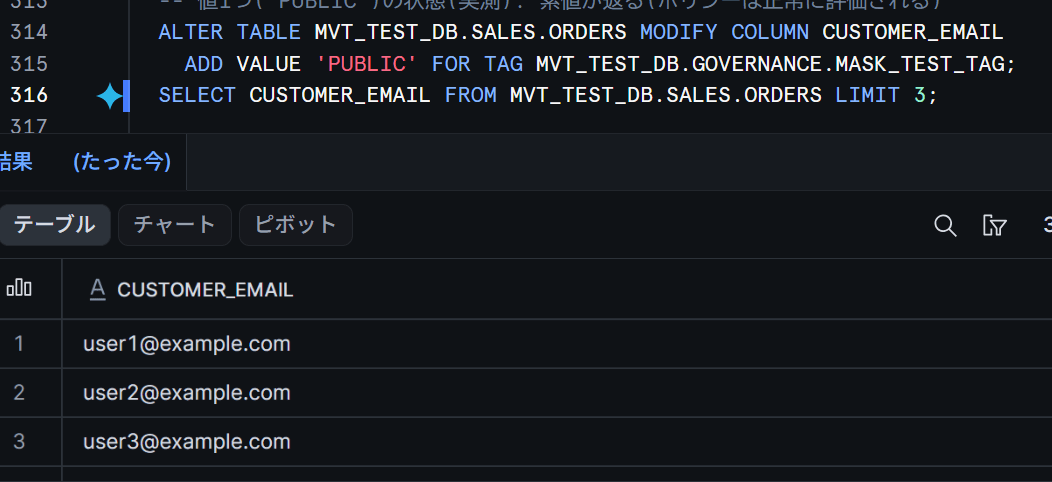
-- With a single value ('PUBLIC'), it is evaluated normally and the raw value is returned
ALTER TABLE MVT_TEST_DB.SALES.ORDERS MODIFY COLUMN CUSTOMER_EMAIL
  ADD VALUE 'PUBLIC' FOR TAG MVT_TEST_DB.GOVERNANCE.MASK_TEST_TAG;
SELECT CUSTOMER_EMAIL FROM MVT_TEST_DB.SALES.ORDERS LIMIT 3;  -- Success
-- Setting two values causes the SELECT itself to fail
ALTER TABLE MVT_TEST_DB.SALES.ORDERS MODIFY COLUMN CUSTOMER_EMAIL
  ADD VALUE 'PII' FOR TAG MVT_TEST_DB.GOVERNANCE.MASK_TEST_TAG;
SELECT CUSTOMER_EMAIL FROM MVT_TEST_DB.SALES.ORDERS LIMIT 3;  -- Error
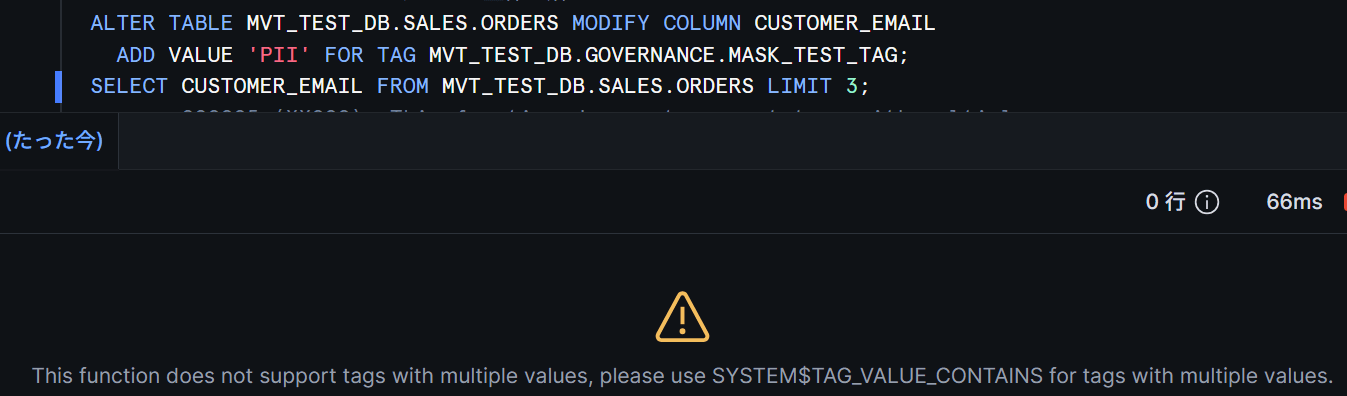
Caution: The masking result does not simply change — the entire query referencing the target column fails with a runtime error. Adding a second value to a tag referenced in a policy condition will stop the queries of all users using that column. As stated in the official documentation, keep tags used in policy conditions separate and as single-value tags.
Can be used together with ALLOWED_VALUES
Combining multi-value tags with ALLOWED_VALUES is not explicitly mentioned in the documentation, but it worked.
CREATE OR REPLACE TAG MVT_TEST_DB.GOVERNANCE.AV_TAG
  ALLOWED_VALUES 'PII', 'FINANCIAL', 'GDPR'
  MULTI_VALUE = TRUE;

ALTER TABLE MVT_TEST_DB.SALES.CUSTOMERS ADD VALUE 'PII' FOR TAG MVT_TEST_DB.GOVERNANCE.AV_TAG;   -- Success
ALTER TABLE MVT_TEST_DB.SALES.CUSTOMERS ADD VALUE 'GDPR' FOR TAG MVT_TEST_DB.GOVERNANCE.AV_TAG;  -- Success
ALTER TABLE MVT_TEST_DB.SALES.CUSTOMERS ADD VALUE 'NOT_ALLOWED' FOR TAG MVT_TEST_DB.GOVERNANCE.AV_TAG;  -- Error
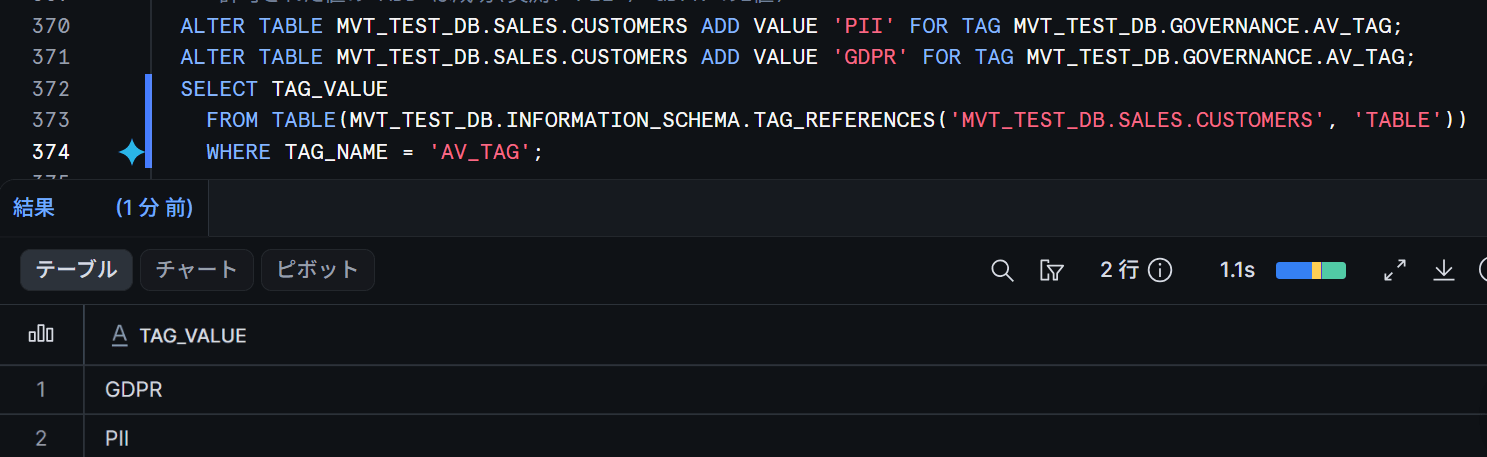
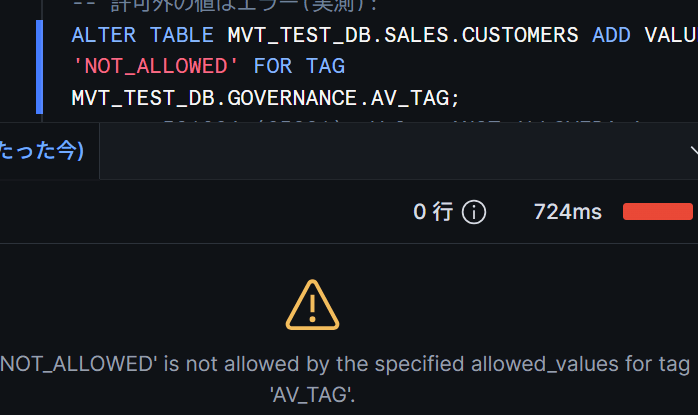
The ALLOWED_VALUES constraint applies to ADD VALUE as well, and values outside the allowed list are rejected. This enables a use case where multiple values are permitted while the vocabulary of classifications is fixed.
Note that writing MULTI_VALUE = TRUE before ALLOWED_VALUES resulted in a syntax error. The official documentation also states that "ALLOWED_VALUES should be specified before other parameters."
On the other hand, combining with ON_CONFLICT = MERGE used in tag propagation (described later) was rejected with an error in this testing environment. Since it can be specified syntactically in CREATE TAG, the behavior may change.
Use Case: Auditing multiple regulatory targets at once
As a final demonstration of the feature testing, let's try a compliance management use case.
When handling multiple regulations with single-value tags, the number of tags grows with each regulation.
With multi-value tags, everything can be consolidated into a single COMPLIANCE_TAG, and combining it with MERGE propagation means downstream processing results are automatically included in the audit scope.
As a scenario, the following three items are classified as regulatory targets.
The key point is that a single object can fall under multiple regulations simultaneously.
- Customer table (CUSTOMERS): Contains personal information such as email addresses and phone numbers, making it subject to Japan's Act on the Protection of Personal Information (APPI) and GDPR
- Payment table (PAYMENTS): Contains card numbers, making it subject to PCI DSS. Also subject to APPI as it involves customer information
- Orders table (ORDERS): Only the email address column is subject to APPI and GDPR at the column level
The overall configuration is as follows. Only the source side requires manual tagging; downstream views are automatically tagged through propagation.
-- Regulatory classification tag (ALLOWED_VALUES not used as it errors when combined with MERGE)
CREATE OR REPLACE TAG MVT_TEST_DB.GOVERNANCE.COMPLIANCE_TAG
  MULTI_VALUE = TRUE
  PROPAGATE = ON_DEPENDENCY_AND_DATA_MOVEMENT
  ON_CONFLICT = MERGE;

-- Add the payment table
CREATE OR REPLACE TABLE MVT_TEST_DB.SALES.PAYMENTS AS
SELECT
  SEQ4() + 1                                              AS PAYMENT_ID,
  '4111-1111-1111-' || LPAD(TO_VARCHAR(SEQ4() + 1), 4, '0') AS CARD_NUMBER,
  UNIFORM(1000, 100000, RANDOM())                         AS AMOUNT
FROM TABLE(GENERATOR(ROWCOUNT => 10));

-- Assign applicable regulations to each table and column
ALTER TABLE MVT_TEST_DB.SALES.CUSTOMERS ADD VALUE 'APPI' FOR TAG MVT_TEST_DB.GOVERNANCE.COMPLIANCE_TAG;
ALTER TABLE MVT_TEST_DB.SALES.CUSTOMERS ADD VALUE 'GDPR' FOR TAG MVT_TEST_DB.GOVERNANCE.COMPLIANCE_TAG;
ALTER TABLE MVT_TEST_DB.SALES.PAYMENTS  ADD VALUE 'PCI_DSS' FOR TAG MVT_TEST_DB.GOVERNANCE.COMPLIANCE_TAG;
ALTER TABLE MVT_TEST_DB.SALES.PAYMENTS  ADD VALUE 'APPI' FOR TAG MVT_TEST_DB.GOVERNANCE.COMPLIANCE_TAG;
ALTER TABLE MVT_TEST_DB.SALES.ORDERS MODIFY COLUMN CUSTOMER_EMAIL
  ADD VALUE 'APPI' FOR TAG MVT_TEST_DB.GOVERNANCE.COMPLIANCE_TAG;
ALTER TABLE MVT_TEST_DB.SALES.ORDERS MODIFY COLUMN CUSTOMER_EMAIL
  ADD VALUE 'GDPR' FOR TAG MVT_TEST_DB.GOVERNANCE.COMPLIANCE_TAG;
Create a downstream view combining customers and payments, and check the tag status.
CREATE OR REPLACE VIEW MVT_TEST_DB.SALES.V_CUSTOMER_PAYMENTS AS
SELECT c.CUSTOMER_ID, c.EMAIL, p.PAYMENT_ID, p.AMOUNT
FROM MVT_TEST_DB.SALES.CUSTOMERS c
JOIN MVT_TEST_DB.SALES.PAYMENTS p ON c.CUSTOMER_ID = p.PAYMENT_ID;

SELECT TAG_NAME, TAG_VALUE, APPLY_METHOD
  FROM TABLE(MVT_TEST_DB.INFORMATION_SCHEMA.TAG_REFERENCES('MVT_TEST_DB.SALES.V_CUSTOMER_PAYMENTS', 'TABLE'))
  WHERE TAG_NAME = 'COMPLIANCE_TAG'
  ORDER BY TAG_VALUE;
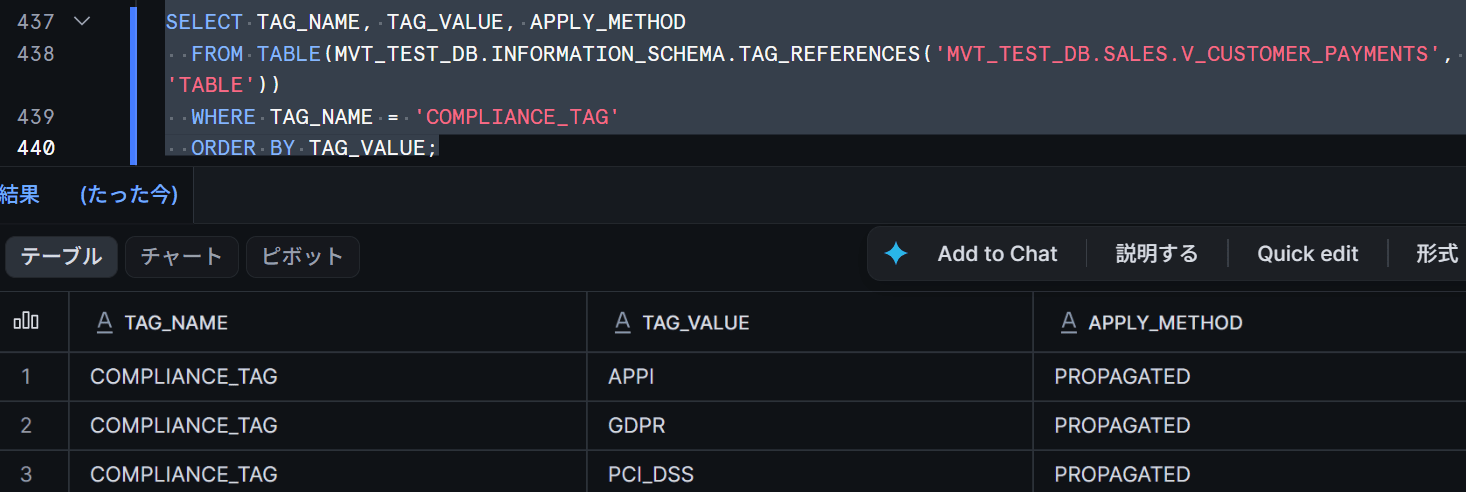
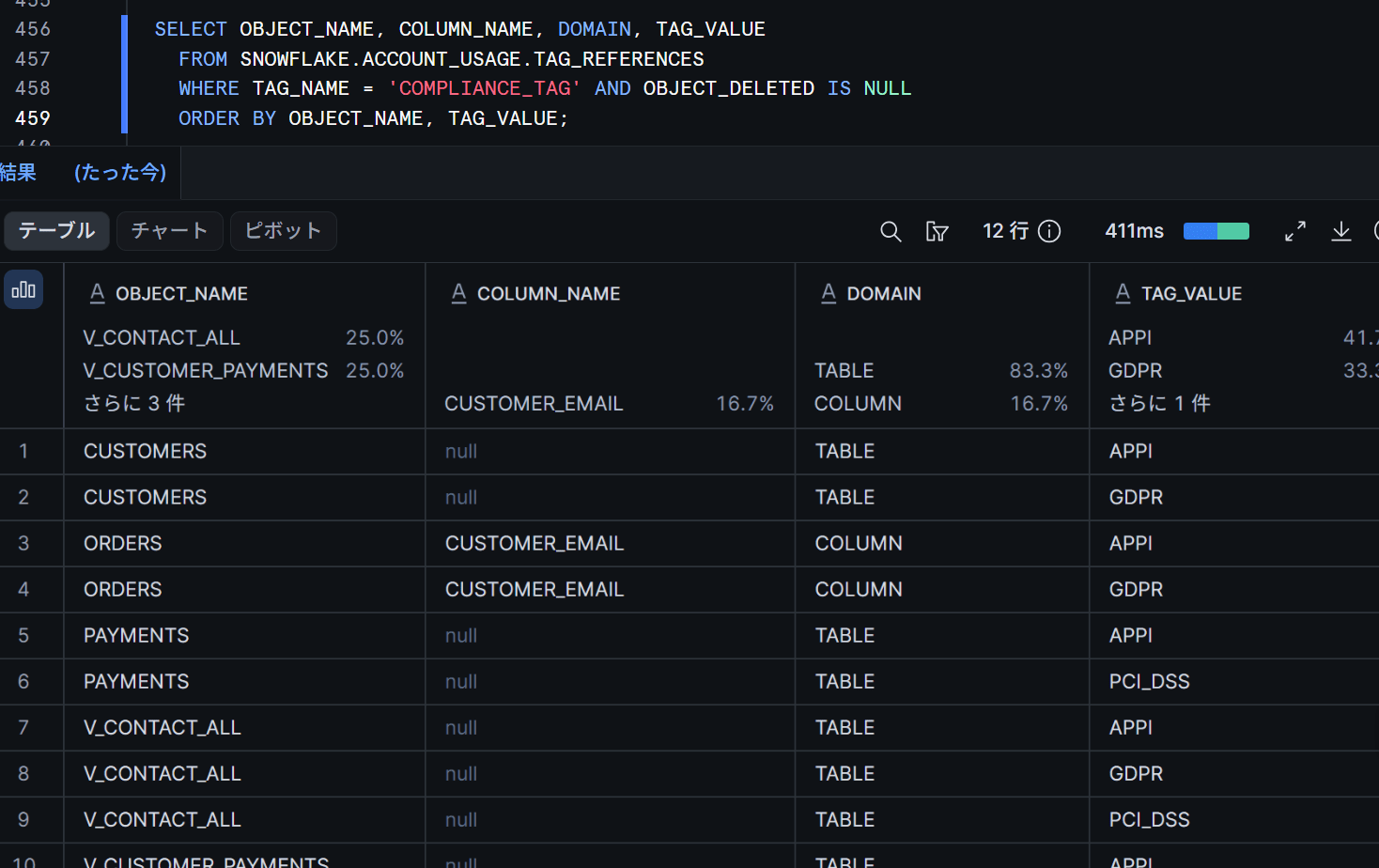
The view combining customers (APPI, GDPR) and payments (PCI_DSS, APPI) became subject to all three regulations without any additional manual classification downstream. This is information that would have been narrowed down to just one value with single-value tag propagation conflicts.
For account-wide auditing, use the SNOWFLAKE.ACCOUNT_USAGE.TAG_REFERENCES view (with up to a 2-hour delay for updates to be reflected). Multiple values are returned one row per value, including those on propagated views.
SELECT OBJECT_NAME, COLUMN_NAME, DOMAIN, TAG_VALUE
  FROM SNOWFLAKE.ACCOUNT_USAGE.TAG_REFERENCES
  WHERE TAG_NAME = 'COMPLIANCE_TAG' AND OBJECT_DELETED IS NULL
  ORDER BY OBJECT_NAME, TAG_VALUE;
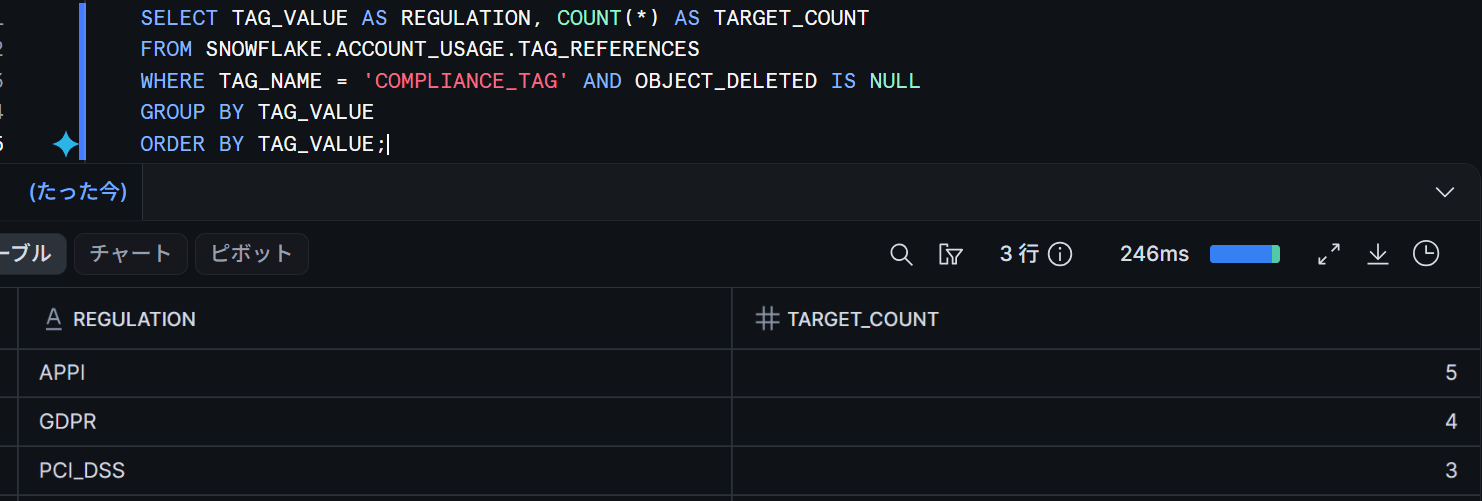
Using WHERE TAG_VALUE = 'GDPR' gives you a per-regulation list, and GROUP BY TAG_VALUE gives you a summary by regulation.
SELECT TAG_VALUE AS REGULATION, COUNT(*) AS TARGET_COUNT
  FROM SNOWFLAKE.ACCOUNT_USAGE.TAG_REFERENCES
  WHERE TAG_NAME = 'COMPLIANCE_TAG' AND OBJECT_DELETED IS NULL
  GROUP BY TAG_VALUE
  ORDER BY TAG_VALUE;
For checking individual objects, INFORMATION_SCHEMA.TAG_REFERENCES and SYSTEM$TAG_VALUE_CONTAINS used throughout this article are available without any delay. A practical approach is to use the ACCOUNT_USAGE side for regular audit reports, and system functions for pinpoint checks in audit scripts.
Limitations and Notes
Here is a summary of things to keep in mind when introducing multi-value tags, based on testing results as of August 27, 2026, and the official documentation.
Limitations and Notes
- Once a tag is set to
MULTI_VALUE = TRUE, it cannot be reverted to a single-value tag. - The value limit is 10 values per object (by default). The 11th value results in an error.
SYSTEM$GET_TAG/SYSTEM$GET_TAG_ON_CURRENT_TABLE/SYSTEM$GET_TAG_ON_CURRENT_COLUMNerror when multiple values are present. They work while there is only one value, so be aware that adding a second value will break existing code.SET TAGreplaces all values, not appends. BothUNSET TAGandDROP VALUEfor all values remove the tag assignment.ADD VALUEwith a duplicate value andDROP VALUEfor a non-existent value do not result in errors.ON_CONFLICT = MERGEis exclusive to multi-value tags. Specifying it on a single-value tag results in an error.- Combining with
ALLOWED_VALUESis possible and the constraint applies toADD VALUEas well. However, combining withON_CONFLICT = MERGEresulted in an error (actual measurement in this testing environment; not documented). - Value comparison in
SYSTEM$TAG_VALUE_CONTAINSis case-sensitive.
Closing
I found it convenient to be able to express cases where multiple classifications apply simultaneously using a single tag, and to carry data lineage downstream without loss when combined with ON_CONFLICT = MERGE.
On the other hand, care is needed regarding compatibility with SYSTEM$GET_TAG-style functions and policy conditions, and it is safer to keep tags used for policies separate as single-value tags.
I hope this article proves useful to someone!