![[New Feature] Building and Deploying SQL + Python Pipelines with GUI Using Snowflake's Pipeline Builder](https://devio2024-media.developers.io/image/upload/f_auto,q_auto,w_3840/f_auto,q_auto/v1790874280/eyecatch/wsr0koxw01pat9lxglvp.png)
[New Feature] Building and Deploying SQL + Python Pipelines with GUI Using Snowflake's Pipeline Builder

This page has been translated by machine translation. View original
It's Kawabata.
On October 22, 2026, Pipeline Builder became Public Preview. It is a feature in Snowsight Workspaces that lets you visually assemble task graphs using a GUI. Previously, to run Notebooks and SQL in sequence, you had to manually write CREATE TASK ... AFTER ... and manage the DDL order and differences yourself every time changes were made.
This article uses data from jaffle shop, which is known as a dbt sample. It covers loading from a public S3, creating staging / marts with SQL, and row count checks with branching using Python. These are assembled into a single task graph on the Pipeline Builder canvas. We then Deploy it as a DCM project and verify execution, monitoring, and deployment to two targets: DEV / PROD.
Pipeline Builder Overview
Pipeline Builder is a visual designer that runs inside Workspaces. You place Notebooks, Python files, ML Jobs, and SQL as cards on the canvas, and connecting cards determines the execution order. Behind the scenes, Pipeline Builder creates and manages the following 4 types of objects.
| Object | Role |
|---|---|
| Task | One canvas card equals one Task. Executes Notebook / Python / ML Job / SQL / .sql files |
| Code Bundle | When .py or .ipynb files are placed on the canvas, a Code Bundle that bundles the project's code is automatically created. You don't need to deploy files yourself |
| Task graph | Created when two or more Tasks are connected. Holds the schedule, execution policy, and Task defaults together |
| DCM project | One pipeline equals one DCM project. Before deploying, you can review changes (creates / modifications / deletions) in a list, and deploy the same definition to different targets |
There are 4 types of Tasks you can place on the canvas.
| Task type | What it executes | Notes |
|---|---|---|
| Notebook / Python | .ipynb or .py inside a Code Bundle | Notebook requires a compute pool. Python also works with a warehouse |
| ML Job | Executes a Python file as an ML Job | Uses a Code Bundle with bundle type ML |
| SQL | SQL written directly in the Task | Can also be used to call stored procedures |
| SQL file | .sql file | Can be selected from files in the Workspace, files on a stage, or a stage URI |
CoCo draft generation (Generate with Cortex in the Create dialog) and the /pipeline-builder skill are "coming soon." They are not available at the time of writing this article.
Prerequisites
- Access to Workspaces. Pipelines are placed in a shared Workspace created with the owner role (reason explained at the beginning of "Tried It Out")
- A DB and schema where pipeline objects will be placed. Can be existing, or defined in the same DCM project
- A warehouse for SQL Tasks. Notebooks and Container Runtime Python also require a compute pool
- Files to be executed must be placed inside the project folder (not inside
sources/orout/) - Required permissions for the deploying role are as follows
| Permission | Target | Purpose |
|---|---|---|
| CREATE DCM PROJECT | Schema | Creates the DCM project object on first Deploy |
| CREATE TASK | Schema | Creating Tasks and task graphs |
| CREATE CODE BUNDLE | Schema | Required when there are Notebook / Python Tasks |
| EXECUTE TASK | Account | Executing Tasks and task graphs |
| EXECUTE MANAGED TASK | Account | Only when using serverless Tasks |
| USAGE | DB, schema, warehouse, compute pool | Location of objects and compute |
| USAGE | notification integration | Only when configuring notifications |
| OWNERSHIP | Task | All Tasks in a graph are owned by the same role as the graph |
| CREATE WORKSPACE | Schema | When creating a shared Workspace. If created with the Task owner role, no additional permissions are needed to read files (not in the documentation table) |
The Pipeline to Verify
The data is 6 years of jaffle shop data published by dbt Labs (s3://dbt-tutorial-public/long_term_dataset/). The following 6 Tasks will be combined into a single task graph.
LOAD_RAW (SQL file) → STAGING (SQL file) → MARTS (SQL file) → CHECK_MARTS (Python)
                                                                  ├─ On success → PUBLISH_SUMMARY (SQL)
                                                                  └─ On failure → LOG_FAILURE (SQL)
| Task | Type | Content |
|---|---|---|
| LOAD_RAW | SQL file | COPY INTO 6 raw tables from an external stage |
| STAGING | SQL file | Creates 6 views equivalent to dbt's stg_* models |
| MARTS | SQL file | Creates 6 tables including orders / order_items / customers |
| CHECK_MARTS | Python | Checks the row count of orders and fails with an exception if below the threshold |
| PUBLISH_SUMMARY | SQL | Creates a daily summary only when CHECK_MARTS succeeds |
| LOG_FAILURE | SQL | Records to the log table only when CHECK_MARTS fails |
The data volume is approximately 2.09 million rows for orders and approximately 3.02 million rows for order_items (September 2016 to August 2022). The environment has 2 schemas, PB_DEMO.DEV and PB_DEMO.PROD, and the same pipeline is deployed to both targets.
Preparation
Using ACCOUNTADMIN, create a dedicated role, warehouse, DB, and external stage. Since the bucket is public, no credentials are needed. Instead of consolidating permissions with OWNERSHIP, we grant them individually as listed in the documentation to verify there are no gaps.
Preparation SQL
USE ROLE ACCOUNTADMIN;

CREATE ROLE PB_ENGINEER;
GRANT ROLE PB_ENGINEER TO ROLE SYSADMIN;
GRANT ROLE PB_ENGINEER TO USER <your username>;

CREATE WAREHOUSE PB_WH WAREHOUSE_SIZE = XSMALL AUTO_SUSPEND = 60 AUTO_RESUME = TRUE;
GRANT USAGE ON WAREHOUSE PB_WH TO ROLE PB_ENGINEER;

CREATE DATABASE PB_DEMO;
CREATE SCHEMA PB_DEMO.DEV;
CREATE SCHEMA PB_DEMO.PROD;

-- jaffle shop data published by dbt Labs (6 years)
CREATE STAGE PB_DEMO.PUBLIC.JAFFLE_S3
  URL = 's3://dbt-tutorial-public/long_term_dataset/'
  FILE_FORMAT = (TYPE = CSV SKIP_HEADER = 1 FIELD_OPTIONALLY_ENCLOSED_BY = '"' NULL_IF = ('', 'NULL'));

-- Grant individually according to the Access control requirements in the documentation
GRANT USAGE ON DATABASE PB_DEMO TO ROLE PB_ENGINEER;
GRANT USAGE ON SCHEMA PB_DEMO.PUBLIC TO ROLE PB_ENGINEER;
GRANT USAGE ON STAGE PB_DEMO.PUBLIC.JAFFLE_S3 TO ROLE PB_ENGINEER;
GRANT USAGE, CREATE TABLE, CREATE VIEW, CREATE TASK, CREATE CODE BUNDLE, CREATE DCM PROJECT
  ON SCHEMA PB_DEMO.DEV TO ROLE PB_ENGINEER;
GRANT USAGE, CREATE TABLE, CREATE VIEW, CREATE TASK, CREATE CODE BUNDLE, CREATE DCM PROJECT
  ON SCHEMA PB_DEMO.PROD TO ROLE PB_ENGINEER;
GRANT EXECUTE TASK ON ACCOUNT TO ROLE PB_ENGINEER;

-- Allow PB_ENGINEER to create the shared Workspace where the pipeline will be placed
GRANT CREATE WORKSPACE ON SCHEMA PB_DEMO.PUBLIC TO ROLE PB_ENGINEER;

-- Log table written to by the failure Task (per environment)
USE ROLE PB_ENGINEER;
CREATE TABLE PB_DEMO.DEV.PIPELINE_RUN_LOG (logged_at TIMESTAMP_LTZ, graph_name VARCHAR, message VARCHAR);
CREATE TABLE PB_DEMO.PROD.PIPELINE_RUN_LOG (logged_at TIMESTAMP_LTZ, graph_name VARCHAR, message VARCHAR);
If you can see 6 files with LIST @PB_DEMO.PUBLIC.JAFFLE_S3;, preparation is complete. raw_orders.csv is about 298 MB and raw_order_items.csv is about 248 MB. Since we are not using serverless Tasks, EXECUTE MANAGED TASK is not granted.
Tried It Out
Creating a Shared Workspace and Pipeline
The Workspace will be a shared Workspace. This is because SQL file tasks read files from the Workspace each time they run, and Tasks run in the session of the owner role. In this verification, files in a personal Workspace could not be referenced from a Task (see "Limitations and Notes"). In Projects » Workspaces, select Create, choose Shared workspace, and create it with the name PB_SHARED, Owner role PB_ENGINEER, Database PB_DEMO, Schema PUBLIC.
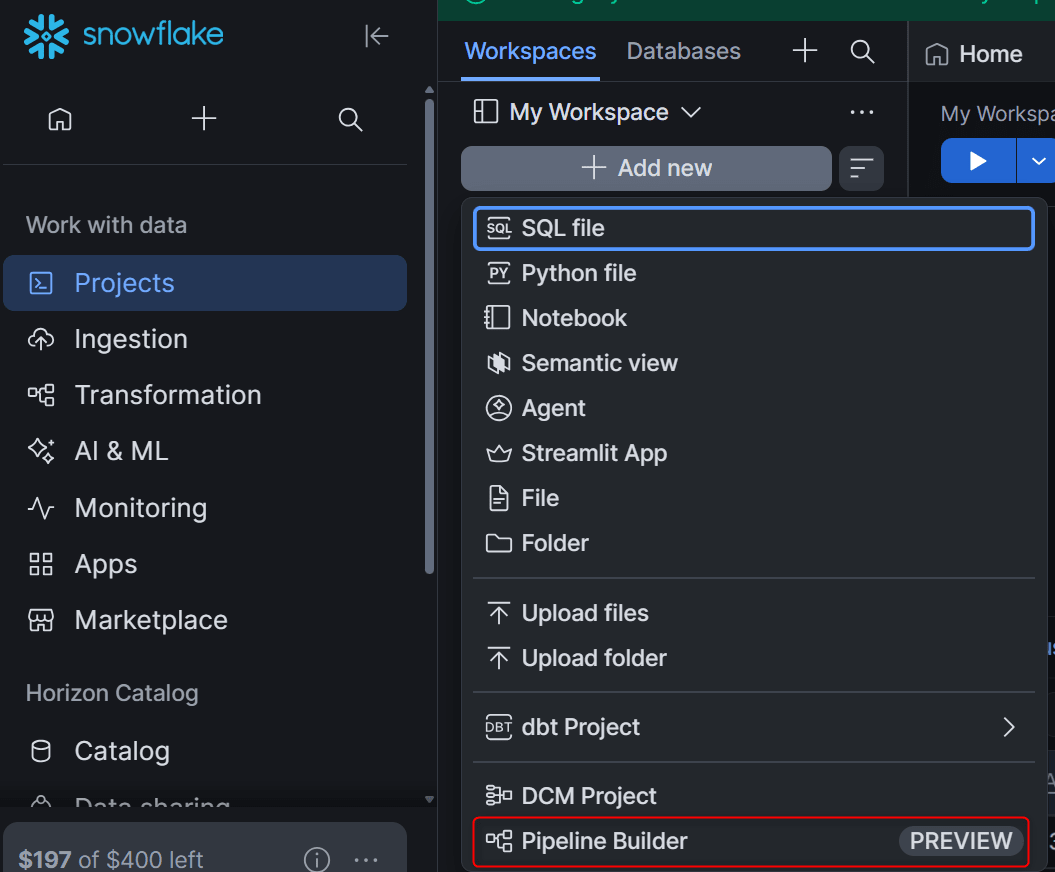
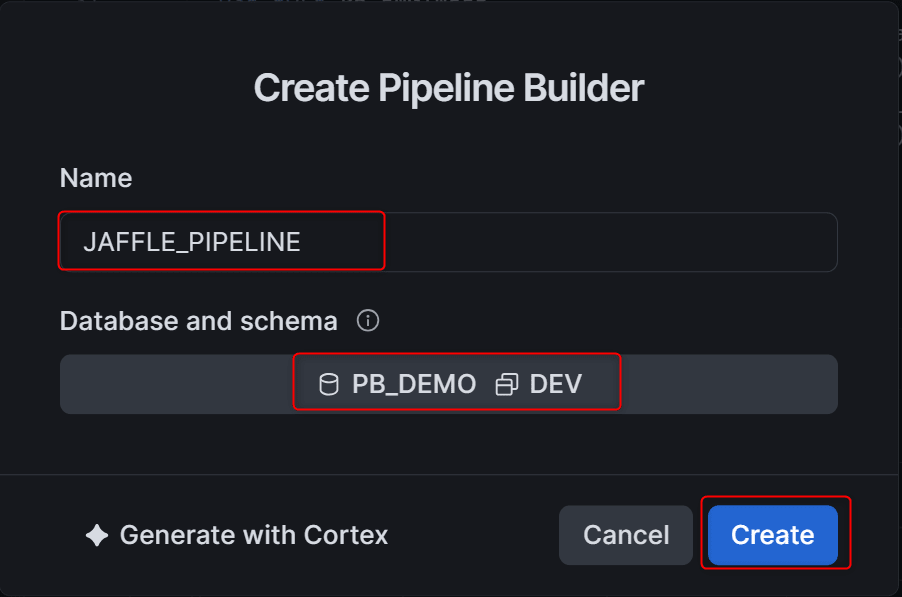
Selecting Pipeline Builder opens the Create Pipeline Builder dialog. Specify the Name and the Database and schema where the DCM project object will be created.
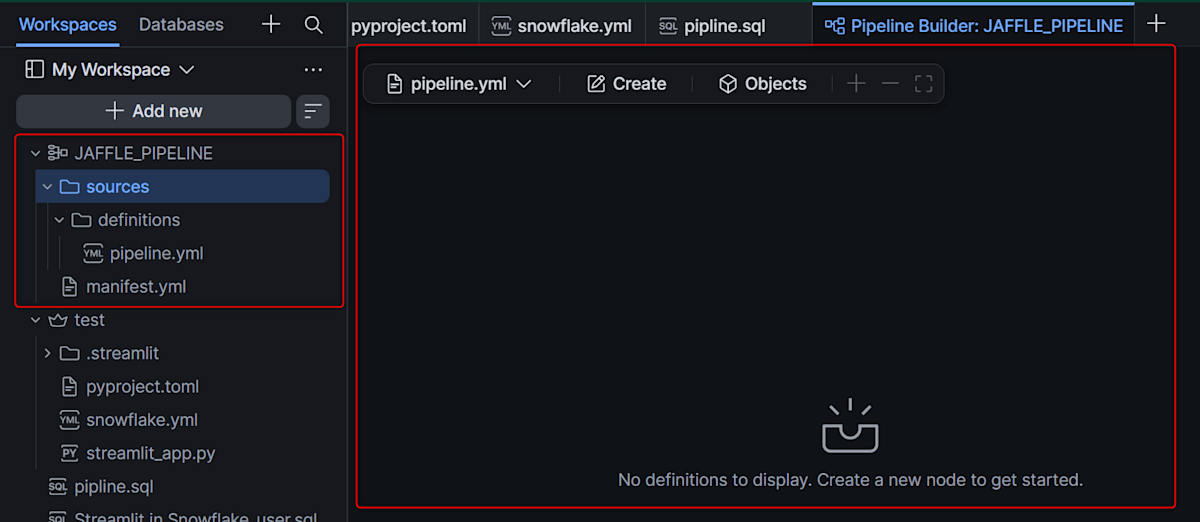
Once created, a project folder appears in the Workspace and an empty canvas opens. The folder contains manifest.yml and sources/, and the definition file pipeline.yml is created under sources/definitions/. All operations on the canvas are written to pipeline.yml, and edits made directly to the file are also reflected on the canvas.
Placing Files to Execute in the Project
Files executed by Tasks are placed inside the project folder (anywhere except sources/ and out/). This time, we upload 3 .sql files and 1 .py file.
01_load_raw.sql creates the raw tables and runs COPY INTO. The key point is that table names are not qualified with a DB or schema. Since Tasks run in the context of the DB and schema they belong to, the same file can be used for both DEV and PROD.
01_load_raw.sql
CREATE TABLE IF NOT EXISTS raw_customers (
    id VARCHAR,
    name VARCHAR
);
CREATE TABLE IF NOT EXISTS raw_orders (
    id VARCHAR,
    customer VARCHAR,
    ordered_at TIMESTAMP_NTZ,
    store_id VARCHAR,
    subtotal NUMBER,
    tax_paid NUMBER,
    order_total NUMBER
);
CREATE TABLE IF NOT EXISTS raw_order_items (
    id VARCHAR,
    order_id VARCHAR,
    sku VARCHAR
);
CREATE TABLE IF NOT EXISTS raw_products (
    sku VARCHAR,
    name VARCHAR,
    type VARCHAR,
    price NUMBER,
    description VARCHAR
);
CREATE TABLE IF NOT EXISTS raw_supplies (
    id VARCHAR,
    name VARCHAR,
    cost NUMBER,
    perishable BOOLEAN,
    sku VARCHAR
);
CREATE TABLE IF NOT EXISTS raw_stores (
    id VARCHAR,
    name VARCHAR,
    opened_at TIMESTAMP_NTZ,
    tax_rate FLOAT
);

COPY INTO raw_customers   FROM @PB_DEMO.PUBLIC.JAFFLE_S3/raw_customers.csv;
COPY INTO raw_orders      FROM @PB_DEMO.PUBLIC.JAFFLE_S3/raw_orders.csv;
COPY INTO raw_order_items FROM @PB_DEMO.PUBLIC.JAFFLE_S3/raw_order_items.csv;
COPY INTO raw_products    FROM @PB_DEMO.PUBLIC.JAFFLE_S3/raw_products.csv;
COPY INTO raw_supplies    FROM @PB_DEMO.PUBLIC.JAFFLE_S3/raw_supplies.csv;
COPY INTO raw_stores      FROM @PB_DEMO.PUBLIC.JAFFLE_S3/raw_stores.csv;
COPY INTO skips files that are in the load history (64 days). Therefore, subsequent executions on the same files complete faster than the first run (in this case, 35 seconds on the first run, 4–10 seconds on subsequent runs).
02_staging.sql turns the stg_* models from the jaffle shop dbt project into views. It creates 6 views.
02_staging.sql
CREATE OR REPLACE VIEW stg_customers AS
SELECT
    id   AS customer_id,
    name AS customer_name
FROM raw_customers;

CREATE OR REPLACE VIEW stg_locations AS
SELECT
    id   AS location_id,
    name AS location_name,
    tax_rate,
    DATE_TRUNC('day', opened_at) AS opened_date
FROM raw_stores;

CREATE OR REPLACE VIEW stg_order_items AS
SELECT
    id       AS order_item_id,
    order_id,
    sku      AS product_id
FROM raw_order_items;

CREATE OR REPLACE VIEW stg_orders AS
SELECT
    id          AS order_id,
    store_id    AS location_id,
    customer    AS customer_id,
    subtotal    AS subtotal_cents,
    tax_paid    AS tax_paid_cents,
    order_total AS order_total_cents,
    (subtotal / 100)::NUMBER(16, 2)    AS subtotal,
    (tax_paid / 100)::NUMBER(16, 2)    AS tax_paid,
    (order_total / 100)::NUMBER(16, 2) AS order_total,
    DATE_TRUNC('day', ordered_at)      AS ordered_at
FROM raw_orders;

CREATE OR REPLACE VIEW stg_products AS
SELECT
    sku         AS product_id,
    name        AS product_name,
    type        AS product_type,
    description AS product_description,
    (price / 100)::NUMBER(16, 2)        AS product_price,
    COALESCE(type = 'jaffle', FALSE)    AS is_food_item,
    COALESCE(type = 'beverage', FALSE)  AS is_drink_item
FROM raw_products;

CREATE OR REPLACE VIEW stg_supplies AS
SELECT
    MD5(COALESCE(id, '') || '-' || COALESCE(sku, '')) AS supply_uuid,
    id         AS supply_id,
    sku        AS product_id,
    name       AS supply_name,
    (cost / 100)::NUMBER(16, 2) AS supply_cost,
    perishable AS is_perishable_supply
FROM raw_supplies;
03_marts.sql turns the marts models into tables. They are arranged in the order of order_items, orders, and customers, with dependencies placed later.
03_marts.sql
CREATE OR REPLACE TABLE order_items AS
WITH order_supplies_summary AS (
    SELECT
        product_id,
        SUM(supply_cost) AS supply_cost
    FROM stg_supplies
    GROUP BY 1
)
SELECT
    oi.*,
    o.ordered_at,
    p.product_name,
    p.product_price,
    p.is_food_item,
    p.is_drink_item,
    s.supply_cost
FROM stg_order_items AS oi
LEFT JOIN stg_orders   AS o ON oi.order_id = o.order_id
LEFT JOIN stg_products AS p ON oi.product_id = p.product_id
LEFT JOIN order_supplies_summary AS s ON oi.product_id = s.product_id;

CREATE OR REPLACE TABLE orders AS
WITH order_items_summary AS (
    SELECT
        order_id,
        SUM(supply_cost)     AS order_cost,
        SUM(product_price)   AS order_items_subtotal,
        COUNT(order_item_id) AS count_order_items,
        SUM(CASE WHEN is_food_item  THEN 1 ELSE 0 END) AS count_food_items,
        SUM(CASE WHEN is_drink_item THEN 1 ELSE 0 END) AS count_drink_items
    FROM order_items
    GROUP BY 1
)
SELECT
    o.*,
    s.order_cost,
    s.order_items_subtotal,
    s.count_food_items,
    s.count_drink_items,
    s.count_order_items,
    s.count_food_items  > 0 AS is_food_order,
    s.count_drink_items > 0 AS is_drink_order,
    ROW_NUMBER() OVER (PARTITION BY o.customer_id ORDER BY o.ordered_at ASC) AS customer_order_number
FROM stg_orders AS o
LEFT JOIN order_items_summary AS s ON o.order_id = s.order_id;

CREATE OR REPLACE TABLE customers AS
WITH customer_orders_summary AS (
    SELECT
        customer_id,
        COUNT(DISTINCT order_id)     AS count_lifetime_orders,
        COUNT(DISTINCT order_id) > 1 AS is_repeat_buyer,
        MIN(ordered_at)  AS first_ordered_at,
        MAX(ordered_at)  AS last_ordered_at,
        SUM(subtotal)    AS lifetime_spend_pretax,
        SUM(tax_paid)    AS lifetime_tax_paid,
        SUM(order_total) AS lifetime_spend
    FROM orders
    GROUP BY 1
)
SELECT
    c.*,
    s.count_lifetime_orders,
    s.first_ordered_at,
    s.last_ordered_at,
    s.lifetime_spend_pretax,
    s.lifetime_tax_paid,
    s.lifetime_spend,
    CASE WHEN s.is_repeat_buyer THEN 'returning' ELSE 'new' END AS customer_type
FROM stg_customers AS c
LEFT JOIN customer_orders_summary AS s ON c.customer_id = s.customer_id;

CREATE OR REPLACE TABLE products  AS SELECT * FROM stg_products;
CREATE OR REPLACE TABLE locations AS SELECT * FROM stg_locations;
CREATE OR REPLACE TABLE supplies  AS SELECT * FROM stg_supplies;
check_marts.py checks the row count of the marts. If below --min-orders, it raises an exception to fail the Task, and on success it records the row counts to PIPELINE_CHECK_LOG. Python running in a Code Bundle has a Snowpark session automatically injected, so no connection information needs to be written.
check_marts.py
"""Marts row count check (Python task).

If the number of rows in ORDERS is less than --min-orders, raise an exception to fail the task.
On success, record the row counts to PIPELINE_CHECK_LOG.
"""
import argparse

from snowflake.snowpark.context import get_active_session

def main() -> None:
    parser = argparse.ArgumentParser()
    parser.add_argument("--min-orders", type=int, default=1)
    parser.add_argument("--schema", default=None, help="database.schema (default: current schema of the session)")
    args = parser.parse_args()

    session = get_active_session()
    schema = args.schema or f"{session.get_current_database()}.{session.get_current_schema()}"

    counts = {t: session.table(f"{schema}.{t}").count() for t in ("ORDERS", "ORDER_ITEMS", "CUSTOMERS")}
    print(f"schema={schema} counts={counts} min_orders={args.min_orders}")

    if counts["ORDERS"] < args.min_orders:
        raise RuntimeError(f"ORDERS has {counts['ORDERS']} rows, less than --min-orders {args.min_orders}")

    session.sql(
        f"CREATE TABLE IF NOT EXISTS {schema}.PIPELINE_CHECK_LOG "
        "(checked_at TIMESTAMP_LTZ, orders NUMBER, order_items NUMBER, customers NUMBER)"
    ).collect()
    session.sql(
        f"INSERT INTO {schema}.PIPELINE_CHECK_LOG VALUES "
        f"(CURRENT_TIMESTAMP(), {counts['ORDERS']}, {counts['ORDER_ITEMS']}, {counts['CUSTOMERS']})"
    ).collect()
    print("check passed")

if __name__ == "__main__":
    main()
Arranging SQL File Tasks and Creating a Task Graph
Dragging 01_load_raw.sql from the file explorer onto the canvas creates a SQL file task card and opens the settings drawer. In the General tab, set the Name (fully qualified name) and Warehouse.
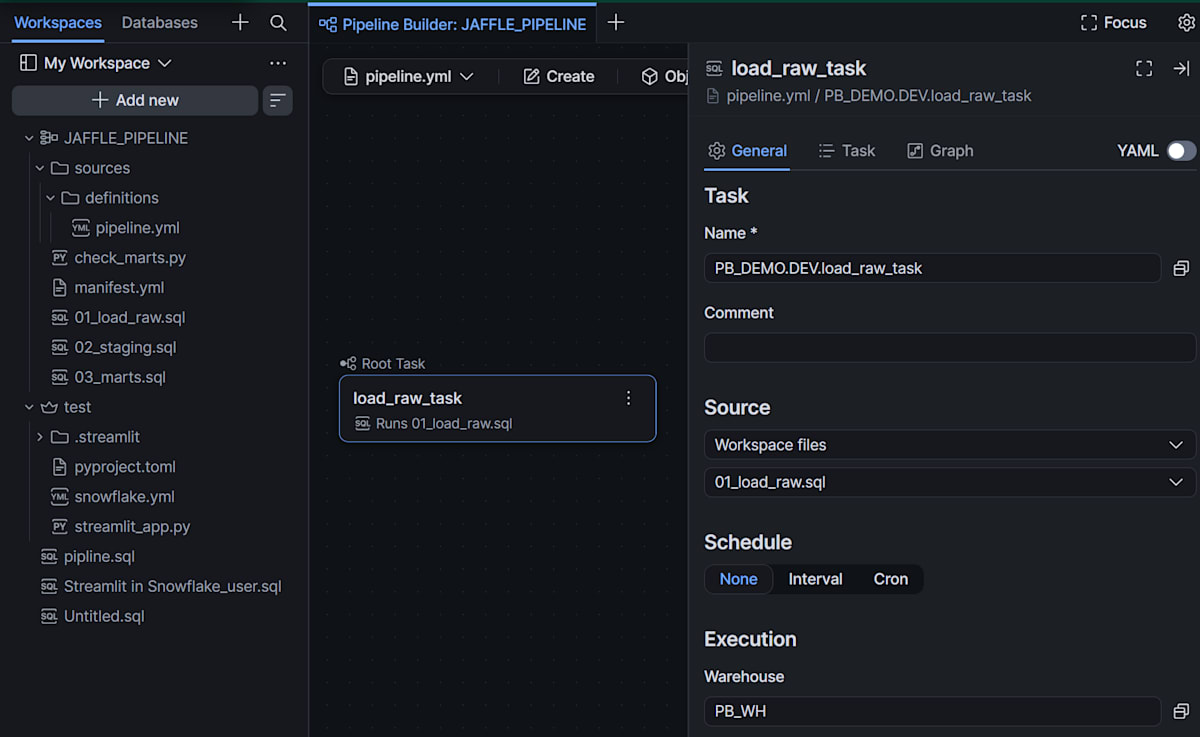
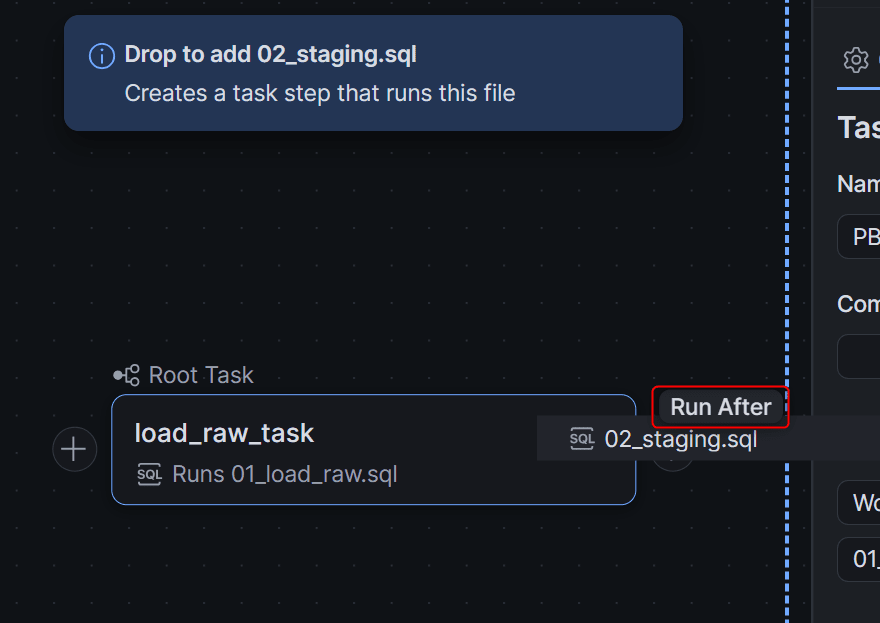
Next, drag 02_staging.sql to the right of the LOAD_RAW card and drop it when the Run After hint appears. A new Task is added, the two are connected, and a task graph is created at the same time. No confirmation dialog appears, and the first Task becomes the root. Place 03_marts.sql after STAGING in the same way.
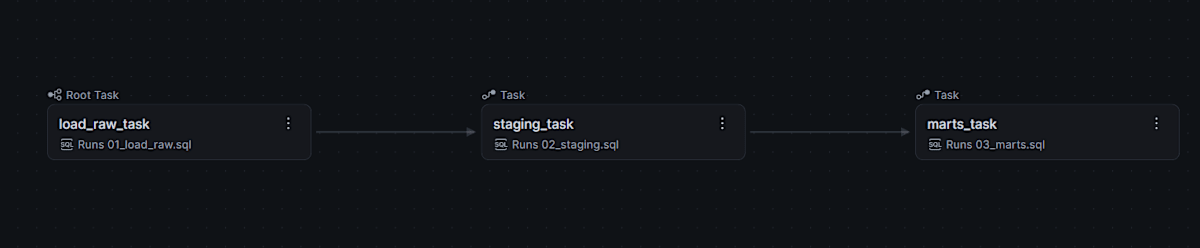
For combinations that cannot be connected, the reason is displayed on the canvas. The documentation lists 5 cases: "different schema," "would create two roots," "Task outside this project," "already belongs to another graph," and "would create a loop."
Python Task and Code Bundle
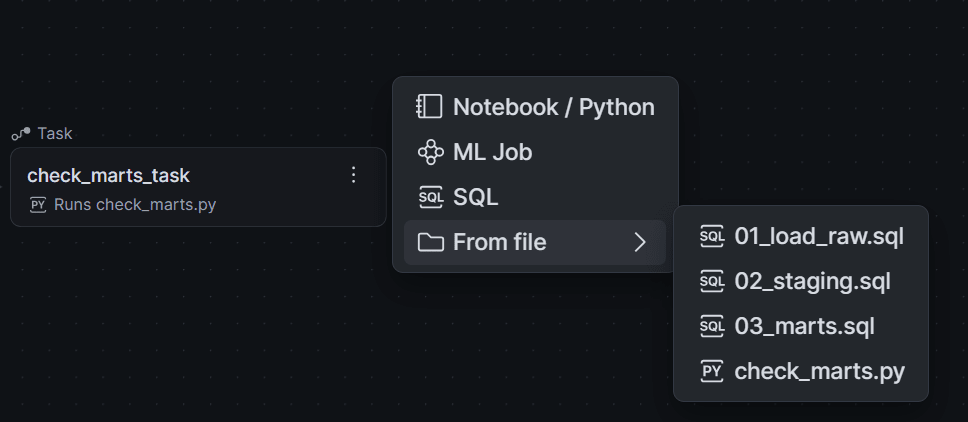
Dropping check_marts.py after MARTS creates a Notebook / Python task. At the same time, a Code Bundle that bundles the project's code is automatically created, and default values for runtime and compute are set. Since we are not using a compute pool and will run on a warehouse, change the Specification tab.
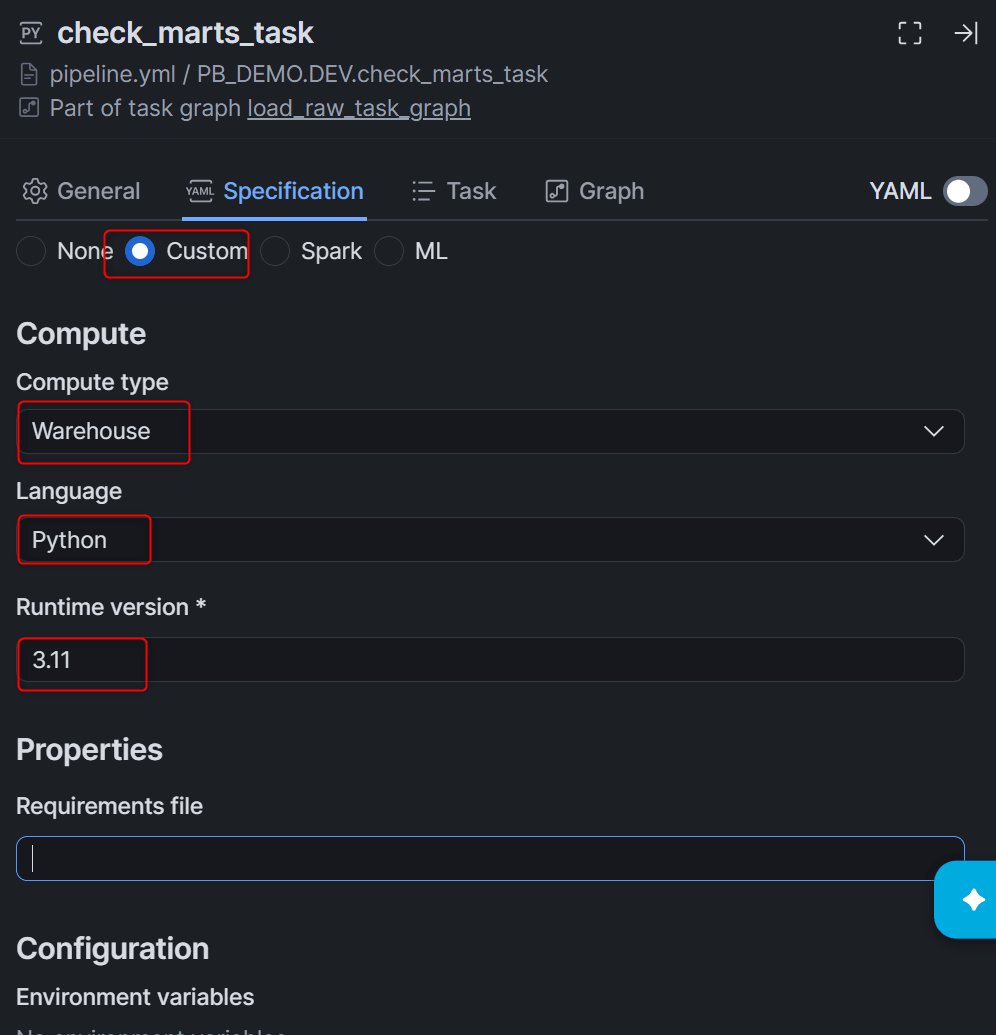
The Code Bundle name is kept as assigned by Pipeline Builder. When adding more Python files, add a Task using the same bundle from the card's +, and only change the Entrypoint.
Using Conditional Tasks to Separate Success and Failure Paths
By default, Tasks run "when all predecessor Tasks have succeeded." According to the documentation, you can create a Task that runs only on failure by changing the Predecessors condition in the Dependencies section of the Task tab. Place two SQL tasks after CHECK_MARTS.
PUBLISH_SUMMARY keeps the default condition and creates a daily summary. Since ordered_at in stg_orders is a TIMESTAMP_NTZ truncated to the day, use TO_DATE to convert it to a date type.
CREATE OR REPLACE TABLE daily_summary AS
SELECT
    TO_DATE(ordered_at) AS order_date,
    COUNT(*)            AS order_count,
    SUM(order_total)    AS revenue
FROM orders
GROUP BY 1;
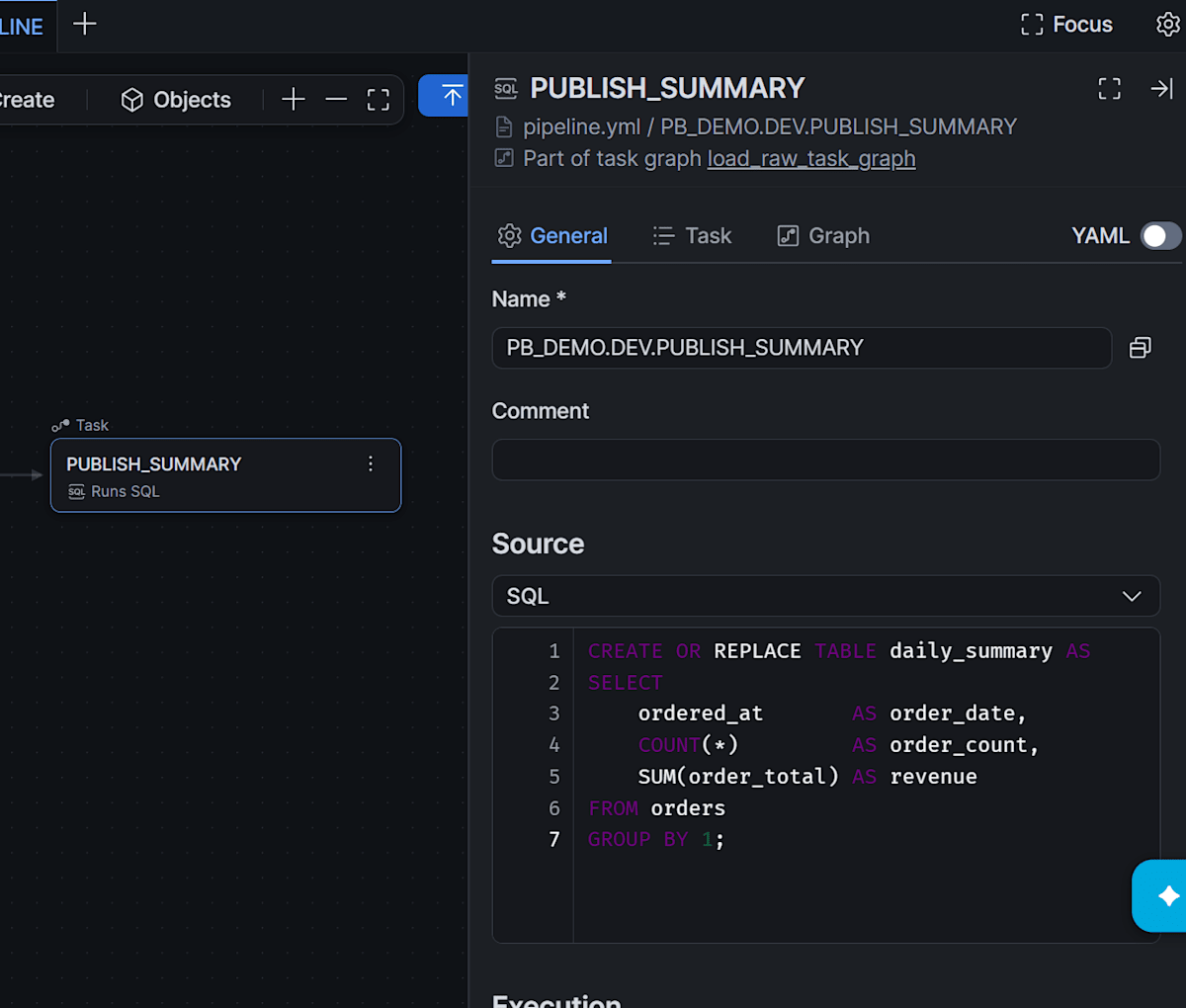
LOG_FAILURE is configured to run only when the predecessor Task fails, and writes to the log table.
INSERT INTO pipeline_run_log (logged_at, graph_name, message)
SELECT
    CURRENT_TIMESTAMP(),
    SYSTEM$TASK_RUNTIME_INFO('CURRENT_TASK_GRAPH_NAME'),
    'CHECK_MARTS failed';
The screen during verification had no dropdown, only Predecessors and Additional conditions. Since Additional conditions corresponds to the Task's WHEN clause, write SYSTEM$PREDECESSORS_STATE('AT_LEAST_ONE_FAILED') here to achieve the same condition.
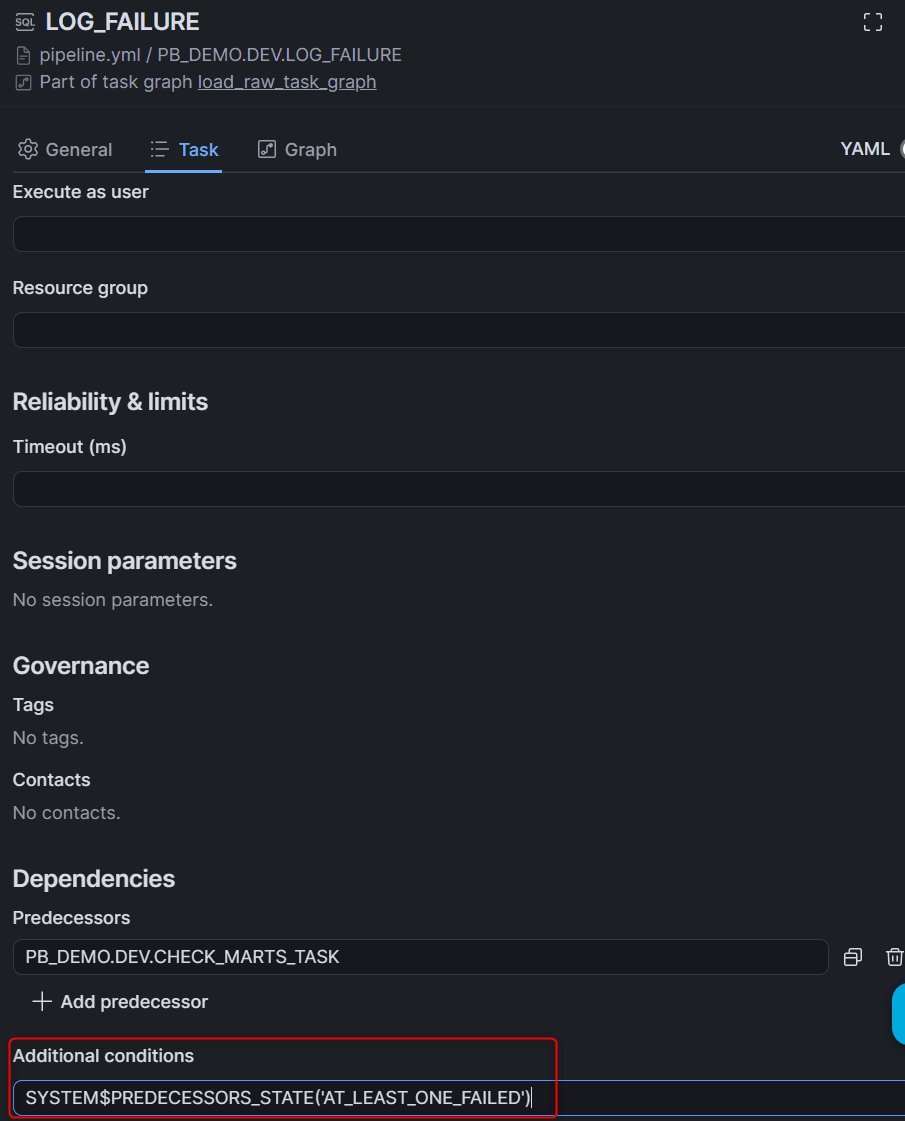
There are 9 types of conditions that can be specified for SYSTEM$PREDECESSORS_STATE. The left column shows the Predecessors condition notation in the documentation, and the right shows the value passed to the function.
| Predecessors condition | Argument value | When it runs |
|---|---|---|
| All succeeded (default) | ALL_SUCCEEDED |
All predecessor Tasks succeeded |
| All done | ALL_DONE |
All finished regardless of success / failure / skip / cancellation |
| At least one failed | AT_LEAST_ONE_FAILED |
At least one failed |
| All failed | ALL_FAILED |
All failed |
| At least one succeeded | AT_LEAST_ONE_SUCCEEDED |
At least one succeeded |
| None failed | NONE_FAILED |
No failures (succeeded or skipped) |
| None failed, at least one succeeded | NONE_FAILED_MIN_ONE_SUCCEEDED |
No failures and at least one succeeded |
| All skipped | ALL_SKIPPED |
All skipped |
| None skipped | NONE_SKIPPED |
No skips |
If both Predecessors condition and Additional conditions are specified, the Task runs only when both are satisfied. Other SQL boolean expressions can also be written in Additional conditions. The documentation includes an example of running only when data is available using SYSTEM$STREAM_HAS_DATA(...). There are also examples of branching using SYSTEM$SET_RETURN_VALUE and SYSTEM$GET_PREDECESSOR_RETURN_VALUE. Predecessors condition cannot be set on the root or finalizer.
Task Graph Schedule and Defaults
Open the graph from Objects » Task graphs and configure the name, schedule, post-Deploy state, and Task defaults. This time, we set a Cron schedule but set the Desired state to Suspended to verify with manual execution.
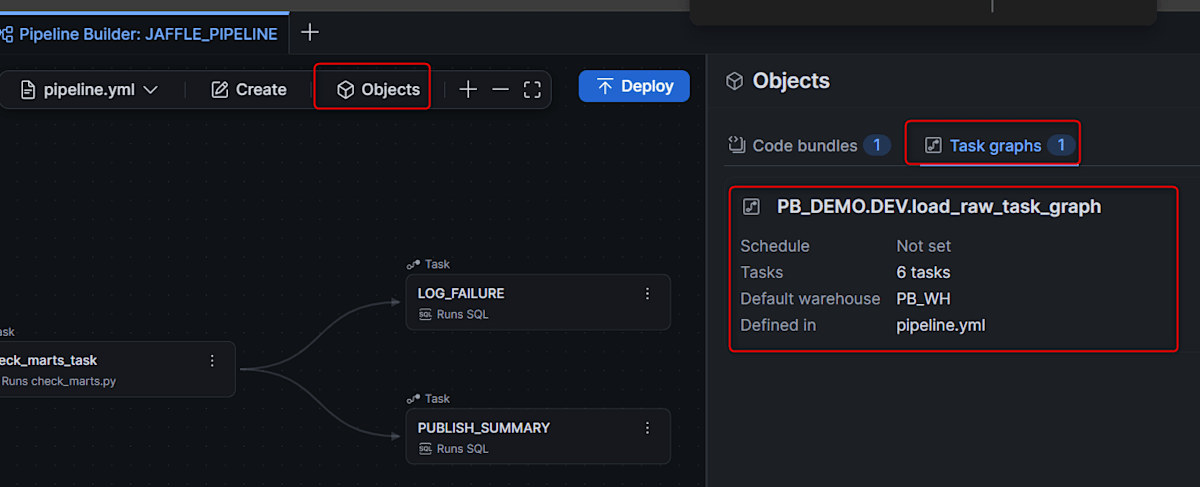
Only the minimum required items are configured this time. There are many other configuration options.
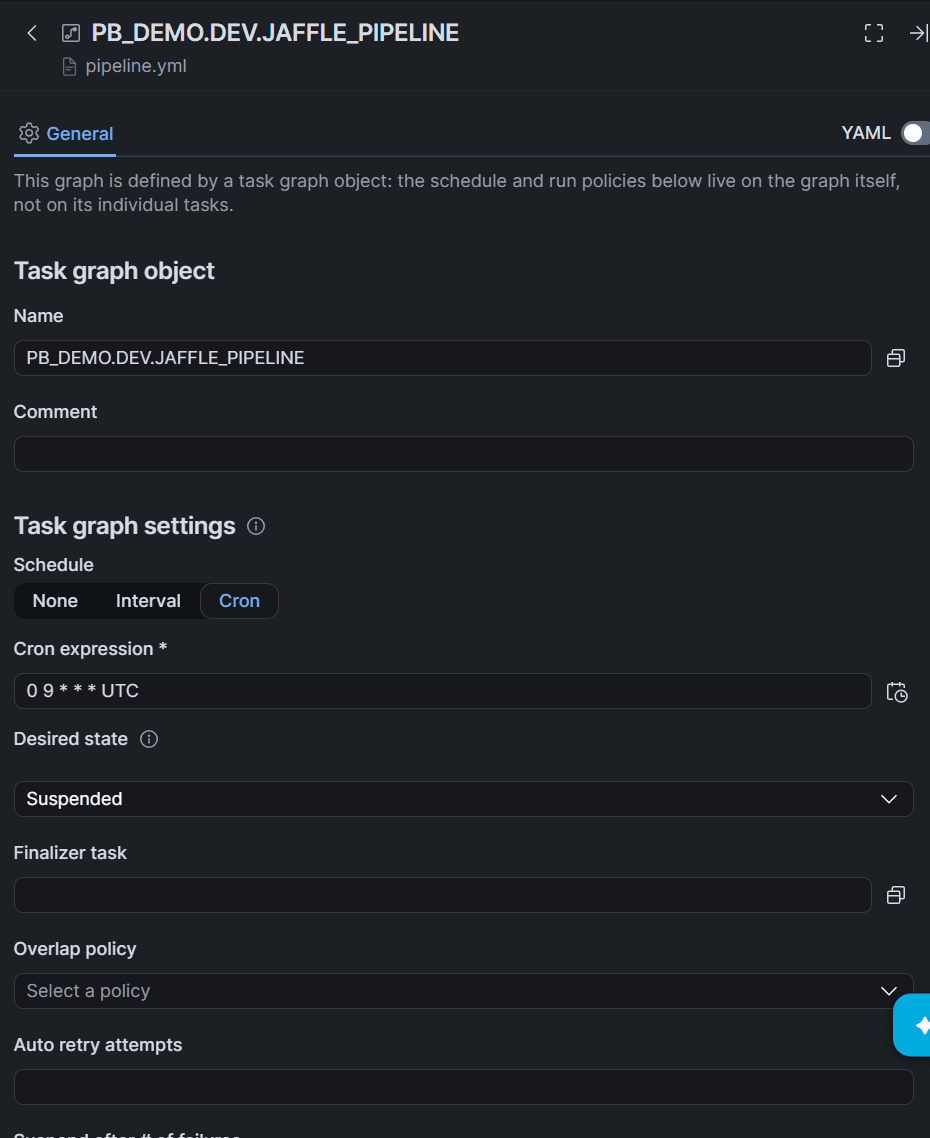
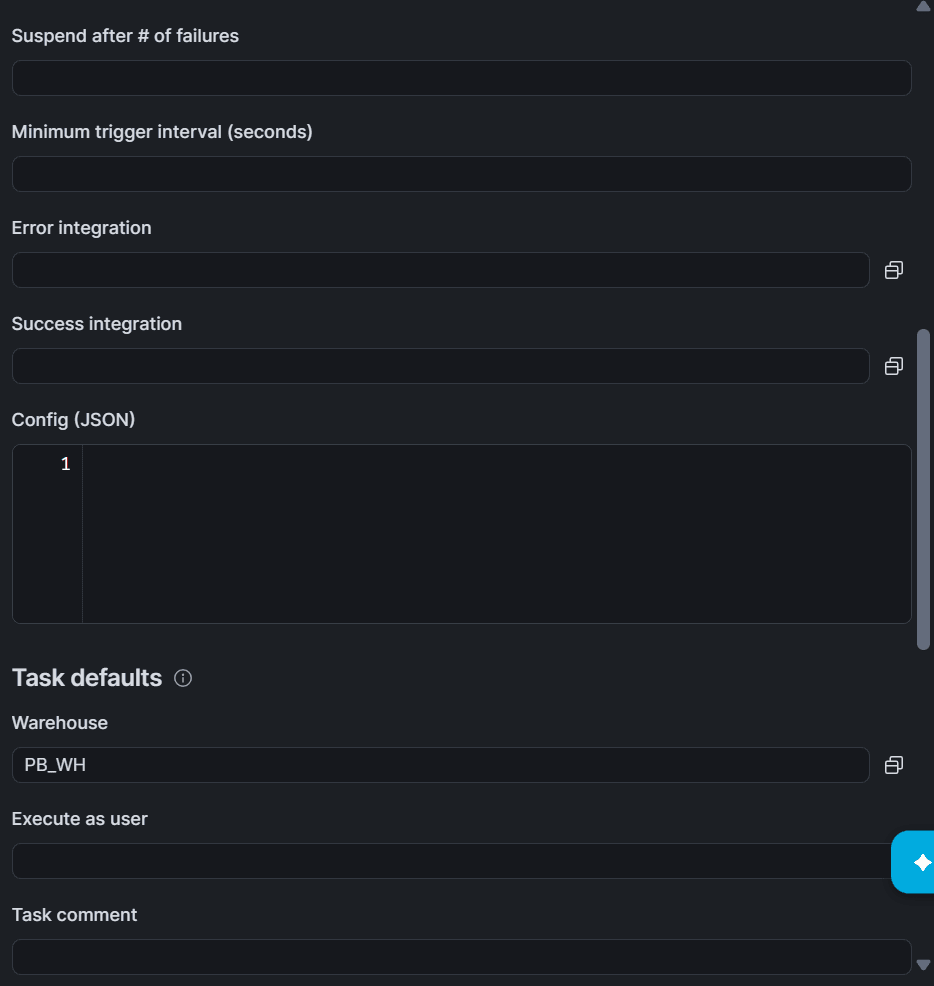
Once the graph is created, graph-wide settings such as the schedule move from the root Task to the graph. Values common to all Tasks (such as warehouse) move to Task defaults, and the defaults are used unless specified individually for each Task. Overlap policy, Auto retry attempts, Suspend after # of failures, and the integration for notifications are also graph-level settings.
Generated YAML
Open sources/definitions/pipeline.yml with the YAML toggle in the drawer to see the complete definition.
Generated YAML
definitions:
  - resource: task
    name: PB_DEMO.DEV.load_raw_task
    definition:
      type: sql_file
      location:
        type: stage_uri
        uri: >-
          snow://workspace/PB_DEMO.PUBLIC.PB_SHARED/versions/last/JAFFLE_PIPELINE/01_load_raw.sql
  - resource: task
    name: PB_DEMO.DEV.staging_task
    definition:
      type: sql_file
      location:
        type: stage_uri
        uri: >-
          snow://workspace/PB_DEMO.PUBLIC.PB_SHARED/versions/last/JAFFLE_PIPELINE/02_staging.sql
    predecessors:
      - PB_DEMO.DEV.LOAD_RAW_TASK
  - resource: task_graph_object
    name: PB_DEMO.DEV.JAFFLE_PIPELINE
    roots:
      - PB_DEMO.DEV.load_raw_task
    schedule:
      type: cron
      value: 0 9 * * * UTC
    state: suspended
    task_defaults:
      warehouse: PB_WH
  - resource: task
    name: PB_DEMO.DEV.marts_task
    definition:
      type: sql_file
      location:
        type: stage_uri
        uri: >-
          snow://workspace/PB_DEMO.PUBLIC.PB_SHARED/versions/last/JAFFLE_PIPELINE/03_marts.sql
    predecessors:
      - PB_DEMO.DEV.STAGING_TASK
  - resource: code_bundle
    name: PB_DEMO.DEV.jaffle_pipeline_waqvc
    from:
      type: asset
      asset: project
  - resource: task
    name: PB_DEMO.DEV.check_marts_task
    definition:
      type: code_bundle
      name: PB_DEMO.DEV.jaffle_pipeline_waqvc
      entrypoint: check_marts.py
      specification:
        bundle:
          type: custom
          compute_type: warehouse
          language: python
          compute_options:
            runtime_version: '3.11'
          properties:
            requirements_file: ''
      arguments:
        - '--min-orders'
        - '1'
    predecessors:
      - PB_DEMO.DEV.MARTS_TASK
    warehouse: PB_WH
  - resource: task
    name: PB_DEMO.DEV.PUBLISH_SUMMARY
    definition:
      type: sql
      value: |-
        CREATE OR REPLACE TABLE daily_summary AS
        SELECT
            TO_DATE(ordered_at) AS order_date,
            COUNT(*)            AS order_count,
            SUM(order_total)    AS revenue
        FROM orders
        GROUP BY 1;
    predecessors:
      - PB_DEMO.DEV.CHECK_MARTS_TASK
    warehouse: PB_WH
  - resource: task
    name: PB_DEMO.DEV.LOG_FAILURE
    definition:
      type: sql
      value: |-
        INSERT INTO pipeline_run_log (logged_at, graph_name, message)
        SELECT
            CURRENT_TIMESTAMP(),
            SYSTEM$TASK_RUNTIME_INFO('CURRENT_TASK_GRAPH_NAME'),
            'CHECK_MARTS failed';
    predecessors:
      - PB_DEMO.DEV.CHECK_MARTS_TASK
    warehouse: PB_WH
    condition: SYSTEM$PREDECESSORS_STATE('AT_LEAST_ONE_FAILED')
The Code Bundle uses from: asset, bundling the entire project referenced by assets: project: path: '**/*' in manifest.yml at Deploy time. SQL file tasks hold the absolute URI of the file on the Workspace in location.uri and read it on every execution.
The URI immediately after generation was versions/live. This points to your own view while editing and is not visible from a Task's session. What a Task can read is the published latest version versions/last. Before deploying, rewrite the URIs of the three SQL file tasks to versions/last and publish. The YAML above reflects those changes.
Note: If you deploy with
versions/livestill in place, execution will fail with "Content of the provided location can not be read: version live is not found."
Deploy
Clicking Deploy in the upper right of the canvas runs the DCM project plan. Since no DCM project object exists yet, a dialog will ask whether to create one. In the subsequent Review planned changes screen, confirm the list of objects to be created and deploy.
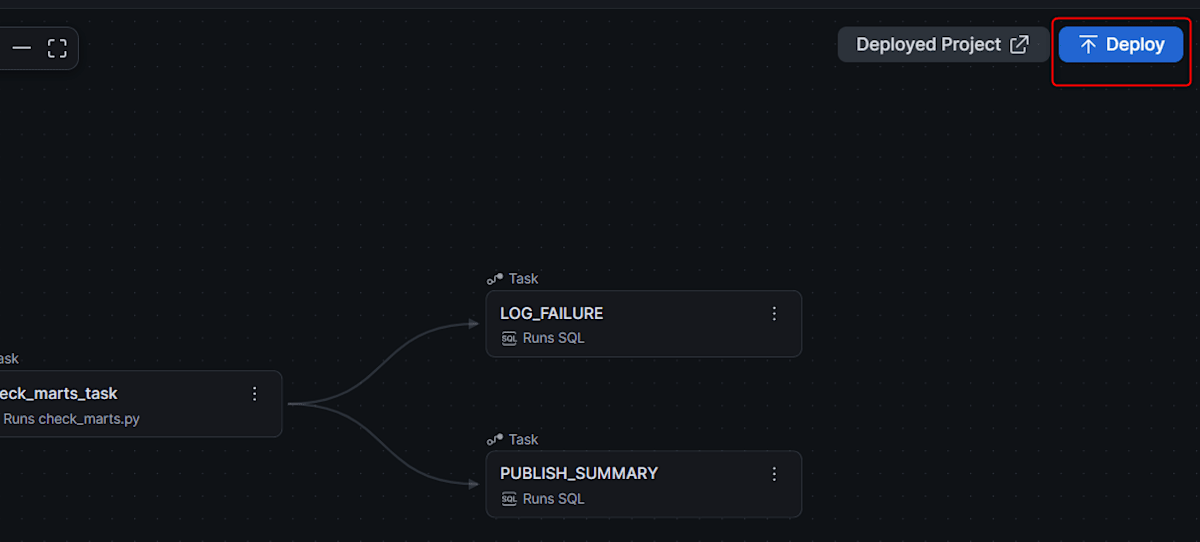
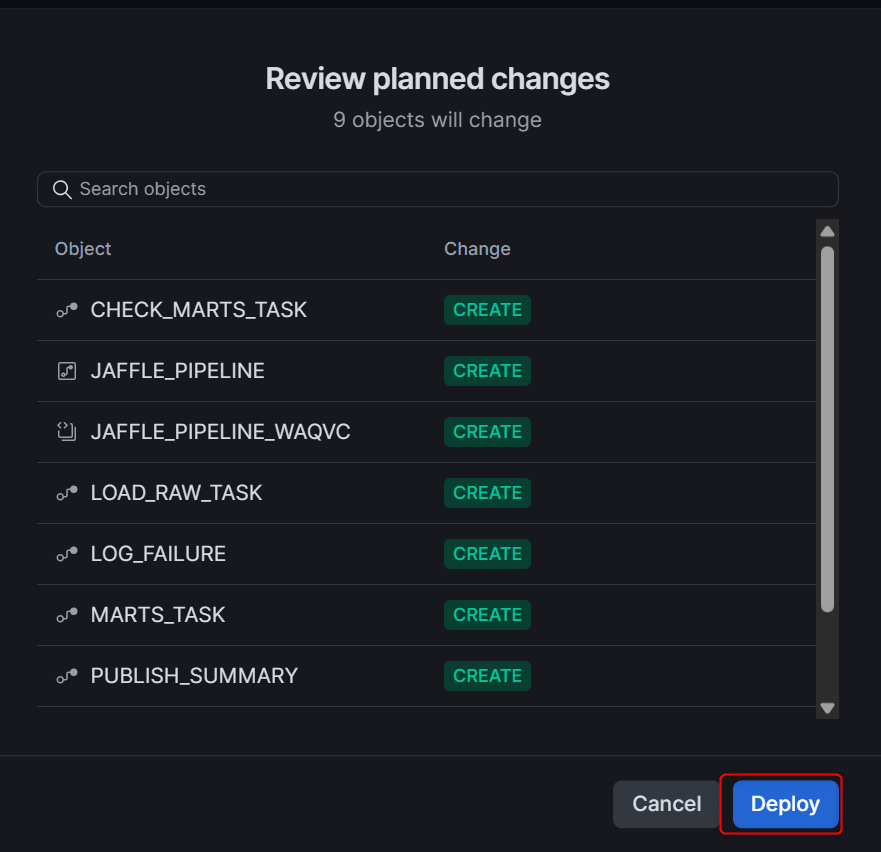
Once deployment is complete, verify the created objects.
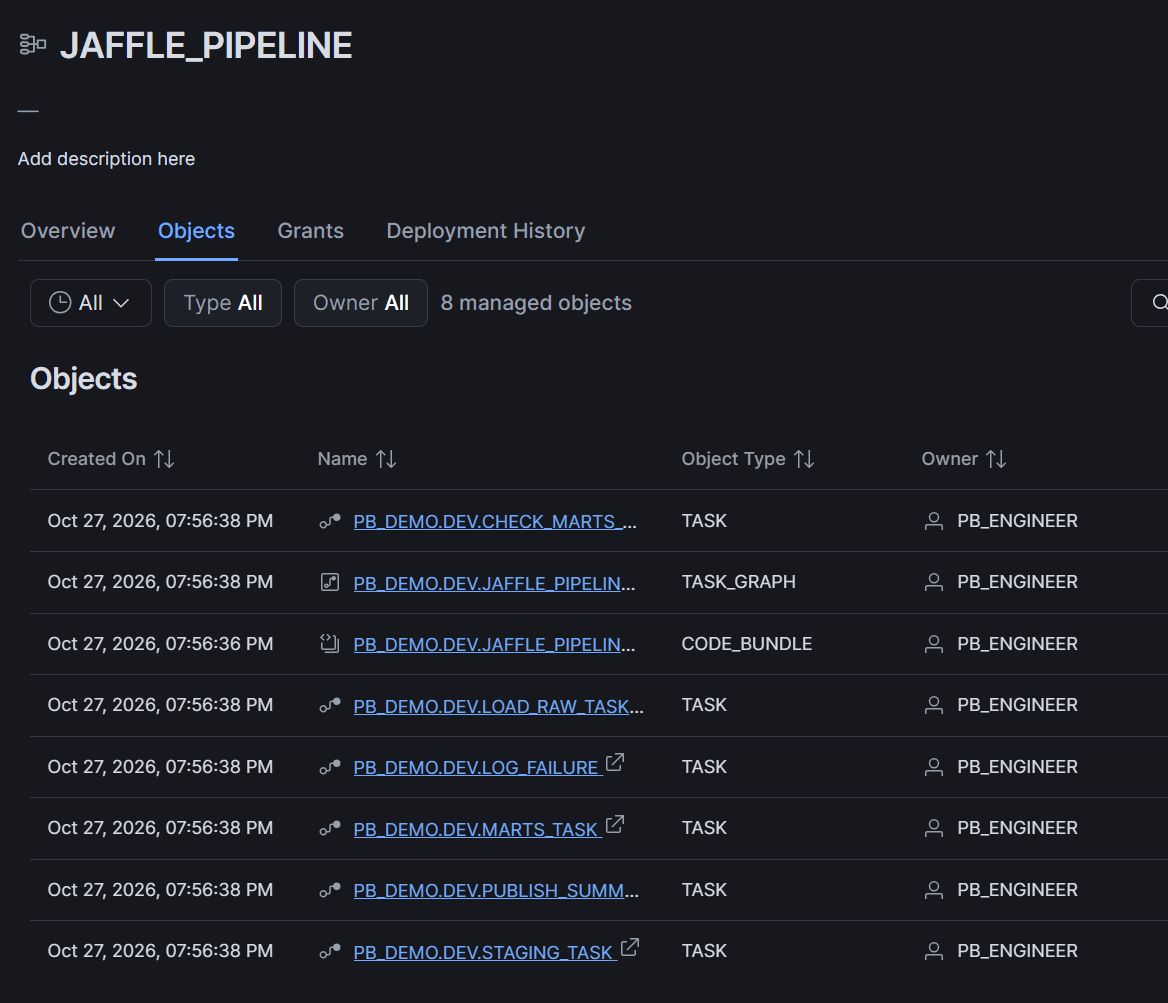
Deploy is an operation that aligns the account's state with the contents of the project files. Adding a Task creates it, changing settings alters it, and removing it from the canvas will DROP it on the next Deploy. If you change files included in a Code Bundle, Deploy also updates it to the new version.
Execute and Monitor
Clicking Deployed Project opens the DCM project detail screen in Snowsight on the Objects tab. Select the task graph and run it using the Run Task Graph icon on the Graph tab. Manual execution is possible even while Suspended.
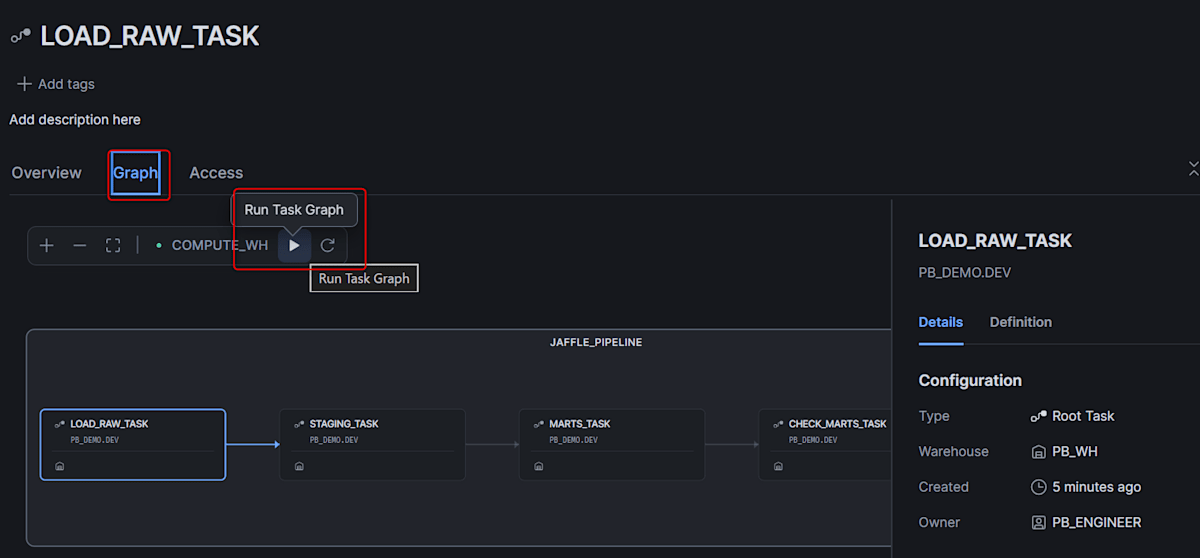
From SQL, run it with EXECUTE TASK GRAPH and track results with TASK_HISTORY. Tasks belonging to a task graph cannot be executed individually.
EXECUTE TASK GRAPH PB_DEMO.DEV.JAFFLE_PIPELINE;

SELECT name, state, error_message, scheduled_time, completed_time
FROM TABLE(PB_DEMO.INFORMATION_SCHEMA.TASK_HISTORY(
    SCHEDULED_TIME_RANGE_START => DATEADD(hour, -1, CURRENT_TIMESTAMP())))
WHERE schema_name = 'DEV'
ORDER BY scheduled_time;

The entire graph completed in 30 seconds (X-Small). Since raw data had already been loaded in the previous run, LOAD_RAW_TASK finished quickly.
SELECT graph_name, state, first_error_task_name, scheduled_time, completed_time
FROM TABLE(PB_DEMO.INFORMATION_SCHEMA.COMPLETE_TASK_GRAPHS(RESULT_LIMIT => 10))
ORDER BY scheduled_time DESC;
Verifying the Task That Runs Only on Failure
Change the arguments of CHECK_MARTS to intentionally cause a failure. Setting --min-orders to 999999999 will raise an exception since 2.09 million rows is not enough.
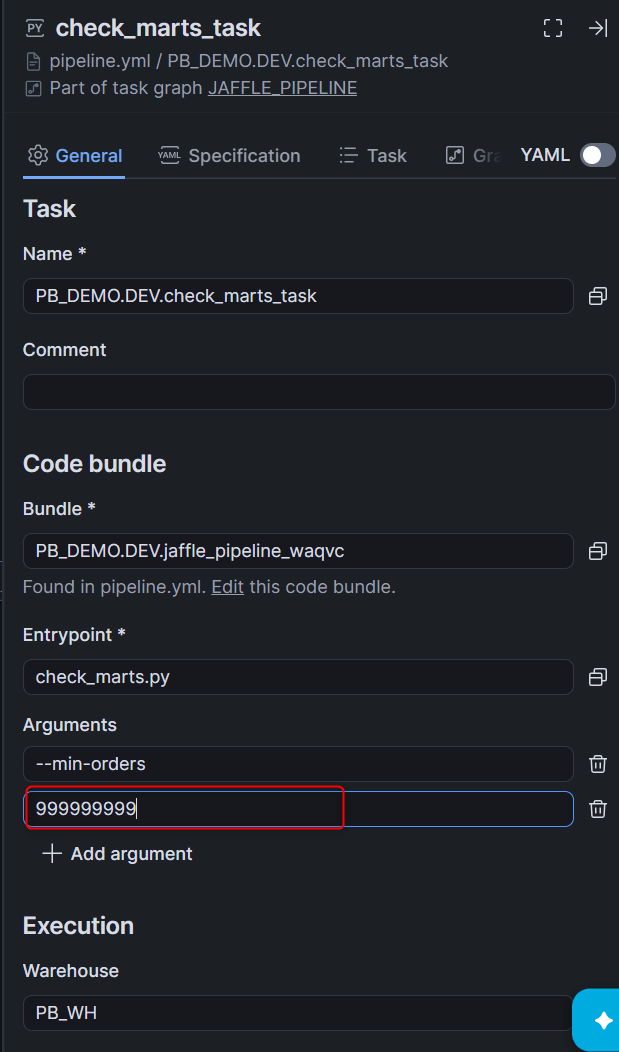
When CHECK_MARTS_TASK fails, PUBLISH_SUMMARY among the downstream tasks becomes SKIPPED, and only LOG_FAILURE executes. As a result, one row is inserted into PIPELINE_RUN_LOG (graph_name is the fully qualified name). In COMPLETE_TASK_GRAPHS, the state was FAILED and first_error_task_name was CHECK_MARTS_TASK.

SELECT * FROM PB_DEMO.DEV.PIPELINE_RUN_LOG;

Deploying to Two Targets: DEV and PROD
Since the pipeline is a DCM project, adding targets to manifest.yml allows deploying the same definition to different DCM project objects. This time, PB_DEMO.PROD on the same account is used as the PROD target.
To make the schema name a variable, add the PROD target and a templating env to manifest.yml. Leave the generated assets specification as is.
manifest_version: 2
type: DCM_PROJECT
default_target: DEV

targets:
  DEV:
    account_identifier: <ORG>-<ACCOUNT>
    project_name: PB_DEMO.DEV.JAFFLE_PIPELINE
    project_owner: PB_ENGINEER
    templating_config: DEV
  PROD:
    account_identifier: <ORG>-<ACCOUNT>
    project_name: PB_DEMO.PROD.JAFFLE_PIPELINE
    project_owner: PB_ENGINEER
    templating_config: PROD

templating:
  configurations:
    DEV:
      env: DEV
    PROD:
      env: PROD

assets:
  project:
    path: '**/*'
In pipeline.yml, replace all occurrences of PB_DEMO.DEV. in object names and reference names with PB_DEMO.{{ env }}.. This applies not only to Task, task graph, and Code Bundle names, but also to roots, predecessors, and the Code Bundle references. The URIs for SQL file tasks point to the shared Workspace, so leave them as is.
  - resource: task
    name: PB_DEMO.{{ env }}.staging_task
    predecessors:
      - PB_DEMO.{{ env }}.LOAD_RAW_TASK
    definition:
      type: sql_file
      location:
        type: stage_uri
        uri: >-
          snow://workspace/PB_DEMO.PUBLIC.PB_SHARED/versions/last/JAFFLE_PIPELINE/02_staging.sql
Create the DCM project object for the PROD side in advance. While deploying from the canvas will ask whether to create it if it doesn't exist, deploying from the bottom pane stopped with "object does not exist, or the project_owner role does not have access."
USE ROLE PB_ENGINEER;
CREATE DCM PROJECT PB_DEMO.PROD.JAFFLE_PIPELINE;
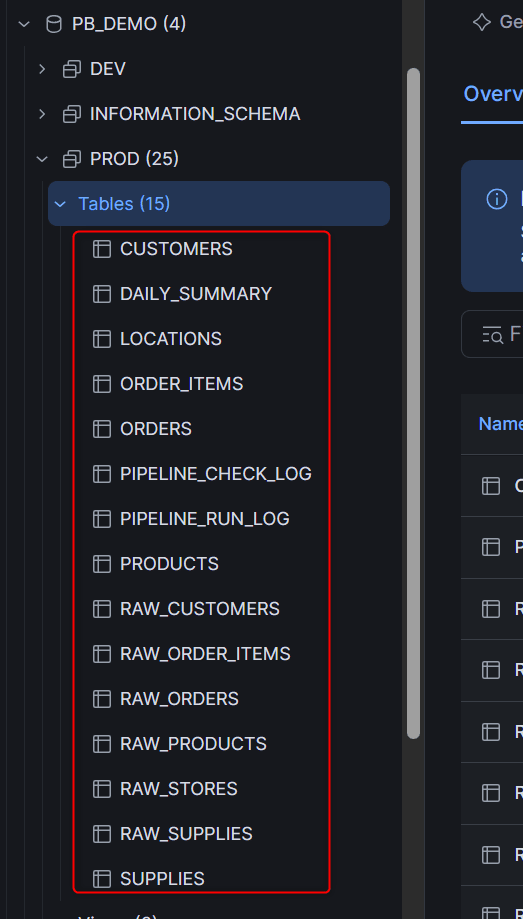
Deploy is performed from the DCM project control in the Workspace bottom pane. Switch the target menu to PROD and execute Deploy from the action menu.
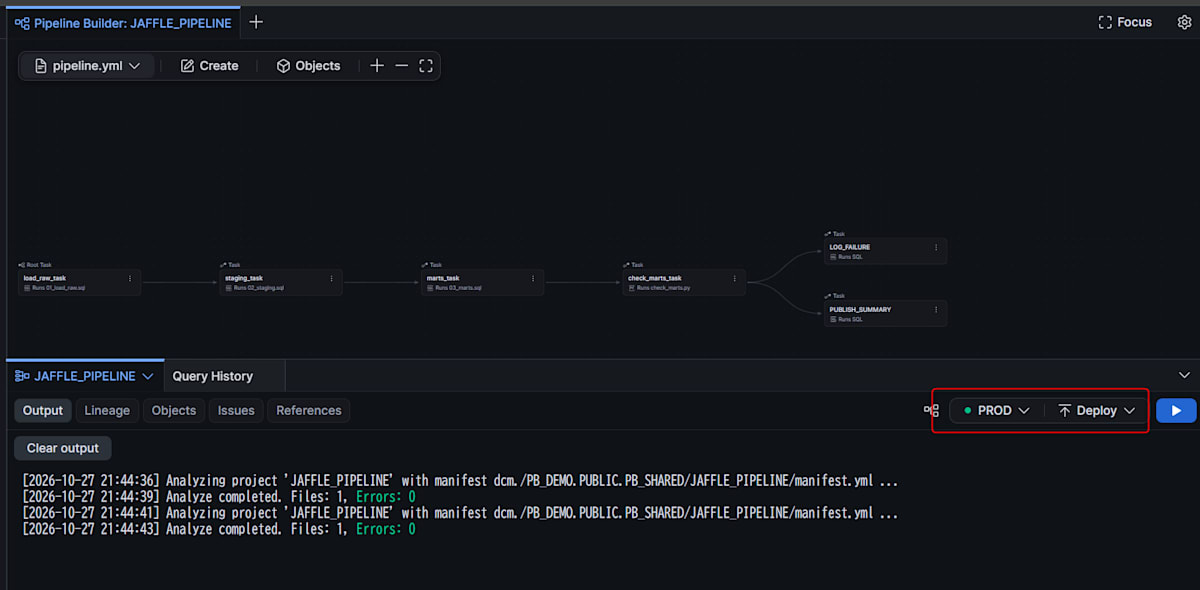
Since the table names inside the SQL files are not qualified, the files work in PROD without any changes.
Limitations and Notes
This is based on findings as of Public Preview (October 27, 2026).
Limitations and Notes
- Only Tasks, task graphs, Code Bundles, and DCM projects can be created on the canvas
- Dynamic Tables and views are written with
DEFINEin the definition file of the same DCM project - Tasks in a single task graph are limited to the same schema, same DCM project, and same owner role
- Task names and object names must be written as fully qualified names
- The source for a Code Bundle is limited to files within the project; stages cannot be selected
- Existing Code Bundles created outside the project can be called from a Task
- Notebook tasks require a compute pool
- Python files run on a warehouse if you set the Compute type to Warehouse in the Specification tab
- Running Code Bundles on a warehouse is in Public Preview
- Task SQL executes with the Task's own DB and schema as the context (confirm with
CURRENT_SCHEMA()) - SQL file tasks read the file on the Workspace on every execution, unlike Code Bundles whose version is fixed at Deploy time
- Tasks run in a session of the SYSTEM user and the owner role. Files in a personal Workspace could not be read by a Task even with
GRANT READ ON WORKSPACE - Even in a shared Workspace, Tasks can only read the published
versions/last. The generatedversions/liveneeds to be rewritten - The URI for a SQL file task is the absolute path of the file in the Workspace where it was placed. It does not change automatically if the project is moved to a different Workspace
- If a root Task fails, all downstream tasks are skipped, and At least one failed Tasks will not run either (skip is not a failure)
- The actual definition file is
sources/definitions/pipeline.yml(documentation describes it aspipeline.ymldirectly under the project) - When deploying to a different target from the bottom pane, create the DCM project object in advance
- A Task that merges after a branch will not run if left at the default All succeeded (because one branch is always skipped)
- Set the condition for a merging Task to None failed, at least one succeeded
- A DCM project that manages a Code Bundle cannot be removed with
DROP DCM PROJECTalone - Delete the managed objects with
EXECUTE DCM PROJECT <name> PURGEbefore dropping - Pipeline generation by CoCo and the
/pipeline-builderskill are "coming soon" - A task graph supports a maximum of 1,000 Tasks, and each Task can have a maximum of 100 parents and 100 children respectively
Closing
With Pipeline Builder, we were able to compose SQL and Python task graphs without writing CREATE TASK, and deploy after reviewing the diff with plan.
Combining the property that a Task's session runs within the Task's own schema with DCM targets allows splitting DEV and PROD from the same files.
Being able to design dependencies between Tasks visually on screen rather than in SQL felt like a significant advantage!
I hope this article is helpful in some way!