
I tried controlling and verifying column projection (output) using Snowflake's Projection Policy on a role basis

This page has been translated by machine translation. View original
This is Kawabata.
Masking policies mask column values, but there are also cases where you want to "prevent a column from being output in the final query results." For example, you might want to prevent salary columns or email addresses from being projected into query results for data sharing destinations or analysis roles.
Snowflake's Projection Policy allows you to control, on a per-column basis, whether columns are projected into final results based on roles.
Since this is a different approach from masking policies and aggregation policies, I tried everything from basic behavior to indirect references via views and combined use with masking policies. Here is a summary of the steps and verification results.
Feature Overview
What is a Projection Policy?
A Projection Policy is a schema-level object that is assigned to columns of tables or views. An assigned column becomes "projection-constrained," and roles that do not satisfy the policy's conditions will be unable to output that column in query results.
Simply put, while a masking policy "replaces values with ***", a Projection Policy controls "whether a column can be projected into the final results." The visibility of column names and schema information depends on the permission configuration, but a Projection Policy itself
is not a feature that completely conceals the existence of a column. In particular, with NULLIFY, the
target column remains in the result set, so users can tell that the column exists.
The PROJECTION_CONSTRAINT Function
In the policy body, you call the PROJECTION_CONSTRAINT function to specify whether projection is allowed or denied, and the behavior when denied.
PROJECTION_CONSTRAINT(ALLOW => {TRUE|FALSE}, ENFORCEMENT => <enforcement_style>)
| Parameter | Description |
|---|---|
ALLOW |
TRUE to allow projection, FALSE to deny |
ENFORCEMENT |
Behavior when ALLOW => FALSE. 'FAIL' (default) causes the query to error. 'NULLIFY' returns NULL for all rows |
The two ENFORCEMENT modes have different use cases.
- FAIL: Fails queries that include a constrained column in the final output. Suitable for cases where you want to detect and correct incorrect usage early.
- NULLIFY: The query succeeds, but the values of the constrained column become NULL for all rows. Suitable for cases where you want to allow
SELECT *but not show values.
Differences from Masking Policies
| Aspect | Projection Policy | Masking Policy |
|---|---|---|
| What is controlled | Projection of a column into the final results | Values of a column |
| How restrictions appear | FAIL: Query results in an error / NULLIFY: Target column is NULL for all rows |
Replaced with a masked value (e.g., ***) |
| Use in WHERE clauses | Possible (conditions are evaluated using the original value since it is not a projection) | The masking policy expression is also applied to WHERE clause references, so conditions are evaluated based on the value returned by the policy |
| Granularity | Per column | Per column |
| Tag-based policy | Not supported | Supported |
Policy Evaluation Order
When multiple policies are set simultaneously, they are evaluated in the following order.
- Row Access Policy filters rows
- Projection Policy determines whether projection of constrained columns is allowed
- Masking Policy masks values
If projection is denied via FAIL, the query fails and no masking results are returned.
Snowflake's policy evaluation order is Row Access Policy, Projection Policy, then Masking Policy.
When combining NULLIFY and a masking policy on the same column, the masking policy is also
evaluated after the Projection Policy judgment, so the final displayed value depends on the masking policy implementation.
Please verify this combination individually using actual policy definitions.
Indirect References via Views
Even if a projection-constrained column is referenced indirectly through a view or CTE, the constraints from the base table are maintained. For example, if a projection policy is set on salary in the base table, projection will be restricted even through a view that references salary.
Furthermore, if the corresponding column in the view also has its own Projection Policy set, all Projection Policies along the column lineage from the base table to the view must allow projection before it can appear in the final results.
Security Considerations
Projection constraints are not a complete confidentiality guarantee. The official documentation explicitly states the following points.
- Projection-constrained columns can be used in WHERE clauses and subqueries, so it may be possible to infer values by repeatedly querying with different conditions.
- Information may leak through the column values of another table joined with a projection-constrained column.
- There are cases where column values are included in error messages.
It is important to understand that Projection Policy is best suited for controlling projection toward "parties in an existing trust relationship" and does not completely prevent attacks by malicious users. If strong confidentiality is a requirement, prioritize a design that physically excludes the target columns from views intended for public access or tables intended for sharing.
Limitations
- Tag-based policies that automatically apply by directly associating a Projection Policy with a tag are not supported. However, it is possible to use the
SYSTEM$GET_TAG_ON_CURRENT_COLUMNfunction within the policy body to conditionally determine projection based on the tag value of the target column. - Not applicable to virtual columns or the VALUE column of external tables.
- Projection-constrained columns cannot be referenced from the conditional expressions of masking policies or row access policies.
- Values of projection-constrained columns cannot be INSERTed into another table or passed as arguments to external functions or stored procedures.
Prerequisites
-
Snowflake: AWS Tokyo region, Enterprise Edition or higher (a trial account is used in this verification)
-
Required permissions: ACCOUNTADMIN role (for verification). In production operation,
CREATE PROJECTION POLICYpermission on the target schema for creating policies, andAPPLY PROJECTION POLICYpermission at the account level (orAPPLYpermission on the policy +OWNERSHIPpermission on the table) are required for applying policies.
Preparation
Creating the Verification Database and Tables
Creating the Verification Database and Tables
USE ROLE ACCOUNTADMIN;

CREATE DATABASE IF NOT EXISTS proj_policy_test;
USE DATABASE proj_policy_test;
CREATE SCHEMA IF NOT EXISTS sch;
USE SCHEMA sch;
CREATE OR REPLACE TABLE employees (
    employee_id INT COMMENT 'Employee ID',
    employee_name VARCHAR COMMENT 'Full Name',
    email VARCHAR COMMENT 'Email Address',
    department VARCHAR COMMENT 'Department',
    salary NUMBER(10, 2) COMMENT 'Monthly Salary',
    phone_number VARCHAR COMMENT 'Phone Number'
);
-- Insert verification data (25 records)
-- salary / email / phone_number are assumed to be confidential columns
INSERT INTO employees VALUES
    (1, 'Tanaka Taro', 'tanaka@example.com', 'Engineering', 850000, '090-1111-0001'),
    (2, 'Sato Hanako', 'sato@example.com', 'Engineering', 650000, '090-1111-0002'),
    (3, 'Suzuki Ichiro', 'suzuki@example.com', 'Engineering', 950000, '090-1111-0003'),
    (4, 'Takahashi Misaki', 'takahashi@example.com', 'Engineering', 600000, '090-1111-0004'),
    (5, 'Ito Kenta', 'ito@example.com', 'Engineering', 450000, '090-1111-0005'),
    (6, 'Watanabe Naomi', 'watanabe@example.com', 'Sales', 700000, '090-1111-0006'),
    (7, 'Yamamoto Manabu', 'yamamoto@example.com', 'Sales', 780000, '090-1111-0007'),
    (8, 'Nakamura Yoko', 'nakamura@example.com', 'Sales', 520000, '090-1111-0008'),
    (9, 'Kobayashi Makoto', 'kobayashi@example.com', 'Sales', 480000, '090-1111-0009'),
    (10, 'Kato Yuji', 'kato@example.com', 'Sales', 650000, '090-1111-0010'),
    (11, 'Yoshida Mari', 'yoshida@example.com', 'Marketing', 500000, '090-1111-0011'),
    (12, 'Matsumoto Daisuke', 'matsumoto@example.com', 'Marketing', 490000, '090-1111-0012'),
    (13, 'Inoue Sakura', 'inoue@example.com', 'Marketing', 470000, '090-1111-0013'),
    (14, 'Kimura Takuya', 'kimura@example.com', 'Marketing', 720000, '090-1111-0014'),
    (15, 'Hayashi Miho', 'hayashi@example.com', 'Marketing', 550000, '090-1111-0015'),
    (16, 'Shimizu Shota', 'shimizu@example.com', 'HR', 680000, '090-1111-0016'),
    (17, 'Saito Megumi', 'saito@example.com', 'HR', 450000, '090-1111-0017'),
    (18, 'Maeda Kenichi', 'maeda@example.com', 'HR', 500000, '090-1111-0018'),
    (19, 'Fujii Yuko', 'fujii@example.com', 'Finance', 530000, '090-1111-0019'),
    (20, 'Okada Ryuichi', 'okada@example.com', 'Finance', 1100000, '090-1111-0020'),
    (21, 'Ishikawa Yumi', 'ishikawa@example.com', 'Finance', 520000, '090-1111-0021'),
    (22, 'Miura Kenji', 'miura@example.com', 'Engineering', 620000, '090-1111-0022'),
    (23, 'Nishida Akari', 'nishida@example.com', 'Sales', 460000, '090-1111-0023'),
    (24, 'Ueda Koji', 'ueda@example.com', 'HR', 550000, '090-1111-0024'),
    (25, 'Kawano Mayu', 'kawano@example.com', 'Engineering', 880000, '090-1111-0025');
Let's confirm the contents of the table.
SELECT * FROM employees ORDER BY employee_id;
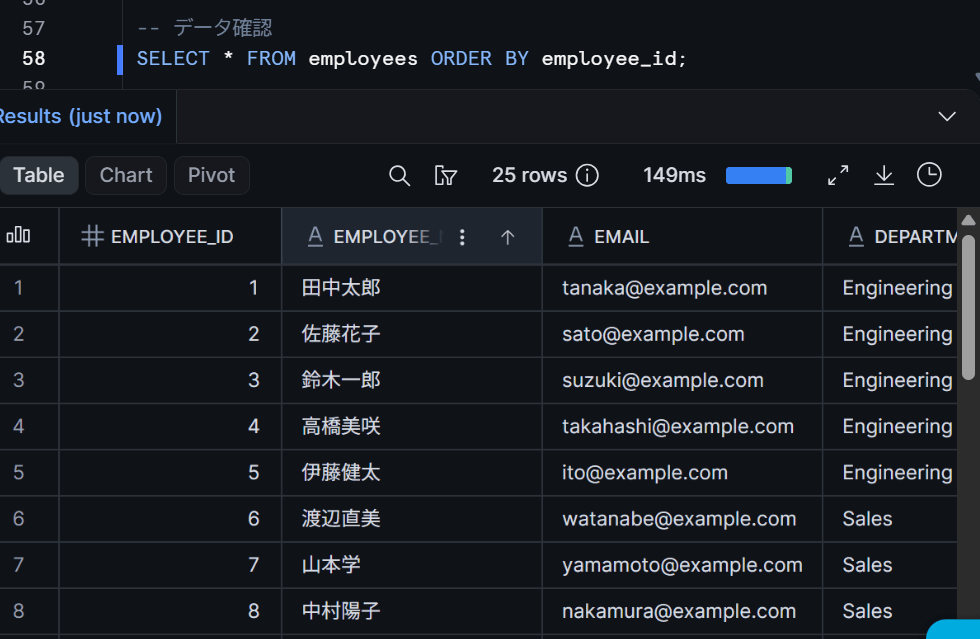
There is no problem as long as 25 records are present.
Creating Verification Roles
We will prepare analyst_role (a role that allows projection) and viewer_role (a role that restricts projection).
Creating Verification Roles
USE ROLE ACCOUNTADMIN;

-- Analysis role (intended to allow projection of confidential columns)
CREATE ROLE IF NOT EXISTS analyst_role;
GRANT USAGE ON DATABASE proj_policy_test TO ROLE analyst_role;
GRANT USAGE ON SCHEMA proj_policy_test.sch TO ROLE analyst_role;
GRANT SELECT ON TABLE proj_policy_test.sch.employees TO ROLE analyst_role;

-- Viewer role (intended to restrict projection of confidential columns)
CREATE ROLE IF NOT EXISTS viewer_role;
GRANT USAGE ON DATABASE proj_policy_test TO ROLE viewer_role;
GRANT USAGE ON SCHEMA proj_policy_test.sch TO ROLE viewer_role;
GRANT SELECT ON TABLE proj_policy_test.sch.employees TO ROLE viewer_role;
-- Grant roles to the verification user (replace with an existing username in your environment)
GRANT ROLE analyst_role TO USER <your_test_user>;
GRANT ROLE viewer_role TO USER <your_test_user>;
Trying It Out
Basic: Creating a Projection Policy and Assigning It to a Column
Let's start with the simplest pattern. We will create a policy that prohibits projection of the salary column for all roles.
USE ROLE ACCOUNTADMIN;
USE SCHEMA proj_policy_test.sch;

-- Policy that prohibits projection for all roles
CREATE OR REPLACE PROJECTION POLICY deny_projection
    AS () RETURNS PROJECTION_CONSTRAINT ->
    PROJECTION_CONSTRAINT(ALLOW => FALSE);
Assign it to the salary column.
ALTER TABLE employees
    MODIFY COLUMN salary
    SET PROJECTION POLICY deny_projection;
Let's try running SELECT * in this state.
SELECT * FROM employees LIMIT 5;
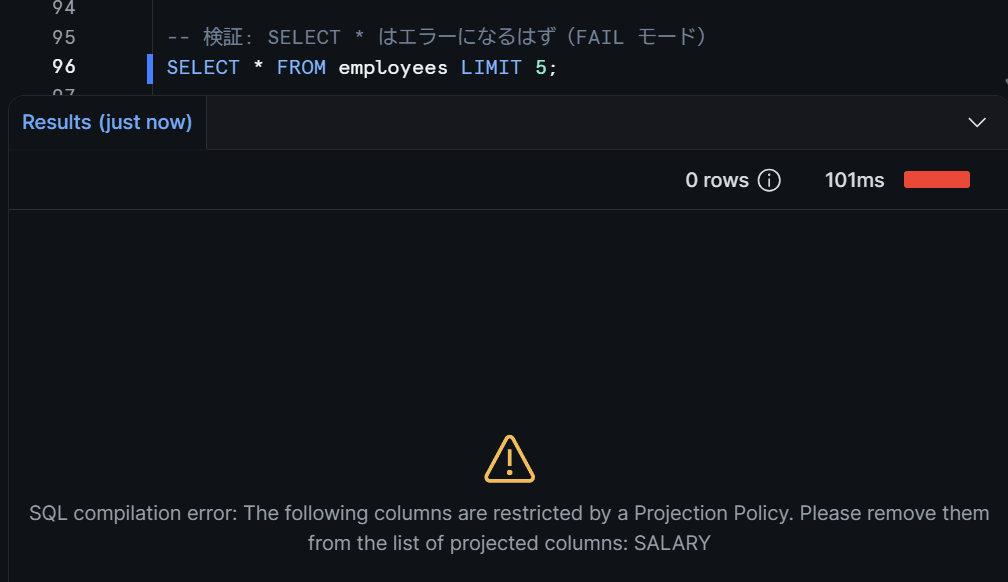
The query should error out because salary hits the projection constraint. Since the default ENFORCEMENT is 'FAIL', including a projection-constrained column in the SELECT list will cause the query itself to fail.
Now let's try removing salary from the SELECT list.
SELECT employee_id, employee_name, email, department, phone_number
FROM employees
LIMIT 5;
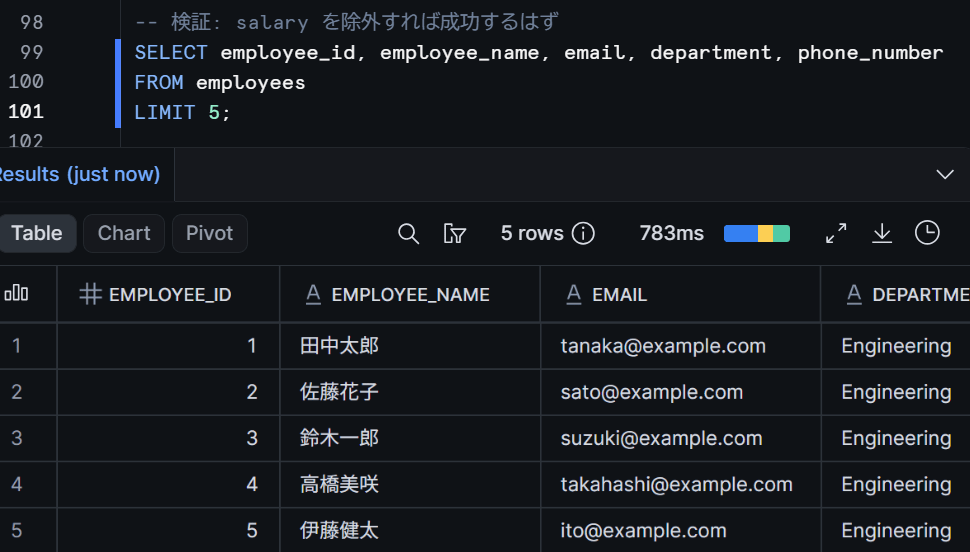
The query returns without issue if salary is not included. In this example, the query succeeds by excluding salary from the final SELECT list. However, a Projection Policy does not only track simple SELECT lists; it tracks the column lineage including views, CTEs, UDFs, derived columns, and more to control projection into the final output (details are verified later).
Now that verification is complete, let's remove the policy.
ALTER TABLE employees
    MODIFY COLUMN salary
    UNSET PROJECTION POLICY;
Verifying the Difference Between ENFORCEMENT Modes (FAIL vs NULLIFY)
Next, let's try a policy with ENFORCEMENT => 'NULLIFY'. Unlike FAIL, the query itself does not error; instead, the values of the constrained column become NULL for all rows.
-- Create a policy in NULLIFY mode
CREATE OR REPLACE PROJECTION POLICY deny_projection_nullify
    AS () RETURNS PROJECTION_CONSTRAINT ->
    PROJECTION_CONSTRAINT(ALLOW => FALSE, ENFORCEMENT => 'NULLIFY');
-- Assign to the salary column
ALTER TABLE employees
    MODIFY COLUMN salary
    SET PROJECTION POLICY deny_projection_nullify;
SELECT employee_id, employee_name, salary, department
FROM employees
LIMIT 5;
This time the query should succeed, and the salary column should be returned as NULL for all rows. SELECT * will also succeed.
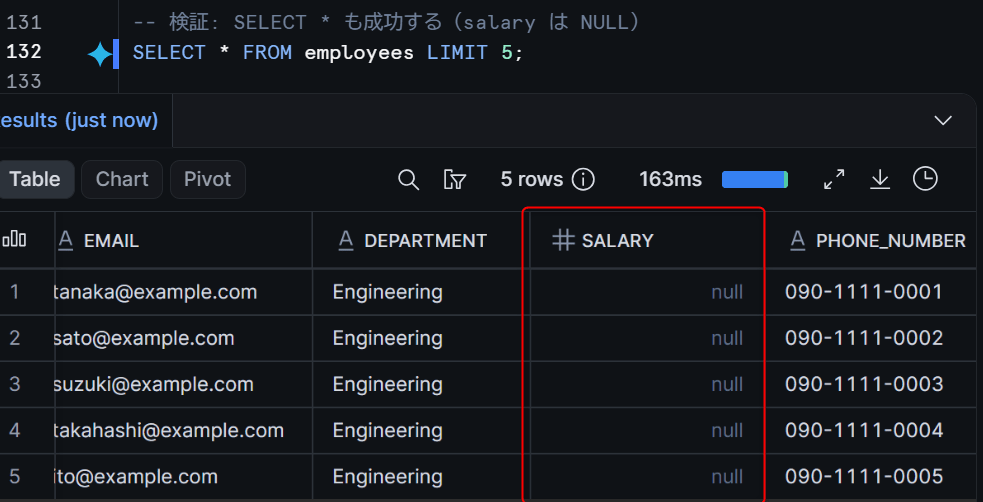
How to choose between FAIL and NULLIFY:
- FAIL: Use when you want to fail queries that project a constrained column. Incorrect usage can be detected and corrected early, but
SELECT *will error, so users need to be informed. - NULLIFY: Use when you want to allow
SELECT *but not show values. The behavior is similar to aNULLmask in a masking policy, but the control layer is different from a masking policy.
Let's remove the policy.
ALTER TABLE employees
    MODIFY COLUMN salary
    UNSET PROJECTION POLICY;
Trying Role-Based Conditional Projection
In actual operation, the pattern of "allowing projection only for specific roles" is most common. Let's create a policy using CURRENT_ROLE() as a condition to allow projection only for analyst_role.
USE ROLE ACCOUNTADMIN;
USE SCHEMA proj_policy_test.sch;

-- Policy that allows projection only for analyst_role
CREATE OR REPLACE PROJECTION POLICY allow_analyst_only
    AS () RETURNS PROJECTION_CONSTRAINT ->
    CASE
        WHEN CURRENT_ROLE() = 'ANALYST_ROLE'
            THEN PROJECTION_CONSTRAINT(ALLOW => TRUE)
        ELSE PROJECTION_CONSTRAINT(ALLOW => FALSE, ENFORCEMENT => 'FAIL')
    END;
-- Assign to the salary column
ALTER TABLE employees
    MODIFY COLUMN salary
    SET PROJECTION POLICY allow_analyst_only;
First, let's check with analyst_role.
USE ROLE analyst_role;
USE WAREHOUSE <your_warehouse_name>;
USE DATABASE proj_policy_test;
USE SCHEMA sch;

SELECT employee_id, employee_name, salary, department
FROM employees
LIMIT 5;
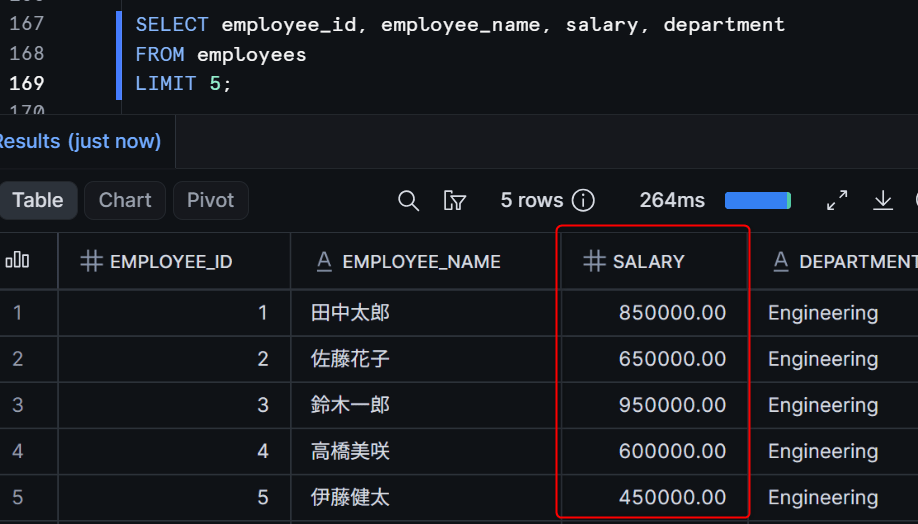
There is no problem if salary is displayed normally with analyst_role.
Next, let's check with viewer_role.
USE ROLE viewer_role;
USE WAREHOUSE <your_warehouse_name>;
USE DATABASE proj_policy_test;
USE SCHEMA sch;

SELECT employee_id, employee_name, salary, department
FROM employees
LIMIT 5;
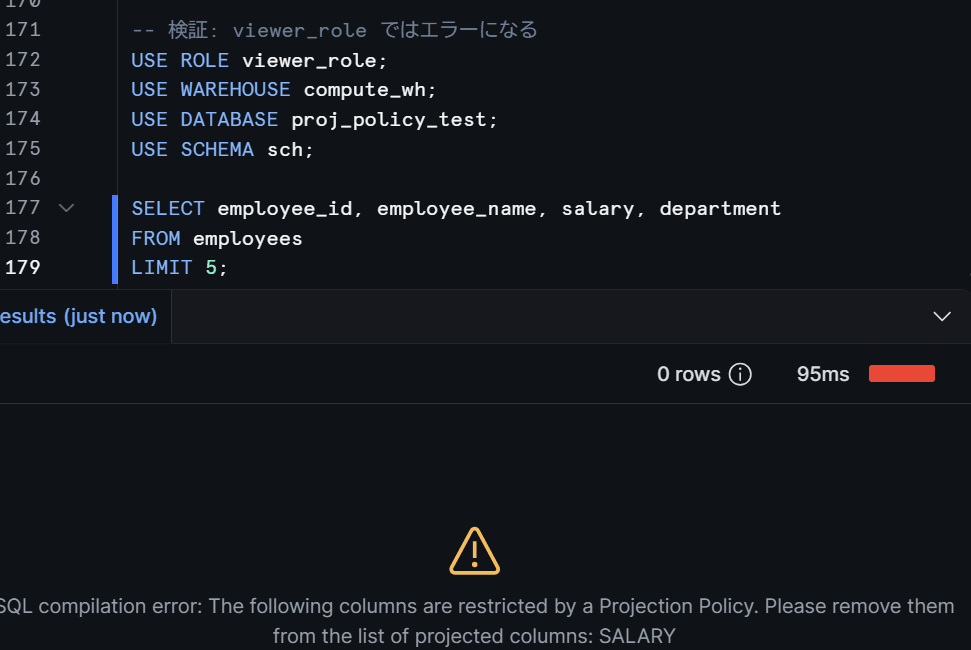
viewer_role should result in an error.
Let's also check with ACCOUNTADMIN.
USE ROLE ACCOUNTADMIN;

SELECT employee_id, employee_name, salary, department
FROM employees
LIMIT 5;
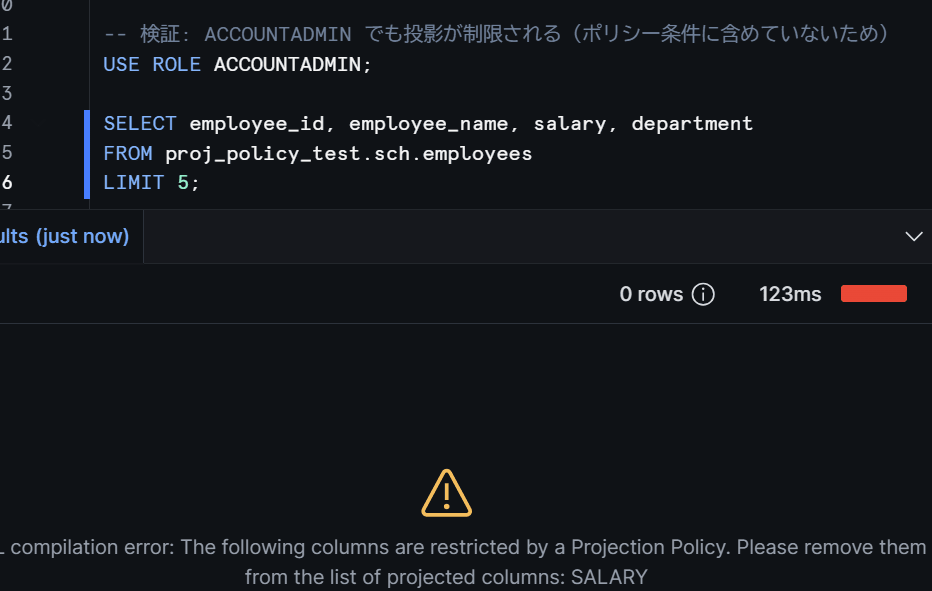
Let's remove the policy.
USE ROLE ACCOUNTADMIN;

ALTER TABLE employees
    MODIFY COLUMN salary
    UNSET PROJECTION POLICY;
Verifying Use in WHERE Clauses (Security Considerations)
Projection-constrained columns cannot appear in the SELECT list, but filtering in WHERE clauses is possible. This is one of the reasons the official documentation states that "Projection Policy is not a complete confidentiality guarantee."
USE ROLE ACCOUNTADMIN;

-- Apply the policy that prohibits projection for all roles to salary
ALTER TABLE employees
    MODIFY COLUMN salary
    SET PROJECTION POLICY deny_projection;
-- Use salary in a WHERE clause without including it in the SELECT list
SELECT employee_id, employee_name, department
FROM employees
WHERE salary > 800000;
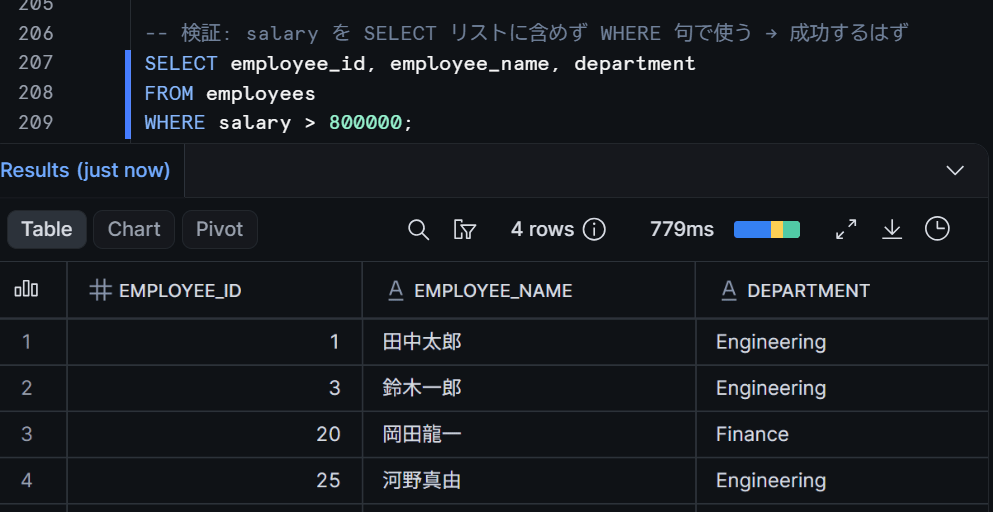
The query succeeds, and only employees with a salary over 800,000 are returned. The salary value itself does not appear in the results, but by repeatedly querying with changing conditions, the range of values can be inferred.
For example, by changing the threshold from WHERE salary > 900000 to WHERE salary > 950000, you can narrow down a specific person's salary. It is difficult to fully protect confidentiality with Projection Policy alone, so it is important to combine it with masking policies, row access policies, and other mechanisms as needed.
Let's remove the policy.
ALTER TABLE employees
    MODIFY COLUMN salary
    UNSET PROJECTION POLICY;
Verifying Indirect References via Views
Let's verify whether constraints are effective even when a projection-constrained column is referenced through a view.
USE ROLE ACCOUNTADMIN;
USE SCHEMA proj_policy_test.sch;

-- Set a projection policy on salary
ALTER TABLE employees
    MODIFY COLUMN salary
    SET PROJECTION POLICY deny_projection;
-- Create a view that includes salary
CREATE OR REPLACE VIEW employee_summary AS
SELECT employee_id, employee_name, department, salary
FROM employees;
-- Grant SELECT permission on the view
GRANT SELECT ON VIEW employee_summary TO ROLE viewer_role;
USE ROLE viewer_role;
USE WAREHOUSE <your_warehouse_name>;
USE DATABASE proj_policy_test;
USE SCHEMA sch;

-- Attempt to project salary via the view
SELECT * FROM employee_summary LIMIT 5;
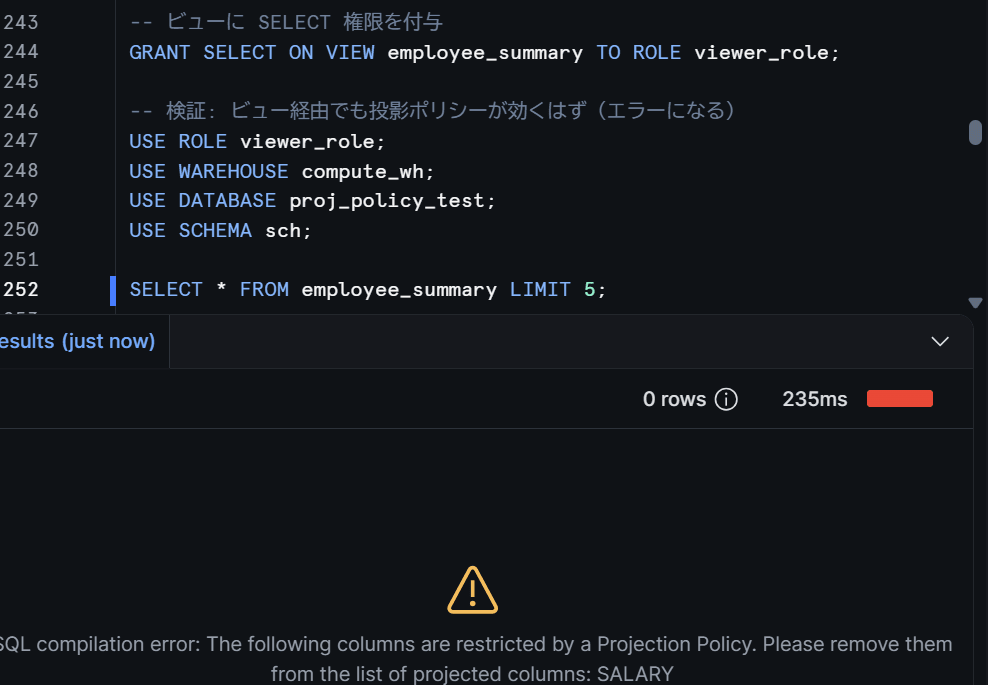
The base table's projection policy is effective even through the view, and projection of salary is blocked. It has been confirmed that simply creating a view cannot circumvent the policy.
Let's remove the policy and delete the view.
USE ROLE ACCOUNTADMIN;

ALTER TABLE employees
    MODIFY COLUMN salary
    UNSET PROJECTION POLICY;

DROP VIEW IF EXISTS employee_summary;
Verifying Combined Use with Masking Policies
Finally, let's apply a Projection Policy and a masking policy to different columns of the same table and verify the behavior when used together.
salary: Projection Policy restricts projection forviewer_role(NULLIFY mode)email: Masking policy masks the value forviewer_role
USE ROLE ACCOUNTADMIN;
USE SCHEMA proj_policy_test.sch;

-- For salary: Projection Policy that NULLIFYs for roles other than analyst_role
CREATE OR REPLACE PROJECTION POLICY salary_projection
    AS () RETURNS PROJECTION_CONSTRAINT ->
    CASE
        WHEN CURRENT_ROLE() = 'ANALYST_ROLE'
            THEN PROJECTION_CONSTRAINT(ALLOW => TRUE)
        ELSE PROJECTION_CONSTRAINT(ALLOW => FALSE, ENFORCEMENT => 'NULLIFY')
    END;
-- For email: Masking Policy that masks for roles other than analyst_role
CREATE OR REPLACE MASKING POLICY mask_email AS (val STRING)
RETURNS STRING ->
CASE
    WHEN CURRENT_ROLE() = 'ANALYST_ROLE' THEN val
    ELSE '***MASKED***'
END;
-- Assign the policies
ALTER TABLE employees
    MODIFY COLUMN salary
    SET PROJECTION POLICY salary_projection;

ALTER TABLE employees
    MODIFY COLUMN email
    SET MASKING POLICY mask_email;
First, let's check with analyst_role.
USE ROLE analyst_role;
USE WAREHOUSE <your_warehouse_name>;
USE DATABASE proj_policy_test;
USE SCHEMA sch;

SELECT employee_id, employee_name, email, salary, department
FROM employees
LIMIT 5;
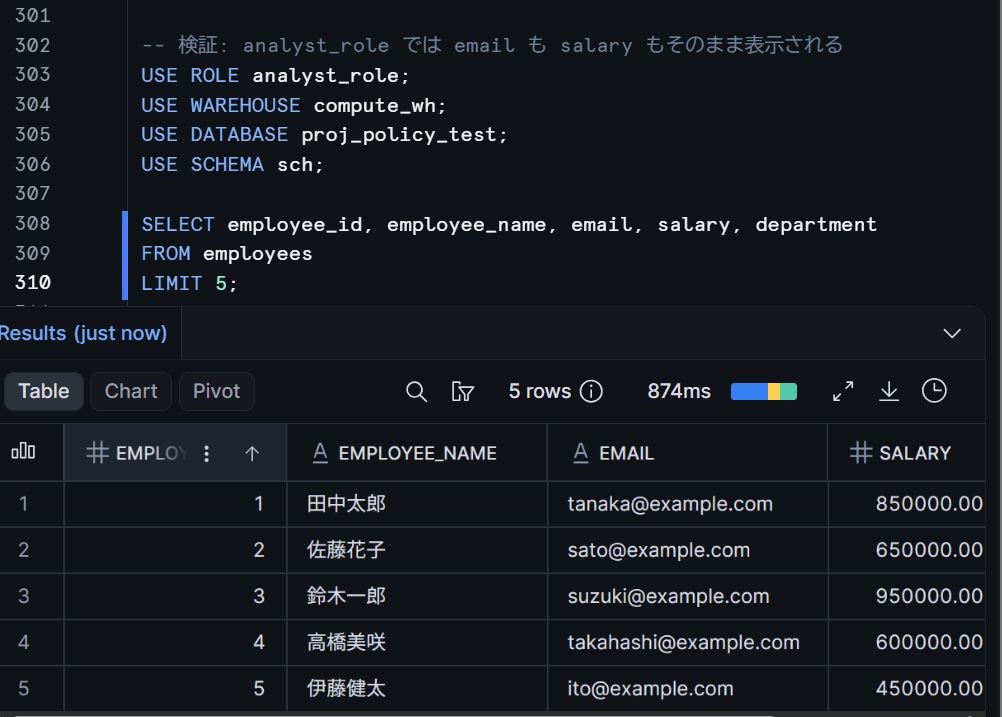
There is no problem if both email and salary are displayed as-is with analyst_role.
Next, let's check with viewer_role.
USE ROLE viewer_role;
USE WAREHOUSE <your_warehouse_name>;
USE DATABASE proj_policy_test;
USE SCHEMA sch;

SELECT employee_id, employee_name, email, salary, department
FROM employees
LIMIT 5;
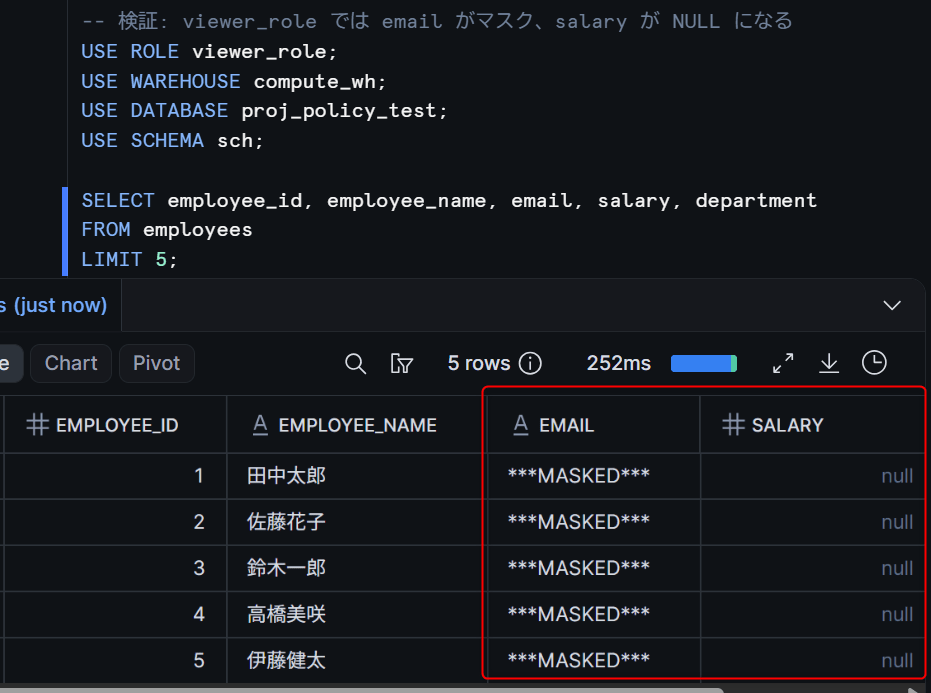
With viewer_role, the expected behavior is as follows.
salary: Projection Policy restricts projection for roles other thananalyst_role(NULLIFY mode)email: Masking policy masks the value for roles other thananalyst_role
We were able to confirm that both policies function simultaneously by setting a Projection Policy and a masking policy on different columns of the same table. In this case, since they are applied to different columns, each works independently. For a design that sets both policies on the same column, please verify the order of Projection Policy judgment (FAIL / NULLIFY) and masking policy application individually.
Let's remove the policies.
USE ROLE ACCOUNTADMIN;

ALTER TABLE employees
    MODIFY COLUMN salary
    UNSET PROJECTION POLICY;

ALTER TABLE employees
    MODIFY COLUMN email
    UNSET MASKING POLICY;
Closing Thoughts
I tried out Projection Policy. The key point is how to differentiate its use from masking policies, which can be summarized as follows.
- Masking Policy: Replaces column values based on conditions such as role
- Projection Policy: Controls whether a column can be projected into the final query results (
FAILcauses the query to error /NULLIFYreturns values as NULL) - Aggregation Policy: Suppresses the return of individual records and requires aggregations that meet a minimum group size
The choice of FAIL / NULLIFY is intuitive, and it is nice to be able to select the mode based on requirements. Role-based conditional branching can also be written straightforwardly with CASE expressions.
On the other hand, projection-constrained columns can be used in WHERE clauses and internal queries, and there is a possibility that information can be inferred through joins and repeated queries. When it is necessary to strongly conceal the existence or values of columns, prioritize a design that excludes the target columns from views and tables intended for public access, and combine it with masking policies, row access policies, Differential Privacy, and other mechanisms as needed.
I hope this article is helpful in some way!