![[New Feature] Tried out Snowflake-provided tags now in public preview](https://images.ctfassets.net/ct0aopd36mqt/wp-refcat-img-3610e3c1ff5961bdb7b464e17f8bf06d/90b168b240005ead852ec1d474bb74fb/snowflake-logo-1200x630-1.png?w=3840&fm=webp)
[New Feature] Tried out Snowflake-provided tags now in public preview

This page has been translated by machine translation. View original
This is Kawabata.
On August 31, 2026, Snowflake-provided tags became Public Preview.
This is a feature that automatically creates 6 types of ready-made tags for governance purposes in the SNOWFLAKE.TAGS schema of all accounts.
Until now, tags for cost centers and sensitivity levels had to be designed and managed per account using CREATE TAG, but this feature allows you to use a common vocabulary across all accounts as-is. I actually tried it out, so I'll summarize the steps and results.
Feature Overview
Snowflake-provided tags are ready-made tags that Snowflake automatically creates in the SNOWFLAKE.TAGS schema of all accounts (referred to as "provided tags" in this article). They cannot be created or deleted by users. The following 6 types are provided.
| Tag | Purpose | Allowed Values |
|---|---|---|
CERTIFICATION_STATUS |
Data validation and reliability status | DRAFT / TO BE REVIEWED / IN REVIEW / CERTIFIED / REJECTED / DEPRECATED (cannot be changed) |
SENSITIVITY |
Data sensitivity level | RESTRICTED / CONFIDENTIAL / INTERNAL / PUBLIC (changeable with OOB_TAG_ADMIN. Initial values are in descending order of sensitivity) |
ENVIRONMENT |
Deployment environment identification | PRODUCTION / STAGING / TEST / DEVELOPMENT (changeable with OOB_TAG_ADMIN) |
COST_CENTER |
Cost allocation identification | No predefined allowed values (any string can be set) |
PROJECT |
Project association | No predefined allowed values (any string can be set) |
SKIP_TAG_PROPAGATION |
Stop automatic tag propagation | Special tag that sets an empty string (Enterprise Edition or higher) |
The characteristics differ per tag, and they are easier to understand when grouped into the following 4 categories.
- Fixed allowed values:
CERTIFICATION_STATUS - Initially defined allowed values, with ability to add/remove:
SENSITIVITY/ENVIRONMENT - No predefined allowed values (any string):
COST_CENTER/PROJECT - Controls special behavior rather than values:
SKIP_TAG_PROPAGATION
Note that these are separate from the classification system tags in SNOWFLAKE.CORE (such as SEMANTIC_CATEGORY) used by the automatic classification feature.
Differences from User-Defined Tags
The main differences from conventional user-defined tags are as follows.
| Comparison Item | User-Defined Tags | Snowflake-Provided Tags |
|---|---|---|
| Creation | User creates in any schema | Snowflake automatically creates in SNOWFLAKE.TAGS |
| Deletion | Owner role can delete | Not possible (even with ACCOUNTADMIN) |
| Allowed Values | Specified arbitrarily at definition time | Predefined per tag (CERTIFICATION_STATUS cannot be changed) |
| Reference Permission | Permission on tag/schema | Application role OOB_TAG_READ (already granted to PUBLIC) |
| Apply Permission | APPLY TAG privilege, or APPLY on tag + object ownership |
OOB_TAG_APPLY + object ownership |
| Definition Changes | Tag owner role | OOB_TAG_ADMIN (allowed values, comments, propagation settings) |
| Vocabulary Standardization | Designed per account | Common across all accounts |
| Special Tag Behavior | No special behavior even if a tag with the same name is created | Only SNOWFLAKE.TAGS.SKIP_TAG_PROPAGATION has the special behavior of stopping propagation |
Intended Use Cases
Using the provided tag vocabulary as-is allows you to start the following governance operations with standard tags alone.
- Protecting sensitive data: Link a tag-based masking policy to
SENSITIVITYfor automatic masking (implemented in the verification below) - Cost allocation: Assign
COST_CENTER/PROJECTto warehouses, etc., and aggregate costs by tag - Data asset certification management: Manage review status with
CERTIFICATION_STATUS, allowing users to selectCERTIFIEDdata - Environment clarification: Distinguish production/development resources with
ENVIRONMENTfor inventory management and prevention of accidental operations
For cost allocation, there is an official pattern for aggregating by joining TAG_REFERENCES in ACCOUNT_USAGE with metering views (such as WAREHOUSE_METERING_HISTORY). The official Doc example uses user-defined tags, but this verification confirmed that assigning SNOWFLAKE.TAGS.COST_CENTER to warehouses is also possible.
Limitations
- As of September 2, 2026, this is a Public Preview feature. Specifications may change before GA.
- Deleting provided tags and adding tags to the
SNOWFLAKE.TAGSschema are not possible. - Allowed values for
CERTIFICATION_STATUScannot be changed even withOOB_TAG_ADMIN. SKIP_TAG_PROPAGATIONand automatic tag propagation require Enterprise Edition or higher.- In the verification environment, propagation stopping via
SKIP_TAG_PROPAGATIONcould not be reproduced (described later).
Verification Environment
- Snowflake: Trial account, AWS Tokyo region
- Edition: Enterprise Edition
- Required permissions: ACCOUNTADMIN (granting application roles, creating verification objects)
Prerequisites
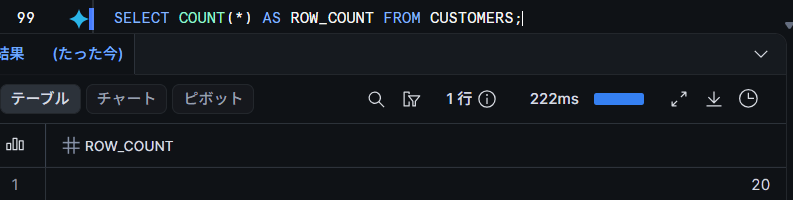
Create a DB/schema for verification and a customer table (20 records) containing PII-equivalent columns.
Database/table creation
USE ROLE ACCOUNTADMIN;
USE WAREHOUSE COMPUTE_WH;

CREATE DATABASE IF NOT EXISTS PROVIDED_TAGS_VERIFY_DB;
CREATE SCHEMA IF NOT EXISTS PROVIDED_TAGS_VERIFY_DB.VERIFY;
USE SCHEMA PROVIDED_TAGS_VERIFY_DB.VERIFY;

-- Verification table (e-commerce customer data)
CREATE OR REPLACE TABLE CUSTOMERS (
    CUSTOMER_ID   NUMBER        COMMENT 'Customer ID',
    CUSTOMER_NAME VARCHAR(100)  COMMENT 'Full name (PII equivalent)',
    EMAIL         VARCHAR(200)  COMMENT 'Email address (PII equivalent)',
    PHONE         VARCHAR(20)   COMMENT 'Phone number (PII equivalent)',
    PREFECTURE    VARCHAR(20)   COMMENT 'Prefecture',
    PLAN_TYPE     VARCHAR(20)   COMMENT 'Contract plan',
    SIGNUP_DATE   DATE          COMMENT 'Registration date',
    MONTHLY_FEE   NUMBER(10,0)  COMMENT 'Monthly fee'
);
INSERT statement for verification data (click to expand)
INSERT INTO CUSTOMERS VALUES
    (1,  'Taro Yamada',    'taro.yamada@example.com',    '090-1111-0001', 'Tokyo',    'PREMIUM',  '2025-01-15', 3000),
    (2,  'Hanako Sato',    'hanako.sato@example.com',    '090-1111-0002', 'Osaka',    'STANDARD', '2025-02-01', 1500),
    (3,  'Ichiro Suzuki',  'ichiro.suzuki@example.com',  '090-1111-0003', 'Aichi',    'FREE',     '2025-02-14', 0),
    (4,  'Yuki Tanaka',    'yuki.tanaka@example.com',    '090-1111-0004', 'Hokkaido', 'STANDARD', '2025-03-03', 1500),
    (5,  'Kenji Watanabe', 'kenji.watanabe@example.com', '090-1111-0005', 'Fukuoka',  'PREMIUM',  '2025-03-20', 3000),
    (6,  'Mika Ito',       'mika.ito@example.com',       '090-1111-0006', 'Tokyo',    'FREE',     '2025-04-01', 0),
    (7,  'Shota Kato',     'shota.kato@example.com',     '090-1111-0007', 'Kanagawa', 'STANDARD', '2025-04-18', 1500),
    (8,  'Aoi Kobayashi',  'aoi.kobayashi@example.com',  '090-1111-0008', 'Kyoto',    'PREMIUM',  '2025-05-02', 3000),
    (9,  'Ren Yoshida',    'ren.yoshida@example.com',    '090-1111-0009', 'Hyogo',    'FREE',     '2025-05-25', 0),
    (10, 'Sakura Yamamoto','sakura.yamamoto@example.com','090-1111-0010', 'Tokyo',    'STANDARD', '2025-06-10', 1500),
    (11, 'Daiki Nakamura', 'daiki.nakamura@example.com', '090-1111-0011', 'Saitama',  'PREMIUM',  '2025-06-28', 3000),
    (12, 'Rin Hayashi',    'rin.hayashi@example.com',    '090-1111-0012', 'Chiba',    'FREE',     '2025-07-07', 0),
    (13, 'Sota Shimizu',   'sota.shimizu@example.com',   '090-1111-0013', 'Osaka',    'STANDARD', '2025-07-19', 1500),
    (14, 'Mei Mori',       'mei.mori@example.com',       '090-1111-0014', 'Miyagi',   'PREMIUM',  '2025-08-04', 3000),
    (15, 'Haruto Ikeda',   'haruto.ikeda@example.com',   '090-1111-0015', 'Hiroshima','FREE',     '2025-08-22', 0),
    (16, 'Yua Hashimoto',  'yua.hashimoto@example.com',  '090-1111-0016', 'Tokyo',    'STANDARD', '2025-09-09', 1500),
    (17, 'Kaito Abe',      'kaito.abe@example.com',      '090-1111-0017', 'Niigata',  'PREMIUM',  '2025-09-30', 3000),
    (18, 'Hina Ishikawa',  'hina.ishikawa@example.com',  '090-1111-0018', 'Okinawa',  'FREE',     '2025-10-11', 0),
    (19, 'Yamato Ogawa',   'yamato.ogawa@example.com',   '090-1111-0019', 'Nagano',   'STANDARD', '2025-10-27', 1500),
    (20, 'Koharu Goto',    'koharu.goto@example.com',    '090-1111-0020', 'Shizuoka', 'PREMIUM',  '2025-11-15', 3000);
Let's Try It
Checking the Provided Tags
First, let's check the contents of the SNOWFLAKE.TAGS schema.
SHOW TAGS IN SCHEMA SNOWFLAKE.TAGS;
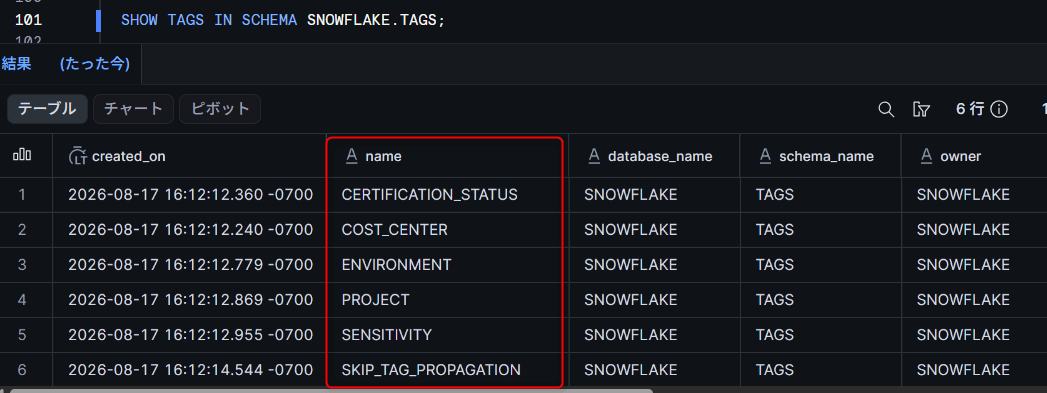
There is no issue if 6 types of tags are displayed. The owner is SNOWFLAKE and owner_role_type is APPLICATION, indicating a structure that cannot be owned or deleted by regular roles.
The comment on SENSITIVITY contained a note that "if Enterprise Edition or higher, you can enable automatic propagation with ALTER TAG SNOWFLAKE.TAGS.SENSITIVITY SET PROPAGATE = ON_DEPENDENCY_AND_DATA_MOVEMENT ON_CONFLICT = ALLOWED_VALUES_SEQUENCE."
The initial allowed values are defined in the order RESTRICTED, CONFIDENTIAL, INTERNAL, PUBLIC (descending order of sensitivity). When ON_CONFLICT = ALLOWED_VALUES_SEQUENCE is set, conflicts during propagation are resolved in this order, with values defined earlier taking priority.
Assigning and Referencing Tags
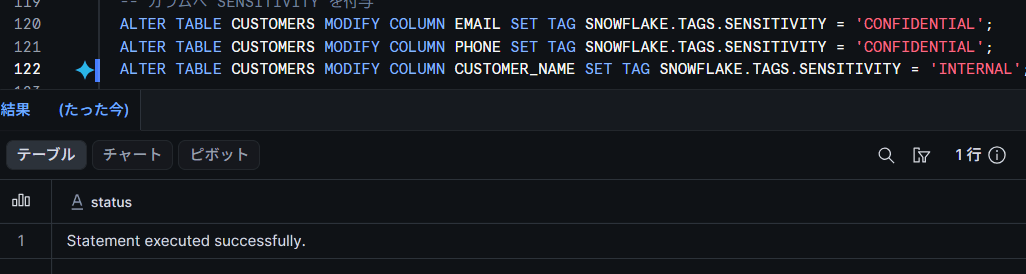
Let's assign tags to a schema, table, and columns respectively.
-- Assign to schema (inherited by child objects)
ALTER SCHEMA PROVIDED_TAGS_VERIFY_DB.VERIFY SET TAG SNOWFLAKE.TAGS.ENVIRONMENT = 'DEVELOPMENT';

-- Assign 3 tags to the table at once
ALTER TABLE CUSTOMERS SET TAG
  SNOWFLAKE.TAGS.CERTIFICATION_STATUS = 'IN REVIEW',
  SNOWFLAKE.TAGS.COST_CENTER = 'DATA-PLATFORM',
  SNOWFLAKE.TAGS.PROJECT = 'CUSTOMER-ANALYTICS';

-- Assign to columns
ALTER TABLE CUSTOMERS MODIFY COLUMN EMAIL SET TAG SNOWFLAKE.TAGS.SENSITIVITY = 'CONFIDENTIAL';
ALTER TABLE CUSTOMERS MODIFY COLUMN PHONE SET TAG SNOWFLAKE.TAGS.SENSITIVITY = 'CONFIDENTIAL';
ALTER TABLE CUSTOMERS MODIFY COLUMN CUSTOMER_NAME SET TAG SNOWFLAKE.TAGS.SENSITIVITY = 'INTERNAL';
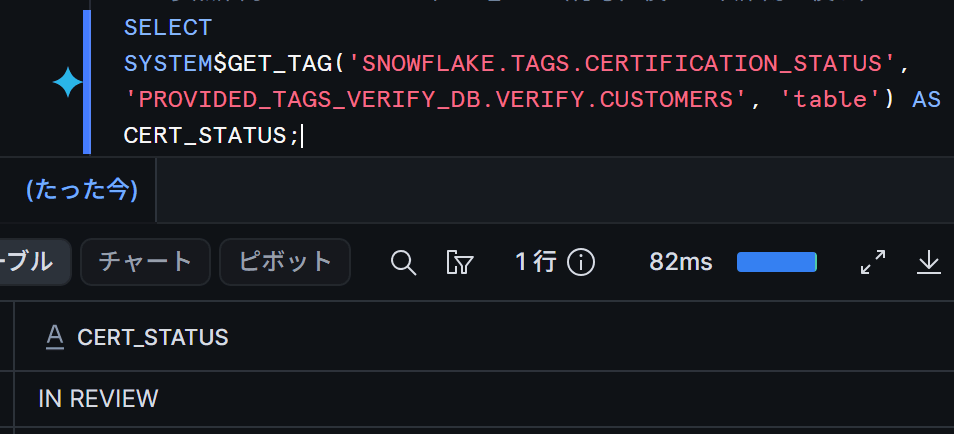
There is no issue if SYSTEM$GET_TAG returns the set value.
SELECT SYSTEM$GET_TAG('SNOWFLAKE.TAGS.CERTIFICATION_STATUS', 'PROVIDED_TAGS_VERIFY_DB.VERIFY.CUSTOMERS', 'table');
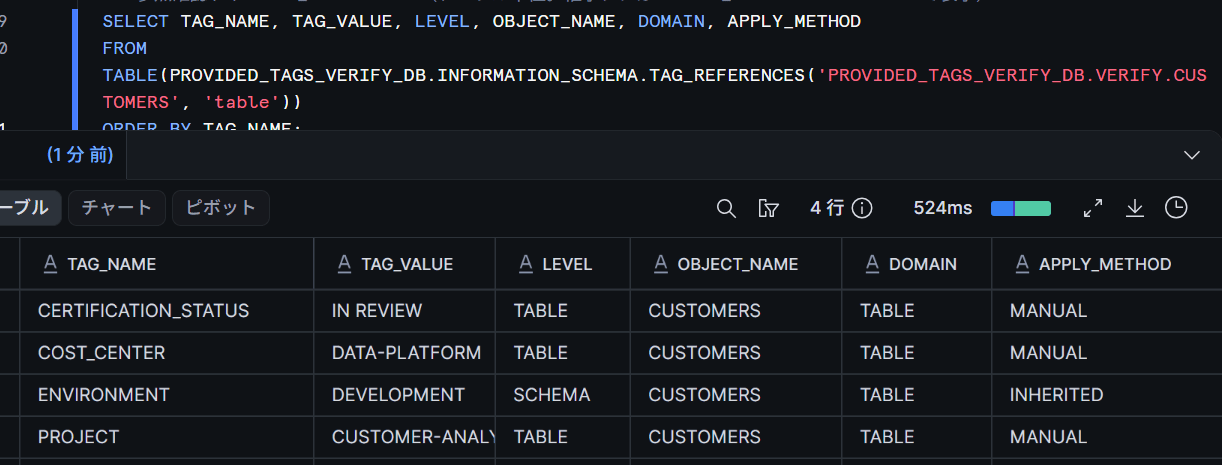
With the TAG_REFERENCES table function, you can check how a tag was applied using the APPLY_METHOD column.
SELECT TAG_NAME, TAG_VALUE, LEVEL, OBJECT_NAME, APPLY_METHOD
FROM TABLE(PROVIDED_TAGS_VERIFY_DB.INFORMATION_SCHEMA.TAG_REFERENCES('PROVIDED_TAGS_VERIFY_DB.VERIFY.CUSTOMERS', 'TABLE'))
ORDER BY TAG_NAME;
The execution result is as follows. Tags applied directly show MANUAL, and ENVIRONMENT inherited from the schema shows INHERITED.
Use TAG_REFERENCES_ALL_COLUMNS for bulk confirmation at the column level. Whether targeting a table or view, specify TABLE as the second argument.
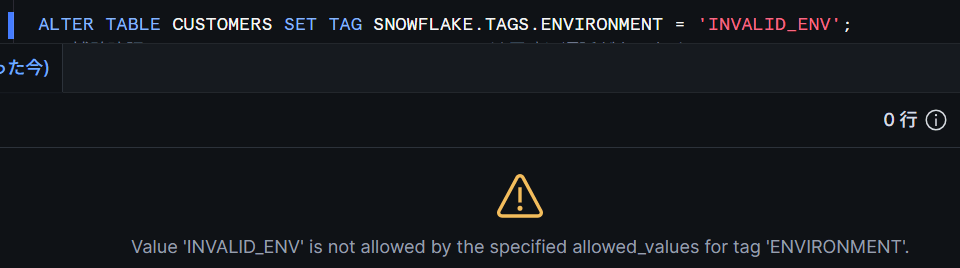
Setting a value other than the allowed values to a tag with defined allowed values will result in an error.
ALTER TABLE CUSTOMERS SET TAG SNOWFLAKE.TAGS.ENVIRONMENT = 'INVALID_ENV';
Checking the Permission Model
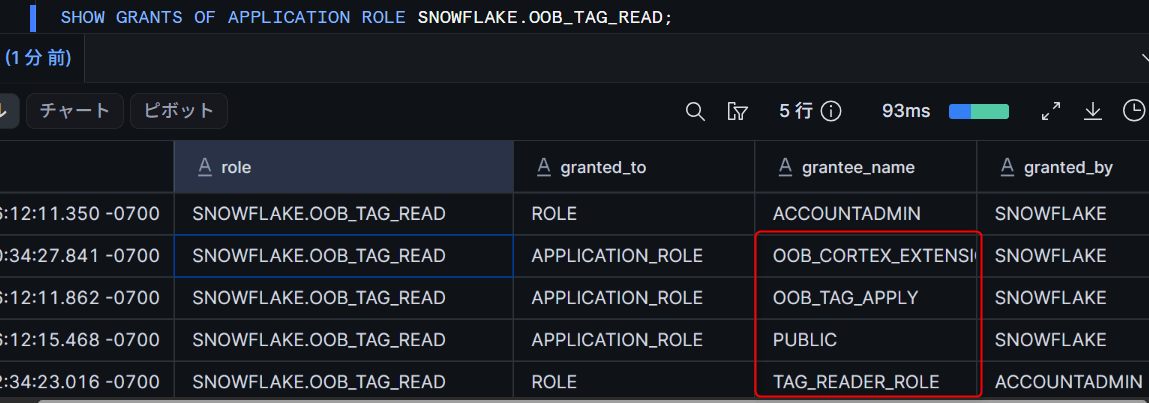
Permissions for provided tags are managed not by regular tag permissions, but by 3 types of application roles in the SNOWFLAKE application.
| Application Role | What It Can Do | Default Granted To |
|---|---|---|
SNOWFLAKE.OOB_TAG_READ |
Reference the SNOWFLAKE.TAGS schema |
PUBLIC (= all roles) |
SNOWFLAKE.OOB_TAG_APPLY |
Apply provided tags (APPLY on tags) |
ACCOUNTADMIN |
SNOWFLAKE.OOB_TAG_ADMIN |
Change allowed values, comments, and propagation settings (excluding CERTIFICATION_STATUS) |
ACCOUNTADMIN |
In the execution results of SHOW GRANTS OF APPLICATION ROLE, it was confirmed that in this account, OOB_TAG_ADMIN → OOB_TAG_APPLY → OOB_TAG_READ have an inclusion relationship in that order. Granting a higher-level role also includes the permissions of lower-level roles.
SHOW GRANTS OF APPLICATION ROLE SNOWFLAKE.OOB_TAG_READ;
-- granted_to APPLICATION_ROLE PUBLIC / OOB_TAG_APPLY etc. are displayed
Customizing Allowed Values
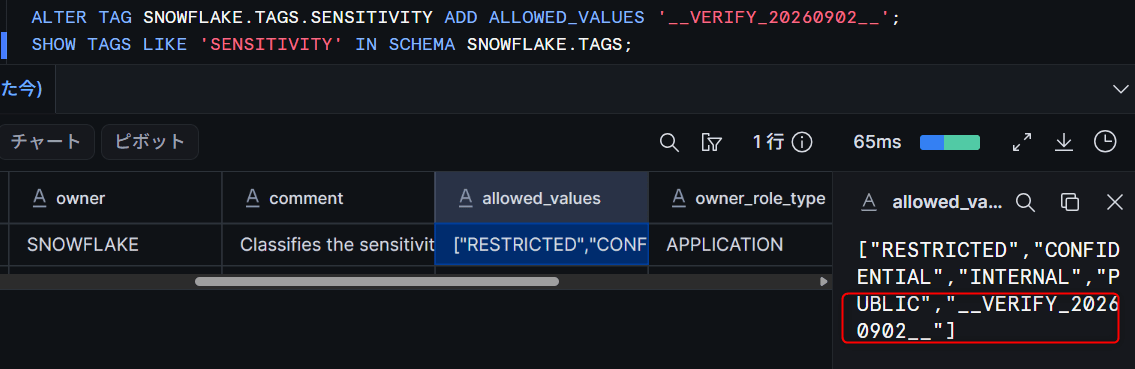
Let's try adding an allowed value to SENSITIVITY using a role with OOB_TAG_ADMIN granted.
USE ROLE TAG_ADMIN_ROLE;
USE SECONDARY ROLES NONE;

ALTER TAG SNOWFLAKE.TAGS.SENSITIVITY ADD ALLOWED_VALUES '__VERIFY_20260902__';
After confirming with SHOW TAGS that the value was added to the allowed values, the tag assignment with the added value was also successful. After verification, we restored it with DROP ALLOWED_VALUES.
ALTER TAG SNOWFLAKE.TAGS.SENSITIVITY DROP ALLOWED_VALUES '__VERIFY_20260902__';
Similarly with ENVIRONMENT, adding allowed values and restoring with DROP ALLOWED_VALUES was possible.
On the other hand, changing the allowed values of CERTIFICATION_STATUS is rejected even with OOB_TAG_ADMIN.
ALTER TAG SNOWFLAKE.TAGS.CERTIFICATION_STATUS ADD ALLOWED_VALUES 'MY_STATUS';
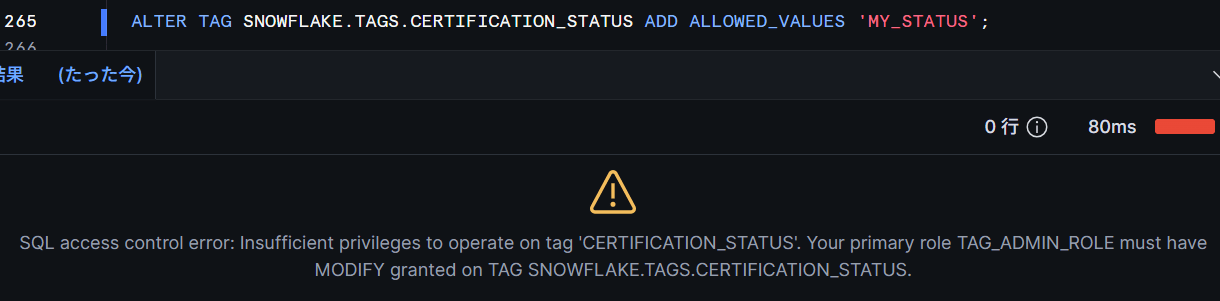
The allowed values of provided tags are settings shared across the entire account.
Checking Automatic Tag Propagation and SKIP_TAG_PROPAGATION
Let's try combining this with automatic tag propagation. Automatic tag propagation and tag-based masking policies are features available for Enterprise Edition or higher (tag assignment and referencing themselves are available in all editions). First, let's confirm the basic propagation behavior using a user-defined tag with propagation settings.
USE ROLE ACCOUNTADMIN;
USE SCHEMA PROVIDED_TAGS_VERIFY_DB.VERIFY;

CREATE OR REPLACE TAG DATA_ORIGIN
  PROPAGATE = ON_DEPENDENCY_AND_DATA_MOVEMENT
  COMMENT = 'Propagation verification tag (user-defined)';
ALTER TABLE CUSTOMERS SET TAG DATA_ORIGIN = 'CRM';

-- View (propagation via object dependency)
CREATE OR REPLACE VIEW CUSTOMERS_VIEW AS
SELECT CUSTOMER_ID, CUSTOMER_NAME, EMAIL, PLAN_TYPE FROM CUSTOMERS;

-- CTAS (propagation via data movement)
CREATE OR REPLACE TABLE CUSTOMERS_COPY AS SELECT * FROM CUSTOMERS;
Let's check with TAG_REFERENCES.
SELECT TAG_NAME, TAG_VALUE, APPLY_METHOD
FROM TABLE(PROVIDED_TAGS_VERIFY_DB.INFORMATION_SCHEMA.TAG_REFERENCES('PROVIDED_TAGS_VERIFY_DB.VERIFY.CUSTOMERS_VIEW', 'TABLE'))
WHERE TAG_NAME = 'DATA_ORIGIN';
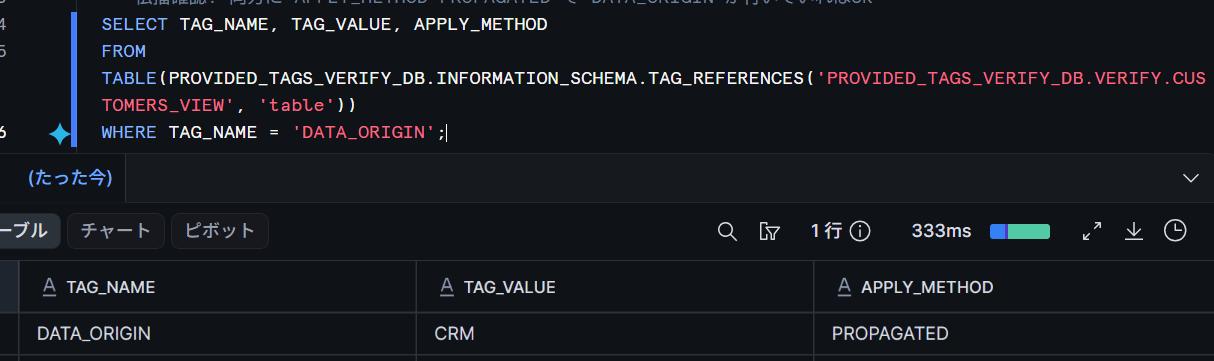
There is no issue if DATA_ORIGIN appears with APPLY_METHOD = PROPAGATED on both the view and the CTAS destination.
Propagation via INSERT (data movement) will be confirmed during the SKIP_TAG_PROPAGATION verification described later.
Next, the propagation settings for the provided tags themselves. Let's run the recommended command as written in the SENSITIVITY comment.
ALTER TAG SNOWFLAKE.TAGS.SENSITIVITY SET PROPAGATE = ON_DEPENDENCY_AND_DATA_MOVEMENT ON_CONFLICT = ALLOWED_VALUES_SEQUENCE;
ALTER TABLE CUSTOMERS SET TAG SNOWFLAKE.TAGS.SENSITIVITY = 'RESTRICTED';

CREATE OR REPLACE TABLE CUSTOMERS_COPY3 AS SELECT * FROM CUSTOMERS;

-- Column-level propagation check
SELECT TAG_NAME, TAG_VALUE, LEVEL, COLUMN_NAME, APPLY_METHOD
FROM TABLE(PROVIDED_TAGS_VERIFY_DB.INFORMATION_SCHEMA.TAG_REFERENCES_ALL_COLUMNS('PROVIDED_TAGS_VERIFY_DB.VERIFY.CUSTOMERS_COPY3', 'TABLE'))
WHERE TAG_NAME = 'SENSITIVITY'
ORDER BY COLUMN_NAME;
The settings were applied successfully. On the source side, RESTRICTED was directly assigned to the table, and CONFIDENTIAL etc. were already directly assigned to columns like EMAIL in the previous steps. When checking the CTAS destination with TAG_REFERENCES_ALL_COLUMNS, both the table and column levels showed the directly assigned tags propagated as PROPAGATED.
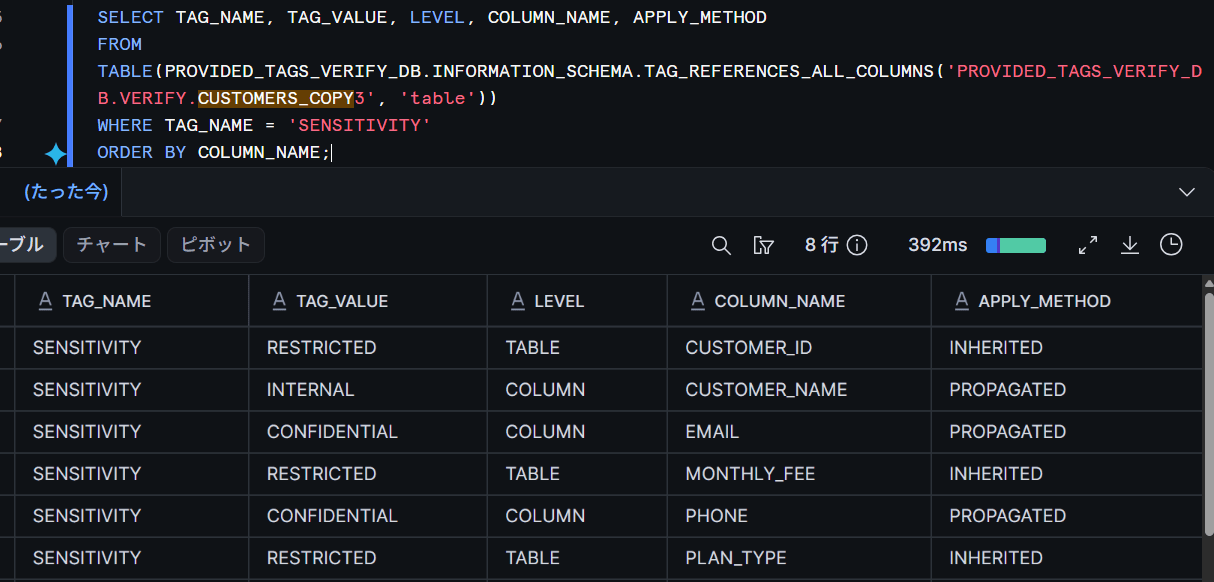
The CTAS destination table itself has the source table's RESTRICTED attached as PROPAGATED. The RESTRICTED displayed for columns without a column tag is inheritance (INHERITED) from the table tag.
Finally, SKIP_TAG_PROPAGATION. As described in the official documentation, set an empty string on the downstream object where you want to stop propagation. At this point, DATA_ORIGIN has already been propagated to CUSTOMERS_COPY / CUSTOMERS_VIEW.
ALTER TABLE CUSTOMERS_COPY SET TAG SNOWFLAKE.TAGS.SKIP_TAG_PROPAGATION = '';
ALTER VIEW  CUSTOMERS_VIEW SET TAG SNOWFLAKE.TAGS.SKIP_TAG_PROPAGATION = '';
After setting, add a new propagation tag to the source and confirm it does not propagate to the SKIP-configured destinations.
-- Add a second propagation tag to the source (to distinguish it as a tag added after the SKIP setting)
CREATE OR REPLACE TAG DATA_QUALITY
  PROPAGATE = ON_DEPENDENCY_AND_DATA_MOVEMENT;
ALTER TABLE CUSTOMERS SET TAG DATA_QUALITY = 'VALIDATED';

-- Trigger a data movement (INSERT) to the SKIP-configured table
INSERT INTO CUSTOMERS_COPY SELECT * FROM CUSTOMERS WHERE CUSTOMER_ID <= 2;

-- Check: as expected if DATA_QUALITY is not attached
SELECT TAG_NAME, TAG_VALUE, APPLY_METHOD
FROM TABLE(PROVIDED_TAGS_VERIFY_DB.INFORMATION_SCHEMA.TAG_REFERENCES('PROVIDED_TAGS_VERIFY_DB.VERIFY.CUSTOMERS_COPY', 'TABLE'))
ORDER BY TAG_NAME;

SELECT TAG_NAME, TAG_VALUE, APPLY_METHOD
FROM TABLE(PROVIDED_TAGS_VERIFY_DB.INFORMATION_SCHEMA.TAG_REFERENCES('PROVIDED_TAGS_VERIFY_DB.VERIFY.CUSTOMERS_VIEW', 'TABLE'))
ORDER BY TAG_NAME;
The expectation was "the previously propagated DATA_ORIGIN remains, and DATA_QUALITY added after the setting does not propagate." However, in actual measurement, DATA_QUALITY appeared with PROPAGATED on both the view (dependency) and the table (data movement via INSERT).
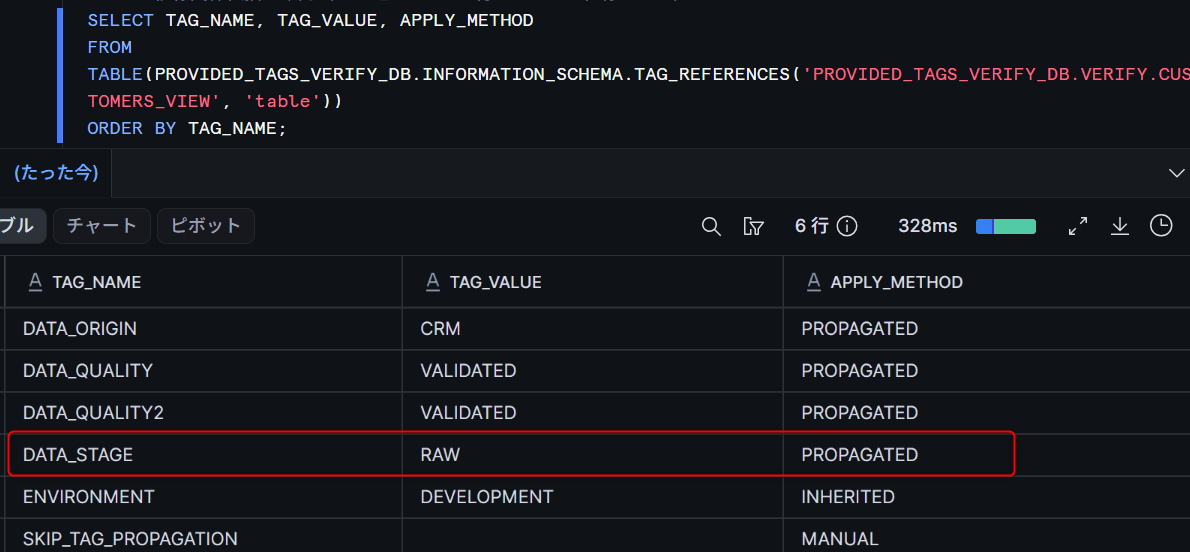
After verification, we restore the propagation settings of the provided tags. It was confirmed that after execution, propagate returns to NONE and on_conflict returns to None in SHOW TAGS.
ALTER TAG SNOWFLAKE.TAGS.SENSITIVITY UNSET PROPAGATE;
Could Not Reproduce Propagation Stopping with SKIP_TAG_PROPAGATION in the Verification Environment
According to the official documentation, "when set on an object, it temporarily pauses all future tag propagation to that object (already propagated tags are not deleted; propagation resumes with UNSET)." However, in the verification environment as of September 2, 2026, tag propagation occurred even after the setting, contrary to the official specification. The actual results are as follows.
- It was confirmed per specification that the previously propagated tag (
DATA_ORIGIN) was not deleted and remained - A propagation tag added to the source after the setting (
DATA_QUALITY, etc.) propagated via dependency (view) - The same tag also propagated via INSERT (data movement)
- Propagation did not stop for either user-defined tags or provided tags (
SENSITIVITY) - When performing CTAS using a SKIP-configured object as the source, tag propagation to downstream objects also did not stop (SQL below)
-- CTAS using SKIP-configured CUSTOMERS_COPY as source
CREATE OR REPLACE TABLE CUSTOMERS_CHAIN AS SELECT * FROM CUSTOMERS_COPY;

-- Check: propagation tags were also PROPAGATED on CUSTOMERS_CHAIN
SELECT TAG_NAME, TAG_VALUE, APPLY_METHOD
FROM TABLE(PROVIDED_TAGS_VERIFY_DB.INFORMATION_SCHEMA.TAG_REFERENCES('PROVIDED_TAGS_VERIFY_DB.VERIFY.CUSTOMERS_CHAIN', 'TABLE'))
ORDER BY TAG_NAME;
The setting itself could be confirmed in TAG_REFERENCES as SKIP_TAG_PROPAGATION with an empty string and APPLY_METHOD = MANUAL, and waiting a few minutes after the setting did not change the behavior. It was confirmed that the SKIP_TAG_PROPAGATION tag itself does not propagate to downstream objects.
These results are observations from a specific account, region, and Preview environment as of September 2, 2026, and do not indicate that all accounts will exhibit the same behavior. There is a possibility of Preview limitations or differences due to verification conditions, and based on these results alone, it cannot be conclusively determined as a specification defect. However, for the time being, designs that rely on SKIP_TAG_PROPAGATION for propagation exclusion should be handled with caution, at least until GA.
Use Case: Linking a Masking Policy to SENSITIVITY
As a representative intended use case, let's try combining this with tag-based masking policies (Enterprise Edition or higher).
Create a policy that evaluates tag values using SYSTEM$GET_TAG_ON_CURRENT_COLUMN and link it to a provided tag.
-- Masking policy that evaluates tag values
CREATE OR REPLACE MASKING POLICY SENSITIVITY_STRING_MASK AS (VAL STRING) RETURNS STRING ->
  CASE
    WHEN SYSTEM$GET_TAG_ON_CURRENT_COLUMN('SNOWFLAKE.TAGS.SENSITIVITY') IN ('RESTRICTED', 'CONFIDENTIAL')
      THEN '*** MASKED ***'
    ELSE VAL
  END;

-- Link to provided tag
ALTER TAG SNOWFLAKE.TAGS.SENSITIVITY SET MASKING POLICY SENSITIVITY_STRING_MASK;
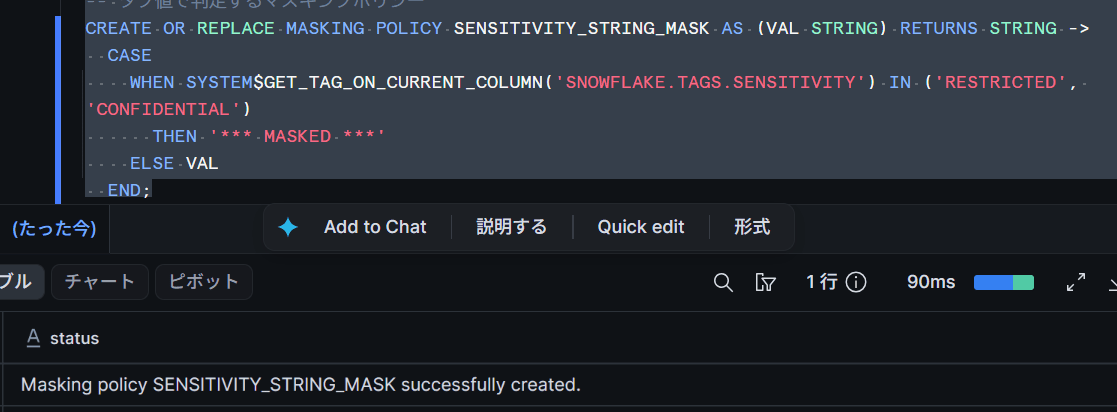
The linking was successful. Let's reference a table that includes columns with SENSITIVITY already assigned.
SELECT CUSTOMER_NAME, EMAIL, PHONE FROM CUSTOMERS;
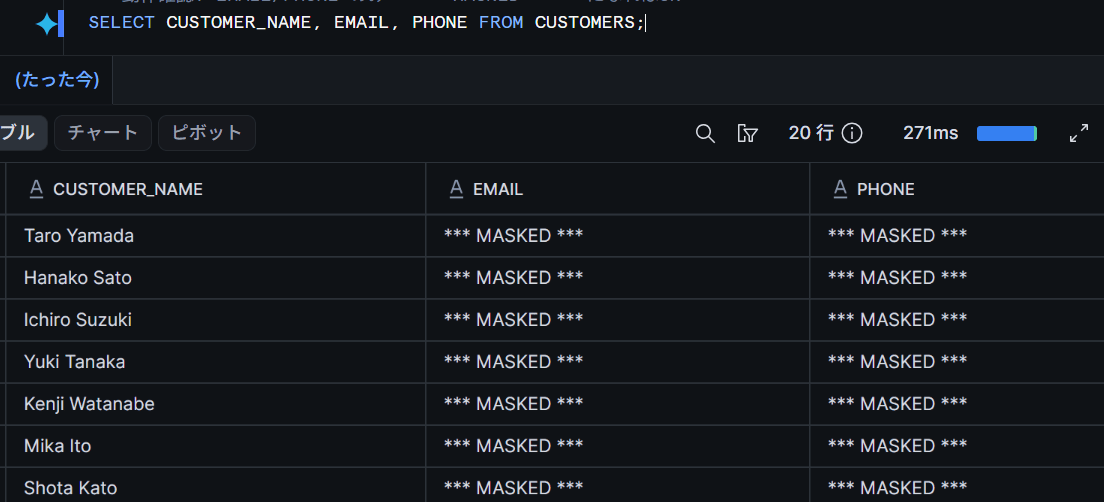
There is no issue if only the email and phone number with CONFIDENTIAL assigned are masked, while the name with INTERNAL remains visible. The allowed values of the provided tag function as a common vocabulary for protection levels as-is.
Since this policy does not include role conditions, all roles will have data masked. In actual operation, combine with role conditions such as IS_ROLE_IN_SESSION to allow only permitted roles to view actual data. Note that only one masking policy can be linked per tag per data type. Since this policy is for the STRING type, NUMBER type columns such as MONTHLY_FEE are not covered. To protect NUMBER type columns as well, create a policy for the NUMBER type and link it to the same tag.
In Closing
By trying out Snowflake-provided tags, I was able to confirm common vocabulary tag assignment, permission management via application roles, allowed value customization, and propagation settings. Since the initial cost of tag design is reduced, it is recommended to start by assigning SENSITIVITY and ENVIRONMENT first. Please be cautious about the behavior of SKIP_TAG_PROPAGATION during the preview period.
I believe the benefits of using Snowflake-provided tags are as follows.
- Ready to use immediately without tag design and creation, providing a common vocabulary with the same names and allowed values across all accounts
- Permission management is consolidated into 3 application roles (OOB_TAG_READ / OOB_TAG_APPLY / OOB_TAG_ADMIN), requiring no design
- No concern about accidental deletion
I hope this article serves as a useful reference for you!