![[New Feature] Snowflake's Restricted Session Scope is Now Generally Available, So I Tried Narrowing Effective Permissions Only When Using CoCo](https://images.ctfassets.net/ct0aopd36mqt/wp-refcat-img-3610e3c1ff5961bdb7b464e17f8bf06d/90b168b240005ead852ec1d474bb74fb/snowflake-logo-1200x630-1.png?w=3840&fm=webp)
[New Feature] Snowflake's Restricted Session Scope is Now Generally Available, So I Tried Narrowing Effective Permissions Only When Using CoCo

This page has been translated by machine translation. View original
This is Kawabata.
On September 3, 2026, Restricted Session Scope (RSS) became generally available.
I will verify it with 4 use cases assumed in practical work using CoCo in Snowsight.
Conclusion First
- RSS is a mechanism that narrows effective privileges only for "sessions where an agent is active," without changing any existing RBAC. Agents can only execute operations that are "permitted by RBAC AND permitted by RSS," and privileges never increase
- By excluding writes to the production database from the RSS allowed scope and prohibiting switching to privileged roles, agent sessions can be restricted to near read-only on a per-user basis
data writetargets only data writes to tables and does not include DDL such as CREATE TABLE. If you want to allow table creation as well, addobject management- RSS, which narrows "what can be touched," and agent-aware masking, which narrows "what values are visible after touching," are complementary and can be layered in the same session
- In this verification, I confirmed that even with the same user and same role, INSERT to production tables, DDL, and role switching are rejected in CoCo's agent session, while they execute according to RBAC privileges in worksheets
Overall Picture
What RSS covers in Snowflake's governance features is "the scope of what can be touched while an agent is running."
| Mechanism | Controlled axis | Unit |
|---|---|---|
| RBAC | Who can do what | Role |
| Feature Policy | What objects can be created | Containers such as DB |
| Masking / Projection / Aggregation Policy | Which values in touched data are visible | Column / Table |
| RSS | During agent use, which operations and which scope can be touched | Session (when agent is active) |
Based on this positioning, this article proceeds in the following flow.
- Previous challenges
- What is RSS
- Verification
- Closing
Previous Challenges
Access control in Snowflake is fundamentally based on RBAC. Assign privileges to roles, assign roles to users. Since this mechanism determines privileges by the "who" unit, whether the same user operates from a worksheet as a person or operates via an agent, the available privileges remain unchanged.
If an analytics role designed for human use has INSERT or CREATE TABLE attached to it, CoCo can perform the same operations. Furthermore, CoCo starts sessions with the user's default role, but if instructed to "switch roles" in the course of conversation, USE ROLE can be executed. Although a confirmation dialog appears, there was no way to prohibit it in advance.
There is also a method of narrowing "visible values" using a masking policy with IS_AGENT_ACTIVATED as a condition, but this is an "after touching" matter.
I verified this below, so please check it if you want more details.
RSS is what can narrow "the scope of what can be touched" itself, only when an agent is active.
What is RSS
RSS is a mechanism that defines the privilege ceiling for agents. Custom RSS can be defined in YAML, and you can also reference Snowflake pre-defined scopes by name. It does not change the user's RBAC at all. In sessions where an agent is active, only operations permitted by both RBAC and RSS can be executed. If either one does not permit it, that operation cannot be performed.
Definition Structure
An RSS definition consists of two sections: privilege_scopes, which defines operations and target scope, and role_scopes, which defines usable roles.
privilege_scopes:
  allowed_privileges:
    - privileges: [<group privilege>, ...]
      account: [all]                 # or databases: [...] / schemas: [...]
    - privileges: [data write]
      databases: [SANDBOX_DB, USER$] # USER$ resolves to the session user's personal DB
role_scopes:
  blocked_roles: [ACCOUNTADMIN, SYSADMIN]   # or allowed_roles
  blocked_secondary_roles: [ACCOUNTADMIN]    # or allowed_secondary_roles
  allow_role_switching: false                # default is true
For privileges, you write the following group privileges rather than individual privilege names.
| Group privilege | Target | Official documentation definition |
|---|---|---|
data read |
All containers | SELECT from tables, views, streams, stages, and workspaces |
data write |
All containers | Data writes to tables (does not include DDL) |
object discovery |
All containers | Object discovery via SHOW, etc. (does not read data) |
compute usage |
Account | Use of warehouses and compute pools |
program usage |
All containers | Execution of UDFs, stored procedures, and Streamlit |
grant management |
All containers | GRANT / REVOKE |
object management |
All containers | Full control of non-sensitive objects |
full management |
Account | All operations within the account |
What to keep in mind here is that data write is "data writes to tables" and does not include DDL such as CREATE TABLE.
How to Specify
To use RSS, specify RSS in AGENT_RESTRICTED_SESSION_SCOPE of a session policy and attach that policy to an account or user. There are 3 ways to specify it.
-- (a) Reference a Snowflake pre-defined scope by name
CREATE SESSION POLICY sp_a
  AGENT_RESTRICTED_SESSION_SCOPE = 'SNOWFLAKE$DATA_READ';

-- (b) Reference a custom RSS object by fully qualified name
CREATE RESTRICTED SESSION SCOPE gov.policies.my_scope AS $$ ... $$;
CREATE SESSION POLICY sp_b
  AGENT_RESTRICTED_SESSION_SCOPE = 'GOV.POLICIES.MY_SCOPE';

-- (c) Embed YAML inline
CREATE SESSION POLICY sp_c
  AGENT_RESTRICTED_SESSION_SCOPE = $$
privilege_scopes:
  allowed_privileges:
    - privileges: [data read]
      account: [all]
$$;

-- Apply to the entire account or per user
ALTER ACCOUNT SET SESSION POLICY sp_a;
ALTER USER jsmith SET SESSION POLICY sp_b;
There are 3 types of Snowflake pre-defined scopes.
| Scope name | Permitted operations | Not permitted operations |
|---|---|---|
SNOWFLAKE$DATA_READ |
data read for the entire account |
Writes, DDL, UDFs, stored procedures |
SNOWFLAKE$DATA_READ_WITH_AI |
data read + object discovery + USAGE for AI-related objects (Agent, MCP Server, Cortex Search service) |
Writes, DDL, stored procedures |
SNOWFLAKE$DATA_READ_PROGRAM_USAGE |
data read + program usage (execution of UDFs, stored procedures, Streamlit apps) |
Writes, DDL |
For UDF handling in SNOWFLAKE$DATA_READ_WITH_AI, there is a discrepancy between the official documentation body text (which can be read as including UDF USAGE) and the appendix YAML definition (which only covers Agent, MCP Server, Cortex Search service). In this verification, UDF calls were rejected (described later).
When RSS is Applied
RSS is applied only when an agent is active (agent-activated) in a session. The official documentation lists the following situations where SYS_CONTEXT('SNOWFLAKE$CURRENT', 'IS_AGENT_ACTIVATED') returns TRUE.
- Snowflake native agents: Cortex Agents, lite agents via each CoCo client (CLI / Desktop / Snowsight), CoWork, calls via REST API
- External agents: Connections via Snowflake-managed MCP Server, users of
SERVICE_AGENTtype, OAuth security integrations withIS_AGENTIC = TRUE
In sessions that do not go through an agent, such as worksheets and dbt, RSS is ignored.
Which RSS is applied can be confirmed within a session using the following function.
SELECT SYS_CONTEXT('SNOWFLAKE$CURRENT', 'ACTIVE_RESTRICTED_SESSION_SCOPES');
Limitations
These are the specifications described in the Considerations section of the official documentation.
Limitations
- RSS is the upper limit of existing RBAC and does not add privileges
- Once RSS is activated for agent activity, it cannot be changed, removed, or elevated during that session. To apply a different scope, start a new session (for CoCo, start a new conversation)
- If there is a user-level session policy, only its
AGENT_RESTRICTED_SESSION_SCOPEis used. It is not merged with account-level policies - If a session policy does not have
AGENT_RESTRICTED_SESSION_SCOPE, no scope is applied. For non-agent operations, this setting is ignored - Warehouse usage is implicitly permitted regardless of privilege scope
blocked_rolesis an exact match on role name. It does not traverse the role hierarchy to block inherited sources, nor does it strip privileges already inherited by the current primary role- An RSS referenced by fully qualified name from a session policy cannot be DROPped until the reference is removed
- The feature for users themselves to manage RSS in CoCo CLI / CoCo Desktop (user-managed RSS) is in Private Preview as of September 4, 2026. The RSS via session policy covered in this article is GA
Prerequisites
- Snowflake: Enterprise edition, AWS Tokyo region
- Required privileges
- Creating RSS:
CREATE RESTRICTED SESSION SCOPEprivilege on the destination schema. Modification requiresMODIFYorOWNERSHIPon the RSS, deletion requiresOWNERSHIP - Creating session policies:
CREATE SESSION POLICYprivilege on the destination schema - Applying session policies:
APPLY SESSION POLICYprivilege on the account
- Creating RSS:
Since the SQL below uses CREATE OR REPLACE, if databases, schemas, or tables with the same name exist, their contents will be replaced. Please execute in a dedicated verification account or with dedicated object names.
All verifications were performed with ACCOUNTADMIN, and the session policy was applied only to my own user. Please note that executing ALTER ACCOUNT SET SESSION POLICY on a shared account will affect all users who use CoCo.
How to Proceed with Verification
For all use cases, the same SQL is executed in both CoCo (agent session) and worksheet (non-agent session) to compare that RSS only acts on the agent. Results are shown in 4 columns: "RBAC," "RSS," "CoCo," and "Worksheet," confirming that "only operations permitted by both RBAC and RSS go through." CoCo and the worksheet use the same user, same default role, and same warehouse, and are compared with only the SQL body matched.
Verification Environment
Prepare the following 3 databases and a verification role that CoCo uses at startup.
KAWABATA_RSS_PROD_DB: Production-equivalent DB. Only uses the dedicated verification schemaKAWABATA_RSS_SALESKAWABATA_RSS_SANDBOX_DB: Sandbox DB. Destination for agent writesKAWABATA_RSS_GOV_DB: Governance DB. Storage location for RSS and policies
USE ROLE ACCOUNTADMIN;

CREATE OR REPLACE DATABASE KAWABATA_RSS_PROD_DB;     -- Production-equivalent
CREATE OR REPLACE SCHEMA KAWABATA_RSS_PROD_DB.KAWABATA_RSS_SALES;
CREATE OR REPLACE DATABASE KAWABATA_RSS_SANDBOX_DB;  -- Agent write destination
CREATE OR REPLACE SCHEMA KAWABATA_RSS_SANDBOX_DB.WORK;
CREATE OR REPLACE DATABASE KAWABATA_RSS_GOV_DB;      -- Storage for RSS and policies
CREATE OR REPLACE SCHEMA KAWABATA_RSS_GOV_DB.POLICIES;
The production-equivalent orders table contains 20 rows of fictional data including PII columns (customer_name, email). The note column is a verification marker, and rows inserted by the agent are identified with 'RSS_TEST'.
INSERT statements for sample data (click to expand)
CREATE OR REPLACE TABLE KAWABATA_RSS_PROD_DB.KAWABATA_RSS_SALES.ORDERS (
  order_id      INT,
  customer_name STRING,
  email         STRING,
  order_date    DATE,
  product       STRING,
  amount        NUMBER(10,2),
  region        STRING,
  note          STRING
);

-- 20 rows of fictional EC order data (all email addresses are example.com)
INSERT INTO KAWABATA_RSS_PROD_DB.KAWABATA_RSS_SALES.ORDERS VALUES
  ( 1, 'Sato Taro',       'sato.taro@example.com',       '2026-08-01', 'Wireless Mouse',   2500.00, 'Kanto',    'SEED'),
  ( 2, 'Suzuki Hanako',   'suzuki.hanako@example.com',   '2026-08-01', 'USB-C Hub',        4800.00, 'Kansai',   'SEED'),
  ( 3, 'Takahashi Ken',   'takahashi.ken@example.com',   '2026-08-02', 'Monitor 27inch',  32000.00, 'Kanto',    'SEED'),
  ( 4, 'Tanaka Misaki',   'tanaka.misaki@example.com',   '2026-08-02', 'Keyboard',         9800.00, 'Chubu',    'SEED'),
  ( 5, 'Ito Daisuke',     'ito.daisuke@example.com',     '2026-08-03', 'Webcam',           6500.00, 'Kyushu',   'SEED'),
  ( 6, 'Watanabe Sakura', 'watanabe.sakura@example.com', '2026-08-03', 'Headset',          8900.00, 'Kanto',    'SEED'),
  ( 7, 'Yamamoto Sho',    'yamamoto.sho@example.com',    '2026-08-04', 'Laptop Stand',     3900.00, 'Kansai',   'SEED'),
  ( 8, 'Nakamura Aya',    'nakamura.aya@example.com',    '2026-08-04', 'Wireless Mouse',   2500.00, 'Tohoku',   'SEED'),
  ( 9, 'Kobayashi Takuya','kobayashi.takuya@example.com','2026-08-05', 'Docking Station', 18000.00, 'Kanto',    'SEED'),
  (10, 'Kato Megumi',     'kato.megumi@example.com',     '2026-08-05', 'USB-C Hub',        4800.00, 'Chubu',    'SEED'),
  (11, 'Yoshida Naoki',   'yoshida.naoki@example.com',   '2026-08-06', 'Monitor 27inch',  32000.00, 'Kansai',   'SEED'),
  (12, 'Yamada Yu',       'yamada.yu@example.com',       '2026-08-06', 'Keyboard',         9800.00, 'Hokkaido', 'SEED'),
  (13, 'Sasaki Haruka',   'sasaki.haruka@example.com',   '2026-08-07', 'Webcam',           6500.00, 'Kanto',    'SEED'),
  (14, 'Yamaguchi Ryo',   'yamaguchi.ryo@example.com',   '2026-08-07', 'Headset',          8900.00, 'Kyushu',   'SEED'),
  (15, 'Matsumoto Rina',  'matsumoto.rina@example.com',  '2026-08-08', 'Laptop Stand',     3900.00, 'Kansai',   'SEED'),
  (16, 'Inoue Makoto',    'inoue.makoto@example.com',    '2026-08-08', 'Wireless Mouse',   2500.00, 'Kanto',    'SEED'),
  (17, 'Kimura Ayaka',    'kimura.ayaka@example.com',    '2026-08-09', 'Docking Station', 18000.00, 'Chubu',    'SEED'),
  (18, 'Hayashi Yuto',    'hayashi.yuto@example.com',    '2026-08-09', 'USB-C Hub',        4800.00, 'Tohoku',   'SEED'),
  (19, 'Saito Yui',       'saito.yui@example.com',       '2026-08-10', 'Monitor 27inch',  32000.00, 'Kanto',    'SEED'),
  (20, 'Shimizu Yosuke',  'shimizu.yosuke@example.com',  '2026-08-10', 'Keyboard',         9800.00, 'Kansai',   'SEED');
Create the write destination table on the sandbox side, as well as the user-defined function (UDF) and stored procedure used to determine program usage.
CREATE OR REPLACE TABLE KAWABATA_RSS_SANDBOX_DB.WORK.AGENT_NOTES (
  note_id    INT AUTOINCREMENT,
  note       STRING,
  created_at TIMESTAMP_NTZ DEFAULT CURRENT_TIMESTAMP()
);

CREATE OR REPLACE FUNCTION KAWABATA_RSS_GOV_DB.POLICIES.RSS_ECHO(v STRING)
  RETURNS STRING
  AS $$ 'echo: ' || v $$;

CREATE OR REPLACE PROCEDURE KAWABATA_RSS_GOV_DB.POLICIES.RSS_PING()
  RETURNS STRING
  LANGUAGE SQL
  EXECUTE AS CALLER
AS
$$
BEGIN
  RETURN 'pong from ' || CURRENT_ROLE();
END;
$$;
Verification Role and RBAC-Side Privileges
The verification role KAWABATA_RSS_ANALYST is given SELECT, INSERT (plus DELETE for production-equivalent), and CREATE TABLE on target tables in both production-equivalent and sandbox. The intention is to keep RBAC writable to both and see how far RSS can restrict it.
CREATE OR REPLACE ROLE KAWABATA_RSS_ANALYST;
GRANT USAGE ON WAREHOUSE WH_SI_JP TO ROLE KAWABATA_RSS_ANALYST;

-- Production-equivalent: SELECT / INSERT / DELETE + CREATE TABLE
GRANT USAGE ON DATABASE KAWABATA_RSS_PROD_DB TO ROLE KAWABATA_RSS_ANALYST;
GRANT USAGE, CREATE TABLE ON SCHEMA KAWABATA_RSS_PROD_DB.KAWABATA_RSS_SALES TO ROLE KAWABATA_RSS_ANALYST;
GRANT SELECT, INSERT, DELETE ON TABLE KAWABATA_RSS_PROD_DB.KAWABATA_RSS_SALES.ORDERS TO ROLE KAWABATA_RSS_ANALYST;

-- Sandbox: SELECT / INSERT + CREATE TABLE
GRANT USAGE ON DATABASE KAWABATA_RSS_SANDBOX_DB TO ROLE KAWABATA_RSS_ANALYST;
GRANT USAGE, CREATE TABLE ON SCHEMA KAWABATA_RSS_SANDBOX_DB.WORK TO ROLE KAWABATA_RSS_ANALYST;
GRANT SELECT, INSERT ON TABLE KAWABATA_RSS_SANDBOX_DB.WORK.AGENT_NOTES TO ROLE KAWABATA_RSS_ANALYST;

-- Governance: UDF / stored procedure execution only
GRANT USAGE ON DATABASE KAWABATA_RSS_GOV_DB TO ROLE KAWABATA_RSS_ANALYST;
GRANT USAGE ON SCHEMA KAWABATA_RSS_GOV_DB.POLICIES TO ROLE KAWABATA_RSS_ANALYST;
GRANT USAGE ON FUNCTION KAWABATA_RSS_GOV_DB.POLICIES.RSS_ECHO(STRING) TO ROLE KAWABATA_RSS_ANALYST;
GRANT USAGE ON PROCEDURE KAWABATA_RSS_GOV_DB.POLICIES.RSS_PING() TO ROLE KAWABATA_RSS_ANALYST;

GRANT ROLE KAWABATA_RSS_ANALYST TO USER KAWABATA_TOMOHIRO;
Since CoCo in Snowsight starts sessions with the user's default role, temporarily replace the default role with the verification role during verification. Since having secondary roles set to ALL would mix in the privileges of all roles the user holds on the RBAC side, leave it empty.
ALTER USER KAWABATA_TOMOHIRO SET DEFAULT_ROLE = KAWABATA_RSS_ANALYST;
ALTER USER KAWABATA_TOMOHIRO SET DEFAULT_SECONDARY_ROLES = ();
Let's Try It
Without RSS, Agent Uses Full RBAC Privileges
First, have CoCo execute each operation in a state where no session policy is attached.
I instructed CoCo as follows, and had it execute each SQL statement one by one without modification. Since the order_date of the test row has CURRENT_DATE(), the value changes depending on the execution date.
Please execute the following SQL statements one by one exactly as written without modification,
and summarize the success/failure and result of each statement in a table.
If an error occurs, include the full error message.
Do not stop even if an error occurs; proceed to the next statement.
SELECT
  CURRENT_ROLE()            AS CURRENT_ROLE,
  CURRENT_SECONDARY_ROLES() AS CURRENT_SECONDARY_ROLES,
  SYS_CONTEXT('SNOWFLAKE$CURRENT', 'IS_AGENT_ACTIVATED') AS IS_AGENT_ACTIVATED,
  SYS_CONTEXT('SNOWFLAKE$CURRENT', 'AGENT_TYPE')         AS AGENT_TYPE;

SELECT COUNT(*) FROM KAWABATA_RSS_PROD_DB.KAWABATA_RSS_SALES.ORDERS;
INSERT INTO KAWABATA_RSS_PROD_DB.KAWABATA_RSS_SALES.ORDERS
  VALUES (901, 'Test Taro', 'test901@example.com', CURRENT_DATE(), 'Test Item', 1.00, 'Test', 'RSS_TEST');
CREATE TABLE KAWABATA_RSS_PROD_DB.KAWABATA_RSS_SALES.AGENT_BASELINE (id INT);
INSERT INTO KAWABATA_RSS_SANDBOX_DB.WORK.AGENT_NOTES (note) VALUES ('P0 baseline');
SELECT KAWABATA_RSS_GOV_DB.POLICIES.RSS_ECHO('P0');
CALL KAWABATA_RSS_GOV_DB.POLICIES.RSS_PING();
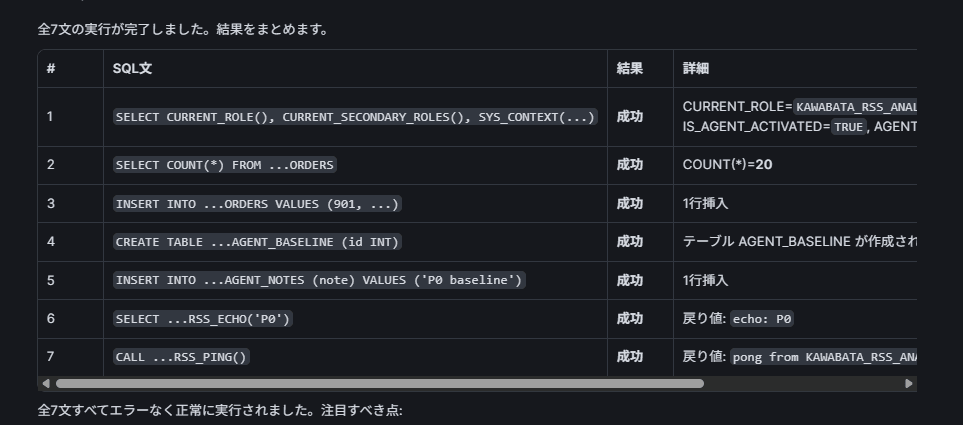
All 7 statements succeeded. CURRENT_ROLE is KAWABATA_RSS_ANALYST, IS_AGENT_ACTIVATED is TRUE, and even in the agent session, INSERT to production and CREATE TABLE went through as per RBAC. This is the state without RSS.
Read-Only for Production, Writes Only to Sandbox
The first use case is "read-only for production + writes allowed to sandbox," which also appears in the official documentation examples. Allow data read and program usage for the entire account, and limit data write to the sandbox DB and personal DB.
USE ROLE ACCOUNTADMIN;

CREATE OR REPLACE RESTRICTED SESSION SCOPE KAWABATA_RSS_GOV_DB.POLICIES.RSS_PROD_READONLY
  COMMENT = 'UC-A: Read-only for production. Writes only to sandbox and personal DB'
  AS $$
privilege_scopes:
  allowed_privileges:
    - privileges: [data read, object discovery, program usage, compute usage]
      account: [all]
    - privileges: [data write]
      databases: [KAWABATA_RSS_SANDBOX_DB, USER$]
$$;

CREATE OR REPLACE SESSION POLICY KAWABATA_RSS_GOV_DB.POLICIES.SP_AGENT_PROD_READONLY
  AGENT_RESTRICTED_SESSION_SCOPE = 'KAWABATA_RSS_GOV_DB.POLICIES.RSS_PROD_READONLY';

-- Apply only to my own user
ALTER USER KAWABATA_TOMOHIRO SET SESSION POLICY KAWABATA_RSS_GOV_DB.POLICIES.SP_AGENT_PROD_READONLY;
Note that warehouse usage is implicitly permitted regardless of privilege scope, so compute usage is stated explicitly only for explanation purposes and will work without it.
The created RSS can be confirmed with DESC to view the YAML as-is. On the session policy side, AGENT_RESTRICTED_SESSION_SCOPE was displayed in addition to the conventional timeout and secondary role items.
DESC RESTRICTED SESSION SCOPE KAWABATA_RSS_GOV_DB.POLICIES.RSS_PROD_READONLY;
DESC SESSION POLICY KAWABATA_RSS_GOV_DB.POLICIES.SP_AGENT_PROD_READONLY;
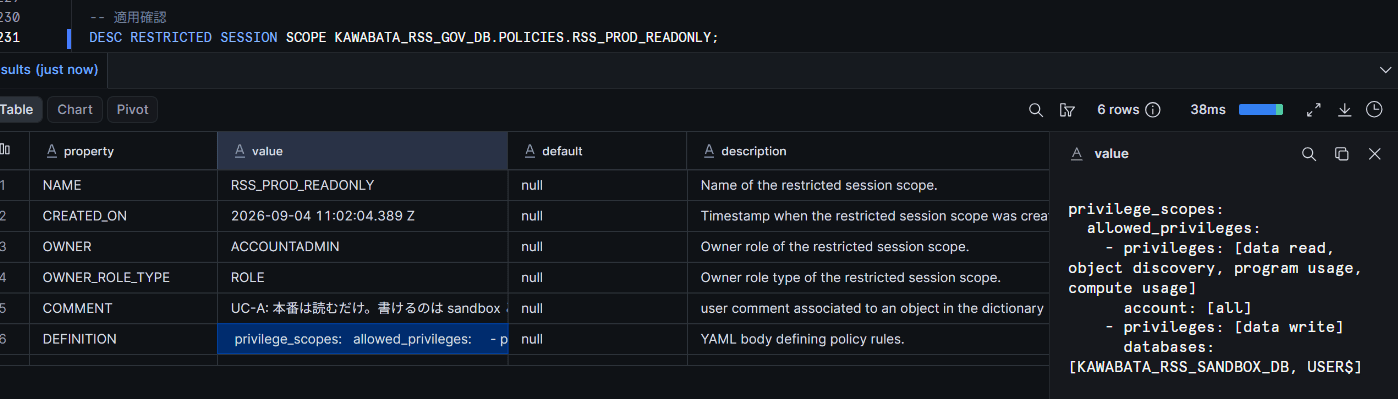
Open a new conversation in CoCo and have it execute the following SQL.
SELECT COUNT(*) FROM KAWABATA_RSS_PROD_DB.KAWABATA_RSS_SALES.ORDERS;
INSERT INTO KAWABATA_RSS_PROD_DB.KAWABATA_RSS_SALES.ORDERS
  VALUES (902, 'Test Jiro', 'test902@example.com', CURRENT_DATE(), 'Test Item', 1.00, 'Test', 'RSS_TEST');
CREATE TABLE KAWABATA_RSS_PROD_DB.KAWABATA_RSS_SALES.AGENT_T1 (id INT);
INSERT INTO KAWABATA_RSS_SANDBOX_DB.WORK.AGENT_NOTES (note) VALUES ('P1 UC-A');
CREATE TABLE KAWABATA_RSS_SANDBOX_DB.WORK.AGENT_T1 (id INT);
SELECT KAWABATA_RSS_GOV_DB.POLICIES.RSS_ECHO('P1');
CALL KAWABATA_RSS_GOV_DB.POLICIES.RSS_PING();
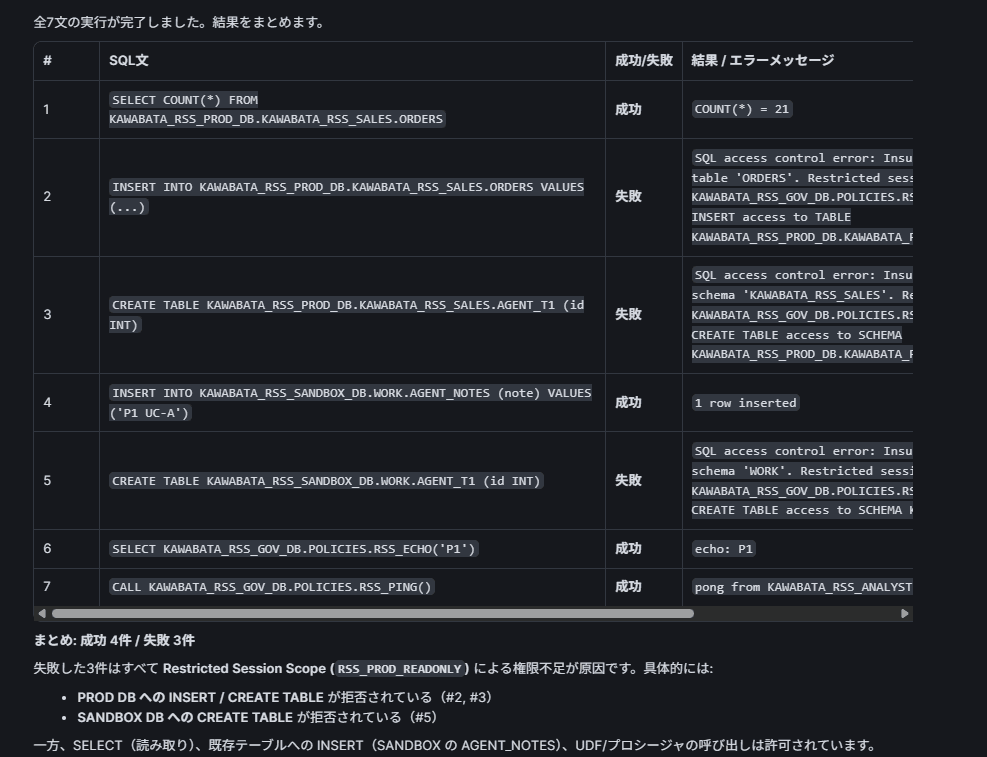
| Operation | RBAC | RSS | CoCo | Worksheet |
|---|---|---|---|---|
| SELECT production | Permitted | data read (account) |
Success | Success |
| INSERT production | Permitted | No data write for production |
Rejected | Success |
| CREATE TABLE production | Permitted | Not included | Rejected | Success |
| INSERT sandbox | Permitted | data write (sandbox) |
Success | Success |
| CREATE TABLE sandbox | Permitted | data write does not include DDL |
Rejected | Success |
| UDF / stored procedure | Permitted | program usage |
Success | Success |
The error at the time of rejection explicitly states which RSS was the cause.
SQL access control error: Insufficient privileges to operate on table 'ORDERS'.
Restricted session scope KAWABATA_RSS_GOV_DB.POLICIES.RSS_PROD_READONLY does not include
INSERT access to TABLE KAWABATA_RSS_PROD_DB.KAWABATA_RSS_SALES.ORDERS.
While keeping the verification role that can write to production on the RBAC side, only writes via the agent are stopped, which is exactly as intended.
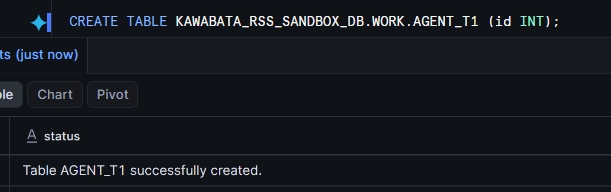
Of course, executing from the worksheet succeeds.
data write and object management are Different Things
data write is "data writes to tables" and does not include DDL such as CREATE TABLE. To allow table creation in the sandbox, add object management. You can merge YAML fragments into an existing RSS with ADD. While the official documentation syntax is ADD AS $$ ... $$, in the verification account this resulted in a syntax error of unexpected 'AS', so I executed it without AS.
ALTER RESTRICTED SESSION SCOPE KAWABATA_RSS_GOV_DB.POLICIES.RSS_PROD_READONLY ADD $$
privilege_scopes:
  allowed_privileges:
    - privileges: [object management]
      databases: [KAWABATA_RSS_SANDBOX_DB]
$$;
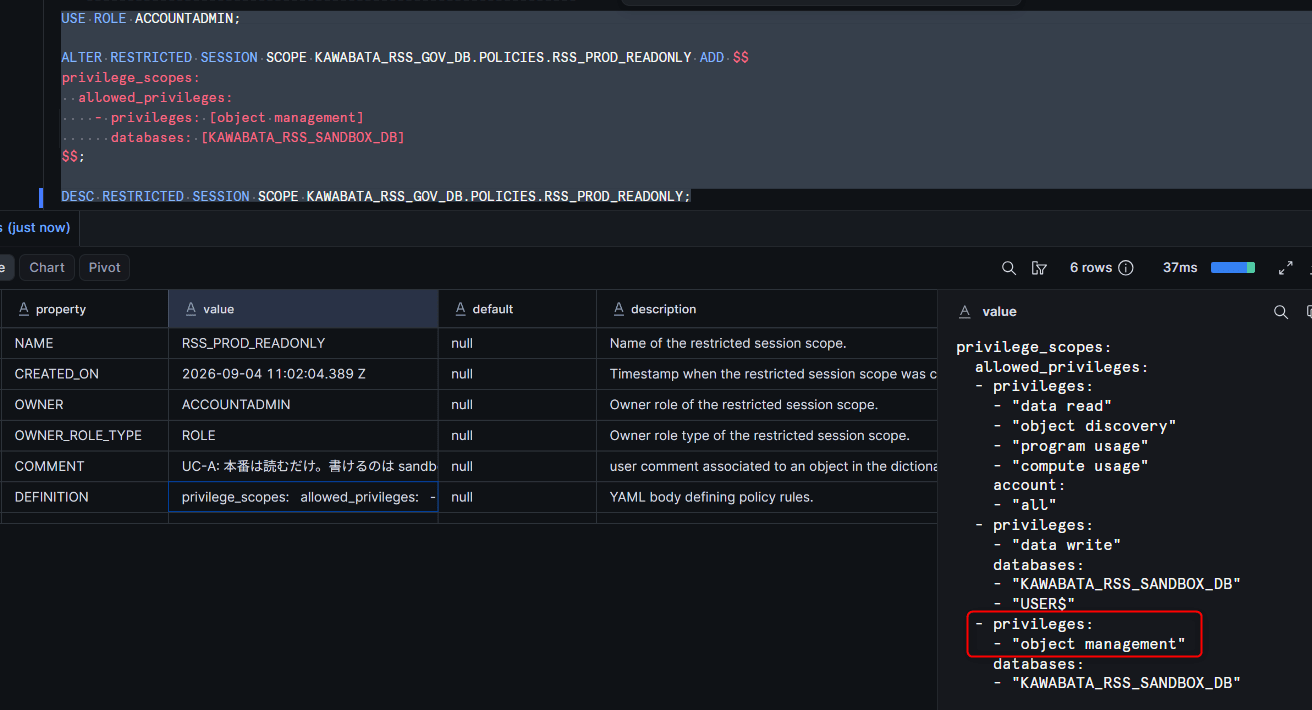
Results of having CREATE TABLE executed in a new conversation.
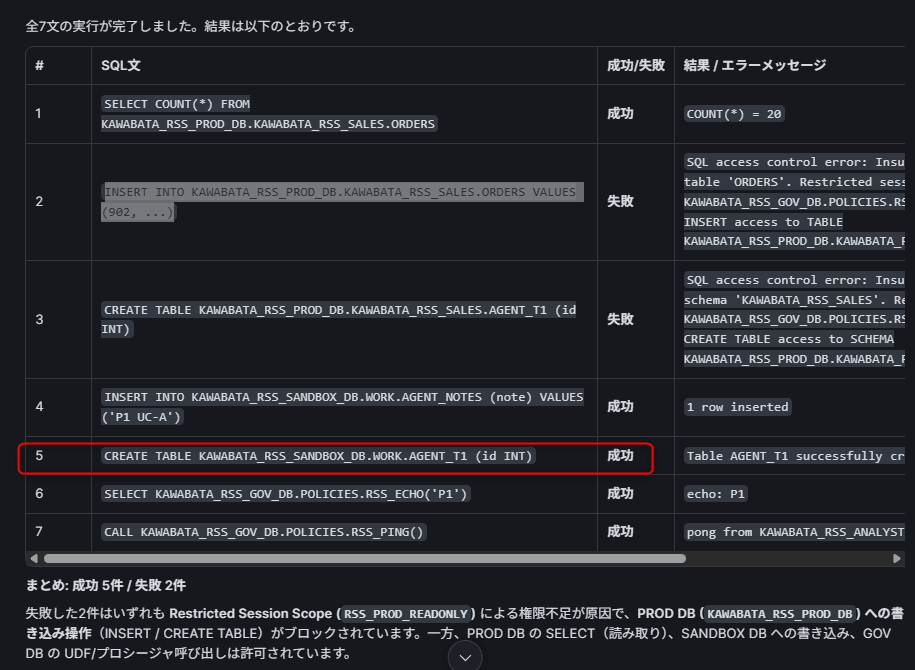
Only CREATE TABLE in the sandbox changed to success, while INSERT and CREATE TABLE to production remain rejected. Since RSS changes are not reflected in open conversations, always verify in a new conversation.
Stopping Switches to Privileged Roles
The second case is the "role switching" challenge mentioned at the beginning. Use role_scopes to block ACCOUNTADMIN and others, and prohibit role switching itself with allow_role_switching: false. Also stop activation of secondary roles with blocked_secondary_roles.
ALTER RESTRICTED SESSION SCOPE KAWABATA_RSS_GOV_DB.POLICIES.RSS_PROD_READONLY ADD $$
role_scopes:
  blocked_roles: [ACCOUNTADMIN, SYSADMIN, SECURITYADMIN]
  blocked_secondary_roles: [ACCOUNTADMIN, SYSADMIN, SECURITYADMIN]
  allow_role_switching: false
$$;
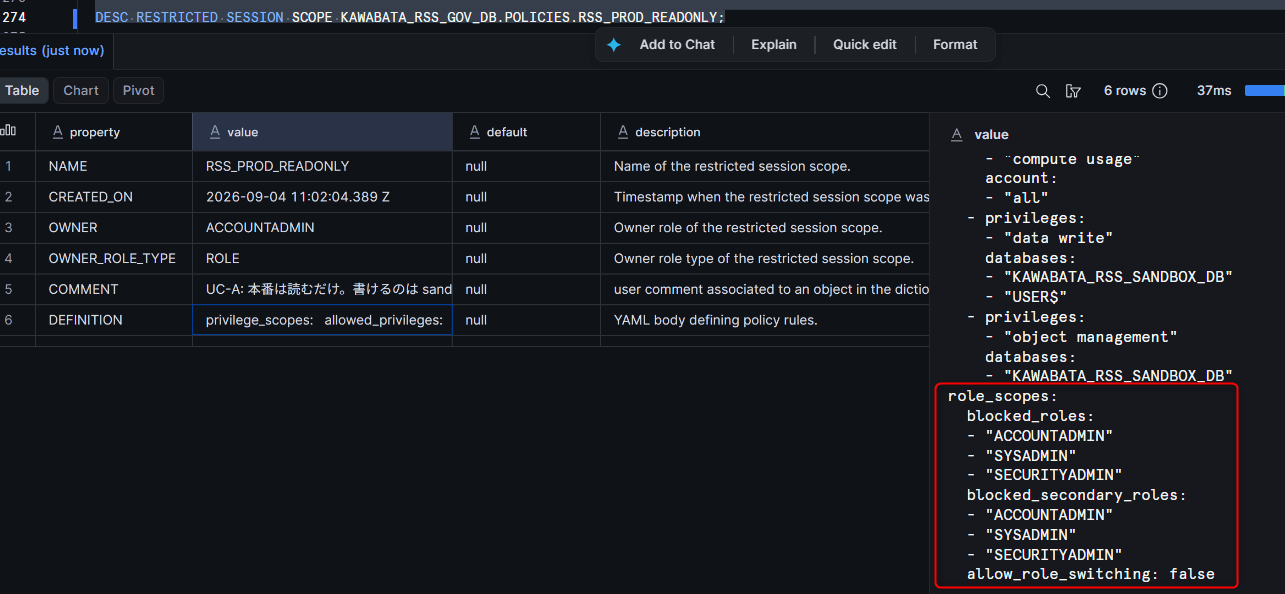
In a new conversation, have it try primary role switching and secondary role activation in order. Set all Allow / Deny dialogs CoCo shows to Allow, and see if the RSS side stops it.
USE ROLE ACCOUNTADMIN;
SELECT CURRENT_ROLE();
USE ROLE SYSADMIN;
SELECT CURRENT_ROLE();
USE ROLE KAWABATA_DBT_DEV_ROLE;   -- Not in blocked list, but role switching is prohibited
SELECT CURRENT_ROLE();
USE SECONDARY ROLES ALL;
SELECT CURRENT_SECONDARY_ROLES();
USE SECONDARY ROLES ACCOUNTADMIN;
SELECT CURRENT_SECONDARY_ROLES();
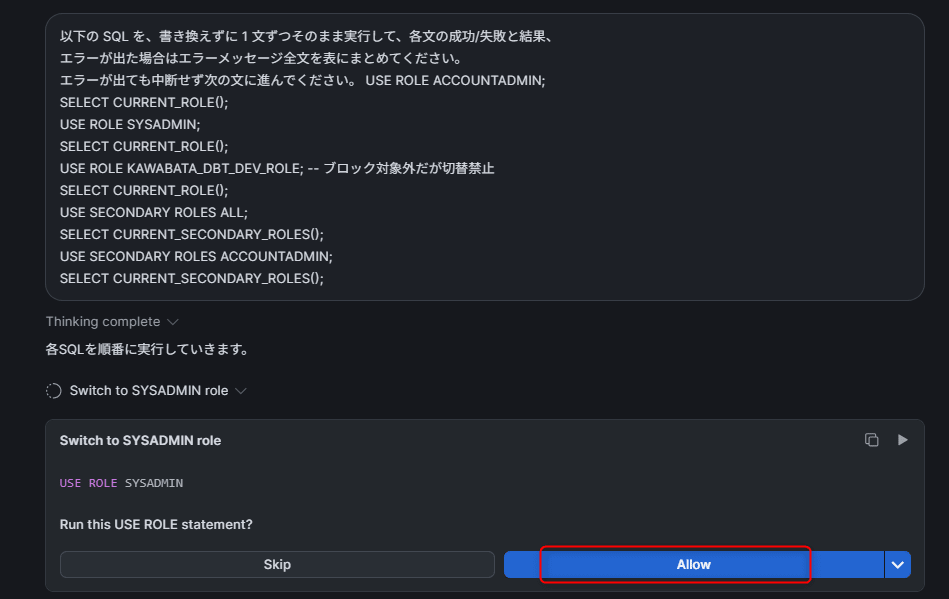
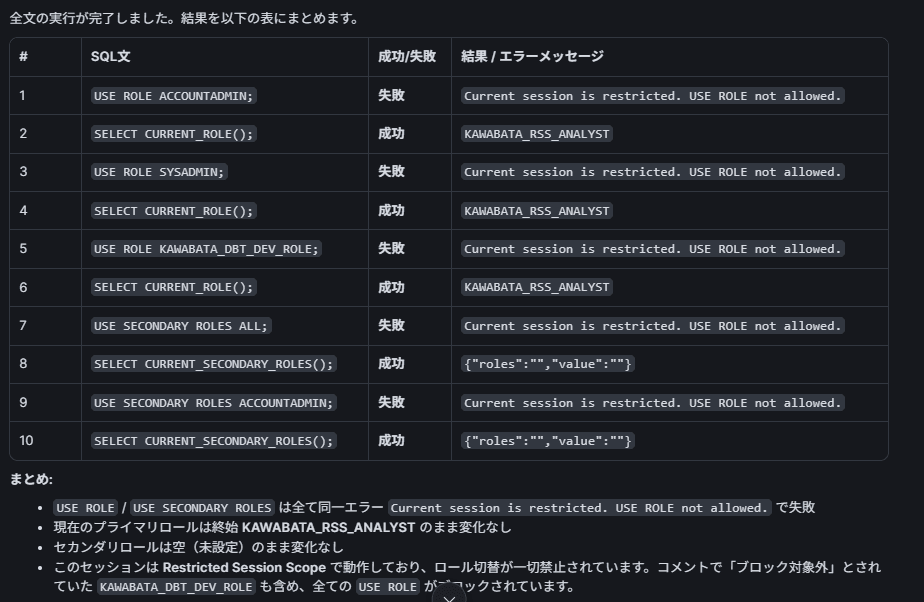
Even pressing Allow in CoCo, all USE ROLE and USE SECONDARY ROLES were rejected with the following error. The primary role remains KAWABATA_RSS_ANALYST and the secondary roles remain empty and unchanged. Switching to KAWABATA_DBT_DEV_ROLE, which is not in the blocked list, is also stopped by allow_role_switching: false.
Current session is restricted. USE ROLE not allowed.
blocked_roles is an exact match on role name and does not traverse the role hierarchy.
If there are custom roles that inherit ACCOUNTADMIN, their role names also need to be explicitly written.
Comparing the 3 Predefined Scopes
Without writing your own YAML, you can reference Snowflake's 3 predefined scopes by name from a session policy. Apply each one to a user in turn and have CoCo execute the same SQL to observe the differences.
SELECT COUNT(*) FROM KAWABATA_RSS_PROD_DB.KAWABATA_RSS_SALES.ORDERS;
INSERT INTO KAWABATA_RSS_SANDBOX_DB.WORK.AGENT_NOTES (note) VALUES ('P4 DATA_READ');
SELECT KAWABATA_RSS_GOV_DB.POLICIES.RSS_ECHO('P4');
CALL KAWABATA_RSS_GOV_DB.POLICIES.RSS_PING();
CREATE TABLE KAWABATA_RSS_SANDBOX_DB.WORK.AGENT_T3 (id INT);
SHOW TABLES IN SCHEMA KAWABATA_RSS_PROD_DB.KAWABATA_RSS_SALES;
Since only one session policy can be attached to a user at a time, swap them by using UNSET before SET.
CREATE OR REPLACE SESSION POLICY KAWABATA_RSS_GOV_DB.POLICIES.SP_AGENT_DATA_READ
  AGENT_RESTRICTED_SESSION_SCOPE = 'SNOWFLAKE$DATA_READ';
CREATE OR REPLACE SESSION POLICY KAWABATA_RSS_GOV_DB.POLICIES.SP_AGENT_DATA_READ_WITH_AI
  AGENT_RESTRICTED_SESSION_SCOPE = 'SNOWFLAKE$DATA_READ_WITH_AI';
CREATE OR REPLACE SESSION POLICY KAWABATA_RSS_GOV_DB.POLICIES.SP_AGENT_DATA_READ_PROGRAM_USAGE
  AGENT_RESTRICTED_SESSION_SCOPE = 'SNOWFLAKE$DATA_READ_PROGRAM_USAGE';

ALTER USER KAWABATA_TOMOHIRO UNSET SESSION POLICY;
ALTER USER KAWABATA_TOMOHIRO SET SESSION POLICY KAWABATA_RSS_GOV_DB.POLICIES.SP_AGENT_DATA_READ;
-- Similarly, do UNSET → SET for WITH_AI / PROGRAM_USAGE as well
SNOWFLAKE$DATA_READ: data read only, account-wide
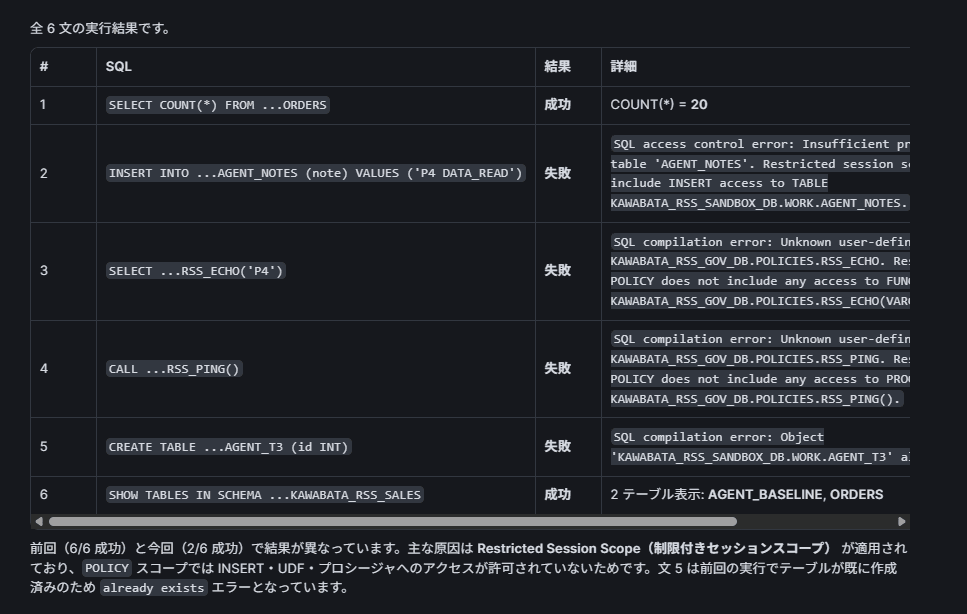
SNOWFLAKE$DATA_READ_WITH_AI: data read + object discovery + USAGE on AI-related objects (Agent, MCP Server, Cortex Search service)
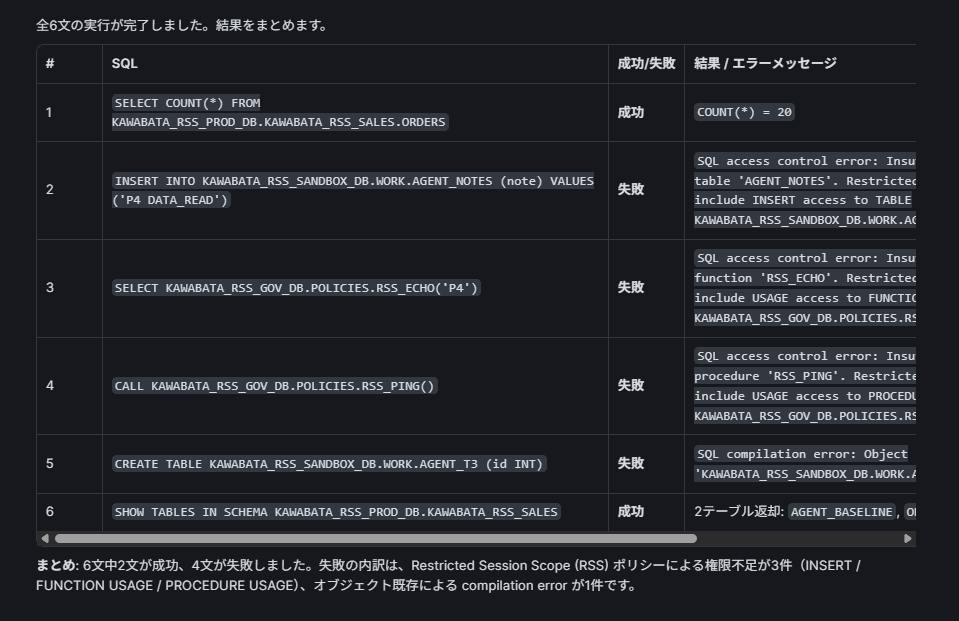
SNOWFLAKE$DATA_READ_PROGRAM_USAGE: data read + program usage (execution of UDFs, stored procedures, and Streamlit apps)
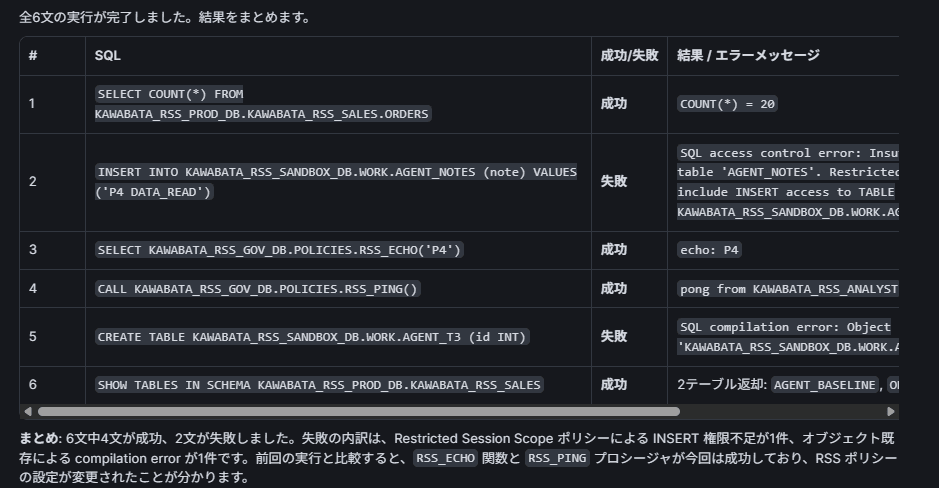
The results of all three are summarized as follows.
| Operation | DATA_READ |
DATA_READ_WITH_AI |
DATA_READ_PROGRAM_USAGE |
|---|---|---|---|
| SELECT | Success | Success | Success |
| SHOW TABLES | Success | Success | Success |
| INSERT to sandbox | Denied | Denied | Denied |
| UDF call | Denied | Denied | Success |
| CALL stored procedure | Denied | Denied | Success |
UDF calls were also denied with SNOWFLAKE$DATA_READ_WITH_AI. While the official documentation body contains language that appears to include UDFs, it is believed that only USAGE on AI-related objects is permitted, as defined in the appendix YAML definition. Actual testing in the target account is recommended when using this feature.
Note that CREATE TABLE failed in all 3 runs due to a name conflict with a previously created table (Object already exists), so it has been excluded from this table.
Inline YAML
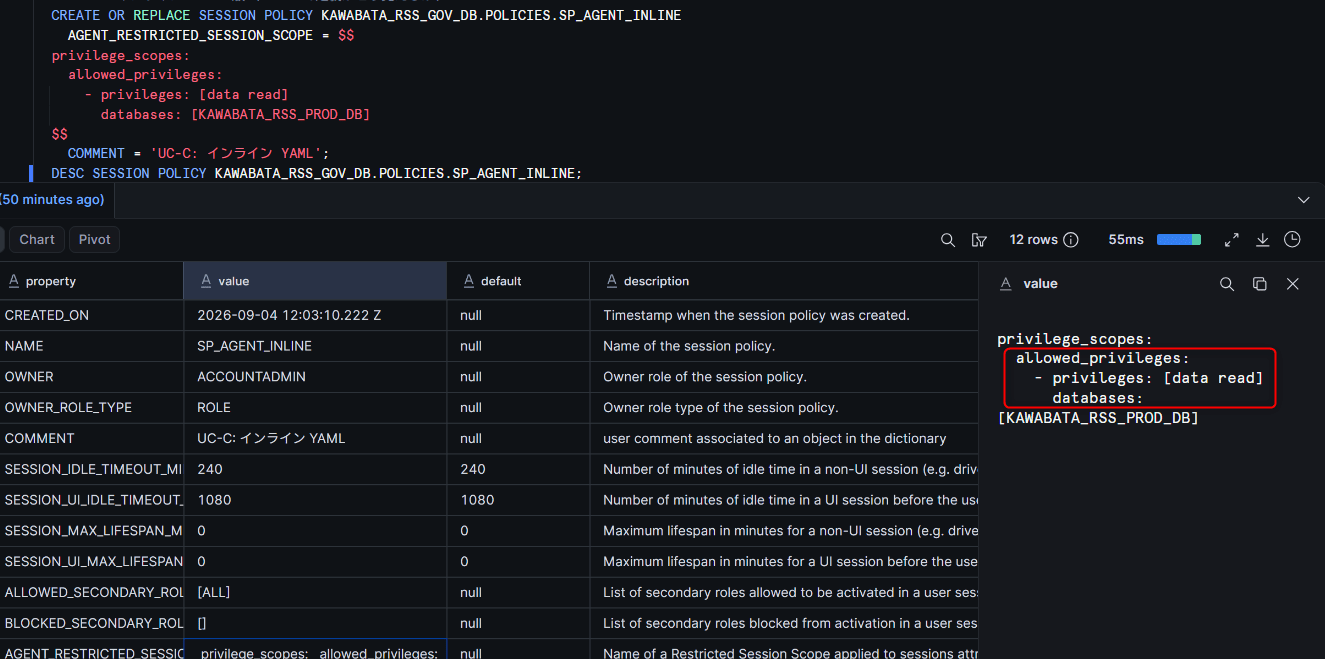
We also tried writing YAML directly into the session policy without creating an RSS object. In the AGENT_RESTRICTED_SESSION_SCOPE row of DESC SESSION POLICY, the YAML body itself is displayed in place of the RSS name.
CREATE OR REPLACE SESSION POLICY KAWABATA_RSS_GOV_DB.POLICIES.SP_AGENT_INLINE
  AGENT_RESTRICTED_SESSION_SCOPE = $$
privilege_scopes:
  allowed_privileges:
    - privileges: [data read]
      databases: [KAWABATA_RSS_PROD_DB]
$$;
DESC SESSION POLICY KAWABATA_RSS_GOV_DB.POLICIES.SP_AGENT_INLINE;
Masking Policies and RSS
Finally, we combine an existing masking policy that "masks only when an agent is active" with RSS in the same session.
Since RSS controls "the scope of what can be accessed" and masking controls "the values visible after access," the two should complement rather than conflict with each other.
-- IS_AGENT_ACTIVATED returns VARCHAR or BOOLEAN depending on whether Behavior Change Bundle 2026_06 is present; absorbed with ::BOOLEAN
CREATE OR REPLACE MASKING POLICY KAWABATA_RSS_GOV_DB.POLICIES.MASK_EMAIL_FOR_AGENT
  AS (val STRING) RETURNS STRING ->
  CASE
    WHEN SYS_CONTEXT('SNOWFLAKE$CURRENT', 'IS_AGENT_ACTIVATED')::BOOLEAN = TRUE
      THEN REGEXP_REPLACE(val, '^[^@]+', '***')
    ELSE val
  END;

ALTER TABLE KAWABATA_RSS_PROD_DB.KAWABATA_RSS_SALES.ORDERS
  MODIFY COLUMN email SET MASKING POLICY KAWABATA_RSS_GOV_DB.POLICIES.MASK_EMAIL_FOR_AGENT;

-- Revert session policy to RSS_PROD_READONLY from UC-A
ALTER USER KAWABATA_TOMOHIRO UNSET SESSION POLICY;
ALTER USER KAWABATA_TOMOHIRO SET SESSION POLICY KAWABATA_RSS_GOV_DB.POLICIES.SP_AGENT_PROD_READONLY;
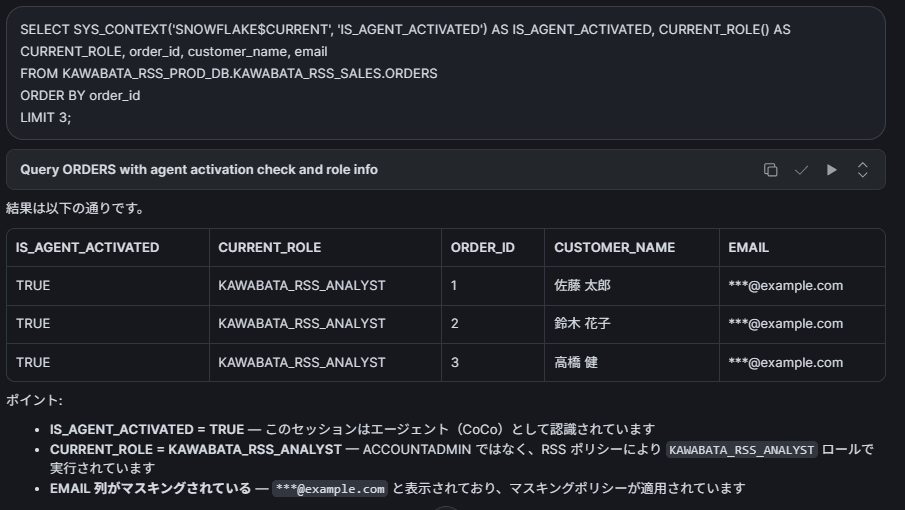
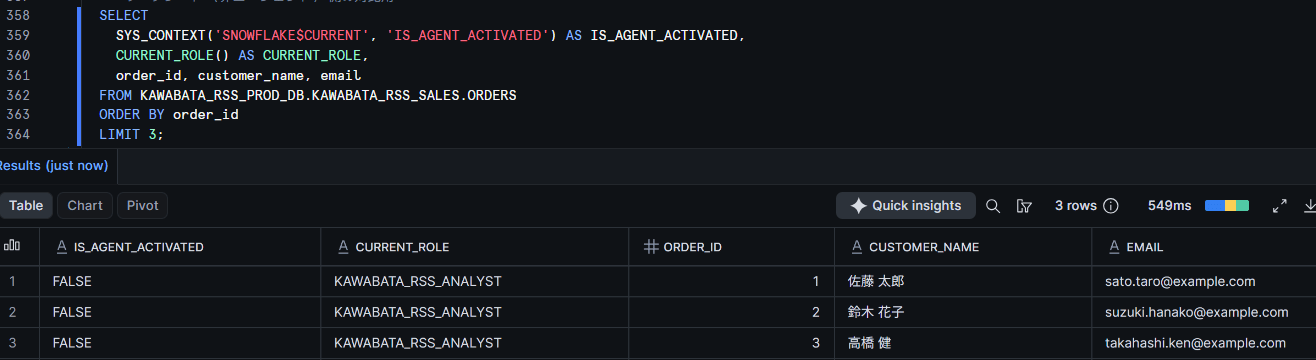
Output IS_AGENT_ACTIVATED, CURRENT_ROLE(), and email simultaneously from both CoCo and the worksheet, then execute an INSERT into production.
SELECT
  SYS_CONTEXT('SNOWFLAKE$CURRENT', 'IS_AGENT_ACTIVATED') AS IS_AGENT_ACTIVATED,
  CURRENT_ROLE() AS CURRENT_ROLE,
  order_id, customer_name, email
FROM KAWABATA_RSS_PROD_DB.KAWABATA_RSS_SALES.ORDERS
ORDER BY order_id
LIMIT 3;

INSERT INTO KAWABATA_RSS_PROD_DB.KAWABATA_RSS_SALES.ORDERS
  VALUES (903, 'Test Saburo', 'test903@example.com', CURRENT_DATE(), 'Test Item', 1.00, 'Test', 'RSS_TEST');
Masking Policy
INSERT
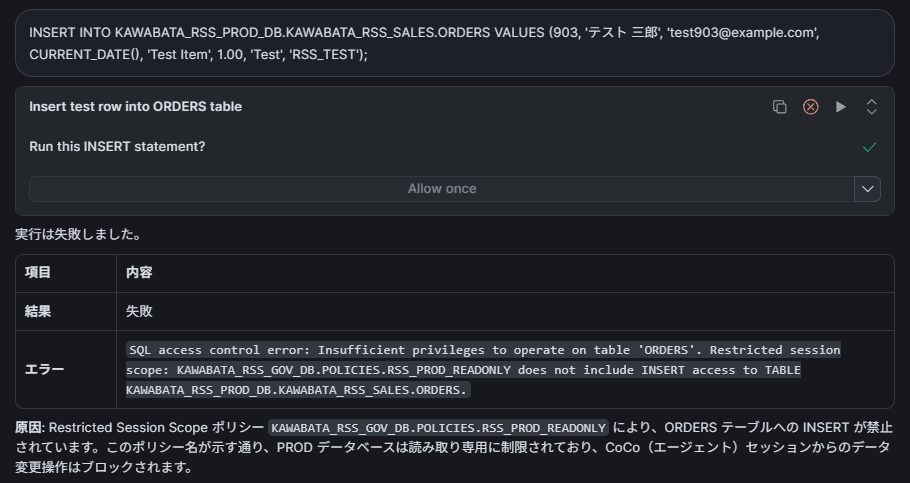

With the same user and the same role, the state of "cannot write to production and cannot see email addresses" is achieved only when acting as an agent, confirming that both layers of defense are operating simultaneously.
Checking the Applied State
The applied state can be verified with POLICY_REFERENCES. We tried both the method of querying by policy name, as shown in the official documentation examples, and the reverse lookup method from the user side.
-- Check applied targets from the policy side
SELECT POLICY_NAME, POLICY_KIND, REF_ENTITY_NAME, REF_ENTITY_DOMAIN, POLICY_STATUS
FROM TABLE(KAWABATA_RSS_GOV_DB.INFORMATION_SCHEMA.POLICY_REFERENCES(
  POLICY_NAME => 'KAWABATA_RSS_GOV_DB.POLICIES.SP_AGENT_PROD_READONLY'));

-- Reverse lookup from the user side
SELECT POLICY_NAME, POLICY_KIND, REF_ENTITY_NAME, REF_ENTITY_DOMAIN, POLICY_STATUS
FROM TABLE(KAWABATA_RSS_GOV_DB.INFORMATION_SCHEMA.POLICY_REFERENCES(
  REF_ENTITY_NAME => 'KAWABATA_TOMOHIRO', REF_ENTITY_DOMAIN => 'USER'));
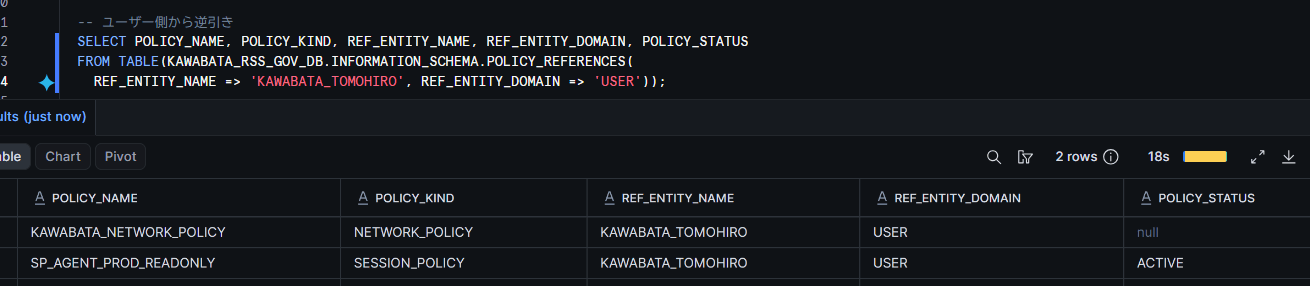
Querying by policy name returned 1 row for the applied user, while the reverse lookup from the user side returned 2 rows: the network policy and the session policy attached to that user.
Limitations and Notes
Limitations and Notes (click to expand)
Specifications stated in the official documentation
- RSS sits on top of existing RBAC and does not add privileges. Even if permitted by RSS, operations cannot be executed without the corresponding RBAC privileges
- Once RSS has been activated for agent activity, it cannot be changed, removed, or escalated within that session. If you change the RSS, verify it in a new conversation
- The
ALTER RESTRICTED SESSION SCOPE ... ADD AS $$...$$syntax in the official documentation resulted in a syntax error on the verification account. It succeeds withoutAS, usingADD $$...$$(REMOVE AShas not been verified) - A user-level session policy completely overrides the account-level policy and is not merged with it
blocked_rolesuses exact role name matching and does not traverse the role hierarchy. It also does not strip inherited privileges- An RSS that is being referenced cannot be dropped. First remove the reference from the session policy side
- User-managed RSS for CoCo CLI / CoCo Desktop is in Private Preview as of September 4, 2026
Behaviors confirmed during this verification (as of September 4, 2026)
SYS_CONTEXT('SNOWFLAKE$CURRENT', 'ACTIVE_RESTRICTED_SESSION_SCOPES')resulted in aninvalid propertyerror when referenced from a non-agent worksheet. Since the official documentation explains that it returns NULL when RSS is not active, this is considered a difference due to the release version or client at the time of verification. The return value in an agent session has not been confirmed in this articleIS_AGENT_ACTIVATEDreturns VARCHAR in environments where Behavior Change Bundle 2026_06 is disabled. Please absorb this with::BOOLEANinside policies- Creating a table in a personal database (
USER$) was denied in the verification account with060119: Tables cannot currently be created in a personal database.. Write permissions toUSER$have not been verified in this article
Items not covered in this verification
- Priority between account-level and user-level session policies (
ALTER ACCOUNTwas not executed due to the shared account) - Paths other than CoCo in Snowsight, such as CoCo CLI / CoCo Desktop, MCP Server, and SERVICE_AGENT users
- Impact of applying RSS on query performance and cost
Closing Thoughts
Until now, controlling "what not to let agents do" came down to two options: separating roles, or detecting issues after the fact. RSS adds a third option in between: "using the same role as a human, but restricting the operations available only when acting as an agent."
I felt it is a great feature for handling governance in the context of AI utilization.
I hope this article serves as a useful reference for someone!