
I tried verifying partial masking with Snowflake's tag-based masking

This page has been translated by machine translation. View original
This is Kawabata.
In this article, I will verify a configuration that uses SYSTEM$GET_TAG_ON_CURRENT_COLUMN in Snowflake's tag-based masking policies to switch the granularity of partial masking based on tag values.
Note: This article reflects verification results as of August 21, 2026.
Overview of Partial Masking
The concept of showing data at reduced granularity
Partial masking is not a binary choice between hiding everything or showing everything — it shows data at reduced granularity. For birthdays, this breaks down into the following levels.
| Granularity | Output | Analytical Use | Re-identification Risk |
|---|---|---|---|
| Raw value | 2001-03-26 |
Exact age calculation | High |
| Up to year-month | 2001-03-01 |
Approximate age, monthly analysis | Can be reduced |
| Up to year | 2001-01-01 |
Generation/age group analysis | Further reduced |
| Up to decade | 2000-01-01 |
Decade-based analysis | Low |
| Full mask | 1900-01-01 |
Cannot be analyzed | Lowest |
Since the day is lost, it becomes impossible to calculate exact ages, but if precise day-level age calculation is not required and the requirement is decade-based or age-group analysis, simply obscuring the day is sufficient. The implementation only requires DATE_TRUNC.
DATE_TRUNC('MONTH', VAL)   -- 2001-03-26 -> 2001-03-01
DATE_TRUNC('YEAR',  VAL)   -- 2001-03-26 -> 2001-01-01
Switching granularity based on tag values
If you create a separate policy for each granularity level, reassignment work occurs every time a column is added. This is where SYSTEM$GET_TAG_ON_CURRENT_COLUMN comes in. This function reads the value of the tag applied to the column currently being evaluated from within the masking policy. You can branch based on the tag value using a single CASE expression in one policy.
CASE
  WHEN SYSTEM$GET_TAG_ON_CURRENT_COLUMN('...DATA_CLASS') = 'PII_YEARMONTH'
    THEN DATE_TRUNC('MONTH', VAL)
  WHEN SYSTEM$GET_TAG_ON_CURRENT_COLUMN('...DATA_CLASS') = 'PII_YEAR'
    THEN DATE_TRUNC('YEAR', VAL)
  ELSE DATE '1900-01-01'
END
With this configuration, the only operational task is assigning tags to columns. When changing granularity, you only need to rewrite the tag value — there is no need to modify the policy itself.
Tag values become a catalog of granularity
Only one masking policy can be set per data type for a single tag. This means VARCHAR columns — whether phone numbers, email addresses, or addresses — are all handled by the same MASK_TEXT policy, and the policy itself cannot distinguish the column's attribute. You should express the type of attribute through the tag value name itself.
For this article, I defined the following.
| Tag Value | Target Type | Behavior |
|---|---|---|
PUBLIC |
All | No masking |
UNCLASSIFIED |
All | Full mask (defaulting to safe side as unclassified) |
PII |
All | Full mask |
PII_YEARMONTH |
DATE | Show up to year-month |
PII_YEAR |
DATE | Show up to year |
PII_PHONE_LAST4 |
VARCHAR | Show only last 4 digits |
PII_EMAIL_DOMAIN |
VARCHAR | Show only the domain |
PII_ADDR_CITY |
VARCHAR | Keep up to the first "市" (full mask if address does not contain "市") |
PII_AMOUNT_BAND |
NUMBER | Round to the nearest 100,000 yen |
The ALLOWED_VALUES of the tag functions as a catalog of granularity levels approved by the organization. Since values not listed here cannot be assigned, it also prevents ad-hoc granularity levels from proliferating in the field.
Prerequisites
- Snowflake Enterprise Edition or higher is required
- A role equivalent to
ACCOUNTADMINis used for creating tags, policies, and granting roles - Verification was performed on a trial account (Enterprise Edition) in the AWS Tokyo region
Setup
A dedicated database BLOG_MASK_DB is created so that everything is self-contained without affecting existing environments.
1. Create a location for tags and policies
USE ROLE ACCOUNTADMIN;
USE WAREHOUSE COMPUTE_WH;

CREATE OR REPLACE DATABASE BLOG_MASK_DB;
CREATE OR REPLACE SCHEMA   BLOG_MASK_DB.GOV;   -- Tags and policies
CREATE OR REPLACE SCHEMA   BLOG_MASK_DB.MART;  -- Verification data

CREATE OR REPLACE TAG BLOG_MASK_DB.GOV.DATA_CLASS
  ALLOWED_VALUES
    'PUBLIC',
    'UNCLASSIFIED',
    'PII',
    'PII_YEARMONTH',
    'PII_YEAR',
    'PII_PHONE_LAST4',
    'PII_EMAIL_DOMAIN',
    'PII_ADDR_CITY',
    'PII_AMOUNT_BAND'
  COMMENT = 'Tag representing partial mask granularity';
By specifying ALLOWED_VALUES, an error will occur at the point of attempting to assign a misspelled value.
2. Create two roles for verification
CREATE OR REPLACE ROLE BLOG_PII_FULL_ROLE COMMENT = 'Privileged role that can see raw values';
CREATE OR REPLACE ROLE BLOG_ANALYST_ROLE  COMMENT = 'General role with partial masking applied';

GRANT USAGE ON WAREHOUSE COMPUTE_WH   TO ROLE BLOG_PII_FULL_ROLE;
GRANT USAGE ON WAREHOUSE COMPUTE_WH   TO ROLE BLOG_ANALYST_ROLE;
GRANT USAGE ON DATABASE  BLOG_MASK_DB TO ROLE BLOG_PII_FULL_ROLE;
GRANT USAGE ON DATABASE  BLOG_MASK_DB TO ROLE BLOG_ANALYST_ROLE;
GRANT USAGE ON SCHEMA    BLOG_MASK_DB.MART TO ROLE BLOG_PII_FULL_ROLE;
GRANT USAGE ON SCHEMA    BLOG_MASK_DB.MART TO ROLE BLOG_ANALYST_ROLE;

GRANT ROLE BLOG_PII_FULL_ROLE TO USER <verification username>;
GRANT ROLE BLOG_ANALYST_ROLE  TO USER <verification username>;
Note: In this article, evaluation is done using
CURRENT_ROLE().CURRENT_ROLE()returns only the current primary role and does not consider role hierarchies or active secondary roles. To include role hierarchies and secondary roles in the evaluation, useIS_ROLE_IN_SESSION('BLOG_PII_FULL_ROLE').
Creating Masking Policies
One policy is created per type. Branching is written in the order: "role check → PUBLIC check → branch by granularity → ELSE", with ELSE set to full mask. This ensures that a missing tag assignment falls on the side of "full mask" rather than "raw value is exposed".
-- DATE
CREATE OR REPLACE MASKING POLICY BLOG_MASK_DB.GOV.MASK_DATE AS (VAL DATE)
RETURNS DATE ->
CASE
  WHEN CURRENT_ROLE() = 'BLOG_PII_FULL_ROLE' THEN VAL
  WHEN COALESCE(SYSTEM$GET_TAG_ON_CURRENT_COLUMN('BLOG_MASK_DB.GOV.DATA_CLASS'), 'UNCLASSIFIED') = 'PUBLIC'
    THEN VAL
  WHEN COALESCE(SYSTEM$GET_TAG_ON_CURRENT_COLUMN('BLOG_MASK_DB.GOV.DATA_CLASS'), 'UNCLASSIFIED') = 'PII_YEARMONTH'
    THEN DATE_TRUNC('MONTH', VAL)
  WHEN COALESCE(SYSTEM$GET_TAG_ON_CURRENT_COLUMN('BLOG_MASK_DB.GOV.DATA_CLASS'), 'UNCLASSIFIED') = 'PII_YEAR'
    THEN DATE_TRUNC('YEAR', VAL)
  ELSE DATE '1900-01-01'
END;
-- VARCHAR
CREATE OR REPLACE MASKING POLICY BLOG_MASK_DB.GOV.MASK_TEXT AS (VAL VARCHAR)
RETURNS VARCHAR ->
CASE
  WHEN CURRENT_ROLE() = 'BLOG_PII_FULL_ROLE' THEN VAL
  WHEN COALESCE(SYSTEM$GET_TAG_ON_CURRENT_COLUMN('BLOG_MASK_DB.GOV.DATA_CLASS'), 'UNCLASSIFIED') = 'PUBLIC'
    THEN VAL
  WHEN COALESCE(SYSTEM$GET_TAG_ON_CURRENT_COLUMN('BLOG_MASK_DB.GOV.DATA_CLASS'), 'UNCLASSIFIED') = 'PII_PHONE_LAST4'
    THEN IFF(LENGTH(VAL) >= 4, '****-****-' || RIGHT(VAL, 4), '***MASKED***')
  WHEN COALESCE(SYSTEM$GET_TAG_ON_CURRENT_COLUMN('BLOG_MASK_DB.GOV.DATA_CLASS'), 'UNCLASSIFIED') = 'PII_EMAIL_DOMAIN'
    THEN IFF(POSITION('@' IN VAL) > 0, '***@' || SPLIT_PART(VAL, '@', 2), '***MASKED***')
  WHEN COALESCE(SYSTEM$GET_TAG_ON_CURRENT_COLUMN('BLOG_MASK_DB.GOV.DATA_CLASS'), 'UNCLASSIFIED') = 'PII_ADDR_CITY'
    THEN IFF(POSITION('市' IN VAL) > 0, LEFT(VAL, POSITION('市' IN VAL)), '***MASKED***')
  ELSE '***MASKED***'
END;
-- NUMBER
CREATE OR REPLACE MASKING POLICY BLOG_MASK_DB.GOV.MASK_NUMBER AS (VAL NUMBER(38,2))
RETURNS NUMBER(38,2) ->
CASE
  WHEN CURRENT_ROLE() = 'BLOG_PII_FULL_ROLE' THEN VAL
  WHEN COALESCE(SYSTEM$GET_TAG_ON_CURRENT_COLUMN('BLOG_MASK_DB.GOV.DATA_CLASS'), 'UNCLASSIFIED') = 'PUBLIC'
    THEN VAL
  WHEN COALESCE(SYSTEM$GET_TAG_ON_CURRENT_COLUMN('BLOG_MASK_DB.GOV.DATA_CLASS'), 'UNCLASSIFIED') = 'PII_AMOUNT_BAND'
    THEN SIGN(VAL) * FLOOR(ABS(VAL) / 100000) * 100000
  ELSE 0
END;
Note that NULL handling differs by type and branch. DATE_TRUNC for DATE and SIGN/FLOOR for NUMBER propagate NULL and return NULL as-is, but for VARCHAR partial masking, if the condition in IFF becomes NULL, it falls to the else side and replaces with ***MASKED***. Since the presence or absence of NULL itself can be an attribute, whether to preserve NULL or collapse it to a fixed value should be unified as a data classification requirement per type, rather than leaving it to happenstance.
Associate all three with the same tag.
ALTER TAG BLOG_MASK_DB.GOV.DATA_CLASS SET MASKING POLICY BLOG_MASK_DB.GOV.MASK_DATE;
ALTER TAG BLOG_MASK_DB.GOV.DATA_CLASS SET MASKING POLICY BLOG_MASK_DB.GOV.MASK_TEXT;
ALTER TAG BLOG_MASK_DB.GOV.DATA_CLASS SET MASKING POLICY BLOG_MASK_DB.GOV.MASK_NUMBER;
Creating Verification Data and Assigning Tags
Creating the verification table
CREATE OR REPLACE TABLE BLOG_MASK_DB.MART.DIM_CUSTOMER (
  CUSTOMER_ID   NUMBER(10,0),
  CUSTOMER_NAME VARCHAR(100),
  BIRTH_EXACT   DATE,          -- Column assigned PUBLIC for comparison purposes (not used in production)
  BIRTH_YM      DATE,
  BIRTH_Y       DATE,
  BIRTH_FULL    DATE,
  PHONE         VARCHAR(20),
  EMAIL         VARCHAR(100),
  ADDRESS       VARCHAR(200),
  BALANCE       NUMBER(38,2),
  REGION        VARCHAR(50)    -- Column intentionally left without a tag
);

INSERT INTO BLOG_MASK_DB.MART.DIM_CUSTOMER VALUES
  (1, 'Kawabata Taro',
   '2001-03-26', '2001-03-26', '2001-03-26', '2001-03-26',
   '090-1234-5678', 'taro.kawabata@example.co.jp', 'Tokyo, Shibuya-ku, Jinnan 1-1-1',
   1234567.89, 'KANTO'),
  (2, 'Sato Hanako',
   '1987-11-04', '1987-11-04', '1987-11-04', '1987-11-04',
   '080-9876-5432', 'hanako@sample.org', 'Kanagawa, Yokohama-shi, Nishi-ku, Minato Mirai 2-2-2',
   -5000.00, 'KANTO');
Tag-based masking is applied to columns where a tag has been assigned and a masking policy corresponding to the column's data type has been set on the tag. Columns with missing tag assignments will return raw values, so assign UNCLASSIFIED to the database to default to the full mask side. In this article, since policies are set for DATE, VARCHAR, and NUMBER types, this default only takes effect for columns of these types.
ALTER DATABASE BLOG_MASK_DB SET TAG BLOG_MASK_DB.GOV.DATA_CLASS = 'UNCLASSIFIED';
Then, declare the granularity for each column. Column-level tag assignments take priority over inheritance from the database.
ALTER TABLE BLOG_MASK_DB.MART.DIM_CUSTOMER MODIFY
  COLUMN CUSTOMER_ID   SET TAG BLOG_MASK_DB.GOV.DATA_CLASS = 'PUBLIC',
  COLUMN CUSTOMER_NAME SET TAG BLOG_MASK_DB.GOV.DATA_CLASS = 'PII',
  COLUMN BIRTH_EXACT   SET TAG BLOG_MASK_DB.GOV.DATA_CLASS = 'PUBLIC',
  COLUMN BIRTH_YM      SET TAG BLOG_MASK_DB.GOV.DATA_CLASS = 'PII_YEARMONTH',
  COLUMN BIRTH_Y       SET TAG BLOG_MASK_DB.GOV.DATA_CLASS = 'PII_YEAR',
  COLUMN BIRTH_FULL    SET TAG BLOG_MASK_DB.GOV.DATA_CLASS = 'PII',
  COLUMN PHONE         SET TAG BLOG_MASK_DB.GOV.DATA_CLASS = 'PII_PHONE_LAST4',
  COLUMN EMAIL         SET TAG BLOG_MASK_DB.GOV.DATA_CLASS = 'PII_EMAIL_DOMAIN',
  COLUMN ADDRESS       SET TAG BLOG_MASK_DB.GOV.DATA_CLASS = 'PII_ADDR_CITY',
  COLUMN BALANCE       SET TAG BLOG_MASK_DB.GOV.DATA_CLASS = 'PII_AMOUNT_BAND';

GRANT SELECT ON TABLE BLOG_MASK_DB.MART.DIM_CUSTOMER TO ROLE BLOG_PII_FULL_ROLE;
GRANT SELECT ON TABLE BLOG_MASK_DB.MART.DIM_CUSTOMER TO ROLE BLOG_ANALYST_ROLE;
No tag has been assigned to REGION. Check the policy application status using POLICY_REFERENCES.
SELECT REF_COLUMN_NAME AS "Column", POLICY_NAME AS "Policy", TAG_NAME AS "Via Tag"
FROM TABLE(BLOG_MASK_DB.INFORMATION_SCHEMA.POLICY_REFERENCES(
       REF_ENTITY_NAME   => 'BLOG_MASK_DB.MART.DIM_CUSTOMER',
       REF_ENTITY_DOMAIN => 'TABLE'))
ORDER BY 1;
Policies were applied to all 11 columns. REGION is covered only by inheritance from the database.
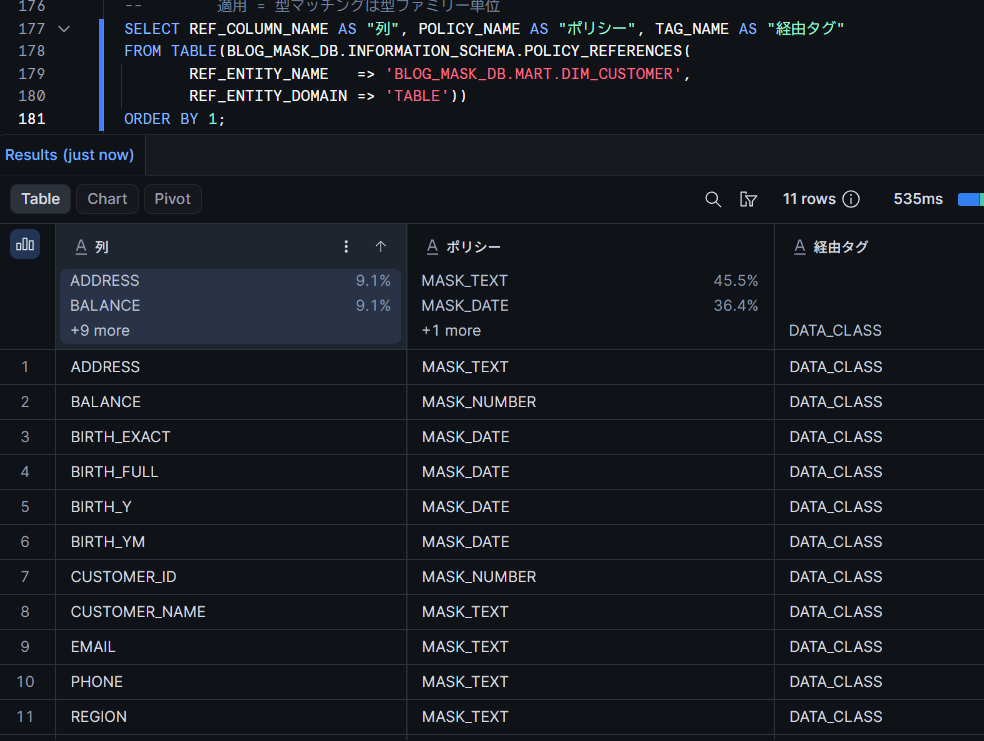
Note that CUSTOMER_ID is NUMBER(10,0), but MASK_NUMBER defined as NUMBER(38,2) was applied. It was confirmed that at least among NUMBER types, an exact match of precision and scale is not required.
Whether each column's tag is directly assigned or inherited can be checked using TAG_REFERENCES_ALL_COLUMNS. The APPLY_METHOD column shows MANUAL (directly assigned) / INHERITED (inherited).
SELECT COLUMN_NAME, TAG_VALUE, APPLY_METHOD, LEVEL
FROM TABLE(BLOG_MASK_DB.INFORMATION_SCHEMA.TAG_REFERENCES_ALL_COLUMNS(
       'BLOG_MASK_DB.MART.DIM_CUSTOMER', 'TABLE'))
WHERE TAG_NAME = 'DATA_CLASS'
ORDER BY COLUMN_NAME;
Trying It Out
Display with the privileged role
USE ROLE BLOG_PII_FULL_ROLE;
SELECT CURRENT_ROLE() AS "Role", CUSTOMER_ID, CUSTOMER_NAME, BIRTH_EXACT,
       PHONE, EMAIL, ADDRESS, BALANCE, REGION
FROM BLOG_MASK_DB.MART.DIM_CUSTOMER
ORDER BY CUSTOMER_ID;
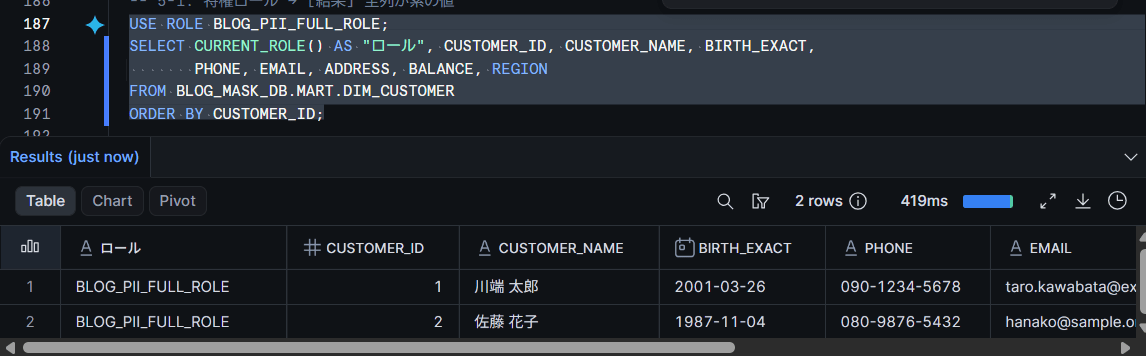
As expected, all columns display raw values.
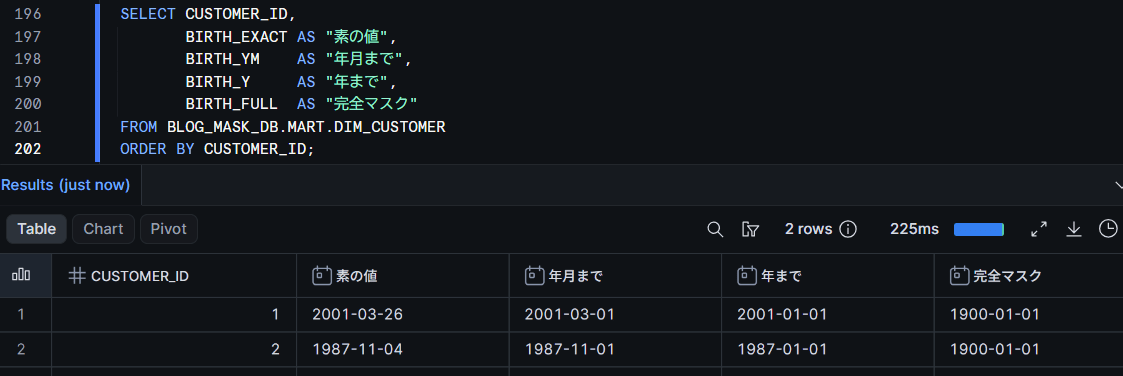
Comparing birthday granularity across 4 levels
USE ROLE BLOG_ANALYST_ROLE;

SELECT CUSTOMER_ID,
       BIRTH_EXACT AS "Raw value",
       BIRTH_YM    AS "Up to year-month",
       BIRTH_Y     AS "Up to year",
       BIRTH_FULL  AS "Full mask"
FROM BLOG_MASK_DB.MART.DIM_CUSTOMER
ORDER BY CUSTOMER_ID;
2001-03-26 became 2001-03-01 — only the day was obscured while the year and month remained. This is within the same table, the same query, and the same role — only the tag value assigned to each column differs.
Partial masking for strings and numbers
SELECT CUSTOMER_ID,
       CUSTOMER_NAME AS "Name (PII)",
       PHONE, EMAIL, ADDRESS, BALANCE,
       REGION        AS "REGION (no tag assigned)"
FROM BLOG_MASK_DB.MART.DIM_CUSTOMER
ORDER BY CUSTOMER_ID;
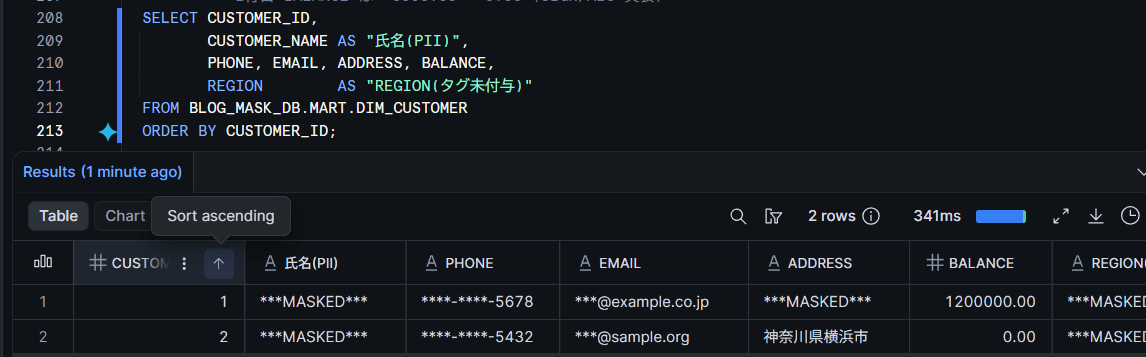
There are three points to note.
- The address in row 1 fell to full mask. Since
Tokyo, Shibuya-ku, Jinnan 1-1-1does not contain "市", the process of keeping up to "市" could not be applied and it safely defaulted to full mask (see Verification Point 1) REGIONhas no tag assigned, but it was masked due to inheritance ofUNCLASSIFIEDassigned at the database level- The balance in row 2 is
0.00compared to the raw value of-5000.00
Behavior with ACCOUNTADMIN
USE ROLE ACCOUNTADMIN;

SELECT CURRENT_ROLE() AS "Role", CUSTOMER_NAME, BIRTH_YM, PHONE, BALANCE
FROM BLOG_MASK_DB.MART.DIM_CUSTOMER
ORDER BY CUSTOMER_ID;
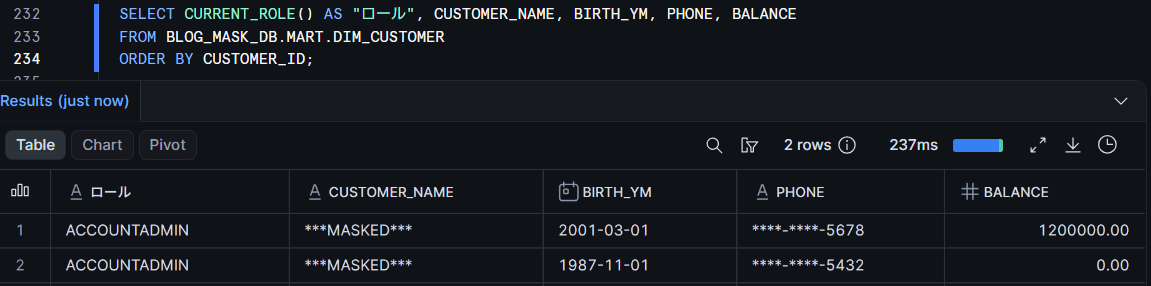
Data is masked even for ACCOUNTADMIN. Masking policies are not exempted by the strength of privileges — only the roles written in the CASE of the policy can access raw values.
Changing granularity by reassigning the tag
Without modifying the policy, only the tag value is changed.
USE ROLE ACCOUNTADMIN;
ALTER TABLE BLOG_MASK_DB.MART.DIM_CUSTOMER MODIFY
  COLUMN BIRTH_YM SET TAG BLOG_MASK_DB.GOV.DATA_CLASS = 'PII_YEAR';

USE ROLE BLOG_ANALYST_ROLE;
SELECT CUSTOMER_ID, BIRTH_YM FROM BLOG_MASK_DB.MART.DIM_CUSTOMER ORDER BY CUSTOMER_ID;
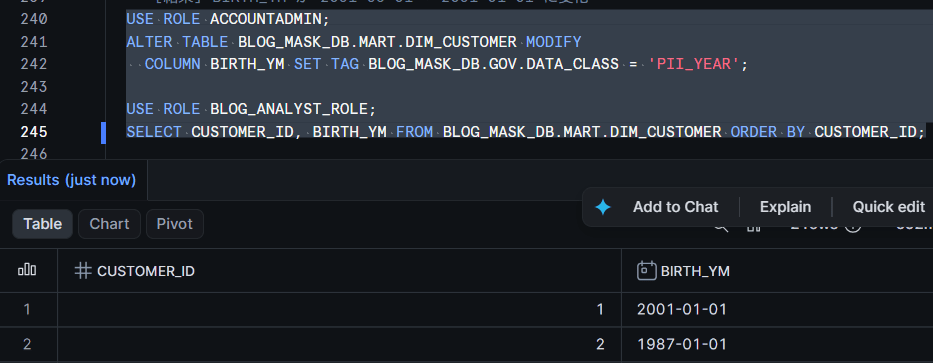
The column that was 2001-03-01 became 2001-01-01. Since the granularity changes with just a single ALTER TABLE ... SET TAG statement, policy reviews are no longer needed when handling granularity change requests.
After verifying, revert to PII_YEARMONTH since year-month granularity is used in subsequent verification.
USE ROLE ACCOUNTADMIN;
ALTER TABLE BLOG_MASK_DB.MART.DIM_CUSTOMER MODIFY
  COLUMN BIRTH_YM SET TAG BLOG_MASK_DB.GOV.DATA_CLASS = 'PII_YEARMONTH';
Verification Point 1: With a "keep-prefix" implementation, inputs without a delimiter expose the full value
When truncating an address to the "市" level, the first implementation that comes to mind is to split on "市" and take the first part.
SPLIT_PART(ADDR, '市', 1) || '市'
Let's verify using boundary values.
WITH T AS (
  SELECT '神奈川県横浜市西区みなとみらい2-2-2' AS ADDR UNION ALL
  SELECT '東京都渋谷区神南1-1-1'                       UNION ALL
  SELECT '大阪府大阪市北区梅田3-3-3'                   UNION ALL
  SELECT ''                                            UNION ALL
  SELECT NULL
)
SELECT
  COALESCE(ADDR, '(NULL)')          AS "Original value",
  SPLIT_PART(ADDR, '市', 1) || '市' AS "Dangerous implementation",
  IFF(POSITION('市' IN ADDR) > 0,
      LEFT(ADDR, POSITION('市' IN ADDR)),
      '***MASKED***')               AS "Safe implementation"
FROM T;
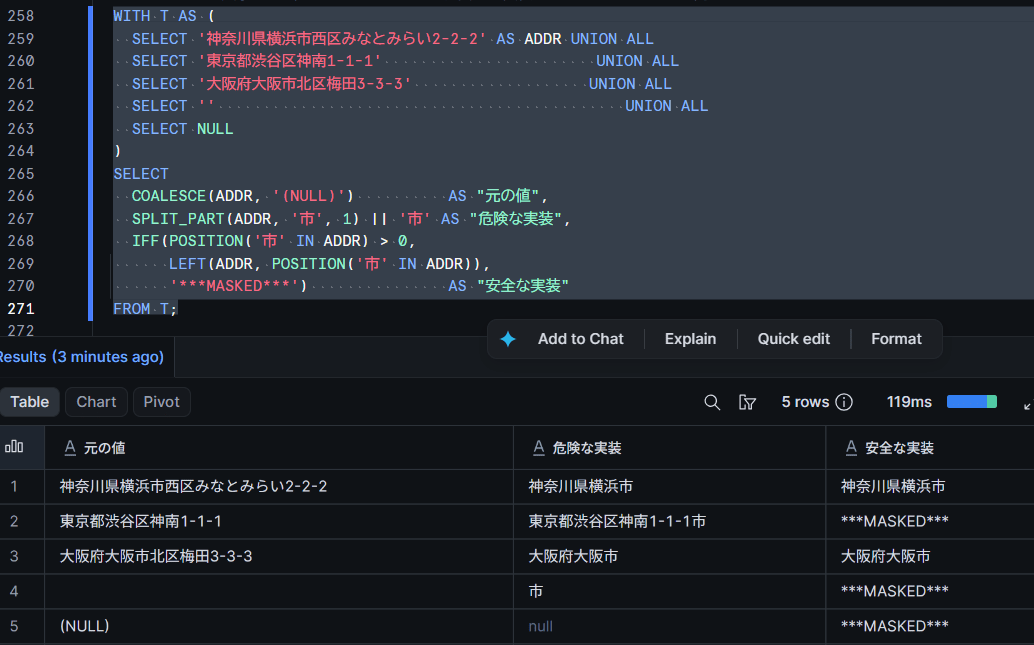
In row 2, the full address including the street number was output. This is because SPLIT_PART returns the entire input as the first element when the delimiter is not found. Since addresses in the 23 wards of Tokyo do not contain "市", the full value — which could not be split — ends up concatenated with "市".
Note:
SPLIT_PART/SUBSTR/REGEXP_SUBSTRdo not return errors when the delimiter or pattern is not found. When implementing partial masking, always verify the output for inputs that do not contain the delimiter. To default to the safe side, usePOSITIONto check for the existence of the delimiter, and fall back to full mask if it is not found.
Note that the "safe implementation" is also a simplified version that only retains up to the first "市", and does not handle designated city wards, counties, towns, villages, or typographic variations. When accurate city/ward/town/village-level handling is required, the practical approach is to prepare a separate, normalized column for prefecture and municipality and set the granularity on that column.
Boundary values for phone numbers and email addresses
Let's also verify the behavior of email addresses, which use SPLIT_PART just like addresses.
WITH T AS (
  SELECT '090-1234-5678' AS PHONE, 'taro.kawabata@example.co.jp' AS EMAIL UNION ALL
  SELECT '123',            'no-at-sign-here'                              UNION ALL
  SELECT '',               ''                                            UNION ALL
  SELECT NULL,             NULL
)
SELECT
  COALESCE(PHONE, '(NULL)') AS "Phone original",
  IFF(LENGTH(PHONE) >= 4, '****-****-' || RIGHT(PHONE, 4), '***MASKED***') AS "Phone masked",
  COALESCE(EMAIL, '(NULL)') AS "Email original",
  '***@' || SPLIT_PART(EMAIL, '@', 2) AS "Email dangerous",
  IFF(POSITION('@' IN EMAIL) > 0, '***@' || SPLIT_PART(EMAIL, '@', 2), '***MASKED***') AS "Email safe"
FROM T;
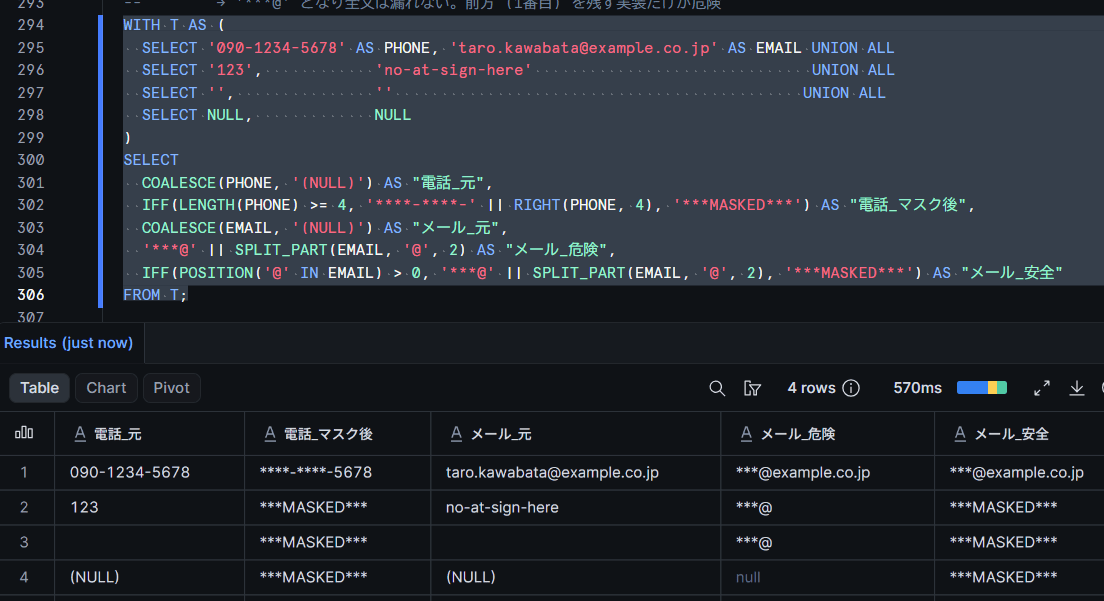
The "dangerous implementation" for the email address did not output the full value — instead it produced ***@. The difference from the address case lies in which part after the delimiter is retained.
- The address uses
SPLIT_PART(..., 1)to retain the first part; when there is no delimiter, the first part becomes the entire string - The email address uses
SPLIT_PART(..., 2)to retain the second part; when there is no delimiter, the second part becomes an empty string
The issue is not SPLIT_PART itself, but implementations that retain the prefix. Partial masking that keeps the front portion — such as for addresses, names, postal codes, and employee number prefixes — behaves the same way, so these should be considered priority items for review.
Can GROUP BY and JOIN be used on masked columns?
Masking policies are applied wherever a masked column is referenced at query execution time. Not only SELECT results, but also JOIN conditions, WHERE, GROUP BY, ORDER BY — general roles evaluate masked values in all of these. Two additional tables are added to verify this.
Adding tables for join verification
USE ROLE ACCOUNTADMIN;

-- Purchase fact (join key and amount are non-PII, declared as PUBLIC)
CREATE OR REPLACE TABLE BLOG_MASK_DB.MART.FCT_PURCHASE (
  PURCHASE_ID     NUMBER(10,0),
  CUSTOMER_ID     NUMBER(10,0),
  PURCHASE_AMOUNT NUMBER(38,2)
);

INSERT INTO BLOG_MASK_DB.MART.FCT_PURCHASE VALUES
  (101, 1, 12000.00),
  (102, 1,  3500.00),
  (103, 2,  8000.00),
  (104, 2,  1500.00),
  (105, 2,   700.00);

ALTER TABLE BLOG_MASK_DB.MART.FCT_PURCHASE MODIFY
  COLUMN PURCHASE_ID     SET TAG BLOG_MASK_DB.GOV.DATA_CLASS = 'PUBLIC',
  COLUMN CUSTOMER_ID     SET TAG BLOG_MASK_DB.GOV.DATA_CLASS = 'PUBLIC',
  COLUMN PURCHASE_AMOUNT SET TAG BLOG_MASK_DB.GOV.DATA_CLASS = 'PUBLIC';

-- Contact list (mixing a different person's address with the example.co.jp domain)
CREATE OR REPLACE TABLE BLOG_MASK_DB.MART.MKT_CONTACT (
  CONTACT_ID NUMBER(10,0),
  EMAIL      VARCHAR(100)
);

INSERT INTO BLOG_MASK_DB.MART.MKT_CONTACT VALUES
  (901, 'taro.kawabata@example.co.jp'),   -- Exact match with customer 1
  (902, 'another-user@example.co.jp'),    -- Different person but same domain
  (903, 'hanako@sample.org');             -- Exact match with customer 2

ALTER TABLE BLOG_MASK_DB.MART.MKT_CONTACT MODIFY
  COLUMN CONTACT_ID SET TAG BLOG_MASK_DB.GOV.DATA_CLASS = 'PUBLIC',
  COLUMN EMAIL      SET TAG BLOG_MASK_DB.GOV.DATA_CLASS = 'PII_EMAIL_DOMAIN';

GRANT SELECT ON TABLE BLOG_MASK_DB.MART.FCT_PURCHASE TO ROLE BLOG_PII_FULL_ROLE;
GRANT SELECT ON TABLE BLOG_MASK_DB.MART.FCT_PURCHASE TO ROLE BLOG_ANALYST_ROLE;
GRANT SELECT ON TABLE BLOG_MASK_DB.MART.MKT_CONTACT  TO ROLE BLOG_PII_FULL_ROLE;
GRANT SELECT ON TABLE BLOG_MASK_DB.MART.MKT_CONTACT  TO ROLE BLOG_ANALYST_ROLE;
Because of the UNCLASSIFIED inheritance at the database level, DATE, VARCHAR, and NUMBER columns with a policy set will fall to full mask if no tag is assigned. Join keys and aggregation target columns must be explicitly declared as PUBLIC.
First, GROUP BY. MKT_CONTACT contains 3 rows with different raw values, of which 2 share the same domain. If aggregation occurs on the masked values, these 2 rows should merge into one group.
USE ROLE BLOG_ANALYST_ROLE;
SELECT EMAIL AS "Email (after masking)", COUNT(*) AS "Count"
FROM BLOG_MASK_DB.MART.MKT_CONTACT
GROUP BY EMAIL
ORDER BY 1;
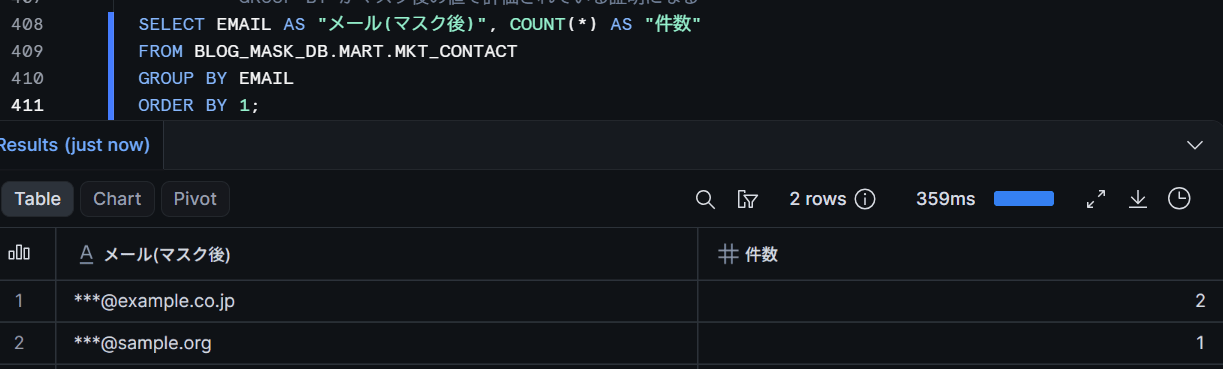
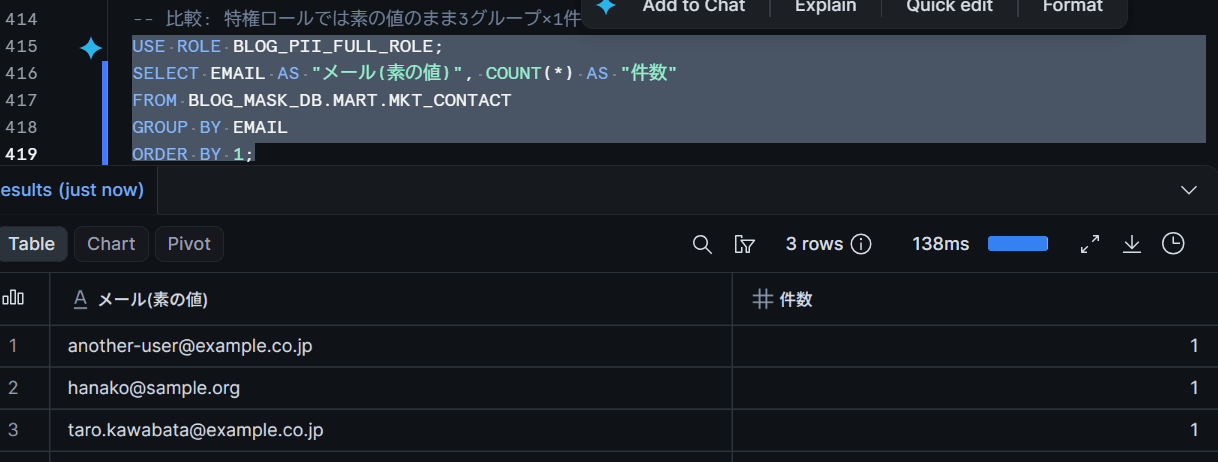
The 2 rows with different raw values merged into 1 group as ***@example.co.jp. This is evidence that GROUP BY is evaluated on the masked values. Running the same query with the privileged role returns 3 groups of 1 row each using raw values.
Next, JOIN. If the join key (CUSTOMER_ID) is PUBLIC, the join succeeds on raw values and can be combined with aggregation on masked dimension attributes.
SELECT YEAR(D.BIRTH_Y) - MOD(YEAR(D.BIRTH_Y), 10) AS "Decade",
       COUNT(DISTINCT D.CUSTOMER_ID)              AS "Customer count",
       COUNT(P.PURCHASE_ID)                       AS "Purchase count",
       SUM(P.PURCHASE_AMOUNT)                     AS "Total purchase amount"
FROM BLOG_MASK_DB.MART.DIM_CUSTOMER D
JOIN BLOG_MASK_DB.MART.FCT_PURCHASE P
  ON D.CUSTOMER_ID = P.CUSTOMER_ID
GROUP BY 1
ORDER BY 1;
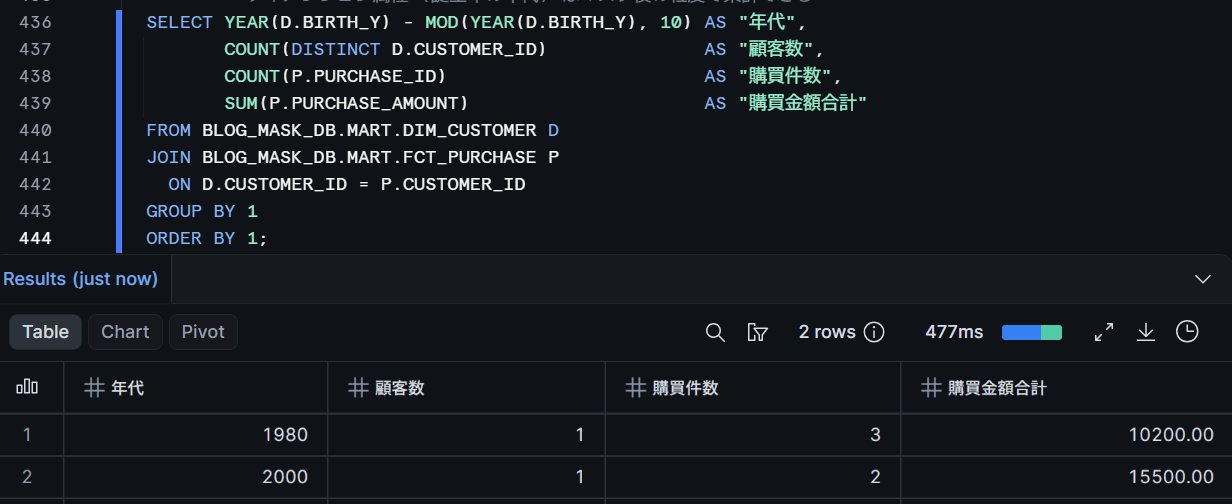
The core use case of partial masking — "hide birthdays, but still enable decade-based purchase analysis" — works even with a JOIN in between.
On the other hand, using masked columns as join keys causes false matches. Let's try joining customers and contacts on EMAIL.
SELECT D.CUSTOMER_ID, D.EMAIL AS "Customer EMAIL (masked)",
       C.CONTACT_ID,  C.EMAIL AS "Contact EMAIL (masked)"
FROM BLOG_MASK_DB.MART.DIM_CUSTOMER D
JOIN BLOG_MASK_DB.MART.MKT_CONTACT C
  ON D.EMAIL = C.EMAIL
ORDER BY D.CUSTOMER_ID, C.CONTACT_ID;
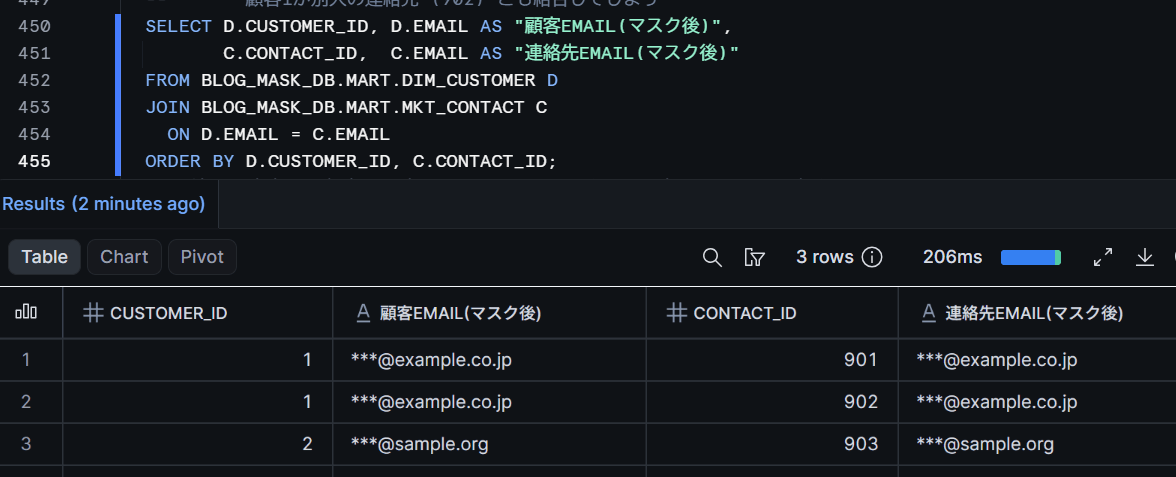
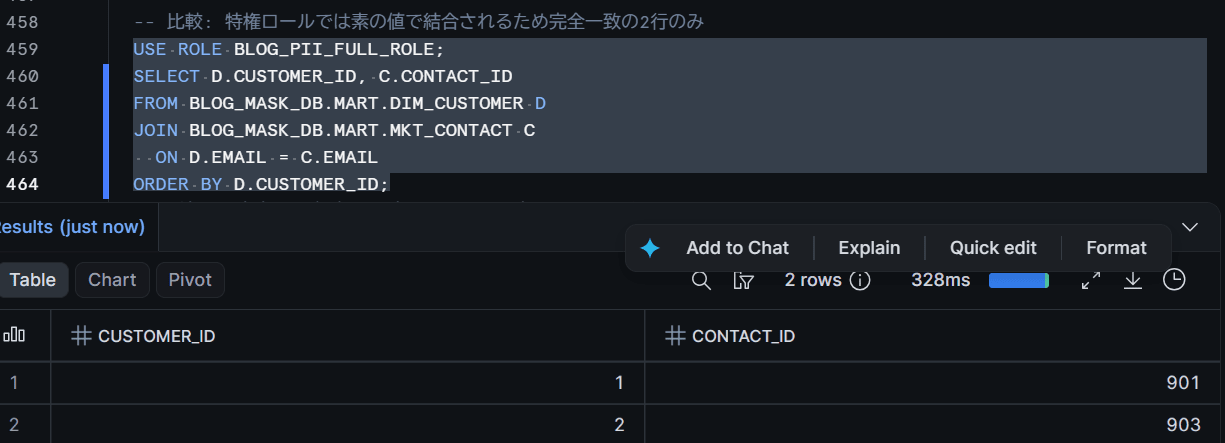
Customer 1 also joined with contact 902, which belongs to a different person. Since both values are collapsed to ***@example.co.jp, they matched simply because they share the same domain. Running the same query with the privileged role returns only the 2 rows that are exact matches on raw values — 901 and 903.
With fully masked columns, all rows collapse to ***MASKED***, resulting in a cross join. Do not use masked columns as JOIN keys or as the basis for COUNT(DISTINCT ...). Design your schema to join on surrogate keys that can be set to PUBLIC.
Limitations and Notes
Here is a summary of limitations and notes confirmed through testing and official documentation.
1. Limitations and Notes
- Tag-based masking policies require Enterprise Edition or higher
SYSTEM$GET_TAG_ON_CURRENT_COLUMNcan only be called within masking policies and projection policies- The tag specified in the argument of
SYSTEM$GET_TAG_ON_CURRENT_COLUMNmust exist at the time of policy evaluation. Specify the tag name as a fully qualified name including the database name and schema name - Even if
UNCLASSIFIEDis inherited by a database or schema, columns for which no masking policy for that data type is set on the tag (in this configuration, TIMESTAMP, BOOLEAN, VARIANT, etc.) are not protected. For operations that default to full masking, either define policies for all data types you intend to permit, or combine with DDL reviews to prevent columns of unsupported types from being introduced - Only one masking policy can be set per tag per data type. The type of attribute is expressed by the tag value name
- Policies linked to a tag cannot be replaced with
CREATE OR REPLACE. To modify the policy body, useALTER MASKING POLICY ... SET BODY; to replace it with a different policy, useALTER TAG ... SET MASKING POLICY ... FORCE(if split into two statements withUNSETfollowed bySET, the column will be unprotected in between) - Materialized views cannot be created on tables where tag-based masking policies are applied. Existing materialized views will be invalidated
- A masking policy and a projection policy can be used together on the same column. At query execution time, the projection eligibility check is performed first, followed by masking. However, there are restrictions such as masking-policy-protected columns cannot be referenced from within the body of a projection policy, and projection-constrained columns cannot be used as arguments in conditional masking policies
- Partial masking that rounds numeric values will change aggregate totals. Since aggregations on masked columns cannot be treated as definitive values, agree on the rounding width and acceptable margin of error in advance
- Whether analysis remains valid with reduced date granularity depends on the combination of granularity and the functions used. Rather than deciding per column in isolation, verify with actual queries
- Partial masking retains values, so the risk of re-identification through combination with other columns remains. Consider combining with aggregation policies or projection policies as needed
Closing Remarks
By configuring granularity switching based on tag values, only one policy per type is needed, and operations are reduced to simply assigning tags to columns. Since it is possible to avoid direct exposure of birthdates while still enabling age-range and age-group analysis, this reduces the number of masking exemption requests in the first place.
On the other hand, partial masking is a process that retains values. Mistakes in what is retained — such as full value exposure in inputs without delimiters, or erroneous mismatches in JOINs between masked columns — can change the meaning of results, so it is advisable to verify boundary values before implementation.
I hope this article proves useful as a reference for something!