
I tried all four types together since Snowflake's tag-based policies now support aggregation, row access, projection, and join policies (Public Preview)

This page has been translated by machine translation. View original
This is Kawabata.
In data governance operations, it is not uncommon for the work of assigning policies to each table to become a burden as the number of tables to be protected increases. While tag-based application of masking policies has been available for some time, row access policies, aggregation policies, and others required direct assignment to target objects.
On July 21, 2026, tag-based application of Aggregation Policy, Row Access Policy, Projection Policy, and Join Policy entered public preview. By setting a policy on a tag, objects to which the tag is assigned will automatically be protected.
In this article, I will verify these four types of tag-based policies using a trial account (Enterprise Edition). I will cover everything from setting policies on tags, assigning tags to objects, and confirming application with restricted roles, presenting the behavior of all four types as well as detailed specifications confirmed during verification (policy replacement with the FORCE option, the constraint of one policy per tag, etc.).
Note: This article presents verification results as of August 4, 2026, while the feature is in public preview. Since it is in preview, behavior may change in the future.
Note that when I verified on July 24, 2026, immediately after the preview was released, there was an issue where tag-based control for types applied to tables/views (aggregation, row access, join) could not be confirmed in this verification environment. In the re-verification on August 4, 2026, the issue no longer reproduced in the same environment. The cause has not been identified, but since it was immediately after release, the timing of feature deployment to the environment may have been a factor.
Overview of Tag-Based Policies
Tag-based policies are a mechanism that combines the object tag feature with data protection policies. When you set a policy on a tag using ALTER TAG ... SET <POLICY_TYPE> POLICY, the policy is automatically applied to all objects to which that tag is assigned.
With this release, the policy types that can be set on a tag are now the following five:
| Policy Type | Control Target | Tag-Based Application Availability |
|---|---|---|
| Masking Policy | Concealing column values | GA (available since before) |
| Aggregation Policy | Enforcing aggregation above minimum group size | Public Preview (newly added) |
| Row Access Policy | Excluding rows that do not match conditions | Public Preview (newly added) |
| Projection Policy | Controlling whether columns can be included in query results | Public Preview (newly added) |
| Join Policy | Requiring joins for table queries and optionally restricting allowed join keys | Public Preview (newly added) |
The levels at which tags can be assigned differ by policy type.
| Policy Type | Database | Schema | Table/View | Column |
|---|---|---|---|---|
| Aggregation Policy | ○ | ○ | ○ | - |
| Row Access Policy | ○ | ○ | ○ | - |
| Projection Policy | ○ | ○ | ○ | ○ |
| Join Policy | ○ | ○ | ○ | - |
When a tag is assigned to a database or schema, the tables and views underneath inherit the tag and are protected collectively.
Prerequisites
- Tag-based aggregation, row access, projection, and join policies are available on Enterprise Edition or higher
- Creating tags requires
CREATE TAGpermission at the schema level - Creating policies requires
CREATE <POLICY_TYPE>permission at the schema level - Setting a policy on a tag requires
APPLY <POLICY_TYPE>permission at the account level - Assigning tags to objects requires
APPLY TAGpermission (or APPLY permission specific to the tag)
Verification was conducted using Snowflake CLI 3.23.0 against a trial account (Enterprise Edition).
Preparation
Create a SALES schema for data and a GOVERNANCE schema for tag and policy management separately.
Preparation
USE ROLE SYSADMIN;

CREATE DATABASE IF NOT EXISTS TAG_POLICY_DEMO;
CREATE SCHEMA IF NOT EXISTS TAG_POLICY_DEMO.SALES;
CREATE SCHEMA IF NOT EXISTS TAG_POLICY_DEMO.GOVERNANCE;

USE SCHEMA TAG_POLICY_DEMO.SALES;

CREATE OR REPLACE TABLE customers (
  customer_id   INT,
  customer_name VARCHAR,
  email         VARCHAR,
  region        VARCHAR
);

INSERT INTO customers VALUES
  (1, 'Sato',      'sato@example.com',      'EAST'),
  (2, 'Suzuki',    'suzuki@example.com',    'EAST'),
  (3, 'Takahashi', 'takahashi@example.com', 'WEST'),
  (4, 'Tanaka',    'tanaka@example.com',    'WEST'),
  (5, 'Ito',       'ito@example.com',       'NORTH'),
  (6, 'Watanabe',  'watanabe@example.com',  'EAST');

CREATE OR REPLACE TABLE orders (
  order_id    INT,
  customer_id INT,
  order_date  DATE,
  amount      INT,
  region      VARCHAR
);

INSERT INTO orders VALUES
  (101, 1, '2026-07-01', 1000, 'EAST'),
  (102, 2, '2026-07-02', 1500, 'EAST'),
  (103, 6, '2026-07-03', 2000, 'EAST'),
  (104, 1, '2026-07-04', 1200, 'EAST'),
  (105, 2, '2026-07-05', 1800, 'EAST'),
  (106, 3, '2026-07-06', 3000, 'WEST'),
  (107, 4, '2026-07-07', 2500, 'WEST'),
  (108, 3, '2026-07-08', 1100, 'WEST'),
  (109, 4, '2026-07-09',  900, 'WEST'),
  (110, 5, '2026-07-10', 4000, 'NORTH'),
  (111, 5, '2026-07-11',  600, 'NORTH');
The number of records in orders by region is 5 for EAST, 4 for WEST, and 2 for NORTH. Since we set the minimum group size of the aggregation policy to 3, this is designed so that we can confirm the case where NORTH is consolidated into the remainder group.
Create a TAG_POLICY_ANALYST role as the role subject to policy restrictions. Within the policy definition, SYSADMIN is excluded from restrictions.
Role
USE ROLE SECURITYADMIN;
CREATE ROLE IF NOT EXISTS TAG_POLICY_ANALYST;
GRANT USAGE ON DATABASE TAG_POLICY_DEMO TO ROLE TAG_POLICY_ANALYST;
GRANT USAGE ON ALL SCHEMAS IN DATABASE TAG_POLICY_DEMO TO ROLE TAG_POLICY_ANALYST;
GRANT SELECT ON ALL TABLES IN DATABASE TAG_POLICY_DEMO TO ROLE TAG_POLICY_ANALYST;
GRANT SELECT ON FUTURE TABLES IN DATABASE TAG_POLICY_DEMO TO ROLE TAG_POLICY_ANALYST;
GRANT USAGE ON WAREHOUSE compute_wh TO ROLE TAG_POLICY_ANALYST;
GRANT ROLE TAG_POLICY_ANALYST TO USER <verification username>;
Setting a policy on a tag requires account-level APPLY <POLICY_TYPE> permission, and assigning tags to objects requires APPLY TAG permission. In this article, to simplify verification, these are granted to SYSADMIN.
USE ROLE SECURITYADMIN;
GRANT APPLY TAG ON ACCOUNT TO ROLE SYSADMIN;
GRANT APPLY AGGREGATION POLICY ON ACCOUNT TO ROLE SYSADMIN;
GRANT APPLY ROW ACCESS POLICY ON ACCOUNT TO ROLE SYSADMIN;
GRANT APPLY PROJECTION POLICY ON ACCOUNT TO ROLE SYSADMIN;
GRANT APPLY JOIN POLICY ON ACCOUNT TO ROLE SYSADMIN;
Note: The above grants are for simplifying verification. In production, it is recommended to manage with dedicated roles that have separation of duties, such as separating the tag administrator role and the policy administrator role.
Let's Try It
Tag-Based Aggregation Policy
First, create a tag and an aggregation policy, then set the policy on the tag using ALTER TAG ... SET AGGREGATION POLICY. This is a policy that imposes no restrictions on SYSADMIN and requires a minimum group size of 3 for all other roles.
USE ROLE SYSADMIN;
USE SCHEMA TAG_POLICY_DEMO.GOVERNANCE;

CREATE OR REPLACE TAG agg_protection;

CREATE OR REPLACE AGGREGATION POLICY min3_agg_policy
AS () RETURNS AGGREGATION_CONSTRAINT ->
  CASE
    WHEN CURRENT_ROLE() = 'SYSADMIN' THEN NO_AGGREGATION_CONSTRAINT()
    ELSE AGGREGATION_CONSTRAINT(MIN_GROUP_SIZE => 3)
  END;

ALTER TAG agg_protection SET AGGREGATION POLICY min3_agg_policy;

ALTER TABLE TAG_POLICY_DEMO.SALES.orders SET TAG agg_protection = 'protected';
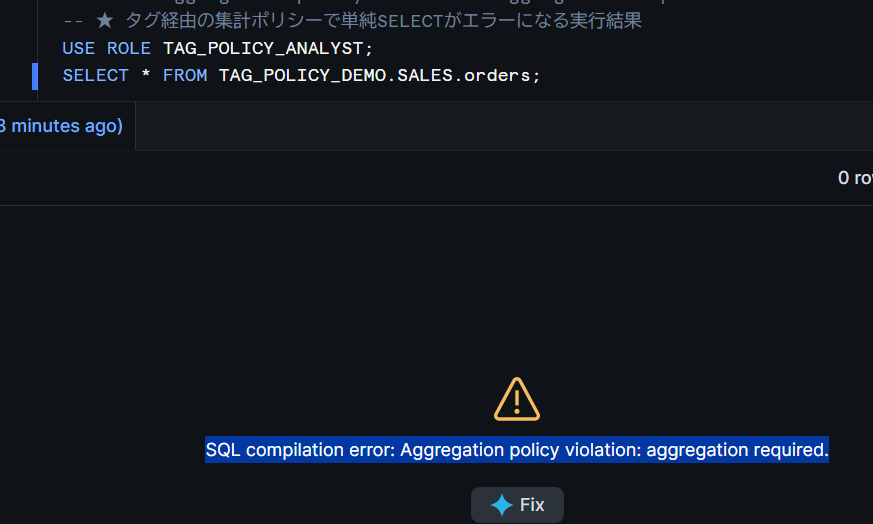
When running a query without aggregation using the TAG_POLICY_ANALYST role, the aggregation policy is applied via the tag and results in an error.
USE ROLE TAG_POLICY_ANALYST;
SELECT * FROM TAG_POLICY_DEMO.SALES.orders;
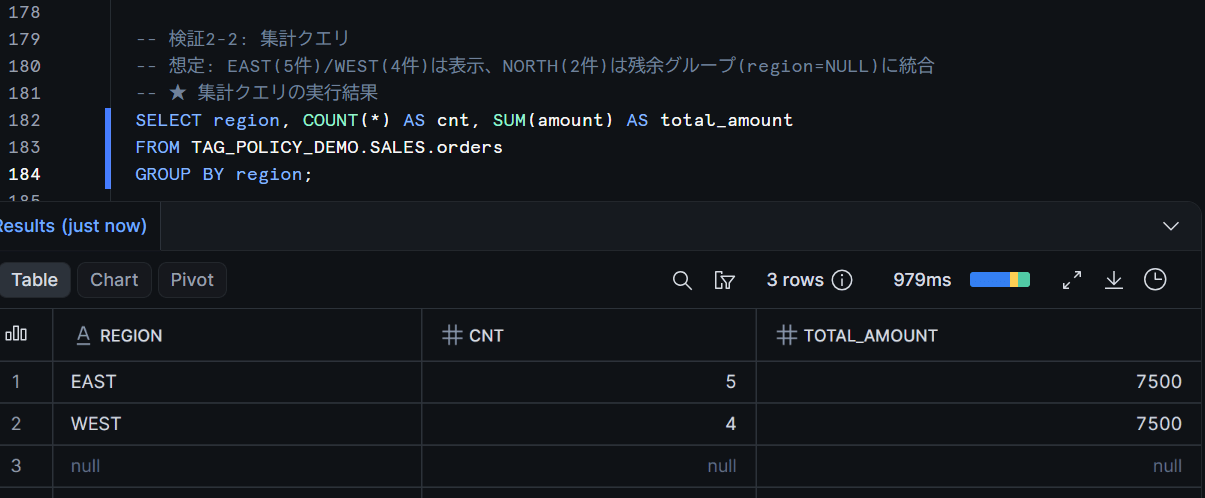
An aggregation query that satisfies the minimum group size of 3 succeeds. Since the number of records in orders by region is 5 for EAST, 4 for WEST, and 2 for NORTH, NORTH with a group size below 3 should be consolidated into the remainder group and returned.
SELECT region, COUNT(*) AS cnt
FROM TAG_POLICY_DEMO.SALES.orders
GROUP BY region;
Confirming the Tag-Based Association
Tag-based policy associations can be confirmed with the POLICY_REFERENCES table function. The TAG_NAME column shows which tag the policy is being applied through.
SELECT policy_name, policy_kind, ref_entity_name, tag_name, policy_status
FROM TABLE(TAG_POLICY_DEMO.INFORMATION_SCHEMA.POLICY_REFERENCES(
  REF_ENTITY_DOMAIN => 'TABLE',
  REF_ENTITY_NAME => 'TAG_POLICY_DEMO.SALES.ORDERS'
));
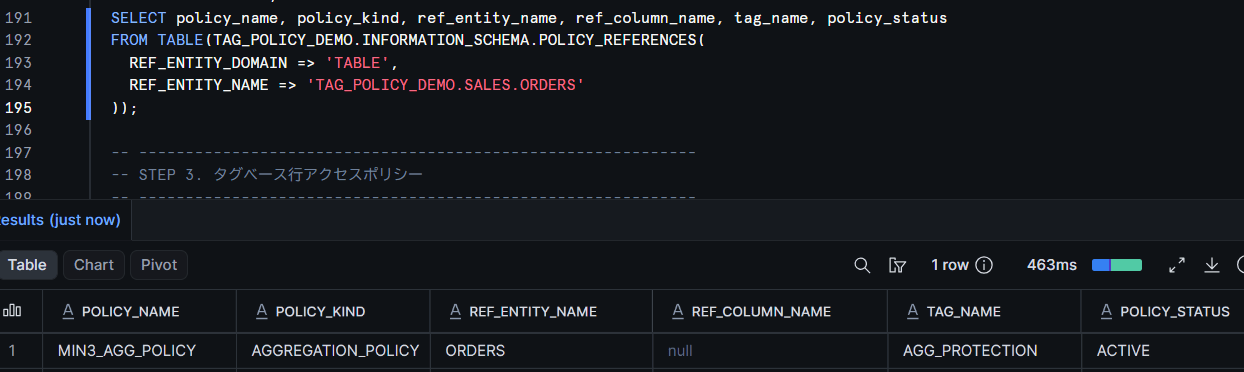
Note that TAG_NAME and POLICY_STATUS in POLICY_REFERENCES can be used to confirm tag-based policy associations. However, the official definition of POLICY_STATUS = 'ACTIVE' is described with the assumption of column-level associations. Especially when introducing preview features, in addition to checking metadata, it is recommended to run actual queries with the restricted role and confirm that control is working as expected.
Tag-Based Row Access Policy
Row access policies follow the same flow. Apply tag-based to orders, which has a column (region) with the same name and type as the policy argument.
CREATE OR REPLACE TAG row_protection;

CREATE OR REPLACE ROW ACCESS POLICY region_rap
AS (region VARCHAR) RETURNS BOOLEAN ->
  CURRENT_ROLE() = 'SYSADMIN'
  OR region = 'EAST';

ALTER TAG row_protection SET ROW ACCESS POLICY region_rap;
ALTER TABLE TAG_POLICY_DEMO.SALES.orders SET TAG row_protection = 'protected';
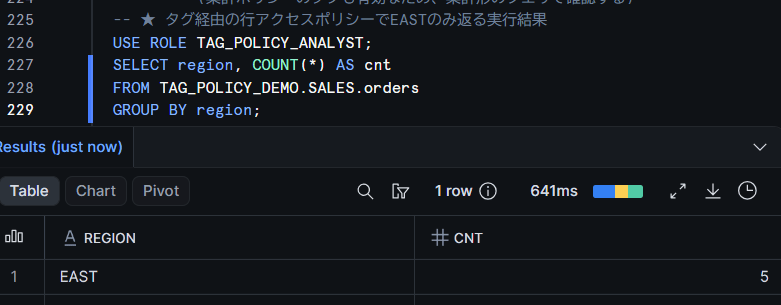
When querying with the TAG_POLICY_ANALYST role, only EAST rows are returned.
USE ROLE TAG_POLICY_ANALYST;
SELECT region, COUNT(*) AS cnt
FROM TAG_POLICY_DEMO.SALES.orders
GROUP BY region;
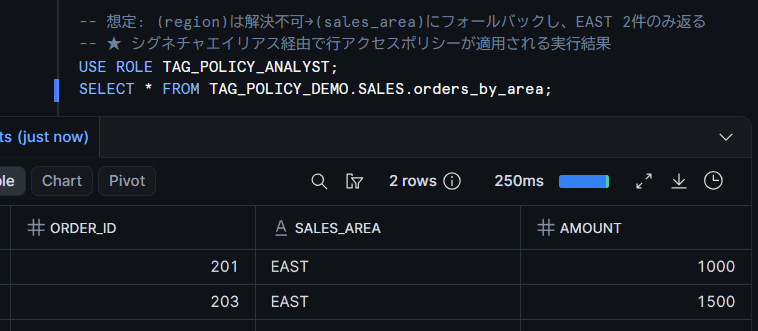
For tables with different column names, you can specify signature aliases with the ON clause when setting the policy on the tag. Alias tuples are matched in the specified order, and the first tuple that can be resolved to the table's column name and data type is used. The official documentation states that if multiple tuples resolve to the same table, it results in an error, and if no tuple resolves, the policy is not applied to that table. Let's prepare a table with a column named sales_area and try it.
CREATE OR REPLACE TABLE TAG_POLICY_DEMO.SALES.orders_by_area (
  order_id   INT,
  sales_area VARCHAR,
  amount     INT
);

INSERT INTO TAG_POLICY_DEMO.SALES.orders_by_area VALUES
  (201, 'EAST', 1000),
  (202, 'WEST', 2000),
  (203, 'EAST', 1500),
  (204, 'NORTH', 3000);

CREATE OR REPLACE TAG row_protection_alias;

ALTER TAG row_protection_alias SET ROW ACCESS POLICY region_rap
  ON (region VARCHAR), (sales_area VARCHAR);

ALTER TABLE TAG_POLICY_DEMO.SALES.orders_by_area
  SET TAG row_protection_alias = 'protected';
Since the sales_area column resolves to the second tuple, only the 2 EAST rows are returned for orders_by_area as well.
Tag-Based Join Policy
A join policy is a policy that prohibits standalone queries on a table and requires joins. When setting the policy on a tag, you can also restrict the allowed join keys with ALLOWED JOIN KEYS.
CREATE OR REPLACE TAG join_protection;

CREATE OR REPLACE JOIN POLICY customer_join_policy
AS () RETURNS JOIN_CONSTRAINT ->
  CASE
    WHEN CURRENT_ROLE() = 'SYSADMIN' THEN JOIN_CONSTRAINT(JOIN_REQUIRED => FALSE)
    ELSE JOIN_CONSTRAINT(JOIN_REQUIRED => TRUE)
  END;

ALTER TAG join_protection SET JOIN POLICY customer_join_policy
  ALLOWED JOIN KEYS (customer_id);

ALTER TABLE TAG_POLICY_DEMO.SALES.customers SET TAG join_protection = 'protected';
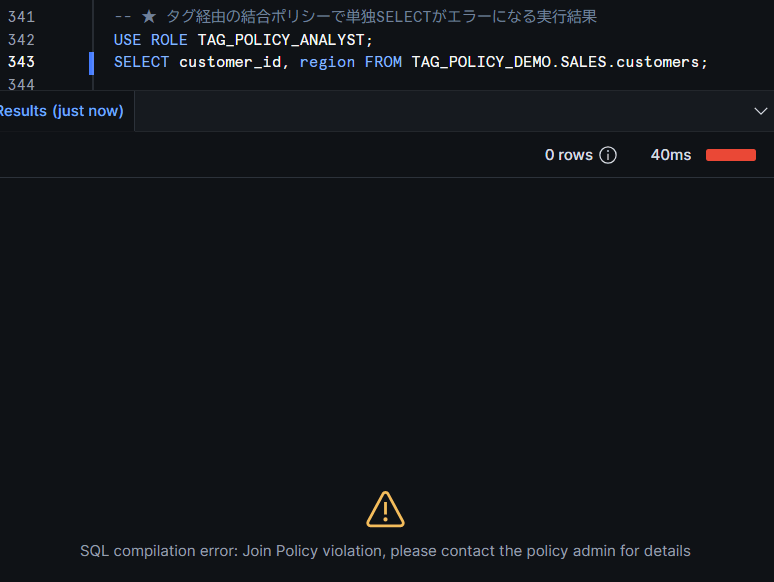
When executing a standalone SELECT with the TAG_POLICY_ANALYST role, the join policy is applied via the tag and results in an error.
USE ROLE TAG_POLICY_ANALYST;
SELECT customer_id, region FROM TAG_POLICY_DEMO.SALES.customers;
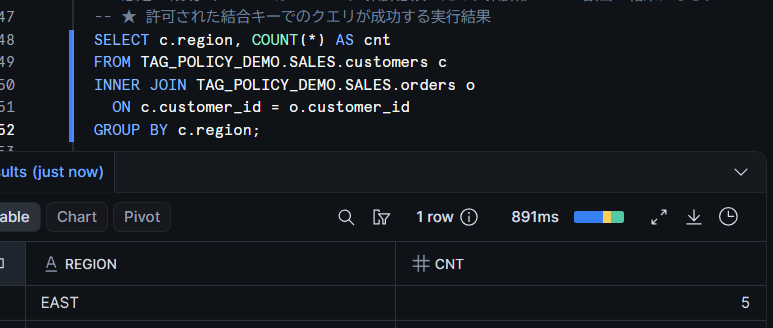
A query joining with orders using the allowed join key (customer_id) succeeds.
SELECT c.region, COUNT(*) AS cnt
FROM TAG_POLICY_DEMO.SALES.customers c
JOIN TAG_POLICY_DEMO.SALES.orders o
  ON c.customer_id = o.customer_id
GROUP BY c.region;
After confirming, since subsequent verifications (projection, masking) use standalone queries on customers, remove the join policy tag. If left as is, subsequent standalone SELECT statements will fail with a join-required error.
USE ROLE SYSADMIN;
ALTER TABLE TAG_POLICY_DEMO.SALES.customers
  UNSET TAG TAG_POLICY_DEMO.GOVERNANCE.join_protection;
Tag-Based Projection Policy
The projection policy is the only one of the four types that can also have tags assigned at the column level. It enables the control of "not showing the value itself, but allowing it to be used for filtering" to be deployed at the column level.
USE ROLE SYSADMIN;
USE SCHEMA TAG_POLICY_DEMO.GOVERNANCE;

CREATE OR REPLACE TAG pii_column;

CREATE OR REPLACE PROJECTION POLICY pii_proj_policy
AS () RETURNS PROJECTION_CONSTRAINT ->
  CASE
    WHEN CURRENT_ROLE() = 'SYSADMIN' THEN PROJECTION_CONSTRAINT(ALLOW => TRUE)
    ELSE PROJECTION_CONSTRAINT(ALLOW => FALSE)
  END;

ALTER TAG pii_column SET PROJECTION POLICY pii_proj_policy;

ALTER TABLE TAG_POLICY_DEMO.SALES.customers
  ALTER COLUMN email SET TAG pii_column = 'email';
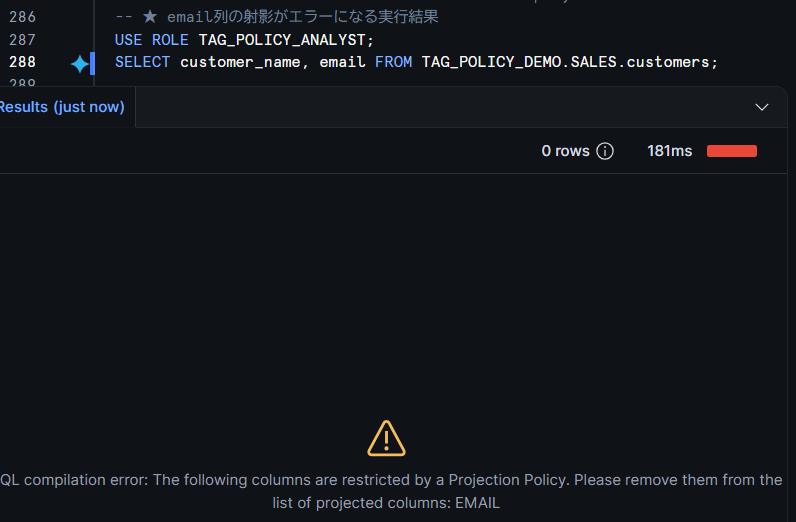
When the TAG_POLICY_ANALYST role attempts to project the email column, it results in an error immediately after the tag is assigned.
USE ROLE TAG_POLICY_ANALYST;
SELECT customer_name, email FROM TAG_POLICY_DEMO.SALES.customers;
Both a query that does not include the email column and a query that uses it only as a WHERE clause condition without projecting it succeed. The original behavior of the projection policy — "not showing the value itself, but allowing it to be used for filtering" — works through the tag as well.
-- Succeeds
SELECT customer_name, region FROM TAG_POLICY_DEMO.SALES.customers;

-- Using in WHERE clause is allowed as long as it is not projected
SELECT customer_name FROM TAG_POLICY_DEMO.SALES.customers
WHERE email LIKE '%example.com';
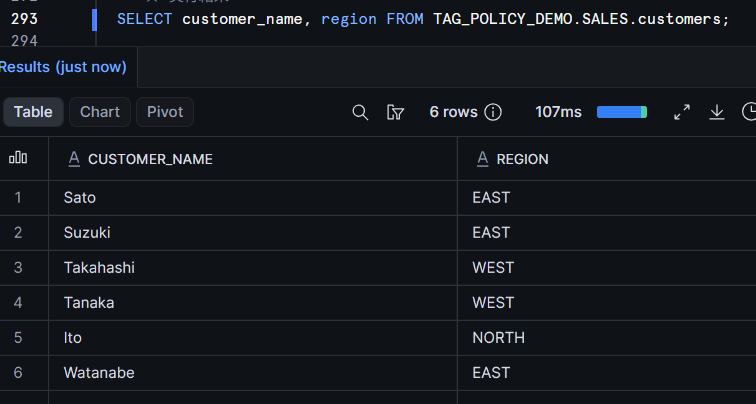
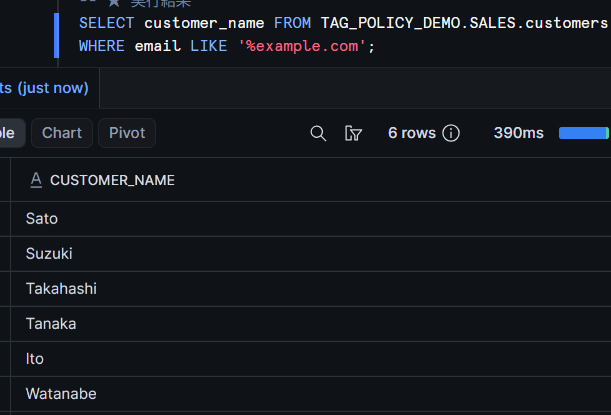
I also tried with a table-level tag, which applied similarly, making all columns of the table non-projectable.
Reference: Tag-Based Masking Policy (GA)
For reference, I also confirmed the tag-based masking policy, which has been available in GA since before, in the same environment.
USE ROLE SYSADMIN;
USE SCHEMA TAG_POLICY_DEMO.GOVERNANCE;

CREATE OR REPLACE TAG mask_test;

CREATE OR REPLACE MASKING POLICY mask_string AS (val STRING) RETURNS STRING ->
  CASE WHEN CURRENT_ROLE() = 'SYSADMIN' THEN val ELSE '***MASKED***' END;

ALTER TAG mask_test SET MASKING POLICY mask_string;
ALTER TABLE TAG_POLICY_DEMO.SALES.customers
  MODIFY COLUMN customer_name SET TAG mask_test = 'on';
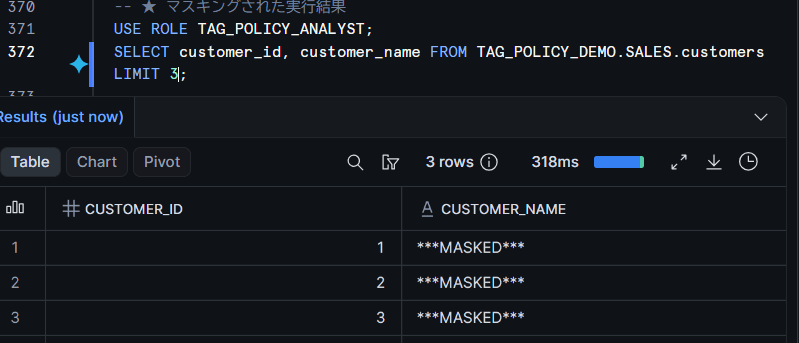
Immediately after the tag was assigned, customer_name became ***MASKED***.
Schema-Level Tag Inheritance and Priority of Direct Assignment
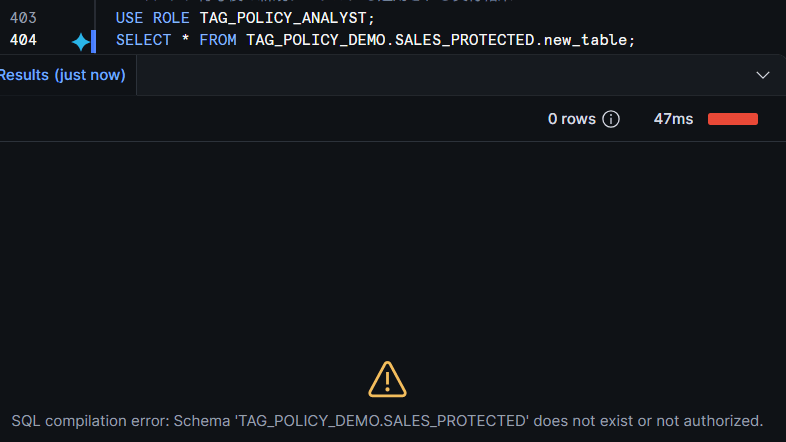
When a tag is assigned to a schema, the tables and views underneath inherit the tag and are protected collectively. New tables created after the tag is assigned should also have the policy applied automatically. I prepared a dedicated schema SALES_PROTECTED for verification (because directly assigning to the SALES schema would apply the aggregation policy to customers and others, interfering with other verifications).
USE ROLE SYSADMIN;

CREATE SCHEMA IF NOT EXISTS TAG_POLICY_DEMO.SALES_PROTECTED;

CREATE OR REPLACE TABLE TAG_POLICY_DEMO.SALES_PROTECTED.orders_copy AS
SELECT * FROM TAG_POLICY_DEMO.SALES.orders;

-- Assign tag to schema → tables underneath inherit and are protected
ALTER SCHEMA TAG_POLICY_DEMO.SALES_PROTECTED
  SET TAG TAG_POLICY_DEMO.GOVERNANCE.agg_protection = 'protected';

-- Table created after tag assignment
CREATE OR REPLACE TABLE TAG_POLICY_DEMO.SALES_PROTECTED.new_table AS
SELECT 1 AS id UNION ALL SELECT 2;
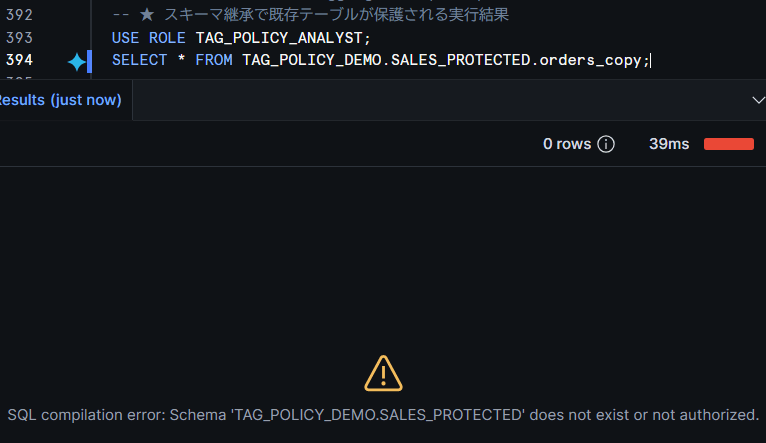
New Table
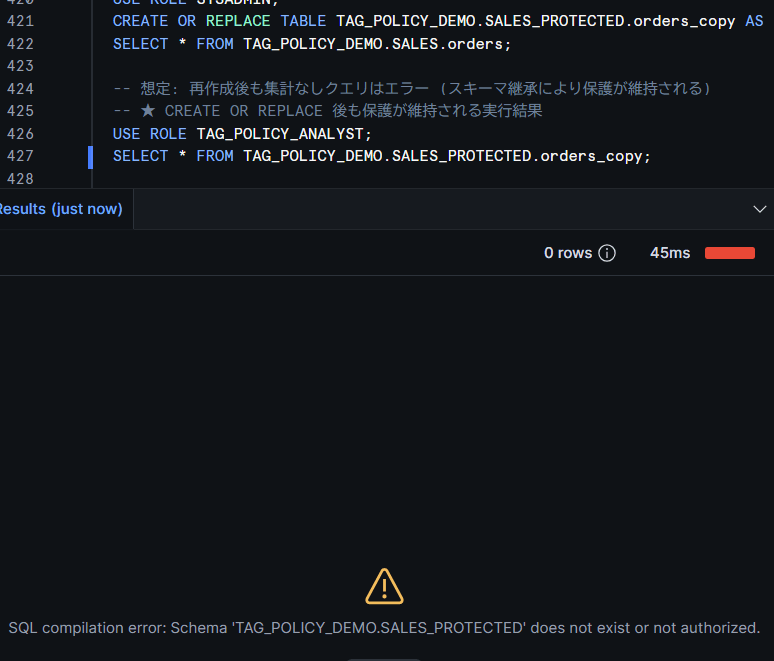
This schema inheritance is particularly important in combination with dbt. In the common table materialization of dbt-snowflake, models are recreated with the equivalent of CREATE OR REPLACE on every dbt run, so tags and policies directly assigned to a table are not retained after recreation (the actual DDL issued depends on the dbt version, materialization, and project customization). On the other hand, with schema inheritance, protection should be automatically applied to recreated models as well. Let's simulate dbt's recreation with CREATE OR REPLACE and confirm.
-- Simulating model recreation by dbt run
CREATE OR REPLACE TABLE TAG_POLICY_DEMO.SALES_PROTECTED.orders_copy AS
SELECT * FROM TAG_POLICY_DEMO.SALES.orders;
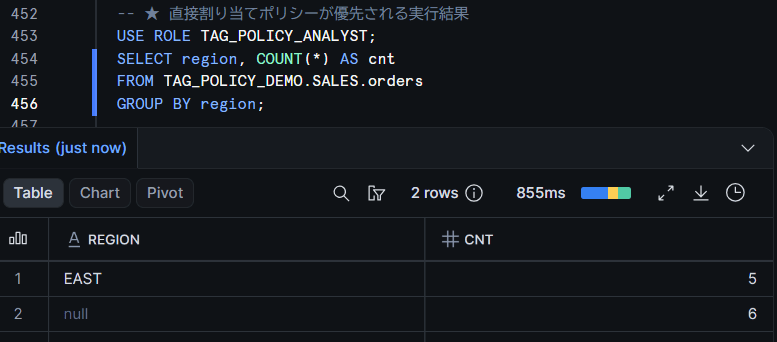
Also, when a directly assigned policy and a tag-based policy conflict, the directly assigned policy takes priority (for aggregation policies, this is only when the entity key matches; if it does not match, both may be applied). Let's assign a separate policy with a minimum group size of 5 directly to orders, which has the tag-based (min3) applied, and confirm.
USE ROLE SYSADMIN;

-- Remove the row access policy tag to avoid seeing only EAST, which would make the difference hard to see
ALTER TABLE TAG_POLICY_DEMO.SALES.orders UNSET TAG TAG_POLICY_DEMO.GOVERNANCE.row_protection;

CREATE OR REPLACE AGGREGATION POLICY TAG_POLICY_DEMO.GOVERNANCE.min5_agg_policy
AS () RETURNS AGGREGATION_CONSTRAINT ->
  CASE
    WHEN CURRENT_ROLE() = 'SYSADMIN' THEN NO_AGGREGATION_CONSTRAINT()
    ELSE AGGREGATION_CONSTRAINT(MIN_GROUP_SIZE => 5)
  END;

ALTER TABLE TAG_POLICY_DEMO.SALES.orders
  SET AGGREGATION POLICY TAG_POLICY_DEMO.GOVERNANCE.min5_agg_policy;
If the tag-based min3 were still in effect, EAST (5 records) and WEST (4 records) would be displayed, but as shown below, it was confirmed that the directly assigned min5 takes priority.
Verifying Restrictions with Actual Hardware
I confirmed what kind of errors the restrictions described in the official documentation produce.
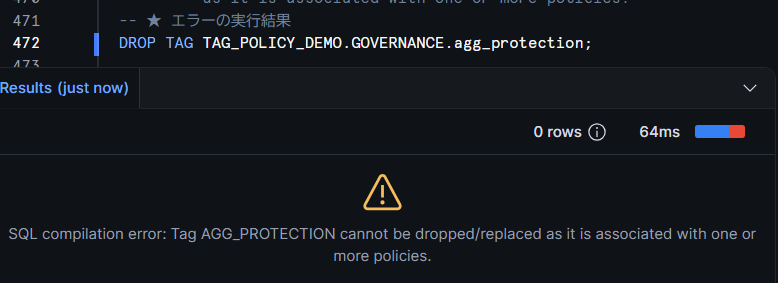
Tags with policies set cannot be dropped.
DROP TAG TAG_POLICY_DEMO.GOVERNANCE.agg_protection;
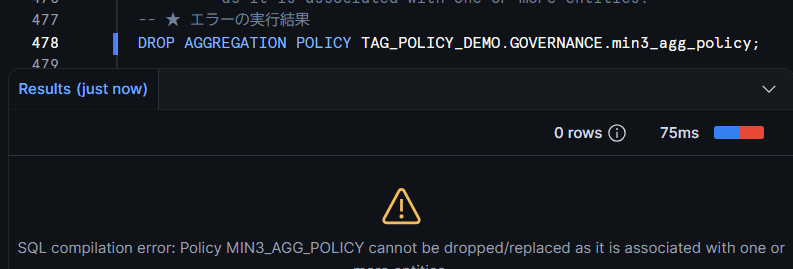
Policies set on tags also cannot be dropped.
DROP AGGREGATION POLICY TAG_POLICY_DEMO.GOVERNANCE.min3_agg_policy;
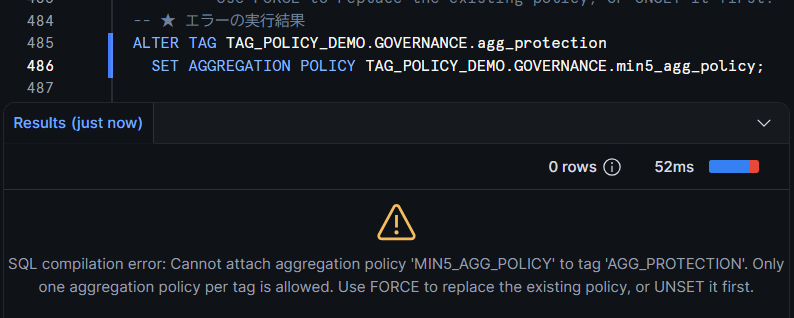
You cannot set multiple policies of the same type on a single tag. The error message provides guidance on replacement using the FORCE option.
ALTER TAG agg_protection SET AGGREGATION POLICY min5_agg_policy;
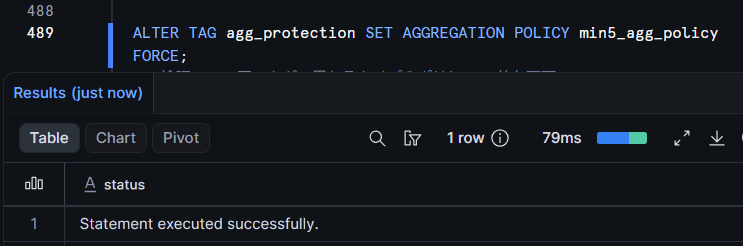
When actually executing with FORCE, it succeeded, and checking with POLICY_REFERENCES confirmed that the policy associated with the tag had been replaced with MIN5_AGG_POLICY. The official documentation also describes the procedure of using FORCE for replacement in a single statement, as splitting into two statements of UNSET→SET may result in a period where protection by that tag-based policy is absent. This is an option worth actively using when replacing policies.
ALTER TAG agg_protection SET AGGREGATION POLICY min5_agg_policy FORCE;
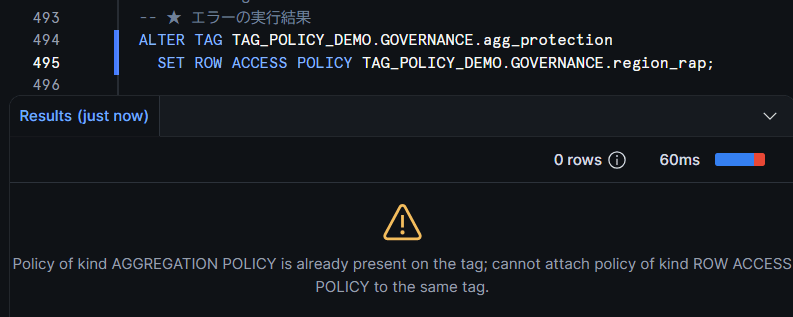
Also, coexistence of different types of policies on the same tag is not possible. Attempting to set a row access policy on a tag that already has an aggregation policy set results in the following error. If you want to use multiple types together, you need a design that separates tags by type. Note that masking policies are an exception; as stated in the official documentation, "A tag can have only one masking policy per data type," meaning one per data type can be set on a single tag.
ALTER TAG agg_protection SET ROW ACCESS POLICY region_rap;
Schemas containing tags with policies also cannot be dropped. From the error message, it is clear that the reason for the deletion block is that the tag is assigned to (in use by) objects in other schemas.
DROP SCHEMA TAG_POLICY_DEMO.GOVERNANCE;
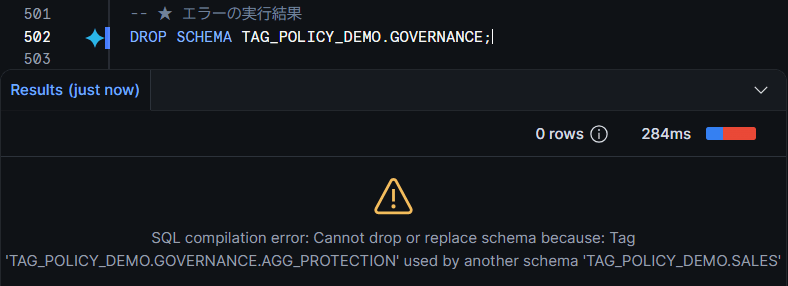
To drop, you first need to disassociate the tag and policy using ALTER TAG ... UNSET <POLICY_TYPE> POLICY.
Restrictions and Notes
Here is a summary of the main points from verification and the official documentation.
Restrictions and Notes
- Enterprise Edition or higher is required (public preview stage)
- In verification immediately after the preview was released (July 24, 2026), there was an issue where tag-based control for types applied to tables/views (aggregation, row access, join) could not be confirmed (the issue did not reproduce in re-verification on August 4, 2026; the cause is unidentified, but the timing of feature deployment to the environment may have been a factor). When introducing preview features, it is recommended to confirm application not only by checking metadata but also by running actual queries with the restricted role
- The 4 types added this time are limited to one per type per tag, and coexistence of different types of policies is also not possible (confirmed by actual testing). Masking policies are the only exception and can be set one per data type
- Multiple tag-based policies of the same kind cannot be associated with the same object (multiple tag-based row access policies or join policies on one table/view, or multiple tag-based projection policies on one column are not allowed). In configurations where multiple tag-based aggregation policies apply to the same table, please confirm the application behavior in advance
- When changing the value of a tag with a policy, in configurations where the tag owner and policy administrator are different, there may be cases where the schema owner or others cannot change the tag value. In such cases, it may be necessary to first disassociate the policy from the tag, change the value, and then reassociate
- Policy replacement can be performed without
UNSETusing theFORCEoption (confirmed by actual testing; also documented in the official documentation) - When a directly assigned policy and a tag-based policy conflict, the directly assigned policy takes priority (for aggregation policies, this is only when the entity key matches; if it does not match, both may be applied)
- Tags with policies set, policies set on tags, and databases/schemas containing them cannot be dropped (the association must be removed first)
- Policies cannot be set on system tags
Conclusion
With support for 4 types of tag-based policies, it becomes possible to consolidate data protection policy management from "per object" to "per tag." In verification, I was able to confirm that protection is applied simply by setting a policy on a tag and assigning the tag to an object, for all four types: aggregation, row access, projection, and join. Combined with schema-level tag inheritance, a governance operation of "tag the schema, and tables created later will automatically be protected" becomes achievable.
I get the impression that things that were previously only possible with masking policies are now possible with four policies as well, greatly expanding the scope of application.
I'm looking forward to the GA release.
I hope this article is helpful in some way!