
[New Feature] Snowflake's Temporary Role Grants Are Now in Preview, So I Granted Roles to Users with Expiration Dates and Checked the Behavior Upon Expiry in 4 Use Cases

This page has been translated by machine translation. View original
This is Kawabata.
On November 10, 2026, Temporary role grants, which lets you set an expiration on role grants to users, became available in preview.
In this article, I try time-limited grants in four use cases: on-call response, temporary PII viewing, time-limited members, and administrator privileges. I also check what happens to a session when the expiration arrives, and the behavior where re-running a normal GRANT ROLE removes the expiration.
Overview of Temporary role grants
Three clauses have been added to GRANT ROLE ... TO USER.
GRANT ROLE <name> TO USER <user_name>
  [ { FOR INTERVAL <interval> | UNTIL <timestamp> } [ RESET EXPIRATION ] ]
| Clause | What to specify |
|---|---|
FOR INTERVAL |
The time from the grant until it expires. Write a positive integer with exactly one unit of MINUTE, HOUR, or DAY (plural forms are also allowed). Examples: '30 MINUTES', '24 HOURS', '7 DAYS' |
UNTIL |
The date and time at which the grant expires. It must be in the future and carry Z or an offset such as +09:00 |
RESET EXPIRATION |
Replaces the expiration of an existing grant with the one specified this time |
When the expiration arrives, the grant expires automatically, so there is no need to run REVOKE ROLE. You can check the expiration in the expires_on column of SHOW GRANTS TO USER and SHOW GRANTS OF ROLE. The same column has also been added to the ACCOUNT_USAGE GRANTS_TO_USERS view. It is NULL for permanent grants.
Behavior on expiration
According to the official documentation, the behavior after expiration depends on how the role is being used.
| How the role is used | Behavior after expiration |
|---|---|
| Session primary role | The next SQL statement executed fails with error 003048 |
| Session secondary role | It is removed from the secondary roles without an error |
| Running query | It keeps running as that role until it finishes |
For queries against hybrid tables and queries running on an interactive warehouse, it takes up to 60 seconds for the expiration to take effect.
Behavior when granting the same role again
When the same grantor grants the same role to the same user again, the existing grant is updated. Without RESET EXPIRATION, the longer expiration is kept. A permanent grant is treated as having the longest possible expiration.
| Existing grant | SQL re-run | Result |
|---|---|---|
| Temporary | No expiration specified | Becomes permanent |
| Temporary | Later expiration | Expiration is extended |
| Temporary | Earlier or identical expiration | No change |
| Permanent | FOR INTERVAL / UNTIL |
No change |
| Temporary or permanent | FOR INTERVAL / UNTIL with RESET EXPIRATION |
Becomes the specified expiration |
Prerequisites
- As of November 12, 2026, the preview is available in all accounts
- Expirations can be set only when granting an account role to a user
- The executing role must have OWNERSHIP of the role being granted or the global privilege MANAGE GRANTS
- Use case 2, which uses a masking policy, requires Enterprise Edition or higher
I tested this in an Enterprise trial account, using Snowsight worksheets.
Preparation
I test with just my own user who is logged in to Snowsight. I assume a user that holds ACCOUNTADMIN. What I set up is two tables, four roles, and two users that are used only as grant targets.
| Role | Grant policy | What it can do |
|---|---|---|
| TG_ANALYST | Permanent | Can query CUSTOMERS. EMAIL is masked |
| TG_ONCALL | Temporary | For incident investigation. Can query all tables in the PROD schema at the time of the grant |
| TG_AUDITOR | Temporary | For time-limited members. Can query all tables in the PROD schema at the time of the grant |
| TG_PII_VIEWER | Temporary | Has no object privileges. Used as the condition to unmask EMAIL |
| User | Purpose |
|---|---|
| My own user | TG_ANALYST is granted permanently. Other roles are granted with expirations to confirm expiration |
| TG_ALICE, TG_BOB | Never log in. Used only as targets for time-limited grants |
The four roles are not granted to SYSADMIN. If they were, a user holding ACCOUNTADMIN could use those roles through inheritance with no expiration. In that state, even if the time-limited grant to my own user expires, I could keep using the role through the inheritance path. I would not be able to confirm that access is lost on expiration.
First, I create a warehouse and tables with SYSADMIN. The masking policy on the EMAIL column returns raw data only when TG_PII_VIEWER is in the session.
Setup queries
USE ROLE SYSADMIN;

CREATE WAREHOUSE IF NOT EXISTS TEMP_GRANT_WH
  WAREHOUSE_SIZE = XSMALL AUTO_SUSPEND = 60 AUTO_RESUME = TRUE INITIALLY_SUSPENDED = TRUE;
CREATE DATABASE IF NOT EXISTS TEMP_GRANT_DEMO;
CREATE SCHEMA IF NOT EXISTS TEMP_GRANT_DEMO.PROD;
USE WAREHOUSE TEMP_GRANT_WH;

CREATE OR REPLACE TABLE TEMP_GRANT_DEMO.PROD.CUSTOMERS (
  CUSTOMER_ID NUMBER, CUSTOMER_NAME STRING, EMAIL STRING, PREFECTURE STRING
);
INSERT INTO TEMP_GRANT_DEMO.PROD.CUSTOMERS VALUES
  (1, 'Ichiro Sato',     'ichiro.sato@example.com',     'Tokyo'),
  (2, 'Hanako Suzuki',   'hanako.suzuki@example.com',   'Osaka'),
  (3, 'Kenta Takahashi', 'kenta.takahashi@example.com', 'Aichi'),
  (4, 'Yui Tanaka',      'yui.tanaka@example.com',      'Fukuoka'),
  (5, 'Daiki Watanabe',  'daiki.watanabe@example.com',  'Hokkaido');

CREATE OR REPLACE TABLE TEMP_GRANT_DEMO.PROD.ORDERS (
  ORDER_ID NUMBER, CUSTOMER_ID NUMBER, AMOUNT NUMBER(10, 0),
  STATUS STRING, ORDERED_AT TIMESTAMP_NTZ
);
INSERT INTO TEMP_GRANT_DEMO.PROD.ORDERS VALUES
  (1001, 1, 12800, 'COMPLETED', '2026-11-10 09:12:00'),
  (1002, 2,  4500, 'COMPLETED', '2026-11-10 13:40:00'),
  (1003, 3, 29800, 'FAILED',    '2026-11-11 22:05:00'),
  (1004, 1,  7600, 'FAILED',    '2026-11-11 22:07:00'),
  (1005, 4, 15400, 'COMPLETED', '2026-11-11 23:30:00'),
  (1006, 5,  9900, 'FAILED',    '2026-11-12 00:02:00');

CREATE OR REPLACE MASKING POLICY TEMP_GRANT_DEMO.PROD.MASK_EMAIL
  AS (val STRING) RETURNS STRING ->
  CASE
    WHEN IS_ROLE_IN_SESSION('TG_PII_VIEWER') THEN val
    ELSE '***MASKED***'
  END;

ALTER TABLE TEMP_GRANT_DEMO.PROD.CUSTOMERS
  MODIFY COLUMN EMAIL SET MASKING POLICY TEMP_GRANT_DEMO.PROD.MASK_EMAIL;
Next, I create the roles and grant the object privileges. I also grant USAGE on the warehouse to SECURITYADMIN, because the queries that filter SHOW results with SELECT use the warehouse.
USE ROLE SECURITYADMIN;
CREATE ROLE IF NOT EXISTS TG_ANALYST;
CREATE ROLE IF NOT EXISTS TG_ONCALL;
CREATE ROLE IF NOT EXISTS TG_AUDITOR;
CREATE ROLE IF NOT EXISTS TG_PII_VIEWER;

USE ROLE SYSADMIN;
GRANT USAGE ON WAREHOUSE TEMP_GRANT_WH TO ROLE SECURITYADMIN;
GRANT USAGE ON WAREHOUSE TEMP_GRANT_WH TO ROLE TG_ANALYST;
GRANT USAGE ON WAREHOUSE TEMP_GRANT_WH TO ROLE TG_ONCALL;
GRANT USAGE ON WAREHOUSE TEMP_GRANT_WH TO ROLE TG_AUDITOR;
GRANT USAGE ON DATABASE TEMP_GRANT_DEMO TO ROLE TG_ANALYST;
GRANT USAGE ON DATABASE TEMP_GRANT_DEMO TO ROLE TG_ONCALL;
GRANT USAGE ON DATABASE TEMP_GRANT_DEMO TO ROLE TG_AUDITOR;
GRANT USAGE ON SCHEMA TEMP_GRANT_DEMO.PROD TO ROLE TG_ANALYST;
GRANT USAGE ON SCHEMA TEMP_GRANT_DEMO.PROD TO ROLE TG_ONCALL;
GRANT USAGE ON SCHEMA TEMP_GRANT_DEMO.PROD TO ROLE TG_AUDITOR;
GRANT SELECT ON TABLE TEMP_GRANT_DEMO.PROD.CUSTOMERS TO ROLE TG_ANALYST;
GRANT SELECT ON ALL TABLES IN SCHEMA TEMP_GRANT_DEMO.PROD TO ROLE TG_ONCALL;
GRANT SELECT ON ALL TABLES IN SCHEMA TEMP_GRANT_DEMO.PROD TO ROLE TG_AUDITOR;
Finally, I grant TG_ANALYST to my own user and create the target users. $me is a session variable holding my own user name.
SET me = CURRENT_USER();

USE ROLE SECURITYADMIN;
GRANT ROLE TG_ANALYST TO USER IDENTIFIER($me);
CREATE USER IF NOT EXISTS TG_ALICE TYPE = PERSON;
CREATE USER IF NOT EXISTS TG_BOB TYPE = PERSON;
Trying it out
I use two Snowsight worksheets. The admin worksheet is for granting roles and checking grant status, and the user worksheet is for running queries with the granted roles. In the SQL that follows, a comment at the top says which worksheet to run it in. In the admin worksheet, first run the following.
-- Admin worksheet
SET me = CURRENT_USER();
USE ROLE SECURITYADMIN;
USE WAREHOUSE TEMP_GRANT_WH;
To wait for expiration, I set the expiration to 1 minute in these tests. In real operations, specify a value that fits the work time, such as '4 HOURS'.
Use case 1: Temporarily grant an investigation role to an on-call engineer
This is the scenario where, during a night-time incident response, you give the engineer read access to production tables for only a few hours. I grant the role to my own user, treating it as the on-call engineer.
-- Admin worksheet
GRANT ROLE TG_ONCALL TO USER IDENTIFIER($me) FOR INTERVAL '1 MINUTE';
SHOW GRANTS OF ROLE TG_ONCALL;
One row was returned for the grant to my own user, and expires_on was set to 1 minute after the grant.

Before the expiration arrives, I switch to TG_ONCALL in the user worksheet and run queries. The second one is a query that runs for 90 seconds, spanning the expiration time.
-- User worksheet (run up to the second query within 1 minute of the grant)
USE ROLE TG_ONCALL;
USE WAREHOUSE TEMP_GRANT_WH;

SELECT STATUS, COUNT(*) AS n
FROM TEMP_GRANT_DEMO.PROD.ORDERS GROUP BY STATUS ORDER BY 1;

SELECT COUNT(*) AS n, SYSTEM$WAIT(90) AS waited
FROM TEMP_GRANT_DEMO.PROD.ORDERS;
The first query returned results.
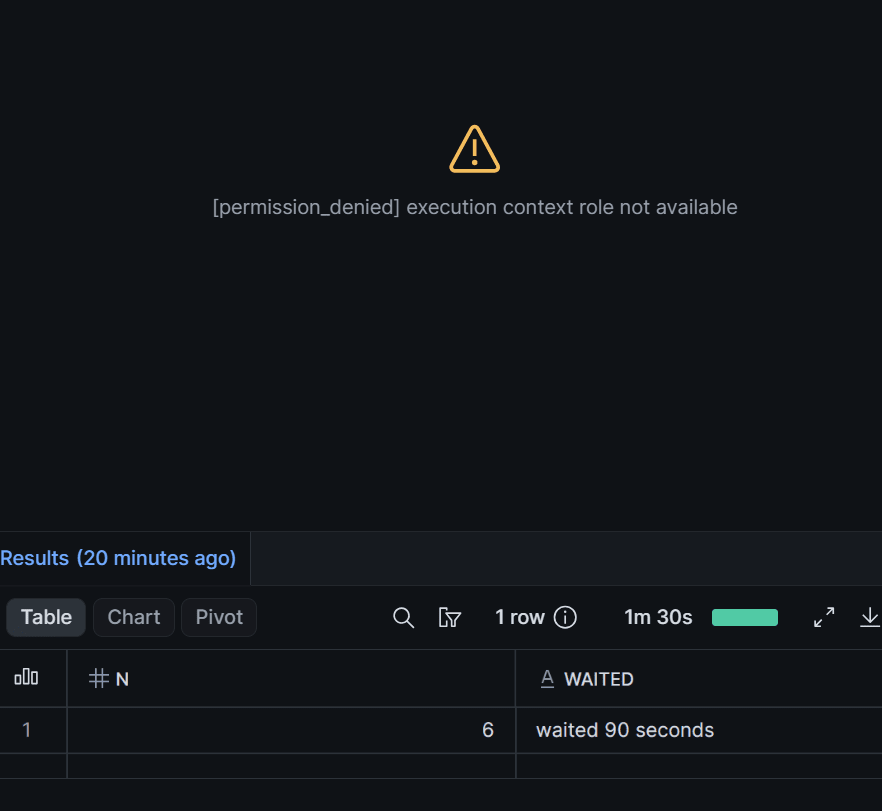
The expiration arrived while the second query was running, but it ran to the end.
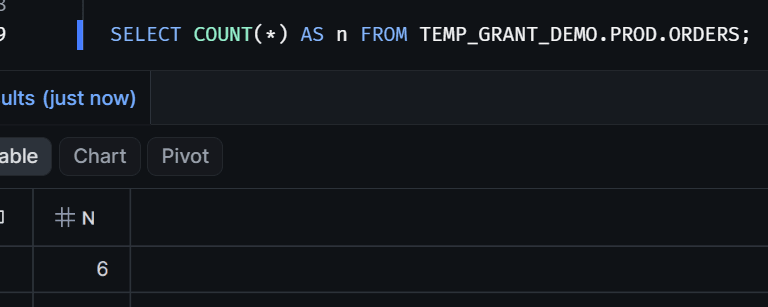
The result pane showed N = 6 and waited 90 seconds, and the execution time was 1m 30s. This matches the official documentation, which says running queries keep running after expiration.
At the same time, the editor area above the result pane changed to the following display. It indicates that TG_ONCALL, which the worksheet had been using, has expired.
After expiration, I check the grant status and try switching roles in a new worksheet.
-- Admin worksheet (after expiration)
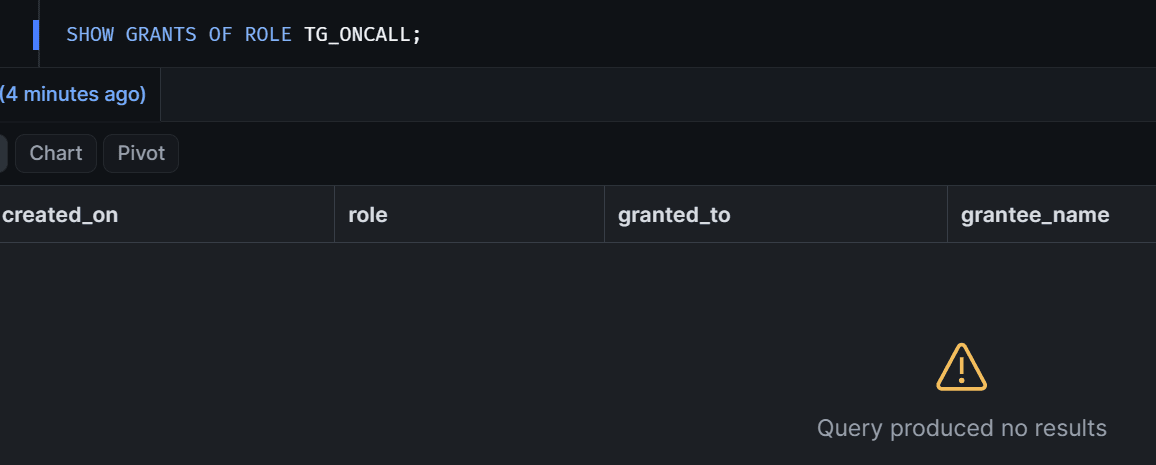
SHOW GRANTS OF ROLE TG_ONCALL;
-- New worksheet (after expiration)
USE ROLE TG_ONCALL;
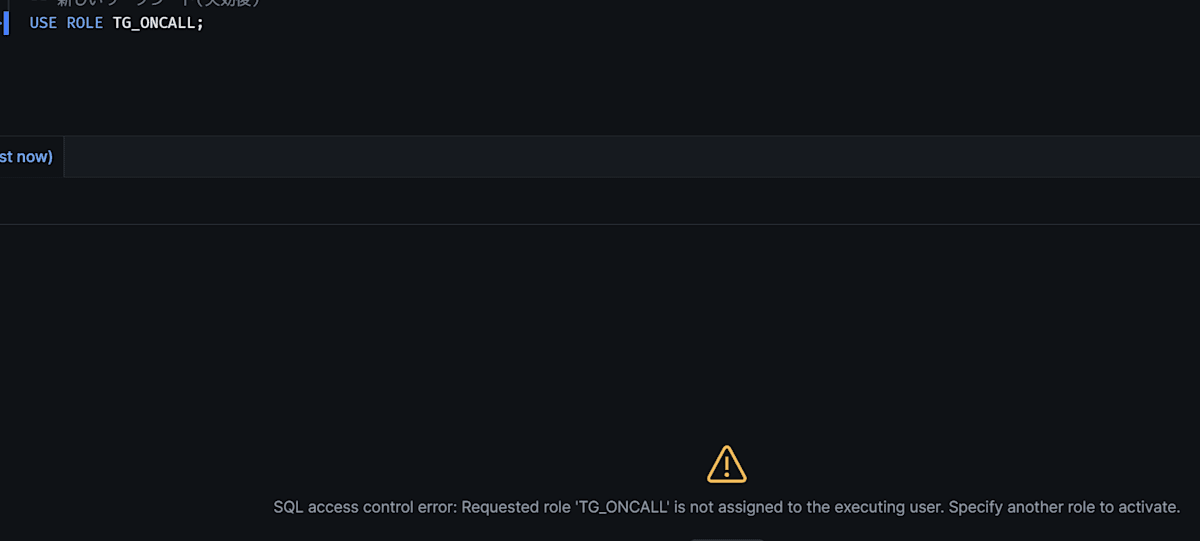
SHOW GRANTS returned no rows, because expired grants are not shown in SHOW GRANTS. USE ROLE TG_ONCALL results in an error. The message is Requested role 'TG_ONCALL' is not assigned to the executing user.
If the response finishes early, you can remove the role without waiting for the expiration by running REVOKE ROLE TG_ONCALL FROM USER IDENTIFIER($me);.
Use case 2: Temporarily grant a PII viewing role
To unmask EMAIL only while investigating an inquiry, I grant TG_PII_VIEWER for 1 minute. To see expiration of a role used as a secondary role, I also grant TG_ONCALL at the same time.
-- Admin worksheet
SET me = CURRENT_USER();
GRANT ROLE TG_PII_VIEWER TO USER IDENTIFIER($me) FOR INTERVAL '1 MINUTE';
GRANT ROLE TG_ONCALL TO USER IDENTIFIER($me) FOR INTERVAL '1 MINUTE';
For the user side, I open a new worksheet. The primary role is the permanently granted TG_ANALYST, and the two granted roles are specified as secondary roles.
-- User worksheet (open a new one; run within 1 minute of the grant)
USE ROLE TG_ANALYST;
USE SECONDARY ROLES TG_PII_VIEWER, TG_ONCALL;
USE WAREHOUSE TEMP_GRANT_WH;

-- Check the grant to myself and its expiration
SHOW GRANTS OF ROLE TG_PII_VIEWER;
Even with TG_ANALYST as the primary role, I could check expires_on of the grant to myself.

Next, I run the following three queries before and after expiration.
-- User worksheet (run before expiration, then wait over 1 minute and run again)
SELECT CURRENT_ROLE() AS r, CURRENT_SECONDARY_ROLES() AS s,
       IS_ROLE_IN_SESSION('TG_PII_VIEWER') AS pii_in_session;

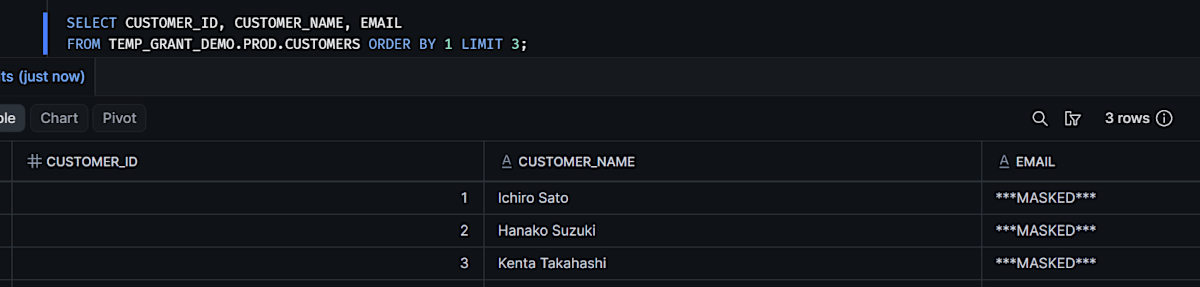
SELECT CUSTOMER_ID, CUSTOMER_NAME, EMAIL
FROM TEMP_GRANT_DEMO.PROD.CUSTOMERS ORDER BY 1 LIMIT 3;

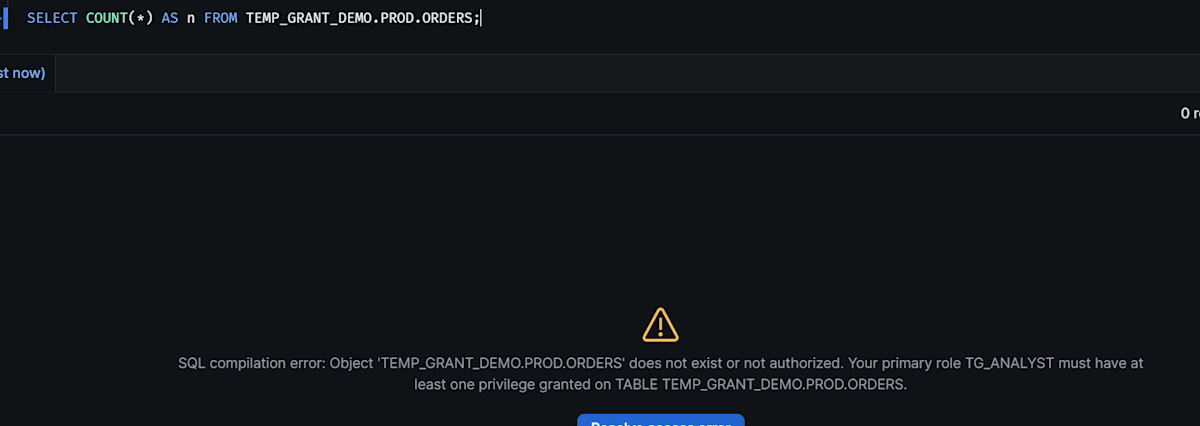
SELECT COUNT(*) AS n FROM TEMP_GRANT_DEMO.PROD.ORDERS;
[Before expiration]
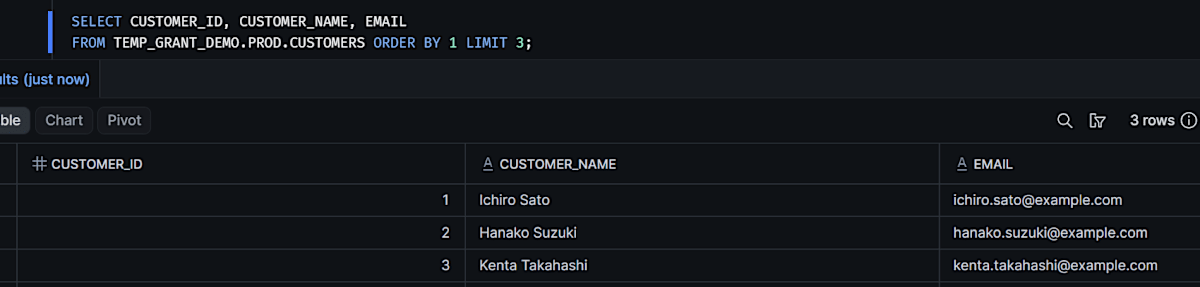
[After expiration]
| Item checked | Before expiration | After expiration |
|---|---|---|
| roles in CURRENT_SECONDARY_ROLES | TG_PII_VIEWER,TG_ONCALL | Empty |
| pii_in_session | TRUE | FALSE |
| EMAIL in row 1 | ichiro.sato@example.com | ***MASKED*** |
| Row count of ORDERS | 6 | Error 002003 (does not exist or not authorized) |
Querying CUSTOMERS after expiration produced no error.
Both roles were removed from the secondary roles, and EMAIL went back to being masked.
The query could continue because the table's read privilege remains with the primary role, TG_ANALYST.
The reason I could query ORDERS was the privileges of TG_ONCALL. SQL that uses privileges held only by the expired role fails after expiration with insufficient privileges. Even in this case the session continued, and CUSTOMERS could still be queried. The impact of expiration differs from use case 1, where the role was used as the primary role.
Use case 3: Grant to a time-limited member until the contract end date
For outsourced members and auditors, grant the role with the contract end date as the expiration. Use UNTIL, which takes a date and time, and add +09:00 when writing in Japan time. I treat TG_BOB as the time-limited member. From here on, I use only the admin worksheet.
First, I try date-times that are not accepted.
-- Admin worksheet
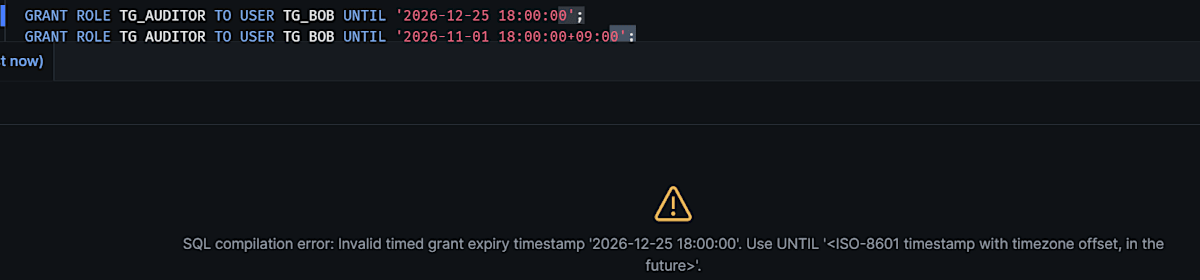
GRANT ROLE TG_AUDITOR TO USER TG_BOB UNTIL '2026-12-25 18:00:00';
GRANT ROLE TG_AUDITOR TO USER TG_BOB UNTIL '2026-11-01 18:00:00+09:00';
Both resulted in errors.
I grant with a future date-time that has an offset, then try extending and shortening the contract. After running each SQL statement, I checked the expiration with SHOW GRANTS OF ROLE TG_AUDITOR.
-- Admin worksheet (run one at a time, checking with SHOW GRANTS each time)
GRANT ROLE TG_AUDITOR TO USER TG_BOB UNTIL '2026-12-25 18:00:00+09:00';                  -- 1
GRANT ROLE TG_AUDITOR TO USER TG_BOB UNTIL '2027-01-29 18:00:00+09:00';                  -- 2
GRANT ROLE TG_AUDITOR TO USER TG_BOB UNTIL '2026-11-30 18:00:00+09:00';                  -- 3
GRANT ROLE TG_AUDITOR TO USER TG_BOB UNTIL '2026-11-30 18:00:00+09:00' RESET EXPIRATION; -- 4

SHOW GRANTS OF ROLE TG_AUDITOR;
| Step | Content | expires_on after execution | created_on |
|---|---|---|---|
| 1 | Grant until the contract end date | 2026-12-25 18:00 | Time of the grant |
| 2 | Re-grant with a later date-time | 2027-01-29 18:00 (extended) | Updated |
| 3 | Re-grant with an earlier date-time | 2027-01-29 18:00 (no change) | Unchanged |
| 4 | Earlier date-time with RESET EXPIRATION |
2026-11-30 18:00 (shortened) | Updated |
An extension takes effect simply by re-granting with a later date-time.
A shortening does not take effect unless RESET EXPIRATION is added.
The success message is the same for 3 and 4.
Whether the change took effect can be judged from expires_on or created_on.

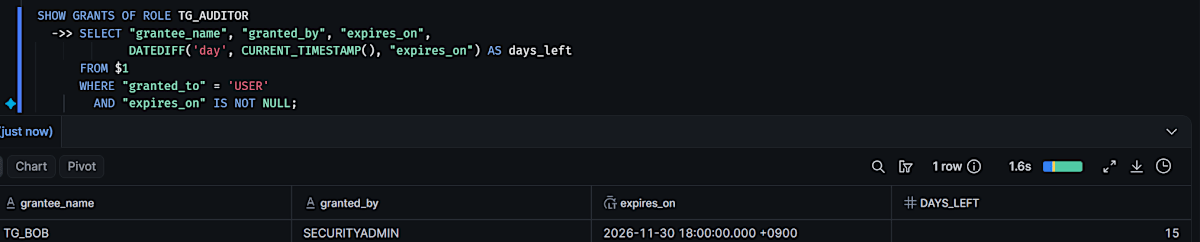
You can get a list of users with time-limited grants by chaining the SHOW result with the pipe operator ->>. To exclude permanent grants, filter to rows where expires_on is not NULL.
-- Admin worksheet
SHOW GRANTS OF ROLE TG_AUDITOR
  ->> SELECT "grantee_name", "granted_by", "expires_on",
             DATEDIFF('day', CURRENT_TIMESTAMP(), "expires_on") AS days_left
      FROM $1
      WHERE "granted_to" = 'USER'
        AND "expires_on" IS NOT NULL;
The one row for TG_BOB was returned with its expiration and the days remaining.
Finally, I rewrite the expiration to 1 minute from now and let it expire.
-- Admin worksheet
GRANT ROLE TG_AUDITOR TO USER TG_BOB FOR INTERVAL '1 MINUTE' RESET EXPIRATION;

-- Run after waiting at least 1 minute
SHOW GRANTS OF ROLE TG_AUDITOR;
SHOW USERS LIKE 'TG_BOB' ->> SELECT "name", "disabled" FROM $1;
After expiration, the TG_AUDITOR grants dropped to 0.
TG_BOB's disabled remains false. Only the role grant expires; the user is not disabled.
If you also want to stop logins at the same time the contract ends, disable the user separately, for example with ALTER USER ... SET DISABLED = TRUE.
Use case 4: Grant administrator privileges only for the work period
I try an operation in which a powerful role such as SECURITYADMIN is not granted permanently but only while work is being done. I treat TG_ALICE as an internal operations engineer.
-- Admin worksheet
GRANT ROLE SECURITYADMIN TO USER TG_ALICE FOR INTERVAL '1 MINUTE';
SHOW GRANTS TO USER TG_ALICE;

-- Run after waiting at least 1 minute
SHOW GRANTS TO USER TG_ALICE;

An expiration could be set even on a system-defined role.
expires_on was set to 1 minute later, and SHOW GRANTS run after 1 minute returned 0 rows.
There is a safeguard for temporary grants of ACCOUNTADMIN.
Trying to change the permanent grant of the last remaining ACCOUNTADMIN in the account to a temporary grant is rejected with error 004904. In my test environment, I am the only user holding ACCOUNTADMIN, and that grant is permanent. I try changing this grant to a temporary one with RESET EXPIRATION.
-- Admin worksheet
USE ROLE ACCOUNTADMIN;
GRANT ROLE ACCOUNTADMIN TO USER IDENTIFIER($me) FOR INTERVAL '7 DAYS' RESET EXPIRATION;
SHOW GRANTS OF ROLE ACCOUNTADMIN;
USE ROLE SECURITYADMIN;
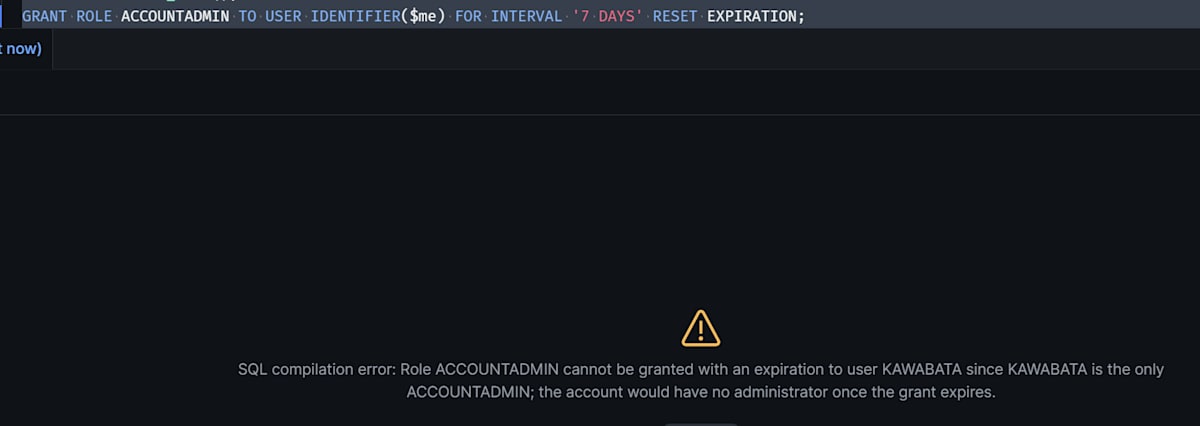
It resulted in an error and the change was not made. Looking at SHOW GRANTS OF ROLE ACCOUNTADMIN, expires_on remains NULL.
Note: In an account where other users also hold a permanent grant of ACCOUNTADMIN, this SQL should succeed according to the re-grant behavior in the official documentation, and your own grant will change to a temporary grant. If you try it, immediately restore the permanent grant with the no-expiration
GRANT ROLE ACCOUNTADMIN TO USER IDENTIFIER($me);.
Re-running a normal GRANT ROLE makes the grant permanent
This is a behavior to be careful about when operating temporary grants.
I run the same SQL that grants TG_ONCALL to TG_ALICE five times, changing the clause each time. Only for the fifth, I change the executing role to ACCOUNTADMIN.
-- Admin worksheet (run one at a time, checking with SHOW GRANTS each time)
GRANT ROLE TG_ONCALL TO USER TG_ALICE FOR INTERVAL '8 HOURS';                  -- 1
GRANT ROLE TG_ONCALL TO USER TG_ALICE;                                         -- 2
GRANT ROLE TG_ONCALL TO USER TG_ALICE FOR INTERVAL '8 HOURS';                  -- 3
GRANT ROLE TG_ONCALL TO USER TG_ALICE FOR INTERVAL '8 HOURS' RESET EXPIRATION; -- 4
USE ROLE ACCOUNTADMIN;
GRANT ROLE TG_ONCALL TO USER TG_ALICE;                                         -- 5
USE ROLE SECURITYADMIN;

SHOW GRANTS OF ROLE TG_ONCALL;
| Step | Executing role | Clause used | expires_on after execution |
|---|---|---|---|
| 1 | SECURITYADMIN | FOR INTERVAL '8 HOURS' |
8 hours later |
| 2 | SECURITYADMIN | None | NULL (became permanent) |
| 3 | SECURITYADMIN | FOR INTERVAL '8 HOURS' |
NULL (no change) |
| 4 | SECURITYADMIN | FOR INTERVAL '8 HOURS' RESET EXPIRATION |
8 hours later |
| 5 | ACCOUNTADMIN | None | NULL (became permanent) |
All five times, the message returned was Statement executed successfully.
When you re-grant without an expiration as in 2, the temporary grant becomes permanent. Adding an expiration again as in 3 does not turn it back into a temporary grant. Adding RESET EXPIRATION as in 4 did turn it back.
Step 5 is the case where the executing role was changed to ACCOUNTADMIN. granted_by remained SECURITYADMIN. No row was added, and the existing temporary grant turned into a permanent grant.
In environments where a standard user-creation script or an IaC tool re-runs GRANT ROLE ... TO USER, temporary grants can turn permanent without anyone noticing. If you decide on roles that are used only for temporary grants, you can find grants without an expiration with the following query.
-- Admin worksheet
SHOW GRANTS OF ROLE TG_ONCALL
  ->> SELECT "grantee_name", "granted_by", "created_on"
      FROM $1
      WHERE "granted_to" = 'USER' AND "expires_on" IS NULL;

-- Remove once the check is done
REVOKE ROLE TG_ONCALL FROM USER TG_ALICE;
Limitations and notes
Limitations and notes
- Adding the clauses to role-to-role grants and to database roles fails with an error (stated in the official documentation)
- Application role grants and privileges granted directly to users are out of scope (stated in the official documentation)
- Grants are managed separately per grantor, and the role can be used as long as at least one valid grant remains (stated in the official documentation, not verified)
- The GRANTS_TO_USERS view can lag by up to 2 hours (stated in the official documentation)
DELETED_ON in the GRANTS_TO_USERS view is not the expiration date-time but the date-time when the grant was deleted. An expired grant remains with DELETED_ON as NULL until Snowflake deletes it. Of the grants I expired during testing, three had DELETED_ON about 24 minutes after expiration (two) and about 93 minutes after expiration (one). To extract only valid grants, also add EXPIRES_ON to the condition, as in the example in the official documentation. ACCOUNT_USAGE cannot be queried with the default privileges of SECURITYADMIN, so switch to ACCOUNTADMIN to run it.
-- Admin worksheet
USE ROLE ACCOUNTADMIN;

SELECT role, grantee_name, granted_by, expires_on
FROM SNOWFLAKE.ACCOUNT_USAGE.GRANTS_TO_USERS
WHERE deleted_on IS NULL
  AND (expires_on IS NULL OR expires_on > CURRENT_TIMESTAMP());
Conclusion
With Temporary role grants, you no longer need to manually revoke roles after the deadline. Because the impact of expiration differs between primary roles and secondary roles, I think the design needs to be matched to how roles are used.
That re-running a GRANT ROLE without an expiration makes the grant permanent is something worth checking before using this together with existing scripts.
I hope this article is helpful to you!