
Building a Multi-Account CI/CD Environment for Snowflake × Terraform Using GitHub Actions

This page has been translated by machine translation. View original
Introduction
I'm kasama from the Data Business Division.
In this article, I'll share how I built a multi-account CI/CD pipeline using Terraform and GitHub Actions for Snowflake environments with separate development and production accounts.
Premise
This article is based on the open-source version of Terraform, not considering HCP Terraform (cloud version).
I'll reference the configurations from the following blogs, with some customizations. While the OIDC setup and general workflow are similar, the multi-account configuration differs slightly, which I'll focus on.
I'll base my approach on the following structure. The implementation creates modules by access role + resource type, called from dev/prd main.tf files. Terraform init, plan, and apply commands are executed through GitHub Actions.
snowflake-terraform-sample % tree
.
├── .github
│   ├── dependabot.yml
│   └── workflows
│       ├── dev-snowflake-terraform-cicd.yml
│       └── prd-snowflake-terraform-cicd.yml
├── cfn
│   └── create_state_gha_resources.yml
├── environments
│   ├── dev
│   │   ├── backend.tf
│   │   ├── main.tf
│   │   ├── outputs.tf
│   │   ├── variables.tf
│   │   └── versions.tf
│   └── prd
│       ├── backend.tf
│       ├── main.tf
│       ├── outputs.tf
│       ├── variables.tf
│       └── versions.tf
├── modules
│   ├── access_role_and_database
│   │   ├── main.tf
│   │   ├── outputs.tf
│   │   ├── variables.tf
│   │   └── versions.tf
│   ├── access_role_and_file_format
│   │   ├── main.tf
│   │   ├── outputs.tf
│   │   ├── variables.tf
│   │   └── versions.tf
│   ├── access_role_and_schema
│   │   ├── main.tf
│   │   ├── outputs.tf
│   │   ├── variables.tf
│   │   └── versions.tf
│   ├── access_role_and_stage
│   │   ├── main.tf
│   │   ├── outputs.tf
│   │   ├── variables.tf
│   │   └── versions.tf
│   ├── access_role_and_storage_integration
│   │   ├── main.tf
│   │   ├── outputs.tf
│   │   ├── variables.tf
│   │   └── versions.tf
│   ├── access_role_and_warehouse
│   │   ├── main.tf
│   │   ├── outputs.tf
│   │   ├── variables.tf
│   │   └── versions.tf
│   ├── aws_storage_integration
│   │   ├── main.tf
│   │   ├── outputs.tf
│   │   ├── variables.tf
│   │   └── versions.tf
│   ├── functional_role
│   │   ├── main.tf
│   │   ├── outputs.tf
│   │   ├── variables.tf
│   │   └── versions.tf
└── README.md
GitHub Actions Workflow
This project adopts a Git Flow strategy, centered around a main branch (production) and a develop branch (development). Feature branches are used for development, with integration and testing on the develop branch before merging to main for production releases. Each branch corresponds to a specific environment, with automatic deployments triggered by merges to branches.
- Development Environment (feature → develop): Automatic deployment to the development environment when PR merges from feature to develop branch
- Production Environment (develop → main): After validation in development, automatic deployment to production when PR merges from develop to main branch
For each environment, terraform plan is executed when creating a PR for preview, and terraform apply is executed when merging the PR for actual deployment.
Development Environment Deployment Flow (feature → develop)
-
When PR is created (terraform plan)
- Developer creates PR from feature branch to develop branch
- GitHub Actions workflow is automatically triggered
- Authenticate to AWS via OIDC and get state from S3 for terraform init
- Run code quality checks (fmt/validate/TFLint/Trivy)
- Execute terraform plan on Snowflake environment with Key-pair authentication
- Comment plan results on PR
-
When PR is merged (terraform apply)
- PR is approved and merged to develop branch
- Workflow is triggered again by push event
- Authenticate to AWS and run terraform init
- Rerun code quality checks
- Automatically deploy to development Snowflake with terraform apply -auto-approve
Production Environment Deployment Flow (develop → main)
-
When PR is created (terraform plan)
- After verification in development, create PR from develop branch to main branch
- GitHub Actions workflow is automatically triggered
- Authenticate to AWS via OIDC and get state from S3 for terraform init
- Run code quality checks (fmt/validate/TFLint/Trivy)
- Execute terraform plan on production Snowflake environment with Key-pair authentication
- Comment plan results on PR
-
When PR is merged (terraform apply)
- After review and approval, merge to main branch
- Workflow is triggered again by push event
- Authenticate to AWS and run terraform init
- Rerun code quality checks
- Automatically deploy to production Snowflake with terraform apply -auto-approve
The workflow for the production environment is similar to development, but branch protection settings can be used to create differences.
Typically, PR merges to the main branch (production deployment) require at least one approval. For the develop branch (development environment), settings can be more flexible based on project policy. For example, if local deployments are prohibited due to Terraform State Lock considerations, making approvals for develop branch merges optional can accelerate CI/CD validation cycles. Alternatively, a staged approval process can be implemented, requiring one approver for develop and two (admin + approver) for main to emphasize code quality.
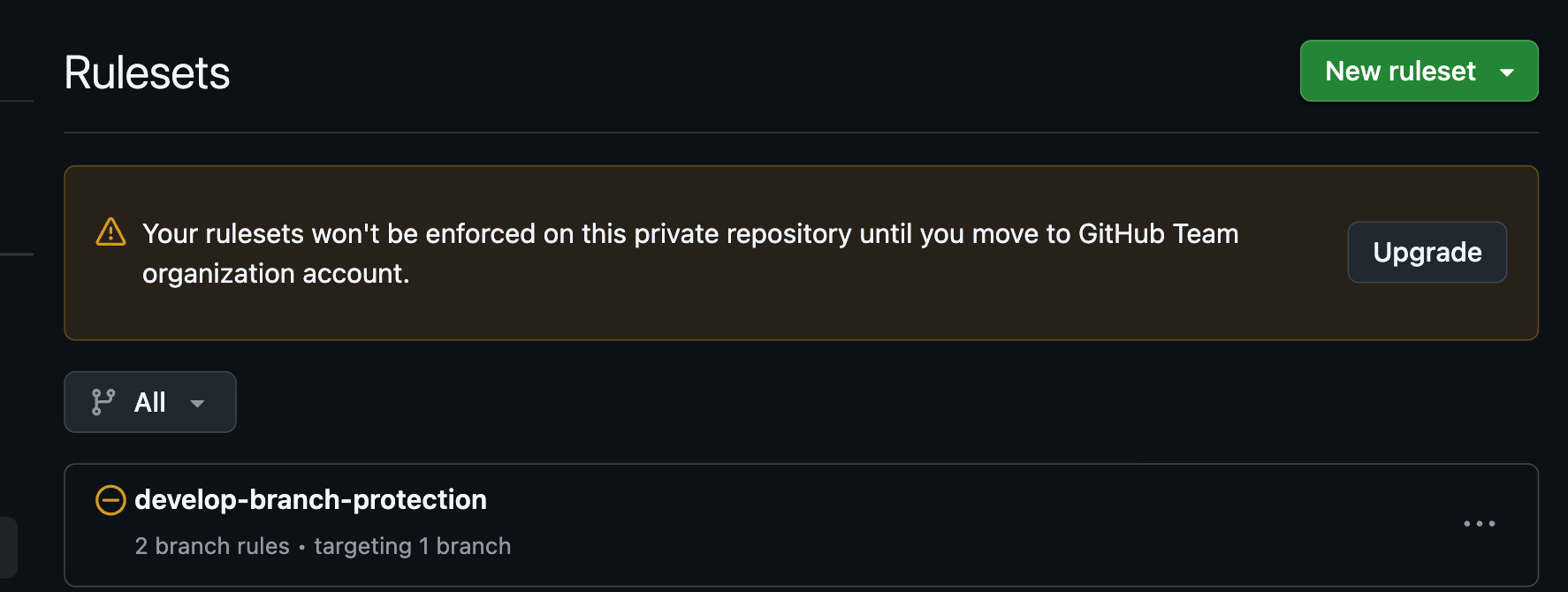
GitHub's Rulesets can be used for branch protection settings like merge approvals. The following article was helpful:
I tried it, but while I could create rulesets, they couldn't be applied to Private repositories on the Free Plan.
Implementation
name: "Snowflake Terraform CI/CD - DEV"

on:
  push:
    branches:
      - develop
    paths:
      - "environments/dev/**"
      - "modules/**"
      - ".github/workflows/dev-snowflake-terraform-cicd.yml"
  pull_request:
    branches:
      - develop
    paths:
      - "environments/dev/**"
      - "modules/**"
      - ".github/workflows/dev-snowflake-terraform-cicd.yml"

jobs:
  plan-dev:
    runs-on: ubuntu-latest
    timeout-minutes: 30
    environment: dev

    env:
      # Terraform
      TF_VERSION: "1.11.0"
      # Snowflake - TF_VAR_ prefix maps to Terraform variables
      TF_VAR_snowflake_organization_name: ${{ secrets.SNOWFLAKE_ORG_NAME }}
      TF_VAR_snowflake_account_name: ${{ secrets.SNOWFLAKE_ACCOUNT_NAME }}
      TF_VAR_snowflake_private_key: ${{ secrets.SNOWFLAKE_PRIVATE_KEY }}

    permissions:
      id-token: write # Required for OIDC
      contents: read # Required for actions/checkout
      pull-requests: write # For PR comments

    steps:
      - uses: actions/checkout@08c6903cd8c0fde910a37f88322edcfb5dd907a8 # v5.0.0

      - uses: hashicorp/setup-terraform@b9cd54a3c349d3f38e8881555d616ced269862dd # v3.1.2
        with:
          terraform_version: ${{ env.TF_VERSION }}

      - name: Set up AWS credentials
        uses: aws-actions/configure-aws-credentials@a03048d87541d1d9fcf2ecf528a4a65ba9bd7838 # v5.0.0
        with:
          role-to-assume: ${{ secrets.AWS_ROLE_ARN }}
          aws-region: ap-northeast-1
          audience: sts.amazonaws.com

      - name: Terraform format
        run: terraform fmt -check -recursive
        working-directory: environments/dev

      - name: Terraform Init
        run: terraform init -upgrade -no-color
        working-directory: environments/dev

      - name: Terraform validate
        run: terraform validate -no-color
        working-directory: environments/dev

      - name: Setup TFLint
        uses: terraform-linters/setup-tflint@ae78205cfffec9e8d93fd2b3115c7e9d3166d4b6 # v5.0.0
        with:
          tflint_version: v0.58.0

      - name: Run TFLint
        run: tflint --init && tflint -f compact --minimum-failure-severity=error
        working-directory: environments/dev

      - name: Run Trivy Security Scan
        uses: aquasecurity/trivy-action@b6643a29fecd7f34b3597bc6acb0a98b03d33ff8 # 0.33.1
        with:
          scan-type: "config"
          scan-ref: "environments/dev"
          format: "table"
          exit-code: 1
          severity: CRITICAL,HIGH
          ignore-unfixed: true

      - name: Terraform Plan
        id: plan
        if: github.event_name == 'pull_request'
        run: |
          terraform plan -no-color -out=tfplan.binary
          terraform show -no-color tfplan.binary > tfplan.txt
        working-directory: environments/dev

      - name: Post Plan to PR
        if: github.event_name == 'pull_request' && steps.plan.outcome == 'success'
        uses: actions/github-script@ed597411d8f924073f98dfc5c65a23a2325f34cd  # v8.0.0
        with:
          script: |
            const fs = require('fs');
            const plan = fs.readFileSync('environments/dev/tfplan.txt', 'utf8');

            github.rest.issues.createComment({
              issue_number: context.issue.number,
              owner: context.repo.owner,
              repo: context.repo.repo,
              body: `### Terraform Plan - Dev

            <details>
            <summary>Show Plan</summary>

            \`\`\`terraform
            ${plan.substring(0, 65000)}
            \`\`\`

            </details>`
            });

      - name: Terraform Apply
        if: github.ref == 'refs/heads/develop' && github.event_name == 'push'
        run: terraform apply -auto-approve
        working-directory: environments/dev
This is the GitHub Actions workflow configuration for the development environment.
on: Limits triggers to the develop branch, withpathsfilters to run only when relevant files are changedenv: References values from pre-configured GitHub Secrets withTF_VAR_prefix, automatically mapping to Terraform variablespermissions: Following the principle of least privilege, specifies onlyid-token: write(OIDC authentication),contents: read(checkout), andpull-requests: write(PR comments)- Third-party Actions: Fixed with commit SHA like
actions/checkout@08c6903...to prevent tag tampering attacks - AWS authentication: Gets temporary credentials via OIDC, reducing risks of leaked long-term access keys
- Code quality checks: Runs terraform fmt/validate, TFLint, and Trivy sequentially, stopping the workflow if issues are found
terraform plan: Runs only when creating a PR with the conditiongithub.event_name == 'pull_request'- Posting plan results to PR: Posts a comment with
actions/github-scriptonly when plan succeeds with the conditionsteps.plan.outcome == 'success' terraform apply: Runs only when merging to develop branch with the conditiongithub.ref == 'refs/heads/develop' && github.event_name == 'push'
There are several security-focused points. In permissions, rather than granting default write permissions, only id-token: write, contents: read, and pull-requests: write are explicitly specified, minimizing the attack surface by granting only the necessary minimum permissions. Third-party Actions are fixed with commit SHA (actions/checkout@08c6..) rather than version tags (v5.0.0). Since tags can be rewritten later, there's a risk they could be replaced with malicious code, but commit SHAs are immutable, preventing this risk. For secret management, sensitive information like Snowflake private keys is managed in GitHub Secrets to prevent output in workflow logs. GitHub Actions automatically masks Secret values, reducing the risk of exposing sensitive information in logs.
These practices are based on the following references:
name: "Snowflake Terraform CI/CD - PRD"

on:
  push:
    branches:
      - main
    paths:
      - "environments/prd/**"
      - "modules/**"
      - ".github/workflows/prd-snowflake-terraform-cicd.yml"
  pull_request:
    branches:
      - main
    paths:
      - "environments/prd/**"
      - "modules/**"
      - ".github/workflows/prd-snowflake-terraform-cicd.yml"

jobs:
  plan-prd:
    runs-on: ubuntu-latest
    timeout-minutes: 30
    environment: prd

    env:
      # Terraform
      TF_VERSION: "1.11.0"
      # Snowflake - TF_VAR_ prefix maps to Terraform variables
      TF_VAR_snowflake_organization_name: ${{ secrets.SNOWFLAKE_ORG_NAME }}
      TF_VAR_snowflake_account_name: ${{ secrets.SNOWFLAKE_ACCOUNT_NAME }}
      TF_VAR_snowflake_private_key: ${{ secrets.SNOWFLAKE_PRIVATE_KEY }}

    permissions:
      id-token: write # Required for OIDC
      contents: read # Required for actions/checkout
      pull-requests: write # For PR comments

    steps:
      - uses: actions/checkout@08c6903cd8c0fde910a37f88322edcfb5dd907a8 # v5.0.0

      - uses: hashicorp/setup-terraform@b9cd54a3c349d3f38e8881555d616ced269862dd # v3.1.2
        with:
          terraform_version: ${{ env.TF_VERSION }}

      - name: Set up AWS credentials
        uses: aws-actions/configure-aws-credentials@a03048d87541d1d9fcf2ecf528a4a65ba9bd7838 # v5.0.0
        with:
          role-to-assume: ${{ secrets.AWS_ROLE_ARN }}
          aws-region: ap-northeast-1
          audience: sts.amazonaws.com

      - name: Terraform format
        run: terraform fmt -check -recursive
        working-directory: environments/prd

      - name: Terraform Init
        run: terraform init -upgrade -no-color
        working-directory: environments/prd

      - name: Terraform validate
        run: terraform validate -no-color
        working-directory: environments/prd

      - name: Setup TFLint
        uses: terraform-linters/setup-tflint@ae78205cfffec9e8d93fd2b3115c7e9d3166d4b6 # v5.0.0
        with:
          tflint_version: v0.58.0

      - name: Run TFLint
        run: tflint --init && tflint -f compact --minimum-failure-severity=error
        working-directory: environments/prd

      - name: Run Trivy Security Scan
        uses: aquasecurity/trivy-action@b6643a29fecd7f34b3597bc6acb0a98b03d33ff8 # 0.33.1
        with:
          scan-type: "config"
          scan-ref: "environments/prd"
          format: "table"
          exit-code: 1
          severity: CRITICAL,HIGH
          ignore-unfixed: true

      - name: Terraform Plan
        id: plan
        if: github.event_name == 'pull_request'
        run: |
          terraform plan -no-color -out=tfplan.binary
          terraform show -no-color tfplan.binary > tfplan.txt
        working-directory: environments/prd

      - name: Post Plan to PR
        if: github.event_name == 'pull_request' && steps.plan.outcome == 'success'
        uses: actions/github-script@ed597411d8f924073f98dfc5c65a23a2325f34cd  # v8.0.0
        with:
          script: |
            const fs = require('fs');
            const plan = fs.readFileSync('environments/prd/tfplan.txt', 'utf8');

            github.rest.issues.createComment({
              issue_number: context.issue.number,
              owner: context.repo.owner,
              repo: context.repo.repo,
              body: `### Terraform Plan - Production

            <details>
            <summary>Show Plan</summary>

            \`\`\`terraform
            ${plan.substring(0, 65000)}
            \`\`\`

            </details>`
            });

      - name: Terraform Apply
        if: github.ref == 'refs/heads/main' && github.event_name == 'push'
        run: terraform apply -auto-approve
        working-directory: environments/prd
This is the GitHub Actions workflow configuration for the production environment.
It has the same structure as the development environment, but with the trigger branch changed to main, the working directory set to environments/prd, and the apply condition set to github.ref == 'refs/heads/main'.
To automate updates for third-party Actions and Terraform providers, we've also included Dependabot configuration.
version: 2
updates:
  # Update GitHub Actions dependencies
  - package-ecosystem: "github-actions"
    directory: "/"
    target-branch: "develop"
    schedule:
      interval: "weekly"
      day: "monday"
      time: "09:00"
      timezone: "Asia/Tokyo"
    labels:
      - "dependencies"
      - "github-actions"
    commit-message:
      prefix: "chore(deps)"
      include: "scope"
    open-pull-requests-limit: 10

  # Update Terraform dependencies
  - package-ecosystem: "terraform"
    directory: "/environments/dev"
    target-branch: "develop"
    schedule:
      interval: "weekly"
      day: "monday"
      time: "09:00"
      timezone: "Asia/Tokyo"
    labels:
      - "dependencies"
      - "terraform"
    commit-message:
      prefix: "chore(deps)"
      include: "scope"
    open-pull-requests-limit: 10

  - package-ecosystem: "terraform"
    directory: "/environments/prd"
    target-branch: "develop"
    schedule:
      interval: "weekly"
      day: "monday"
      time: "09:00"
      timezone: "Asia/Tokyo"
    labels:
      - "dependencies"
      - "terraform"
    commit-message:
      prefix: "chore(deps)"
      include: "scope"
    open-pull-requests-limit: 10
This configuration automatically checks for updates to GitHub Actions and Terraform (dev/prd environments) dependencies every Monday at 09:00 (Japan time), creating up to 10 PRs for new versions. Terraform provider updates (especially for the Snowflake provider) may include breaking changes due to preview features being made GA or specification changes, so it's important to check the CHANGELOG and thoroughly test in the development environment before merging PRs.
Preparation
Creating Snowflake Deployment User
As of October 2025, while Snowflake CLI supports OIDC, Snowflake Terraform does not yet support it, so we'll connect using key pair authentication with a Snowflake deployment user.
Run the following commands locally or in AWS CloudShell to create a key pair. Since GitHub Secrets cannot be referenced after setting, we're storing the values in AWS SSM Parameter.
# Generate RSA key pair
openssl genrsa -out snowflake_private_key.pem 2048
openssl rsa -in snowflake_private_key.pem -pubout -out snowflake_public_key.pem

# Format the public key (remove line breaks)
PUBLIC_KEY=$(cat snowflake_public_key.pem | grep -v "BEGIN PUBLIC KEY" | grep -v "END PUBLIC KEY" | tr -d '\n')
echo $PUBLIC_KEY

# Save private key to AWS SSM Parameter Store
aws ssm put-parameter \
    --name "/<your-unique-name>/dev/snowflake/terraform-user/private-key" \
    --value "$(cat snowflake_private_key.pem)" \
    --type "SecureString" \
    --overwrite

# Save formatted public key
aws ssm put-parameter \
    --name "/<your-unique-name>/dev/snowflake/terraform-user/public-key" \
    --value "$PUBLIC_KEY" \
    --type "String" \
    --overwrite
Run the following SQL in your Snowflake account to create a deployment user:
USE ROLE SECURITYADMIN;

CREATE USER TERRAFORM_BLOG_USER
    TYPE = SERVICE
    RSA_PUBLIC_KEY='<YOUR_RSA_PUBLIC_KEY>'  -- Paste your formatted public key
    DEFAULT_ROLE=PUBLIC;

CREATE ROLE TERRAFORM;

GRANT ROLE TERRAFORM TO USER TERRAFORM_BLOG_USER;
GRANT ROLE SECURITYADMIN TO ROLE TERRAFORM;
GRANT ROLE SYSADMIN TO ROLE TERRAFORM;
GRANT ROLE TERRAFORM TO ROLE ACCOUNTADMIN;

-- Grant CREATE INTEGRATION permission (run as ACCOUNTADMIN)
USE ROLE ACCOUNTADMIN;
GRANT CREATE INTEGRATION ON ACCOUNT TO ROLE TERRAFORM;

USE ROLE SYSADMIN;

CREATE OR REPLACE WAREHOUSE TERRAFORM_BLOG_WH
    WAREHOUSE_SIZE=XSMALL
    AUTO_RESUME=TRUE
    AUTO_SUSPEND=60
    INITIALLY_SUSPENDED=TRUE
    STATEMENT_TIMEOUT_IN_SECONDS=300  -- 5min
    COMMENT='For terraform.';

-- Grant warehouse usage to SECURITYADMIN (needed for Terraform execution)
GRANT USAGE ON WAREHOUSE TERRAFORM_BLOG_WH TO ROLE SECURITYADMIN;

-- Grant MANAGE GRANTS to SYSADMIN (needed for future grants)
USE ROLE SECURITYADMIN;
GRANT MANAGE GRANTS ON ACCOUNT TO ROLE SYSADMIN;
AWS GitHub Actions Resource Deployment
Below is an example of IAM Role and S3 resources used for Terraform deployment. Please feel free to change resource names according to your project. These were deployed using CloudFormation.
cfn/create_state_gha_resources.yml
AWSTemplateFormatVersion: 2010-09-09
Description: |-
  Snowflake-Terraform S3 & GitHub Actions Setup - Creates S3 bucket for Terraform state
  and IAM role for GitHub Actions with comprehensive configuration

Mappings:
  # Switch values based on AWS AccountId
  EnvMapping:
    "123456789012":
      EnvName: dev

Metadata:
  AWS::CloudFormation::Interface:
    ParameterGroups:
      - Label:
          default: "GitHub Configuration"
        Parameters:
          - GitHubAccountName
          - GitHubRemoteRepoName
          - GitHubOIDCProviderArn

Parameters:
  GitHubAccountName:
    Type: String
    Default: your-github-account
    Description: GitHub account name of the repository
  GitHubRemoteRepoName:
    Type: String
    Default: "terraform-snowflake-sample"
  GitHubOIDCProviderArn:
    Type: String
    Description: ARN of the existing GitHub OIDC Provider

Resources:
  # S3 Bucket for Terraform state
  TerraformStateBucket:
    Type: AWS::S3::Bucket
    Properties:
      BucketName: !Sub
        - "your-project-${EnvName}-s3-snf-state"
        - EnvName: !FindInMap
            - EnvMapping
            - !Ref "AWS::AccountId"
            - EnvName
      VersioningConfiguration:
        Status: Enabled
      PublicAccessBlockConfiguration:
        BlockPublicAcls: true
        BlockPublicPolicy: true
        IgnorePublicAcls: true
        RestrictPublicBuckets: true
      BucketEncryption:
        ServerSideEncryptionConfiguration:
          - ServerSideEncryptionByDefault:
              SSEAlgorithm: AES256
      Tags:
        - Key: service-id
          Value: your-project
        - Key: module
          Value: terraform-state
        - Key: project
          Value: integrated-analysis-env

  # IAM Role for GitHub Actions
  GitHubActionsRole:
    Type: AWS::IAM::Role
    Properties:
      RoleName: !Sub
        - "your-project-${EnvName}-iamrole-snf-gha"
        - EnvName: !FindInMap
            - EnvMapping
            - !Ref "AWS::AccountId"
            - EnvName
      Path: /
      AssumeRolePolicyDocument:
        Version: 2012-10-17
        Statement:
          - Sid: TrustGitHubActionsOIDCProvider
            Effect: Allow
            Principal:
              Federated: !Ref GitHubOIDCProviderArn
            Action: sts:AssumeRoleWithWebIdentity
            Condition:
              StringLike:
                token.actions.githubusercontent.com:sub:
                  - !Sub "repo:${GitHubAccountName}/${GitHubRemoteRepoName}:*"
      Policies:
        - PolicyName: !Sub
            - "your-project-${EnvName}-iampolicy-snf-gha"
            - EnvName: !FindInMap
                - EnvMapping
                - !Ref "AWS::AccountId"
                - EnvName
          PolicyDocument:
            Version: 2012-10-17
            Statement:
              # Terraform state S3 bucket permissions
              - Sid: TerraformS3StateBucketPolicy
                Effect: Allow
                Action:
                  - s3:ListBucket
                  - s3:GetBucketLocation
                  - s3:ListBucketMultipartUploads
                  - s3:ListBucketVersions
                  - s3:GetObject
                  - s3:GetObjectVersion
                  - s3:PutObject
                  - s3:DeleteObject
                Resource:
                  - !Sub "arn:aws:s3:::${TerraformStateBucket}"
                  - !Sub "arn:aws:s3:::${TerraformStateBucket}/*"
              # Permissions to create and configure S3 buckets used by Terraform modules
              - Sid: ModuleS3BucketManagement
                Effect: Allow
                Action:
                  - s3:CreateBucket
                  - s3:DeleteBucket
                  - s3:PutBucketVersioning
                  - s3:GetBucketTagging
                  - s3:PutEncryptionConfiguration
                  - s3:GetEncryptionConfiguration
                  - s3:PutBucketTagging
                  - s3:PutBucketPolicy
                  - s3:GetBucketPolicy
                  - s3:DeleteBucketPolicy
                  - s3:GetBucketLocation
                  - s3:GetBucketAcl
                  - s3:GetBucketCORS
                  - s3:ListBucket
                  - s3:GetBucketWebsite
                  - s3:GetBucketVersioning
                  - s3:GetAccelerateConfiguration
                  - s3:GetBucketRequestPayment
                  - s3:GetBucketLogging
                  - s3:GetLifecycleConfiguration
                  - s3:GetReplicationConfiguration
                  - s3:GetBucketObjectLockConfiguration
                Resource:
                  - !Sub
                    - "arn:aws:s3:::your-project-${EnvName}-s3-*"
                    - EnvName: !FindInMap
                        - EnvMapping
                        - !Ref "AWS::AccountId"
                        - EnvName
                  - "arn:aws:s3:::your-project-snowflake-*"
              # IAM permissions to create roles and attach inline policies for modules
              - Sid: ModuleIamRoleManagement
                Effect: Allow
                Action:
                  - iam:CreateRole
                  - iam:DeleteRole
                  - iam:GetRole
                  - iam:TagRole
                  - iam:PutRolePolicy
                  - iam:GetRolePolicy
                  - iam:DeleteRolePolicy
                  - iam:ListRolePolicies
                  - iam:ListAttachedRolePolicies
                  - iam:ListInstanceProfilesForRole
                  - iam:UpdateAssumeRolePolicy
                  - iam:UntagRole
                Resource:
                  - !Sub
                    - "arn:aws:iam::${AWS::AccountId}:role/your-project-${EnvName}-iamrole-*"
                    - EnvName: !FindInMap
                        - EnvMapping
                        - !Ref "AWS::AccountId"
                        - EnvName
                  - !Sub "arn:aws:iam::${AWS::AccountId}:role/your-project-snowflake-*"
              # SSM Parameter Store permissions
              - Sid: SSMParameterStorePolicy
                Effect: Allow
                Action:
                  - ssm:GetParameter
                  - ssm:GetParameters
                Resource:
                  - !Sub "arn:aws:ssm:ap-northeast-1:${AWS::AccountId}:parameter/your-project/snowflake/*"
Outputs:
  TerraformStateBucketName:
    Description: Terraform state bucket name
    Value: !Ref TerraformStateBucket
  GitHubActionsRoleArn:
    Description: IAM Role ARN for GitHub Actions
    Value: !GetAtt GitHubActionsRole.Arn
GitHub Secrets Configuration
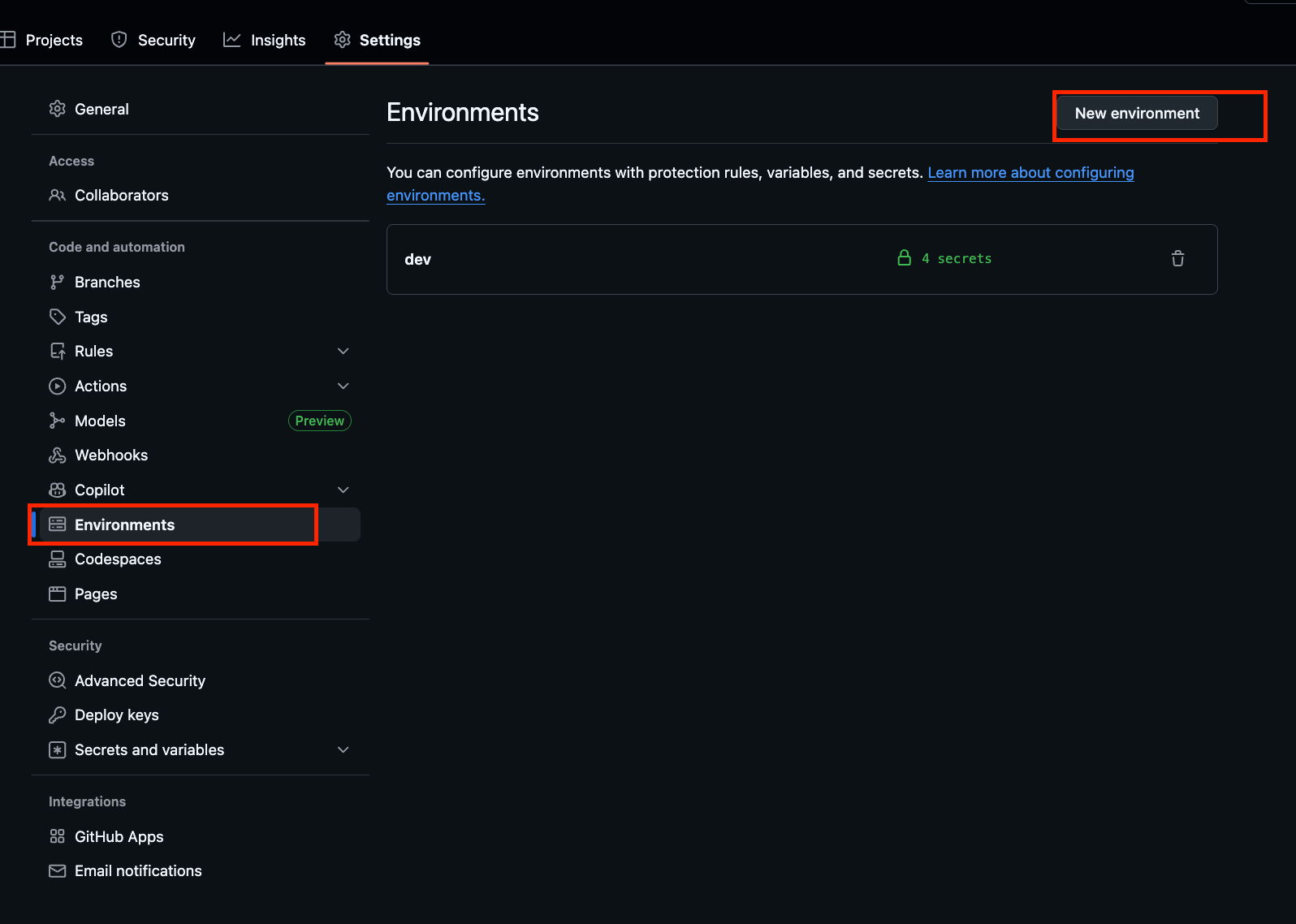
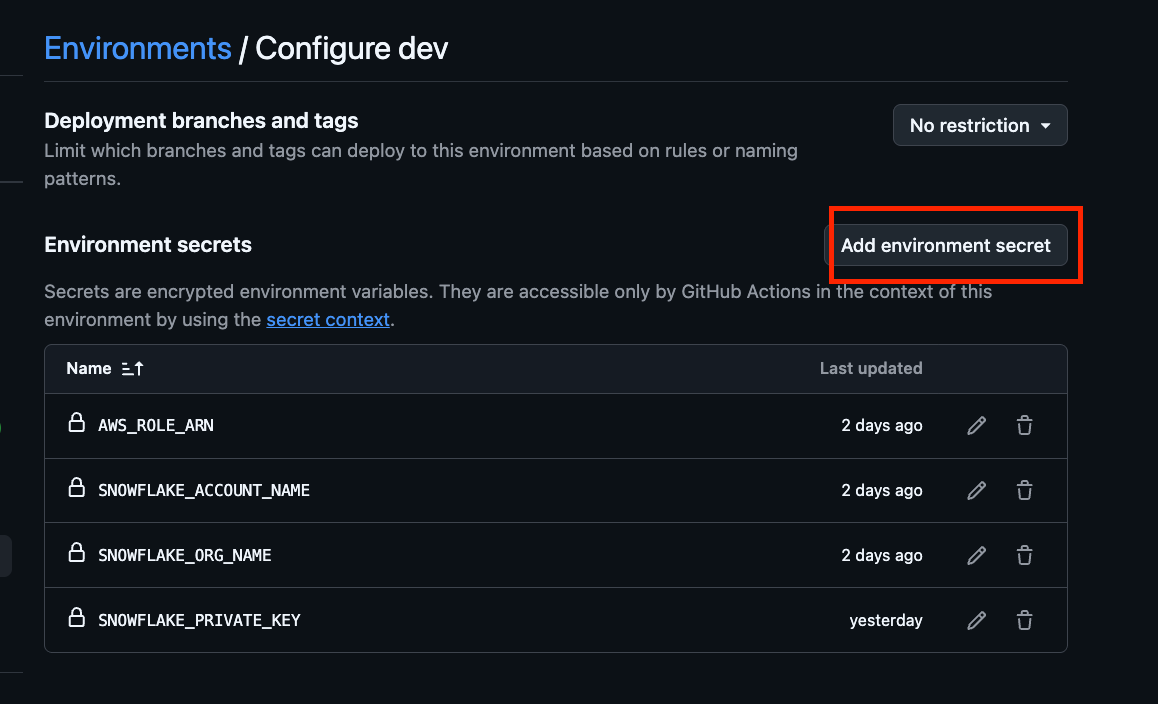
Manually configure secrets for your GitHub repository.
Open Settings > Environments in your GitHub repository, and create dev and prd from New environment. Define secrets like PRIVATE_KEY in the created Environment to reference them in GitHub Actions.
Deployment
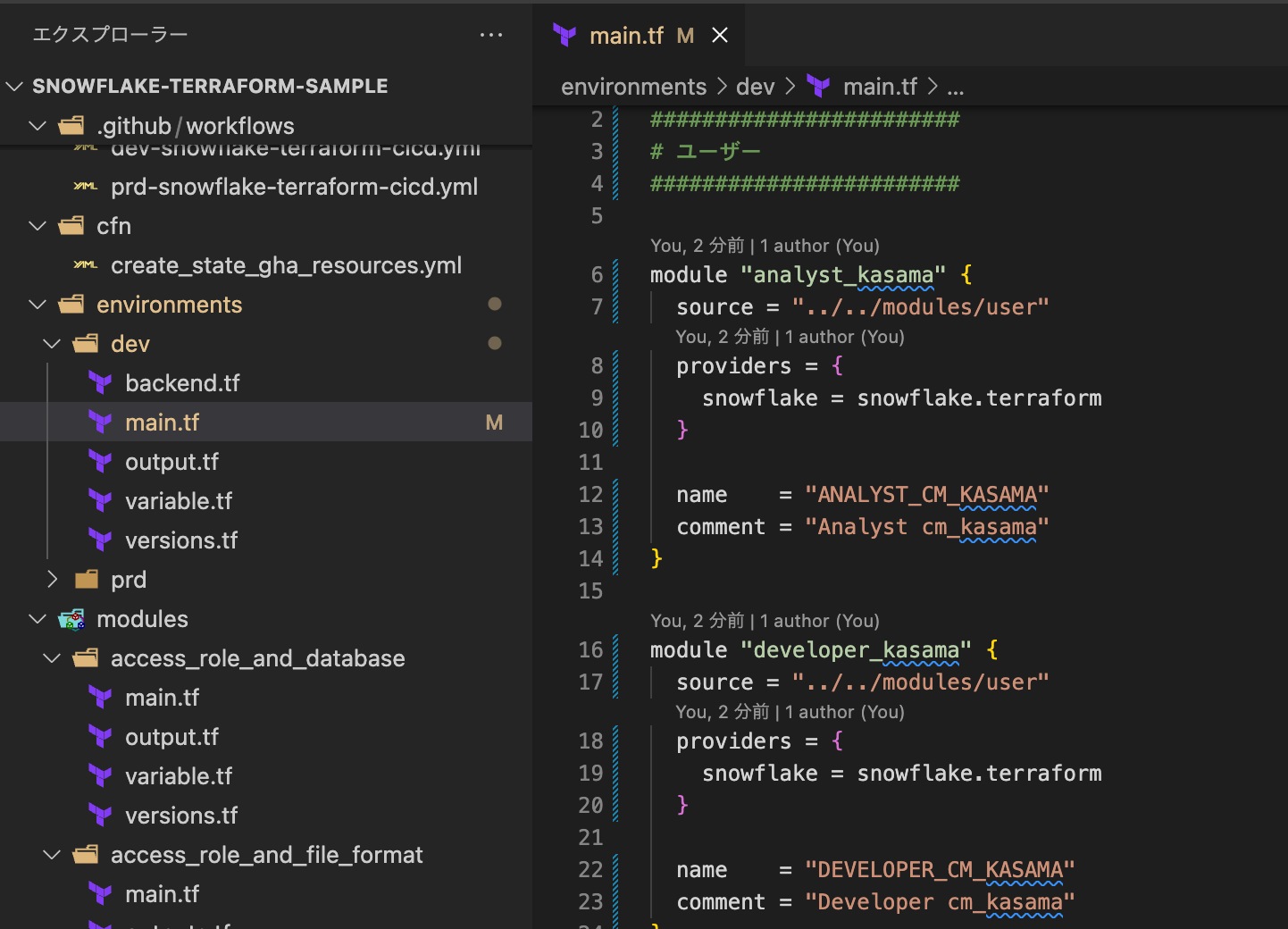
Now let's deploy Snowflake Terraform. The actual implementation of Snowflake Terraform is similar to the content in the blog below, so we'll skip those details. The structure consists of defining configuration values in main.tf and calling modules.
Push the implemented content from your local feature branch.
@ snowflake-terraform-sample % git add .
@ snowflake-terraform-sample % git commit -m "feat(dev): Enable all Snowflake infrastructure modules"
@ snowflake-terraform-sample % git push origin
Create a Pull Request from the feature branch to the develop branch on GitHub.
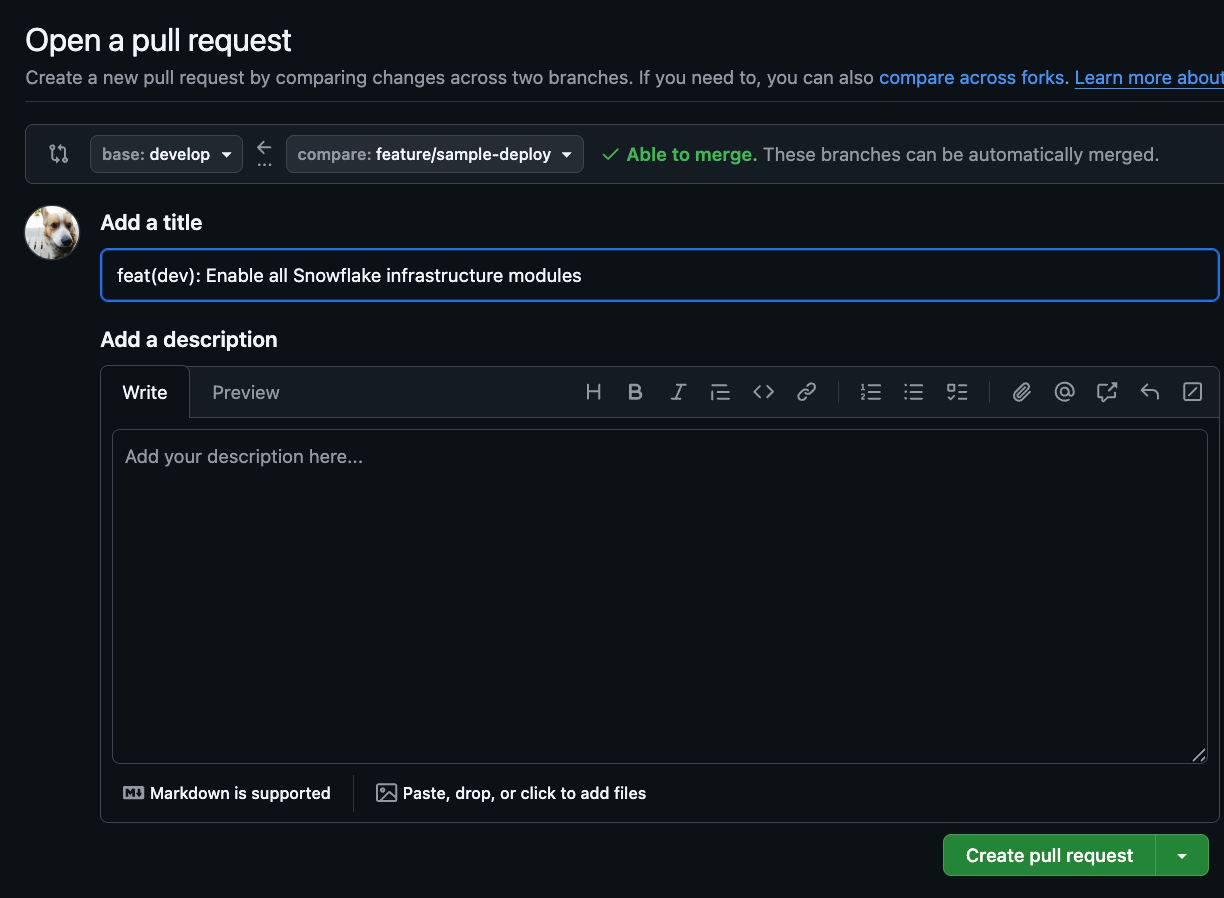
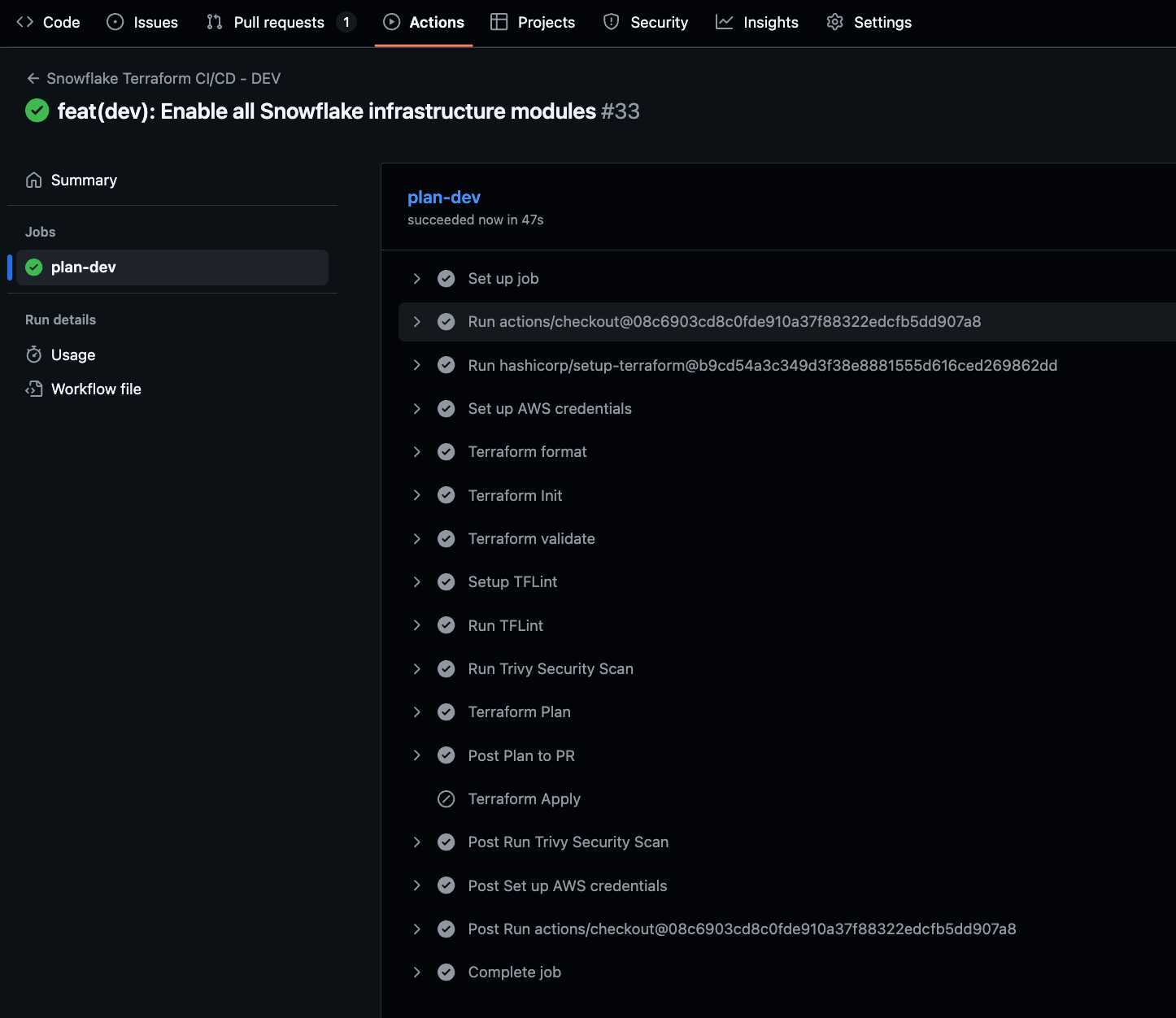
When a Pull Request to the develop branch is created, GitHub Actions will run.
Checking the Actions log, we can confirm it completed successfully. The terraform apply is skipped as expected.
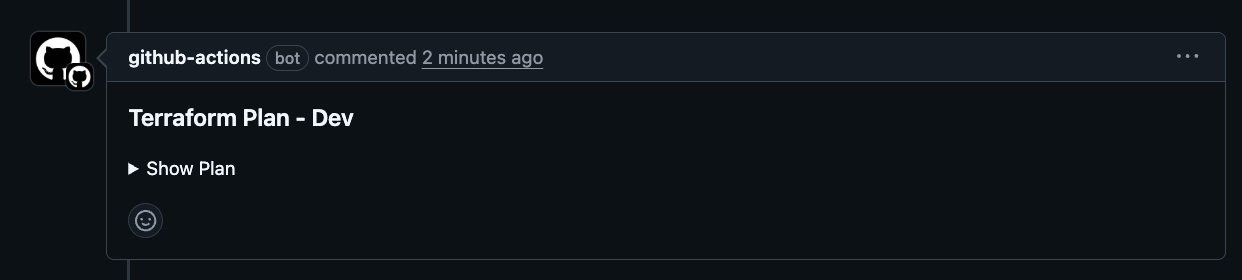
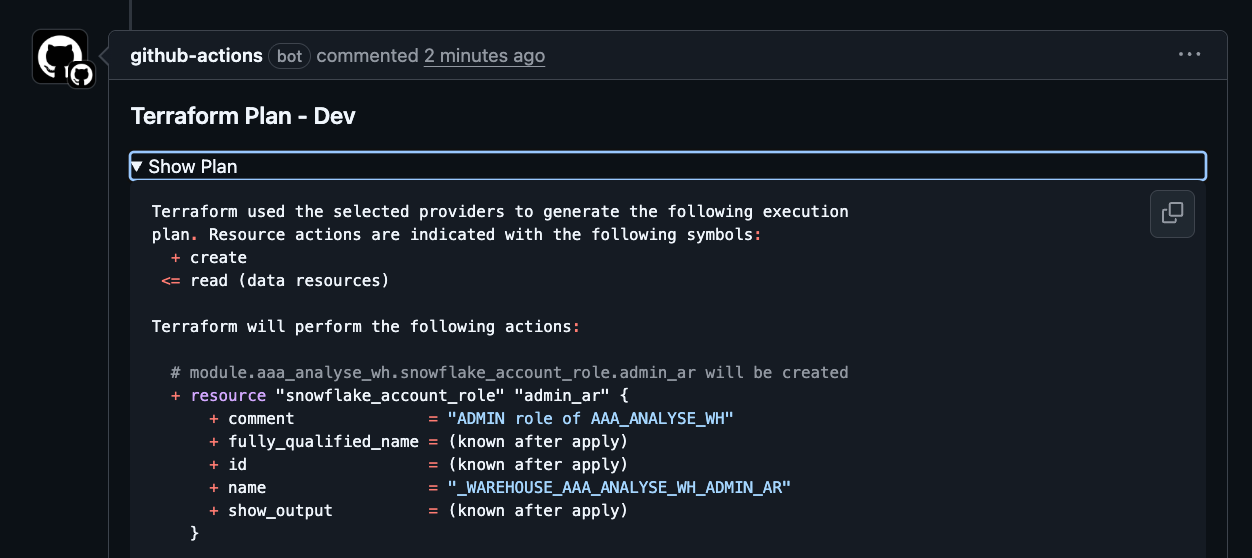
Returning to the Pull Request, we can see the bot has output the results of the terraform plan command. If your project has Claude AI review integration, you might want to have it summarize the terraform plan results.
After determining there are no issues, I merged it. GitHub Actions runs again, this time skipping the terraform plan command and executing the terraform apply command.
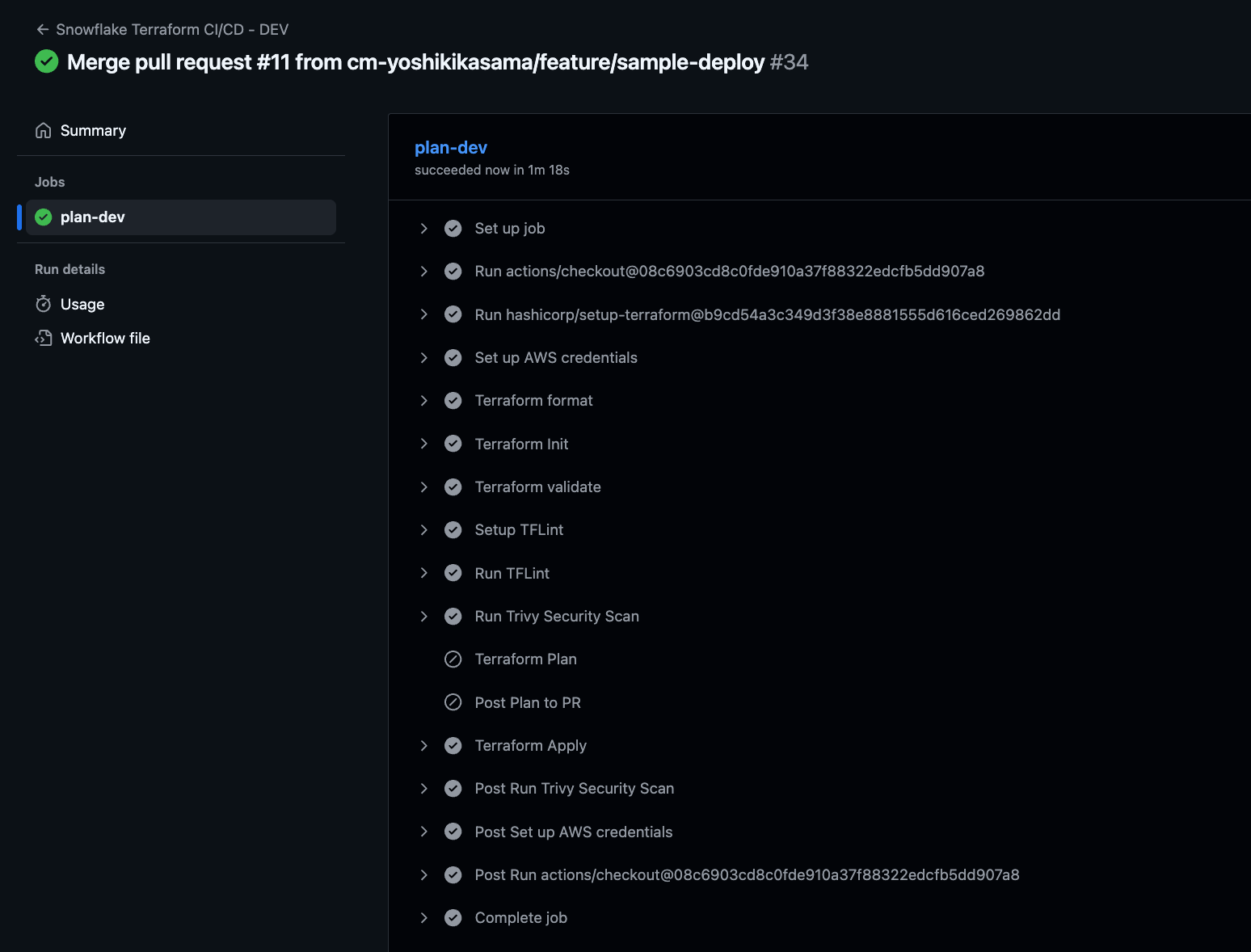
The process completed successfully, and we confirmed the resources exist in the Snowflake account.
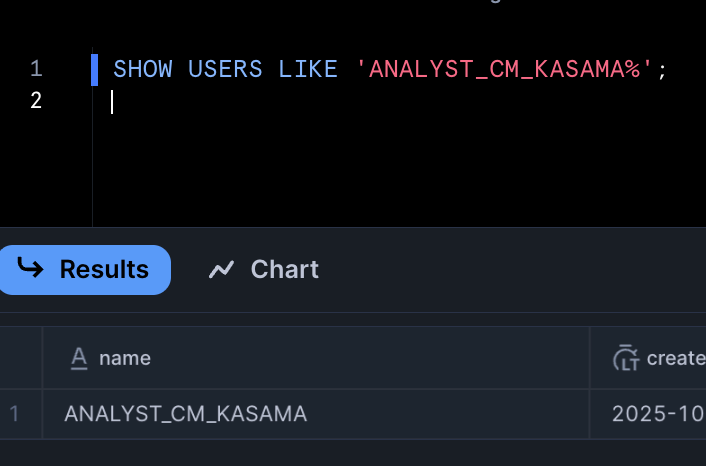
For applying to the Snowflake production environment, create a PR from develop to main branch and follow the same steps, so we'll omit those details.
Conclusion
There are many considerations when configuring GitHub Actions, so I hope this serves as a helpful reference.