
I tried building S3 Storage Integration with Snowflake × Terraform

This page has been translated by machine translation. View original
Introduction
I'm kasama from the Data Business Division.
This time, I'd like to build a Storage Integration that connects Snowflake and AWS S3 using Terraform.
Prerequisite
As a prerequisite, this article discusses the open-source version of Terraform, not HCP Terraform (cloud version).
I'll implement based on the configuration described in the following blog. We'll create modules by user type and implement them in main.tf for each dev/prd environment. Terraform init, plan, and apply commands will be executed through GitHub Actions.
snowflake-terraform-sample % tree
.
├── .github
│   └── workflows
│       ├── dev-snowflake-terraform-cicd.yml
│       └── prd-snowflake-terraform-cicd.yml
├── environments
│   ├── dev
│   │   ├── backend.tf
│   │   ├── main.tf
│   │   ├── output.tf
│   │   ├── variable.tf
│   │   └── versions.tf
│   └── prd
│       ├── backend.tf
│       ├── main.tf
│       ├── output.tf
│       ├── variable.tf
│       └── versions.tf
└── modules
    └── data_engineer
        ├── main.tf
        ├── outputs.tf
        ├── variables.tf
        └── versions.tf
Circular Dependency in S3 Storage Integration Creation and Its Solution
Challenges with Terraform
In the Snowflake official documentation, resources are created in the following order:
- Create an IAM policy for the S3 bucket
- Create an IAM Role (temporarily set your AWS account ID in the Trust Policy)
- Create a Storage Integration in Snowflake (specify the IAM Role ARN from Step 2)
- Use
DESC INTEGRATIONto obtain the Snowflake-generatedSTORAGE_AWS_IAM_USER_ARNandSTORAGE_AWS_EXTERNAL_ID - Update the IAM Role Trust Policy (set the values obtained in Step 4)
- Create an external Stage in Snowflake
This procedure works well for manual setup, but when implementing with Terraform, you need to modify the IAM Role Trust Policy after creation, which can't be completed in a single terraform apply. After the initial apply, you need to manually check the Storage Integration values, update the IAM Role Trust Policy, and apply again, which increases operational overhead.
Solution
- Pre-calculate the IAM Role ARN
- Create the Storage Integration
- Create the S3 bucket
- Create the IAM Role (with the correct Trust Policy)
- Create the IAM policy for the S3 bucket
- Create the external Stage
Since the IAM Role ARN follows a predictable format (arn:aws:iam::{account-id}:role/{role-name}), it can be pre-built as a string from the AWS account ID and role name. Since Snowflake doesn't verify the existence of the IAM Role when creating a Storage Integration, we can create the Storage Integration first with an IAM Role ARN that doesn't exist yet, and then create the IAM Role afterward using the output values, thus avoiding the circular dependency.
Implementation
Let's look at the actual implementation.
Since dev and prd environments are similar except for some detailed settings, I'll only cover the dev environment implementation.
I'll skip the GitHub Actions workflow and Snowflake deployment user setup procedures as they were covered in this blog:
terraform {
  backend "s3" {
    bucket       = "<YOUR_TERRAFORM_STATE_BUCKET>"  # Example: your-company-dev-terraform-state
    key          = "snowflake/snowflake.tfstate"
    region       = "ap-northeast-1"
    encrypt      = true
    use_lockfile = true
  }
}
This defines where to store the Terraform state file. Replace the S3 bucket name with an appropriate value.
# ========================================================================================
# S3 Storage Integration Configuration - Dev Environment
# ========================================================================================
# This configuration uses the data_engineer module for S3 storage integration
# ========================================================================================

module "data_engineer" {
  source = "../../modules/data_engineer"

  providers = {
    snowflake.sysadmin     = snowflake.sysadmin
    snowflake.accountadmin = snowflake.accountadmin
  }

  # Basic configuration
  database_name  = "RAW_DATA_DEV"
  warehouse_name = "RAW_DATA_DEV_ADMIN_WH"

  # Warehouse configuration
  warehouse_size                = "XSMALL"
  warehouse_auto_suspend        = 60
  warehouse_initially_suspended = true
  warehouse_min_cluster_count   = 1
  warehouse_max_cluster_count   = 1

  # Storage Integration configuration
  storage_integration_name    = "S3_DEV_INTEGRATION"
  storage_integration_enabled = true
  stage_name                  = "DEV_STAGE"
  stage_schema                = "PUBLIC"

  # AWS configuration
  aws_s3_bucket_name  = "<YOUR_S3_BUCKET_NAME>"        # Example: your-company-snowflake-dev-data
  aws_iam_role_name   = "<YOUR_IAM_ROLE_NAME>"         # Example: your-company-snowflake-dev-role
  aws_iam_policy_name = "<YOUR_IAM_POLICY_NAME>"       # Example: snowflake-s3-dev-access-policy

  # AWS Tags
  aws_tags = {
    Environment = "dev"
    ManagedBy   = "Terraform"
    Project     = "snowflake-terraform-sample"
  }
}
This calls the data_engineer module to create the Storage Integration, Database, Warehouse, and Stage all at once. The Providers block explicitly passes multiple Snowflake roles (sysadmin/accountadmin). Replace AWS-related resource names (S3 Bucket, IAM Role, IAM Policy) with appropriate values.
########################
# Snowflake authentication
########################

variable "snowflake_organization_name" {
  type        = string
  description = "Snowflake organization name"
}

variable "snowflake_account_name" {
  type        = string
  description = "Snowflake account name"
}

variable "snowflake_private_key" {
  description = "Snowflake private key content (for CI/CD)"
  type        = string
  default     = ""
  sensitive   = true
}
This defines variables needed for Snowflake connection. These values are passed from GitHub Actions Secrets with the TF_VAR_ prefix.
terraform {
  required_version = ">= 1.5.0"
  required_providers {
    snowflake = {
      source  = "snowflakedb/snowflake"
      version = "~> 2.3.0"
    }
    aws = {
      source  = "hashicorp/aws"
      version = "6.18.0"
    }
  }
}

# Snowflake provider with SYSADMIN role
provider "snowflake" {
  alias             = "sysadmin"
  role              = "SYSADMIN"
  organization_name = var.snowflake_organization_name
  account_name      = var.snowflake_account_name
  user              = "TERRAFORM_BLOG_USER"
  authenticator     = "SNOWFLAKE_JWT"
  private_key       = var.snowflake_private_key
  warehouse         = "TERRAFORM_BLOG_WH"
  preview_features_enabled = [
    "snowflake_stage_resource"
  ]
}

# Snowflake provider with ACCOUNTADMIN role (for admin module)
provider "snowflake" {
  alias             = "accountadmin"
  role              = "ACCOUNTADMIN"
  organization_name = var.snowflake_organization_name
  account_name      = var.snowflake_account_name
  user              = "TERRAFORM_BLOG_USER"
  authenticator     = "SNOWFLAKE_JWT"
  private_key       = var.snowflake_private_key
  warehouse         = "TERRAFORM_BLOG_WH"
  preview_features_enabled = [
    "snowflake_storage_integration_resource"
  ]
}

provider "aws" {
  region = "ap-northeast-1"
}
This fixes the versions of Terraform and Providers and defines two Snowflake Providers (sysadmin/accountadmin). Since creating a Storage Integration requires ACCOUNTADMIN privileges, we use aliases to differentiate between multiple roles.
# AWS caller identity for ARN construction
data "aws_caller_identity" "current" {}

# Local variables for computed values
locals {
  s3_bucket_url = "s3://${var.aws_s3_bucket_name}/"
  aws_role_arn  = "arn:aws:iam::${data.aws_caller_identity.current.account_id}:role/${var.aws_iam_role_name}"
}

# Database
resource "snowflake_database" "db" {
  provider = snowflake.sysadmin
  name     = var.database_name
}

# Warehouse
resource "snowflake_warehouse" "wh" {
  provider            = snowflake.sysadmin
  name                = var.warehouse_name
  warehouse_size      = var.warehouse_size
  auto_suspend        = var.warehouse_auto_suspend
  initially_suspended = var.warehouse_initially_suspended
  min_cluster_count   = var.warehouse_min_cluster_count
  max_cluster_count   = var.warehouse_max_cluster_count
}

# S3 Storage Integration
resource "snowflake_storage_integration" "s3_integ" {
  provider                  = snowflake.accountadmin
  name                      = var.storage_integration_name
  type                      = "EXTERNAL_STAGE"
  enabled                   = var.storage_integration_enabled
  storage_provider          = "S3"
  storage_aws_role_arn      = local.aws_role_arn
  storage_allowed_locations = [local.s3_bucket_url]
}

# ===========================
# AWS Resources
# ===========================
# S3 bucket, encryption, versioning settings

resource "aws_s3_bucket" "snowflake_storage" {
  bucket = var.aws_s3_bucket_name
  tags   = var.aws_tags
}

# S3 bucket encryption
resource "aws_s3_bucket_server_side_encryption_configuration" "snowflake_storage" {
  bucket = aws_s3_bucket.snowflake_storage.id

  rule {
    apply_server_side_encryption_by_default {
      sse_algorithm = "AES256"
    }
  }
}

resource "aws_s3_bucket_versioning" "snowflake_storage" {
  bucket = aws_s3_bucket.snowflake_storage.id

  versioning_configuration {
    status = "Enabled"
  }
}

# IAM role (using Snowflake Storage Integration output values)
resource "aws_iam_role" "snowflake_access" {
  name = var.aws_iam_role_name
  path = "/"

  # Directly using Snowflake Storage Integration output
  assume_role_policy = jsonencode({
    Version = "2012-10-17"
    Statement = [
      {
        Sid    = "TrustIamUserOfSnowflakePolicy"
        Effect = "Allow"
        Principal = {
          AWS = snowflake_storage_integration.s3_integ.storage_aws_iam_user_arn
        }
        Action = "sts:AssumeRole"
        Condition = {
          StringEquals = {
            "sts:ExternalId" = snowflake_storage_integration.s3_integ.storage_aws_external_id
          }
        }
      }
    ]
  })

  tags = var.aws_tags
}

resource "aws_iam_role_policy" "snowflake_s3_access" {
  name = var.aws_iam_policy_name
  role = aws_iam_role.snowflake_access.id

  policy = jsonencode({
    Version = "2012-10-17"
    Statement = [
      {
        Sid    = "ReadAndWriteObjectsInSpecificBucketPolicy"
        Effect = "Allow"
        Action = [
          "s3:PutObject",
          "s3:GetObject",
          "s3:GetObjectVersion",
          "s3:DeleteObject",
          "s3:DeleteObjectVersion"
        ]
        Resource = "${aws_s3_bucket.snowflake_storage.arn}/*"
      },
      {
        Sid    = "ListBucketAndGetLocationAllowPolicy"
        Effect = "Allow"
        Action = [
          "s3:ListBucket",
          "s3:GetBucketLocation"
        ]
        Resource = aws_s3_bucket.snowflake_storage.arn
        Condition = {
          StringLike = {
            "s3:prefix" = "*"
          }
        }
      }
    ]
  })
}

resource "aws_s3_bucket_policy" "snowflake_access" {
  bucket = aws_s3_bucket.snowflake_storage.id

  policy = jsonencode({
    Version = "2012-10-17"
    Statement = [
      {
        Sid    = "AllowSnowflakeAccess"
        Effect = "Allow"
        Principal = {
          AWS = aws_iam_role.snowflake_access.arn
        }
        Action = [
          "s3:GetObject",
          "s3:PutObject",
          "s3:DeleteObject",
          "s3:ListBucket"
        ]
        Resource = [
          aws_s3_bucket.snowflake_storage.arn,
          "${aws_s3_bucket.snowflake_storage.arn}/*"
        ]
      }
    ]
  })
}

# ===========================
# Snowflake Stage (depends on AWS resources)
# ===========================

# External Stage
resource "snowflake_stage" "stage" {
  provider            = snowflake.sysadmin
  database            = snowflake_database.db.name
  schema              = var.stage_schema
  name                = var.stage_name
  url                 = local.s3_bucket_url
  storage_integration = snowflake_storage_integration.s3_integ.name

  # Create Stage after IAM role is created
  depends_on = [
    aws_iam_role.snowflake_access,
    aws_iam_role_policy.snowflake_s3_access
  ]
}

# Grant Storage Integration to SYSADMIN
resource "snowflake_grant_privileges_to_account_role" "integ_to_sysadmin" {
  provider          = snowflake.accountadmin
  privileges        = ["USAGE"]
  account_role_name = "SYSADMIN"
  on_account_object {
    object_type = "INTEGRATION"
    object_name = snowflake_storage_integration.s3_integ.name
  }
}
Here's the main module implementation. Key points are:
- ARN pre-calculation: Get AWS account ID with
data.aws_caller_identity.current, then construct IAM Role ARN as a string inlocal.aws_role_arn. - Storage Integration creation: Use the pre-calculated
local.aws_role_arnto create the Storage Integration. The IAM Role doesn't exist yet. - IAM Role creation: Use
snowflake_storage_integration.s3_integ.storage_aws_iam_user_arnandstorage_aws_external_idto build the Trust Policy, allowing Snowflake to correctly AssumeRole. - Stage creation: Explicitly specify
depends_onforaws_iam_role.snowflake_accessandaws_iam_role_policy.snowflake_s3_accessto ensure Stage is created after IAM resources.
# Basic configuration
variable "database_name" {
  description = "Database name"
  type        = string
}

variable "warehouse_name" {
  description = "Warehouse name"
  type        = string
}

# Warehouse configuration
variable "warehouse_size" {
  description = "Warehouse size"
  type        = string
}

variable "warehouse_auto_suspend" {
  description = "Auto suspend time in seconds"
  type        = number
}

variable "warehouse_initially_suspended" {
  description = "Initially suspended"
  type        = bool
}

variable "warehouse_min_cluster_count" {
  description = "Minimum cluster count"
  type        = number
}

variable "warehouse_max_cluster_count" {
  description = "Maximum cluster count"
  type        = number
}

variable "storage_integration_name" {
  description = "Storage integration name"
  type        = string
}

variable "stage_name" {
  description = "Stage name"
  type        = string
}

variable "stage_schema" {
  description = "Schema for the stage"
  type        = string
}

variable "storage_integration_enabled" {
  description = "Storage integration enabled"
  type        = bool
}

# AWS configuration
variable "aws_s3_bucket_name" {
  description = "S3 bucket name for Snowflake storage"
  type        = string
}

variable "aws_iam_role_name" {
  description = "IAM role name for Snowflake access"
  type        = string
}

variable "aws_iam_policy_name" {
  description = "IAM policy name"
  type        = string
}

variable "aws_tags" {
  description = "AWS resource tags"
  type        = map(string)
  default     = {}
}
This defines the module's input variables, accepting parameters needed for Snowflake resources (Database, Warehouse, Storage Integration, Stage) and AWS resources (S3, IAM).
terraform {
  required_providers {
    snowflake = {
      source  = "snowflakedb/snowflake"
      version = "~> 2.3.0"
      configuration_aliases = [
        snowflake.sysadmin,
        snowflake.accountadmin
      ]
    }
    aws = {
      source  = "hashicorp/aws"
      version = "6.18.0"
    }
  }
}
This defines the module's provider requirements. It accepts two Snowflake provider aliases: sysadmin and accountadmin. The calling module (environments/dev/main.tf) needs to use a providers block to pass the actual providers.
Deployment
After implementation is complete, deploy via GitHub Actions.
Implement on a feature branch and push:
git checkout -b feature/s3-storage-integration
git add .
git commit -m "feat(dev): Add S3 Storage Integration"
git push origin feature/s3-storage-integration
Create a Pull Request from the feature branch to the develop branch on GitHub.
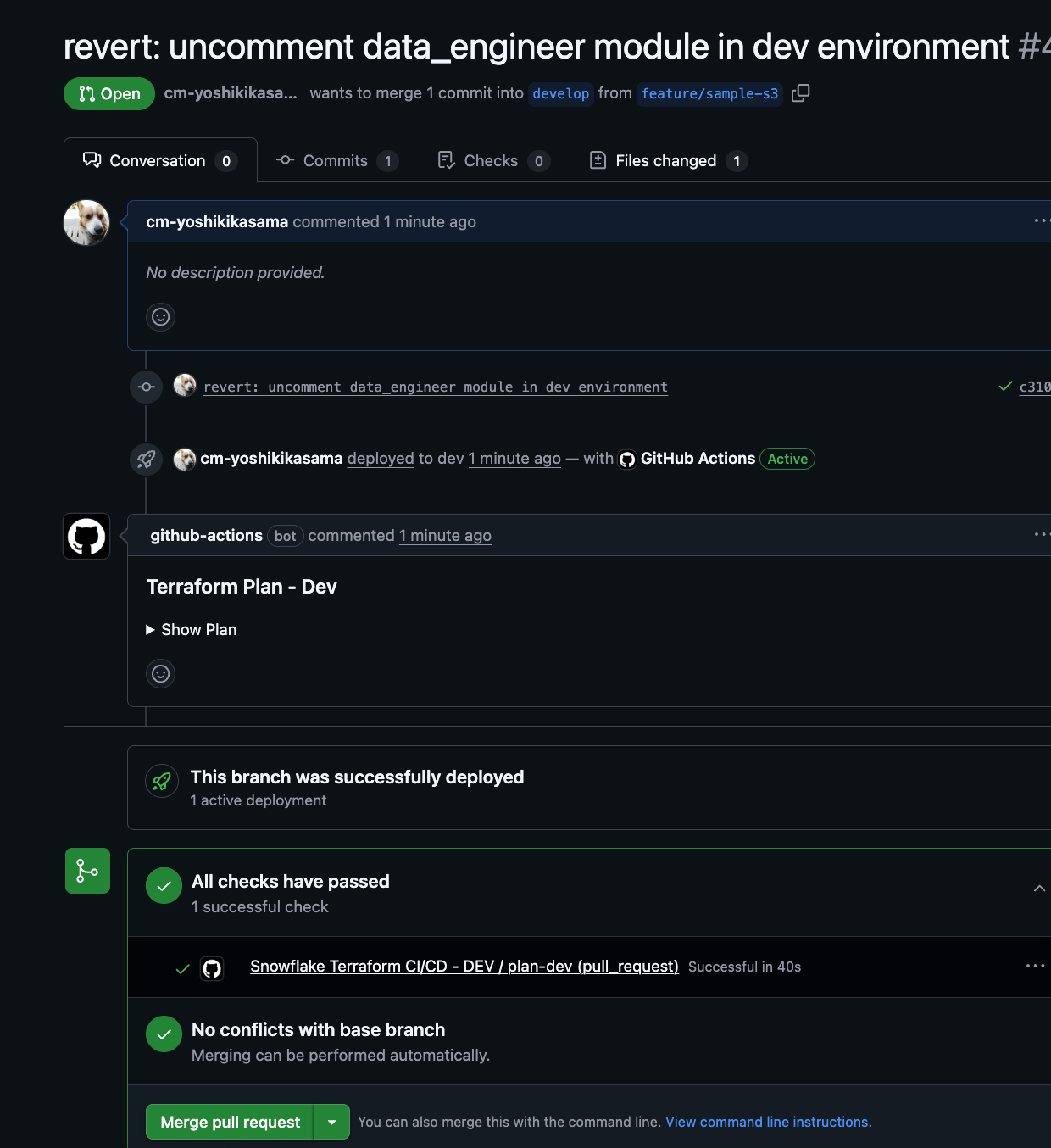
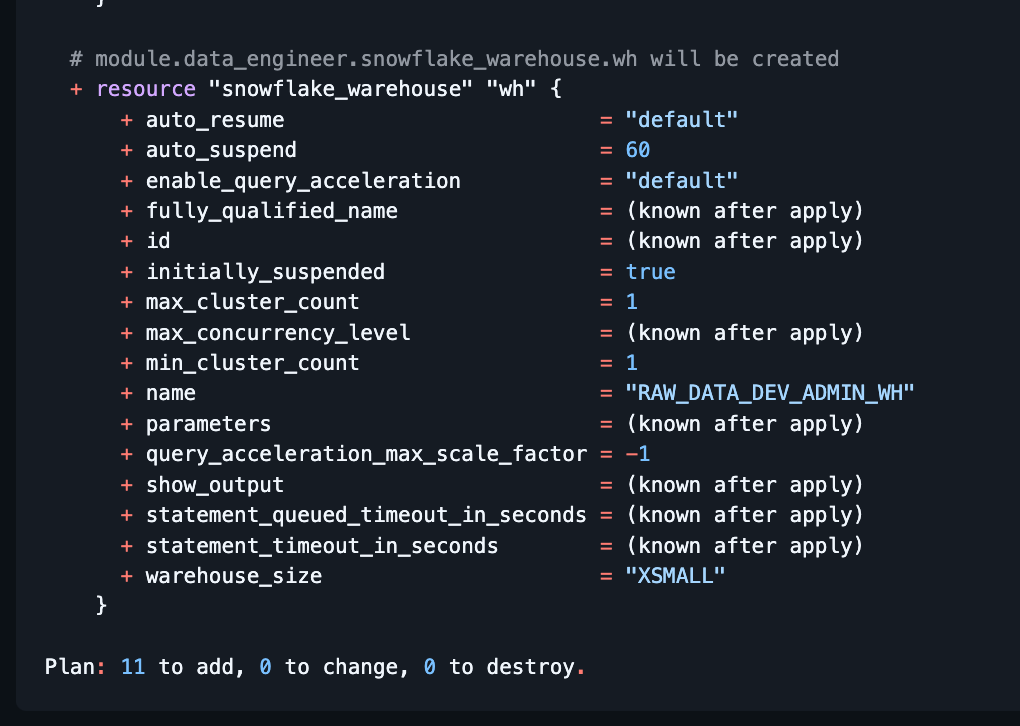
When a Pull Request is created, GitHub Actions will run automatically and comment the terraform plan results on the PR.
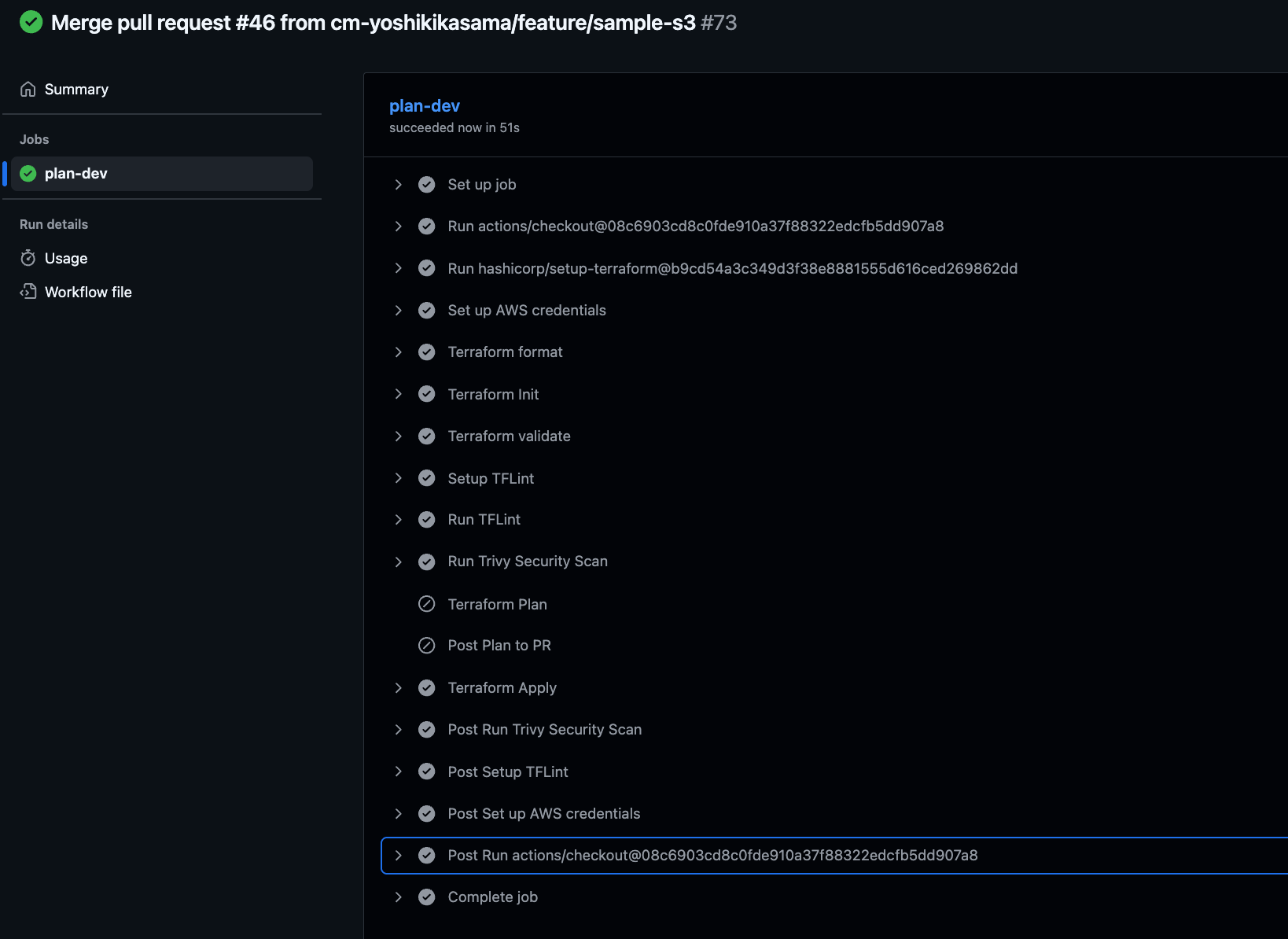
Approving and merging the PR will automatically trigger GitHub Actions to run terraform apply, deploying the resources.
Post-Deployment Verification
After deployment, verify that the Storage Integration works correctly with sample data.
Preparing Sample CSV Data
Run the following commands in AWS CloudShell to upload test data to S3:
# Create sample data
cat > sample_data.csv << 'EOF'
id,name,age,email
1,Alice,30,alice@example.com
2,Bob,25,bob@example.com
3,Charlie,35,charlie@example.com
4,Diana,28,diana@example.com
5,Eve,32,eve@example.com
EOF

# Upload to S3
aws s3 cp sample_data.csv s3://<YOUR_S3_BUCKET_NAME>/sample_data/
Verify Data in Snowflake
Confirm that the deployed Storage Integration, IAM Role, and external Stage work together correctly to load data from S3 to Snowflake.
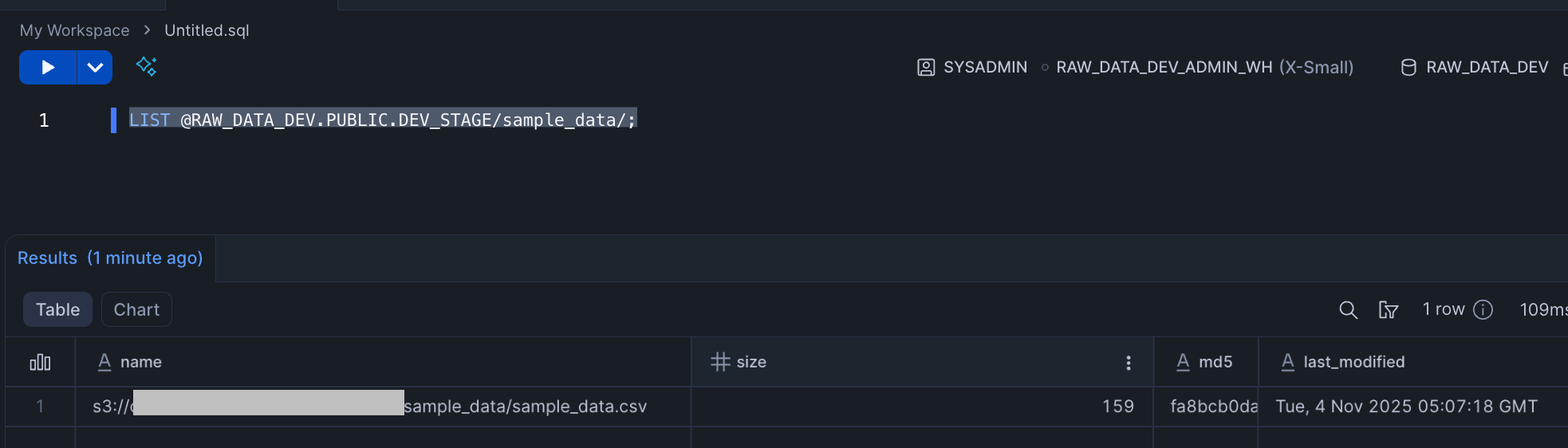
First, check if the external Stage can properly recognize files in the S3 Bucket (verifying that Storage Integration and IAM Role authentication succeeds):
-- Check files in Stage
LIST @RAW_DATA_DEV.PUBLIC.DEV_STAGE/sample_data/;
We can now reference data stored in S3.
Next, verify that we can load data from S3 to Snowflake tables using the COPY INTO command:
-- Create table
USE ROLE SYSADMIN;
USE DATABASE RAW_DATA_DEV;
USE WAREHOUSE RAW_DATA_DEV_ADMIN_WH;

CREATE OR REPLACE TABLE users (
    id INTEGER,
    name STRING,
    age INTEGER,
    email STRING
);

-- Load data from Stage
COPY INTO users
FROM @DEV_STAGE/sample_data/sample_data.csv
FILE_FORMAT = (
    TYPE = 'CSV'
    FIELD_DELIMITER = ','
    SKIP_HEADER = 1
    FIELD_OPTIONALLY_ENCLOSED_BY = '"'
);

-- Verify data
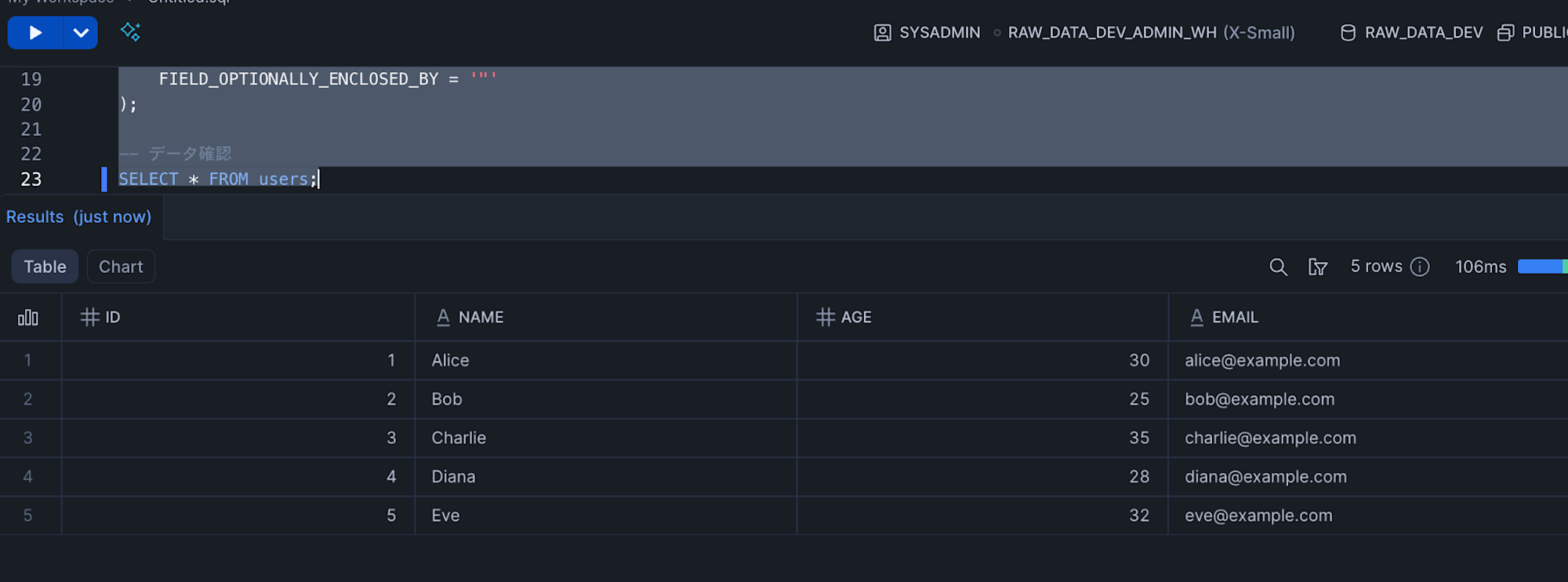
SELECT * FROM users;
We've confirmed that data loading from S3 to Snowflake is working correctly.
For cleanup, empty the S3 Bucket contents first, then comment out environments/dev/main.tf and deploy.
Conclusion
I hope this is helpful for those who, like me, were struggling with the need to deploy Snowflake's S3 Storage Integration in two steps with Terraform.