SQS message size has been expanded to a maximum of 1MiB

This page has been translated by machine translation. View original
On August 4, 2025, Amazon SQS (Simple Queue Service) received a long-awaited update, increasing the maximum data size that can be sent in a single message from 256KiB to 1MiB, which is 4 times larger.
Until now, handling data exceeding 256KiB required workarounds such as using extended client libraries that integrate with S3, but this update makes it much easier to handle larger messages.
Recently, I had the opportunity to verify that sending and receiving messages of approximately 1MiB is possible using AWSCLI, which I'll introduce here.
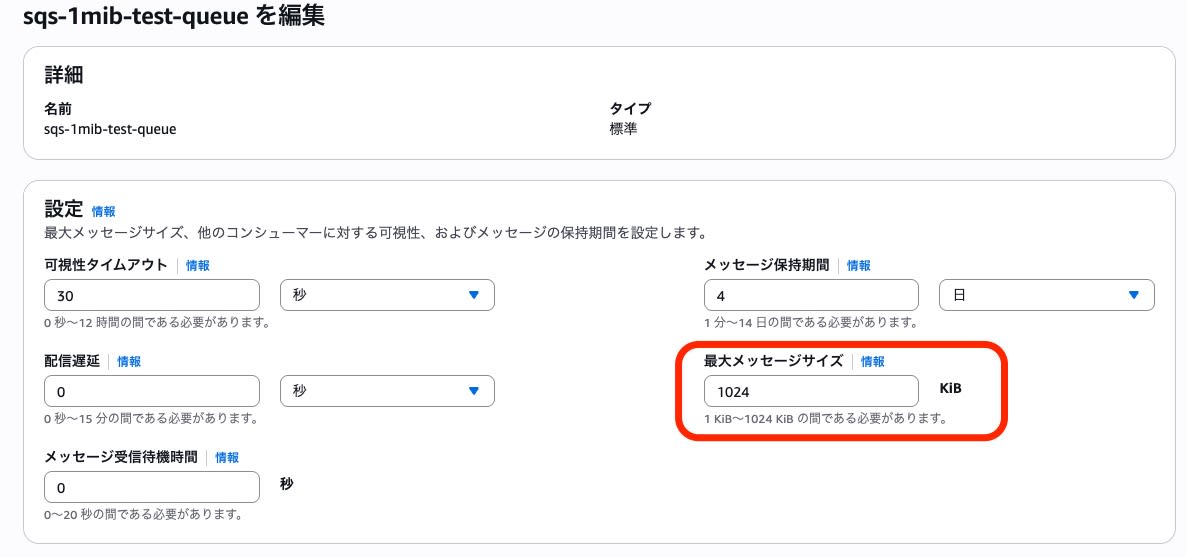
SQS Configuration Screen
In the SQS queue configuration screen, the maximum message size default is now 1024KiB.
Verification
I attempted to verify functionality using awscli.
Test Environment
The region was Osaka (ap-northeast-3), using the standard awscli from CloudShell.
$ aws --version
aws-cli/2.27.60 Python/3.13.4 Linux/6.1.141-155.222.amzn2023.x86_64 exec-env/CloudShell exe/x86_64.amzn.2023
1. Creating an SQS Queue
I created a test SQS queue and checked its attributes.
aws sqs create-queue --queue-name sqs-1mib-test-queue
The MaximumMessageSize of the SQS queue was 1048576 bytes (1MiB).
$ aws sqs get-queue-attributes --queue-url "$QUEUE_URL" --attribute-names MaximumMessageSize
{
    "Attributes": {
        "MaximumMessageSize": "1048576"
    }
}
2. Sending a 1MiB Message
I created a test file just under 1MiB and attempted to send it to SQS.
Creating a Test File
# 1MiBのテストメッセージを生成
python3 -c "
import json
import sys
from datetime import datetime, timezone

# JSONのキーや他の値の長さを考慮してペイロードサイズを調整
data_size = 1048576 - 200
message_data = {
    'test_type': 'SQS 1MiB payload test',
    'timestamp': datetime.now(timezone.utc).strftime('%Y-%m-%dT%H:%M:%SZ'),
    'data_size_bytes': data_size,
    'payload': 'A' * data_size
}

message_json = json.dumps(message_data)
# UTF-8エンコード後のバイト数でサイズを確認
message_bytes = message_json.encode('utf-8')
print(f'Message size: {len(message_bytes)} bytes', file=sys.stderr)
sys.stdout.buffer.write(message_bytes)
" > large_message.json
Sending the Message
# キューURLを取得
QUEUE_URL=$(aws sqs get-queue-url --queue-name sqs-1mib-test-queue --query 'QueueUrl' --output text)

# メッセージを送信
aws sqs send-message \
    --queue-url "$QUEUE_URL" \
    --message-body file://large_message.json
3. Receiving the Message
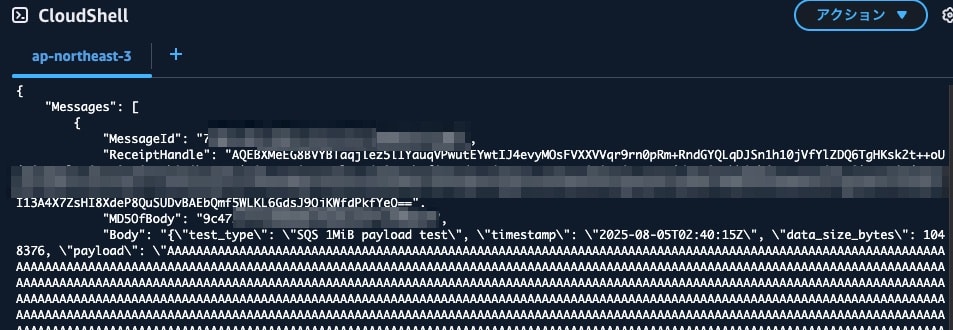
I attempted to receive the message of just under 1MiB.
aws sqs receive-message \
    --queue-url "$QUEUE_URL" \
    --max-number-of-messages 1 \
> receive_message.json
I confirmed that the received message file size was just under 1MiB.
~ $ ls -la receive_message.json
-rw-r--r--. 1 cloudshell-user cloudshell-user 1049152 Aug  5 02:40 receive_message.json
~ $ ls -lah receive_message.json
-rw-r--r--. 1 cloudshell-user cloudshell-user 1.1M Aug  5 02:40 receive_message.json
~ $ ls -la large_message.json
-rw-r--r--. 1 cloudshell-user cloudshell-user 1048494 Aug  5 05:01 large_message.json
The reason the received message is slightly larger is due to the addition of MessageId, ReceiptHandle, and other metadata in the API response.
Changing Message Size
I attempted to set the SQS message size to the previous limit of 256KiB.
aws sqs set-queue-attributes \
    --queue-url "$QUEUE_URL" \
    --attributes '{"MaximumMessageSize":"262144"}'
When I tried to send a 1MiB message in this state, it resulted in an error.
~ $ aws sqs send-message --queue-url "$QUEUE_URL" --message-body file://large_message.json

An error occurred (InvalidParameterValue) when calling the SendMessage operation: One or more parameters are invalid. Reason: Message must be shorter than 262144 bytes.
Default Settings When Creating a Queue
I checked the requestParameters in CloudTrail information.
Queues created through the GUI (management console) had the MaximumMessageSize explicitly set.
- CLI
    "userAgent": "aws-cli/2.27.60 md/awscrt#0.26.1 ua/2.1 os/linux#6.1.141-155.222.amzn2023.x86_64 md/arch#x86_64 lang/python#3.13.4 md/pyimpl#CPython exec-env/CloudShell m/Z,b,E cfg/retry-mode#standard md/installer#exe md/distrib#amzn.2023 md/prompt#off md/command#sqs.create-queue",
    "requestParameters": {
        "queueName": "sqs-1mib-test-queue"
    },
- GUI
    "userAgent": "Mozilla/5.0 (Macintosh; Intel Mac OS X 10_15_7) AppleWebKit/537.36 (KHTML, like Gecko) Chrome/138.0.0.0 Safari/537.36",
    "requestParameters": {
        "queueName": "sqs-1mib-test-queue-gui",
        "attributes": {
            "Policy": "{\"Version\":\"2012-10-17\",\"Id\":\"__default_policy_ID\",\"Statement\":[{\"Sid\":\"__owner_statement\",\"Effect\":\"Allow\",\"Principal\":{\"AWS\":\"xxxxxxxxxxxx\"},\"Action\":[\"SQS:*\"],\"Resource\":\"arn:aws:sqs:ap-northeast-3:xxxxxxxxxxxx:sqs-1mib-test-queue-gui\"}]}",
            "ReceiveMessageWaitTimeSeconds": "0",
            "SqsManagedSseEnabled": "true",
            "DelaySeconds": "0",
            "KmsMasterKeyId": "",
            "RedrivePolicy": "",
            "MessageRetentionPeriod": "345600",
            "MaximumMessageSize": "1048576",
            "VisibilityTimeout": "30",
            "RedriveAllowPolicy": ""
        }
For queues created before August 2025 with a specified maximum message size (MaximumMessageSize) using GUI or other methods, the previous values might be preserved. If you're handling messages larger than 256KiB in existing SQS queues, I recommend checking your current settings to be sure.
Summary
With the extension of SQS's maximum message size to 1MiB, many workloads can now utilize SQS more simply.
If you need to handle messages larger than 1MiB, please continue to consider using extended client libraries that integrate with S3.