
Squash Merge Causes Orphaned Git Tags — Why git describe Can't Find Them and How to Fix It

This page has been translated by machine translation. View original
When using GitHub's squash merge, git describe --tags --abbrev=0 stopped finding the latest tag. The cause is that tags created on a feature branch become orphaned by squash merge. Here I'll summarize the steps to reproduce, how to diagnose, and countermeasures.
Prerequisites / Environment
- Git 2.49
- GitHub (using PR squash merge)
- Release automation script uses
git describe --tagsfor version detection
What Happened
I was using the following command to get the version in a release automation script.
CURRENT=$(git describe --tags --abbrev=0 2>/dev/null || echo "v0.0.0")
Even though I had released v0.6.3, this command was returning v0.6.0. The tags v0.6.1, v0.6.2, and v0.6.3 were not being found.
Cause: Tag Orphaning Due to Squash Merge
The Problem with the Release Flow
The release flow at the time followed this order:
- Implement on a feature branch
- Version bump commit
- Create tag on the feature branch (
git tag v0.6.3) - Push branch and tag
- Create PR → squash merge
What Squash Merge Does
Squash merge creates a new commit on main that combines all commits from the feature branch into one.
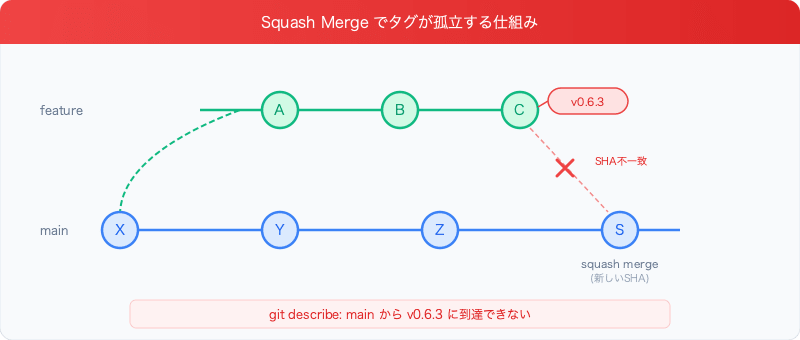
The key point is that squash merge commit S has a different SHA than C. Tag v0.6.3 points to commit C, but C does not exist in main's ancestors.
How git describe Works
git describe --tags --abbrev=0 returns the first tag it finds by traversing the ancestors of the current commit. When run on main, it only traverses ancestors X → Y → Z → S, so the tag attached to commit C cannot be found.
# Run on main
$ git describe --tags --abbrev=0
v0.6.0  # v0.6.1, v0.6.2, v0.6.3 are not found
This is tag "orphaning." The tags themselves exist, but they cannot be reached from main's commit history.
How to Diagnose
Check if a Tag is Orphaned
# Check if the commit pointed to by the tag is an ancestor of main
git merge-base --is-ancestor $(git rev-parse v0.6.3) main
echo $?  # 0 = is an ancestor, 1 = orphaned
List the Orphan Status of All Tags
for tag in $(git tag --sort=-v:refname); do
  if git merge-base --is-ancestor "$(git rev-parse "$tag")" main 2>/dev/null; then
    echo "OK   $tag"
  else
    echo "ORPHAN $tag"
  fi
done
Output:
ORPHAN v0.6.3
ORPHAN v0.6.2
ORPHAN v0.6.1
OK   v0.6.0
OK   v0.5.0
Check the Relationship Between Tags and Commits
# SHA of the commit pointed to by the tag
git rev-parse v0.6.3

# SHA of the latest commit on main (squash merge commit)
git rev-parse main

# Different SHAs are displayed → tag is not on main
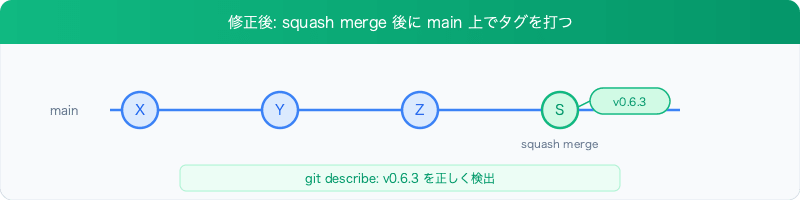
Countermeasure: Create Tags on main After Squash Merge
Revised Flow
- Implement on a feature branch
- Version bump commit (do not create tag yet)
- Push branch, create PR
- Squash merge
- Checkout main and pull
- Create tag on the squash merge commit
- Push tag
# After squash merging the PR
git checkout main
git pull origin main

# Create tag on the squash merge commit
git tag v0.6.3
git push origin --tags
This ensures the tag reliably points to a commit in main's history.
Repairing Existing Orphaned Tags
Orphaned tags can be reassigned to the correct commit on main using git tag -f.
First, identify the squash merge commit corresponding to each tag.
# Squash merge commit messages include a PR number, so use that to identify them
git log --oneline main | head -20
Once you find the corresponding commit, reassign the tag.
# Reassign tags locally
git tag -f v0.6.3 <squash-merge-commit-sha>
git tag -f v0.6.2 <squash-merge-commit-sha>
git tag -f v0.6.1 <squash-merge-commit-sha>

# Force push to remote
git push origin --tags --force
Verification after repair:
$ git describe --tags --abbrev=0
v0.6.3  # Correctly detected

$ for tag in v0.6.{1,2,3}; do
    git merge-base --is-ancestor "$(git rev-parse "$tag")" main && echo "OK $tag" || echo "ORPHAN $tag"
  done
OK v0.6.1
OK v0.6.2
OK v0.6.3
This Does Not Happen with a Regular Merge
With a regular merge (non-squash), the feature branch commits are included in main's ancestors, so this problem does not occur.
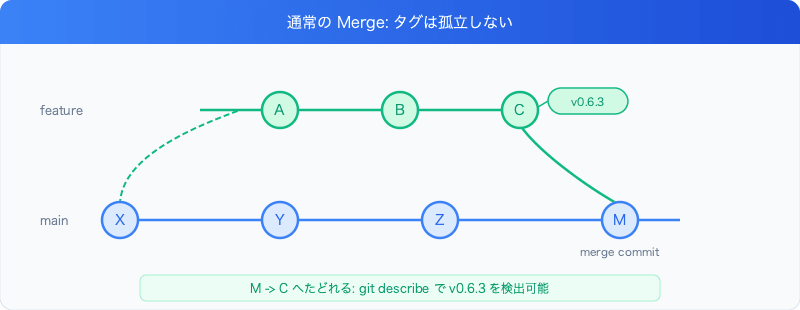
Since you can trace from merge commit M to C, git describe can find the tag.
Rebase merge has the same problem. Since rebase cherry-picks commits, new SHAs are generated.
| Merge Method | Tags Become Orphaned? |
|---|---|
| Regular merge | No |
| Squash merge | Yes |
| Rebase merge | Yes |
Summary
- Squash merge creates a new commit on main with a different SHA than the feature branch commits
- Tags created on a feature branch cannot be reached from main's ancestors and will not be detected by
git describe - Countermeasure: Create tags on main after squash merge
- Tag orphaning can be diagnosed with
git merge-base --is-ancestor - Orphaned tags can be reassigned to a commit on main using
git tag -f
If you use git describe --tags in release automation, be careful when combining it with squash merge.