
I tried fully automating 2-hop deployment via a bastion server with Node.js (ssh2)

This page has been translated by machine translation. View original
Introduction
I needed to deploy a web application to a server on a closed network. However, that server has the following constraints:
- No internet connection —
git cloneanddocker pullcannot be used - SSH connection only possible via a bastion server (2 hops required)
- SFTP upload to the bastion is possible, but the SSH key from the bastion to the deployment target exists only on the bastion (
scp -Jcannot be used from local)
At first I was doing this manually, but typos in commands and missing steps occurred frequently, so I implemented a script that completes pack → transfer → extract → launch in a single command using the Node.js ssh2 library.
In this article, I'll introduce three components: the deploy orchestrator (deploy.mjs), the server-side script (deploy.sh), and remote log streaming (logs.mjs).
Prerequisites & Environment
| Item | Value |
|---|---|
| Local OS | macOS |
| Node.js | 24 LTS |
| ssh2 | 1.17.0 |
| Deployment target | Linux (Docker, Docker Compose installed) |
| Container setup | Frontend (Next.js) + Backend (FastAPI) |
Network Configuration
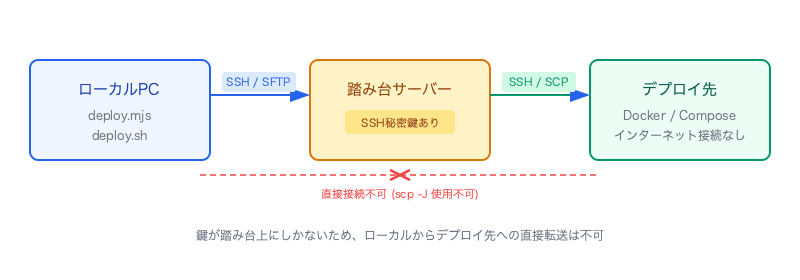
There is no way to connect directly from local to the deployment target; everything must go through the bastion.
Overall Deploy Flow
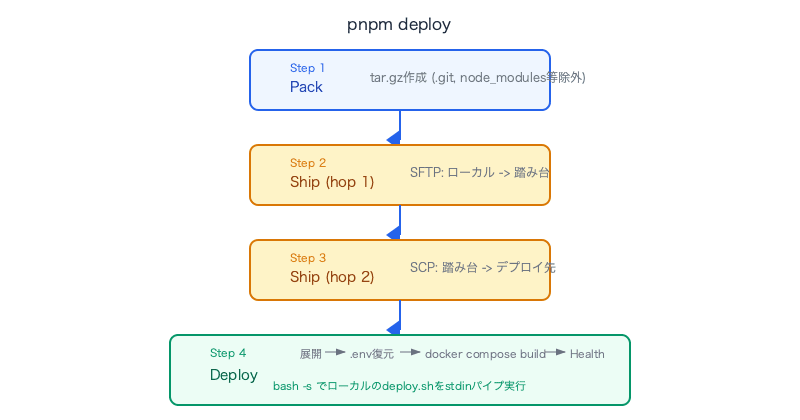
Implementation
deploy.mjs — Local-side Orchestrator
Register it in package.json as "deploy": "node scripts/deploy.mjs" and call it with pnpm deploy.
Resolving SSH Authentication
First, SSH authentication is automatically resolved. If SSH_AUTH_SOCK (ssh-agent) is available, it uses that; otherwise it looks for key files in ~/.ssh.
function resolveAuth() {
  const agentSocket = process.env.SSH_AUTH_SOCK;
  if (agentSocket) {
    return { agent: agentSocket };
  }
  for (const name of ['id_ed25519', 'id_rsa', 'id_ecdsa']) {
    const keyPath = path.join(os.homedir(), '.ssh', name);
    if (fs.existsSync(keyPath)) {
      return { privateKey: fs.readFileSync(keyPath) };
    }
  }
  throw new Error('No SSH auth available');
}
Step 1: Pack
Creates a tar.gz excluding .git, node_modules, .next, .venv, .env (secret information), and .ignore.
await execFileAsync('tar', [
  '-czf', ARCHIVE_PATH,
  `--exclude=${PROJECT_NAME}/.git`,
  `--exclude=${PROJECT_NAME}/node_modules`,
  `--exclude=${PROJECT_NAME}/.next`,
  `--exclude=${PROJECT_NAME}/backend/.venv`,
  `--exclude=${PROJECT_NAME}/backend/data`,
  `--exclude=${PROJECT_NAME}/.env`,
  `--exclude=${PROJECT_NAME}/.ignore`,
  PROJECT_NAME,
], {
  cwd: PARENT_DIR,
  env: { ...process.env, COPYFILE_DISABLE: '1' },  // Suppress macOS ._files
});
COPYFILE_DISABLE: '1' is macOS-specific and prevents resource fork files starting with ._ from being included in the archive.
Step 2: Local → Bastion (SFTP)
Uses ssh2's sftp subsystem to upload with progress display.
function sftpPut(sftp, localPath, remotePath) {
  return new Promise((resolve, reject) => {
    const total = fs.statSync(localPath).size;
    let lastPct = 0;
    sftp.fastPut(localPath, remotePath, {
      step: (transferred) => {
        const pct = Math.floor((transferred / total) * 100);
        if (pct >= lastPct + 10) {
          process.stdout.write(
            `\r  ${pct}% (${(transferred / 1e6).toFixed(1)} / ${(total / 1e6).toFixed(1)} MB)`
          );
          lastPct = pct;
        }
      },
    }, (err) => {
      process.stdout.write('\r  100%\n');
      if (err) reject(err); else resolve();
    });
  });
}
fastPut is an ssh2 method that efficiently transfers an entire file, and the step callback allows monitoring of transfer progress.
Step 3: Bastion → Deployment Target (SCP)
Executes the scp command on the bastion. The reason scp -J (ProxyJump) cannot be used from local is that the SSH key exists only on the bastion.
await bastionExec(
  bastion,
  `scp -o StrictHostKeyChecking=no ${bastionDest} ${DEPLOY_USER}@${DEPLOY_HOST}:`
);
Here, bastionExec is a helper that executes commands on the bastion SSH session and relays stdout/stderr to local in real time.
function bastionExec(conn, cmd, deployScript) {
  return new Promise((resolve, reject) => {
    conn.exec(cmd, (err, stream) => {
      if (err) return reject(err);
      if (deployScript) {
        stream.write(deployScript);
        stream.end();
      }
      stream.on('data', (d) => process.stdout.write(d));
      stream.stderr.on('data', (d) => process.stderr.write(d));
      stream.on('close', (code) => {
        if (code === 0) resolve();
        else reject(new Error(`Bastion exec exited with code ${code}: ${cmd}`));
      });
    });
  });
}
Step 4: Remote Deploy (Pipe bash script to stdin)
This is the most interesting part. deploy.sh is read locally and piped to the standard input of bash -s on the deployment target via the bastion.
const deployScript = fs.readFileSync(DEPLOY_SH);
const bashCmd = DEPLOY_ARGS ? `bash -s -- ${DEPLOY_ARGS}` : 'bash -s';

await bastionExec(
  bastion,
  `ssh -o StrictHostKeyChecking=no ${DEPLOY_USER}@${DEPLOY_HOST} ${bashCmd}`,
  deployScript,
);
bash -s is a command that reads and executes a script from standard input. This means the deploy script does not need to be placed on the remote server in advance, and the latest local version is always executed.
Automatic Deploy Log Saving
All output is teed to a timestamped file.
const LOG_DIR = path.resolve(SCRIPT_DIR, '..', '.ignore', 'deploy-logs');
fs.mkdirSync(LOG_DIR, { recursive: true });
const logFile = path.join(LOG_DIR, `${new Date().toISOString().replace(/[:.]/g, '-')}.log`);
const logStream = fs.createWriteStream(logFile, { flags: 'a' });

const origStdoutWrite = process.stdout.write.bind(process.stdout);
process.stdout.write = (chunk, ...args) => {
  logStream.write(chunk);
  return origStdoutWrite(chunk, ...args);
};
By wrapping process.stdout.write, normal console output is maintained while also being automatically saved to a file. This is useful for investigating the cause of deploy failures.
deploy.sh — Server-side Script
deploy.sh is a script executed remotely via bash -s. It switches behavior between --init (first time) and no flag (update).
.env Backup and Restore
A mechanism that saves the existing .env during updates, then restores it after extracting the new source code.
# On update: stop containers → back up .env
if [[ -f "${DEPLOY_DIR}/docker-compose.yml" ]]; then
  cd "$DEPLOY_DIR" && docker compose down
  cd "$HOME"
  if [[ -f "${DEPLOY_DIR}/.env" ]]; then
    cp "${DEPLOY_DIR}/.env" "$HOME/.env.my-app.bak"
  fi
fi

# Delete old files → extract archive
find "${DEPLOY_DIR}" -mindepth 1 -delete
tar -xzf "$ARCHIVE" --warning=no-unknown-keyword
cp -a "${SOURCE_DIR}/." "$DEPLOY_DIR/"

# Restore .env
if [[ -f "$HOME/.env.my-app.bak" ]]; then
  cp "$HOME/.env.my-app.bak" "${DEPLOY_DIR}/.env"
fi
Since .env is not included in the archive (due to secret information), once configured on the server it will be automatically restored in subsequent updates.
First-time Deploy .env Guide
On first run (--init), if .env does not exist, it displays setup instructions and stops.
if [[ "$INIT" == true ]]; then
  echo "----------------------------------------------"
  echo " .env is not configured. Please create it with the following steps:"
  echo ""
  echo "   cp ${DEPLOY_DIR}/.env.example ${DEPLOY_DIR}/.env"
  echo "   vi ${DEPLOY_DIR}/.env"
  echo ""
  echo " After configuration, run this script again:"
  echo "   pnpm deploy --init"
  echo "----------------------------------------------"
  exit 1
fi
Health Check
docker compose up -d --build
sleep 3
curl -sf http://localhost:40002/v1/healthz && echo "backend OK" \
  || echo "WARNING: backend health check failed"
Using the -s (silent) and -f (fail on HTTP error) flags, a health check failure only displays a WARNING and the script itself exits normally. Since the container may still be starting up immediately after launch, it waits 3 seconds before checking.
Docker Compose Configuration
Separate Dockerfiles for production and development, with ports remapped in docker-compose.override.yml.
# docker-compose.yml (base)
services:
  backend:
    build:
      context: .
      dockerfile: Dockerfile.backend
    env_file: .env
    restart: unless-stopped

  frontend:
    build:
      context: .
      dockerfile: Dockerfile.frontend
    env_file: .env
    depends_on:
      - backend
    restart: unless-stopped
# docker-compose.override.yml (environment-specific port mapping)
services:
  frontend:
    ports:
      - "40001:3000"
  backend:
    ports:
      - "40002:8765"
docker-compose.override.yml is a file that Docker Compose automatically merges. By not including port definitions in the base docker-compose.yml and instead configuring them in per-environment overrides, the same source code can be deployed to different port schemes.
The EC2 deployment target in this case has its operating hours scheduled from 8:00 to 22:00 to reduce costs, automatically starting every morning and stopping every night. Initially, since no restart policy was set, every time EC2 started in the morning it was necessary to SSH in and manually run docker compose up -d.
By setting restart: unless-stopped, containers are automatically resumed when the Docker daemon starts (= when EC2 starts), eliminating the need for manual work every morning.
restart: unless-stopped
The reason unless-stopped was chosen over always is that when intentionally stopped with docker compose down, we want it to remain stopped. This does not interfere with the flow of stopping containers during deployment → re-extracting → restarting.
logs.mjs — Remote Log Streaming
For post-deploy debugging, I also created a script that streams remote docker compose logs to local.
const FOLLOW = process.argv.includes('--follow');
const TAIL = process.argv.find((a) => a.startsWith('--tail='))?.split('=')[1] ?? '200';

// Service name validation (command injection prevention)
const rawService = process.argv.find(
  (a) => !a.startsWith('-') && a !== process.argv[0] && a !== process.argv[1]
) ?? '';
if (rawService && !/^[a-zA-Z0-9_-]+$/.test(rawService)) {
  throw new Error(`Invalid service name: ${rawService}`);
}

const remoteCmd = `ssh -o StrictHostKeyChecking=no ${DEPLOY_USER}@${DEPLOY_HOST} \
  'cd ${DEPLOY_DIR} && docker compose logs --tail=${TAIL}${followFlag} ${service}'`;
Usage:
pnpm logs                      # Display the last 200 lines
pnpm logs -- --follow          # Real-time streaming
pnpm logs -- --follow backend  # backend container only
Without the hassle of directly SSH-ing into the deployment target, you can check logs with a single command from local.
Execution Results
$ pnpm deploy

=== pack ===
Packing project -> ../my-app.tar.gz
created: ../my-app.tar.gz (12.3 MB)

=== ship: step 1 - local -> bastion ===
Bastion connected.
Uploading to bastion: /home/user/my-app.tar.gz
  100%

=== ship: step 2 - bastion -> target ===
(~12 MB, may take a minute...)
done: my-app.tar.gz -> user@10.xxx.x.xx:~/

=== remote deploy (bastion -> target) ===
=== extract ===
stopping containers...
.env backed up
extracted → /var/www/my-app
.env restored
=== .env ===
.env OK
=== deploy ===
Building backend...
Building frontend...
...
=== done ===
backend OK

log saved: .ignore/deploy-logs/2026-06-19T10-30-00-000Z.log
From pack → 2-hop transfer → extraction → Docker Compose startup → health check, the process completes in about 3 minutes.
Key Points
| Point | Reason |
|---|---|
Pipe script to stdin with bash -s |
No need to place script on remote. The latest local version is always executed |
.env backup and restore |
Secret information is not included in the archive, and no manual re-configuration is needed during updates |
--init / no-flag branching |
Safely switch behavior between first run and updates |
| SFTP progress display | Easy to judge hangs even with large archives |
| Automatic deploy log saving | Faster root cause analysis during incidents |
COPYFILE_DISABLE: '1' |
Prevents macOS-specific ._ files from being included |
restart: unless-stopped |
Automatically resumes containers on EC2 scheduled startup. No more manual startup every morning |
Summary
Even under the constraints of a closed network and bastion-mediated access, using the ssh2 library allows you to build a 2-hop deploy pipeline with a single Node.js script.
The script pipe to bash -s in particular is a versatile technique that saves the effort of placing and managing script files on the remote server. Combined with Docker Compose's override.yml, it also provides the flexibility to apply the same source code directly to different environment rules.
I hope this is helpful for anyone struggling with deployments to closed environments.