Take backups at quiescence points using AWS Backup with Step Functions

This page has been translated by machine translation. View original
Introduction
Hello everyone, this is Akaike.
Have you ever wanted to stop a server and take a backup at a quiesce point using AWS Backup? I have.
However, since AWS Backup takes backups while the instance is running, this cannot be achieved as-is.
So this time, I put together a configuration that uses Step Functions to take backups at a quiesce point even with AWS Backup.
About AWS Backup Consistency
As a prerequisite, AWS Backup will snapshot all EBS volumes attached to an EC2 instance at the same point in time, even when multiple volumes are attached.
In the AWS official documentation, this is called crash consistency.
Crash consistency means that the snapshots for every Amazon EBS volume attached to the same Amazon EC2 instance are taken at the exact same moment.
A crash-consistent backup is like "taking a snapshot with the power on."
This is sufficient for many workloads, but for applications that hold unwritten data in memory, there is a risk of data inconsistency upon restoration.
To avoid this, you need to obtain an application-consistent backup.
There are two main ways to achieve this:
- Option 1: Ensure consistency while keeping the application running
- On Windows, use VSS (Volume Shadow Copy Service); on Linux, use
fsfreezeor pre/post scripts to temporarily quiesce I/O and take a backup - However, SSM Agent and VSS component setup is required, and the target is limited to VSS/freeze-compatible applications
- On Windows, use VSS (Volume Shadow Copy Service); on Linux, use
- Option 2: Ensure consistency by stopping the instance first
- Take a backup with the application completely stopped, i.e., at a "quiesce point"
- Consistent backups can be reliably obtained even for applications that do not support VSS
This time, I chose Option 2 because I wanted to reliably create quiesce points including workloads that do not support VSS.
About the Configuration
What I want to do is simple: automate the following flow.
- Stop the EC2 instance
- Wait for the stop to complete
- Take a backup with AWS Backup
- Wait for the backup to complete
- Start the EC2 instance
I adopted Step Functions to control this state transition of "stop → wait → backup → wait → start."
The overall configuration is as follows.
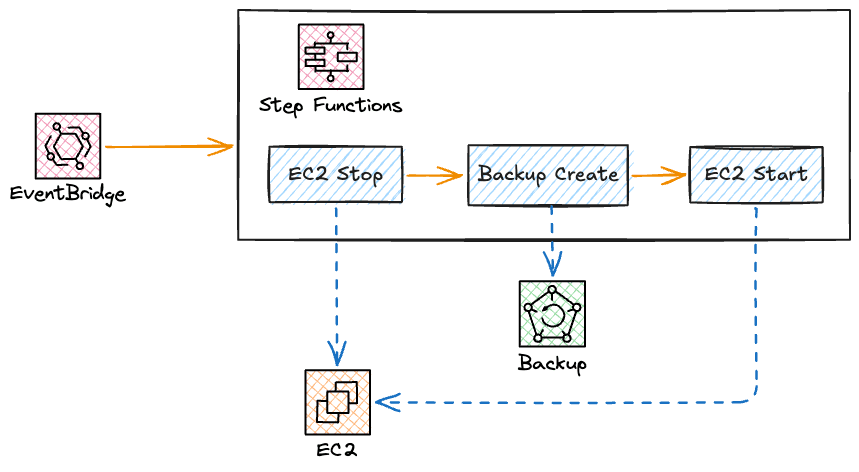
The roles are organized as follows.
| Service | Role |
|---|---|
| EventBridge Scheduler | Start the state machine by day of the week and time |
| Step Functions | Control the entire flow of stop → backup → start |
| AWS Backup | Obtain and store the actual backup (recovery point) |
Terraform
I will post the entire Terraform created this time.
Details will be explained in the next section "Implementation Explanation."
Code
- aws_backup.tf
# -----------------------------------------------------------------------------
# Backup Vault - For production
# -----------------------------------------------------------------------------
resource "aws_backup_vault" "prod" {
  name = "example-prod-backup-vault"

  tags = {
    Name = "example-prod-backup-vault"
  }
}

# Vault Lock - Governance mode
# Without changeable_for_days specified, this is governance mode (lock can be released/changed)
resource "aws_backup_vault_lock_configuration" "prod" {
  backup_vault_name  = aws_backup_vault.prod.name
  min_retention_days = 15
}
- iam.tf
# -----------------------------------------------------------------------------
# AWS Backup execution role
# -----------------------------------------------------------------------------
data "aws_iam_policy_document" "backup_assume_role" {
  statement {
    effect  = "Allow"
    actions = ["sts:AssumeRole"]
    principals {
      type        = "Service"
      identifiers = ["backup.amazonaws.com"]
    }
  }
}

resource "aws_iam_role" "backup" {
  name               = "example-backup-role"
  assume_role_policy = data.aws_iam_policy_document.backup_assume_role.json
}

resource "aws_iam_role_policy_attachment" "backup_service" {
  role       = aws_iam_role.backup.name
  policy_arn = "arn:aws:iam::aws:policy/service-role/AWSBackupServiceRolePolicyForBackup"
}

# -----------------------------------------------------------------------------
# Step Functions execution role
# -----------------------------------------------------------------------------
data "aws_iam_policy_document" "sfn_inline" {
  # EC2 stop/start/status check
  statement {
    effect = "Allow"
    actions = [
      "ec2:StopInstances",
      "ec2:StartInstances",
      "ec2:DescribeInstances",
      "ec2:DescribeInstanceStatus",
    ]
    resources = ["*"]
  }

  # AWS Backup start/status check
  statement {
    effect = "Allow"
    actions = [
      "backup:StartBackupJob",
      "backup:DescribeBackupJob",
    ]
    resources = ["*"]
  }

  # Permission to pass the AWS Backup execution role
  statement {
    effect    = "Allow"
    actions   = ["iam:PassRole"]
    resources = [aws_iam_role.backup.arn]
  }

  # CloudWatch Logs / X-Ray (for log output and tracing)
  statement {
    effect = "Allow"
    actions = [
      "logs:CreateLogDelivery",
      "logs:GetLogDelivery",
      "logs:UpdateLogDelivery",
      "logs:DeleteLogDelivery",
      "logs:ListLogDeliveries",
      "logs:PutResourcePolicy",
      "logs:DescribeResourcePolicies",
      "logs:DescribeLogGroups",
    ]
    resources = ["*"]
  }

  statement {
    effect = "Allow"
    actions = [
      "xray:PutTraceSegments",
      "xray:PutTelemetryRecords",
      "xray:GetSamplingRules",
      "xray:GetSamplingTargets",
    ]
    resources = ["*"]
  }
}
- step_functions.tf
resource "aws_sfn_state_machine" "stop_backup_start" {
  name     = "example-stop-backup-start-sfn"
  role_arn = aws_iam_role.sfn.arn
  type     = "STANDARD"

  logging_configuration {
    log_destination        = "${aws_cloudwatch_log_group.sfn_stop_backup_start.arn}:*"
    include_execution_data = true
    level                  = "ALL"
  }

  tracing_configuration {
    enabled = true
  }

  definition = jsonencode({
    Comment = "Stop EC2, take an AWS Backup at a quiesce point, then start it after completion"
    StartAt = "LookupInstanceId"
    States = {
      # Identify a single instance from the Name tag
      LookupInstanceId = {
        Type     = "Task"
        Resource = "arn:aws:states:::aws-sdk:ec2:describeInstances"
        Parameters = {
          Filters = [
            {
              Name        = "tag:Name"
              "Values.$"  = "States.Array($.instance_name)"
            },
            {
              Name   = "instance-state-name"
              Values = ["pending", "running", "stopping", "stopped"]
            }
          ]
        }
        ResultSelector = {
          "instance_ids.$" = "$.Reservations[*].Instances[*].InstanceId"
        }
        ResultPath = "$.lookup"
        Next       = "CountInstances"
        Catch = [{ ErrorEquals = ["States.ALL"], Next = "ExecutionFailed" }]
      }

      CountInstances = {
        Type = "Pass"
        Parameters = {
          "count.$" = "States.ArrayLength($.lookup.instance_ids)"
        }
        ResultPath = "$.lookup_meta"
        Next       = "CheckLookupCount"
      }

      CheckLookupCount = {
        Type = "Choice"
        Choices = [
          {
            Variable      = "$.lookup_meta.count"
            NumericEquals = 1
            Next          = "ExtractInstanceId"
          }
        ]
        Default = "LookupFailed"
      }

      # Extract the instance ID only when exactly one result is found
      ExtractInstanceId = {
        Type = "Pass"
        Parameters = {
          "instance_id.$" = "$.lookup.instance_ids[0]"
        }
        ResultPath = "$.target"
        Next       = "StopInstance"
      }

      # Fail if 0 or multiple instances are found to prevent accidental operations
      LookupFailed = {
        Type  = "Fail"
        Cause = "Name tag did not match exactly one instance"
      }

      StopInstance = {
        Type     = "Task"
        Resource = "arn:aws:states:::aws-sdk:ec2:stopInstances"
        Parameters = {
          "InstanceIds.$" = "States.Array($.target.instance_id)"
        }
        ResultPath = "$.stop_result"
        Next       = "WaitBeforeCheckStopped"
        Catch = [{ ErrorEquals = ["States.ALL"], Next = "ExecutionFailed" }]
      }

      WaitBeforeCheckStopped = {
        Type    = "Wait"
        Seconds = 30
        Next    = "CheckStopped"
      }

      # Without IncludeAllInstances: true, stopped instances are not included in results
      CheckStopped = {
        Type     = "Task"
        Resource = "arn:aws:states:::aws-sdk:ec2:describeInstanceStatus"
        Parameters = {
          "InstanceIds.$"      = "States.Array($.target.instance_id)"
          IncludeAllInstances = true
        }
        ResultPath = "$.status_result"
        Next       = "IsStopped"
        Catch = [{ ErrorEquals = ["States.ALL"], Next = "FallbackStartInstance" }]
      }

      IsStopped = {
        Type = "Choice"
        Choices = [
          {
            Variable      = "$.status_result.InstanceStatuses[0].InstanceState.Code"
            NumericEquals = 80
            Next          = "StartBackupJob"
          }
        ]
        Default = "WaitBeforeCheckStopped"
      }

      StartBackupJob = {
        Type     = "Task"
        Resource = "arn:aws:states:::aws-sdk:backup:startBackupJob"
        Parameters = {
          "BackupVaultName.$" = "$.backup_vault_name"
          "ResourceArn.$"     = "States.Format('arn:aws:ec2:ap-northeast-1:123456789012:instance/{}', $.target.instance_id)"
          IamRoleArn          = "arn:aws:iam::123456789012:role/example-backup-role"
          Lifecycle = {
            "DeleteAfterDays.$" = "$.retention_days"
          }
          RecoveryPointTags = {
            "Name.$"        = "$.instance_name"
            "Environment.$" = "$.environment"
          }
        }
        ResultPath = "$.backup_result"
        Next       = "WaitBeforeCheckBackup"
        Catch = [{ ErrorEquals = ["States.ALL"], Next = "FallbackStartInstance" }]
      }

      WaitBeforeCheckBackup = {
        Type    = "Wait"
        Seconds = 60
        Next    = "CheckBackupComplete"
      }

      CheckBackupComplete = {
        Type     = "Task"
        Resource = "arn:aws:states:::aws-sdk:backup:describeBackupJob"
        Parameters = {
          "BackupJobId.$" = "$.backup_result.BackupJobId"
        }
        ResultPath = "$.backup_status"
        Next       = "IsBackupComplete"
        Catch = [{ ErrorEquals = ["States.ALL"], Next = "FallbackStartInstance" }]
      }

      IsBackupComplete = {
        Type = "Choice"
        Choices = [
          {
            Variable     = "$.backup_status.State"
            StringEquals = "COMPLETED"
            Next         = "StartInstance"
          }
        ]
        Default = "WaitBeforeCheckBackup"
      }

      StartInstance = {
        Type     = "Task"
        Resource = "arn:aws:states:::aws-sdk:ec2:startInstances"
        Parameters = {
          "InstanceIds.$" = "States.Array($.target.instance_id)"
        }
        ResultPath = "$.start_result"
        Next       = "WaitBeforeCheckRunning"
        Catch = [{ ErrorEquals = ["States.ALL"], Next = "ExecutionFailed" }]
      }

      WaitBeforeCheckRunning = {
        Type    = "Wait"
        Seconds = 30
        Next    = "CheckRunning"
      }

      CheckRunning = {
        Type     = "Task"
        Resource = "arn:aws:states:::aws-sdk:ec2:describeInstanceStatus"
        Parameters = {
          "InstanceIds.$" = "States.Array($.target.instance_id)"
        }
        ResultPath = "$.running_result"
        Next       = "IsRunning"
        Catch = [{ ErrorEquals = ["States.ALL"], Next = "ExecutionFailed" }]
      }

      # Wait until running and both system/instance status checks are ok
      IsRunning = {
        Type = "Choice"
        Choices = [
          {
            And = [
              {
                Variable      = "$.running_result.InstanceStatuses[0].InstanceState.Code"
                NumericEquals = 16
              },
              {
                Variable     = "$.running_result.InstanceStatuses[0].SystemStatus.Status"
                StringEquals = "ok"
              },
              {
                Variable     = "$.running_result.InstanceStatuses[0].InstanceStatus.Status"
                StringEquals = "ok"
              }
            ]
            Next = "Done"
          }
        ]
        Default = "WaitBeforeCheckRunning"
      }

      # Even on failure, at least attempt to start the instance before treating it as failed
      FallbackStartInstance = {
        Type     = "Task"
        Resource = "arn:aws:states:::aws-sdk:ec2:startInstances"
        Parameters = {
          "InstanceIds.$" = "States.Array($.target.instance_id)"
        }
        Next = "ExecutionFailed"
      }

      ExecutionFailed = {
        Type = "Fail"
      }

      Done = {
        Type = "Succeed"
      }
    }
  })
}
- eventbridge.tf
resource "aws_scheduler_schedule" "app_stop_backup_start" {
  name                         = "example-app-stop-backup-start-schedule"
  description                  = "AP server stop → backup → start operation"
  schedule_expression          = "cron(0 1 ? * FRI *)"
  schedule_expression_timezone = "Asia/Tokyo"

  flexible_time_window {
    mode = "OFF"
  }

  target {
    arn      = aws_sfn_state_machine.stop_backup_start.arn
    role_arn = aws_iam_role.scheduler.arn

    input = jsonencode({
      instance_name     = "example-app-server"
      backup_vault_name = aws_backup_vault.prod.name
      retention_days    = 21
      environment       = "prod"
    })

    retry_policy {
      maximum_retry_attempts = 0
    }
  }
}
About the Implementation
From here, I will explain the key points of the implementation above.
About AWS Backup
We create a Backup Vault as the storage destination for backups.
Also, this time we decided not to create a backup plan (schedule), but instead trigger backups on-demand using StartBackupJob from Step Functions.
This is because I wanted to centralize schedule management on the EventBridge Scheduler side.
About Step Functions
Regarding the state machine defined in the definition of step_functions.tf, the processing flow is as follows.
- Resolve the instance ID from the
Nametag - Stop the instance
- Poll until it becomes
stopped - Start the backup with
StartBackupJob - Poll until the backup becomes
COMPLETED - Start the instance
- Poll until it is
runningand the status checks areok
From here, let's look at each state in order.
Resolve the instance from the Name tag
First, rather than passing the instance ID from EventBridge Scheduler, we pass the value of the Name tag.
By specifying the tag name, we can handle cases where the instance ID changes after restoration during operation.
We search by tag using describeInstances, confirm that there is exactly one matching instance, and then extract the ID.
If unexpectedly multiple instances are found or if no instances are found, we cause a Fail to prevent accidents where an unintended instance is stopped.
"LookupInstanceId": {
  "Type": "Task",
  "Resource": "arn:aws:states:::aws-sdk:ec2:describeInstances",
  "Parameters": {
    "Filters": [
      {
        "Name": "tag:Name",
        "Values.$": "States.Array($.instance_name)"
      },
      {
        "Name": "instance-state-name",
        "Values": ["pending", "running", "stopping", "stopped"]
      }
    ]
  },
  "ResultSelector": {
    "instance_ids.$": "$.Reservations[*].Instances[*].InstanceId"
  },
  "ResultPath": "$.lookup",
  "Next": "CountInstances",
  "Catch": [{ "ErrorEquals": ["States.ALL"], "Next": "ExecutionFailed" }]
}
Next, we determine whether exactly one instance is found.
"CountInstances": {
  "Type": "Pass",
  "Parameters": {
    "count.$": "States.ArrayLength($.lookup.instance_ids)"
  },
  "ResultPath": "$.lookup_meta",
  "Next": "CheckLookupCount"
},
"CheckLookupCount": {
  "Type": "Choice",
  "Choices": [{
    "Variable": "$.lookup_meta.count",
    "NumericEquals": 1,
    "Next": "ExtractInstanceId"
  }],
  "Default": "LookupFailed"
}
Stop the instance and wait for it to stop
Once the instance ID is confirmed, we stop it. Since the instance does not immediately become stopped after the stop request, we wait a certain amount of time with Wait, then check the state with describeInstanceStatus, and loop using Choice to build polling.
EC2 state code 80 represents stopped. We repeat waiting and checking until this state is reached.
"StopInstance": {
  "Type": "Task",
  "Resource": "arn:aws:states:::aws-sdk:ec2:stopInstances",
  "Parameters": {
    "InstanceIds.$": "States.Array($.target.instance_id)"
  },
  "ResultPath": "$.stop_result",
  "Next": "WaitBeforeCheckStopped",
  "Catch": [{ "ErrorEquals": ["States.ALL"], "Next": "ExecutionFailed" }]
},
"WaitBeforeCheckStopped": {
  "Type": "Wait",
  "Seconds": 30,
  "Next": "CheckStopped"
},
"CheckStopped": {
  "Type": "Task",
  "Resource": "arn:aws:states:::aws-sdk:ec2:describeInstanceStatus",
  "Parameters": {
    "InstanceIds.$": "States.Array($.target.instance_id)",
    "IncludeAllInstances": true
  },
  "ResultPath": "$.status_result",
  "Next": "IsStopped",
  "Catch": [{ "ErrorEquals": ["States.ALL"], "Next": "FallbackStartInstance" }]
},
"IsStopped": {
  "Type": "Choice",
  "Choices": [{
    "Variable": "$.status_result.InstanceStatuses[0].InstanceState.Code",
    "NumericEquals": 80,
    "Next": "StartBackupJob"
  }],
  "Default": "WaitBeforeCheckStopped"
}
Since describeInstanceStatus by default only returns instances in the running state, an important point is that IncludeAllInstances: true is specified for the stop check. Without this, stopped instances are not included in the results and the judgment cannot be made.
Start the backup and wait for it to complete
Once the instance has stopped, we finally start the backup with StartBackupJob. At this point, the application is completely stopped, so a backup at a quiesce point can be obtained.
For ResourceArn, we specify the ARN of the EC2 instance. The region and account ID are assembled using States.Format. The retention period (DeleteAfterDays) and tags can be dynamically switched using the input values from EventBridge Scheduler.
"StartBackupJob": {
  "Type": "Task",
  "Resource": "arn:aws:states:::aws-sdk:backup:startBackupJob",
  "Parameters": {
    "BackupVaultName.$": "$.backup_vault_name",
    "ResourceArn.$": "States.Format('arn:aws:ec2:ap-northeast-1:123456789012:instance/{}', $.target.instance_id)",
    "IamRoleArn": "arn:aws:iam::123456789012:role/example-backup-role",
    "Lifecycle": {
      "DeleteAfterDays.$": "$.retention_days"
    },
    "RecoveryPointTags": {
      "Name.$": "$.instance_name",
      "Environment.$": "$.environment"
    }
  },
  "ResultPath": "$.backup_result",
  "Next": "WaitBeforeCheckBackup",
  "Catch": [{ "ErrorEquals": ["States.ALL"], "Next": "FallbackStartInstance" }]
}
Since backup jobs also take time to complete, we poll using describeBackupJob until the State becomes COMPLETED.
"WaitBeforeCheckBackup": {
  "Type": "Wait",
  "Seconds": 60,
  "Next": "CheckBackupComplete"
},
"CheckBackupComplete": {
  "Type": "Task",
  "Resource": "arn:aws:states:::aws-sdk:backup:describeBackupJob",
  "Parameters": {
    "BackupJobId.$": "$.backup_result.BackupJobId"
  },
  "ResultPath": "$.backup_status",
  "Next": "IsBackupComplete",
  "Catch": [{ "ErrorEquals": ["States.ALL"], "Next": "FallbackStartInstance" }]
},
"IsBackupComplete": {
  "Type": "Choice",
  "Choices": [{
    "Variable": "$.backup_status.State",
    "StringEquals": "COMPLETED",
    "Next": "StartInstance"
  }],
  "Default": "WaitBeforeCheckBackup"
}
Start the instance and wait for it to start
Finally, we start the instance and wait until it is running (state code 16) and both the system/instance status checks are ok. By confirming the status checks as well, we ensure the OS has fully booted and the service is available.
"IsRunning": {
  "Type": "Choice",
  "Choices": [{
    "And": [
      {
        "Variable": "$.running_result.InstanceStatuses[0].InstanceState.Code",
        "NumericEquals": 16
      },
      {
        "Variable": "$.running_result.InstanceStatuses[0].SystemStatus.Status",
        "StringEquals": "ok"
      },
      {
        "Variable": "$.running_result.InstanceStatuses[0].InstanceStatus.Status",
        "StringEquals": "ok"
      }
    ],
    "Next": "Done"
  }],
  "Default": "WaitBeforeCheckRunning"
}
Fallback on failure
If a failure occurs during backup or status checking, leaving the instance stopped would have a business impact.
Therefore, in the Catch of each Task, we transition to FallbackStartInstance, creating a structure that "at least attempts to start the instance before treating it as a failure."
"FallbackStartInstance": {
  "Type": "Task",
  "Resource": "arn:aws:states:::aws-sdk:ec2:startInstances",
  "Parameters": {
    "InstanceIds.$": "States.Array($.target.instance_id)"
  },
  "Next": "ExecutionFailed"
},
"ExecutionFailed": {
  "Type": "Fail"
}
This way, even if a backup fails, the state becomes "the instance attempted to start and the workflow is notified as a failure," preventing the accident of waking up the next morning with the instance still stopped.
Scheduled execution with EventBridge Scheduler
Finally, we run the created state machine periodically from EventBridge Scheduler. In eventbridge.tf, we set the timezone to Asia/Tokyo and specify the execution timing with a cron expression.
We pass the Name tag of the target instance, Backup Vault name, retention period, and environment name as input (input) to the state machine. This allows the same state machine to be reused for multiple instances and schedules.
Other Considerations
Here is a summary of points to be aware of when implementing.
- Downtime will occur
- Since quiesce point backups require stopping the instance, the service will be stopped during that time.
- It is a prerequisite to schedule this during off-peak hours such as late at night when the business impact is minimal.
- Polling interval and total time required
- Please adjust the
Waitseconds to match the time it takes to stop/start the instance and complete the backup. - Too short and API calls increase; too long and the overall time required grows.
- Please adjust the
- Re-confirm whether crash consistency is sufficient
- As mentioned at the beginning, crash-consistent backups may be sufficient depending on the workload.
- Since quiesce point backups involving a stop are more reliable but involve downtime, judge whether stopping is truly necessary against your requirements.
- Failure notifications
- Although not covered in this article, having a mechanism to notify via SNS or Chatbot when the state machine reaches
Failwill allow for peace of mind in operations, especially given that stop/start operations are involved.
- Although not covered in this article, having a mechanism to notify via SNS or Chatbot when the state machine reaches
Conclusion
That's it — I tried taking backups at a quiesce point using AWS Backup with Step Functions.
Even in situations where AWS Backup's crash-consistent backups alone cannot meet the requirements, by combining Step Functions, we were able to achieve backups at a quiesce point.
Also, compared to implementing with Lambda, Step Functions eliminates the need for code management and the associated version management, making it recommended from an operational standpoint as well.
