I tried out the Context Management feature of Strands Agents

This page has been translated by machine translation. View original
Introduction
Hello, I'm Jinno from the consulting department, hoping to improve my driving skills.
Why is parking so difficult? I'm studying by watching YouTube every day.
But driving aside, are you all using Strands Agents?
A feature called Context Management was recently added. Just like AgentCore, new features keep coming out one after another.
There were already similar features like Conversation Manager and Context Offloader, but what's the difference?
I'd like to first explain the features and then actually try them out!
Context Management
When you continue a long conversation with an agent, the context window fills up with messages and tool results, leading to token limit errors or degraded response quality that doesn't give you the results you want...
Previously, Strands Agents dealt with this problem by individually configuring Conversation Manager and Context Offloader, but a new feature called Context Management has been added. By simply specifying one mode in context_manager, the SDK configures a complete context management setup with tuned defaults.
There are two modes: auto and agentic. In agentic mode, the model itself monitors how much context remains and decides when and what to compress. It's like the /compact feature in Claude Code, which sounds interesting!
I'd like to actually run both modes and observe how large tool results get offloaded, and the moment the model calls pin_context or truncate_context.
I'll also verify the behavior when used together with AgentCore Memory's Session Manager, which persists sessions.
Prerequisites
The environment used for verification is as follows.
| Item | Version/Setting |
|---|---|
| Python | 3.12 |
| strands-agents | 1.45.0 |
| bedrock-agentcore | 1.17.0 (used for combined verification with Session Manager) |
| Model (basic verification) | Claude Sonnet 4.5 (Amazon Bedrock, us.anthropic.claude-sonnet-4-5-20250929-v1:0) |
| Model (200K window verification) | Claude Haiku 4.5 (Amazon Bedrock, us.anthropic.claude-haiku-4-5-20251001-v1:0) |
Also, since Context Management is a mechanism that combines two existing components, let me first confirm the role of each.
| Component | Role |
|---|---|
| Conversation Manager | Summarizes and deletes old messages to keep conversation history within the context window |
| Context Offloader | Intercepts large tool results at runtime and offloads them externally, leaving only a short preview in the context (introduced in a previous article) |
Previously, you needed to assemble these individually and adjust thresholds, but Context Management configures both of these just by selecting a mode.
Trying Auto Mode
Let's start with auto mode. The usage is simple — just pass auto to context_manager.
from strands import Agent

agent = Agent(context_manager="auto")
That's it? It's surprisingly simple. What gets configured...?
What Gets Configured
According to the documentation, auto mode configures two components with the default values that scored highest on an evaluation benchmark called ContextBench.
Let me peek inside the generated Agent to verify this is actually the case.
from strands import Agent

agent = Agent(context_manager="auto")

cm = agent.conversation_manager
print("conversation_manager:", type(cm).__name__)
print("summary_ratio:", cm.summary_ratio)
print("compression_threshold:", cm._compression_threshold)
print("tools:", agent.tool_names)
conversation_manager: SummarizingConversationManager
summary_ratio: 0.3
compression_threshold: 0.85
tools: ['retrieve_offloaded_content']
Indeed, it's configured with the values as documented! To summarize, these are the values:
| Component | Settings | Behavior |
|---|---|---|
| SummarizingConversationManager | summary ratio 0.3, compression threshold 0.85 | Proactively summarizes old messages before the window fills up, preserving important information while making room for new turns |
| ContextOffloader | max result tokens 1,500, preview tokens 750 | Offloads large tool results to external storage, leaving only a truncated preview in the context |
A tool called retrieve_offloaded_content is also registered, so the agent can reference the full offloaded content itself when needed.
Observing How Large Tool Results Are Offloaded
Let's prepare a tool that returns a large amount of information and observe the offloading behavior.
I'll create a tool that returns a fictitious design document with 40 sections, and plant an important piece of information — a release approval code — at the end of the document (a position that definitely won't be in the preview). If only the preview is visible, the agent shouldn't be able to answer this question.
Full verification code (exp_auto_offload.py)
import json
from strands import Agent, tool
from strands.models import BedrockModel

@tool
def get_design_doc() -> str:
    """Retrieve the full text of the internal design document"""
    sections = []
    for i in range(1, 41):
        sections.append(
            f"## Section {i}: Design of module module_{i}\n"
            f"module_{i} handles stage {i} of the data transformation pipeline."
            f"The input schema uses schema_v{i}, which is passed downstream after validation."
            f"On error, retry is performed 3 times, and on failure, the message is sent to DLQ."
            f"The throughput target is {i * 100} items per second, with latency within {i * 10} milliseconds."
        )
    # Plant an important fact at the end of the document (a position not in the preview)
    sections.append(
        "## Appendix: Environment Variable List\n"
        "The administrator contact for this system is platform-team@example.com, and "
        "the release approval code is SAKURA-2026."
    )
    return "\n\n".join(sections)

model = BedrockModel(model_id="us.anthropic.claude-sonnet-4-5-20250929-v1:0")
agent = Agent(model=model, tools=[get_design_doc], context_manager="auto")

agent("Please retrieve the design document and just tell me how many sections it has.")

# Check the tool results remaining in the conversation history
for msg in agent.messages:
    for block in msg["content"]:
        if "toolResult" in block:
            text = json.dumps(block["toolResult"]["content"], ensure_ascii=False)
            print(f"Length: {len(text)} characters")
            print(text[:400])

agent("Please tell me the release approval code written in the document.")
When I ran it, the tool results remaining in the conversation history looked like this:
Length: 3581 characters
[{"text": "[Offloaded: 1 blocks, ~1,806 tokens]
Tool result was offloaded to external storage due to size.
Use the preview below if it answers your question.
If you need more detail, use retrieve_offloaded_content with a reference and:
  - pattern: regex or keyword to find matching lines with context
  - line_range: { start, end } to read a specific span of lines
Retrieve full content (omit pattern/line_range) as a last resort.

## Section 1: Design of module module_1
module_1 handles stage 1 of the data transformation pipeline....
The tool result of approximately 1,806 tokens exceeded the threshold of 1,500 tokens, so it was automatically offloaded to external storage, leaving only the beginning preview and instructions on how to retrieve it in the context!
In addition to simply retrieving the full offloaded text, you can use pattern for regex/keyword search and line_range for specifying a line range.
When answering the question about counting sections, the agent called retrieve_offloaded_content with a regex pattern specified.
[40 matches for /^## Section/]

>   1| ## Section 1: Design of module module_1
    2| module_1 handles stage 1 of the data transformation pipeline....
>   4| ## Section 2: Design of module module_2
You can perform grep-like searches against the offloaded destination. Since retrieving the full text again would bloat the context, it's designed so you can pinpoint only the lines you need.
Next, let me ask about the release approval code at the end that isn't included in the preview.
Tool #3: retrieve_offloaded_content
The release approval code is SAKURA-2026.
It determined that the information wasn't in the preview, called retrieve_offloaded_content on its own, and answered correctly! The cycle of offloading and on-demand retrieval is working as expected.
Combining with Explicit Settings
You can also override only the parts you want fine control over with your own settings.
from strands import Agent
from strands.agent.conversation_manager import SlidingWindowConversationManager

# Your own Conversation Manager is used,
# while ContextOffloader continues to be added automatically
agent = Agent(
    context_manager="auto",
    conversation_manager=SlidingWindowConversationManager(
        window_size=30,
    ),
)
Passing conversation_manager replaces the auto-configured SummarizingConversationManager, while ContextOffloader remains added. Conversely, if you include your own ContextOffloader in plugins, it won't be added again, and your own settings are maintained. It's designed to allow partial replacements rather than forcing a choice between all-automatic or all-manual.
Trying Agentic Mode
Auto mode compresses based on fixed thresholds determined by the SDK, but agentic mode delegates that control to the model itself.
from strands import Agent

agent = Agent(context_manager="agentic")
The model looks at how full the context window is and decides for itself when to compress, what to compress, and what to protect.
The official documentation example is easy to understand: for a coding agent, it could decide to discard the content of old files that have already been edited while pinning currently failing tests it's working on. Fixed thresholds can only compress in order from oldest and cannot make this distinction, so the tradeoff of agentic mode is paying a bit more in tokens in exchange for the model's judgment.
Checking the Configuration
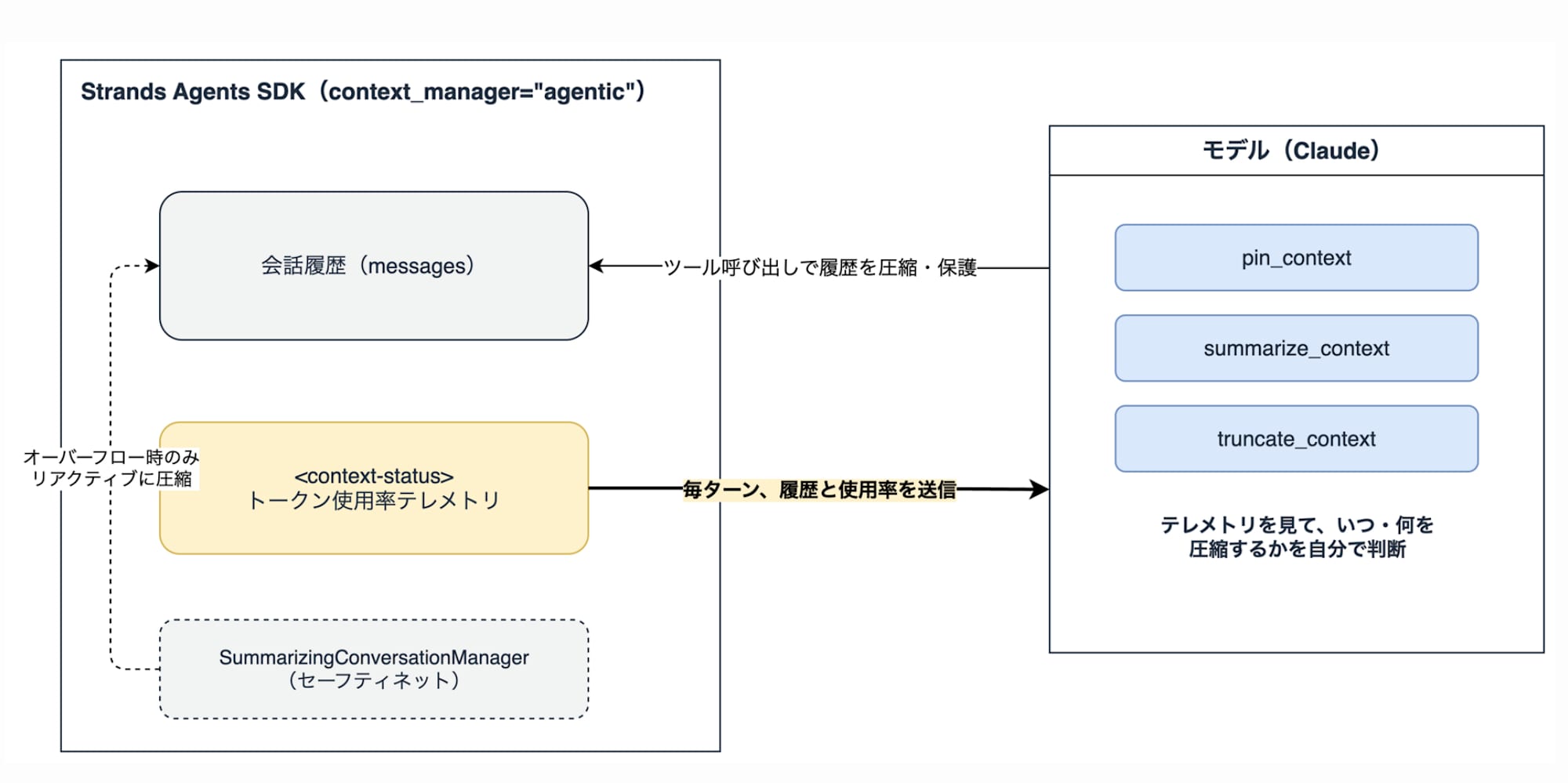
To let the model manage context, token usage telemetry and tools are provided.
The first is token usage telemetry. Before each model call, the SDK appends a status block to the latest message.
<context-status>
<used>50,000 / 200,000 tokens (25.0%)</used>
<remaining>~150,000 tokens</remaining>
</context-status>
The model uses this signal to judge for itself whether the window is sufficiently full, rather than waiting for a fixed cutoff.
The second is three context manipulation tools the model can call. When creating an agent in agentic mode, the following tools were registered, including retrieve_offloaded_content derived from ContextOffloader.
['summarize_context', 'truncate_context', 'pin_context', 'retrieve_offloaded_content']
| Tool | Behavior |
|---|---|
| summarize_context | Folds old messages into a summary written by the model itself. You can choose how many recent messages to keep in original form, how aggressively to summarize, and whether to target tool results or discussion |
| truncate_context | Simply deletes old messages that no longer need to be saved. You can also choose the number of messages to keep and the type of target |
| pin_context | Marks messages that must not disappear even after compression. Pinned messages will not be deleted by either tool |
The idea is to protect the user's constraints and important facts, as well as the current task, with pin_context, while cleaning up unnecessary parts with summarize_context / truncate_context. Note that recent messages are always kept in their original form, and the first user message is always preserved to prevent the conversation from breaking.
Here's a diagram summarizing the mechanism so far.
There's Also a Safety Net
In agentic mode as well, SummarizingConversationManager and ContextOffloader are configured in the background. However, their role differs from auto mode.
The Conversation Manager is configured as a safety net that doesn't perform proactive compression — it only reactively compresses if the model neglects to make a judgment and the window is about to overflow.
The Offloader's inline threshold is set higher at 8,000 tokens compared to 1,500 tokens in auto mode. The reasoning is that since the model itself is managing context, it's better to show tool output inline before offloading it, so it has more material for judgment.
Filling a 200K Window
Let's observe whether it actually fires by filling the 200K window. To save costs, I'll use Claude Haiku 4.5.
Before that, as preparation, I created an observable model that wraps the stream so we can peek at the status block actually being passed to the model. The models in subsequent verification code use this.
from strands.models import BedrockModel

class ObservableBedrockModel(BedrockModel):
    """A wrapper for peeking at <context-status> from messages just before the model call"""

    async def stream(self, messages, tool_specs=None, system_prompt=None, **kwargs):
        last = messages[-1]
        for block in last.get("content", []):
            if "text" in block and "<context-status>" in block["text"]:
                status = block["text"][block["text"].index("<context-status>"):]
                print(f"\n--- Telemetry passed to model ---\n{status}\n---")
        async for event in super().stream(messages, tool_specs, system_prompt, **kwargs):
            yield event
Verification 1: Repeatedly Sending the Same Memo
First, let me try the simplest approach to fill the window. In the first turn, I'll communicate constraints (Japanese report, domestic market only, no real names for 3 competitors), and then just keep sending approximately 15K token survey memos.
Main part of verification code (exp_agentic_200k_simple.py)
model = ObservableBedrockModel(
    model_id="us.anthropic.claude-haiku-4-5-20251001-v1:0",
    region_name="us-west-2",
)
agent = Agent(model=model, context_manager="agentic")

agent(
    "I need your help with a long-term market research project. As important constraints, "
    "the final report must be in Japanese, the target market is domestic only, and the names "
    "of 3 competitors (Company A, Company B, Company C) must not be written by their real names "
    "in the report. Please never forget these constraints. "
    "I'll be sending large amounts of memos each turn, so just summarize the key points in one sentence."
)

def make_filler(batch: int) -> str:
    lines = [f"Survey memo batch {batch}. Please summarize the key points in one sentence."]
    for i in range(1, 301):
        lines.append(
            f"Memo{batch}-{i}: Store survey in region {i} showed weekday daytime foot traffic of {i * 3} people, "
            f"weekends {i * 7} people. Main product price range is {800 + i * 10} yen to {1500 + i * 20} yen. "
            f"Customer survey showed taste satisfaction at {50 + i % 50}%, price satisfaction at {40 + i % 60}%. "
            f"Store area is {20 + i} tsubo, {2 + i % 8} employees, estimated monthly sales approximately {100 + i * 5}0,000 yen."
        )
    return "\n".join(lines)

for batch in range(1, 25):
    agent(make_filler(batch))

agent("Please tell me all the constraints I gave you at the beginning.")
Here's the results timeline. The model proactively called tools!
| Timing | Usage | Model Action |
|---|---|---|
| Turn 1 | 1.4% | Proactively called pin_context immediately after hearing the constraints |
| Batch 3 | 54.1% | Proactively called summarize_context. Usage dropped to 42.0% in the next turn |
| Batch 5 | 72.1% | Proactively called truncate_context |
| Batch 7 onward | Plateaus around 95% | No tool calls from the model. Each turn repeats: overflow occurs → safety net reactively compresses → retry |
Just from the utterance "please never forget," pin_context was called, and proactive summarization began at 54% usage. Looking at the log right after summarize_context, you can see the model reporting its own awareness of the usage rate.
Tool #2: summarize_context

Understood. Context cleanup is complete.

Current project status:
- Important constraints being strictly followed (Japanese, domestic, no real names)
- Received and confirmed 300-region data in 3 batches
- Efficiently progressing at 54.1% token usage
From batch 7 onward, usage stayed stuck around 95%, with the safety net catching real API overflows, reactively compressing, and retrying in a cycle. It completed all 24 batches without crashing with errors.
However, there were 2 problems with this verification design. One was that sending the same pattern of memos repeatedly caused the model to point out the duplication and unnaturalness later on, refusing to accept batches and failing to properly answer the constraint verification in the final turn. The other was that this design fundamentally couldn't measure what was lost in compression. So I redesigned the verification.
Verification 2: Measuring Compression Quality with Varied Content
The second time, I redesigned it to not just fill the window but also measure compression quality. There are 3 key points:
- Send approximately 17K token memos across 24 batches, with region, business type, numbers, and findings changing per batch, framed as restaurant survey memos by prefecture
- Embed one random 8-digit survey approval number per batch at the beginning of each batch
- After all batches are submitted, give 3 quiz questions (recitation of the constraints communicated at the start, approval numbers from early batches, approval numbers from late batches) and check what remained after compression
Making the approval numbers random strings was effective. I initially tried sequential numbers like APPROVE-region name-number, but the model could give correct answers by pattern inference rather than memory, making it useless for verification.
Main part of verification code (exp_agentic_200k.py)
import random

from strands import Agent

model = ObservableBedrockModel(
    model_id="us.anthropic.claude-haiku-4-5-20251001-v1:0",
    region_name="us-west-2",
)
agent = Agent(model=model, context_manager="agentic")

agent(
    "I need your help with a nationwide restaurant market research project. As important constraints, "
    "the final report must be in Japanese, the target is domestic market only, and the names "
    "of 3 competitors (Company A, Company B, Company C) must not be written by their real names "
    "in the report. Please never forget these constraints. "
    "I'll be sending survey memos by prefecture in order, so please summarize the key points "
    "of each batch in 2-3 lines. "
    "The survey approval number for each batch is important information needed for auditing."
)

PREFS = ["Hokkaido", "Aomori", "Iwate", ...]  # 24 prefectures
BIZ = ["Cafe", "Bakery", "Ramen restaurant", ...]
TOPICS = ["Foot traffic power of station-front locations", "Mobile order adoption status", ...]
REMARKS = ["Interviews with shop owners revealed many voiced concerns about the impact of rising raw material costs", ...]

def make_batch(batch: int) -> str:
    rng = random.Random(batch)
    pref = PREFS[batch - 1]
    code = "".join(rng.choice("ABCDEFGHJKMNPQRSTUVWXYZ23456789") for _ in range(8))
    lines = [
        f"Batch {batch}: Field survey memos for {pref} area. Please summarize the key points in 2-3 lines.",
        f"Important: The survey approval number for batch {batch} is {code}.",
    ]
    for i in range(1, 141):
        lines.append(
            f"Memo{batch}-{i}: Regarding {rng.choice(BIZ)} in {pref} (surveyed store #{i}), "
            f"surveyed with focus on {rng.choice(TOPICS)}. Weekday foot traffic {rng.randint(30, 400)} people, "
            f"weekends {rng.randint(80, 900)} people, average spend {rng.randint(600, 3200)} yen, "
            f"estimated monthly sales {rng.randint(150, 1200)}0,000 yen. {rng.choice(REMARKS)}. "
            f"{rng.randint(2, 15)} employees, part-time ratio {rng.randint(20, 90)}%."
        )
    return "\n".join(lines)

for batch in range(1, 25):
    agent(make_batch(batch))

agent("Please tell me all the constraints I gave you at the beginning.")
agent("Please tell me the survey approval number for batch 2 (Aomori).")
agent("Please tell me the survey approval number for batch 23 (Aichi).")
How the Context Fills Up
The usage rate increased by approximately 8.5% with each batch submission, reaching 96.2% at batch 11. Up to this point, the model had not called any tools at all. Then the real API overflow occurred when batch 12 was submitted, and immediately after bedrock threw context window overflow error was recorded in the logs, the safety net's SummarizingConversationManager reactively compressed and retried.
batch 11: messages 22 -> 24  tools=none  (11s)
    telemetry: 192,418 / 200,000 tokens (96.2%)
bedrock threw context window overflow error
batch 12: messages 24 -> 20  tools=none  (19s)  ★history shortened
    telemetry: 159,393 / 200,000 tokens (79.7%)
Messages went from 24 to 20, and usage dropped from 96.2% to 79.7%. From then on, it stabilized in a 3-batch cycle of reaching 96% again with every 3 batches and the safety net firing, with turns that normally take 8-11 seconds taking 18-20 seconds only when compression occurs, but completing all 24 batches without crashing.
In the latter half, it kept outputting warnings like this every turn, but didn't call summarize_context itself and kept demanding compression from the user.
⚠️ Emergency: With only 3,794 tokens remaining, proper processing is difficult. Cannot accept next batch. Context compression is essential.
In verification 1, pin_context, summarize_context, and truncate_context were called proactively in succession, but this time not a single one was called. Since when and how to compress is truly delegated to the model, there is significant variance between runs. If you have information you definitely want compressed or protected, it seems best to explicitly state the policy in the system prompt (I'll verify this in verification 3 later).
Checking the Behavior
Here are the quiz results after all 24 batches were submitted. Since the model didn't call pin_context in this run, this is the answer check after 4 reactive compressions by the safety net without any protection.
| Quiz | Result | Details |
|---|---|---|
| Recitation of constraints communicated at the start | Partial only | The initial message containing the constraints was folded into the summary and lost. However, the prohibition on competitor real names and domestic market only could be recovered via the summary, and it honestly reported the missing gap at the start of the conversation |
| Batch 2 approval number (early) | Lost | Responded that the record couldn't be found. However, it didn't fabricate an answer, and instead listed the numbers from batches 1, 3, 4, and 5 that remained in the summary |
| Batch 23 approval number (late) | Correct | Answered immediately from the recent zone where the original text is preserved |
The 4 numbers from batches 1, 3, 4, and 5 that the model listed via the summary, and the 10 numbers from batches 15-24 in the original text preservation zone, totaling 14 numbers, were all character-for-character accurate despite being random 8-digit strings. The safety net's summary preserves information better than I expected. On the other hand, only batch 2 was missing from the summary, and there is an element of chance as to what makes it into the summary.
In summary, without pinning, recent information remains in original form and older information also survives with considerable accuracy via summarization, but there's no guarantee of certainty. What happened to be lost this time was just one approval number, but for long-running tasks where you absolutely can't lose information, it's safer to have the model use pin_context rather than leaving it to chance, by instructing it in the system prompt (let me verify this next in verification 3).
That said, I wondered if explicitly instructing via system prompt would actually stabilize things. So I ran an additional verification.
Verification 3: Explicitly Stating the Compression Policy in the System Prompt
I re-ran with exactly the same data and quizzes as verification 2, but with the context management policy made explicit in the system prompt. The four points of policy given were:
- When important constraints are communicated, immediately pin them with pin_context for protection
- Check the usage rate every turn, and if it exceeds 60%, compress with summarize_context
- Include every single batch's survey approval number in the summary without missing any
- Don't ask the user to compress — execute it yourself using the tools
The only difference from the verification 2 code is the presence or absence of the system prompt.
SYSTEM_PROMPT = (
    "You are an assistant supporting a long-term market research project.\n"
    "\n"
    "## Context Management Policy (must be followed)\n"
    "1. When the user communicates important constraints, immediately call pin_context "
    "to pin and protect the message containing the constraints.\n"
    "2. Check the token usage rate in <context-status> every turn, and if it exceeds 60%, "
    "you must call summarize_context in that response to compress the context. "
    "Do not leave it until the usage approaches the limit.\n"
    "3. When creating a summary, include every single batch's survey approval number without missing any. "
    "Approval numbers are the most critical information needed for auditing.\n"
    "4. Do not ask the user to compress the context. Execute it yourself using the tools.\n"
)

agent = Agent(model=model, context_manager="agentic", system_prompt=SYSTEM_PROMPT)
Checking the Behavior
Here's the results timeline. The proactive tool calls that were zero in verification 2 occurred a total of 5 times.
| Timing | Usage | Model Action |
|---|---|---|
| Turn 1 | 1.5% | Proactively called pin_context immediately after hearing the constraints |
| Batch 8 | 62.8% | Detected >60% and proactively called summarize_context. Usage dropped to 54.8% in the next turn |
| Batch 9-13 | 63% → 97.7% | No tool calls despite the policy. Overflow occurred at batch 14, safety net fired once |
| Batch 15 | 89.5% | Proactively called summarize_context |
| Batch 20 | 89.6% | Called pin_context and summarize_context consecutively, usage dropped dramatically to 21.4% |
At turn 1, pinning occurred immediately after the constraints were communicated.
Understood. I have confirmed the important constraints.
Tool #1: pin_context
And at batch 8, after reporting itself that usage exceeded 60%, it went into summarization and left a list of approval numbers as an audit record in the response right after compression. It was trying to fulfill the third point of the policy! Somehow it's charming how it tries to diligently complete the task.
Context usage rate is 62.8%. I will compress the context here to improve efficiency.
Tool #2: summarize_context

Context compression complete.

**List of survey approval numbers to date (for auditing)**
- Batch 1 (Hokkaido): EV643CJD
- Batch 2 (Aomori): 9696BCCN
- Batch 3 (Iwate): HVUEN8WS
...
However, it's not perfect. In batches 9-13, it didn't compress even when usage exceeded 60%, and an overflow occurred at batch 14, causing the safety net to fire once. While the system prompt significantly stabilizes behavior, there's no guarantee it will be followed every time, and I felt the safety net is still reassuring to have.
Perfect Score on the Quiz
Comparing the post-compression quiz results with verification 2:
| Quiz | Verification 2 (no policy) | Verification 3 (with policy) |
|---|---|---|
| Recitation of constraints communicated at the start | Partial only. Original lost | Correct. Fully recited from pinned original |
| Batch 2 approval number (early) | Lost | Correct |
| Batch 23 approval number (late) | Correct | Correct |
The early approval number that was lost in verification 2 was preserved to the end by instructing that the summary include the list of numbers. Thanks to pinning, the constraints also remained in their original form, with a perfect score on all questions.
When to Use auto vs agentic
The guidelines in the official documentation are simple.
| Mode | Suitable Cases |
|---|---|
| auto | Effective for simple conversations. Managed in the background with no model involvement or additional tool calls |
| agentic | When you want the model itself to decide what to keep in context. Can judge relevance on a per-message basis rather than using fixed thresholds |
The cost of agentic mode is the tokens consumed by the model to read telemetry and call tools. Based on our verification, the voluntary tool usage in agentic mode showed significant variance between executions, with the safety net reliably supporting that variance from below.
Tasks can complete even in a bare state, but as seen in Verification 3, stably eliciting good judgment requires providing pinning and compression policies through system prompts and similar means as a prerequisite. With that in place, agentic mode is well-suited for long-running agents where the importance of information in context changes as the task progresses. For simple multi-turn chat, auto mode should be sufficient.
Trying AgentCore Memory Session Manager in Combination
We now understand the behavior of both modes, but in actual production use, you'll want to think about session persistence as well. So we also tested whether AgentCoreMemorySessionManager using AgentCore Memory can be used together with Context Management, and how offloading and compression are handled when combined.
We create a new AgentCore Memory resource for verification. Since we only use short-term memory (event storage), no strategy configuration is needed.
aws bedrock-agentcore-control create-memory \
  --region us-west-2 \
  --name ContextManagementDemo \
  --event-expiry-duration 7
The agent is assembled with the following implementation. Simply pass both context_manager and session_manager simultaneously.
from bedrock_agentcore.memory.integrations.strands.config import AgentCoreMemoryConfig
from bedrock_agentcore.memory.integrations.strands.session_manager import AgentCoreMemorySessionManager
from strands import Agent
from strands.models import BedrockModel

config = AgentCoreMemoryConfig(
    memory_id="ContextManagementDemo-XXXXXXXXXX",
    session_id="ctx-demo-session-001",
    actor_id="jinno-demo",
)
session_manager = AgentCoreMemorySessionManager(
    agentcore_memory_config=config, region_name="us-west-2"
)
model = BedrockModel(
    model_id="us.anthropic.claude-sonnet-4-5-20250929-v1:0", region_name="us-west-2"
)

agent = Agent(
    model=model,
    context_manager="agentic",
    session_manager=session_manager,
)
The combination worked without errors. The context_manager is only rejected when combined with stateful models; it coexists fine with Session Manager.
However, when restarting the process and restoring the session, there was a concerning behavior.
Verification 1: Do Offloaded Tool Results Persist After Restart?
We use the design document tool from the auto mode verification again. In the first process, we had the agent retrieve the document and offload the tool result, terminated the process, then in the second process restored the session from the same session_id and asked about the release approval code that was outside the preview.
[Number of restored messages: 4]
Head of restored tool result: [{"text": "[Offloaded: 1 blocks, ~1,806 tokens]...

Tool #1: retrieve_offloaded_content

Tool #2: get_design_doc

Tool #3: retrieve_offloaded_content
The release approval code is SAKURA-2026.
The conversation history was properly restored from AgentCore Memory, and the offload preview also remains in the history.
However, when checking the result of the retrieve_offloaded_content that the agent called first, it became inaccessible as shown below.
Error: reference not found: mem_1_tooluse_PFc2nyXPSaOpBvEqmCl9Jq_0
Since the offload destination is in-memory storage, even though the reference ID written in the preview is restored, the actual content disappeared along with the previous process. This is the behavior described in the limitations. Note that in-memory storage not only clears on process restart, but by default also automatically deletes offloaded content that has gone 20 cycles without being accessed.
When the agent detects a broken reference, it autonomously calls get_design_doc again to re-retrieve the document (where it gets offloaded again), then calls retrieve_offloaded_content on the new reference to arrive at the correct answer. If the original tool can be re-executed, the model will autonomously recover, but if you need to reliably carry over tool results that cannot be re-executed, you need to explicitly configure persistent storage such as S3Storage.
Let's test whether S3 actually retains the content. When you pass a ContextOffloader with S3Storage specified in plugins, the automatically configured in-memory version is skipped and your own settings are used.
from strands.vended_plugins.context_offloader import ContextOffloader, S3Storage

offloader = ContextOffloader(
    storage=S3Storage(
        bucket="your-offload-bucket",
        prefix="offload/",
        region_name="us-west-2",
    ),
    max_result_tokens=1_500,
    preview_tokens=750,
)

agent = Agent(
    model=model,
    tools=[get_design_doc],
    context_manager="auto",
    plugins=[offloader],  # When a custom Offloader exists, automatic addition is skipped
    session_manager=session_manager,
)
When we offload the document in the first process, we can confirm that the actual content is placed in the S3 bucket.
aws s3 ls s3://your-offload-bucket/offload/
2026-07-08 10:13:29 16420 1783473208232_1_tooluse_XRnxv20gg9YOMGgjTgzDHY_0
With this in place, we restart the process and ask the same question.
[Number of restored messages: 4]

Tool #1: retrieve_offloaded_content
The release approval code is SAKURA-2026.
This time there was no broken reference, the original reference ID remaining in the history was resolved directly, and the correct answer was reached with a single retrieve_offloaded_content call without re-executing the tool!
By swapping the storage, offloaded content can now be carried over across processes! Note that the retention period of the actual content on S3 does not automatically synchronize with Session Manager, so how long to keep it needs to be managed through the bucket's lifecycle settings.
Verification 2: Is agentic Mode Compression Persisted?
Next is agentic mode. To reproduce compression with a small number of turns, we used an agent with context_window_limit set small in the model config, had it pin context with pin_context after conveying the constraints, executed truncate_context to clean things up, then terminated the process and tried restoring the session.
--- First Process ---
[Number of messages before cleanup: 10]
Tool #2: truncate_context
[Number of messages after cleanup: 9]

--- After Restart ---
[Number of restored messages: 14]
Wait, the messages that were reduced by truncate are all coming back when restored...!
This is because Session Manager uses an append-type mechanism that sequentially records message additions as events. While summarize_context and truncate_context directly rewrite the agent's message list, these deletions are not reflected in already-recorded events, and the history is reconstructed from all saved events upon restoration. In other words, the compression effect of agentic mode is limited to within the process, and upon resuming a session, the context rolls back to its pre-compression size.
If the context becomes tight again after resuming, the model can compress again, but for workloads that resume long-running tasks multiple times, the token cost of redoing compression each time is something to keep in mind.
Summary for Combined Use
The verification results are summarized as follows.
| Aspect | Behavior |
|---|---|
| Compatibility | No issues. context_manager and session_manager can be specified simultaneously |
| Conversation History | Persisted in AgentCore Memory, restorable with the same session_id |
| Offloaded Content | Default is in-memory, so it disappears on restart. On broken references, the model attempts recovery by re-executing the original tool. If S3Storage is explicitly configured, the original references resolve as-is after restart |
| agentic Compression | Limited to within the process. History rolls back to pre-compression state upon restoration |
Limitations
There are two points to note when using this.
- For stateful models (models that manage conversation state on the server side), a ValueError will occur regardless of which mode is set for context_manager.
- The Offloader configured by both modes uses in-memory storage, so offloaded content disappears on process restart. Also, even while the process is running, offloaded content that has gone 20 cycles without being accessed is automatically deleted by default. If you need to persist offloaded content when using Session Management together, explicitly configure a ContextOffloader with FileStorage or S3Storage specified.
Closing
It's great that context management can be implemented with a single line of context_manager="auto". While it's simple to use, it's important to thoroughly understand what is happening under the hood.
Looking at agentic mode's approach of showing the situation through telemetry and delegating decisions to the model, I got the sense that context management is shifting toward something the model handles autonomously.
Since it seems easy to use casually, I'd like to share the advantages and disadvantages learned from actual experience, as well as how this feature can be utilized for real tasks going forward!
I hope this article was helpful in some way. Thank you for reading to the end!