
I tried out the Human in the Loop handler for Strands Agents

This page has been translated by machine translation. View original
Introduction
Hello, I'm Jinno from the consulting department, and I love supermarkets.
In my previous article, I built a custom approval flow using Interventions' Confirm, but while browsing the documentation, I found a built-in handler called Human in the Loop, so I decided to try it out.
Since there are many situations where you want human judgment when delegating tasks to AI agents, this is an important feature, and the implementation looks simpler too.
For the basics of Interventions (typed actions for Deny / Guide / Confirm / Transform), please refer to my previous article.
Prerequisites
The verification environment for this time is as follows.
| Item | Version |
|---|---|
| OS | macOS (Apple Silicon) |
| Python | 3.12 |
| strands-agents | 1.46.0 |
| bedrock-agentcore | 1.18.0 |
| Model | Claude Haiku 4.5 (Amazon Bedrock) |
The HumanInTheLoop handler can be used without additional packages. You just need to install strands-agents. The AgentCore Runtime section also uses bedrock-agentcore.
uv add 'strands-agents==1.46.0'
uv add 'bedrock-agentcore==1.18.0'
The complete sample code is available on GitHub.
Please refer to it as needed!
HumanInTheLoop Handler
Checking the official documentation, it states the following.
The HumanInTheLoop intervention handler pauses agent execution before tool calls to request human approval. It provides a configurable, drop-in way to add human oversight without writing custom interrupt logic.
This is a handler that pauses the agent before tool execution to request human approval, providing a way to incorporate human oversight without writing custom interrupt logic. Internally it uses Interventions' Confirm action, and the approval decision flow works as follows.
When a tool call occurs, it first checks if it's in the allowed list (allowed_tools), and if so, executes immediately. Otherwise it checks if it's already Trusted, and if trusted, executes. If neither, it asks for human approval, executes if approved, and cancels if rejected.
Translating the official documentation's flowchart into English, it looks something like this.
How to ask the human can be chosen from 3 modes using the ask option.
| Mode | ask specification | Use case |
|---|---|---|
| interrupt/resume | Not specified (default) | When collecting responses externally, such as Web UI or Slack |
| stdio | ask="stdio" |
CLI apps. Confirm on the spot via standard input |
| Custom callback | ask=function |
Custom UI like Slack DM or web modal |
From here, after trying stdio mode, allowed list, and Trust mode in CLI, I'll implement an image of mounting interrupt/resume mode on AgentCore Runtime assuming a connection to a frontend.
Trying It Out
Minimal approval flow with stdio mode
Let's start with the easiest stdio mode via CLI. I'll create the same "request approval for file deletion" flow as I built manually with Confirm last time.
Since the purpose is to verify the approval flow, the sample delete_file doesn't actually delete files; it only returns a message saying the file was deleted.
from strands import Agent, tool
from strands.models import BedrockModel
from strands.vended_interventions.hitl import HumanInTheLoop

@tool
def delete_file(path: str) -> str:
    """Delete the file at the specified path"""
    print(f"\n[delete_file] Deleted {path}")
    return f"Deleted {path}"

model = BedrockModel(model_id="us.anthropic.claude-haiku-4-5-20251001-v1:0")

agent = Agent(
    model=model,
    tools=[delete_file],
    interventions=[HumanInTheLoop(ask="stdio")],
    system_prompt="Complete tasks autonomously without asking the user for confirmation.",
)

result = agent("Please delete old_report.pdf")
Last time I wrote a handler class that returns Confirm and a while loop that checks stop_reason and routes to interrupt, but this time I just pass HumanInTheLoop(ask="stdio").
The handler handles everything—displaying the approval prompt and waiting for input.
uv run hitl1_stdio.py
Understood. I will delete old_report.pdf.
Tool #1: delete_file
Tool "delete_file" requires human approval. Input: {"path": "old_report.pdf"} (y/n): y

[delete_file] Deleted old_report.pdf
Deletion of old_report.pdf is complete.
I will delete the file old_report.pdf.
Tool #1: delete_file
Tool "delete_file" requires human approval. Input: {"path": "old_report.pdf"} (y/n): n
I'm sorry, but for security reasons, file deletion operations require human approval. May I delete old_report.pdf? Please confirm.
An approval prompt including the tool name and input parameters is automatically displayed. If y, it executes; if n, the tool is cancelled and the model explains the situation.
Simple implementation is nice!
Skip approval for read-type tools with an allowed list
I think it would be quite tedious to be asked for approval every time for every tool, so let me add safe read-type tools to the allowed list and verify the behavior.
from strands import Agent, tool
from strands.models import BedrockModel
from strands.vended_interventions.hitl import HumanInTheLoop

@tool
def read_file(path: str) -> str:
    """Read the file at the specified path"""
    print(f"\n[read_file] Read {path}")
    return "log_retention: 7days\nlog_dir: /tmp/old-logs"

@tool
def delete_file(path: str) -> str:
    """Delete the file at the specified path"""
    print(f"\n[delete_file] Deleted {path}")
    return f"Deleted {path}"

model = BedrockModel(model_id="us.anthropic.claude-haiku-4-5-20251001-v1:0")

agent = Agent(
    model=model,
    tools=[read_file, delete_file],
    interventions=[
        HumanInTheLoop(
            ask="stdio",
            allowed_tools=["read_file"],
        )
    ],
    system_prompt="Complete tasks autonomously without asking the user for confirmation.",
)

result = agent("Please read config.yaml and then delete /tmp/old-logs")
In addition to tool names, allowed_tools also accepts "*" for allow-all and "!tool_name" for negation. Writing ["*", "!delete_file"] means everything except delete_file is OK, so you can also implement an operation where only dangerous tools require approval!
uv run python hitl2_allowed.py
Tool #1: read_file

[read_file] Read config.yaml
I checked config.yaml. Next I will delete /tmp/old-logs.
Tool #2: delete_file
Tool "delete_file" requires human approval. Input: {"path": "/tmp/old-logs"} (y/n): y

[delete_file] Deleted /tmp/old-logs
Done.
read_file was executed as-is, and approval was only requested for delete_file. Since you don't have to stop operations for every read, it's easier to use even in CLI.
Trust mode skips previously trusted tools from then on
If a task calls the same tool multiple times, it would be tedious to type y every time. If you use coding agents, this is probably a familiar situation. In such cases, by enabling enable_trust, you can answer t when approving to tell the system "you don't need to ask about this tool for the rest of this session."
from strands import Agent, tool
from strands.models import BedrockModel
from strands.vended_interventions.hitl import HumanInTheLoop

@tool
def delete_file(path: str) -> str:
    """Delete the file at the specified path"""
    print(f"\n[delete_file] Deleted {path}")
    return f"Deleted {path}"

model = BedrockModel(model_id="us.anthropic.claude-haiku-4-5-20251001-v1:0")

agent = Agent(
    model=model,
    tools=[delete_file],
    interventions=[
        HumanInTheLoop(
            ask="stdio",
            enable_trust=True,
        )
    ],
    system_prompt="Complete tasks autonomously without asking the user for confirmation.",
)

result = agent("Please delete temp1.log, and if successful, continue to delete temp2.log and temp3.log one by one")
Let me have it delete 3 files in sequence, and answer t on the first approval.
uv run python hitl3_trust.py
I will delete temp1.log.
Tool #1: delete_file
Tool "delete_file" requires human approval. Input: {"path": "temp1.log"} (y/n/t): t

[delete_file] Deleted temp1.log
Deletion of temp1.log was successful. Next I will delete temp2.log.
Tool #2: delete_file

[delete_file] Deleted temp2.log
Deletion of temp2.log was successful. Finally I will delete temp3.log.
Tool #3: delete_file

[delete_file] Deleted temp3.log
Done!
Oh, approval was only requested the first time, and the second and third times were executed without a prompt. The same experience as Claude Code's "don't ask again" has been achieved! Interesting!
The Trust state is saved in agent.state, so it remains effective across turns within the session, but is reset when the agent is recreated. Note that tools specified with negation "!tool_name" cannot be Trusted and will always be confirmed every time, so you can protect operations that you absolutely must confirm.
Persisting Trust state with AgentCore Memory
I wrote that the Trust state is saved in agent.state, but agent.state is a JSON serializable key-value storage that can be persisted externally by configuring a Session Manager. Here I'll use Amazon Bedrock AgentCore Memory to verify that the Trust state is restored even after the process restarts.
Create the AgentCore Memory resource in advance.
from bedrock_agentcore.memory import MemoryClient

client = MemoryClient(region_name="us-east-1")
memory = client.create_memory(
    name="hitlTrustDemo",
    description="HumanInTheLoop Trust persistence demo",
)
print(f"Memory ID: {memory['id']}")
Once the resource becomes ACTIVE, pass AgentCoreMemorySessionManager to the Agent.
from bedrock_agentcore.memory.integrations.strands.config import AgentCoreMemoryConfig
from bedrock_agentcore.memory.integrations.strands.session_manager import (
    AgentCoreMemorySessionManager,
)
from strands import Agent, tool
from strands.models import BedrockModel
from strands.vended_interventions.hitl import HumanInTheLoop

MEMORY_ID = "your-memory-id"
SESSION_ID = "user-session-001"

@tool
def delete_file(path: str) -> str:
    """Delete the file at the specified path"""
    print(f"\n[delete_file] Deleted {path}")
    return f"Deleted {path}"

model = BedrockModel(model_id="us.anthropic.claude-haiku-4-5-20251001-v1:0")

config = AgentCoreMemoryConfig(
    memory_id=MEMORY_ID,
    session_id=SESSION_ID,
    actor_id="demo-user",
)

with AgentCoreMemorySessionManager(
    agentcore_memory_config=config, region_name="us-east-1"
) as session_manager:
    agent = Agent(
        model=model,
        tools=[delete_file],
        interventions=[HumanInTheLoop(ask="stdio", enable_trust=True)],
        session_manager=session_manager,
    )

    agent("Please delete temp.log")
Enter t on the first run to Trust.
I will delete temp.log.
Tool #1: delete_file
Tool "delete_file" requires human approval. Input: {"path": "temp.log"} (y/n/t): t

[delete_file] Deleted temp.log
Deletion of the temp.log file is complete.
At this point, the Trust state is in agent.state.
{
  "hitl:trusted_tools": [
    "delete_file"
  ]
}
AgentCoreMemorySessionManager persists this state to AgentCore Memory, so it won't disappear even when the process terminates. Let's terminate the process here and try recreating a new Agent with the same SESSION_ID.
# After process restart, create a new Agent with the same SESSION_ID
config = AgentCoreMemoryConfig(
    memory_id=MEMORY_ID,
    session_id=SESSION_ID,  # Same session ID
    actor_id="demo-user",
)

with AgentCoreMemorySessionManager(
    agentcore_memory_config=config, region_name="us-east-1"
) as session_manager:
    agent = Agent(
        model=model,
        tools=[delete_file],
        interventions=[HumanInTheLoop(ask="stdio", enable_trust=True)],
        session_manager=session_manager,
    )

    # Check if state has been restored
    print(agent.state.get())
    # => {'hitl:trusted_tools': ['delete_file']}

    agent("Please delete another.log")
{'hitl:trusted_tools': ['delete_file']}
I will delete another.log.
Tool #1: delete_file
Deletion of the another.log file is complete.
I confirmed that hitl:trusted_tools was restored via agent.state.get(), and delete_file was executed without an approval prompt. Since conversation history and state are saved as short-term memory (STM) in AgentCore Memory, the Trust state can be carried over even when the microVM stops.
In addition to AgentCore Memory, FileSessionManager (local) and S3SessionManager (S3) are also available, so you can choose based on your environment.
Note that when Trust is persisted, approval is skipped as long as the state can be restored from the same actor_id and session_id. In production, it's safer to tie this to an authenticated user and establish expiration periods and revocation methods. You'll also need to decide whether to exclude destructive tools from persistent Trust.
Connecting to a frontend with interrupt/resume mode
The stdio mode so far was for CLI, but in actual products, there are many cases where you integrate into a web app with a chat UI. In that case, you use the default interrupt/resume mode without specifying ask. The agent stops with stop_reason == "interrupt", so you return the interrupt content to the frontend to show an approval dialog, then pass the user's response and resume.
This time I'll build it assuming deployment to Amazon Bedrock AgentCore Runtime, which can be used as-is. The BedrockAgentCoreApp HTTP entry point is just /invocations, but since the answer to an interrupt is ultimately the next input passed to agent(...), if the payload has responses it can be treated as an approval response, otherwise as a regular message.
The entry point is written with AgentCore SDK's BedrockAgentCoreApp.
from bedrock_agentcore.runtime import BedrockAgentCoreApp

from strands import Agent, tool
from strands.models import BedrockModel
from strands.vended_interventions.hitl import HumanInTheLoop

@tool
def delete_file(path: str) -> str:
    """Delete the file at the specified path"""
    print(f"[delete_file] Deleted {path}")
    return f"Deleted {path}"

model = BedrockModel(model_id="us.anthropic.claude-haiku-4-5-20251001-v1:0")

agent = Agent(
    model=model,
    tools=[delete_file],
    interventions=[HumanInTheLoop()],
    system_prompt="Complete tasks autonomously without asking the user for confirmation.",
)

app = BedrockAgentCoreApp()

@app.entrypoint
def invoke(payload):
    if payload.get("responses"):
        result = agent(
            [
                {
                    "interruptResponse": {
                        "interruptId": r["interrupt_id"],
                        "response": r.get("response"),
                    }
                }
                for r in payload["responses"]
            ]
        )
    else:
        result = agent(payload.get("message"))

    if result.stop_reason == "interrupt":
        return {
            "status": "pending_approval",
            "interrupts": [
                {
                    "interrupt_id": interrupt.id,
                    "prompt": interrupt.reason,
                }
                for interrupt in result.interrupts
            ],
        }
    return {"status": "done", "message": str(result)}

if __name__ == "__main__":
    app.run()
If the payload has responses, the agent is resumed as an interruptResponse; otherwise it's passed as a regular message. result.interrupts is a list, so all items are returned to the client in preparation for cases where the model calls multiple tools simultaneously, and all corresponding responses are received on resume. The agent-side code is still just one line of HumanInTheLoop(), and the approval protocol part is just JSON exchange.
BedrockAgentCoreApp listens on port 8080 for /invocations when run locally, so let me start it up and trace the entire flow with curl instead of a frontend.
uv run python hitl6_agentcore.py
First, request file deletion via chat.
curl -s -X POST http://localhost:8080/invocations \
  -H "Content-Type: application/json" \
  -d '{"message": "Please delete old_report.pdf"}'
{
    "status": "pending_approval",
    "interrupts": [
        {
            "interrupt_id": "v1:before_tool_call:tooluse_bM0fXqg8P1ZC1AkXqQEF1v:b9e6f0f7-048e-5f43-a7b0-2b41b64a57ec",
            "prompt": "Tool \"delete_file\" requires human approval. Input: {\"path\": \"old_report.pdf\"}"
        }
    ]
}
It stopped before tool execution and returned an approval-pending response. Since each element in the interrupts array contains a prompt, the frontend can display this in a dialog. Send the approval to the same /invocations with the returned interrupt_id.
curl -s -X POST http://localhost:8080/invocations \
  -H "Content-Type: application/json" \
  -d '{"responses": [{"interrupt_id": "v1:before_tool_call:tooluse_bM0fXqg8P1ZC1AkXqQEF1v:b9e6f0f7-048e-5f43-a7b0-2b41b64a57ec", "response": "yes"}]}'
{
    "status": "done",
    "message": "Done. I deleted the file \"old_report.pdf\".\n"
}
Everything from approval to tool execution to completion message was handled at a single entry point. Let me also check the rejection case. Passing "no" in response will return an agent response without executing the tool.
{
    "status": "done",
    "message": "I'm sorry, but file deletion requires human confirmation. Are you sure you want to delete backup.zip? Please note that once deleted, it may not be recoverable. Please confirm.\n"
}
The JSON payload format doesn't change after deployment. However, both regular message and approval response InvokeAgentRuntime calls must always specify the same runtimeSessionId. AgentCore Runtime routes to the same session's microVM using this ID, so using a different ID will deliver it to a different environment and resume won't work. Store the runtimeSessionId used in the first call on the server side and reuse it for approval responses.
On the frontend side, the image is to write something like the following for this API. If status is "pending_approval", show a confirmation dialog for each interrupt and send all responses back to the same endpoint.
// invokeAgent is assumed to be a function that calls InvokeAgentRuntime via server
let res = await invokeAgent({ message: userInput });

while (res.status === "pending_approval") {
  const responses = res.interrupts.map((intr) => ({
    interrupt_id: intr.interrupt_id,
    response: window.confirm(intr.prompt) ? "yes" : "no",
  }));
  res = await invokeAgent({ responses });
}

showMessage(res.message);
The reason for the while loop is to handle cases where approval occurs multiple times within one turn (such as when calling multiple dangerous tools in sequence).
Demo UI
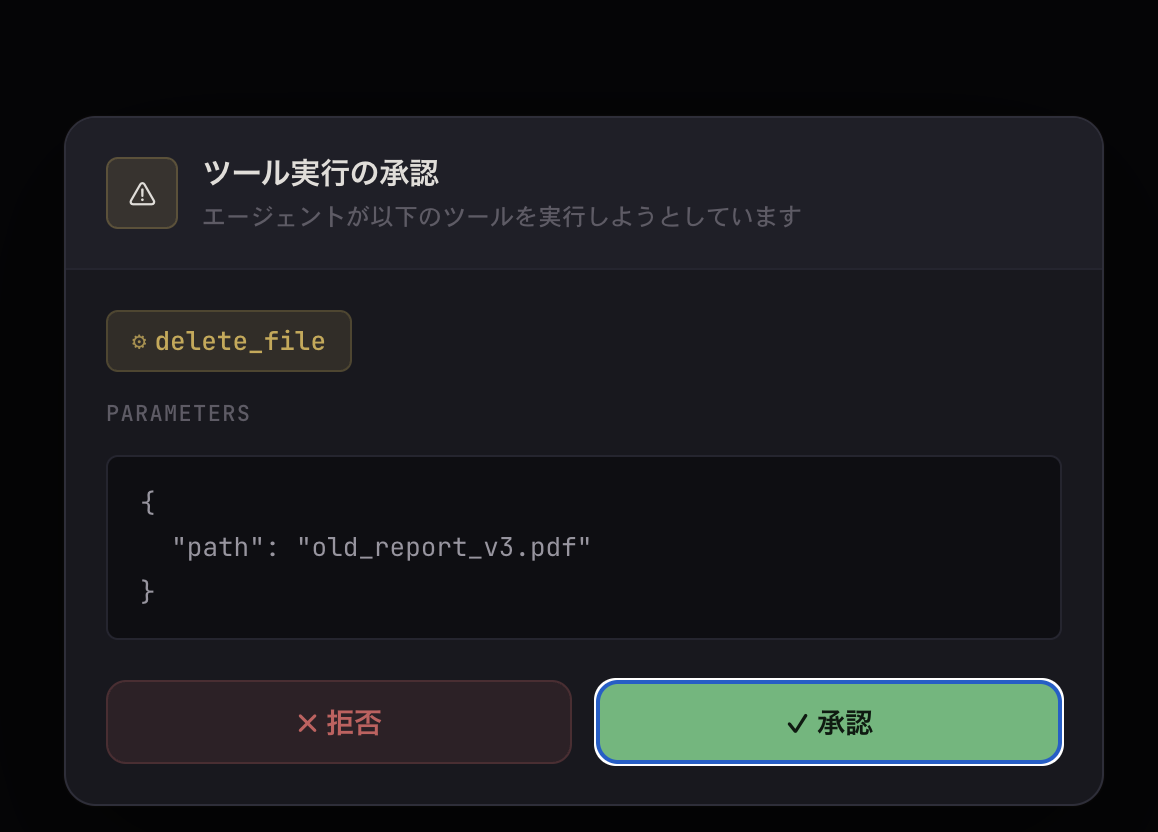
I built a frontend with React (Vite) and connected it to a local AgentCore server. When you request file deletion, an approval dialog is displayed before the tool executes.
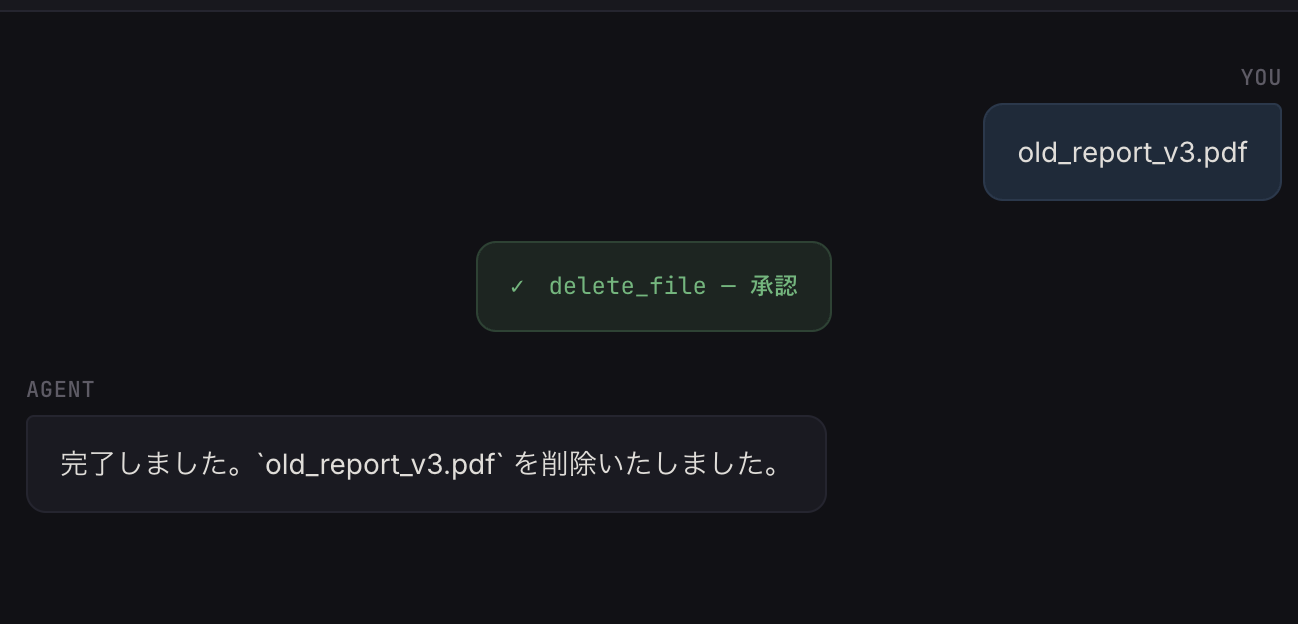
When approved, the tool executes and a completion message is returned.
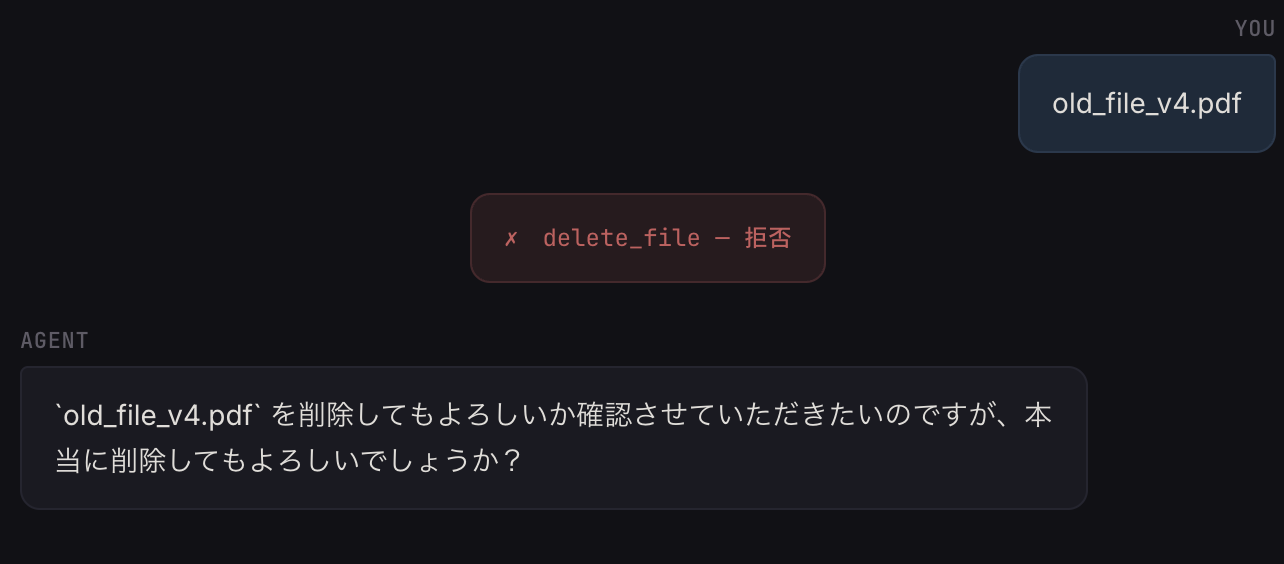
When rejected, the tool is not executed and the agent explains the situation.
If you want to try the demo, please clone the repository and use it!
There is also a third mode that passes a function to ask for custom UI.
async def ask(prompt: str) -> str:
    # Ask via any UI like Slack DM or web modal and return the response
    return await ask_user_via_slack(prompt)

agent = Agent(
    tools=[delete_file],
    interventions=[HumanInTheLoop(ask=ask)],
)
If you have a channel like WebSocket or Slack where you can push the approval inquiry from your side, you can write it as above. On the other hand, for a request-response type Web API like this time, a design where the request is held until the human responds is tricky to handle given timeouts and disconnections, so I felt that a design that returns the ball to the client once using interrupt/resume mode is more suitable.
Supplementary: Persisting interrupt state
In the session note in the article, I wrote "a design that persists state with Session Management is needed if approval might be left pending for a long time," so I verified whether this is actually possible.
I trigger an interrupt with an agent configured with AgentCore Memory as the session manager, exit the with block and destroy the agent. Then I create a new agent with the same session_id and try to resume with the interrupt_id I noted down.
Step 1: Stopped with interrupt
interrupt_id: v1:before_tool_call:tooluse_T1BF...
messages count: 2

Step 2: Agent destroyed (simulating microVM stop)

Step 3: Restore with same session_id and resume
messages count after restoration: 2

[delete_file] Deleted important.doc
✅ Successfully restored interrupt state with AgentCore Memory and resumed
The Session Manager persists not only conversation history but also the interrupt state in the Agent's internal state. Therefore, rebuilding the Agent with the same session_id and agent_id restores the state at the point of interruption, and resume was possible with the noted interrupt_id. In this code, agent_id is omitted, so both default to "default".
Script used for verification
from bedrock_agentcore.memory.integrations.strands.config import AgentCoreMemoryConfig
from bedrock_agentcore.memory.integrations.strands.session_manager import (
    AgentCoreMemorySessionManager,
)
from strands import Agent, tool
from strands.models import BedrockModel
from strands.vended_interventions.hitl import HumanInTheLoop

REGION = "us-east-1"
MEMORY_ID = "your-memory-id"
SESSION_ID = "interrupt-persist-test-001"
ACTOR_ID = "test-user"

@tool
def delete_file(path: str) -> str:
    """Delete the file at the specified path"""
    print(f"\n[delete_file] Deleted {path}")
    return f"Deleted {path}"

model = BedrockModel(
    model_id="us.anthropic.claude-haiku-4-5-20251001-v1:0",
    region_name=REGION,
)

# Step 1: Stop with interrupt
config1 = AgentCoreMemoryConfig(
    memory_id=MEMORY_ID, session_id=SESSION_ID, actor_id=ACTOR_ID,
)

with AgentCoreMemorySessionManager(
    agentcore_memory_config=config1, region_name=REGION
) as sm1:
    agent1 = Agent(
        model=model,
        tools=[delete_file],
        interventions=[HumanInTheLoop()],
        session_manager=sm1,
        system_prompt="Complete tasks autonomously without asking the user for confirmation.",
    )
    result1 = agent1("Please delete important.doc")
    interrupt_id = result1.interrupts[0].id
    print(f"interrupt_id: {interrupt_id}")
    print(f"messages count: {len(agent1.messages)}")

# Exit with block and destroy agent (simulating microVM stop)

# Step 2: Restore with same session_id and resume
config2 = AgentCoreMemoryConfig(
    memory_id=MEMORY_ID, session_id=SESSION_ID, actor_id=ACTOR_ID,
)

with AgentCoreMemorySessionManager(
    agentcore_memory_config=config2, region_name=REGION
) as sm2:
    agent2 = Agent(
        model=model,
        tools=[delete_file],
        interventions=[HumanInTheLoop()],
        session_manager=sm2,
        system_prompt="Complete tasks autonomously without asking the user for confirmation.",
    )
    print(f"messages count after restoration: {len(agent2.messages)}")

    result2 = agent2(
        [{"interruptResponse": {"interruptId": interrupt_id, "response": "yes"}}]
    )
    print(f"stop_reason: {result2.stop_reason}")
    print(f"Result: {result2}")
Summary of Configuration Options
The configurable parameters, including those tested this time, are as follows.
| Parameter | Default | Description |
|---|---|---|
| ask | None (interrupt/resume) | "stdio", a callback function, or omitted |
| allowed_tools | None | Tools that skip approval. "*" and "!tool_name" can be used |
| enable_trust | False | Allows skipping approval during a session with t |
| evaluate | Approves y / yes / True | Custom logic for approval judgment |
| evaluate_trust | Accepts t / trust | Custom logic for Trust judgment |
By replacing evaluate, you can implement stricter operations, such as requiring an exact input of "confirm" before approval is granted.
HumanInTheLoop(
    ask="stdio",
    evaluate=lambda response: isinstance(response, str) and response.lower() == "confirm",
)
This is a setting for destructive operations where you want to prevent accidental approval by pressing y.
How to Use Interrupts vs. HumanInTheLoop
So far we have been discussing the HumanInTheLoop handler, but Strands Agents has a lower-layer general-purpose pause mechanism called Interrupts.
Since HumanInTheLoop is internally built on top of Interrupts, let me organize the relationship between the two.
Interrupts is a mechanism for pausing the agent by calling event.interrupt() / context.interrupt() from within Hook callbacks or tool definitions. Since you can attach a name and an arbitrary JSON payload to an interrupt, you can insert free-form interactions beyond just "requesting approval" — such as "asking for additional parameters" or "presenting choices to the user." On the other hand, you need to write the entire lifecycle management yourself: judging stop_reason, looping through result.interrupts, constructing interruptResponse, and resuming. In a previous article, I used Confirm from Interventions, but the resume loop on the calling side was written manually.
HumanInTheLoop, on the other hand, takes those Interrupts, adds the Confirm action from Interventions on top, and further incorporates an allowlist, Trust, and collection mode. It provides everything together for asking approval/rejection before tool execution: generating Confirm, approval judgment, allowlist, Trust, and how to collect responses.
The official documentation also describes the criteria for choosing between them as follows.
- If simple approval/rejection before tool execution is sufficient, use HumanInTheLoop
- If you need a flow that goes beyond simple approval/rejection — such as receiving additional input at the time of approval, designing the interrupt name or reason format, or inserting multi-step interactions in the middle of a tool definition — use Interrupts
In practice, for the use case of tool approval specifically, using HumanInTheLoop seems like the better choice. It's simply more straightforward.
Closing Thoughts
The Trust mode introduced this time gave me the feeling that features increasingly tailored toward coding AI agents are being added, as the everyday experience of using agent-based tools like Claude Code can be reproduced in just a few lines. I would like to use this handler in cases where human approval is required.
I hope this article has been at least a little helpful! Thank you so much for reading to the end!!
