![[Summer Vacation Independent Research Relay]
I built a mechanism to request time series forecasting from Chronos-2 deployed to a SageMaker AI inference endpoint via Snowflake external functions](https://devio2024-media.developers.io/image/upload/f_auto,q_auto,w_3840/v1785473300/user-gen-eyecatch/ler64doiesj8vluowcgq.png)
[Summer Vacation Independent Research Relay] I built a mechanism to request time series forecasting from Chronos-2 deployed to a SageMaker AI inference endpoint via Snowflake external functions

This page has been translated by machine translation. View original
Hello, I'm Suzuki from the Data Business Division.
This article is the 7th entry in the 'Summer Break Independent Research Relay' by volunteer members of Classmethod.
This blog relay is a project by members who regularly follow cloud and AI, aiming to output not just "tried it" but also "built it" and "researched/investigated it".
We hope this will not only provide new insights but also contribute to the development of our company and community, so we appreciate your continued reading.
Now, let's get started. Today's article is: 'Built a system to request time series forecasting from Chronos-2 deployed on a SageMaker AI inference endpoint via Snowflake external functions'.
About the system we built
Chronos-2 is Amazon's time series foundation model capable of zero-shot time series forecasting. It supports not only univariate but also multivariate and covariate-based forecasting.
Chronos-2 can be deployed and used with SageMaker AI inference endpoints as infrastructure via AutoGluon-Cloud or SageMaker JumpStart.
While AWS makes it very convenient to use by simply deploying to a SageMaker AI inference endpoint, I wanted to be able to process data stored in Snowflake as well, so I researched and built a configuration that sends requests via Lambda functions from external functions as shown below.
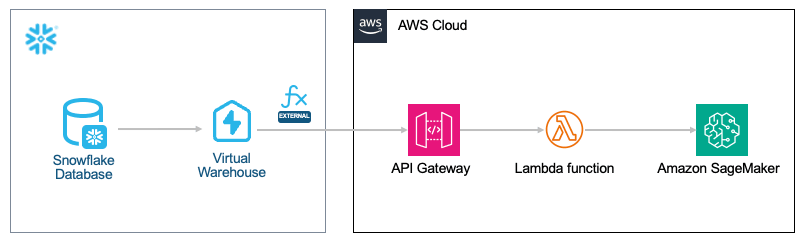
For requests from Snowflake to AWS, I used Snowflake external functions as follows.
What we built
The SageMaker AI inference endpoint for Chronos-2 was created with SageMaker JumpStart. With AutoGluon-Cloud, which is listed as recommended on HuggingFace, Lambda functions would need to be configured to use AutoGluon-Cloud as well, which would make the library heavier, so I decided to send requests to the inference endpoint from boto3.
1. Create a Lambda package and place it in S3
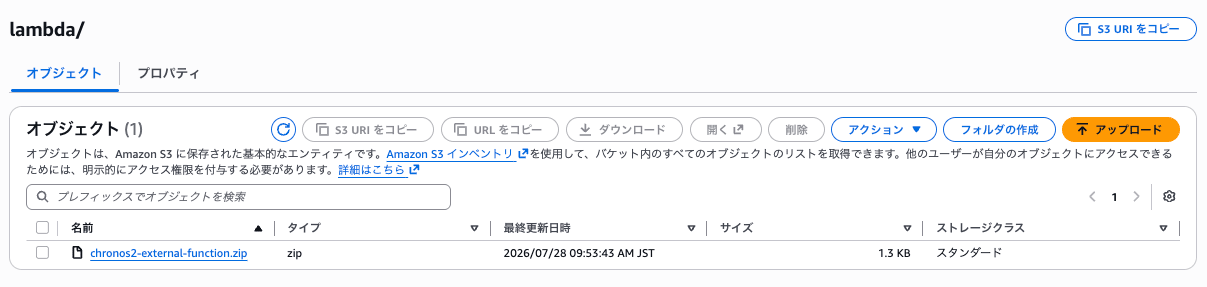
I created a Lambda function to be executed from the API endpoint and uploaded it to an S3 bucket.
The S3 bucket was created in advance.
As mentioned above, the implementation uses boto3 to send requests to the endpoint whose name is set as an environment variable.
Lambda function implementation example
"""Snowflake external function proxy for a JumpStart Chronos-2 endpoint."""

from __future__ import annotations

import base64
import hashlib
import json
import logging
import os
from typing import Any

import boto3

logger = logging.getLogger()
logger.setLevel(logging.INFO)

SAGEMAKER_ENDPOINT_NAME = os.environ.get("SAGEMAKER_ENDPOINT_NAME", "").strip()
runtime = boto3.client("sagemaker-runtime")

def _snowflake_error(status_code: int, message: str) -> dict[str, Any]:
    body = json.dumps({"data": [], "error": message})
    return {
        "statusCode": status_code,
        "body": body,
        "headers": {"Content-Type": "application/json"},
    }

def _snowflake_success(rows: list[list[Any]]) -> dict[str, Any]:
    body = json.dumps({"data": rows})
    md5digest = hashlib.md5(body.encode("utf-8")).digest()
    return {
        "statusCode": 200,
        "body": body,
        "headers": {
            "Content-Type": "application/json",
            "Content-MD5": base64.b64encode(md5digest).decode("ascii"),
        },
    }

def _parse_event_body(event: dict[str, Any]) -> dict[str, Any]:
    raw_body = event.get("body")
    if raw_body is None:
        raise ValueError("Request body is missing")

    if event.get("isBase64Encoded"):
        raw_body = base64.b64decode(raw_body).decode("utf-8")

    return json.loads(raw_body)

def handler(event: dict[str, Any], context: Any) -> dict[str, Any]:
    try:
        if not SAGEMAKER_ENDPOINT_NAME:
            raise ValueError("SAGEMAKER_ENDPOINT_NAME is not set")

        rows = _parse_event_body(event)["data"]
        prediction_length, freq = int(rows[0][4]), str(rows[0][5])

        inputs = []
        for row in rows:
            if int(row[4]) != prediction_length or str(row[5]) != freq:
                raise ValueError("prediction_length and freq must match within a batch")
            inputs.append(
                {
                    "item_id": str(row[1]),
                    "start": str(row[2]),
                    "target": [float(value) for value in row[3]],
                }
            )

        payload = {
            "inputs": inputs,
            "parameters": {
                "prediction_length": prediction_length,
                "freq": freq,
            },
        }
        response = runtime.invoke_endpoint(
            EndpointName=SAGEMAKER_ENDPOINT_NAME,
            ContentType="application/json",
            Accept="application/json",
            Body=json.dumps(payload).encode("utf-8"),
        )
        forecasts = json.loads(response["Body"].read())["predictions"]

        output_rows = []
        for row, input_data, forecast in zip(rows, inputs, forecasts, strict=True):
            forecast.setdefault("item_id", input_data["item_id"])
            output_rows.append([int(row[0]), forecast])

        return _snowflake_success(output_rows)
    except Exception as exc:
        logger.exception("Chronos-2 external function failed")
        return _snowflake_error(400, str(exc))
Together with the CloudFormation template to be used later, the files were placed as follows.
infra
├── cloudformation.yaml
└── lambda
    ├── build.sh
    └── handler.py
The implementation was uploaded to the S3 bucket as follows.
chmod +x infra/lambda/build.sh
./infra/lambda/build.sh  \
    <S3 bucket name for Lambda code upload> \
    lambda/chronos2-external-function.zip \
    <profile name>
2. Deploy the inference endpoint
Next, I deployed Chronos-2 to the inference endpoint first.
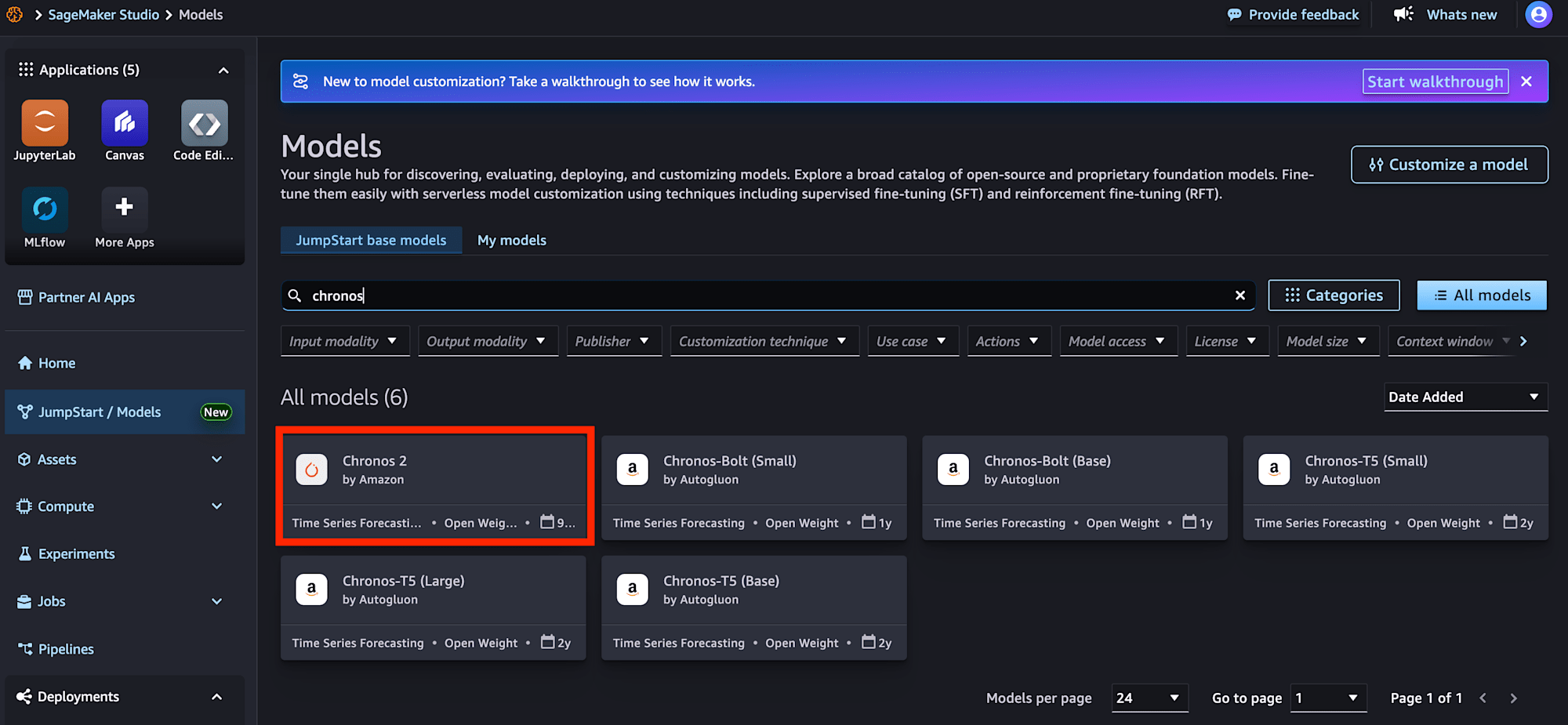
I opened JumpStart from the SageMaker Studio console and searched for and selected chronos-2.
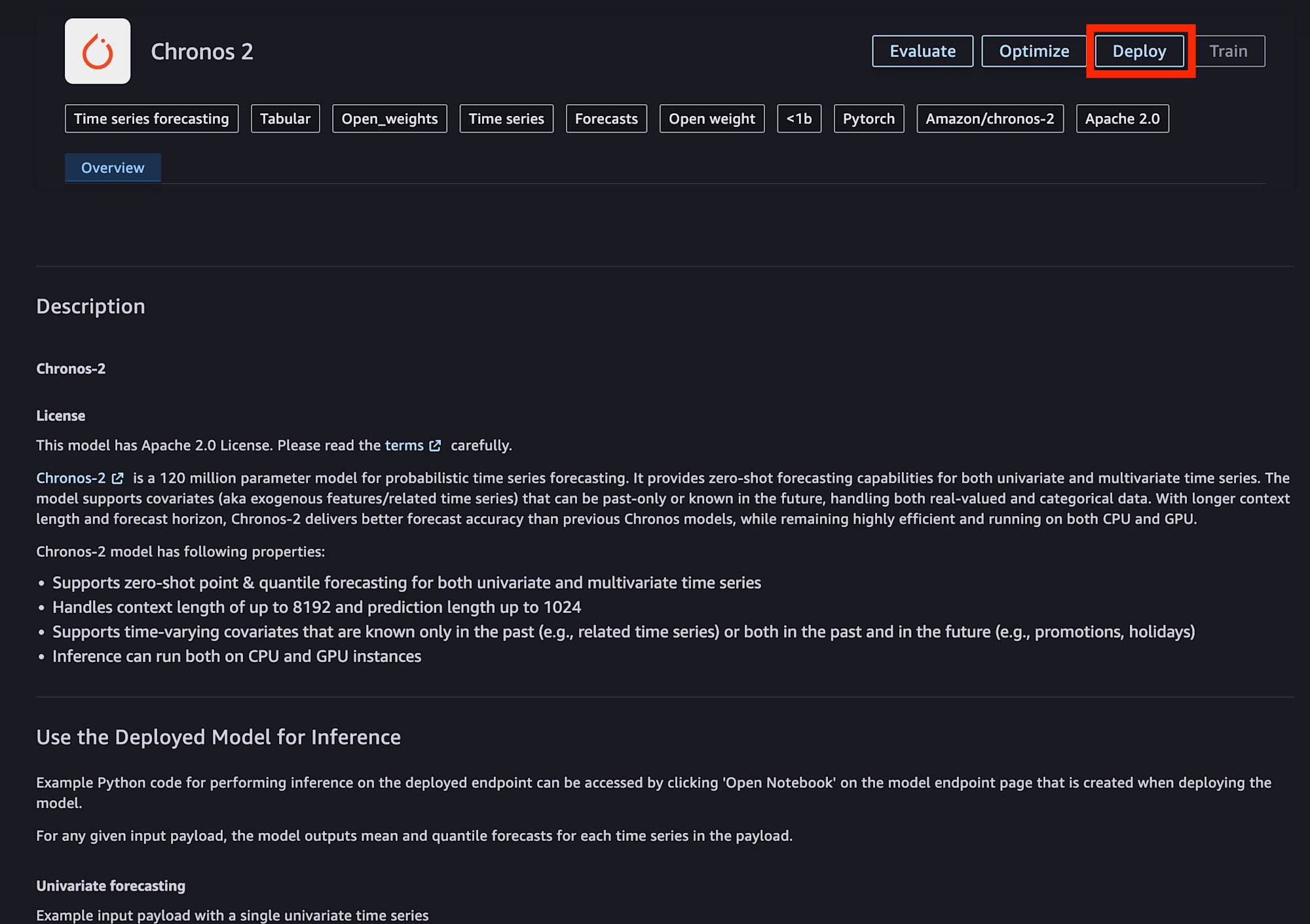
I pressed the Deploy button.
For the endpoint configuration, I chose ml.c5.xlarge, which was the cheapest among the supported options. For higher throughput, it was also possible to increase the instance size or select an instance with an accelerator.
A custom name was set for the endpoint name.
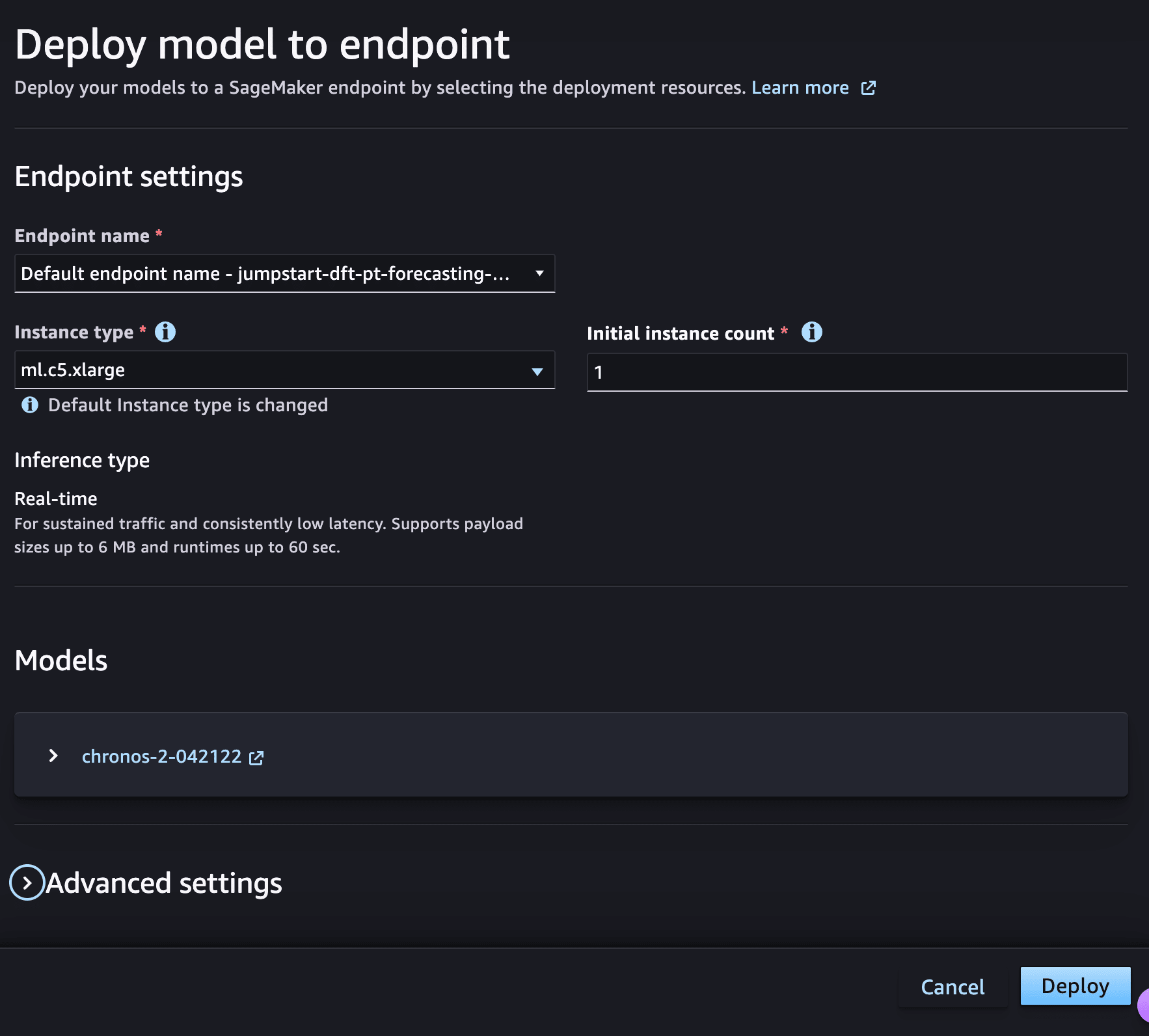
Everything else was deployed with the defaults.
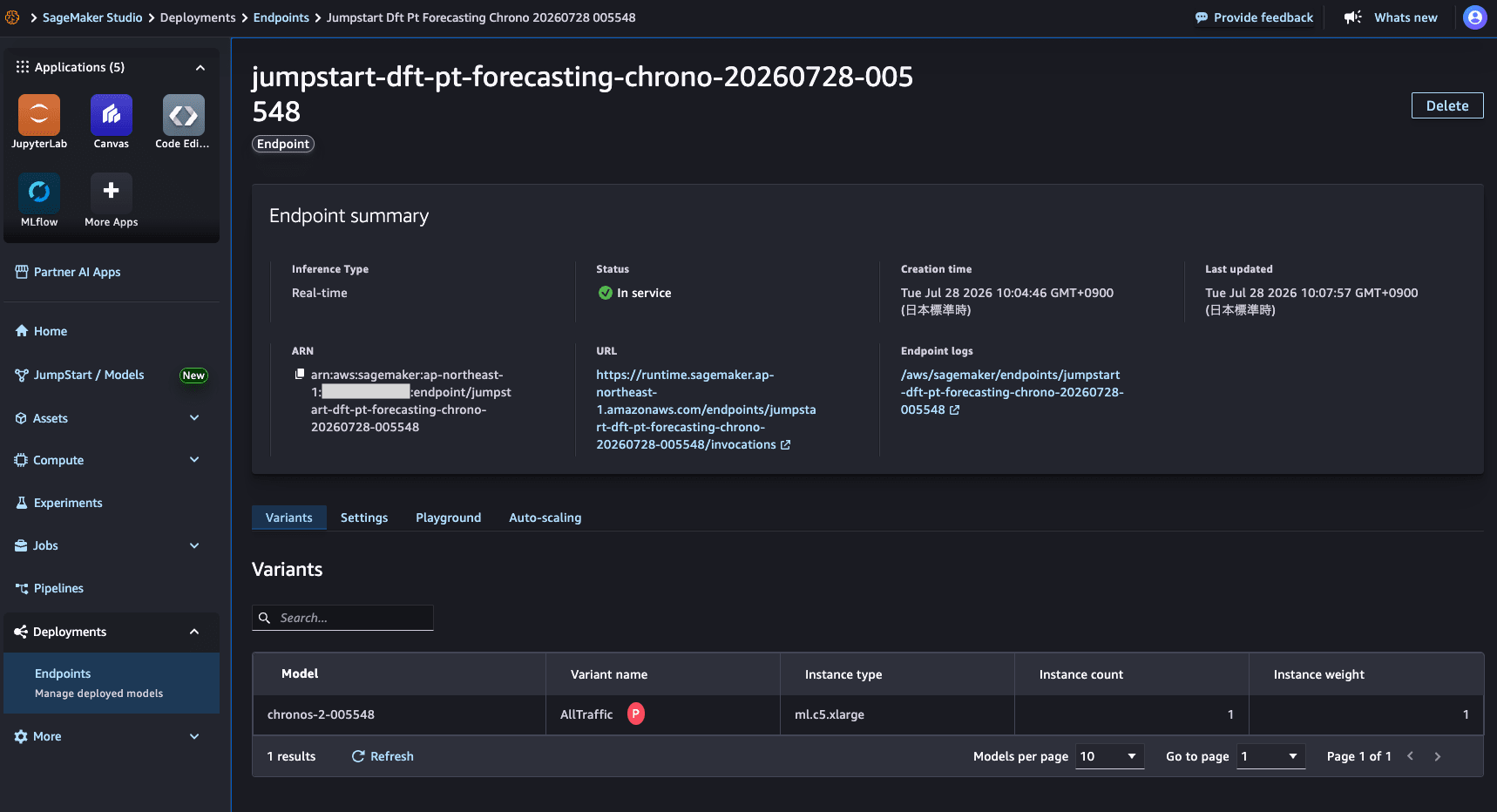
Although a custom name was set for the endpoint name, it appeared that the endpoint name included the deployment date and time.
3. Deploy the API Gateway and Lambda function
I deployed the following CloudFormation template.
CloudFormation template example
AWSTemplateFormatVersion: "2010-09-09"
Description: API Gateway and Lambda proxy for Snowflake external functions calling Chronos-2 on SageMaker.

Parameters:
  SageMakerEndpointName:
    Type: String
    Description: Name of the Chronos-2 realtime endpoint deployed from SageMaker JumpStart.

  LambdaExecutionRoleName:
    Type: String
    AllowedPattern: "^[a-zA-Z0-9+=,.@_-]+$"
    Description: IAM role name used by the Lambda function.

  LambdaCodeS3Bucket:
    Type: String
    Description: S3 bucket containing the Lambda deployment package.

  LambdaCodeS3Key:
    Type: String
    Default: lambda/chronos2-external-function.zip
    Description: S3 object key for the Lambda deployment package.

  apiGatewayStageName:
    Type: String
    AllowedPattern: "^[-a-z0-9]+$"
    Default: ext-func-stage
    Description: API deployment stage.

  lambdaName:
    Type: String
    AllowedPattern: "^[a-zA-Z0-9]+[-a-zA-Z0-9-]+[-a-zA-Z0-9]+$"
    Default: chronos2-ext-func-lambda
    Description: Lambda function name.

  apiGatewayType:
    Type: String
    Default: REGIONAL
    AllowedValues:
      - REGIONAL
      - PRIVATE
    Description: API Gateway endpoint type.

  apiGatewayName:
    Type: String
    AllowedPattern: "^[a-zA-Z0-9]+[-a-zA-Z0-9-]+[-a-zA-Z0-9]+$"
    Default: chronos2-ext-func-api
    Description: API Gateway instance name.

  apiGatewayIAMRoleName:
    Type: String
    AllowedPattern: "^[a-zA-Z0-9]+[-a-zA-Z0-9-]+[-a-zA-Z0-9]+$"
    Description: IAM role assumed by Snowflake for API Gateway invocation.

  sourceVpcId:
    Type: String
    Default: ""
    Description: Snowflake VPC ID. Required only for PRIVATE API Gateway.

Conditions:
  shouldCreateRegionalGateway:
    !Equals [!Ref apiGatewayType, REGIONAL]

Resources:
  apiIAMRole:
    Type: AWS::IAM::Role
    Properties:
      RoleName: !Ref apiGatewayIAMRoleName
      AssumeRolePolicyDocument:
        Version: "2012-10-17"
        Statement:
          - Effect: Allow
            Principal:
              AWS: !Sub "arn:aws:iam::${AWS::AccountId}:root"
            Action: sts:AssumeRole

  lambdaExecutionIAMRole:
    Type: AWS::IAM::Role
    Properties:
      RoleName: !Ref LambdaExecutionRoleName
      AssumeRolePolicyDocument:
        Version: "2012-10-17"
        Statement:
          - Effect: Allow
            Principal:
              Service: lambda.amazonaws.com
            Action: sts:AssumeRole
      ManagedPolicyArns:
        - arn:aws:iam::aws:policy/service-role/AWSLambdaBasicExecutionRole
      Policies:
        - PolicyName: InvokeChronos2Endpoint
          PolicyDocument:
            Version: "2012-10-17"
            Statement:
              - Effect: Allow
                Action:
                  - sagemaker:InvokeEndpoint
                Resource: !Sub "arn:aws:sagemaker:${AWS::Region}:${AWS::AccountId}:endpoint/${SageMakerEndpointName}"

  lambdaFunction:
    Type: AWS::Lambda::Function
    DependsOn:
      - lambdaExecutionIAMRole
    Properties:
      FunctionName: !Ref lambdaName
      Description: Snowflake external function proxy for Chronos-2 on SageMaker.
      Runtime: python3.12
      Handler: handler.handler
      Role: !GetAtt lambdaExecutionIAMRole.Arn
      Timeout: 29
      MemorySize: 2048
      Environment:
        Variables:
          SAGEMAKER_ENDPOINT_NAME: !Ref SageMakerEndpointName
      Code:
        S3Bucket: !Ref LambdaCodeS3Bucket
        S3Key: !Ref LambdaCodeS3Key

  apiGateway:
    Type: AWS::ApiGateway::RestApi
    DependsOn:
      - apiIAMRole
    Properties:
      Name: !Ref apiGatewayName
      Description: Snowflake external functions gateway for Chronos-2.
      Policy: !Sub
        - |
          {
            "Version": "2012-10-17",
            "Statement": [
              {
                "Effect": "Allow",
                "Principal": {
                  "AWS": "arn:aws:sts::${AWS::AccountId}:assumed-role/${apiGatewayIAMRoleName}/snowflake"
                },
                "Action": "execute-api:Invoke",
                "Resource": "${resourceArn}",
                "Condition": { ${vpcCondition} }
              }
            ]
          }
        - resourceArn: !Join ["", ["execute-api:/", "*"]]
          vpcCondition: !If
            - shouldCreateRegionalGateway
            - ""
            - !Sub '"StringEquals": { "aws:sourceVpc": "${sourceVpcId}" }'
      EndpointConfiguration:
        Types:
          - !Ref apiGatewayType

  apiResource:
    Type: AWS::ApiGateway::Resource
    Properties:
      RestApiId: !Ref apiGateway
      ParentId: !GetAtt
        - apiGateway
        - RootResourceId
      PathPart: chronos2

  apiGatewayRootMethod:
    Type: AWS::ApiGateway::Method
    Properties:
      AuthorizationType: AWS_IAM
      HttpMethod: POST
      Integration:
        IntegrationHttpMethod: POST
        Type: AWS_PROXY
        Uri: !Sub
          - arn:aws:apigateway:${AWS::Region}:lambda:path/2015-03-31/functions/${lambdaArn}/invocations
          - lambdaArn: !GetAtt lambdaFunction.Arn
      ResourceId: !Ref apiResource
      RestApiId: !Ref apiGateway

  apiGatewayDeployment:
    Type: AWS::ApiGateway::Deployment
    DependsOn:
      - apiGatewayRootMethod
    Properties:
      RestApiId: !Ref apiGateway
      StageName: !Ref apiGatewayStageName

  lambdaApiGatewayInvoke:
    Type: AWS::Lambda::Permission
    Properties:
      Action: lambda:InvokeFunction
      FunctionName: !GetAtt lambdaFunction.Arn
      Principal: apigateway.amazonaws.com
      SourceArn: !Sub arn:aws:execute-api:${AWS::Region}:${AWS::AccountId}:${apiGateway}/*/*/*

Outputs:
  ResourceInvocationUrl:
    Description: Resource invocation URL for CREATE EXTERNAL FUNCTION.
    Value: !Sub https://${apiGateway}.execute-api.${AWS::Region}.amazonaws.com/${apiGatewayStageName}/chronos2

  ApiGatewayIAMRoleArn:
    Description: IAM role ARN for Snowflake CREATE API INTEGRATION.
    Value: !GetAtt apiIAMRole.Arn

  LambdaExecutionRoleArn:
    Description: IAM role ARN used by the Lambda function.
    Value: !GetAtt lambdaExecutionIAMRole.Arn

  LambdaFunctionName:
    Description: Lambda function name.
    Value: !Ref lambdaFunction
Deployed using the AWS CLI as follows.
aws cloudformation deploy \
  --profile <profile name> \
  --template-file infra/cloudformation.yaml \
  --stack-name chronos2-snowflake-ext-func \
  --capabilities CAPABILITY_NAMED_IAM \
  --parameter-overrides \
    SageMakerEndpointName=<deployed inference endpoint name> \
    LambdaExecutionRoleName=<Lambda execution role name> \
    LambdaCodeS3Bucket=<S3 bucket name for Lambda code upload> \
    LambdaCodeS3Key=lambda/chronos2-external-function.zip \
    apiGatewayIAMRoleName=<IAM role name for API Gateway>
Successfully deployed the Lambda function triggered by the API Gateway.
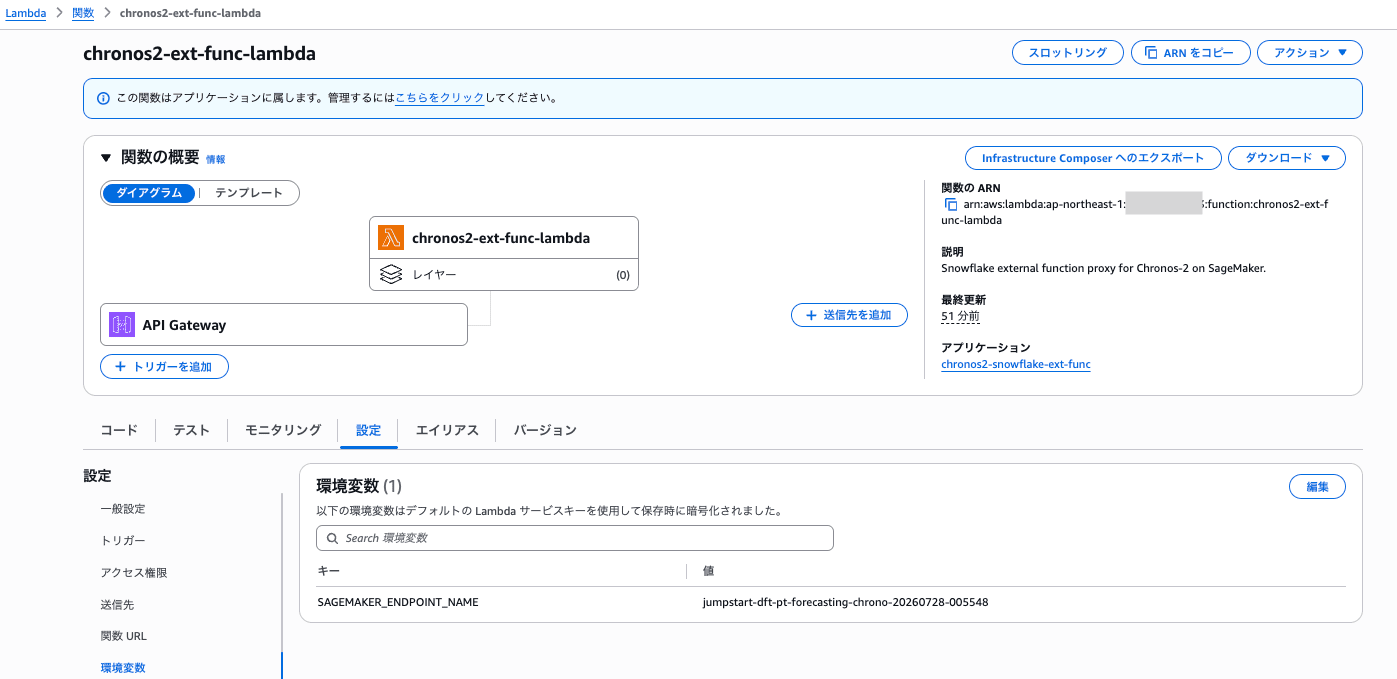
4. Preparing the Snowflake side
Next, I prepared the Snowflake environment.
i. Create the external integration
Created the external integration.
USE ROLE ACCOUNTADMIN;

CREATE OR REPLACE API INTEGRATION chronos2_api_integration
  API_PROVIDER = aws_api_gateway
  API_AWS_ROLE_ARN = '<ApiGatewayIAMRoleArn>'
  API_ALLOWED_PREFIXES = ('<ResourceInvocationUrl prefix without /chronos2>')
  ENABLED = TRUE;

-- Assuming usage from SYSADMIN
GRANT USAGE ON INTEGRATION chronos2_api_integration TO ROLE SYSADMIN;
<ResourceInvocationUrl prefix without /chronos2> is the ResourceInvocationUrl OUTPUT created by CloudFormation with /chronos2 removed.
ii. Update the trust policy of the IAM role for API Gateway
Retrieved API_AWS_IAM_USER_ARN and API_AWS_EXTERNAL_ID using DESC INTEGRATION chronos2_api_integration;.
Updated the trust policy of the IAM role for API Gateway as follows so that API Gateway can be invoked from Snowflake.
#!/usr/bin/env bash
set -euo pipefail

ROLE_NAME="$1"
SNOWFLAKE_IAM_USER_ARN="$2"
SNOWFLAKE_EXTERNAL_ID="$3"
AWS_ACCOUNT_ID="$4"
AWS_PROFILE_NAME="${5:-}"

TRUST_POLICY="$(cat <<EOF
{
  "Version": "2012-10-17",
  "Statement": [
    {
      "Effect": "Allow",
      "Principal": {
        "AWS": "${SNOWFLAKE_IAM_USER_ARN}"
      },
      "Action": "sts:AssumeRole",
      "Condition": {
        "StringEquals": {
          "sts:ExternalId": "${SNOWFLAKE_EXTERNAL_ID}"
        }
      }
    },
    {
      "Effect": "Allow",
      "Principal": {
        "AWS": "arn:aws:iam::${AWS_ACCOUNT_ID}:root"
      },
      "Action": "sts:AssumeRole"
    }
  ]
}
EOF
)"

AWS_ARGS=(iam update-assume-role-policy
  --role-name "${ROLE_NAME}"
  --policy-document "${TRUST_POLICY}"
)

if [[ -n "${AWS_PROFILE_NAME}" ]]; then
  AWS_ARGS+=(--profile "${AWS_PROFILE_NAME}")
fi

aws "${AWS_ARGS[@]}"

echo "Updated trust policy for role ${ROLE_NAME}"
Executed as follows to update the trust policy.
chmod +x ./scripts/update_iam_trust.sh
./scripts/update_iam_trust.sh \
  <IAM role name for API Gateway> \
  <Retrieved API_AWS_IAM_USER_ARN value> \
  <Retrieved API_AWS_EXTERNAL_ID value> \
  <AWS_ACCOUNT_ID> \
  <profile name>
iii. Create the external function
Created the external function as follows.
USE ROLE SYSADMIN;
USE DATABASE <database_name>;
USE SCHEMA <schema_name>;

CREATE OR REPLACE EXTERNAL FUNCTION chronos2_forecast(
  item_id VARCHAR,
  start_ts VARCHAR,
  target ARRAY,
  prediction_length NUMBER,
  freq VARCHAR
)
RETURNS VARIANT
API_INTEGRATION = chronos2_api_integration
AS '<ResourceInvocationUrl>';
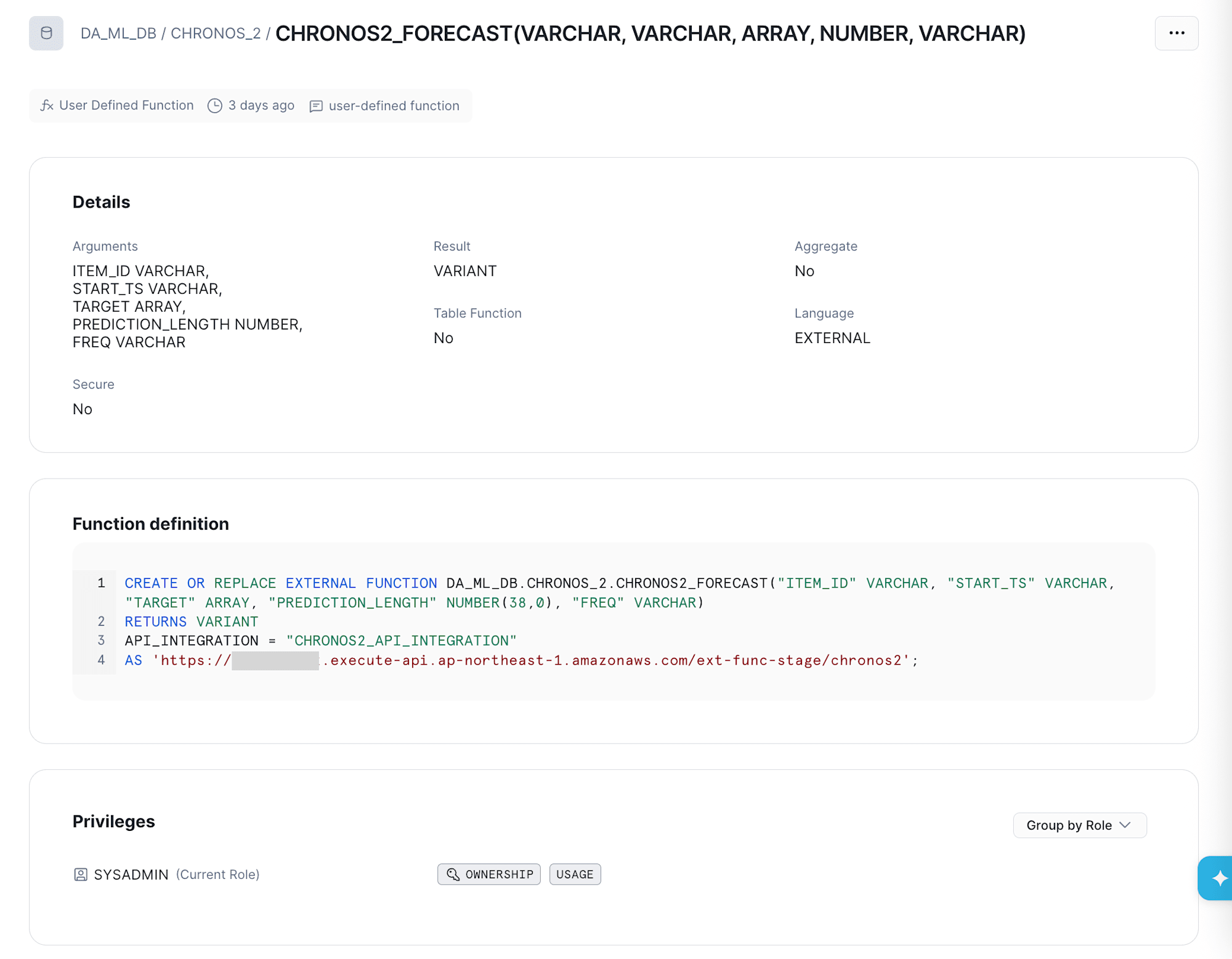
iv. Upload demo data and aggregate for execution
Downloaded the sample data introduced in Zero-shot forecasting in the AutoGluon-Cloud guide.
Uploaded it as the CHRONOS2_RAW table.
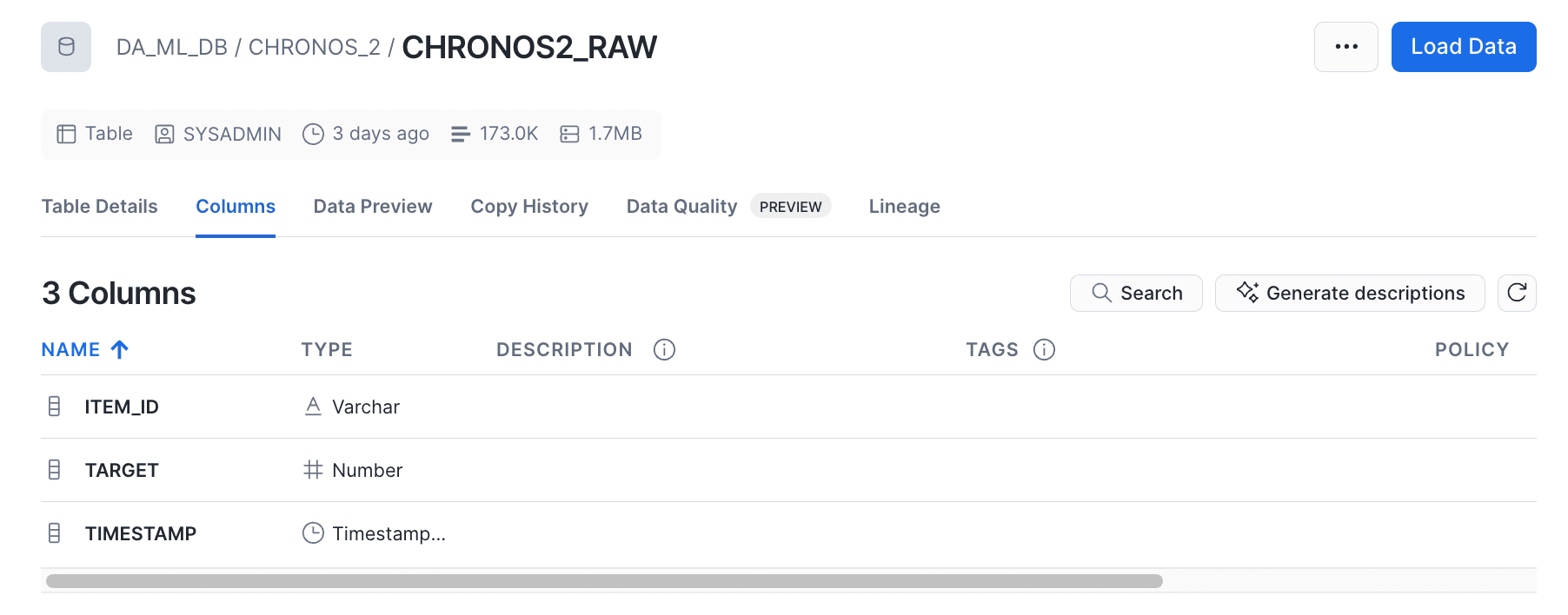
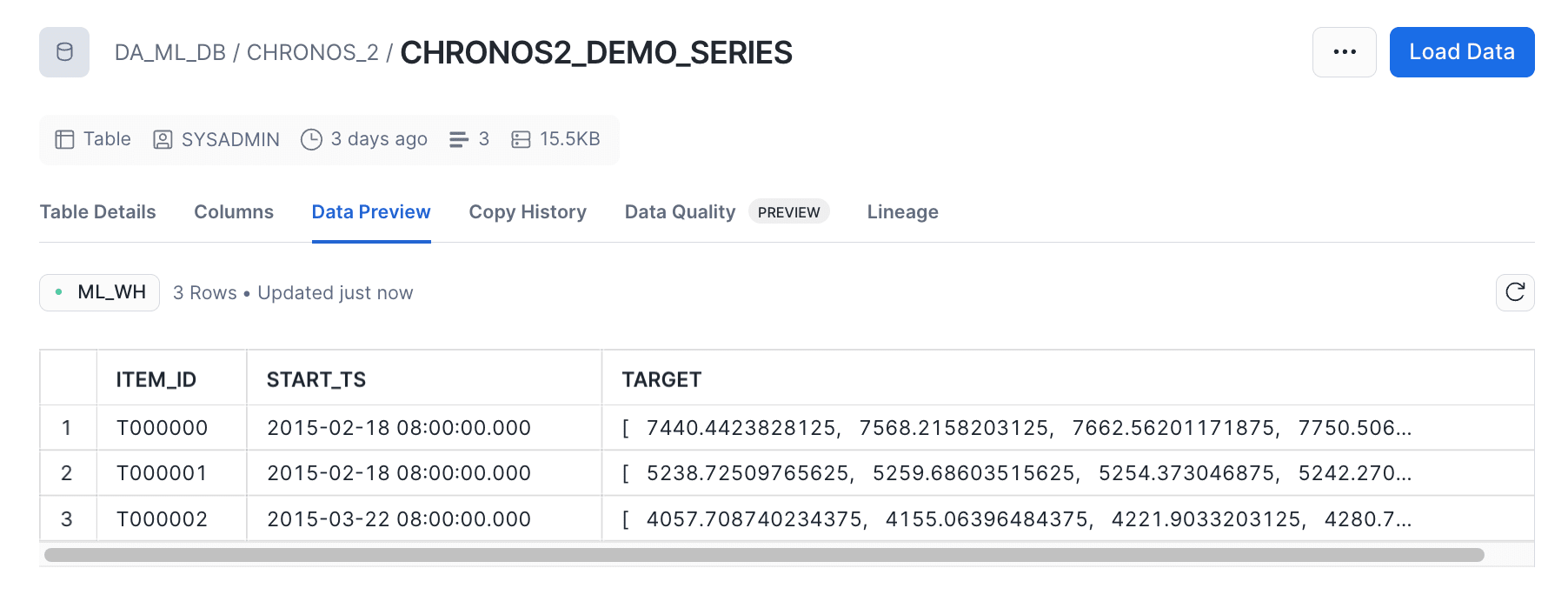
To pass data to Chronos-2 via the external function, aggregated data for 3 series was created as follows.
The latest 512 points per series were aggregated into a list, and 3 of those series were retrieved.
CREATE OR REPLACE TABLE chronos2_demo_series AS
WITH ranked AS (
  SELECT
    item_id,
    timestamp,
    target,
    ROW_NUMBER() OVER (PARTITION BY item_id ORDER BY timestamp DESC) AS rn_desc
  FROM chronos2_raw
),
limited AS (
  SELECT
    item_id,
    timestamp,
    target
  FROM ranked
  WHERE rn_desc <= 512
),
ordered AS (
  SELECT
    item_id,
    timestamp,
    target,
    ROW_NUMBER() OVER (PARTITION BY item_id ORDER BY timestamp ASC) AS rn_asc
  FROM limited
),
aggregated AS (
  SELECT
    item_id,
    MIN(timestamp)::VARCHAR AS start_ts,
    ARRAY_AGG(target) WITHIN GROUP (ORDER BY rn_asc) AS target
  FROM ordered
  GROUP BY item_id
  HAVING COUNT(*) >= 48
)
SELECT *
FROM aggregated
ORDER BY item_id
LIMIT 3;
5. Run inference from the external function
Confirmed that inference could be performed by requesting the inference endpoint via the external function using the created demo data.
CREATE OR REPLACE TABLE CHORONOS_2_RESULT
AS
SELECT
  item_id,
  chronos2_forecast(
    item_id,
    start_ts,
    target,
    48,
    '30min'
  ) AS forecast
FROM chronos2_demo_series;
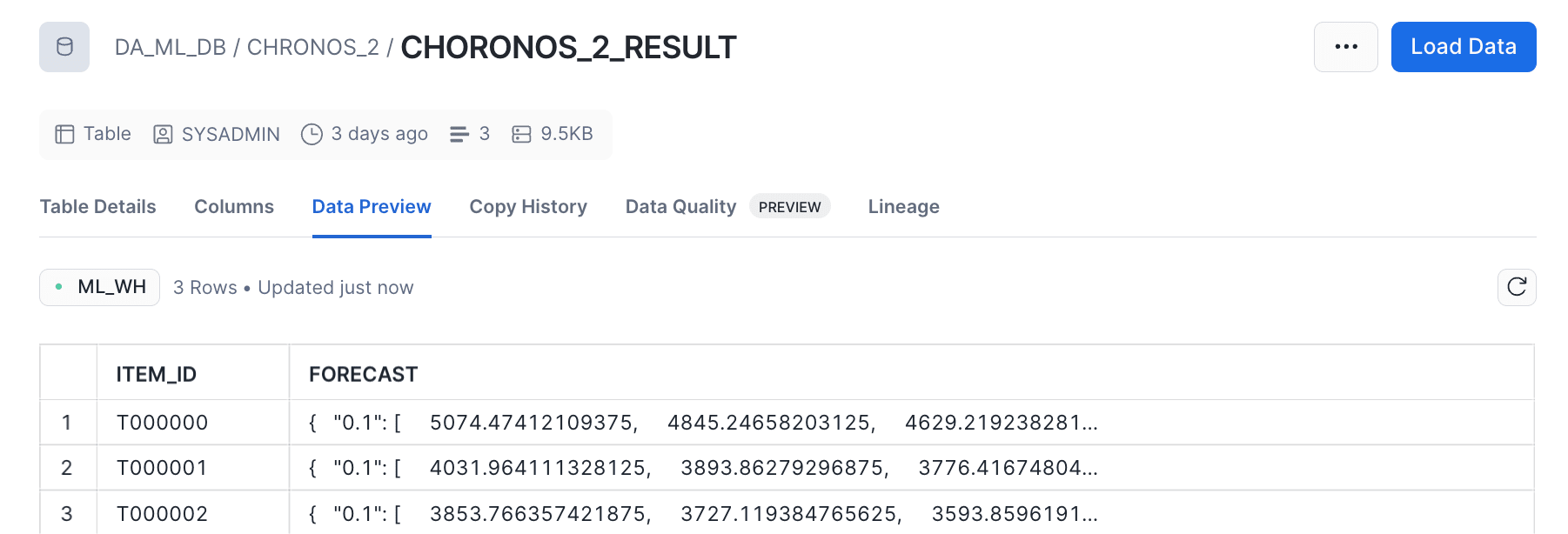
The inference results were visualized with CoCo. It is very convenient as it immediately displays visualization results in an ipynb file.
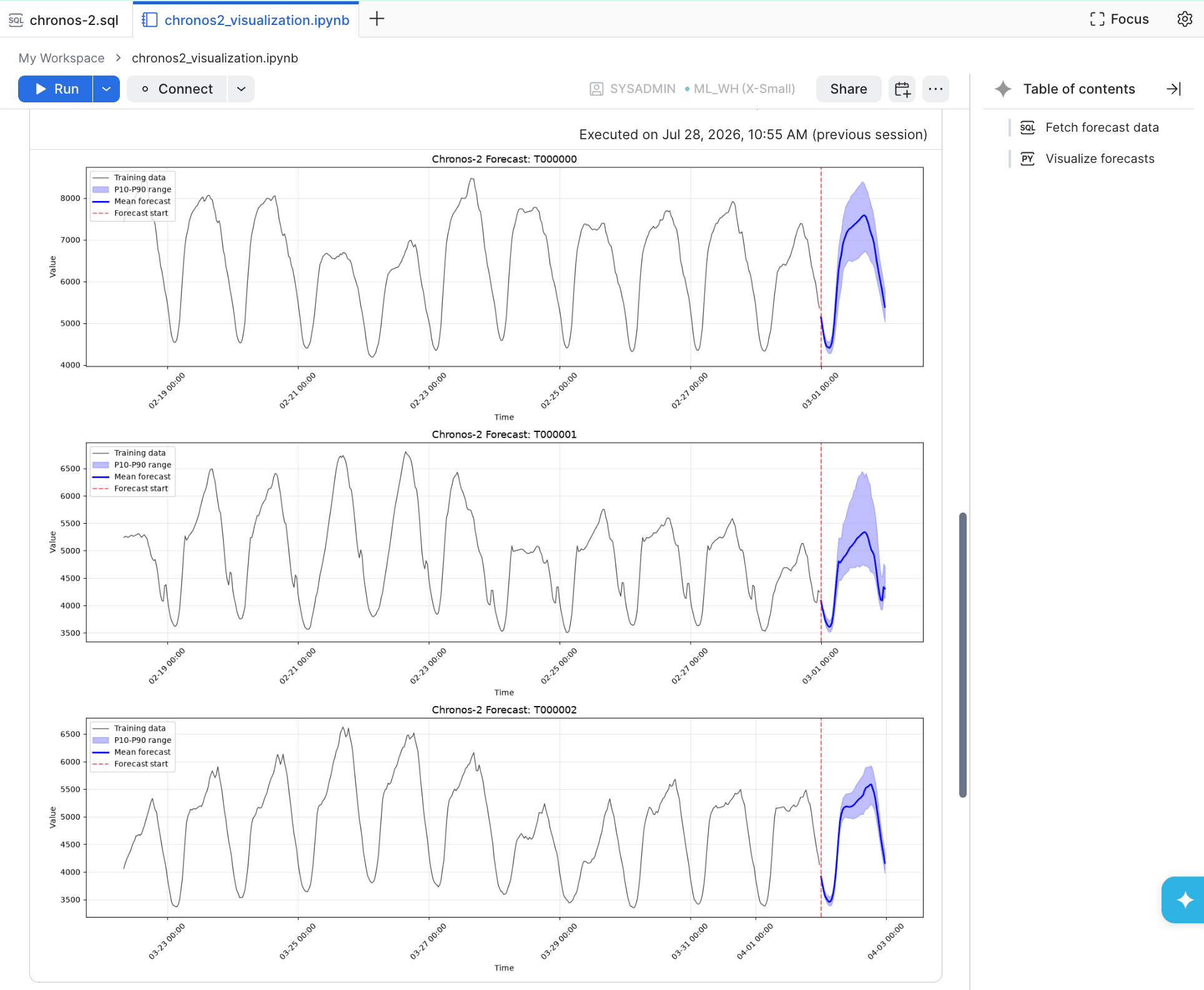
The forecasting turned out quite nicely just by feeding in the input data!
In closing
That was the 7th entry in the 'Summer Break Independent Research Relay', introducing the system we built to request time series forecasting from Chronos-2 deployed on a SageMaker AI inference endpoint via Snowflake external functions.
Note that since we are using API Gateway REST API and Lambda integration this time, there are constraints such as timeouts if the inference time requested by Lambda is too long.
If such issues arise, since data can be exported from Snowflake to S3, it may be necessary to devise an asynchronous inference mechanism.
Also, this time we tried with a regional endpoint, but it should also be possible to use a private endpoint for greater security, so please check if you are interested.
In the next article, related to this one, I will introduce my research on how to deploy Chronos-2 to a SageMaker AI inference endpoint.
