![[SwiftUI] Alerts Can Now Be Displayed Without Bool in Xcode 27](https://devio2024-media.developers.io/image/upload/f_auto,q_auto,w_3840/f_auto,q_auto/v1790873839/eyecatch/tyoyhmoiiuh7ikmugnhl.png)
[SwiftUI] Alerts Can Now Be Displayed Without Bool in Xcode 27

This page has been translated by machine translation. View original
Introduction
In Xcode 27 (iOS 27.0 SDK), an API was added to SwiftUI's alert that allows you to display an alert simply by passing an Optional Binding. These are alert(error:) for errors and alert(_:item:) for passing arbitrary values.
Previously, it was necessary to separately maintain a Bool display flag, so let's compare how this changes things against the traditional approach.
Verification Environment
- Xcode 27
- iOS 27.0 Simulator
Displaying Errors
Traditional Approach
alert(isPresented:error:), which displays an alert by passing a LocalizedError, required a Binding<Bool> display flag.
struct ContentView: View {
    @State private var isPresented = false
    @State private var error: SampleLocalizedError?

    var body: some View {
        Button("Load") {
            Task {
                do {
                    try await load()
                } catch let error as SampleLocalizedError {
                    self.error = error
                    isPresented = true
                } catch {}
            }
        }
        .alert(isPresented: $isPresented, error: error) { _ in
            Button("OK") {}
        } message: { error in
            Text(error.recoverySuggestion ?? "")
        }
    }
}
You needed to maintain two State values — the error value and the Bool — and update both. When dismissed, the Bool would return to false, but the error value would remain.
Approach from Xcode 27 Onwards
Simply pass an Optional Binding of the error to alert(error:).
struct ContentView: View {
    @State private var error: SampleLocalizedError?

    var body: some View {
        Button("Load") {
            Task {
                do {
                    try await load()
                } catch let error as SampleLocalizedError {
                    self.error = error
                } catch {}
            }
        }
        .alert(error: $error) { _ in
            Button("OK") {}
        } message: { error in
            Text(error.recoverySuggestion ?? "")
        }
    }
}
State is now just a single error value. Assigning a value shows the alert, and when dismissed, it automatically returns to nil. Not having to manage a Bool is a small but welcome improvement.
The title uses errorDescription, just as before. The body is assembled manually using message:.
Passing a Raw Error
alert(error:) can also accept Error types that do not conform to LocalizedError. Since you can pass an any Error received from catch directly, I tried it out.
@State private var error: (any Error)?

// ...
catch {
    self.error = error
}

.alert(error: $error) {
    Button("OK") {}
}
The title displayed the error's localizedDescription as-is. When I passed URLError(.notConnectedToInternet), the content was as follows:
- The operation couldn't be completed. (NSURLErrorDomain error -1009.)
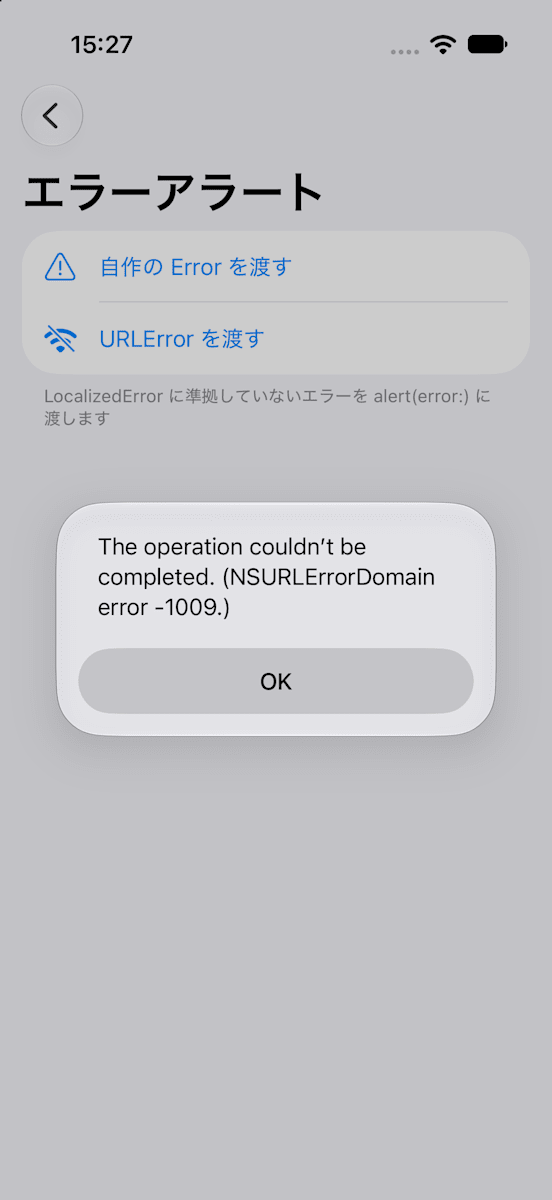
Since this is developer-facing language, it feels difficult to use as-is on a screen shown to users (though I wonder when you would actually use it).
In practice, I think most cases involve conforming to LocalizedError and defining the message text yourself.
Displaying with Arbitrary Values
Traditional Approach
alert(_:isPresented:presenting:), which passes values other than errors, also required a Bool display flag.
@State private var isPresented = false
@State private var target: String?

Button("Delete") {
    target = "Sample"
    isPresented = true
}
.alert("Confirmation", isPresented: $isPresented, presenting: target) { _ in
    Button("OK") {}
} message: { target in
    Text(target)
}
Approach from Xcode 27 Onwards
Pass an Optional Binding to alert(_:item:).
@State private var target: String?

Button("Delete") {
    target = "Sample"
}
.alert("Confirmation", item: $target) { _ in
    Button("OK") {}
} message: { target in
    Text(target)
}
This also returns to nil when dismissed.
While sheet(item:) requires conformance to Identifiable, alert(_:item:) does not. You can pass a String directly, as in the code above.
confirmationDialog(_:item:) also has the same style of API added.
Value Changes While Displayed Are Not Reflected
Even if you rewrite the value while the alert is displayed, the content of the alert does not change. This is the same for both alert(error:) and alert(_:item:).
Apple's documentation for alert(_:item:) states that changes after display are ignored. While alert(error:) documentation does not mention this, the same behavior was confirmed in the verification environment (Xcode 27 / iOS 27.0 Simulator), so caution is warranted.
Works on Older OS Versions
Looking at Apple's documentation, alert(error:) and alert(_:item:) support iOS 15.0 and later.
Therefore, building with Xcode 27 means these APIs can be used even in apps supporting older OS versions.
However, the API that accepts a raw Error not conforming to LocalizedError appears to only be available on iOS 27 and later.
Summary
alert(error:)andalert(_:item:)were added in Xcode 27- The
Booldisplay flag is no longer needed; simply assigning an Optional value displays the alert - When dismissed, it automatically returns to
nil, so no cleanup code is needed - Rewriting the value while the alert is displayed does not change the alert's content
alert(error:)can accept a rawError, but developer-facing language appears as-is in the title- Unlike
sheet(item:),alert(_:item:)does not requireIdentifiable - Building with Xcode 27 allows use from iOS 15 onwards (iOS 27 onwards when passing a raw
Error)
References