I tried out TiDB Cloud Filesystem in public preview

This page has been translated by machine translation. View original
Hello, I'm sora from the Game Solutions department.
This time, I'll write about trying out TiDB Cloud Filesystem, which started its public preview on September 15, 2026.
I was interested in being able to create a filesystem on TiDB Cloud and mount it on a Mac, as well as using it as a place to store work notes for Claude Code, so I'll focus on those aspects.
Please note that the content of this article reflects the state as of October 13, 2026, and since it's in public preview, things may change by GA.
What is TiDB Cloud Filesystem?
It's a serverless distributed file system designed for AI agents and automation workloads.
In the TiDB Cloud release notes, it's introduced as follows:
TiDB Cloud Filesystem is a serverless distributed file system designed for AI agents and automation workloads.
Files remain even after sandboxes or ephemeral execution environments end.
The idea is that you can open the same filesystem from another session, agent, or CI and pick up where you left off.
Internally it uses TiDB, with small files stored in TiDB tables and large files in object storage.
Consistency between files and metadata is maintained through TiDB transactions.
The design background is explained in the following article:
Operations are performed using the TiDB Cloud CLI (ti), which also entered public preview at the same time.
Relationship with TiDB Cloud Clusters
While it's built on TiDB, creating a filesystem didn't result in any visible clusters from the user's perspective.
After creating a filesystem, checking the cluster list in the console showed nothing new added.
Creation also completed in a few seconds, with no waiting time suggesting a cluster was starting up in the background.
The only options you can specify at creation time are display name, label, and region — there's no option to specify a project.
There's no Filesystem menu in the console, and it's not among the things you can create via Create Resource.
Everything from creation to deletion is done through the CLI.
Trying It Out
Installing the ti CLI
Run the installation command from the official documentation.
curl -fsSL https://github.com/tidbcloud/ti-cli/releases/latest/download/install.sh | sh -s -- --yes
Two binaries are downloaded: ti itself and another one called ti-drive9.
drive9 is a file service built on top of TiDB Cloud's Filesystem interface, and file operations and mounting go through this drive9.
After installation, the available regions are displayed.
  Config regions:
    aws-us-east-1, aws-us-west-2, aws-eu-central-1, aws-ap-northeast-1, aws-ap-southeast-1
    alicloud-ap-southeast-1

  ti fs regions:
    aws-us-east-1, aws-ap-southeast-1, aws-us-west-2, alicloud-ap-southeast-1, gcp-us-east1
While Tokyo (aws-ap-northeast-1) is available in the overall ti regions, it's not in the ti fs regions.
This time, I'll use Singapore (aws-ap-southeast-1), which is closest to Japan.
Update: In v0.2.10 released on October 15, 2026, azure-centralus was added to the ti fs regions.
Incidentally, the installation output notifies you that anonymous telemetry is enabled by default.
It states that what's sent includes command names, flag names, error codes, etc., and that tokens, file paths, and file contents are not sent.
If you want to disable it, write the following to ~/.ti/.preferences:
[telemetry]
enabled = false
Add it to your PATH and check the version.
export PATH="$HOME/.ti/bin:$PATH"
echo 'export PATH="$HOME/.ti/bin:$PATH"' >> ~/.zshrc
ti --version
ti 0.2.9 (9fd8d7bc3dc3fa1c2b71fdef58f140511a17ed7a, 2026-10-02T17:05:01Z, darwin/arm64)
Configuring the ti CLI
Create an API key in the TiDB Cloud console under Organization Settings > API Keys, then register it with ti configure.
ti configure
Default region code (aws-us-east-1): aws-ap-southeast-1
TiDB Cloud public key: ********
TiDB Cloud private key:
{
  "profile": "default",
  "region_code": "aws-ap-southeast-1",
  "credentials_stored": true
}
The default region right after installation is aws-us-east-1, so I changed it to aws-ap-southeast-1 here.
The official documentation shows the order starting with the public key, but in practice the region came first.
At this point, only the key is saved, and whether the key is correct gets verified the first time a command accesses TiDB Cloud.
Creating a Filesystem
Create the filesystem.
time ti fs create-file-system \
  --display-name sora-fs-trial \
  --wait
With --wait, the command waits until the filesystem is ready before returning.
{
  "file_system_id": "xxxxxxxx-xxxx-xxxx-xxxx-xxxxxxxxxxxx",
  "display_name": "sora-fs-trial",
  "labels": {},
  "region_code": "aws-ap-southeast-1",
  "fs_token": "drive9_xxxxxxxx",
  "status": "ready",
  "credentials_stored": true
}
ti fs create-file-system --display-name sora-fs-trial --wait  0.04s user 0.07s system 2% cpu 4.007 total
It became ready in about 4 seconds.
The fs_token is an owner token that can operate the entire filesystem, with no expiration date.
The CLI saves it locally automatically, but the plaintext is only displayed at this moment.
Since the fs_token appears directly in the output, you need to be careful when screen sharing or pasting logs.
The options available at creation can be confirmed with --help.
--display-name <string>   Organization-visible file system display name. It is metadata, not a resource selector.
--label <string>          Organization-visible metadata label in key=value form. Repeat up to 30 times; do not store secrets.
The descriptions for display name and label say "Organization-visible", and since the free tier is also per organization, filesystems are considered to belong to the organization rather than to a project.
Mounting on Mac
On macOS, you can mount via WebDAV even without macFUSE.
The default for --driver is auto, which automatically selects WebDAV in environments without FUSE.
Put the file_system_id from creation into an environment variable.
Even if there's only one filesystem, it won't be selected automatically, and without setting it you'll get the following error:
ti [ERROR]: file system ID is required; pass --file-system-id, set TI_FS_FILE_SYSTEM_ID, or supply an FS token
export TI_FS_FILE_SYSTEM_ID="<file_system_id>"
mkdir -p ~/tidbfs
time ti fs mount-file-system --mount-path ~/tidbfs
{
  "status": "mounted",
  "profile": "default",
  "file_system_id": "xxxxxxxx-xxxx-xxxx-xxxx-xxxxxxxxxxxx",
  "mount_path": "/Users/<user>/tidbfs",
  "remote_path": "/",
  "driver": "webdav",
  "endpoint": {
    "service": "fs",
    "base_url": "https://aws-ap-southeast-1.drive9.ai",
    "provider": "aws",
    "api_provider": "aws",
    "region_code": "ap-southeast-1",
    "region_name": "aws-ap-southeast-1"
  },
  "write_back_cache": true
}
ti fs mount-file-system --mount-path ~/tidbfs  0.05s user 0.07s system 1% cpu 9.936 total
It was mounted in about 10 seconds, and driver was set to webdav.
The connection destination is aws-ap-southeast-1.drive9.ai, not tidbcloud.com.
If you're using it in an environment with restricted outbound traffic, you'll need to allow this domain.
In Finder, it appears as a WebDAV connection to a server at 127.0.0.1.
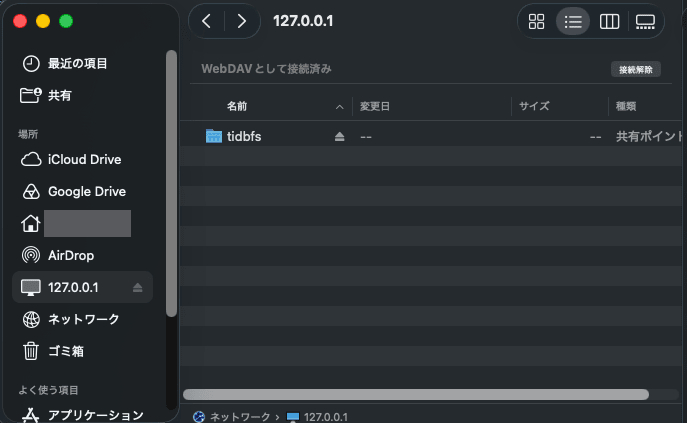
ti (drive9) runs a WebDAV server inside the Mac, and Finder connects to it.
The WebDAV server communicates with the TiDB Cloud side.
Looking at mount output also showed a 127.0.0.1 URL was mounted.
http://127.0.0.1:52035/_drive9_xxxxxxxx/ on /Users/<user>/tidbfs (webdav, nodev, noexec, nosuid, mounted by <user>)
Operating from Finder
I tried creating a folder, drag-and-dropping files, moving to a folder, renaming, and moving to trash in Finder.
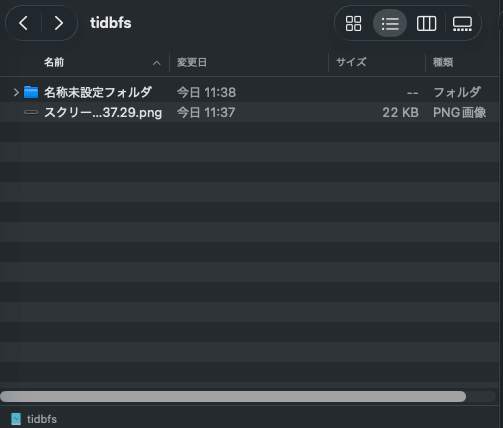
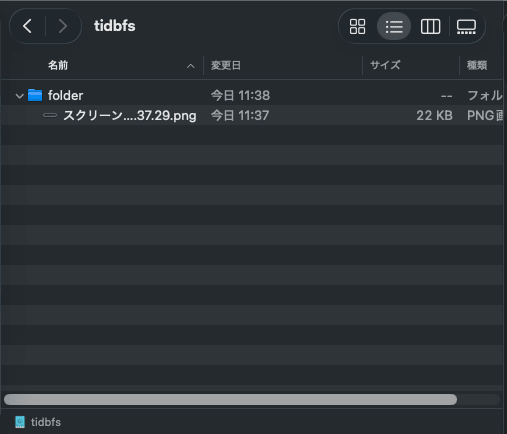
All operations worked, but there was a lag every time before placing or moving files was reflected in the display.
This time I'm mounting from a Mac in Tokyo to a filesystem in Singapore.
The official product page FAQ also states that while mounting on a laptop is supported, for evaluation they recommend using a cloud VM in the same region as the filesystem.
Supported, but not what we recommend for evaluation. Run it from a cloud VM in the same region as the filesystem.
While still mounted, let's look at the TiDB Cloud side contents from another terminal.
ti fs ls --path /
{
  "path": "/",
  "entries": [
    {
      "name": ".DS_Store",
      "size_bytes": 10244,
      "is_dir": false
    },
    {
      "name": "._.DS_Store",
      "size_bytes": 4096,
      "is_dir": false
    },
    {
      "name": "folder",
      "size_bytes": 0,
      "is_dir": true
    }
  ]
}
The .DS_Store and ._.DS_Store files created by macOS were also saved as files.
The PNG files I drag-and-dropped also got ._ companion files, so putting one file there results in two files on the remote side.
.DS_Store was being rewritten every time I operated in Finder, growing from 8,196 bytes to 10,244 bytes.
As noted in the pricing section below, small file writes have a higher unit cost, so it's worth keeping in mind when using with Mac mounted.
Incidentally, when I looked at the PNG I drag-and-dropped then moved to a folder using describe-file, the revision was 4.
{
  "path": "/folder/スクリーンショット 2026-10-13 11.37.29.png",
  "size_bytes": 22442,
  "is_dir": false,
  "revision": 4,
  "mtime": 1791859356,
  "resource_id": "xxxxxxxxxxxxxxxxxxxxxxxxxx",
  "nlink": 1,
  "content_type": "image/png"
}
Once done checking, unmount.
ti fs unmount-file-system --mount-path ~/tidbfs
After unmounting, the local ~/tidbfs returns to an empty folder.
Files remain on the TiDB Cloud side, so they remain visible the next time you mount or via CLI.
Operations Without Mounting
You can work with files using ti fs commands without mounting.
echo "TiDB Cloud Filesystemの検証メモ。シンガポールリージョンで作成した。" > /tmp/memo.md
time ti fs copy-file --from-local /tmp/memo.md --to-remote /memo.md
time ti fs read-file --path /memo.md
{
  "operation": "copy_file",
  "source_path": "/tmp/memo.md",
  "target_path": "/memo.md",
  "status": "copied"
}
ti fs copy-file --from-local /tmp/memo.md --to-remote /memo.md  0.04s user 0.03s system 5% cpu 1.226 total
TiDB Cloud Filesystemの検証メモ。シンガポールリージョンで作成した。
ti fs read-file --path /memo.md  0.04s user 0.04s system 6% cpu 1.113 total
Both upload and read took about 1 second, with no noticeable lag like when operating from Finder.
You can also search by content and by filename.
ti fs grep --path / --pattern "シンガポール"
ti fs find-files --file-name-pattern "*.md"
Both gave the same result.
{
  "path": "/",
  "results": [
    {
      "path": "/memo.md",
      "name": "memo.md"
    }
  ]
}
Japanese text matched as well, and the file was found immediately even in a search right after writing.
By default it searches for string matches, and you can also enable semantic search by configuring an embedding provider.
Incidentally, in v0.2.9, filenames containing spaces in ls and search results get cut off before the first space.
The スクリーンショット 2026-10-13 11.37.29.png placed via Finder shows as スクリーンショット in ls, and can't be found when specified by that name.
ti [ERROR]: fs stat: not found
It can be read by specifying the original full name, so the data itself is stored correctly.
An issue has already been filed, and the fix PR was merged on October 7, 2026.
As of October 13, 2026, the latest release (v0.2.9) does not yet include it.
Update: It has been fixed in v0.2.10 released on October 15, 2026.
Using with Claude Code
I'll have Claude Code use ti fs to save work notes to TiDB Cloud Filesystem.
Then, I'll start a new session from a different directory and have it read those notes and continue from there.
Issuing a Scoped Token
I'll give Claude Code a token that only allows access under /claude.
Scoped tokens can be issued by specifying a path and operations.
ti fs create-directory --path /claude

umask 077
ti fs generate-file-system-scoped-token \
  --file-system-id "$TI_FS_FILE_SYSTEM_ID" \
  --subject claude-code \
  --ttl 24h \
  --allow /claude:read,list,search,write \
  --query fs_token --output text > ~/claude-fs-token
With --allow, only read, list, search, and write under /claude are permitted, with delete excluded.
ti fs list-file-system-tokens --file-system-id "$TI_FS_FILE_SYSTEM_ID" --output text
TOKEN_ID                              NAME         SCOPE      STATUS  EXPIRES_AT
xxxxxxxx-xxxx-xxxx-xxxx-xxxxxxxxxxxx  default      owner      active  never
xxxxxxxx-xxxx-xxxx-xxxx-xxxxxxxxxxxx  claude-code  fs_scoped  active  2026-10-14T02:47:26Z
The owner token from creation is named default with no expiration, while the token created this time is set to expire in 24 hours.
Saving Work Notes
Set the token and region as environment variables, then start Claude Code.
mkdir -p ~/fs-trial-a && cd ~/fs-trial-a
export TI_FS_TOKEN="$(cat ~/claude-fs-token)"
export TI_REGION_CODE="aws-ap-southeast-1"
claude
Without adding any skills, I asked the following:
You can use TiDB Cloud Filesystem with the ti fs command. Check how to use it with ti fs --help.
Research the pricing structure for TiDB Cloud Filesystem and save the key points to /claude/notes/pricing.md.
It's okay if it's incomplete — please also write the remaining research items at the end of the same file.
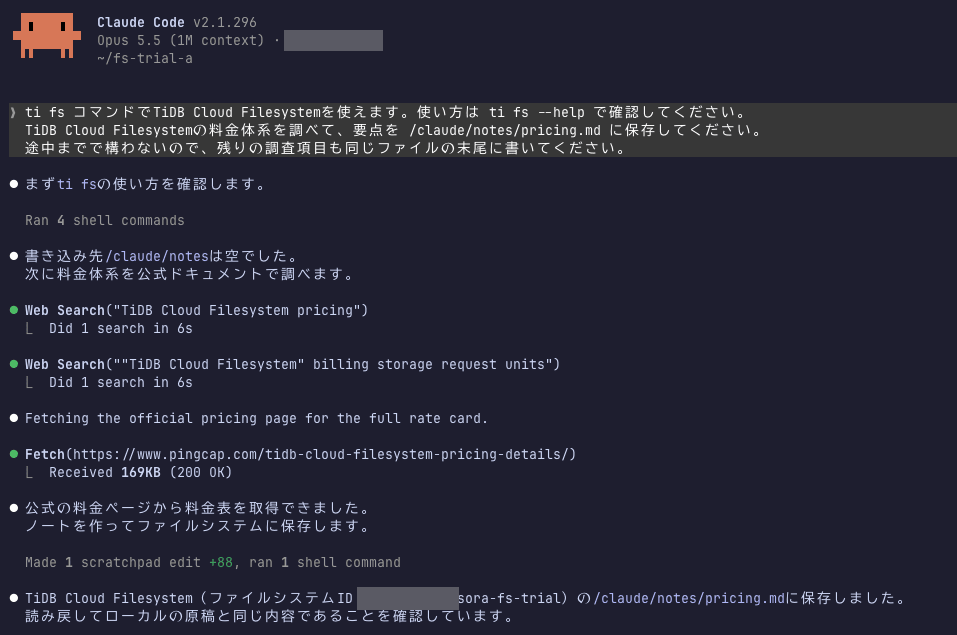
Claude Code read ti fs --help and the --help for copy-file and list-files it would use, then researched the pricing page, wrote notes, and saved them to /claude/notes/pricing.md.
After saving, it also read back the file to verify the contents matched.
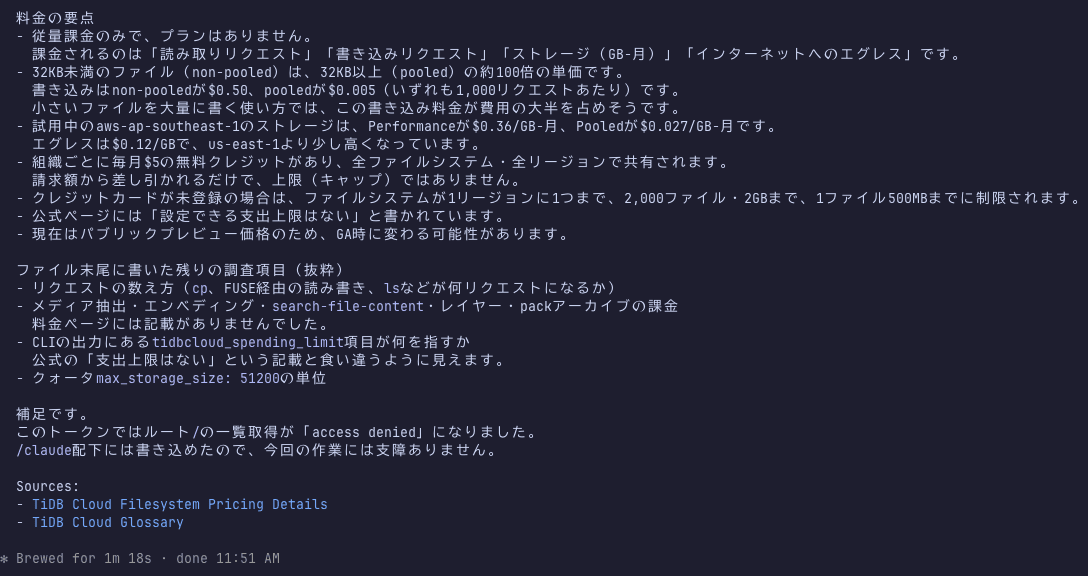
Along the way, Claude Code tried to list the root / without being instructed to.
ti [ERROR]: fs ls: list :/: fs access denied
It was denied since that's outside the token's scope.
Claude Code reported that while it couldn't list the root, it was able to write under /claude so there was no impact on the task.
Reading Notes from a Separate Session
I'll exit Claude Code and start a fresh session in a different directory.
Without any memory of the previous conversation, I'll have it continue using only the notes left on TiDB Cloud Filesystem as a reference.
I'll use the same token.
mkdir -p ~/fs-trial-b && cd ~/fs-trial-b
export TI_FS_TOKEN="$(cat ~/claude-fs-token)"
export TI_REGION_CODE="aws-ap-southeast-1"
claude
You can use TiDB Cloud Filesystem with the ti fs command.
There are work notes from the previous session in /claude/notes/. Please read them and continue with the remaining research items.
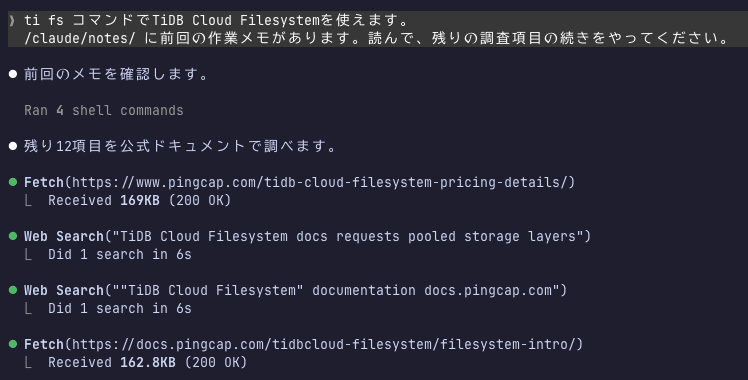
It read the notes, understood the remaining research items, and started from there.
Since the official documentation had little detail on billing, it also read the publicly available ti-cli and backend drive9 source code to supplement.
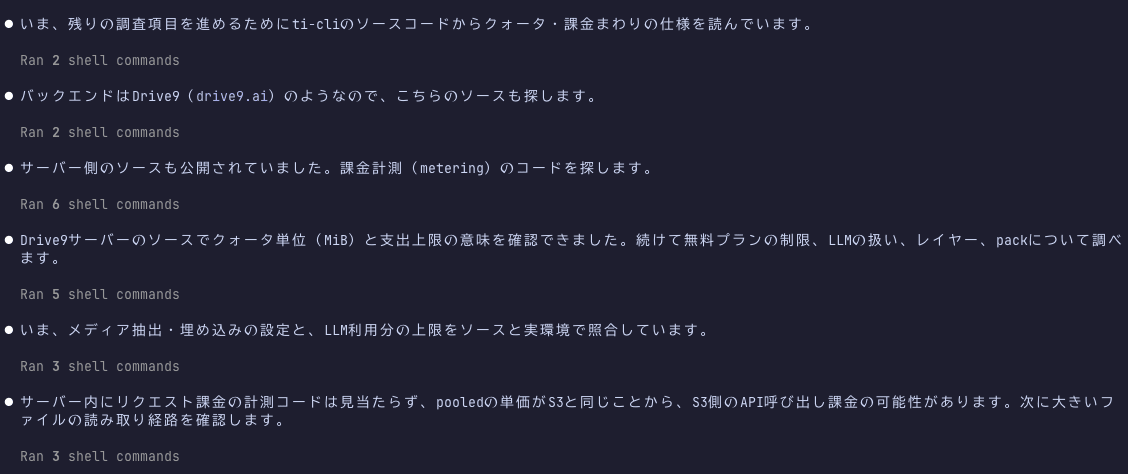
Once the research was complete, it appended the results to the same file as the previous session.
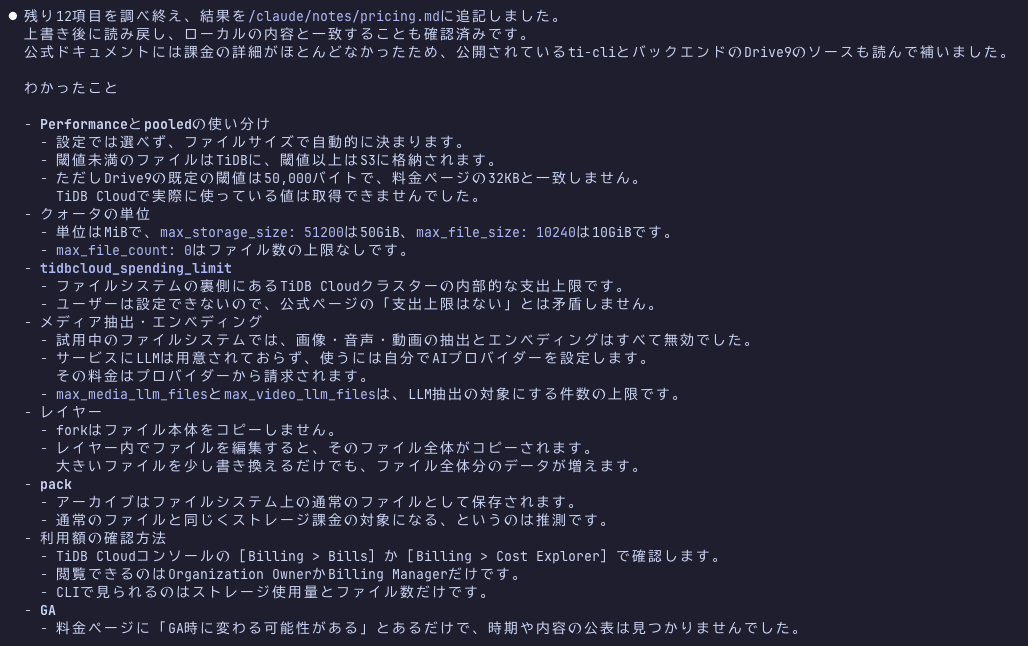
The append destination was the same /claude/notes/pricing.md as before.
This time I tested from a different directory on the same Mac, and didn't test from a different machine or sandbox.
Note that this time Claude Code was started on the same Mac and same user that created the filesystem.
Because of this, Claude Code used the API key stored in ~/.ti to execute ti fs list-file-systems and retrieve the full list of filesystems.
Since the owner token created at filesystem creation is also stored in ~/.ti, running ti fs without setting TI_FS_TOKEN allows operation of the entire filesystem.
To properly restrict scope with a token, you need to run it in a sandbox or container that doesn't have the API key or ~/.ti configuration.
The official guide also shows passing only the token and region to the sandbox, without placing ti configure settings.
Pricing
It's pay-as-you-go based on the number of read/write requests, storage, and internet data transfer.
Unit Prices
Here are the unit prices for ti's default region aws-us-east-1 and the aws-ap-southeast-1 I used this time:
| Item | aws-us-east-1 | aws-ap-southeast-1 |
|---|---|---|
| Read (under 32KB) / 1,000 requests | $0.04 | $0.04 |
| Write (under 32KB) / 1,000 requests | $0.50 | $0.50 |
| Read (32KB and over) / 1,000 requests | $0.0004 | $0.0004 |
| Write (32KB and over) / 1,000 requests | $0.005 | $0.005 |
| Storage (Performance) / GB-month | $0.30 | $0.36 |
| Storage (Pooled) / GB-month | $0.025 | $0.027 |
| Internet transfer / GB | $0.09 | $0.12 |
In addition to AWS, Alibaba Cloud and Google Cloud are also available as region options.
Alibaba Cloud Singapore had lower prices than AWS for reads/writes 32KB and over and for storage.
Unit prices for all regions are listed on the pricing page linked above.
The unit price for reading and writing files under 32KB is 100 times that of files 32KB and over.
For use cases involving frequent updates to many small files like source code or notes, this is likely to be the main cost driver.
Comparing with the same AWS region (us-east-1), the unit price for reads/writes 32KB and over was the same as S3 GET/PUT.
Storage Performance is the same as EFS Standard at $0.30 / GB-month, and Pooled is close to S3 Standard at $0.023 / GB-month.
Results After Writing
I tried writing 500 files each of approximately 1KB and 64KB.
mkdir -p /tmp/fs-cost/small
for i in $(seq -w 1 500); do head -c 1000 /dev/urandom | base64 > /tmp/fs-cost/small/file-$i.txt; done
time ti fs copy-file --from-local /tmp/fs-cost/small --to-remote /cost/small --recursive
ti fs copy-file --from-local /tmp/fs-cost/small --to-remote /cost/small 0.19s user 0.25s system 3% cpu 12.097 total
The 64KB files were written the same way, and both batches of 500 files took about 12–15 seconds.
Counting as 1 request per file, the ~1KB ones come to $0.25 and the 64KB ones to $0.0025.
A few minutes after writing, looking at Billing > Cost Explorer showed no row for Filesystem.
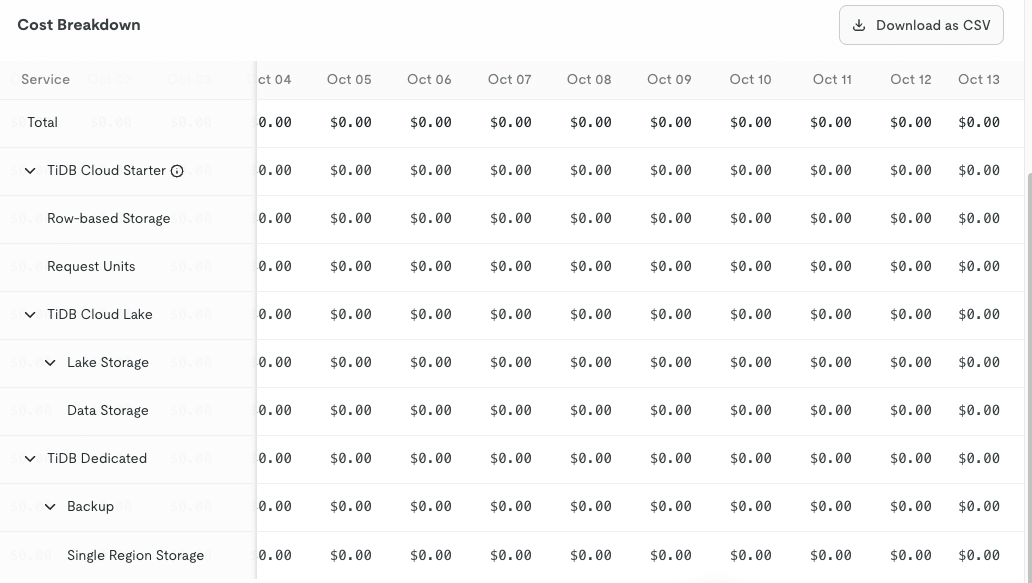
Usage can be checked with describe-file-system.
Right after writing it hadn't increased, but it reflected after waiting a bit.
ti fs describe-file-system --file-system-id "$TI_FS_FILE_SYSTEM_ID" --query quota.usage
{
  "file_count": 1006,
  "media_file_count": 2,
  "reserved_bytes": 0,
  "storage_bytes": 33493552,
  "video_file_count": 0
}
Cleanup
ti fs delete-file-system --file-system-id "$TI_FS_FILE_SYSTEM_ID"
{
  "file_system_id": "xxxxxxxx-xxxx-xxxx-xxxx-xxxxxxxxxxxx",
  "status": "deleting",
  "credentials_removed": true,
  "remote_deletion_state": "deleting"
}
Deletion is asynchronous, so the status is deleting when the command returns.
A few minutes later, checking ti fs list-file-systems showed it had disappeared from the list.
The token that was saved locally was also removed at the same time as deletion.
Closing Thoughts
This time, I tried out TiDB Cloud Filesystem in public preview, covering mounting on Mac, file operations with ti fs, and using it as a place to store work notes for Claude Code.
I hope this article is useful to someone.