I Tried Connecting Two VPCs with Overlapping CIDRs Using 1:1 NAT on Transit Gateway

This page has been translated by machine translation. View original
Introduction
AWS Transit Gateway and AWS Cloud WAN now support 1:1 NAT.
1:1 NAT is a feature that lets you configure translation rules on an attachment. It lets you connect networks with overlapping CIDRs without renumbering or NAT appliances.
This article shows the results of connecting two VPCs (A and B) that both use 10.0.0.0/16 through Transit Gateway VPC attachments.
What I Tested
Configuration
The Region is ap-northeast-1, and the AWS CLI version is 2.38.5. In a single account, I placed one instance in one AZ of each VPC.
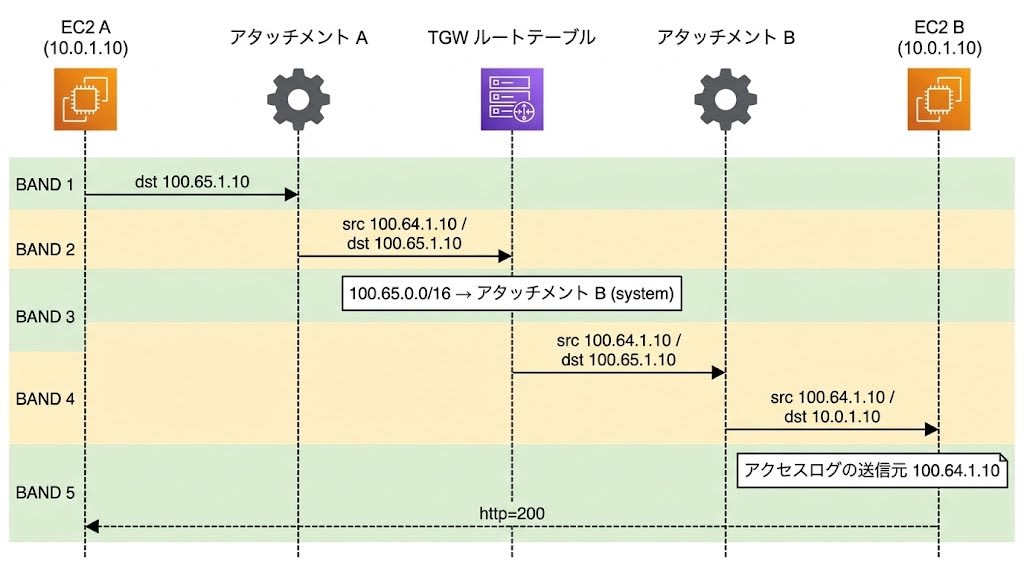
The two VPCs have the same CIDR (10.0.0.0/16), subnet (10.0.1.0/24), and instance IP (10.0.1.10). A NAT rule is configured on each attachment: A translates to 100.64.0.0/16 and B translates to 100.65.0.0/16. I chose the translated ranges from 100.64.0.0/10 so that they do not overlap with either VPC's CIDR. From the peer's point of view, A appears as 100.64.1.10 and B appears as 100.65.1.10. The arrow in the diagram shows the direction of a request from A to B.
There is one Transit Gateway, with both attachments associated with the default route table and propagation enabled as well. No internet route or VPC endpoint is set up.
The instance in B runs an HTTP server on port 8080 and keeps an access log. The instance in A repeatedly runs curl against B's NAT address, 100.65.1.10. curl times out after 3 seconds and waits 5 seconds after each run, so the interval is about 5 seconds on success and about 8 seconds while failures continue. I retrieved the logs from the console output.
According to the documentation, translation carries over the host portion as is, does not change ports, and applies to IPv4 only.
User data used for the connectivity test and commands to retrieve logs
VPC-A
#!/bin/bash
# VPC-A: curl B's NAT address (100.65.1.10) every 5 seconds and write the result with a timestamp to the console
setsid nohup bash -c '
while true; do
  ts=$(date -u +%Y-%m-%dT%H:%M:%SZ)
  code=$(curl -s -m 3 -o /dev/null -w "%{http_code}" http://100.65.1.10:8080/)
  echo "A-CURL $ts target=100.65.1.10 http=$code exit=$?" > /dev/console
  sleep 5
done' > /dev/null 2>&1 < /dev/null &
VPC-B
#!/bin/bash
# VPC-B: start an HTTP server on 8080 and write the access log (including source addresses) to the console
setsid nohup bash -c 'echo "B-SERVER start $(date -u +%Y-%m-%dT%H:%M:%SZ)" > /dev/console; exec python3 -m http.server 8080 --bind 0.0.0.0 > /dev/console 2>&1' > /dev/null 2>&1 < /dev/null &
Retrieving the console output
aws ec2 get-console-output --instance-id <instance-a-id> --latest --output text --query Output | grep -a A-CURL
aws ec2 get-console-output --instance-id <instance-b-id> --latest --output text --query Output | grep -aE 'B-SERVER|GET /|Serving HTTP'
The console output is reflected later than the actual time, and during testing there was a difference of up to about 50 seconds between the time of retrieval and the time of the latest line. For time comparisons, I used the values written by A's curl.
VPC-Side Configuration
Separately from the Transit Gateway NAT configuration, create routes on the VPC side for the peer's NAT address (the route on B's side is for replies). In B's security group, allow traffic from A's translated source address.
# VPC-A route table: send traffic destined for B's NAT address to the Transit Gateway
aws ec2 create-route --route-table-id <vpc-a-route-table-id> \
  --destination-cidr-block 100.65.0.0/16 --transit-gateway-id <tgw-id>

# VPC-B route table: send traffic destined for A's NAT address to the Transit Gateway
aws ec2 create-route --route-table-id <vpc-b-route-table-id> \
  --destination-cidr-block 100.64.0.0/16 --transit-gateway-id <tgw-id>

# VPC-B security group: allow TCP 8080 from A's translated source
aws ec2 authorize-security-group-ingress --group-id <vpc-b-sg-id> \
  --ip-permissions 'IpProtocol=tcp,FromPort=8080,ToPort=8080,IpRanges=[{CidrIp=100.64.0.0/16}]'
Route Table and Connectivity Before NAT Configuration
Let's check the Transit Gateway route table before setting the NAT rules.
aws ec2 search-transit-gateway-routes \
  --transit-gateway-route-table-id <tgw-route-table-id> \
  --filters Name=state,Values=active,blackhole \
  --query 'Routes[].{Cidr:DestinationCidrBlock,Type:Type,State:State,Att:TransitGatewayAttachments[0].TransitGatewayAttachmentId}' \
  --output json
[
    {
        "Cidr": "10.0.0.0/16",
        "Type": "propagated",
        "State": "active",
        "Att": "tgw-attach-0123456789abcdef0"
    }
]
The only 10.0.0.0/16 route is the one propagated from A's attachment; nothing is propagated from B. The VPC attachment documentation states that when you attach VPCs with overlapping CIDRs, the routes of the VPC connected later are not propagated.
Between adding the VPC-side routes and setting the rules, A's curl ran twice, and both attempts timed out (http=000, exit=28). At this point, the Transit Gateway route table had no route for 100.65.0.0/16.
Setting the NAT Rules
Set one rule with RuleNumber 100 on each of the two attachments. MatchSourceCidr is 10.0.0.0/16, the same as the VPC's CIDR. According to the documentation, when MatchSourceCidr exactly matches the VPC's CIDR, Transit Gateway automatically adds a route to the NAT translation target.
# VPC-A attachment
aws ec2 modify-transit-gateway-attachment-nat-configuration \
  --transit-gateway-attachment-id <attachment-a-id> \
  --nat-gateway-support enable \
  --nat-gateway-rules RuleNumber=100,MatchSourceCidr=10.0.0.0/16,NatCidr=100.64.0.0/16

# VPC-B attachment
aws ec2 modify-transit-gateway-attachment-nat-configuration \
  --transit-gateway-attachment-id <attachment-b-id> \
  --nat-gateway-support enable \
  --nat-gateway-rules RuleNumber=100,MatchSourceCidr=10.0.0.0/16,NatCidr=100.65.0.0/16
According to the documentation, the rules you pass to --nat-gateway-rules replace all existing rules on that attachment. For an attachment that already has rules, pass them together with the rules you want to keep.
Check the status with get-transit-gateway-attachment-nat-configuration. Wait until NatGatewaySupport is enabled and the rule State is activated. The following is the output when I checked A's attachment after the configuration.
aws ec2 get-transit-gateway-attachment-nat-configuration \
  --transit-gateway-attachment-id <attachment-a-id>
{
    "TransitGatewayAttachmentId": "tgw-attach-0123456789abcdef0",
    "NatGatewaySupport": "enabled",
    "NatSystemRouteSupport": "enable",
    "NatGatewayRules": [
        {
            "RuleNumber": 100,
            "MatchSourceCidr": "10.0.0.0/16",
            "NatCidr": "100.64.0.0/16",
            "State": "activated"
        }
    ]
}
Route Table and Source Address After Configuration
I retrieved the route table with the same command as before the configuration.
[
    {
        "Cidr": "100.64.0.0/16",
        "Type": "system",
        "State": "active",
        "Att": "tgw-attach-0123456789abcdef0"
    },
    {
        "Cidr": "100.65.0.0/16",
        "Type": "system",
        "State": "active",
        "Att": "tgw-attach-0fedcba987654321f"
    }
]
The propagated route for 10.0.0.0/16 that existed before the configuration is gone, and system routes whose destinations are each attachment's translated CIDR have been added. The destinations I added to the VPC-side route tables are also these translated CIDRs.
The following diagram shows how the addresses change in a single request from A to B. The green parts are measured values, and the yellow parts are values based on the official documentation. I did not capture packets in transit through the attachments.
- Measured (green): the destination of A's curl, 100.65.1.10; the system route for 100.65.0.0/16 in the Transit Gateway route table; the source 100.64.1.10 in B's access log; and http=200 on A
- Documentation (yellow): the rule on A's attachment translates the source from 10.0.1.10 to 100.64.1.10, and the rule on B's attachment translates the destination from 100.65.1.10 to B's real address, 10.0.1.10
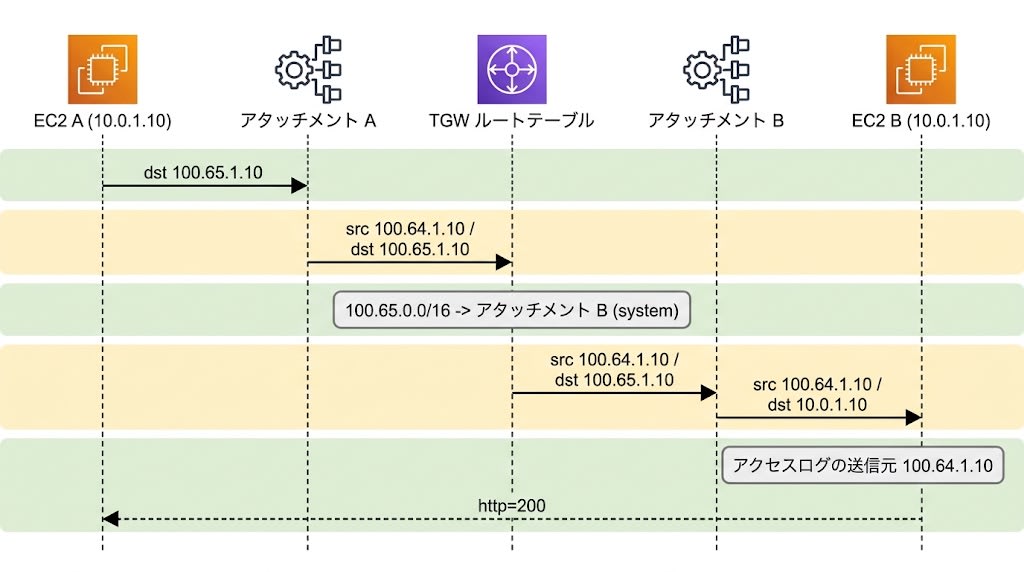
In B's access log, the source was not A's real IP, 10.0.1.10, but the translated 100.64.1.10.
100.64.1.10 - - [25/Oct/2026 03:53:52] "GET / HTTP/1.1" 200 -
100.64.1.10 - - [25/Oct/2026 03:53:57] "GET / HTTP/1.1" 200 -
100.64.1.10 - - [25/Oct/2026 03:54:02] "GET / HTTP/1.1" 200 -
All 18 access log entries up to the time of retrieval had the same source. Security groups and logs on the receiving side must therefore handle the translated address.
Time Taken to Take Effect
I set the rules at 03:52:54 (UTC). I then checked the state transitions by polling about every 6 seconds. The 03:53:06 row is omitted because its state is the same as 03:53:00, and the 03:53:13 row is kept as the check just before A transitions. Each cell shows "NatGatewaySupport / rule State" in that order. The times in the table are when I checked the state; the actual transition happened within about 6 seconds before that.
| Time (UTC) | A | B |
|---|---|---|
| 03:53:00 | enabling / activated | enabling / activated |
| 03:53:13 | enabling / activated | enabling / activated |
| 03:53:19 | enabled / activated | enabling / activated |
| 03:53:25 | enabled / activated | enabled / activated |
A's curl kept failing even after I confirmed that both had become enabled, and first succeeded at 03:53:52.
A-CURL 2026-10-25T03:53:28Z target=100.65.1.10 http=000 exit=28
A-CURL 2026-10-25T03:53:36Z target=100.65.1.10 http=000 exit=28
A-CURL 2026-10-25T03:53:44Z target=100.65.1.10 http=000 exit=28
A-CURL 2026-10-25T03:53:52Z target=100.65.1.10 http=200 exit=0
A-CURL 2026-10-25T03:53:57Z target=100.65.1.10 http=200 exit=0
A-CURL 2026-10-25T03:54:02Z target=100.65.1.10 http=200 exit=0
The last failed curl started at 03:53:44, so connectivity was established between 03:53:44 and 03:53:52. That is 50 to 58 seconds from setting the rules to connectivity, and 19 to 27 seconds after I confirmed that B had become enabled. These values come from a single measurement when enabling for the first time from a state with no route. I did not measure rule changes against traffic in use.
The documentation says that when enabling NAT or changing rules, a mismatch between when the translation and the routes take effect can briefly interrupt traffic to NAT addresses. Confirm that a configuration has taken effect through connectivity as well as the API state.
Conditions to Check Before Adoption
The main restrictions described in the official documentation (1:1 NAT overview, How it works and prerequisites, Routing behavior, How to configure) are the following four.
- For two VPCs with overlapping CIDRs, set translation rules on both attachments. If only one side has a rule, the reply destination on the side without a rule becomes an address inside its own VPC, which is handled by the VPC's local route and never reaches the Transit Gateway.
- If a rule's MatchSourceCidr exactly matches the VPC's CIDR, the propagated route to that VPC's real addresses is replaced by a route to the NAT translation target. Other attachments that were communicating with that VPC using real addresses will no longer be able to communicate, so before configuring, update those peers to use the translated addresses.
- The NAT translation target must be within RFC 1918 or 100.64.0.0/10, and must have the same prefix length as the original CIDR. Transit Gateway checks for overlaps only among the rules on the same attachment, so you need to avoid overlaps with the CIDRs of VPCs and other attachments yourself.
- NAT cannot be configured on a VPC attachment with appliance mode enabled.
Check the Amazon VPC pricing page for whether 1:1 NAT has additional charges and what the unit price is.
Summary
Previously, Transit Gateway had the restriction that VPCs with overlapping CIDRs could not be connected, but with 1:1 NAT support, this can now be worked around.
Transit Gateway has seen a series of major updates, such as policy-based routing (PBR) in July. When connecting VPCs with Transit Gateway, please check the latest updates, and if you want to avoid CIDR overlaps or have a background where using NAT is desirable, try the newly supported 1:1 NAT.
