I Tried Out ECS Gateway, a New Feature of Amazon ECS

This page has been translated by machine translation. View original
Introduction
On October 20, 2026, Amazon ECS Gateway was announced.
ECS Gateway is a feature in which ECS manages the ALB that serves as the entry point for ECS services, along with related resources, and a single ALB can be shared by up to 25 services.
This time, I set up a public gateway and a private gateway in the same cluster in the Tokyo Region, associated a service with each, and checked the FQDNs.
Test Environment
| Item | Configuration |
|---|---|
| Region | ap-northeast-1 (Tokyo) |
| Network | Default VPC. Public subnets in 1a, 1c, and 1d were used |
| Gateway | One public gateway (gw-public) and one private gateway (gw-private) were created. The IP address type is IPv4 |
| ECS service | nginx runs on Fargate and is connected to gw-public and gw-private |
| Task | One per service. 0.25 vCPU / 0.5 GB, with a public IP |
| Tool used | AWS CLI 2.39.3 |
Creating Gateways and Connecting Services
Public and Private Gateways
For a gateway, you pass an infrastructure role that ECS uses to create the ALB and other resources. Save the trust policy as trust-ecs.json, create the role, and attach the managed policy.
Creating the infrastructure role
trust-ecs.json:
{"Version":"2012-10-17","Statement":[{"Effect":"Allow","Principal":{"Service":"ecs.amazonaws.com"},"Action":"sts:AssumeRole"}]}
aws iam create-role --role-name gwv-gateway-infra --assume-role-policy-document file://trust-ecs.json
aws iam attach-role-policy --role-name gwv-gateway-infra --policy-arn arn:aws:iam::aws:policy/AmazonECSInfrastructureRoleForGatewayHostSharedALB
The following commands create the private gateway and associate it with the cluster. For the public gateway, I created it the same way by changing --name to gw-public and the scheme to internet-facing, and associated it with gw-verify. In the console, you can specify the same settings on the following screen.
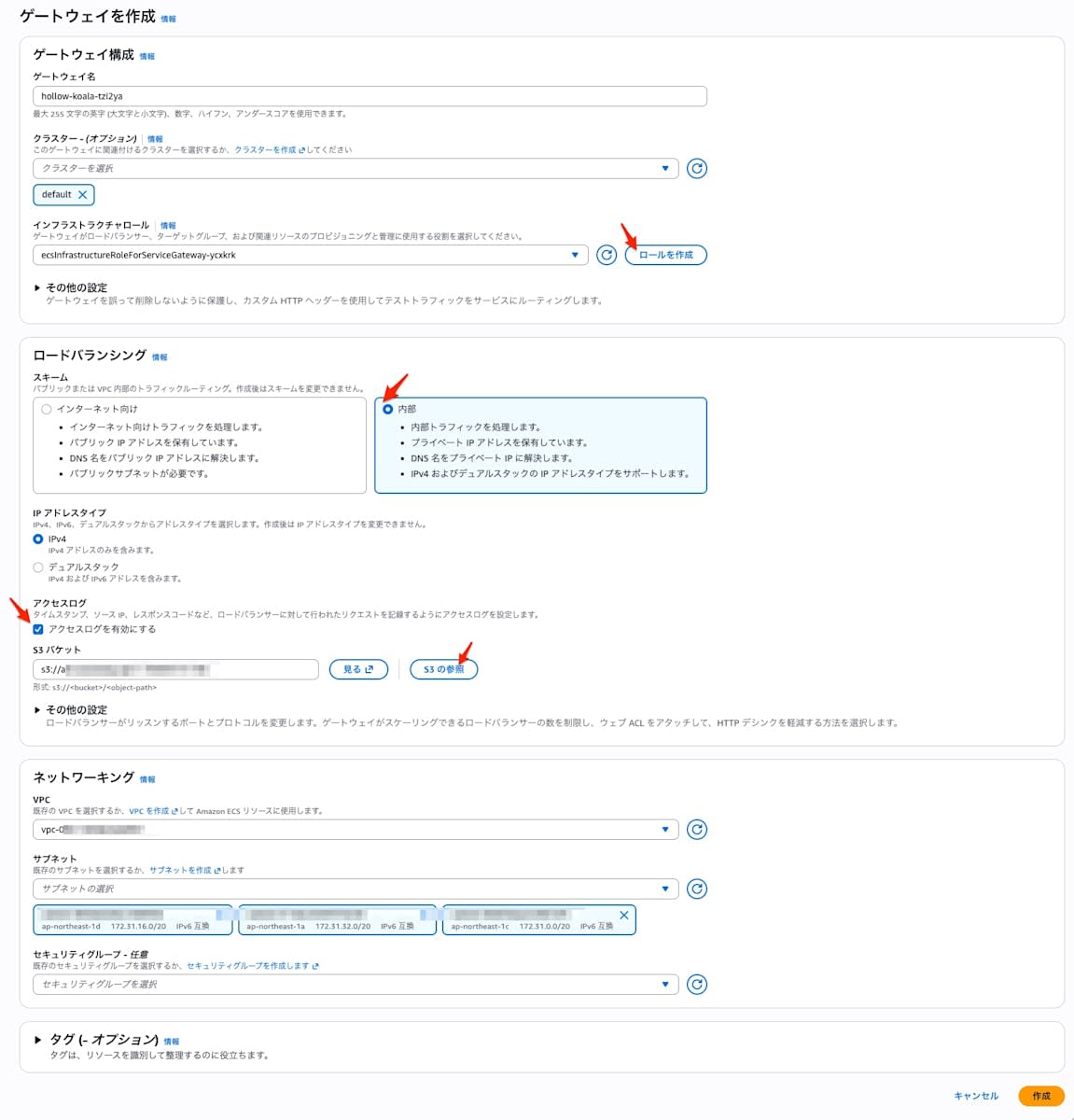
aws ecs create-gateway \
  --name gw-private \
  --infrastructure-role-arn arn:aws:iam::<ACCOUNT_ID>:role/gwv-gateway-infra \
  --configuration '{"hostSharedAlb":{"scheme":"internal","networkConfiguration":{"subnets":["<subnet-id-1a>","<subnet-id-1c>","<subnet-id-1d>"],"ipAddressType":"ipv4"}}}'

aws ecs associate-gateway-with-cluster --gateway gw-private --cluster gw-verify
The default scheme is internet-facing. ipAddressType is written inside networkConfiguration. The default is dualstack, and this time I specified ipv4.
This is the response from describe-gateway for gw-private immediately after creation (the two lines for gatewayArn and infrastructureRoleArn are omitted).
{
    "gateway": {
        "name": "gw-private",
        "status": "ACTIVE",
        "deletionProtection": true,
        "configuration": {
            "hostSharedAlb": {
                "networkConfiguration": {
                    "subnets": [
                        "subnet-xxxxxxxxxxxxxxxxx",
                        "subnet-xxxxxxxxxxxxxxxxx",
                        "subnet-xxxxxxxxxxxxxxxxx"
                    ],
                    "ipAddressType": "ipv4"
                },
                "scheme": "internal",
                "port": 443,
                "protocol": "HTTPS",
                "maxAlbCount": 10,
                "currentAlbCount": 0,
                "httpDesync": "defensive"
            }
        },
        "accessType": "PRIVATE",
        "propagateTags": "GATEWAY",
        "tags": [],
        "createdAt": "2026-10-31T22:16:22.076000+09:00",
        "updatedAt": "2026-10-31T22:16:22.076000+09:00"
    }
}
currentAlbCount is 0, so no ALB is created just by creating a gateway. deletionProtection was true even though I did not specify it. The listener is HTTPS 443 only, and the port and protocol cannot be changed. After creation, the accessType of gw-public was PUBLIC and that of gw-private was PRIVATE.
Connection Targets for Services
The connector that connects a service to a gateway references a named port in the task definition by portName. Add a name to portMappings in the task definition.
Task definition with a named port
Save it as taskdef.json and register it. The task execution role gwv-task-exec is an ordinary role with AmazonECSTaskExecutionRolePolicy attached.
{
  "family": "gwv-web",
  "networkMode": "awsvpc",
  "requiresCompatibilities": ["FARGATE"],
  "cpu": "256",
  "memory": "512",
  "executionRoleArn": "arn:aws:iam::<ACCOUNT_ID>:role/gwv-task-exec",
  "containerDefinitions": [
    {
      "name": "web",
      "image": "public.ecr.aws/docker/library/nginx:stable",
      "essential": true,
      "portMappings": [
        {"name": "web", "containerPort": 80, "protocol": "tcp", "appProtocol": "http"}
      ]
    }
  ]
}
aws ecs register-task-definition --cli-input-json file://taskdef.json
When creating a service, add --gateway-connectors and choose the connection target with filters.accessTypes. A service specifying PRIVATE was connected only to the private gateway, and a service specifying PUBLIC was connected only to the public gateway. In the console, you specify the target gateway on the service creation screen.
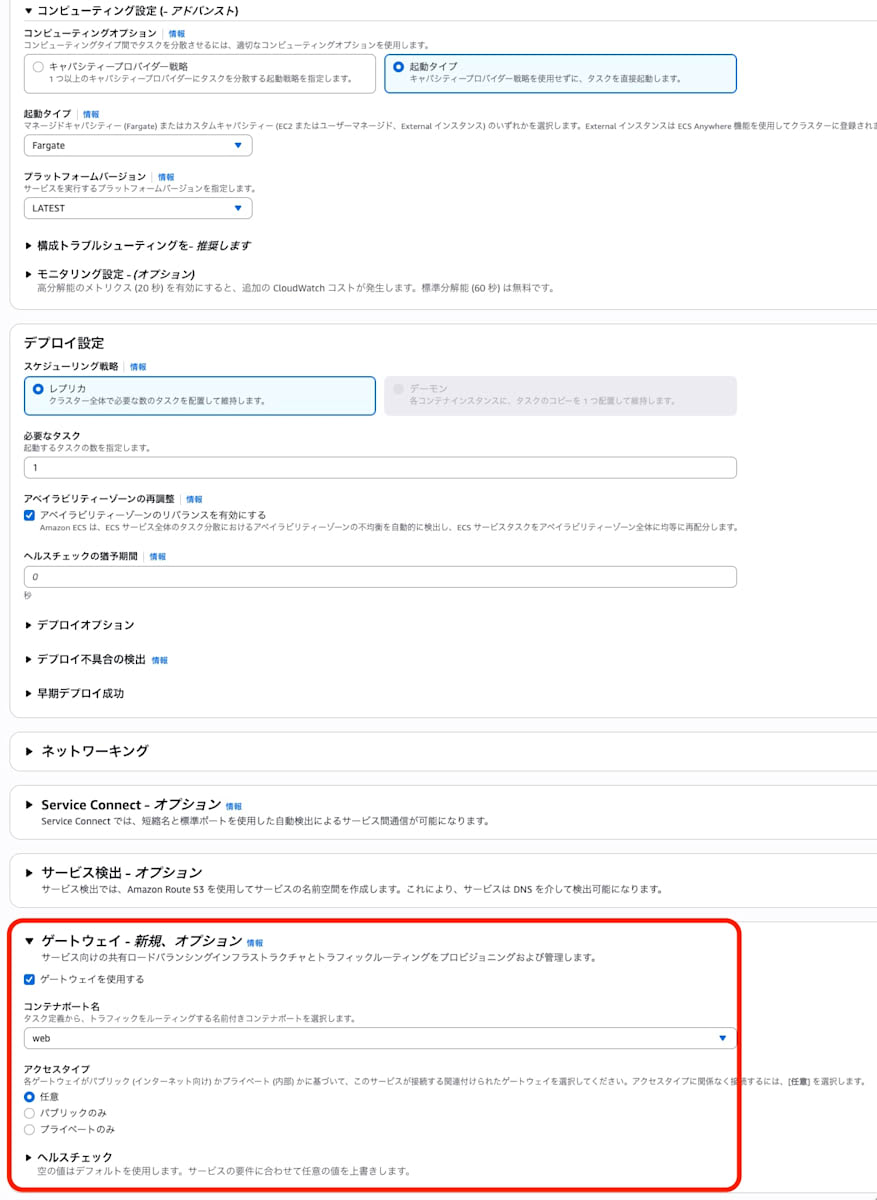
aws ecs create-service --cluster gw-verify --service-name svc-private-01 \
  --task-definition gwv-web --desired-count 1 --launch-type FARGATE \
  --network-configuration "awsvpcConfiguration={subnets=[<subnet-id-1a>,<subnet-id-1c>,<subnet-id-1d>],assignPublicIp=ENABLED}" \
  --gateway-connectors '[{"portName":"web","filters":{"accessTypes":["PRIVATE"]}}]'
I specified assignPublicIp=ENABLED to give the task a route to the internet so that it can pull the container image. The type of gateway to connect to is determined by filters.accessTypes, not by this setting.
About 12 seconds after creating svc-public-01 and svc-private-01, one internet-facing ALB was created on the public side and one internal ALB on the private side.
If you omit filters, the service is connected to a gateway that is in the same VPC and covers all the AZs the service uses. If you associate a public gateway with the cluster later, it also becomes a connection target at the next deployment. To prevent unintended exposure, explicitly specify PRIVATE for services that should not be exposed to the internet.
FQDN and IP Addresses
FQDN Format
If you pass the ARN of a service revision to describe-service-revisions, you can get the serviceUrl.
aws ecs describe-service-revisions --service-revision-arns <サービスリビジョンのARN> \
  --query 'serviceRevisions[0].ecsManagedResources.gatewayConnections[].[accessType,status,serviceUrl]' --output text
These are the results obtained from the public and private services. The IDs in the URLs are masked.
| Service | accessType | status | serviceUrl |
|---|---|---|---|
| svc-private-01 | PRIVATE | ACTIVE | https://sv-xxxxxxxxxxxxxxxxxxxxxxxxxxxxxxxx.ecs.<region>.on.aws |
| svc-public-01 | PUBLIC | ACTIVE | https://sv-xxxxxxxxxxxxxxxxxxxxxxxxxxxxxxxx.ecs.<region>.on.aws |
The URL had the form https://sv-<32-digit hexadecimal>.ecs.<region>.on.aws. Because the ID is generated randomly, the URL changes even if you recreate a service with the same name.
Name Resolution Results
From a PC outside the VPC (hereafter, my local PC), I retrieved the A records of each FQDN.
svc-private-01: 172.31.x.a 172.31.x.b 172.31.x.c
svc-public-01:  x.x.x.p    x.x.x.q    x.x.x.r
For svc-private-01, the private IPs of the internal ALB were returned, and for svc-public-01, the public IPs of the internet-facing ALB were returned.
For both FQDNs, A records were returned directly without a CNAME in between, and the TTL was 60 seconds. The private FQDN could also be resolved from my local PC, but what was returned were private IPs inside the VPC.
Comparison with Express Mode
Common Configuration
In a separate cluster, gw-verify-express, I created one public service, svc-express-01, with Express Mode. I compared its ALB-related resources with those of gw-public. The following points were the same.
- The endpoint format (
https://sv-<32-digit hexadecimal>.ecs.<region>.on.aws) - HTTPS 443 listener (TLS policy ELBSecurityPolicy-TLS13-1-2-Ext1-PQ-2025-09, default action is a fixed response 404 Not Found)
- A rule that forwards based on a host-header condition (priority is 44990 in both)
- Target group (target type ip, HTTP 80, health check path
/, interval 30 seconds, success code 200) - A per-service ACM certificate (AMAZON_ISSUED, EC-prime256v1, DNS validation)
- How the security groups are set up (the ALB one allows 80 and 443 from 0.0.0.0/0, and the service one allows TCP 80 inbound from the ALB security group)
- The tag AmazonECSManaged=true attached to the ALB, security groups, and target group
Differences from Express Mode
What ECS Gateway creates are the resources related to the entry point, such as the ALB, listener, rules, target groups, certificates, hostnames, and security groups. Unlike Express Mode, you configure the task definition, logs, and auto scaling yourself.
Services in Express Mode cannot be connected to ECS Gateway. Even if you use both in the same VPC, a separate ALB is created for each.
Deleting Gateways
After deleting the services and once the routes and ALBs were gone, I removed the association with the cluster and the deletion protection, and then deleted the gateway.
aws ecs disassociate-gateway-from-cluster \
  --gateway gw-private \
  --cluster gw-verify

aws ecs update-gateway \
  --gateway gw-private \
  --infrastructure-role-arn arn:aws:iam::<ACCOUNT_ID>:role/gwv-gateway-infra \
  --no-deletion-protection \
  --configuration '{"hostSharedAlb":{"maxAlbCount":10}}'

aws ecs delete-gateway --gateway gw-private
In my testing, update-gateway required --infrastructure-role-arn and --configuration even when changing only the deletion protection. Also, run delete-gateway after the status becomes UPDATE_COMPLETE.
Summary
With ECS Gateway, you can create and manage in one go the resources needed for a service's entry point, such as the ALB, HTTPS listener, certificates, host-based routing, and security groups. Because a single ALB is shared by up to 25 services, you can reduce ALB running costs compared to a setup that stands up an ALB for each service. As for certificates, ACM certificates for the AWS-managed domain (on.aws) can be used at no additional charge, and the gateway also provides the HTTPS listener. From the console's service creation screen, you can also configure CloudFront and WAF together.
The responsibilities can be divided so that the platform team prepares public and private gateways and manages the network configuration, while application teams simply specify a named port and accessType to connect. Since the task definitions, logs, and auto scaling remain on the application side, you can separate entry point management from application responsibilities.
