Tried out the new feature BigQuery Graph

This page has been translated by machine translation. View original
I am from the Data Business Division, Hanzawa.
On April 9th, BigQuery Graph was announced as a new feature.
Until now, BigQuery had a strong image primarily as an analytical platform for data warehousing, but going forward, its range of applications will likely expand to cases handling graph data.
Additionally, this feature was prominently highlighted at Google Cloud Next '26 held in Las Vegas until recently, indicating it's a highly anticipated feature.
Although I don't have previous experience with graph databases (GDB), I'd like to try it out.
What is a Graph Database (GDB)?
A graph database (GDB) is a type of NoSQL database that uses a graph structure consisting of nodes and edges to represent entities and their relationships.
-
Nodes
- Simply put, they are points
- Entities that represent real objects like people, products, or places
-
Edges
- Simply put, they are lines
- Elements that represent relationships between nodes
- For example, the relationship between a "customer" node and a "product" node can be expressed as "purchased."
Comparing relational databases (RDB) and graph databases (GDB) from various perspectives:
| Feature | Relational Database (RDB) | Graph Database (GDB) |
|---|---|---|
| Data Structure | Tabular format with rows and columns Handled with strict schemas with predefined properties |
Graph structure with nodes and edges Flexible representation of relationships |
| Query Efficiency | JOIN operations to combine tables; queries can become slower or more complex as relationships increase | Can directly traverse edges; queries focusing on relationships tend to be more intuitive |
| Query Language | SQL (Structured Query Language) | GQL (Graph Query Language) |
| Use Cases | Suitable for structured, predictable business data like financial systems or inventory management | Suitable for applications centered on relationship analysis like social networks, fraud detection, or path optimization |
What is GQL?
BigQuery Graph uses GQL (Graph Query Language) to query graph data.
GQL syntax differs significantly from traditional SQL, so it might take some time to get used to it.
The following documentation provides helpful information about specific syntax.
For example, if you want to retrieve all "product names" that "Customer A" has purchased:
In this case, the query would be as follows:
GRAPH ShopGraph
MATCH (c:Customer {customer_name: 'A'})-[:purchased]->(p:Product)
RETURN p.product_name
In this query, GRAPH specifies the target graph, and MATCH traverses the relationship between nodes and edges. Inside {}, you can specify node property conditions, in this case representing customers with customer_name equal to A. Finally, RETURN returns the product names you want to retrieve.
Conversely, if you want to retrieve all customer names who purchased "Product B":
In this case, the query would be:
GRAPH ShopGraph
MATCH (p:Product {product_name: 'B'})<-[:purchased]-(c:Customer)
RETURN c.customer_name
While the first query traversed from "Customer" to "Product," this query traverses in the opposite direction from "Product" to "Customer." Therefore, the direction of the purchased edge is written as <-[:purchased]- to indicate the reverse direction.
These patterns are described as graph patterns within the MATCH statement. Please also check the following documentation for more details.
Finally, let's try a slightly more complex example.
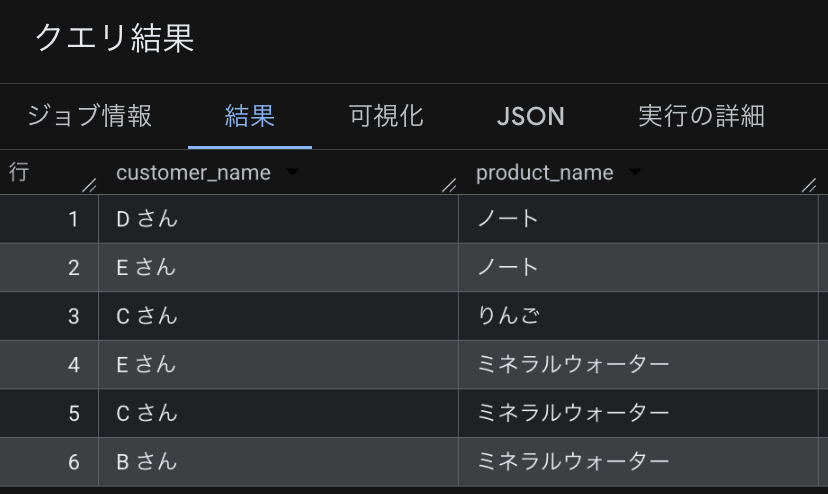
The following query retrieves the "customer names" and "product names" of customers who purchased the same products as "Customer A":
GRAPH ShopGraph
MATCH (a:Customer {customer_name: 'A'})-[:purchased]->(p:Product)<-[:purchased]-(c:Customer)
WHERE c != a
RETURN c.customer_name, p.product_name
This query can also be written step by step using the NEXT statement. NEXT passes the results from the previous step to the next step.
FILTER is a syntax that applies conditions to the result rows, similar in appearance to WHERE, but it can reference columns passed from the previous step. Here, c != a excludes Customer A themselves.
GRAPH ShopGraph
MATCH (a:Customer {customer_name: 'A'})-[:purchased]->(p:Product)
RETURN a, p

NEXT

MATCH (p)<-[:purchased]-(c:Customer)
FILTER c != a
RETURN c.customer_name, p.product_name
What I've introduced so far is just a part of the basic GQL syntax. Please also check the official documentation mentioned above for more detailed syntax.
Let's Try It Out
Now, I'd like to actually reproduce the examples I introduced earlier on BigQuery Graph.
1. Preparing Sample Data
First, let's prepare the sample data.
To represent the above relationship, I'll create the following 3 tables:
- Customer table
- Product table
- Bridge table representing the purchasing relationship between customers and products
Tables 1 and 2 will be treated as nodes, and table 3 as edges, but they are created as regular tables.
CREATE OR REPLACE TABLE `sample_graph.customers` (
  customer_id INT64 PRIMARY KEY NOT ENFORCED,
  customer_name STRING
);

INSERT INTO `sample_graph.customers` (customer_id, customer_name)
VALUES
  (1, 'A さん'),
  (2, 'B さん'),
  (3, 'C さん'),
  (4, 'D さん'),
  (5, 'E さん');
CREATE OR REPLACE TABLE `sample_graph.products` (
  product_id INT64 PRIMARY KEY NOT ENFORCED,
  product_name STRING,
  category STRING,
  price INT64
);

INSERT INTO `sample_graph.products` (product_id, product_name, category, price)
VALUES
  (101, 'りんご', '食品', 120),
  (102, 'ミネラルウォーター', '飲料', 180),
  (103, 'ノート', '文房具', 150),
  (104, 'ボールペン', '文房具', 200),
  (105, 'トイレットペーパー', '日用品', 300),
  (106, 'コーヒー豆', '食品', 450),
  (107, 'ワイヤレスイヤホン', '家電', 1200),
  (108, 'モバイルバッテリー', '家電', 2400);
CREATE OR REPLACE TABLE `sample_graph.customer_product_bridge` (
  purchase_id INT64 PRIMARY KEY NOT ENFORCED,
  customer_id INT64 REFERENCES `sample_graph.customers` (customer_id) NOT ENFORCED,
  product_id INT64 REFERENCES `sample_graph.products` (product_id) NOT ENFORCED,
  purchased_at DATE
);

INSERT INTO `sample_graph.customer_product_bridge`
  (purchase_id, customer_id, product_id, purchased_at)
VALUES
  (1, 1, 101, DATE '2026-04-01'),  -- A さん -> りんご
  (2, 1, 102, DATE '2026-04-02'),  -- A さん -> ミネラルウォーター
  (3, 1, 103, DATE '2026-04-03'),  -- A さん -> ノート
  (4, 2, 102, DATE '2026-04-02'),  -- B さん -> ミネラルウォーター
  (5, 2, 104, DATE '2026-04-03'),  -- B さん -> ボールペン
  (6, 2, 105, DATE '2026-04-04'),  -- B さん -> トイレットペーパー
  (7, 3, 101, DATE '2026-04-01'),  -- C さん -> りんご
  (8, 3, 102, DATE '2026-04-02'),  -- C さん -> ミネラルウォーター
  (9, 3, 106, DATE '2026-04-05'),  -- C さん -> コーヒー豆
  (10, 4, 103, DATE '2026-04-03'), -- D さん -> ノート
  (11, 4, 107, DATE '2026-04-06'), -- D さん -> ワイヤレスイヤホン
  (12, 5, 102, DATE '2026-04-02'), -- E さん -> ミネラルウォーター
  (13, 5, 103, DATE '2026-04-03'), -- E さん -> ノート
  (14, 5, 108, DATE '2026-04-07'); -- E さん -> モバイルバッテリー
2. Creating a Property Graph
A property graph can be created using the CREATE PROPERTY GRAPH syntax.
In NODE TABLES, specify the tables corresponding to nodes, and in EDGE TABLES, specify the tables corresponding to edges. Additionally, in EDGE TABLES, you can specify SOURCE KEY and DESTINATION KEY to express which nodes are connected.
CREATE OR REPLACE PROPERTY GRAPH sample_graph.ShopGraph
  NODE TABLES (
    `sample_graph.customers` AS Customer
      LABEL customer,
    `sample_graph.products` AS Product
      LABEL product
  )
  EDGE TABLES (
    `sample_graph.customer_product_bridge` AS Purchase
      SOURCE KEY (customer_id) REFERENCES Customer (customer_id)
      DESTINATION KEY (product_id) REFERENCES Product (product_id)
  );
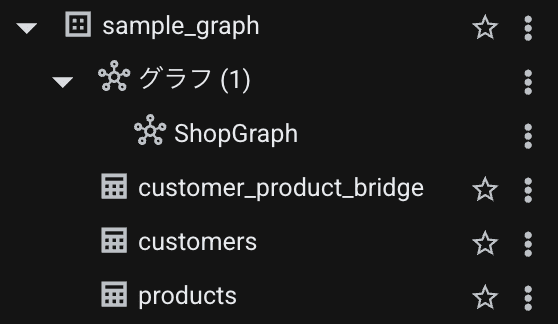
In the end, the dataset structure looks like this:
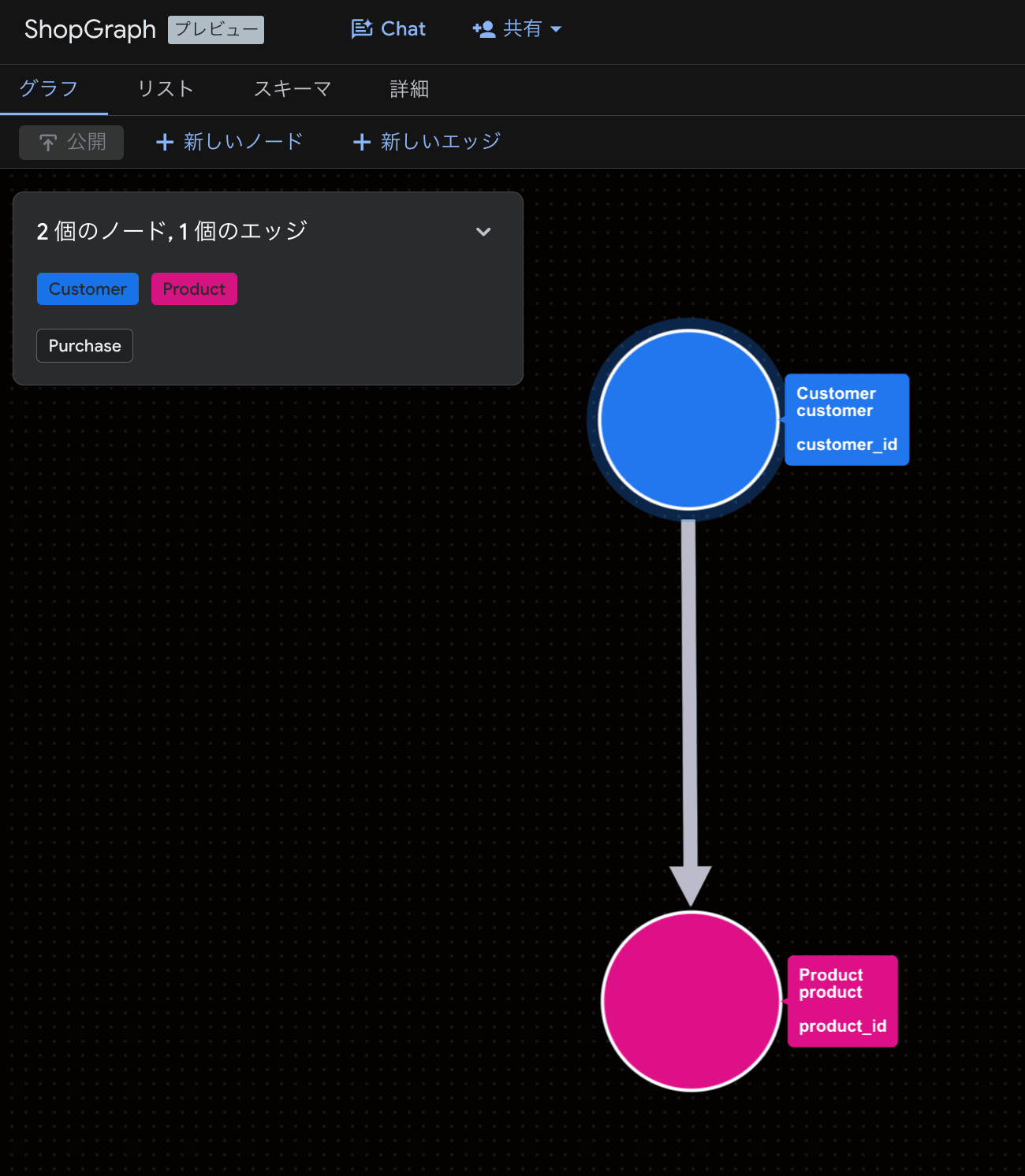
Additionally, you can visually confirm the relationships between nodes from the console.
3. Trying It Out
Following the previous examples, I'll try these 3 patterns:
- Retrieve all product names purchased by Customer A
- Retrieve customer names who purchased mineral water
- Retrieve customer names and product names of customers who purchased the same products as Customer A
3.1. Retrieve all product names purchased by Customer A
GRAPH sample_graph.ShopGraph
MATCH (c:customer {customer_name: 'A さん'})-[:Purchase]->(p:product)
RETURN p.product_name
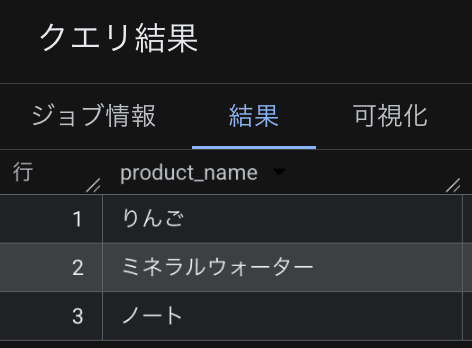
We can see that the products purchased by Customer A are apple, mineral water, and notebook.
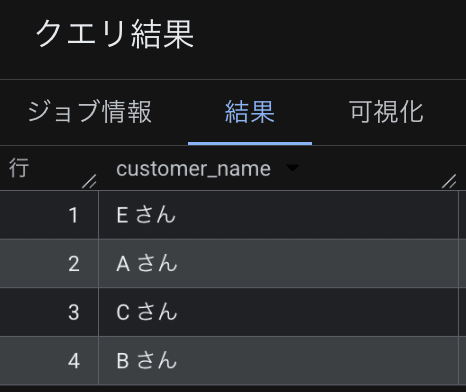
3.2. Retrieve customer names who purchased mineral water
GRAPH sample_graph.ShopGraph
MATCH (p:product {product_name: 'ミネラルウォーター'})<-[:Purchase]-(c:customer)
RETURN c.customer_name
We can see that Customers A, B, C, and E purchased mineral water.
3.3. Retrieve customer names and product names of customers who purchased the same products as Customer A
GRAPH sample_graph.ShopGraph
MATCH (a:customer {customer_name: 'A さん'})-[:Purchase]->(p:product)
RETURN a, p

NEXT

MATCH (p)<-[:Purchase]-(c:customer)
FILTER c != a
RETURN c.customer_name, p.product_name
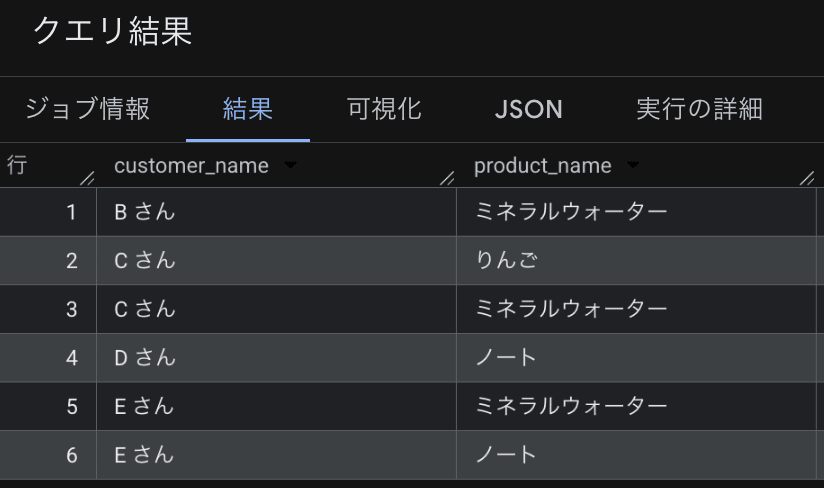
Additionally, you can use GQL execution results in SQL:
SELECT
  customer_name,
  product_name
FROM
  GRAPH_TABLE(
    sample_graph.ShopGraph
    MATCH (a:customer {customer_name: 'A さん'})-[:Purchase]->(p:product)
    RETURN a, p

    NEXT

    MATCH (p)<-[:Purchase]-(c:customer)
    FILTER c != a
    RETURN c.customer_name, p.product_name
  )
ORDER BY customer_name;
Bonus
The documentation introduces best practices for graph schema design and querying. Please check them out as well.
Also, several official tutorials are available, so please try them if you're interested.
Conclusion
In this blog, I tried out the new BigQuery Graph feature. It was also a good opportunity to understand the basics of graph databases.
Furthermore, on April 22nd, new features for BigQuery Graph were added, such as defining measures and querying graphs in natural language through Conversational Analytics. Expectations for future developments are high.
Going forward, I'd like to try these features as well.