I tried CI/CD for dbt Projects on Snowflake with GitHub Actions + OIDC Authentication

This page has been translated by machine translation. View original
This is Kawabata.
With dbt Projects on Snowflake, you can now run dbt projects directly on Snowflake, and there are likely many cases where you want to incorporate CI/CD into your development workflow. A key concern in that case is how to authenticate from GitHub Actions to Snowflake. Storing passwords or PATs (Programmatic Access Tokens) in GitHub Secrets comes with the operational burden of managing and rotating long-lived secrets.
In this article, we'll use GitHub Actions' OIDC tokens and Snowflake's Workload Identity Federation to build a CI that runs dbt build in a dev environment on PRs and a CD that deploys to production with snow dbt deploy on merges to main — all without any long-lived secrets.
Architecture Overview
CI/CD for dbt Projects on Snowflake
With dbt Projects on Snowflake, dbt projects are deployed as schema-level DBT PROJECT objects and executed on Snowflake. The official documentation describes the following CI/CD configuration:
- CI: For each Pull Request, deploy a DBT PROJECT object for testing and run
dbt buildagainst the dev environment - CD: After merging to the main branch, update the production DBT PROJECT object with
snow dbt deploy
snow dbt deploy is a versioned deployment, where each deployment adds a new version. Execution history is also retained, allowing you to track when and which version was executed.
Authentication via OIDC (Workload Identity Federation)
Using Snowflake's Workload Identity Federation, GitHub Actions can authenticate to Snowflake using short-lived OIDC tokens. Only the account identifier needs to be stored in GitHub Secrets — no passwords, PATs, or key pairs are required.
The mechanism works by registering the ISSUER (token issuer) and SUBJECT (the token's sub claim) as WORKLOAD_IDENTITY on a TYPE = SERVICE user, allowing Snowflake to verify GitHub's OIDC tokens.
sub claim and Service User Design
The sub claim of GitHub Actions' OIDC token changes format depending on the triggering event.
| Event | sub claim format |
|---|---|
| pull_request | repo:<org>/<repo>:pull_request |
| push (branch) | repo:<org>/<repo>:ref:refs/heads/<branch> |
| Job with environment specified | repo:<org>/<repo>:environment:<name> |
Snowflake service users require an exact match between the SUBJECT and the sub claim. The official tutorial uses environment: prod on both CI/CD jobs to unify the sub claim, configuring everything with a single service user.
Since we're going with a simple configuration without GitHub Environments this time, we'll create two service users: one for CI (pull_request) and one for CD (push to main). Separating the authentication principals makes it easy to extend toward permission separation, such as granting the CI user access only to dev and the CD user access only to prod.
Note that for simplicity in this article's verification, both users are granted a common role (dbt_cicd_role), meaning the CI user can also access prod in this configuration. If you want to implement permission separation, split the roles into dbt_ci_role (dev and raw only) / dbt_cd_role (prod and raw only), assign them to their respective service users, and match the role in each target of profiles.yml accordingly.
Prerequisites
- Snowflake account (ACCOUNTADMIN-level privileges required for creating service users)
- Repository with GitHub Actions enabled
- Snowflake CLI 3.11.0 or later (required for OIDC authentication; installed via
snowflakedb/snowflake-actions@v3) - dbt project: This article uses jaffle-shop (dbt Labs' sample project)
- dbt version: dbt Core 1.11.11 specified
- This article assumes the default branch is
main. If you use a different branch name such asmaster, update thebranchesin the workflow and the SUBJECT of the CD service user accordingly.
Prerequisites Setup
Creating the Snowflake Environment
Create the database, dev/prod schemas, warehouse, and a role for CI/CD. While the official tutorial uses ACCOUNTADMIN directly, here we grant a dedicated role with minimal permissions.
Creating the Snowflake Environment
USE ROLE ACCOUNTADMIN;

CREATE DATABASE IF NOT EXISTS jaffle_shop_db;
CREATE SCHEMA IF NOT EXISTS jaffle_shop_db.dev;
CREATE SCHEMA IF NOT EXISTS jaffle_shop_db.prod;
CREATE SCHEMA IF NOT EXISTS jaffle_shop_db.raw;   -- For source data (seeds)

CREATE WAREHOUSE IF NOT EXISTS jaffle_shop_wh
  WAREHOUSE_SIZE = XSMALL
  AUTO_SUSPEND = 60
  AUTO_RESUME = TRUE
  INITIALLY_SUSPENDED = TRUE;

CREATE ROLE IF NOT EXISTS dbt_cicd_role;
GRANT USAGE ON DATABASE jaffle_shop_db TO ROLE dbt_cicd_role;
GRANT USAGE ON WAREHOUSE jaffle_shop_wh TO ROLE dbt_cicd_role;
GRANT ALL ON SCHEMA jaffle_shop_db.dev  TO ROLE dbt_cicd_role;
GRANT ALL ON SCHEMA jaffle_shop_db.prod TO ROLE dbt_cicd_role;
GRANT ALL ON SCHEMA jaffle_shop_db.raw  TO ROLE dbt_cicd_role;

GRANT CREATE DBT PROJECT ON SCHEMA jaffle_shop_db.dev  TO ROLE dbt_cicd_role;
GRANT CREATE DBT PROJECT ON SCHEMA jaffle_shop_db.prod TO ROLE dbt_cicd_role;

GRANT CREATE SCHEMA ON DATABASE jaffle_shop_db TO ROLE dbt_cicd_role;
CREATE DBT PROJECT is the privilege required for snow dbt deploy. Also, since dbt checks for the existence of the target schema and creates it with CREATE SCHEMA IF NOT EXISTS at runtime, even if the schema is already created in advance, dbt build will fail with a permission error if CREATE SCHEMA on the database is not granted (an error I actually encountered during verification). Detailed access control information is summarized in the following documentation.
Adjusting the dbt Project (jaffle-shop)
In dbt Projects on Snowflake, profiles.yml is required at the project root in addition to dbt_project.yml. Define two targets: dev and prod.
profiles.yml
jaffle_shop:
  target: dev
  outputs:
    dev:
      type: snowflake
      account: '_'   # Placeholder. Not used since execution is internal to Snowflake
      user: '_'      # Same as above
      role: DBT_CICD_ROLE
      database: JAFFLE_SHOP_DB
      schema: DEV
      warehouse: JAFFLE_SHOP_WH
      threads: 8
    prod:
      type: snowflake
      account: '_'
      user: '_'
      role: DBT_CICD_ROLE
      database: JAFFLE_SHOP_DB
      schema: PROD
      warehouse: JAFFLE_SHOP_WH
      threads: 8
Note: Since execution happens internally within Snowflake, placeholder strings are fine for
accountanduser. No password is needed either. However,type/database/schema/role/warehouseare required. Furthermore,snow dbt deployvalidates the contents of profiles.yml against the actual environment before deploying, and will reject with an error like "Role 'XXX' does not exist or is not accessible." if theroleorwarehousedoesn't exist or isn't accessible from the connecting user (all targets are validated). Make sure they exactly match the actual object names in your environment.
Creating OIDC Service Users
Create two users: one for CI and one for CD. Configure the SUBJECT to exactly match the sub claim of each respective event.
Creating OIDC Service Users
USE ROLE ACCOUNTADMIN;

-- For CI (pull_request event)
CREATE USER IF NOT EXISTS svc_gha_dbt_ci
  TYPE = SERVICE
  WORKLOAD_IDENTITY = (
    TYPE = OIDC
    ISSUER = 'https://token.actions.githubusercontent.com'
    SUBJECT = 'repo:<your-org>/<your-dbt-repo>:pull_request'
  )
  DEFAULT_ROLE = dbt_cicd_role
  DEFAULT_WAREHOUSE = jaffle_shop_wh
  COMMENT = 'GitHub Actions CI (pull_request) service user';

-- For CD (push to main event)
CREATE USER IF NOT EXISTS svc_gha_dbt_cd
  TYPE = SERVICE
  WORKLOAD_IDENTITY = (
    TYPE = OIDC
    ISSUER = 'https://token.actions.githubusercontent.com'
    SUBJECT = 'repo:<your-org>/<your-dbt-repo>:ref:refs/heads/main'
  )
  DEFAULT_ROLE = dbt_cicd_role
  DEFAULT_WAREHOUSE = jaffle_shop_wh
  COMMENT = 'GitHub Actions CD (push to main) service user';

GRANT ROLE dbt_cicd_role TO USER svc_gha_dbt_ci;
GRANT ROLE dbt_cicd_role TO USER svc_gha_dbt_cd;
Note: The SUBJECT must exactly match the sub claim. Replace
<your-org>/<your-dbt-repo>with the actual path of your repository. The match must be exact, including case.
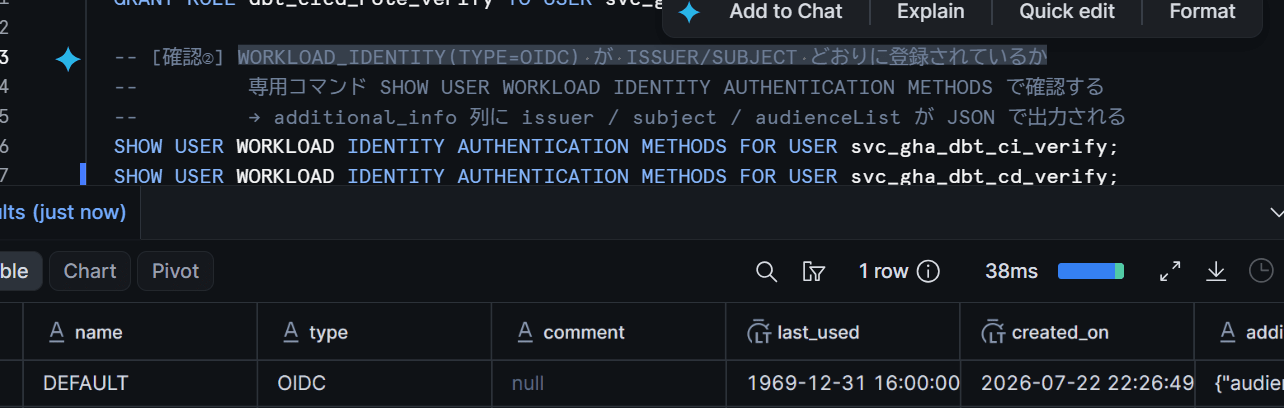
I verified that WORKLOAD_IDENTITY (TYPE=OIDC) is registered with the correct ISSUER/SUBJECT.
GitHub Repository Settings
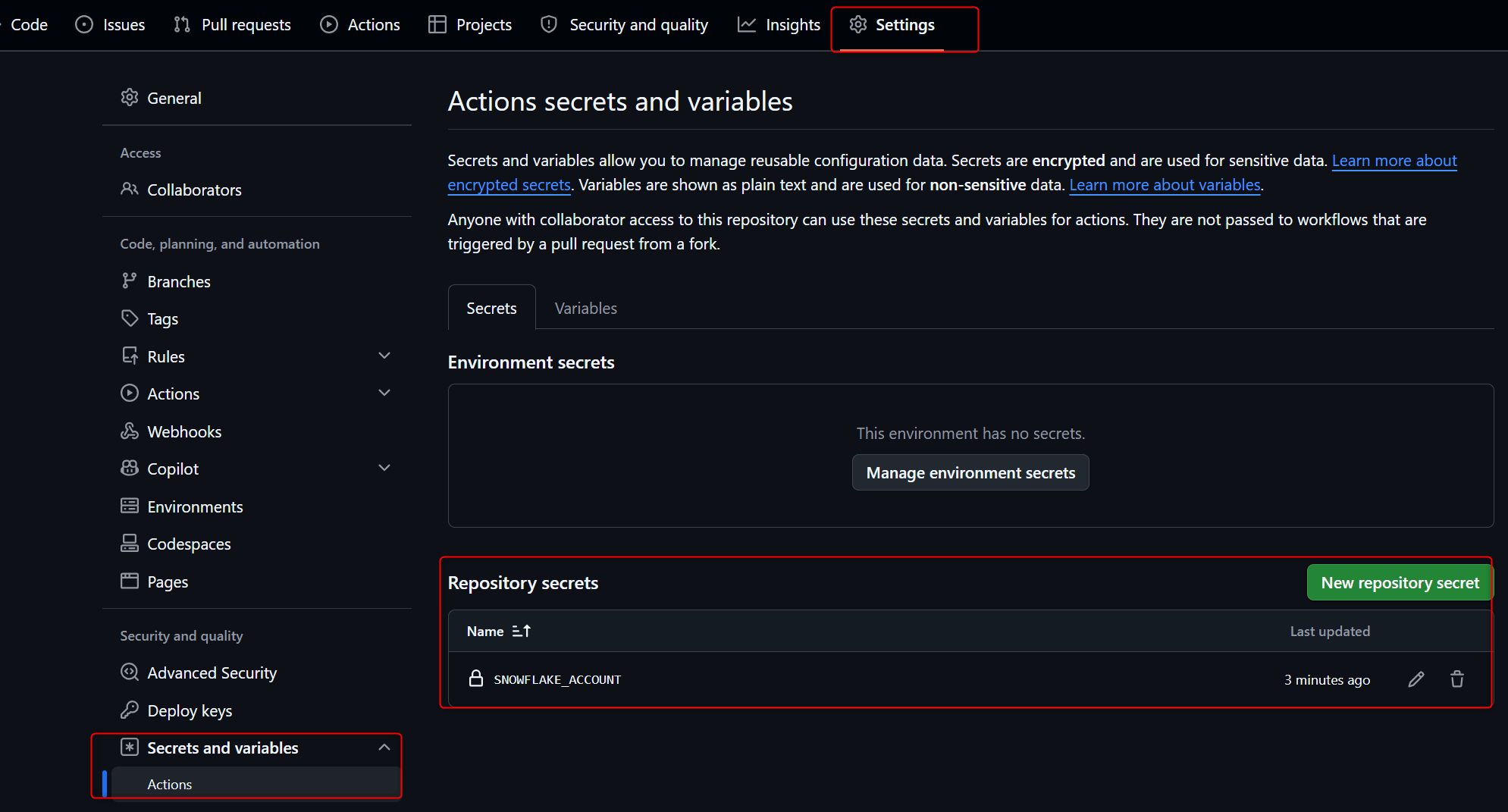
Open Settings, then select Secrets and variables → Actions. Click New repository secret and register just one secret.
SNOWFLAKE_ACCOUNT: Account identifier (in<orgname>-<account_name>format)
That's all the secrets you need to register. No passwords or PATs required — this is one of the major benefits of OIDC authentication.
Creating the CI Workflow
Create .github/workflows/ci.yml. Triggered by PRs, it deploys a test DBT PROJECT object to the dev schema and runs dbt build with the dev target.
name: CI - dbt build on PR
run-name: PR by ${{ github.actor }}
on:
  pull_request:
    types: [opened, synchronize, reopened, ready_for_review]
    branches: [main]

concurrency:
  group: ci-dev
  cancel-in-progress: false

permissions:
  contents: read
  id-token: write   # Required for OIDC token issuance

jobs:
  dbt-ci:
    runs-on: ubuntu-latest
    env:
      SNOWFLAKE_CLI_FEATURES_ENABLE_DBT: true
      SNOWFLAKE_ACCOUNT: ${{ secrets.SNOWFLAKE_ACCOUNT }}
      SNOWFLAKE_ROLE: DBT_CICD_ROLE
      SNOWFLAKE_WAREHOUSE: JAFFLE_SHOP_WH
      SNOWFLAKE_DATABASE: JAFFLE_SHOP_DB
      SNOWFLAKE_SCHEMA: DEV
    steps:
      - uses: actions/checkout@v4

      - name: Install dbt and resolve dependencies
        run: |
          pip install 'dbt-core==1.11.*'
          dbt deps

      - name: Install Snowflake CLI
        uses: snowflakedb/snowflake-actions@v3
        with:
          use-oidc: true

      - name: Test connection
        run: snow connection test -x

      - name: Deploy tester dbt project object
        run: snow dbt deploy ci_jaffle_shop --source . --dbt-version 1.11.11 -x

      - name: Build and test on dev
        run: snow dbt execute -x ci_jaffle_shop build --target dev
Key points:
id-token: writeinpermissionsis required for OIDC token issuance- Passing
use-oidc: truetosnowflakedb/snowflake-actions@v3automatically sets the authentication environment variables (such asSNOWFLAKE_AUTHENTICATOR=WORKLOAD_IDENTITY) - The environment variable
SNOWFLAKE_CLI_FEATURES_ENABLE_DBT: trueis required to usesnow dbtcommands -xis the temporary connection option, which connects based on environment variables without a config file- Explicitly specifying
SNOWFLAKE_ROLE/SNOWFLAKE_WAREHOUSEensures the connection context is determined without relying on the service user's default role settings (if not specified and the default role isn't effective, you'll get a "Could not use database" error) concurrencyserializes CI runs. Since all PRs share the sameci_jaffle_shopobject, concurrentEXECUTE DBT PROJECTon the same DBT PROJECT object is not supported
Creating the CD Workflow
Create .github/workflows/deploy.yml. Triggered by pushes to main, it deploys the production DBT PROJECT object to the prod schema, then runs build with the prod target.
name: CD - deploy dbt project on merge
run-name: Deploy by ${{ github.actor }}
on:
  push:
    branches: [main]

concurrency:
  group: cd-prod
  cancel-in-progress: false

permissions:
  contents: read
  id-token: write

jobs:
  dbt-deploy:
    runs-on: ubuntu-latest
    env:
      SNOWFLAKE_CLI_FEATURES_ENABLE_DBT: true
      SNOWFLAKE_ACCOUNT: ${{ secrets.SNOWFLAKE_ACCOUNT }}
      SNOWFLAKE_ROLE: DBT_CICD_ROLE
      SNOWFLAKE_WAREHOUSE: JAFFLE_SHOP_WH
      SNOWFLAKE_DATABASE: JAFFLE_SHOP_DB
      SNOWFLAKE_SCHEMA: PROD
    steps:
      - uses: actions/checkout@v4

      - name: Install dbt and resolve dependencies
        run: |
          pip install 'dbt-core==1.11.*'
          dbt deps

      - name: Install Snowflake CLI
        uses: snowflakedb/snowflake-actions@v3
        with:
          use-oidc: true

      - name: Test connection
        run: snow connection test -x

      - name: Deploy production dbt project object
        run: snow dbt deploy jaffle_shop --source . --default-target prod --dbt-version 1.11.11 -x

      - name: Build models on prod
        run: snow dbt execute -x jaffle_shop build --target prod

      - name: List dbt project objects
        run: snow dbt list -x
In CD, --default-target prod is specified to set the default target of the DBT PROJECT object to prod. Initially I verified a deploy-only configuration, but since deploying alone only registers a new version of the DBT PROJECT object without updating the tables in the prod schema, I added a build step to ensure data is reflected upon merge. In production with many models, separating the build into a scheduled Snowflake Task and having CD handle only deployment is also an option.
The concurrency setting is for serializing CD runs. Since concurrent EXECUTE DBT PROJECT on the same DBT PROJECT object is not supported, cancel-in-progress: false makes subsequent runs wait rather than be cancelled when merges happen consecutively.
Trying It Out
Verifying OIDC Authentication
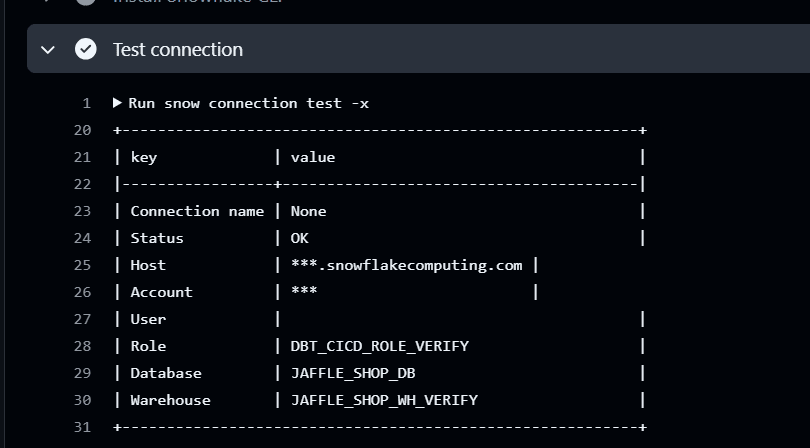
Pushing the workflow to main triggers CD. First, confirm that OIDC authentication succeeds by checking the result of snow connection test -x.
CI: Tests Run When a PR is Created
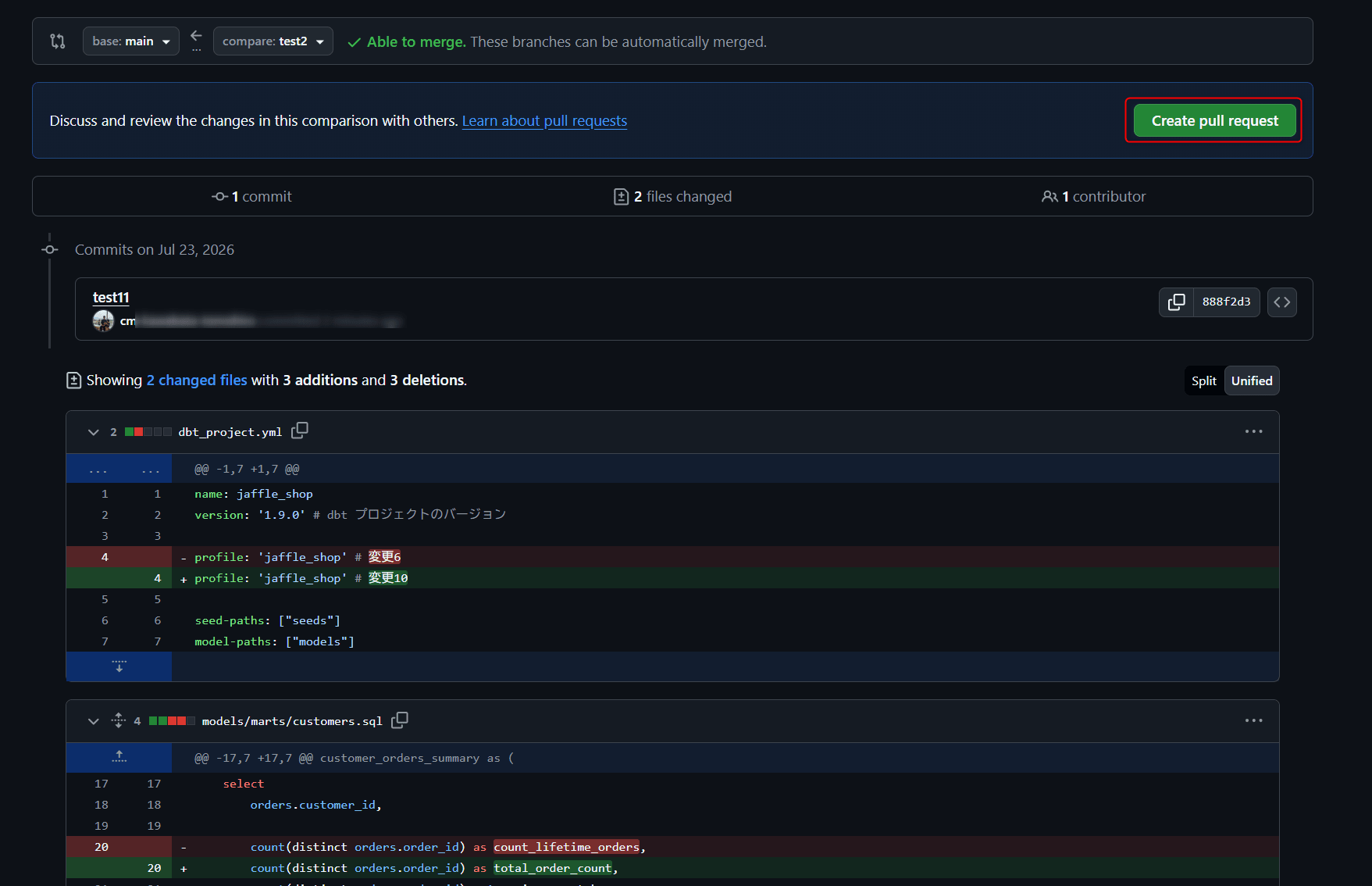
Making a minor change to a model on a feature branch and creating a PR triggers the CI workflow.
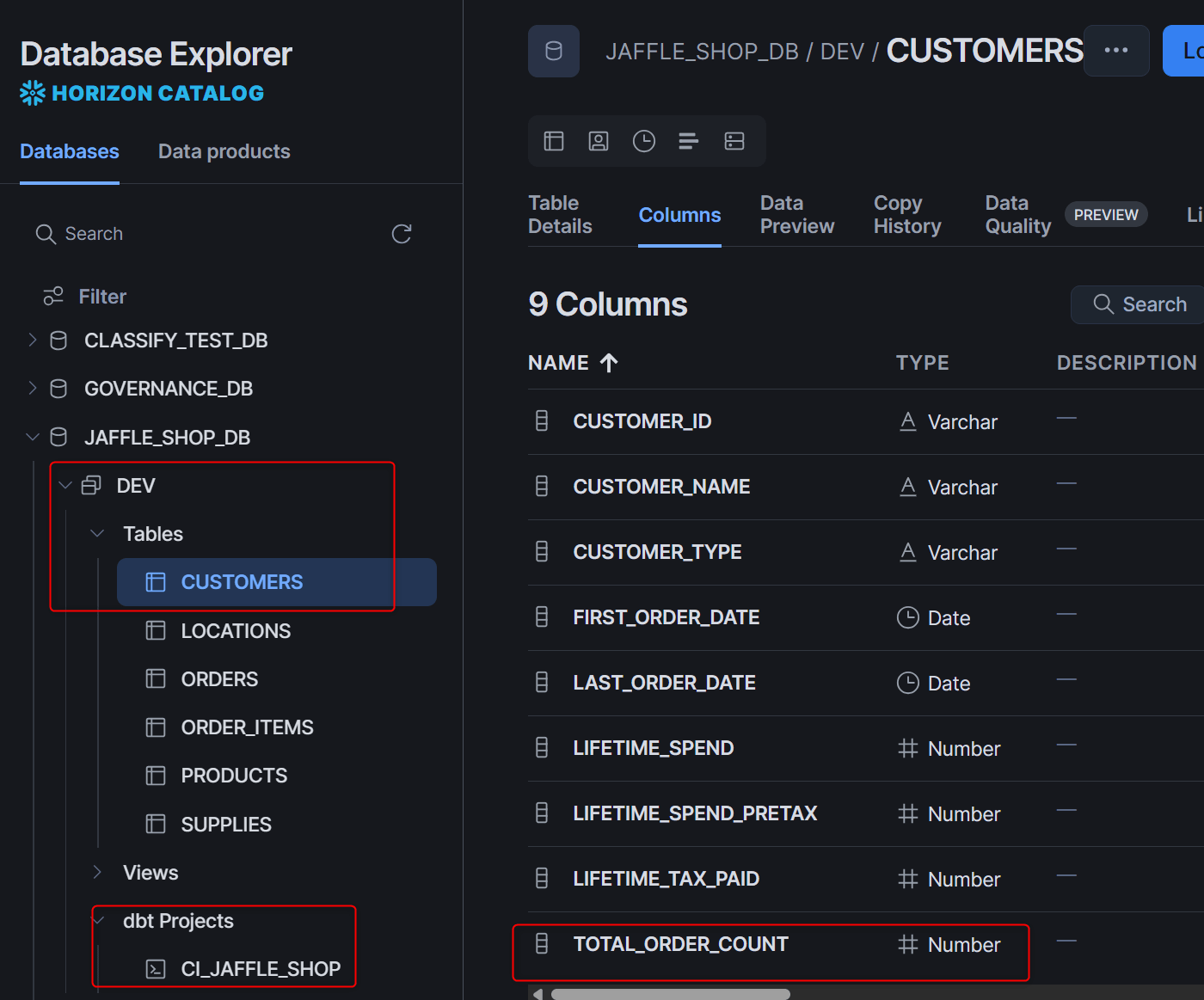
This time, I changed some column names in customers.sql.
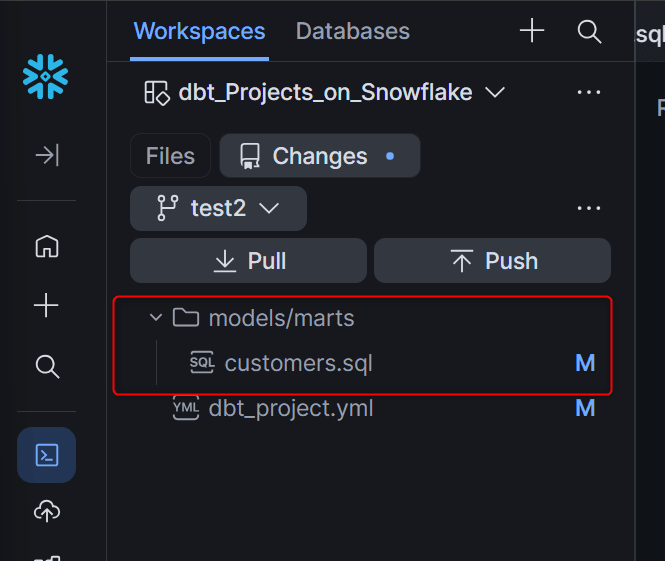
Creating the PR.
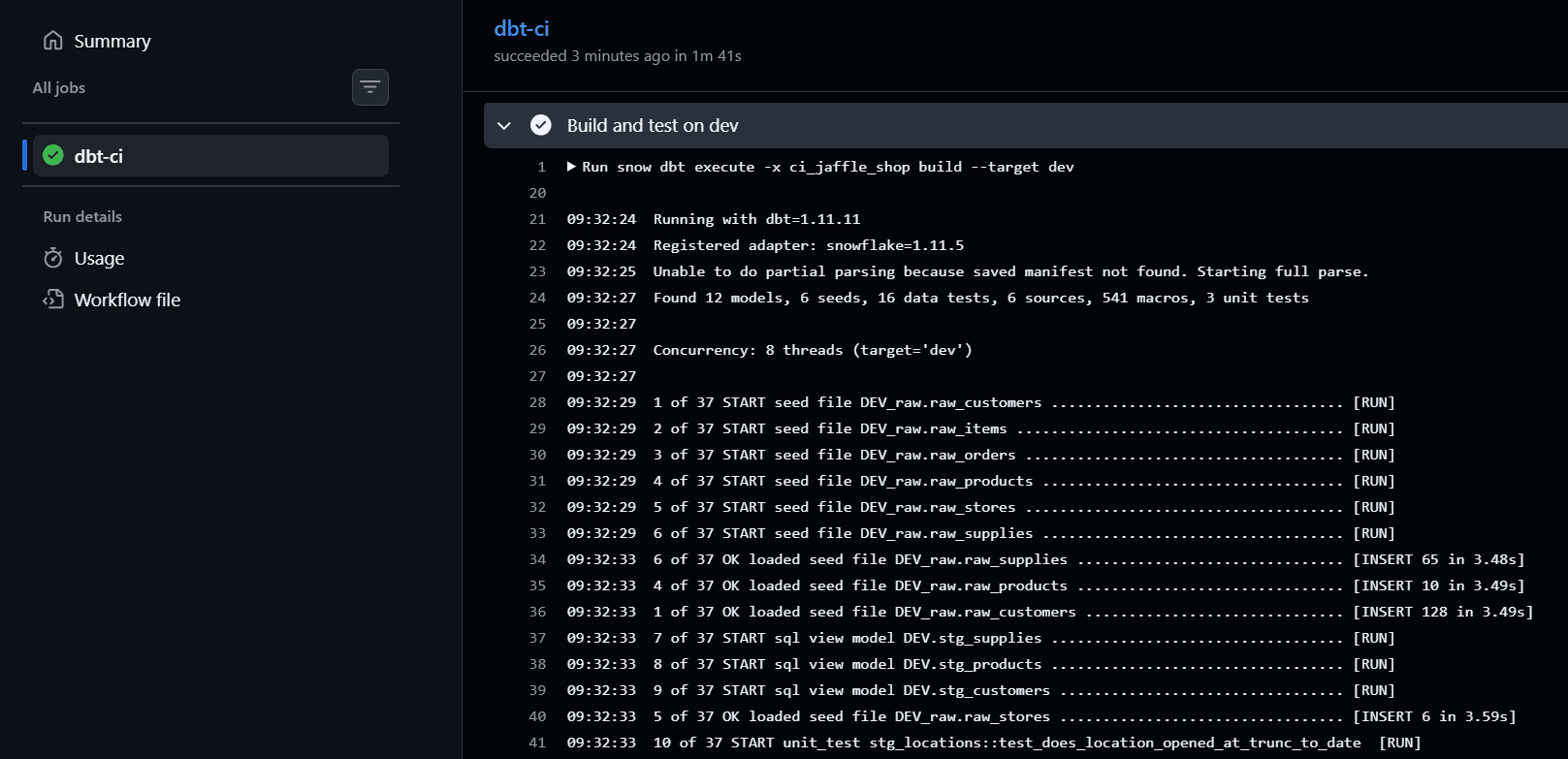
In CI, the test object ci_jaffle_shop is deployed to the dev schema, and dbt build is executed with the dev target.
At this point, you can confirm that the changes are reflected in the dev schema while the prod schema remains unchanged.
CD: Production Object Updated on Merge
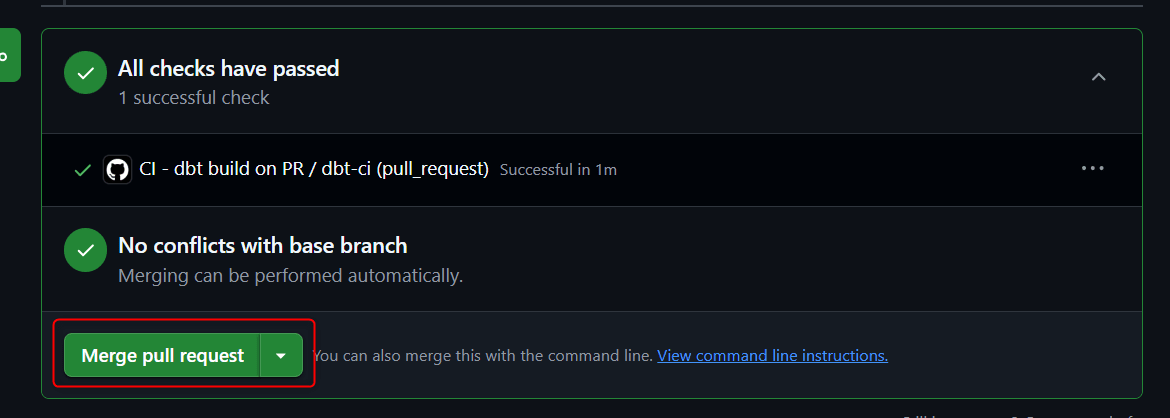
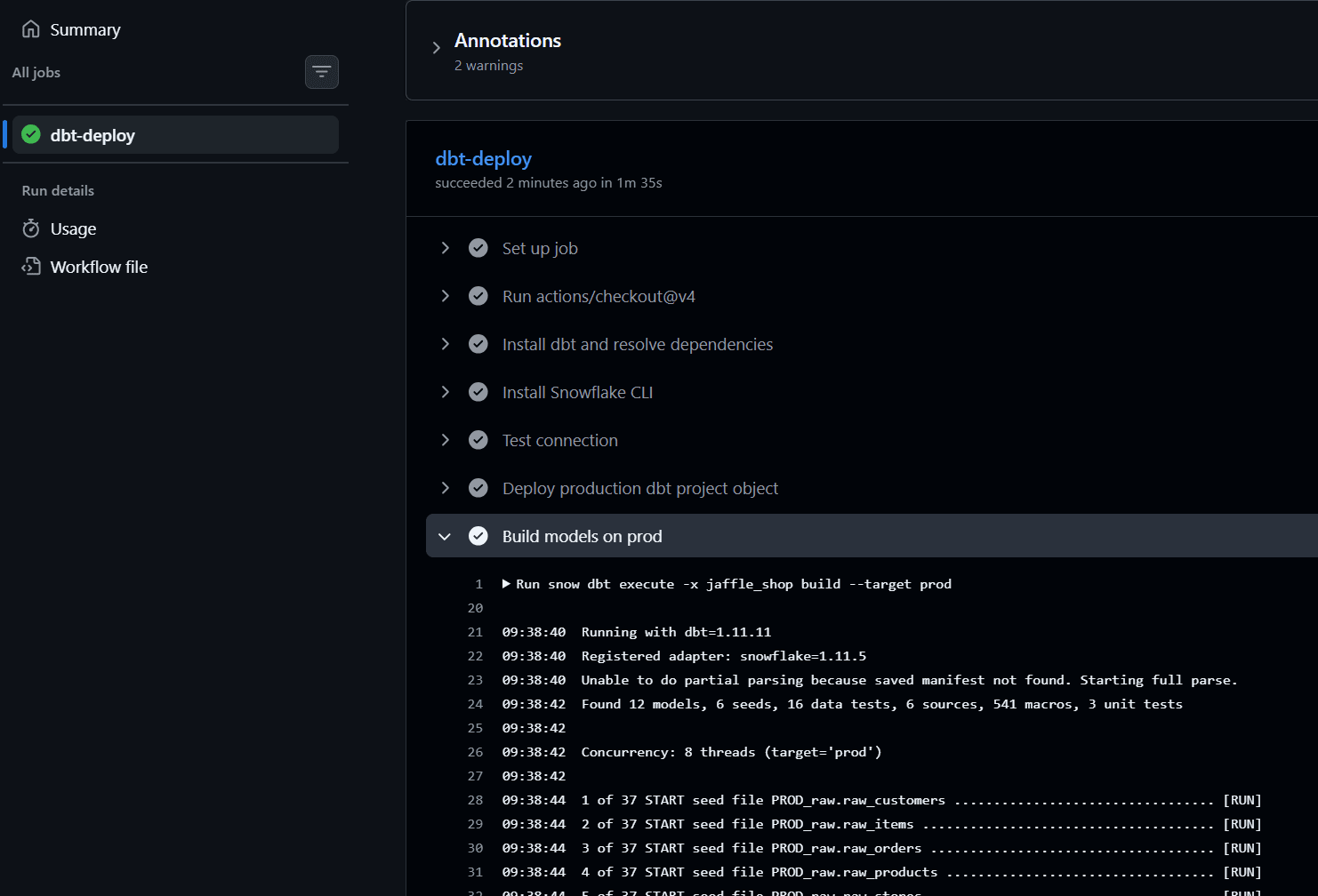
Merging the PR triggers the CD workflow, deploying the production object as a new version, and the subsequent build step also updates the tables and views in the prod schema.
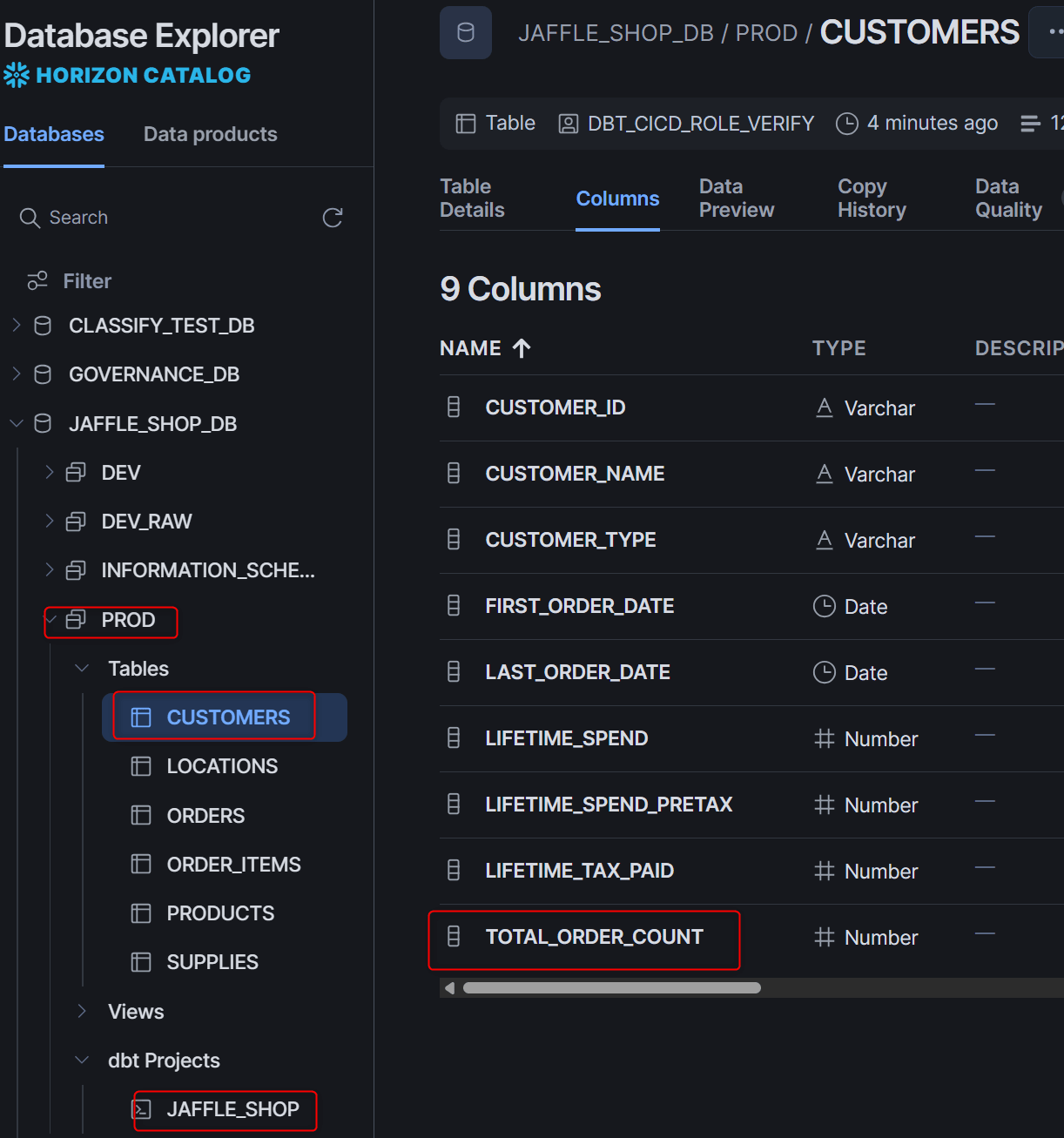
I confirmed that the changes were also reflected in the prod schema.
Confirming That CI Blocks on Test Failure
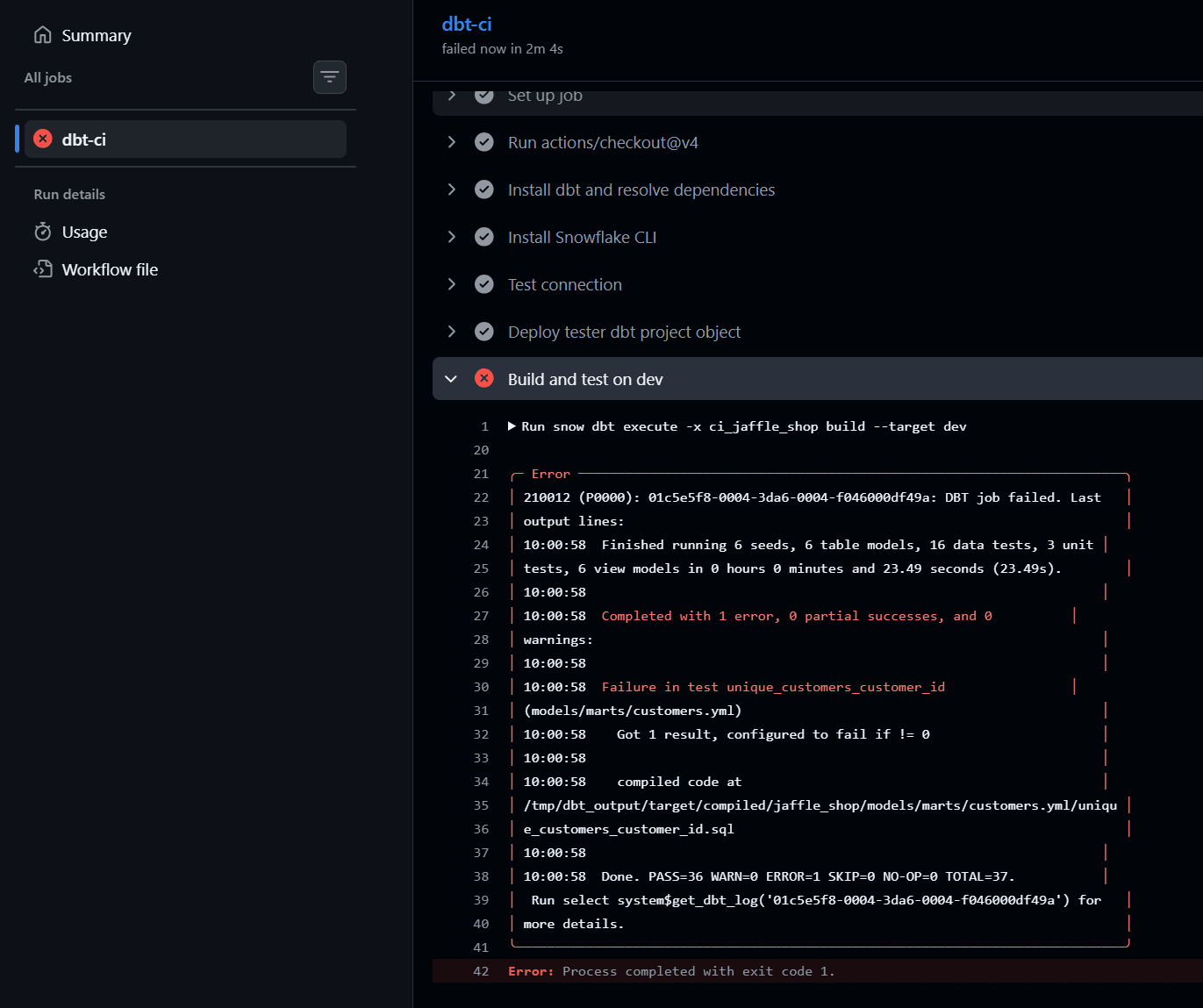
Creating a PR with a change that intentionally causes test failures (such as a not_null violation) will cause the CI to fail. Combined with branch protection rules, this can block merges when tests don't pass.
This time I added the following to the end of customers.sql:
-- test: intentionally duplicate customer_id to cause unique test failure for verification
select * from joined

union all

(select * from joined limit 1)
Limitations and Notes
snow dbt deploy --forceoperates asCREATE OR REPLACE DBT PROJECT, which destroys existing versions and execution history. It is recommended not to use this in normal CD pipelines- DBT PROJECT objects cannot be executed with Serverless Tasks; a user-managed warehouse is required
- Concurrent
EXECUTE DBT PROJECTon the same DBT PROJECT object is not supported - dbt Cloud projects are not supported (only dbt Core / dbt Fusion)
- If your account uses network policies, you need to add the Snowflake-managed network rule
SNOWFLAKE.NETWORK_SECURITY.GITHUBACTIONS_GLOBALto the allowlist for connections from GitHub-hosted runners - While this article uses two service users for simplicity, for production use it is recommended to configure GitHub Environments (
environment: prod) with required reviewers and set the SUBJECT torepo:<org>/<repo>:environment:prod. This makes for a safer CD pipeline since the deployment job won't run until it passes the approval gate - The sub claim specification for GitHub's OIDC tokens may change or be extended, so please also refer to the official GitHub documentation when implementing
Closing Thoughts
Using GitHub Actions' OIDC tokens and Workload Identity Federation, we were able to build CI/CD for dbt Projects on Snowflake with only the account identifier stored in GitHub Secrets.
I hope this article is helpful to someone!