
When AWS Authentication via GitHub Actions OIDC Failed, I Checked the sub Claim and Fixed the Trust Policy

This page has been translated by machine translation. View original
Hello, this is Tsukuboshi (tsukuboshi0755)!
When authenticating from GitHub Actions to AWS via OIDC, the standard approach was to write the sub condition in the IAM role's trust policy using the organization name and repository name.
However, for repositories created after July 15, 2026, if you keep using this standard notation, CI authentication to AWS will fail.
Have you ever been stuck, not knowing what to suspect when a configuration that works in existing repositories fails only in a new repository?
So in this article, I will reproduce the authentication error caused by the GitHub specification change responsible for this, the immutable subject claim, and walk through the steps of checking the sub claim and fixing the trust policy!
What is the immutable subject claim
The conventional sub contained the owner (organization or user) name and the repository name as they are.
This format has a weakness related to name reuse.
If a third party acquires the same name after a repository is deleted or renamed, the workflow of that repository can receive a token with the identical sub, and thus can assume the role on the AWS side.
To close this weakness, the new format now includes an immutable numeric ID following each name.
The main changes are as follows.
| Item | Details |
|---|---|
| Syntax of the new format | repo:OWNER@OWNER-ID/REPO@REPO-ID:ref:refs/heads/BRANCH |
Why @ is used as the delimiter |
Because @ cannot appear in GitHub usernames and repository names |
| Automatically applied to | Repositories created after July 15, 2026. Renames and transfers after that date also switch to the new format |
| Existing repositories | Switch to the new format only if you explicitly opt in |
| How to opt in | Either at the organization level or the repository level, via the OIDC settings UI or the REST API |
To prevent this scenario, repositories created on or after July 15, 2026 now use an immutable default subject format that includes both the owner ID and the repository ID.
Syntax:
repo:OWNER@OWNER-ID/REPO@REPO-ID:ref:refs/heads/BRANCHUnless you opt in to immutable subject claims, repositories created before July 15, 2026 keep the previous format. You can opt in at the organization or repository level by using the OIDC settings UI or the REST API.
For repositories created on or after July 15, 2026, or repositories that have opted in to immutable subject claims, the
subclaim includesowner_idandrepo_id, as shown in the immutable example. Update your trust policy to match the format used by the repository.
Existing repositories stay in the old format, so only newly created repositories receive the new-format sub, which makes it look like "only a specific repository fails."
Note that you cannot remove the numeric IDs from sub, and even if you customize claims with include_claim_keys in the REST API, owner_id and repo_id remain.
Therefore, the fix will be to align the trust policy side with the new format.
However, a trust policy aligned with the new format will not match existing repositories that send the old-format sub.
If you use the same template for existing repositories too, it is a good idea to decide first whether to opt in and align them to the new format.
Prerequisites
To reproduce the demo, prepare the following.
- An AWS account with permissions to create IAM roles and OIDC providers with CloudFormation
- A GitHub repository created after July 15, 2026 (hereafter referred to as
octo-org/octo-repo) - The default branch of the above repository being
main
Note that you cannot create multiple OIDC providers with the same URL in one AWS account.
In an account that already has a token.actions.githubusercontent.com provider, remove the GitHubOIDCProvider resource from the template below and rewrite it to reference the ARN of the existing provider.
This was verified with the following versions.
| Item | Version |
|---|---|
| aws-actions/configure-aws-credentials | v6 |
| GitHub Actions runner | ubuntu-24.04 |
Trying it out
First, I will create a role with a conventional old-format trust policy and reproduce the authentication failure from the new repository.
Then I will check the actual sub and fix the trust policy to the new format.
Creating an IAM role with an old-format trust policy
I will create the OIDC provider and the IAM role together in a single CloudFormation template.
The sub in the trust policy is written in the old format that was common until now, with only the organization name and repository name.
AWSTemplateFormatVersion: "2010-09-09"

Parameters:
  GitHubOrg:
    Type: String
    Default: octo-org

  RepositoryName:
    Type: String
    Default: octo-repo

Resources:
  GitHubOIDCProvider:
    Type: AWS::IAM::OIDCProvider
    Properties:
      Url: https://token.actions.githubusercontent.com
      ClientIdList:
        - sts.amazonaws.com

  DemoRole:
    Type: AWS::IAM::Role
    Properties:
      RoleName: iamrole-for-oidc-demo
      AssumeRolePolicyDocument:
        Version: "2012-10-17"
        Statement:
          - Effect: Allow
            Principal:
              Federated: !Ref GitHubOIDCProvider
            Action: sts:AssumeRoleWithWebIdentity
            Condition:
              StringEquals:
                token.actions.githubusercontent.com:aud: sts.amazonaws.com
                token.actions.githubusercontent.com:sub: !Sub repo:${GitHubOrg}/${RepositoryName}:ref:refs/heads/main

Outputs:
  RoleArn:
    Value: !GetAtt DemoRole.Arn
No permission policy is attached to the role.
The sts get-caller-identity called for verification requires no permissions, so the trust policy alone is enough to check only whether authentication succeeds.
Deploy with the following command.
Replace GitHubOrg and RepositoryName with your own organization name and repository name.
aws cloudformation deploy \
  --template-file bootstrap.yaml \
  --stack-name github-oidc-demo \
  --parameter-overrides GitHubOrg=octo-org RepositoryName=octo-repo \
  --capabilities CAPABILITY_NAMED_IAM
After deployment, open the role's "Trust relationships" tab in the IAM console, and you can confirm that sub is registered in the old format.
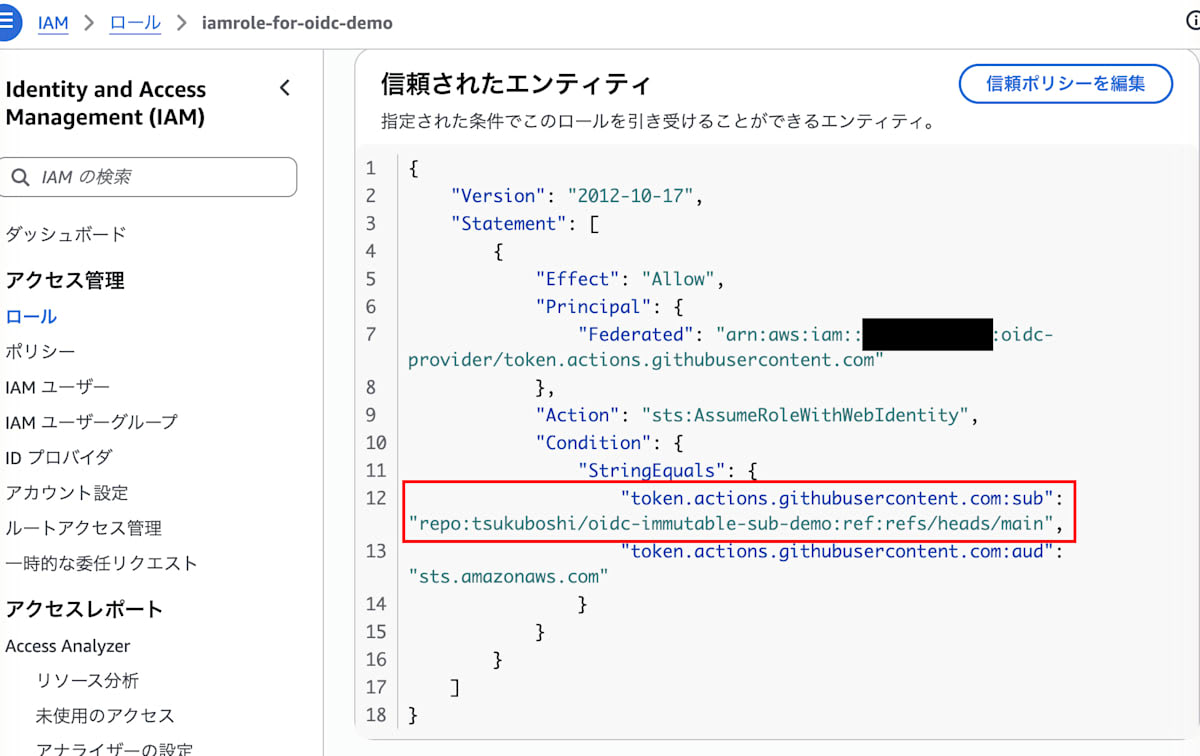
The sub in the red frame is just the organization name and repository name separated by /, and contains no numeric IDs.
Creating the workflow
Add the following workflow to the repository.
For this verification, I have also included a diagnostic step, Debug OIDC claims, for checking the sub claim.
Specify the value of the stack output RoleArn for role-to-assume.
name: OIDC demo

on:
  workflow_dispatch:

permissions:
  id-token: write
  contents: read

jobs:
  assume-role:
    runs-on: ubuntu-24.04
    steps:
      - name: Configure AWS credentials
        id: aws-credentials
        uses: aws-actions/configure-aws-credentials@v6
        with:
          role-to-assume: arn:aws:iam::<自アカウントID>:role/iamrole-for-oidc-demo
          aws-region: ap-northeast-1
          mask-aws-account-id: true

      - name: Debug OIDC claims
        if: failure() && steps.aws-credentials.outcome == 'failure' && runner.debug == '1'
        run: |
          TOKEN=$(curl -sS \
            -H "Authorization: bearer ${ACTIONS_ID_TOKEN_REQUEST_TOKEN}" \
            "${ACTIONS_ID_TOKEN_REQUEST_URL}&audience=sts.amazonaws.com" \
            | jq -r '.value')
          PAYLOAD=$(echo "${TOKEN}" | cut -d. -f2 | tr '_-' '/+')
          case $(( ${#PAYLOAD} % 4 )) in
            2) PAYLOAD="${PAYLOAD}==" ;;
            3) PAYLOAD="${PAYLOAD}=" ;;
          esac
          echo "${PAYLOAD}" | base64 -d | jq '{sub, aud, repository, ref}'

      - name: Get caller identity
        run: aws sts get-caller-identity
Debug OIDC claims is a diagnostic step included in this verification to check the actual sub when authentication fails.
Because the ID token is masked as soon as it is obtained, simply enabling ACTIONS_STEP_DEBUG will not make sub appear in the logs.
So the token is obtained with ACTIONS_ID_TOKEN_REQUEST_TOKEN and ACTIONS_ID_TOKEN_REQUEST_URL, and only the payload part is decoded.
Since logs can be viewed by anyone who can read the repository, I included two measures in the diagnostic step to limit the information left in the logs.
- A JWT can be used for authentication as is while it is within its validity period, so the whole token is not output; the payload extracted with
cut -d. -f2is narrowed down to only the necessary claims withjq - The diagnostic step is conditioned with
ifso that it runs only when authentication fails and it is a debug run (for reference, anidis attached to the authentication step)
Note that you should not leave the diagnostic step permanently in production workflows; add it temporarily when authentication fails, and remove it once the cause is found.
The final Get caller identity is a step to check whether the role could be assumed.
Its output includes the AWS account ID, so mask-aws-account-id: true is specified for Configure AWS credentials to mask it in the logs.
Reproducing the authentication error
Select the OIDC demo workflow from the repository's "Actions" tab and run it with "Run workflow".
Then the Configure AWS credentials step fails after repeated retries with the following error.
Retry AssumeRole: attempt 1 of 12 failed: Could not assume role with OIDC: Not authorized to perform sts:AssumeRoleWithWebIdentity. Retrying after 31ms.
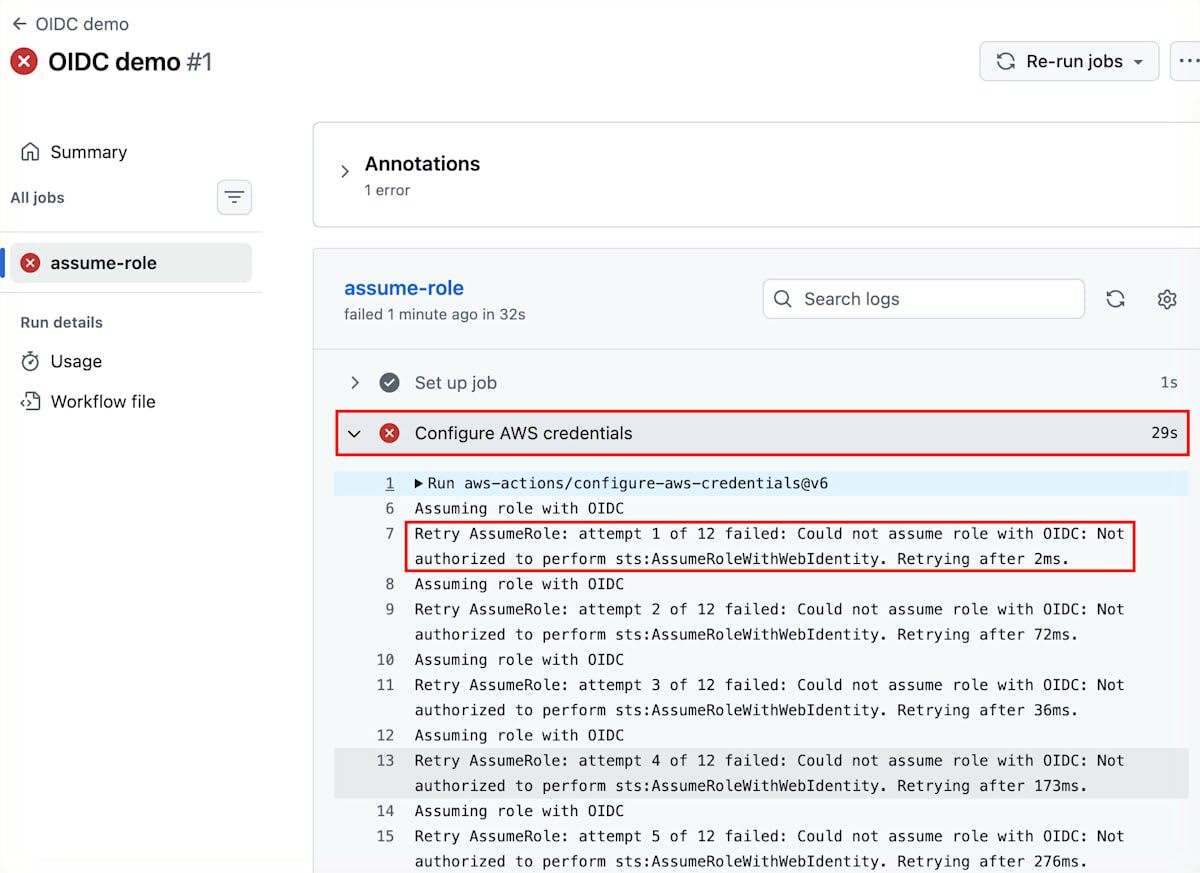
It is rejected with the same message from attempt 1 of 12, and the step ends with a failure display.
This error message is returned in the same way both when the trust policy conditions do not match and when the IdP ARN set on the role is wrong.
Therefore, the error message alone cannot narrow down the cause.
The main places to check when OIDC authentication fails are the following three.
| What to check | How to check |
|---|---|
permissions of the workflow |
Whether id-token: write is set. Without it, the ID token itself cannot be obtained |
aud condition of the trust policy |
Whether it matches the token's aud (the default for configure-aws-credentials is sts.amazonaws.com) |
sub condition of the trust policy |
Whether it matches the token's sub: an exact match for StringEquals, a pattern match for StringLike |
This workflow has permissions set, and aud is as in the template.
For the remaining sub, we cannot tell whether it matches without looking at what GitHub is actually sending.
Checking the sub claim with a debug run
From "Re-run jobs" at the top right of the failed run's page, select "Re-run all jobs", check "Enable debug logging", and re-run.
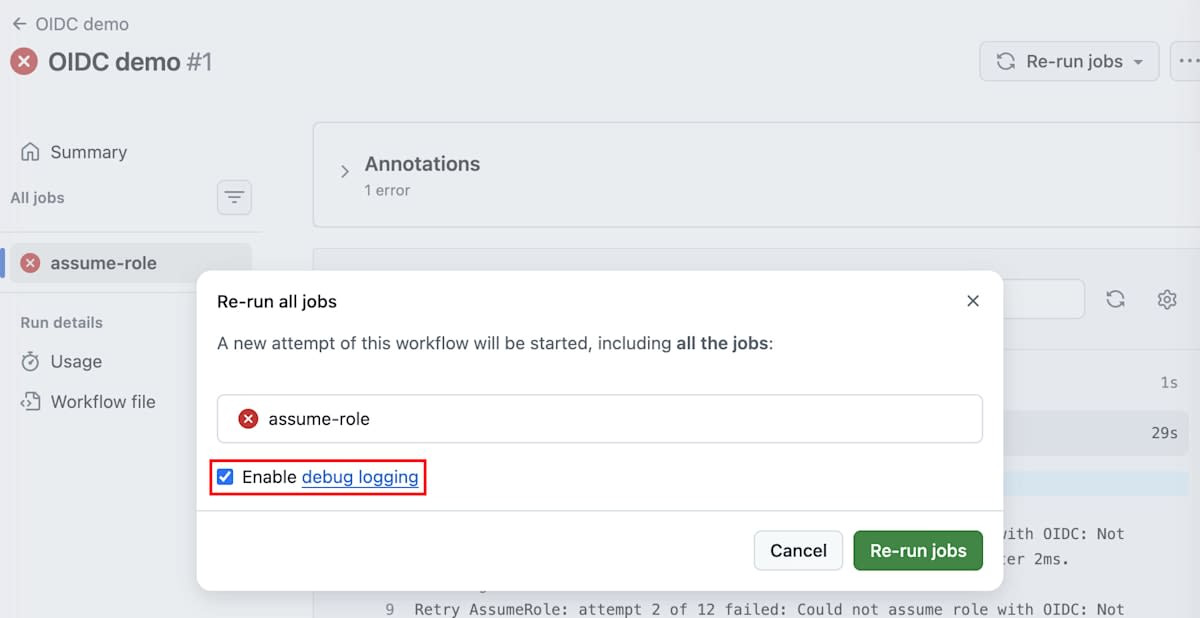
When you re-run with it checked, debug lines beginning with ##[debug] are added to each step's log.
In a debug run, runner.debug becomes 1, so the Debug OIDC claims step runs after the authentication failure.
If the new format applies, the output is as follows.
{
  "sub": "repo:octo-org@123456/octo-repo@456789:ref:refs/heads/main",
  "aud": "sts.amazonaws.com",
  "repository": "octo-org/octo-repo",
  "ref": "refs/heads/main"
}
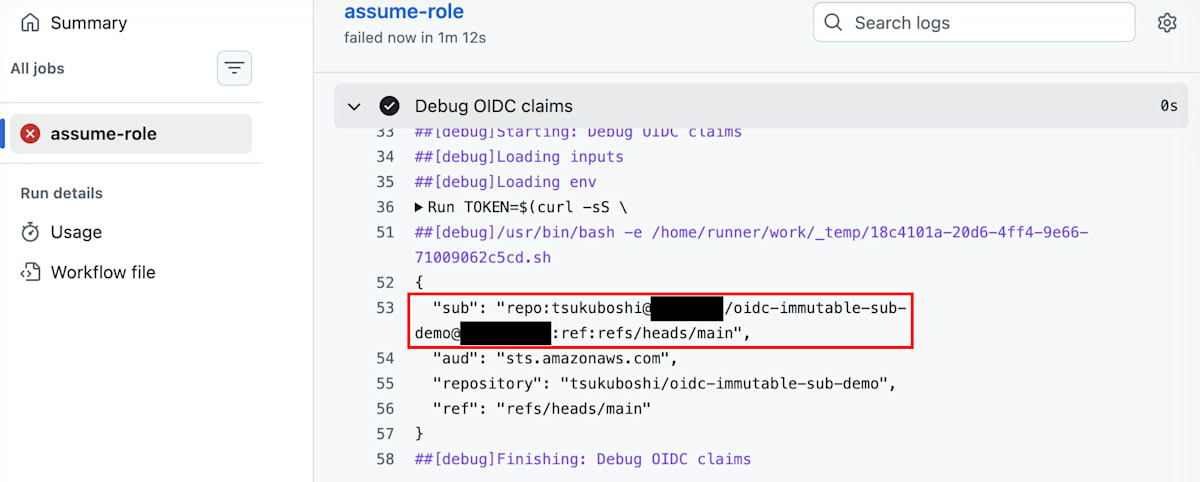
repository remains organization name/repository name, and only sub has the numeric IDs added.
In contrast, what is registered in the trust policy's StringEquals is the old format with only the organization name and repository name.
repo:octo-org/octo-repo:ref:refs/heads/main
The token's sub has numbers prefixed with @ after the organization name and repository name, so it did not result in an exact match.
aud and the ref branch match the trust policy conditions, so we can conclude that the only remaining difference is sub.
Fixing the trust policy to the new format
To align the trust policy with the new format, you need to embed the organization ID and repository ID in the sub condition.
In my verification, I parameterized the two IDs with different handling.
AWSTemplateFormatVersion: "2010-09-09"

Parameters:
  GitHubOrg:
    Type: String
    Default: octo-org

  GitHubOrgId:
    Type: String
    Description: 組織ID
    Default: "123456"
    AllowedPattern: ^[0-9]+$

  RepositoryName:
    Type: String
    Default: octo-repo

  RepositoryId:
    Type: String
    Description: リポジトリID。`*` を指定すると任意のリポジトリIDを受け付ける
    Default: "*"
    AllowedPattern: '^([0-9]+|\*)$'

Resources:
  GitHubOIDCProvider:
    Type: AWS::IAM::OIDCProvider
    Properties:
      Url: https://token.actions.githubusercontent.com
      ClientIdList:
        - sts.amazonaws.com

  DemoRole:
    Type: AWS::IAM::Role
    Properties:
      RoleName: iamrole-for-oidc-demo
      AssumeRolePolicyDocument:
        Version: "2012-10-17"
        Statement:
          - Effect: Allow
            Principal:
              Federated: !Ref GitHubOIDCProvider
            Action: sts:AssumeRoleWithWebIdentity
            Condition:
              StringEquals:
                token.actions.githubusercontent.com:aud: sts.amazonaws.com
              StringLike:
                token.actions.githubusercontent.com:sub: !Sub repo:${GitHubOrg}@${GitHubOrgId}/${RepositoryName}@${RepositoryId}:ref:refs/heads/main

Outputs:
  RoleArn:
    Value: !GetAtt DemoRole.Arn
The organization ID is a value you only need to look up once, so I assume the actual value is written into the parameter's default value.
On the other hand, the repository ID is rarely seen day to day, and making everyone look it up at every setup is not realistic, so I set the default to *.
However, with * as is, if you recreate a repository with the same name in the same organization, it passes the condition even though the ID has changed.
Since StringLike matches values without wildcards by exact match, in environments where you want to be strict, pass the actual number for the repository ID.
Also, * in StringLike matches any string including /, so filling in a value like 12* would let other IDs through as well.
This is why AllowedPattern is attached to RepositoryId, restricting accepted values to a digit string or a lone *.
By the way, the IDs can be found in id and owner.id of the response of GET /repos/{owner}/{repo}, but for a demo, using the values shown in the diagnostic step's sub is handy.
After fixing the template, pass the organization ID and update the stack.
aws cloudformation deploy \
  --template-file bootstrap.yaml \
  --stack-name github-oidc-demo \
  --parameter-overrides GitHubOrg=octo-org GitHubOrgId=123456 RepositoryName=octo-repo \
  --capabilities CAPABILITY_NAMED_IAM
After the update, open the role's "Trust relationships" tab and you can confirm that the sub condition has moved to StringLike and is in the new format with IDs.
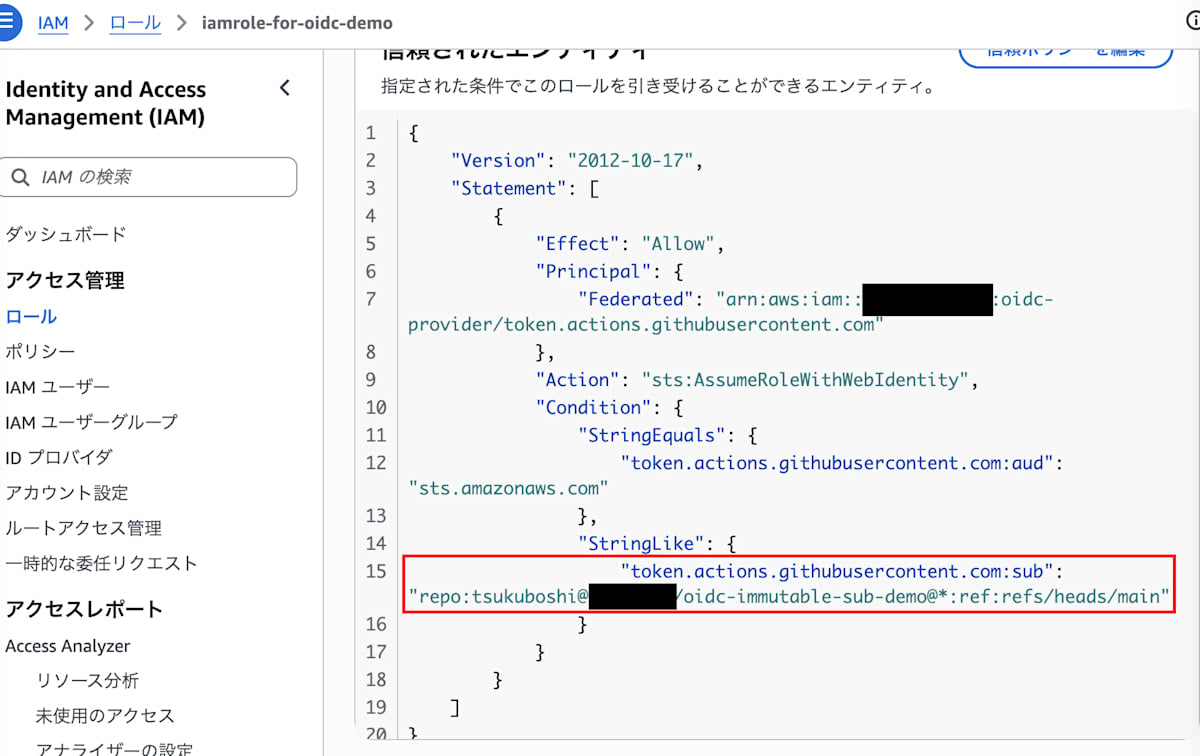
The organization ID is fixed to a number, and only the position of the repository ID is *.
Verification
After fixing the trust policy, run the workflow with "Run workflow".
This time Configure AWS credentials succeeded, and the output of the Get caller identity step was as follows!
{
    "UserId": "AROAXXXXXXXXXXXXXXXXX:GitHubActions",
    "Account": "***",
    "Arn": "***"
}
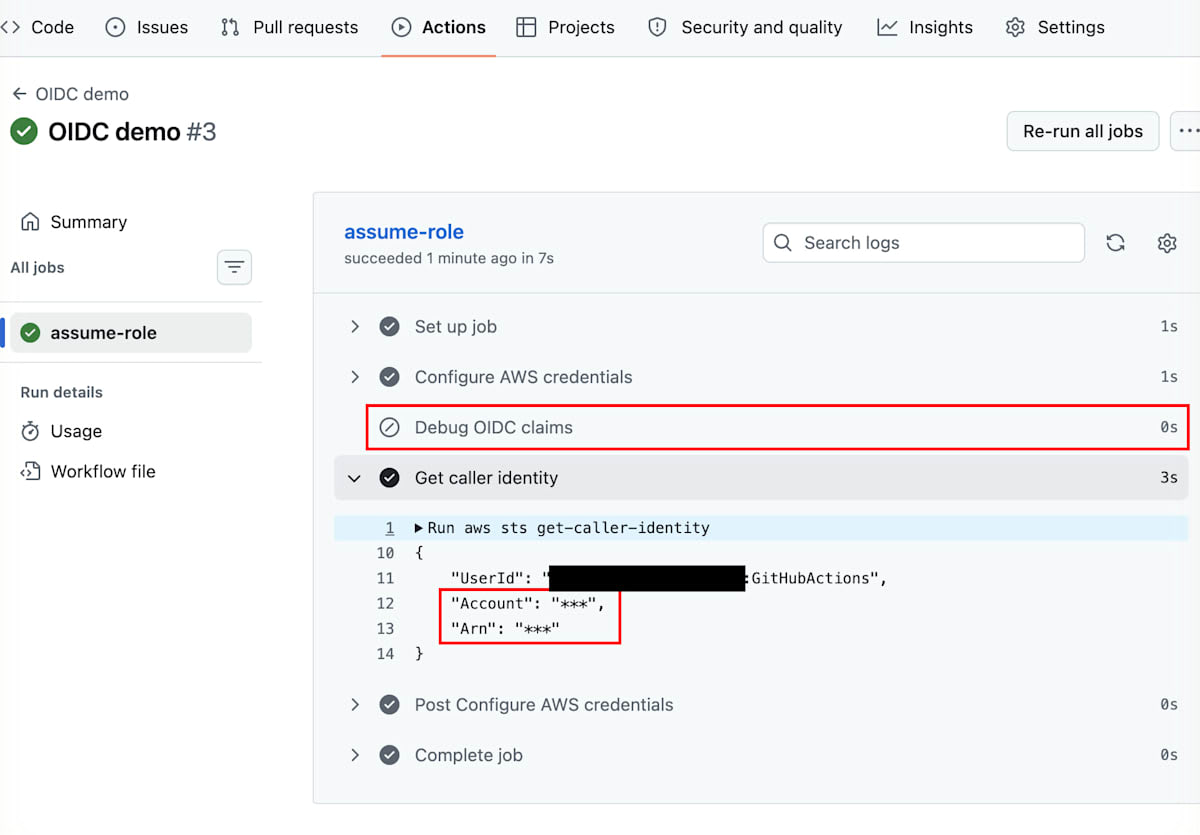
Thanks to mask-aws-account-id, the entire values of Account and of Arn, which contains the account ID, are replaced with ***.
The evidence that the role could be assumed is the success of Configure AWS credentials and that UserId starts with AROA, which represents a role.
Since authentication succeeded, the Debug OIDC claims step is skipped.
This screen also confirms that claims are not left in the logs in normal runs.
Conclusion
In this article, I reproduced the error caused by the immutable subject claim, which is the cause of AWS authentication failing with GitHub Actions OIDC, and walked through the steps of checking the sub claim and fixing the trust policy.
When only a new repository fails authentication, the cause may not be the template or workflow, but that the format of the sub issued by GitHub has changed.
Because ID tokens are masked in logs, whether you can see the actual sub greatly changes the time it takes to isolate the cause.
If you are similarly troubled by authentication failing only in new repositories, please start by checking the actual sub with the diagnostic step from this article!
That was Tsukuboshi (tsukuboshi0755)!
