I was able to send data from AWS IoT Core to InfluxDB, so I tried it out

This page has been translated by machine translation. View original
Hello. I'm akky from the Manufacturing Business Technology Department.
Recently, a new rule action was added to AWS IoT Core that allows JSON data to be sent directly to InfluxDB. It appears that not only Timestream for InfluxDB, but also self-hosted InfluxDB can be used as a destination. Until now, in order to send data from IoT Core to InfluxDB, it was necessary to forward the data to InfluxDB using Lambda or similar services, but this feature eliminates the need for Lambda.
This time, I tried out this new feature, so I'd like to introduce it. However, there are also some current limitations, which I will cover as well.
Configuration
Until Now
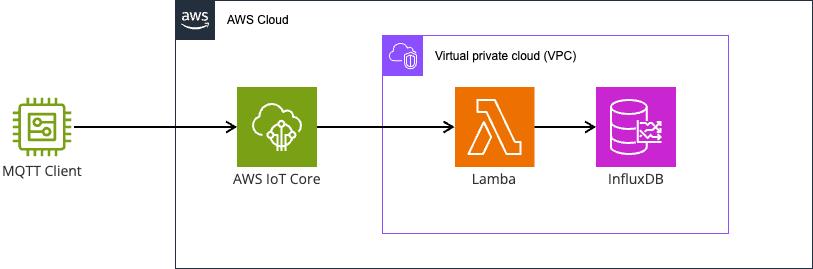
It was necessary to use Lambda from an IoT Core rule to convert the data to line protocol and send it to InfluxDB.
By using VPC Lambda, it is possible to connect to an InfluxDB instance placed in a Private Subnet.
Configuration Now Supported
As shown in the diagram below, it is now possible to access InfluxDB directly from an IoT Core rule, eliminating the need to use Lambda.
As with other IoT Rules, it is still necessary to write SQL, but it is now possible to send data to InfluxDB with just the configuration from the management console.
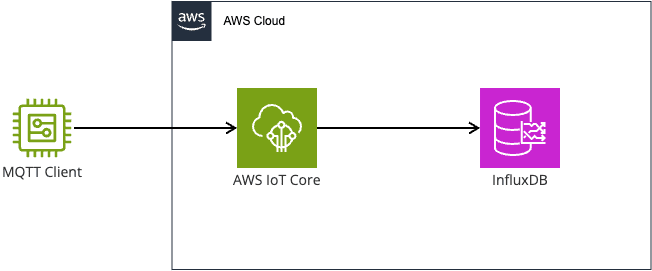
However, InfluxDB must be accessible via the internet, and it is not possible to connect to an InfluxDB cluster placed in a private subnet. This is currently the biggest limitation.
JSON Format
I tested whether JSON data in the following format sent via MQTT from a client could be stored in InfluxDB.
The format uses messageTime as UNIX time, and stores measurement data to be saved in data.
{"messageTime": 1234567890, "data": {"D0": 1, "D1": 2}}
There are two issues with handling this format as-is in IoT Core. However, they are minor.
1. The time column is fixed to timestamp
The time referenced by the InfluxDB action must be a property named timestamp.
This can be resolved by using SELECT messageTime AS timestamp.
Note that while seconds are used in this case, milliseconds and other units can also be selected.
2. Payload format issue
The slight issue is that the data to be ingested is nested inside data.
The InfluxDB rule expects a format like the following, so the data needs to be transformed.
{"timestamp": 1234567890, "D0": 1, "D1": 2}
The straightforward approach is to specify it in SQL as follows.
SELECT messageTime AS timestamp, data.D0 AS D0, data.D1 AS D1 FROM 'topic'
However, with this method, the SQL also needs to be updated whenever the data fields increase.
Therefore, using the transform() function to convert the data into an array eliminates the problem even when the contents of data change.
SELECT VALUE transform('enrichArray', {'timestamp': messageTime}, [data]) FROM 'topic'
In this case, the output will be an array, but fortunately, according to the InfluxDB rule documentation, client-side batching can accept arrays, so this is not a problem.
Verification
Service
I created an InfluxDB V2 environment with CDK.
Access to InfluxDB requires access from the internet, but the list of source IP addresses for IoT Core does not appear to be publicly available.
However, exposing it with 0.0.0.0/0 would be risky, so at the very least, I wanted to restrict access to connections coming from AWS.
As an alternative, I extracted the ap-northeast-1 region and EC2 prefix entries from ip-ranges.json and specified them in the security group attached to InfluxDB, which worked successfully.
Note that since the security group quota (L-0EA8095F) defaults to 60, it is necessary to submit a quota increase request before deployment. Currently there are approximately 160 rules under the above conditions, so I submitted an increase request for 200.
IoT Core Rule Configuration
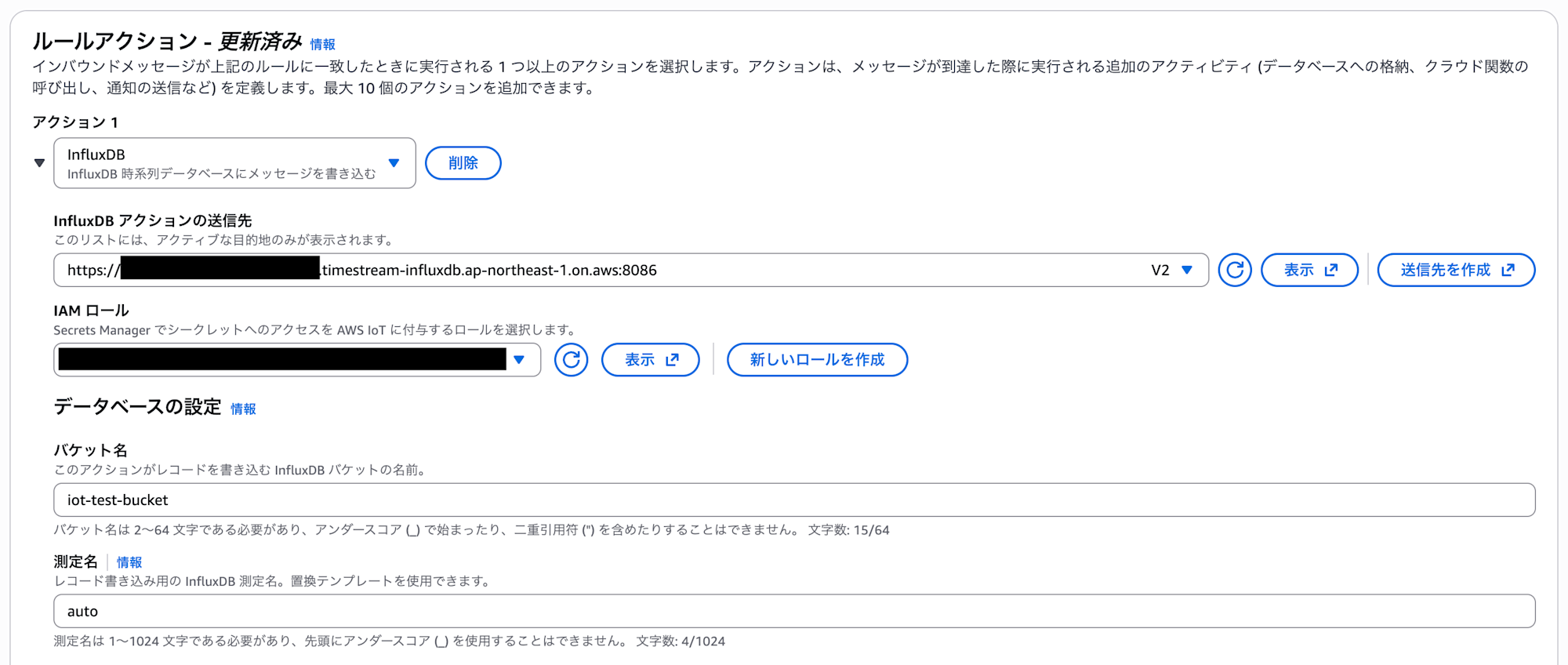
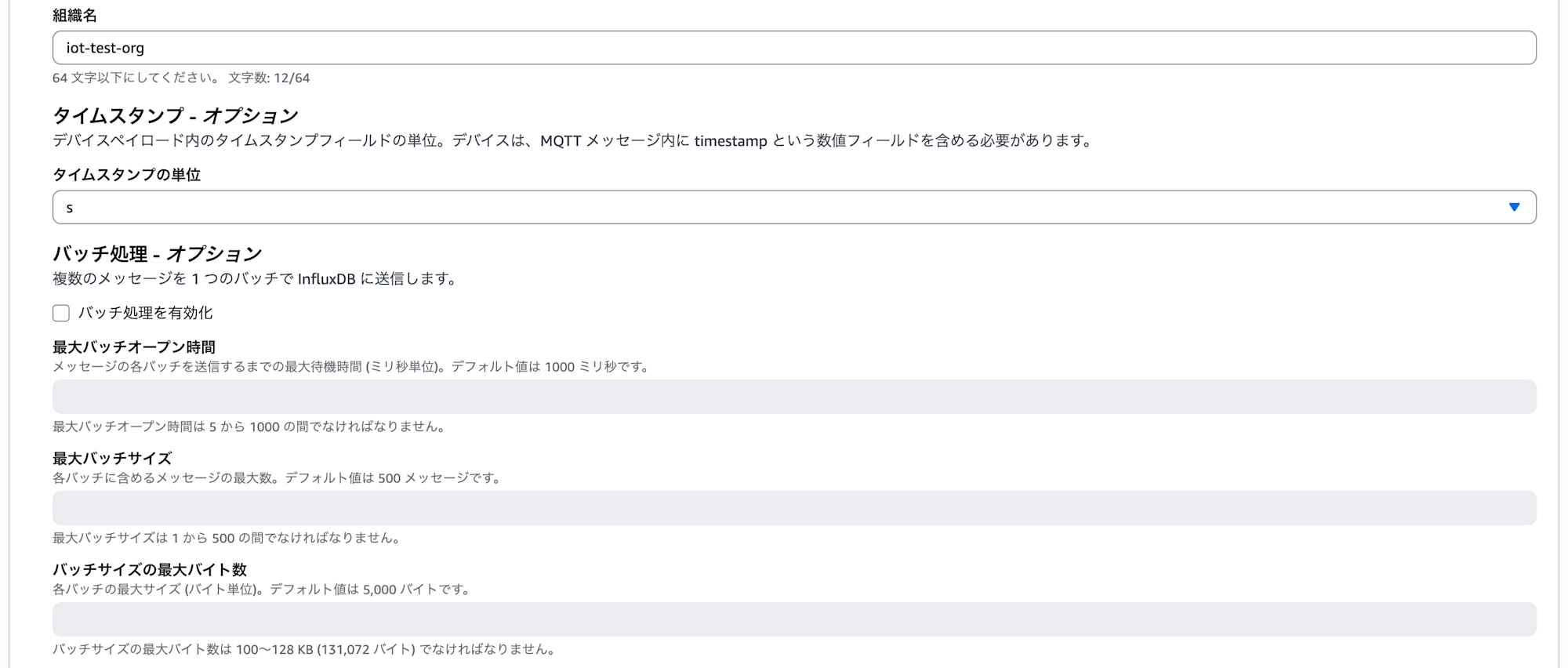
After creating the VPC and InfluxDB, create an IoT Core Rule. Set the destination of the InfluxDB action to the InfluxDB address. Set the bucket name, measurement name, and organization name to your preferred values, and set the timestamp unit to match the UNIX time being sent.
Batching was not configured this time.
For the line protocol tag, I configured it to include clientid(). However, since data was sent from the AWS CLI in this verification, it resulted in N/A.

Operation Verification
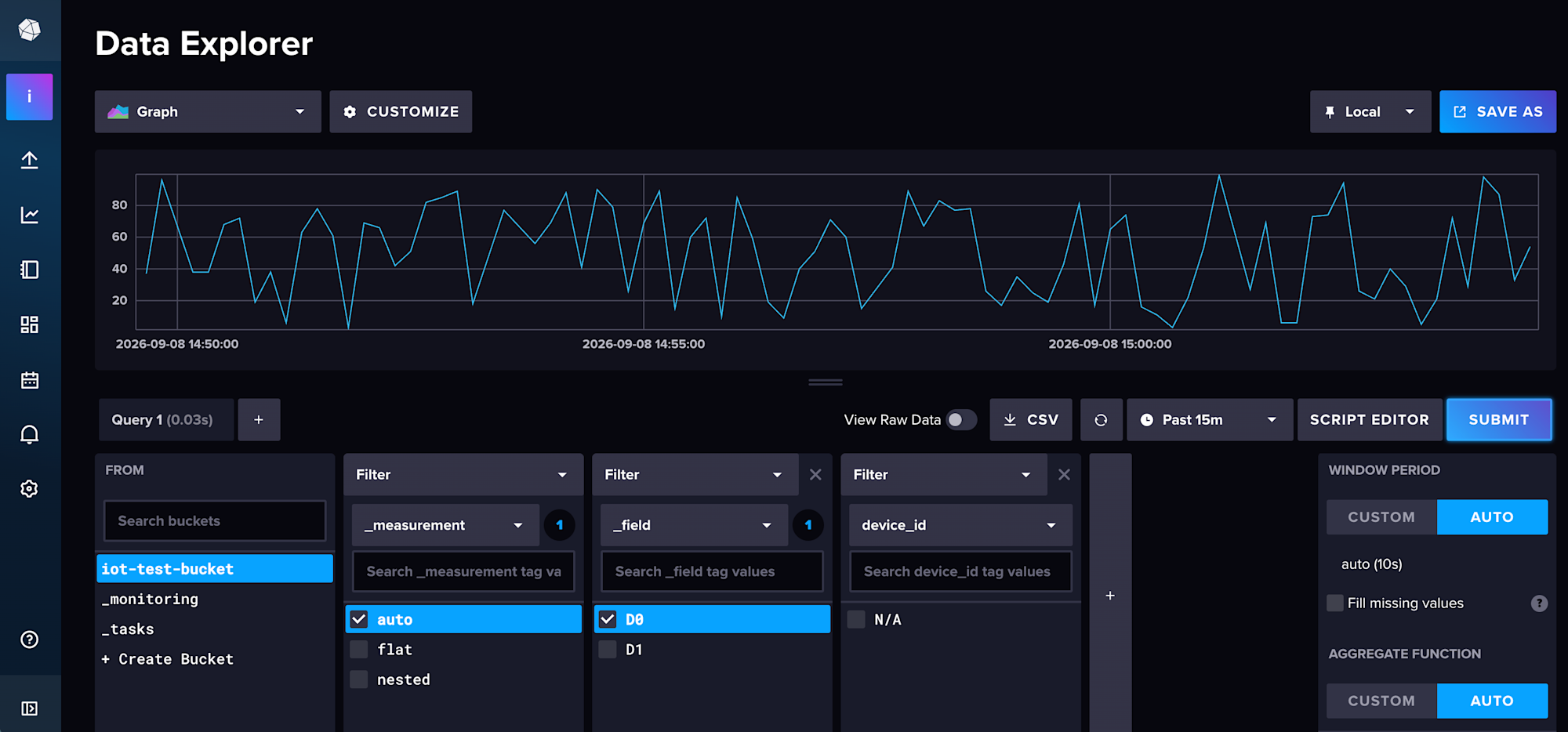
I created a shell script that sends random values in the above format, and upon connecting to the InfluxDB Web UI, I was able to confirm that the values were being recorded. The property names from data were correctly set in _field.
Summary
I verified the InfluxDB rule for AWS IoT Core.
Since it is now possible to send data to InfluxDB without Lambda, I believe the use cases for InfluxDB have expanded further.
However, there are limitations such as the requirement to place InfluxDB in a public subnet, so some additional verification will be necessary before adopting it in a production system.
That's all.