Uploading and Deleting Objects in Snowflake's S3 External Stage from a Streamlit App

This page has been translated by machine translation. View original
I'm Suzuki from the Data Business Division.
I wanted to upload and delete objects in an S3 bucket configured as an external stage from an app running in Snowflake in Streamlit.
There is information on uploading from an app to an internal stage, but I couldn't find much on what to do when uploading to or deleting from an external stage, so I'm summarizing what I tried.
The following was helpful for uploading to a stage. This article focuses in particular on uploading to and deleting from an external stage.
Summary of this article
Conclusion first
The key points were as follows.
- Run the Streamlit app on the container runtime
- For uploads, first upload to an internal stage, then copy to the external stage
- For deletion, grant the necessary permissions to the IAM role configured in the storage integration
For example, an app like the following worked.
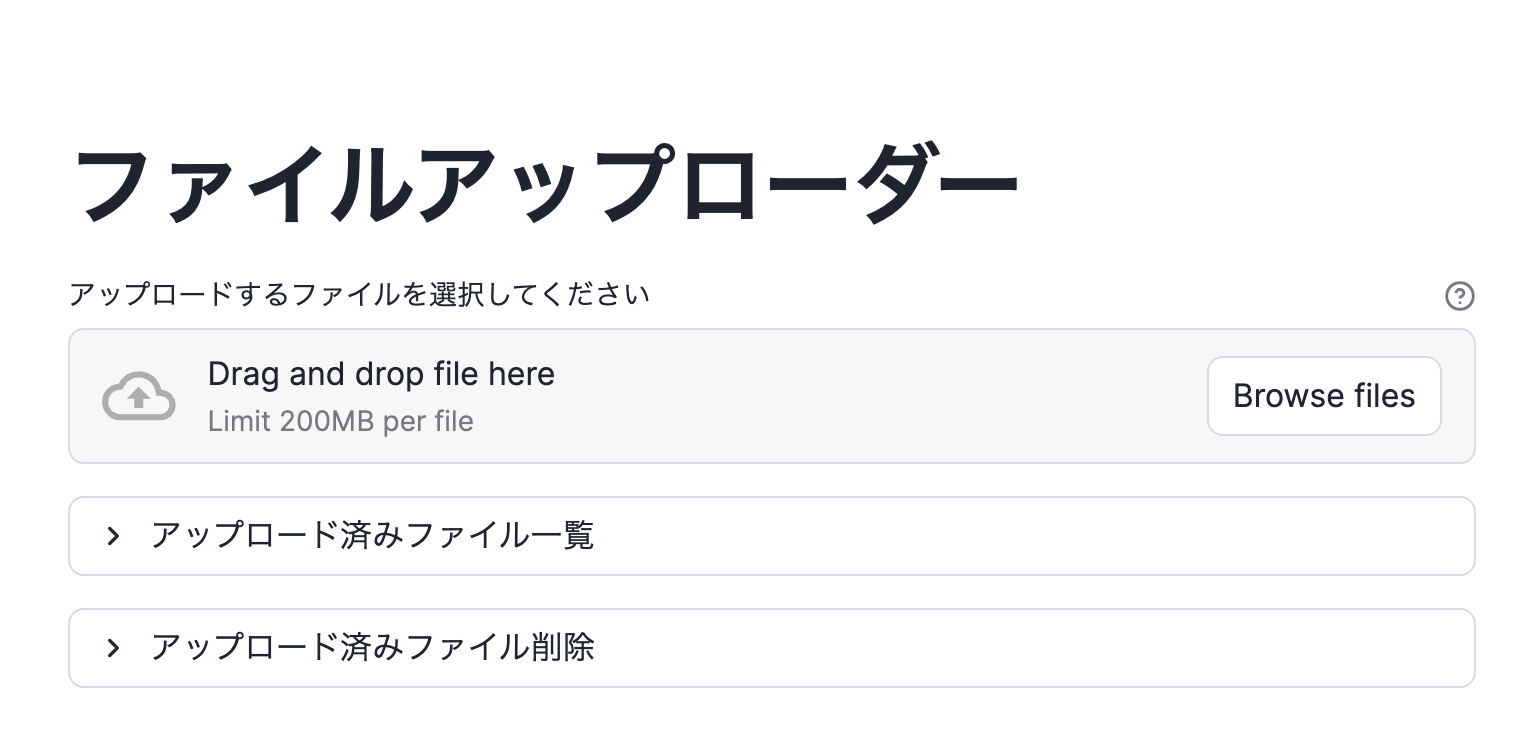
Implementation code example
Replace the database name, schema name, and internal stage name with your own.
import io
import uuid
from pathlib import PurePosixPath

import streamlit as st
from snowflake.snowpark.context import get_active_session

INTERNAL_STAGE_FQN = "データベース名.スキーマ名.内部ステージ名"
INTERNAL_STAGE_REF = f"@{INTERNAL_STAGE_FQN}"

EXTERNAL_STAGE_FQN = "データベース名.スキーマ名.外部ステージ名"
EXTERNAL_STAGE_REF = f"@{EXTERNAL_STAGE_FQN}"

DELETE_CANDIDATES_KEY = "delete_candidate_names"

def stage_location_for_key(stage_ref: str, relative_key: str) -> str:
    file_name = PurePosixPath(relative_key).name
    return f"{stage_ref}/{file_name}"

def describe_stages(session) -> bool:
    can_desc_stage = True
    for label, fqn in (
        ("内部", INTERNAL_STAGE_FQN),
        ("外部", EXTERNAL_STAGE_FQN),
    ):
        try:
            session.sql(f"DESC STAGE {fqn}").collect()
        except Exception as exc:
            st.error(
                f"{label}ステージ `{fqn}` を参照できません。名前・権限(USAGE 等)を確認してください。"
                f"\n\n詳細: {exc}"
            )
            can_desc_stage = False
    return can_desc_stage

def list_stage_files(session):
    try:
        return session.sql(f"LIST {EXTERNAL_STAGE_REF}").collect()
    except Exception as exc:
        st.warning(f"ファイル一覧の取得に失敗しました: {exc}")
        return []

def format_list_row(row) -> str:
    try:
        name = row["name"]
    except (KeyError, TypeError, IndexError):
        name = row[0] if row is not None else ""
    if isinstance(name, str) and "/" in name:
        return name.split("/", 1)[1]
    return str(name)

def main():
    st.set_page_config(page_title="ファイルアップローダー", layout="centered")
    st.title("ファイルアップローダー")

    session = get_active_session()

    if not describe_stages(session):
        st.stop()

    uploaded_file = st.file_uploader(
        "アップロードするファイルを選択してください",
        help=(
            "ブラウザから SiS に読み込んだあと、内部ステージへ put_stream し、"
            "copy_files で外部ステージ(S3)へコピーします。内部ステージの一時オブジェクトは "
            "成功・失敗にかかわらず finally で削除します。"
        ),
    )

    if uploaded_file is not None:
        file_name = PurePosixPath(uploaded_file.name).name
        tmp_prefix = f"streamlit_upload_tmp/{uuid.uuid4()}/"
        internal_dir = f"{INTERNAL_STAGE_REF}/{tmp_prefix}"
        internal_file = f"{internal_dir}{file_name}"
        try:
            file_stream = io.BytesIO(uploaded_file.getvalue())
            session.file.put_stream(
                file_stream,
                internal_file,
                auto_compress=False,
                overwrite=True,
            )
            session.file.copy_files(
                source=internal_dir,
                target_stage_location=f"{EXTERNAL_STAGE_REF}/",
                files=[file_name],
                detailed_output=True,
            )
            st.success(f"S3(外部ステージ)へアップロードしました: `{file_name}`")
        except Exception as exc:
            st.error(f"アップロードに失敗しました: {exc}")
        finally:
            try:
                session.file.remove(internal_dir)
            except Exception as cleanup_exc:
                st.warning(
                    f"内部ステージ上の一時ファイルの削除に失敗しました: {cleanup_exc}"
                )

    with st.expander("アップロード済みファイル一覧", expanded=False):
        if st.button("一覧を取得", key="list_stage_files"):
            rows = list_stage_files(session)
            if rows:
                names = [format_list_row(r) for r in rows]
                st.dataframe({"name": names}, use_container_width=True, hide_index=True)
            else:
                st.info(
                    "ファイルが見つかりません(空、または LIST 権限がありません)。"
                )

    with st.expander("アップロード済みファイル削除", expanded=False):
        if st.button("候補一覧を読み込み", key="load_delete_candidates"):
            rows = list_stage_files(session)
            st.session_state[DELETE_CANDIDATES_KEY] = (
                [format_list_row(r) for r in rows] if rows else []
            )

        candidates = st.session_state.get(DELETE_CANDIDATES_KEY)
        if candidates is None:
            st.info("「候補一覧を読み込み」で LIST 結果を読み込んでください。")
        elif not candidates:
            st.info("削除対象がありません(空、または LIST 権限がありません)。")
        else:
            selected = st.selectbox(
                "削除するオブジェクトキー(ステージ直下の相対パス)",
                options=candidates,
                key="delete_select",
            )
            confirm = st.checkbox(
                "選択したファイルを削除する(取り消しできません)",
                value=False,
                key="delete_confirm",
            )
            if st.button("削除を実行", type="primary", disabled=not confirm):
                if selected not in candidates:
                    st.error("選択が無効です。候補一覧を再読み込みしてください。")
                else:
                    try:
                        loc = stage_location_for_key(EXTERNAL_STAGE_REF, selected)
                        session.file.remove(loc)
                        st.success(f"削除しました: `{selected}`")
                        st.session_state[DELETE_CANDIDATES_KEY] = [
                            n for n in candidates if n != selected
                        ]
                    except Exception as exc:
                        st.error(f"削除に失敗しました: {exc}")

if __name__ == "__main__":
    main()
※ At the time of writing, it was not possible to upload directly to an external stage from a Streamlit app running on the container runtime.
Points on choosing technical elements
To implement the functionality, I had to choose the technical elements to adopt from several perspectives, which was a bit complicated.
First, I used the container runtime. With warehouse execution, the same restrictions as stored procedures apply, so objects in the stage could not be deleted.
For uploading objects, I first uploaded to an internal stage and then used COPY FILES to copy to the external stage. For example, you cannot upload files to an S3 external stage from Snowsight either, and similarly from the app, you need to first upload to an internal stage and then use an operation that supports copying to the external stage, which is a cloud storage service. In the case of a warehouse, it is treated as a Snowpark stored procedure, so this operation is possible, which was a slightly confusing point.
How to manage credentials when making requests from a Streamlit app to the S3 API was also a key point. This time, I confirmed that the IAM role configured in the storage integration can be used.
Other than this method, you could also access with boto3 using credentials stored in a secret, but since that requires managing secrets, it is better to be able to operate with the storage integration's IAM role.
As for an example of accessing AWS using secrets, an example for Bedrock is introduced below.
Below I introduce what I verified.
Prerequisites for verification
Creating the external stage
Following the guide below, I created an external stage for the S3 bucket in advance.
The guide describes the method in detail, so I omit the explanation here.
Streamlit app features
The explanation assumes creating a Streamlit app with the following three features.
- Uploading objects to the external stage
- Listing objects on the external stage
- Deleting objects on the external stage
The external stage is assumed to be an S3 bucket. The Snowflake account is also assumed to have chosen AWS as its cloud provider.
Trying it out
1. Trying with a warehouse-execution app
First, I ran the following code in a warehouse-execution app.
Warehouse execution implementation example
Replace the database name, schema name, and internal stage name with your own.
import io
from pathlib import PurePosixPath

import streamlit as st
from snowflake.snowpark.context import get_active_session

STAGE_FQN = "データベース名.スキーマ名.外部ステージ名"
STAGE_REF = f"@{STAGE_FQN}"

DELETE_CANDIDATES_KEY = "delete_candidate_names"

def stage_location_for_key(stage_ref: str, relative_key: str) -> str:
    file_name = PurePosixPath(relative_key).name
    return f"{stage_ref}/{file_name}"

def describe_stage(session) -> bool:
    try:
        session.sql(f"DESC STAGE {STAGE_FQN}").collect()
        return True
    except Exception as exc:
        st.error(
            "ステージを参照できません。名前・権限(USAGE 等)を確認してください。"
            f"\n\n詳細: {exc}"
        )
        return False

def list_stage_files(session):
    try:
        return session.sql(f"LIST {STAGE_REF}").collect()
    except Exception as exc:
        st.warning(f"ファイル一覧の取得に失敗しました: {exc}")
        return []

def format_list_row(row) -> str:
    try:
        name = row["name"]
    except (KeyError, TypeError, IndexError):
        name = row[0] if row is not None else ""
    if isinstance(name, str) and "/" in name:
        return name.split("/", 1)[1]
    return str(name)

def main():
    st.set_page_config(page_title="ファイルアップローダー", layout="centered")
    st.title("ファイルアップローダー")

    session = get_active_session()

    if not describe_stage(session):
        st.stop()

    uploaded_file = st.file_uploader(
        "アップロードするファイルを選択してください",
        help="ブラウザから SiS に読み込んだあと、外部ステージ経由で S3 に PUT します。",
    )

    if uploaded_file is not None:
        try:
            file_stream = io.BytesIO(uploaded_file.getvalue())
            session.file.put_stream(
                file_stream,
                f"{STAGE_REF}/{uploaded_file.name}",
                auto_compress=False,
                overwrite=True,
            )
            st.success(
                f"S3(外部ステージ)へアップロードしました: `{uploaded_file.name}`"
            )
        except Exception as exc:
            st.error(f"アップロードに失敗しました: {exc}")

    with st.expander("アップロード済みファイル一覧", expanded=False):
        if st.button("一覧を取得", key="list_stage_files"):
            rows = list_stage_files(session)
            if rows:
                names = [format_list_row(r) for r in rows]
                st.dataframe({"name": names}, use_container_width=True, hide_index=True)
            else:
                st.info(
                    "ファイルが見つかりません(空、または LIST 権限がありません)。"
                )

    with st.expander("アップロード済みファイル削除", expanded=False):
        if st.button("候補一覧を読み込み", key="load_delete_candidates"):
            rows = list_stage_files(session)
            st.session_state[DELETE_CANDIDATES_KEY] = (
                [format_list_row(r) for r in rows] if rows else []
            )

        candidates = st.session_state.get(DELETE_CANDIDATES_KEY)
        if candidates is None:
            st.info("「候補一覧を読み込み」で LIST 結果を読み込んでください。")
        elif not candidates:
            st.info("削除対象がありません(空、または LIST 権限がありません)。")
        else:
            selected = st.selectbox(
                "削除するオブジェクトキー(ステージ直下の相対パス)",
                options=candidates,
                key="delete_select",
            )
            confirm = st.checkbox(
                "選択したファイルを削除する(取り消しできません)",
                value=False,
                key="delete_confirm",
            )
            if st.button("削除を実行", type="primary", disabled=not confirm):
                if selected not in candidates:
                    st.error("選択が無効です。候補一覧を再読み込みしてください。")
                else:
                    try:
                        loc = stage_location_for_key(STAGE_REF, selected)
                        session.file.remove(loc)
                        st.success(f"削除しました: `{selected}`")
                        st.session_state[DELETE_CANDIDATES_KEY] = [
                            n for n in candidates if n != selected
                        ]
                    except Exception as exc:
                        st.error(f"削除に失敗しました: {exc}")

if __name__ == "__main__":
    main()
In this implementation, a file is uploaded to the app with st.file_uploader and written to the external stage with snowflake.snowpark.FileOperation.put_stream. For listing, LIST is run via Snowpark SQL. Objects on the external stage are deleted with snowflake.snowpark.FileOperation.remove.
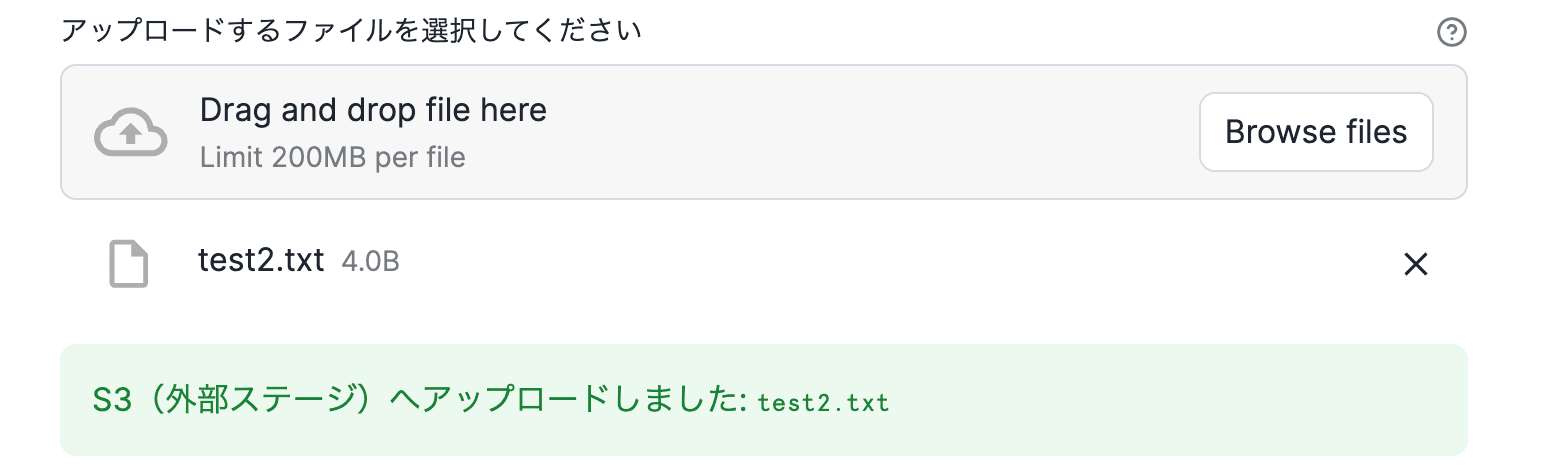
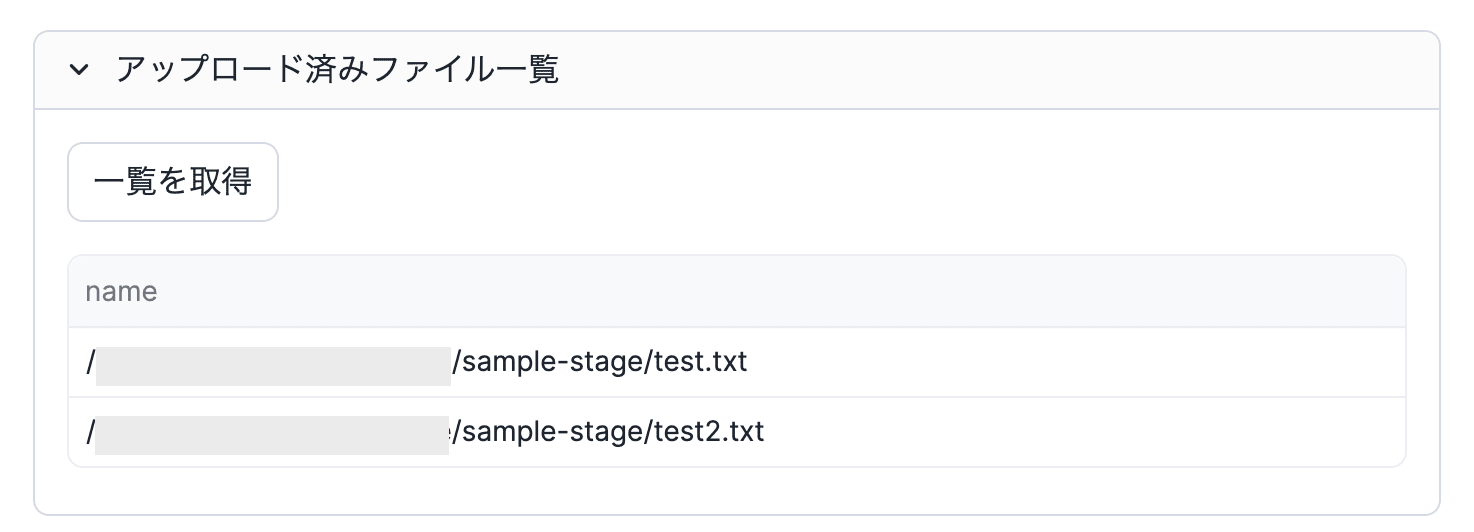
In this case, uploading and listing objects directly on the external stage are possible, but deletion fails.
▼Upload succeeds
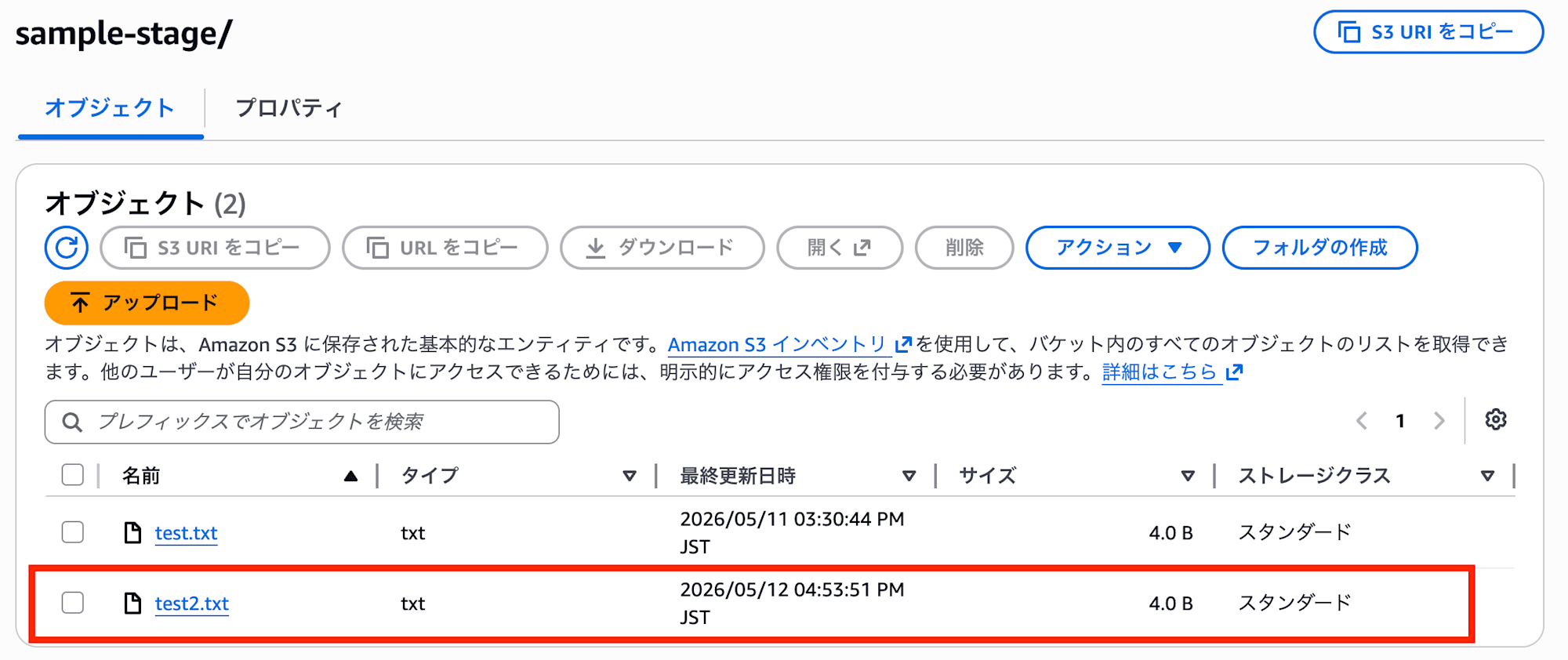
▼Listing succeeds
▼Deletion fails
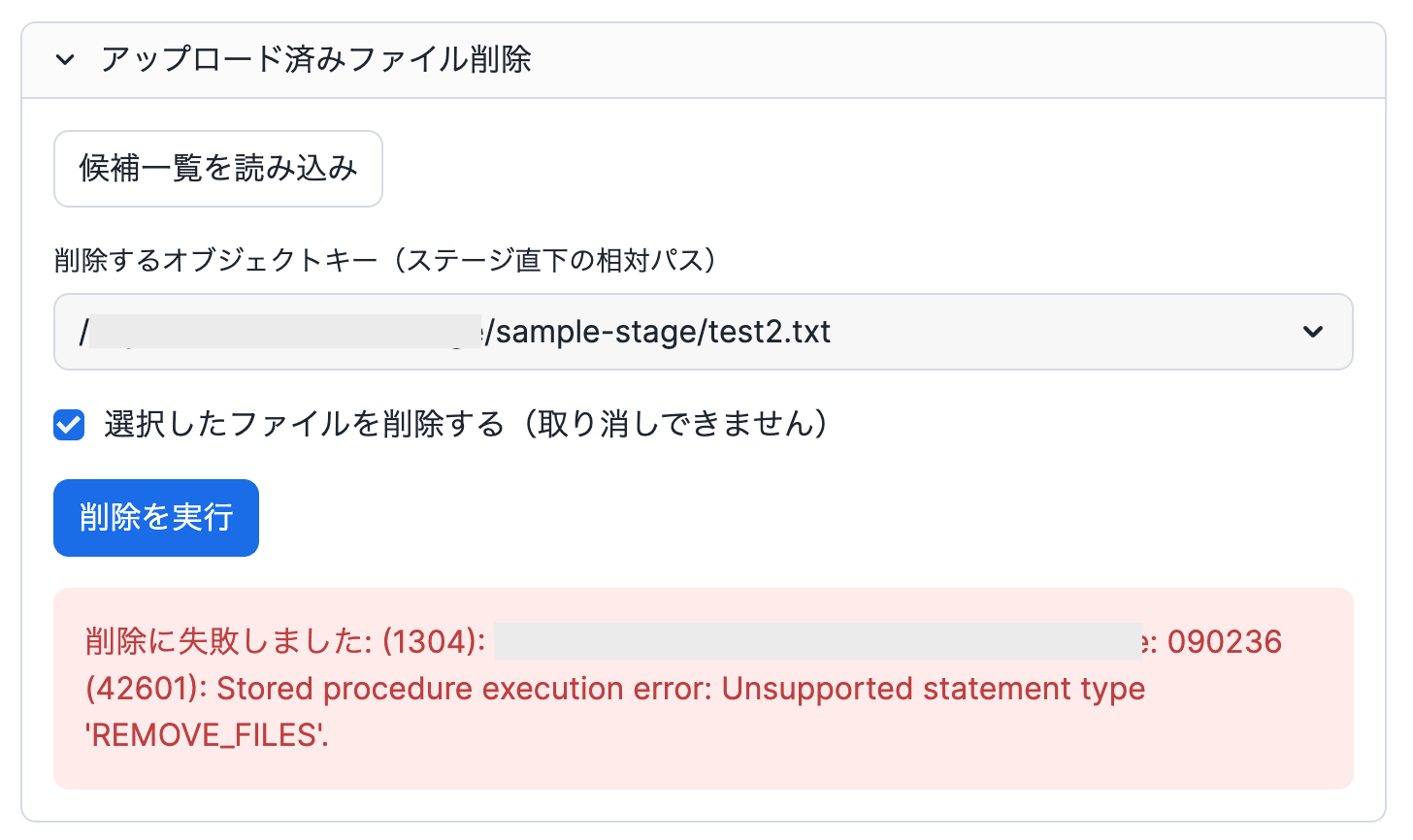
The point of this behavior is that Streamlit apps run on a warehouse are subject to the same restrictions as stored procedures.
PUT does not support external tables at the time of writing, but it is supported when called from a Snowpark stored procedure.
On the other hand, REMOVE cannot be executed from a stored procedure. This operation is not supported in stored procedures that use owner's rights and must be executed using caller's rights. For that reason, the error message Stored procedure execution error: Unsupported statement type 'REMOVE_FILES'. is raised.
However, as described in Understanding owner’s rights and Streamlit in Snowflake apps, when running on the container runtime the same restrictions as stored procedures no longer apply, so I ran the same code on the container runtime.
2. Trying with a container runtime app (uploading directly to the external stage)
Next, I ran the app implementation from step 1 as a container-execution app.
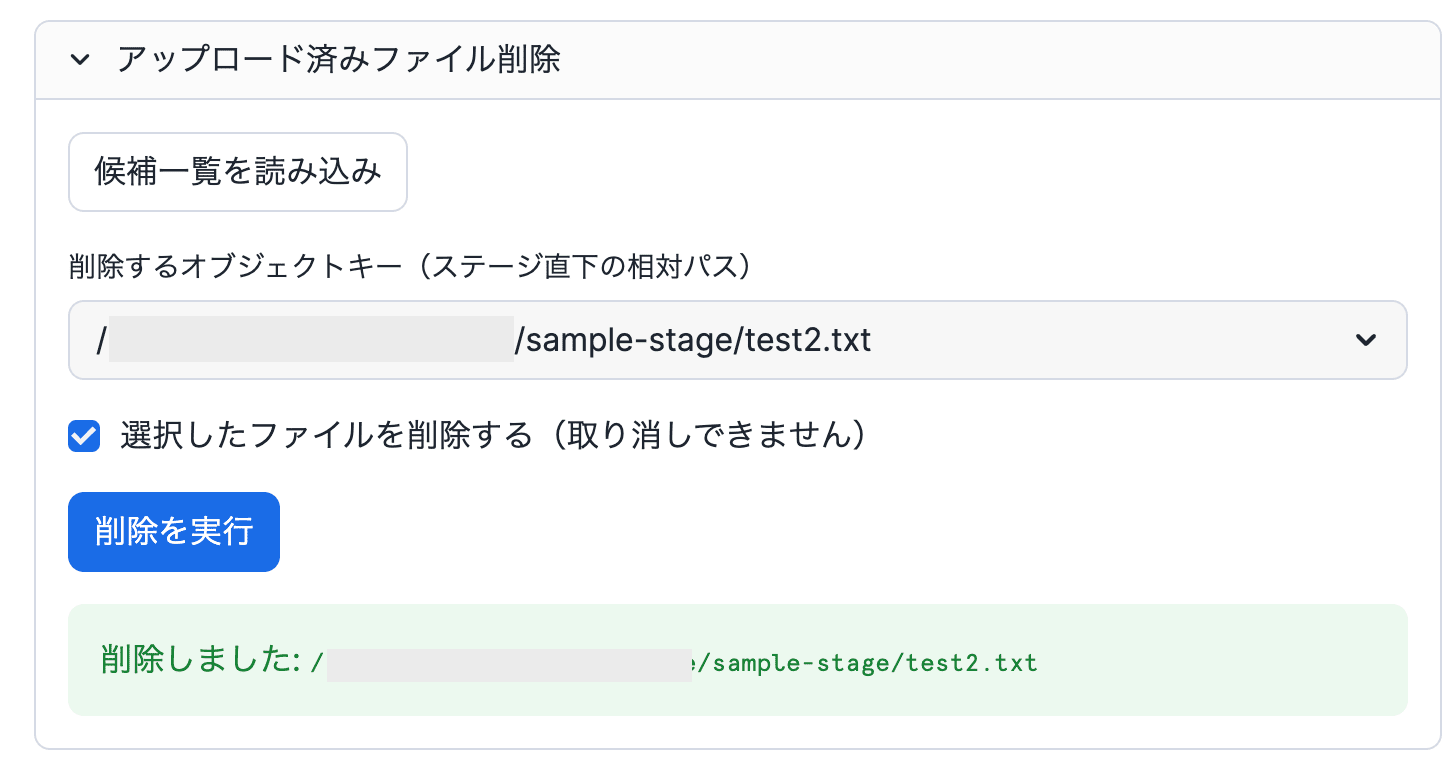
In this case, deleting objects on the external stage is possible, but the upload fails.
▼Upload fails
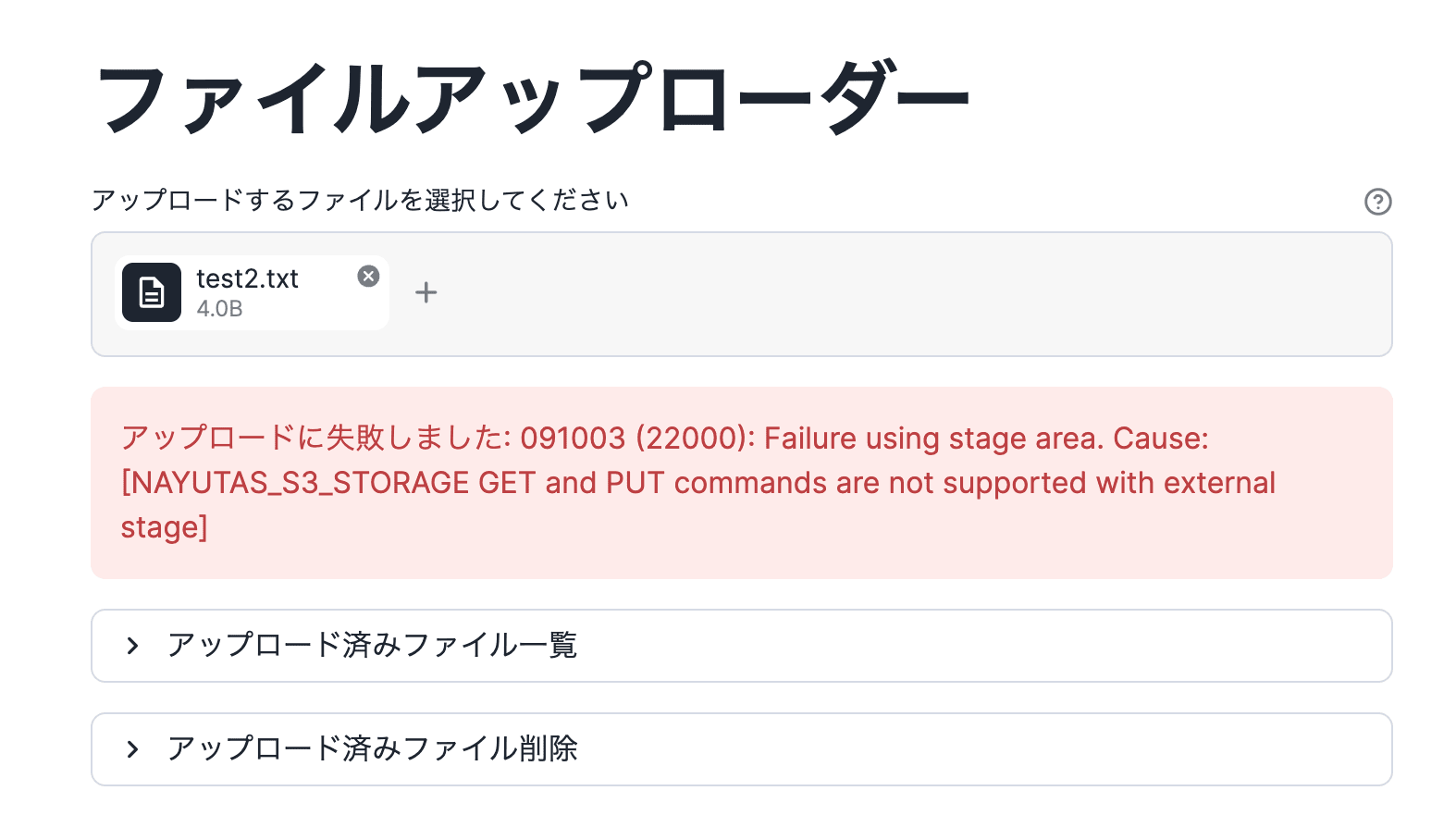
▼Deletion succeeds
The reason for this behavior is the opposite of before: because the restrictions of a stored procedure running with owner's rights no longer apply to the app, REMOVE becomes possible, but the PUT operation to the external stage is no longer executed from a Snowpark stored procedure, so it becomes impossible.
However, even under this condition, PUT operations to an internal stage are possible, so it seems that a little more ingenuity in the upload would work.
3. Trying with a container runtime app (uploading via an internal stage)
Finally, I improved the app's upload process as follows and ran it.
Before uploading an object to the S3 external stage, it is first uploaded to an internal stage and then COPYed to the external stage.
※ The following is an excerpt of the relevant part from the implementation example introduced at the beginning.
    if uploaded_file is not None:
        file_name = PurePosixPath(uploaded_file.name).name
        tmp_prefix = f"streamlit_upload_tmp/{uuid.uuid4()}/"
        internal_dir = f"{INTERNAL_STAGE_REF}/{tmp_prefix}"
        internal_file = f"{internal_dir}{file_name}"
        try:
            file_stream = io.BytesIO(uploaded_file.getvalue())
            session.file.put_stream(
                file_stream,
                internal_file,
                auto_compress=False,
                overwrite=True,
            )
            session.file.copy_files(
                source=internal_dir,
                target_stage_location=f"{EXTERNAL_STAGE_REF}/",
                files=[file_name],
                detailed_output=True,
            )
            st.success(f"S3(外部ステージ)へアップロードしました: `{file_name}`")
        except Exception as exc:
            st.error(f"アップロードに失敗しました: {exc}")
        finally:
            try:
                session.file.remove(internal_dir)
            except Exception as cleanup_exc:
                st.warning(
                    f"内部ステージ上の一時ファイルの削除に失敗しました: {cleanup_exc}"
                )
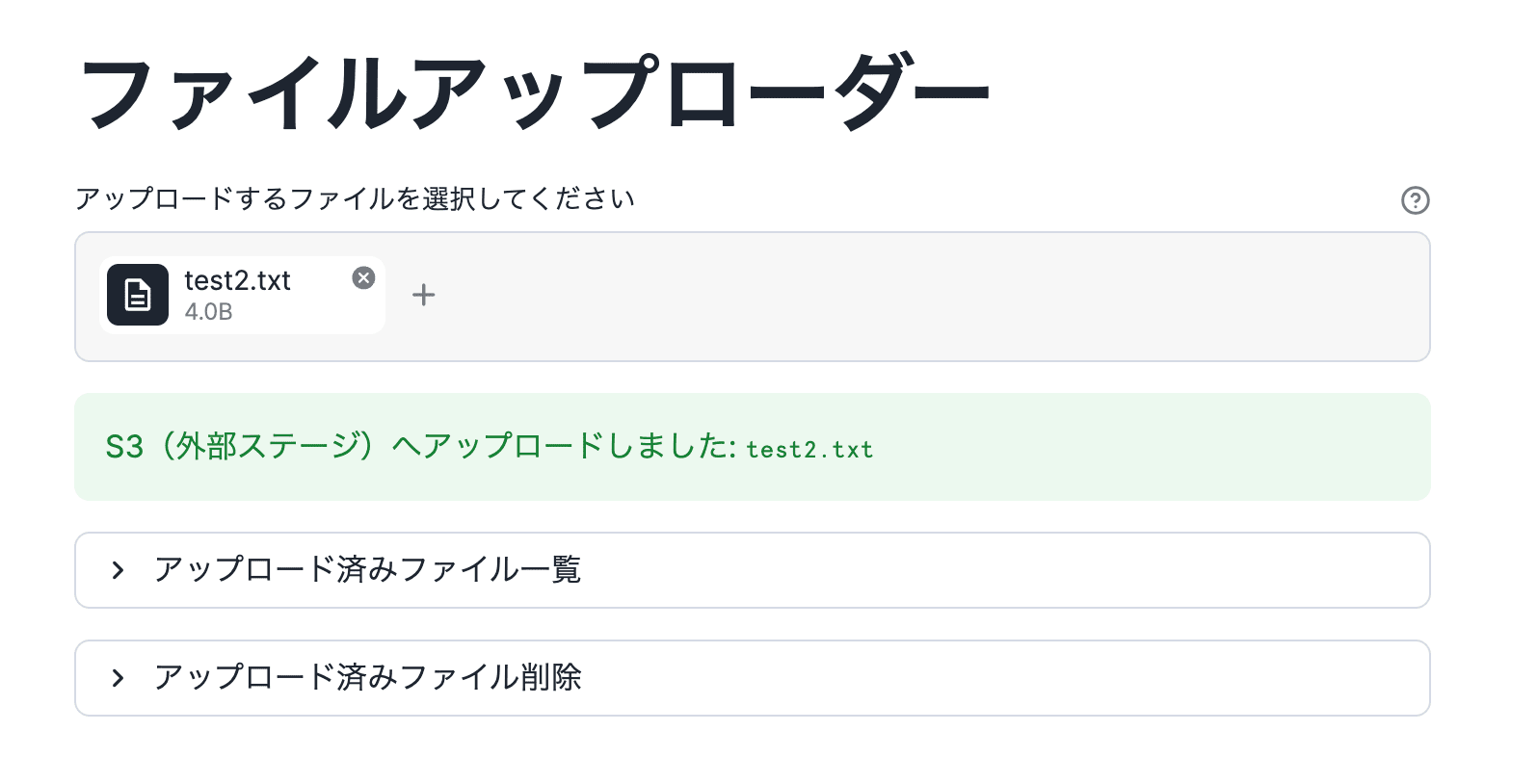
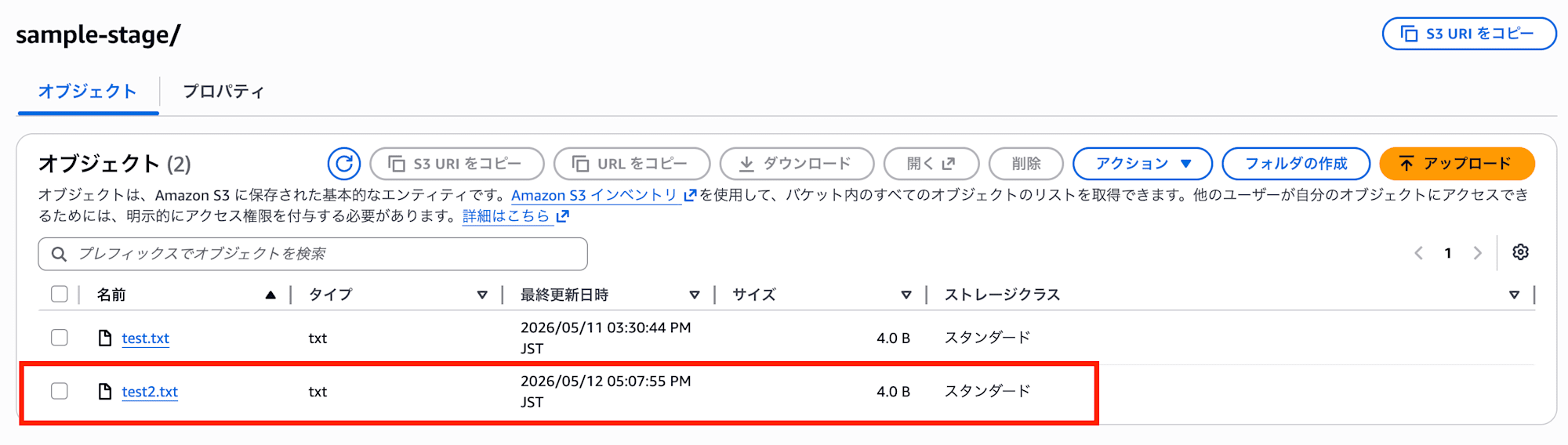
With this implementation, the upload also succeeded as shown below.
▼Upload succeeds
Notes
About stopping the compute pool
With a warehouse, when you end the session, the warehouse suspends according to the AUTO_SUSPEND value.
With containers, the Streamlit server runs continuously on a compute pool node, so if you want to stop it at a finer granularity, such as outside business hours, it seems you need to stop it with something like a task.
If a viewer takes no action for 3 days, the Streamlit server process terminates, and from there the compute pool suspends according to the AUTO_SUSPEND value.
Also, after suspension, startup takes a little time (about a few minutes).
Conclusion
This was an introduction to an example of uploading and deleting objects from a Streamlit app to an S3 bucket configured as an external stage from Snowflake on AWS.
With the container runtime, both uploading and deleting were possible, but at present uploads need to go first to an internal stage and then be copied to the external stage.
However, since objects can be operated on with the permissions of the IAM role configured in the storage integration, there was no need to manage secrets.