Can You Use AWS IAM Identity Center Even Without AWS Organizations? Sorting Out the Concepts of Organization Instances and Account Instances

This page has been translated by machine translation. View original
Konnichiwa, this is Chiba (Sachi).
AWS IAM Identity Center (hereafter simply IAM Identity Center) is a solution that lets you centrally manage access to applications and AWS accounts. You probably think of it most often in the context of access to AWS accounts. It is also often said, "Instead of using IAM users, let's manage users with IAM Identity Center."
One thing you often have to think about when using IAM Identity Center is AWS Organizations. Sometimes you hear that "AWS Organizations is required together with IAM Identity Center," while the AWS documentation says that "AWS Organizations is not required when using IAM Identity Center." You may wonder which one is actually true.
To give the conclusion first: "You can use IAM Identity Center without AWS Organizations, but for single sign-on to AWS accounts, which is what most people want to do, AWS Organizations is required."
The concepts of IAM Identity Center's organization instance and account instance are deeply involved here.
This time, let's sort these out.
Can you use IAM Identity Center without AWS Organizations? (Summary first)
-
There are broadly two types of access through IAM Identity Center
- Access to AWS accounts
- Access to applications
-
When enabling IAM Identity Center, you must specify one of the following
- Organization instance
- Account instance (introduced in November 2023)
-
The types of IAM Identity Center instances that can be created for each account type are as follows
Account type Organization instance Account instance AWS Organizations management account ● ● AWS Organizations member account - ● Standalone account - ● -
An organization instance is required for access to AWS accounts
To sum up, you can use IAM Identity Center without AWS Organizations, but for "access to AWS accounts," which is what most people want to do, you need an AWS Organizations management account.
Taking a slight detour to cover AssumeRole
When thinking about access to AWS accounts through IAM Identity Center, the concept of AssumeRole is closely related. Let's briefly cover it.
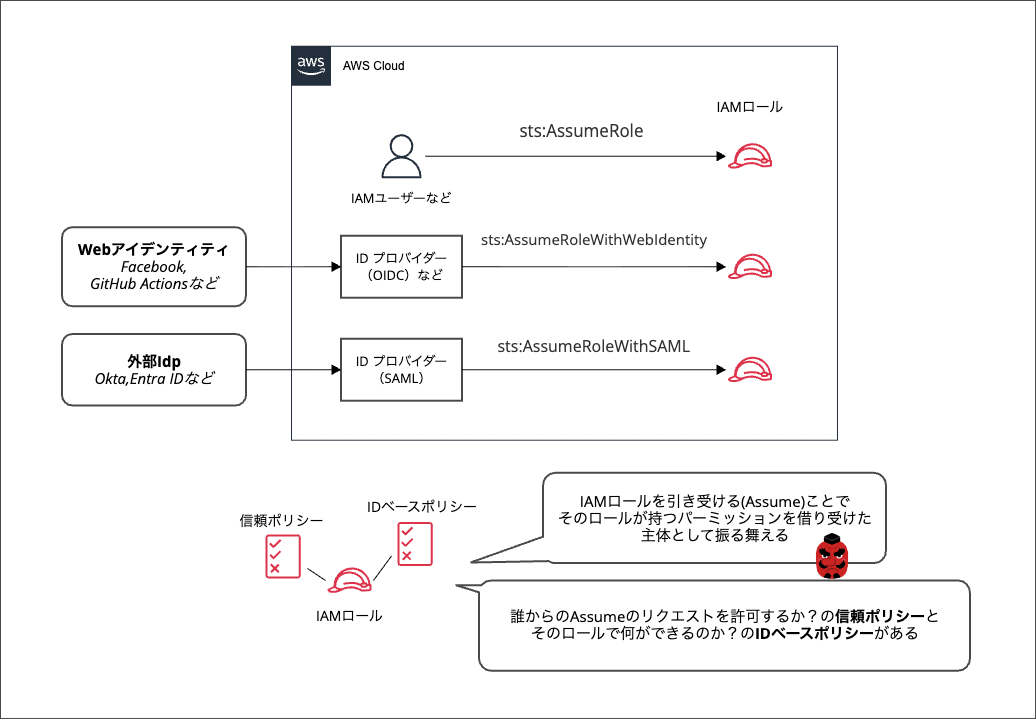
An IAM role is like a mask that grants temporary permissions to whoever puts it on. The mask has "what can be done (permissions)" defined in advance, but the key point is that the mask itself doesn't act on its own will; it only takes effect when someone puts it on.
To put "putting on the mask" in more proper terms, it is "assuming an IAM role," and the corresponding API is called AssumeRole.
Depending on who assumes the IAM role, the API is subdivided a bit further.
sts:AssumeRole: When an IAM user, another IAM role, an AWS service, etc. assumes the rolests:AssumeRoleWithWebIdentity: When an OIDC provider, etc. assumes the rolests:AssumeRoleWithSAML: When a SAML provider assumes the role
This time, let's especially remember sts:AssumeRoleWithSAML.
Understanding the types of AWS accounts
Taking yet another detour, let's also cover the types of AWS accounts. They are deeply related to IAM Identity Center's organization instance and account instance, which appear later.
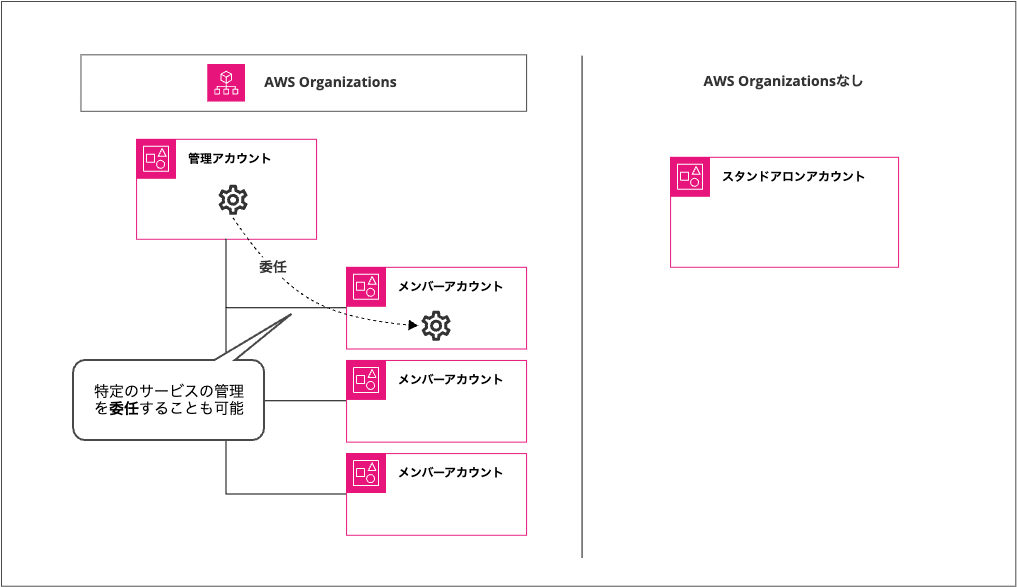
There is a service called AWS Organizations that centrally manages multiple AWS accounts. In AWS Organizations there is a top-level management account (also called the parent account), and all other accounts are called member accounts. An AWS account that stands alone, not managed by AWS Organizations, is sometimes called a standalone account to distinguish it.
To summarize briefly:
- Management account: The top-level account of AWS Organizations
- Member account: An account in AWS Organizations other than the management account
- Standalone account : An account that does not belong to AWS Organizations
Note that in AWS Organizations, you can also delegate the management of certain services to a member account. In that case, the delegated account is called a "delegated member account" or "delegated administrator account."
In IAM Identity Center as well, some operations can be delegated, but it makes things a bit complicated, so this blog does not cover delegation cases.
What can you do with IAM Identity Center?
Let's briefly cover what you can do with IAM Identity Center in the first place. To put it very plainly, IAM Identity Center is a solution that enables single sign-on to AWS accounts and applications through a single portal.
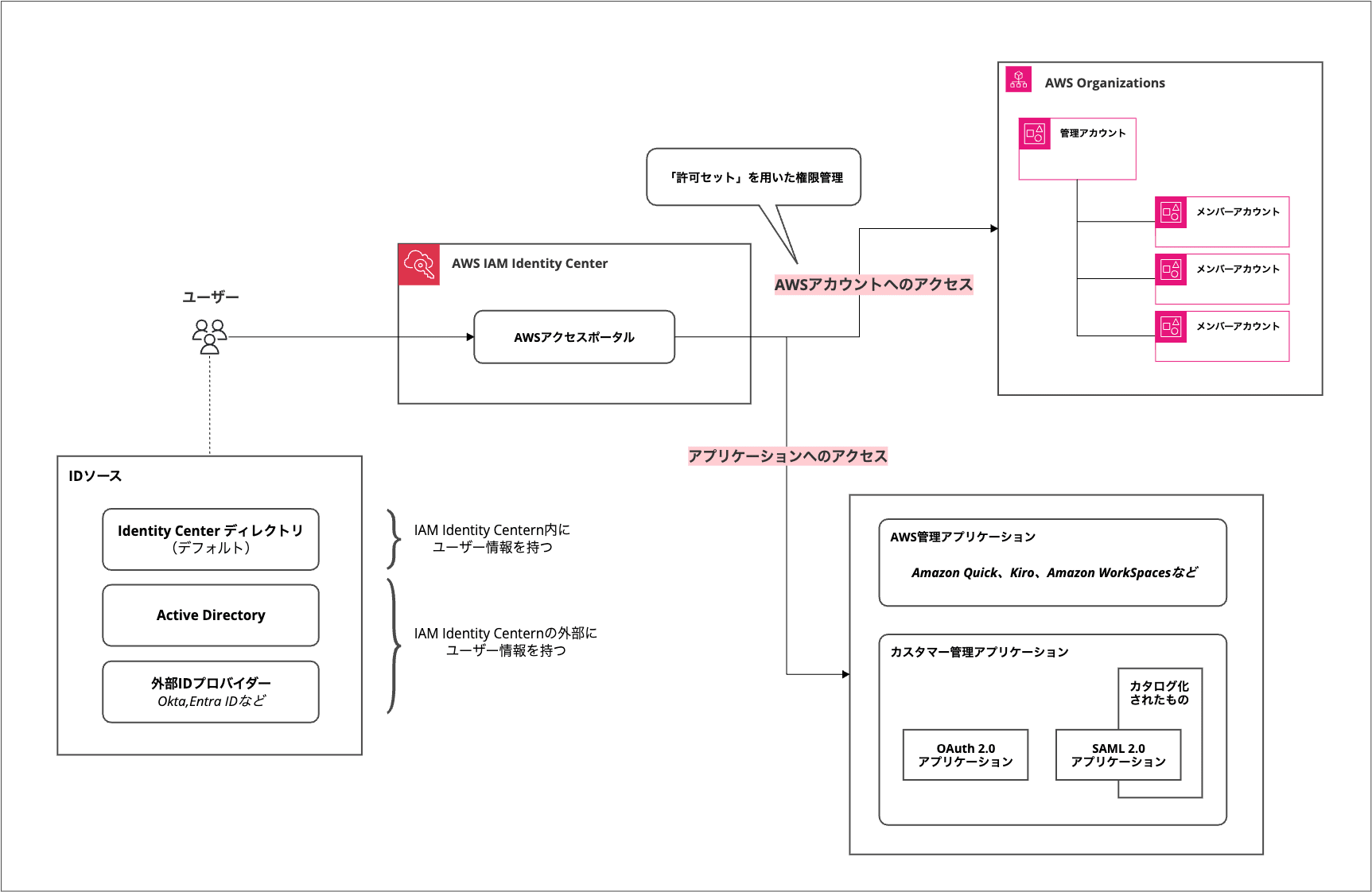
Users can access AWS accounts and applications by connecting to IAM Identity Center's AWS access portal. Although it is called the "AWS access portal," the destinations are not limited to AWS.
The destinations can be classified as follows.
- Access to AWS accounts
- Access to applications
- AWS managed applications
- Customer managed applications
- OAuth 2.0 applications
- SAML 2.0 applications
"Access to AWS accounts" here refers to access to any AWS account within the AWS Organizations organization in which IAM Identity Center is enabled. Details come later, but a mechanism called a "permission set" is the key.
For SAML 2.0 applications, more than 300 applications such as Zoom, Slack, and GitHub are provided as a "predefined catalog," so you can set them up easily by following the procedures provided by each service provider.
The "users" and groups here use those defined in one of the following identity sources.
- Identity Center directory (default)
- Active Directory
- External identity provider
If you want to start in the simplest way, creating and managing users/groups individually in the Identity Center directory is the quickest approach, and if you already manage Active Directory or an external identity provider (Okta, Entra ID, etc.), you can also use that user information.
An image of access to AWS accounts through IAM Identity Center
In the context of "I want to use IAM Identity Center," I think "access to AWS accounts" is what people most often have in mind.
To grasp the overall picture, I recommend this blog. At the time it was called "AWS Single Sign On (AWS SSO)," but it refers to what is now IAM Identity Center.
Simply put, "access to AWS accounts" through IAM Identity Center can also be thought of as a mechanism to easily achieve sts:AssumeRoleWithSAML to each account in an AWS Organizations organization.
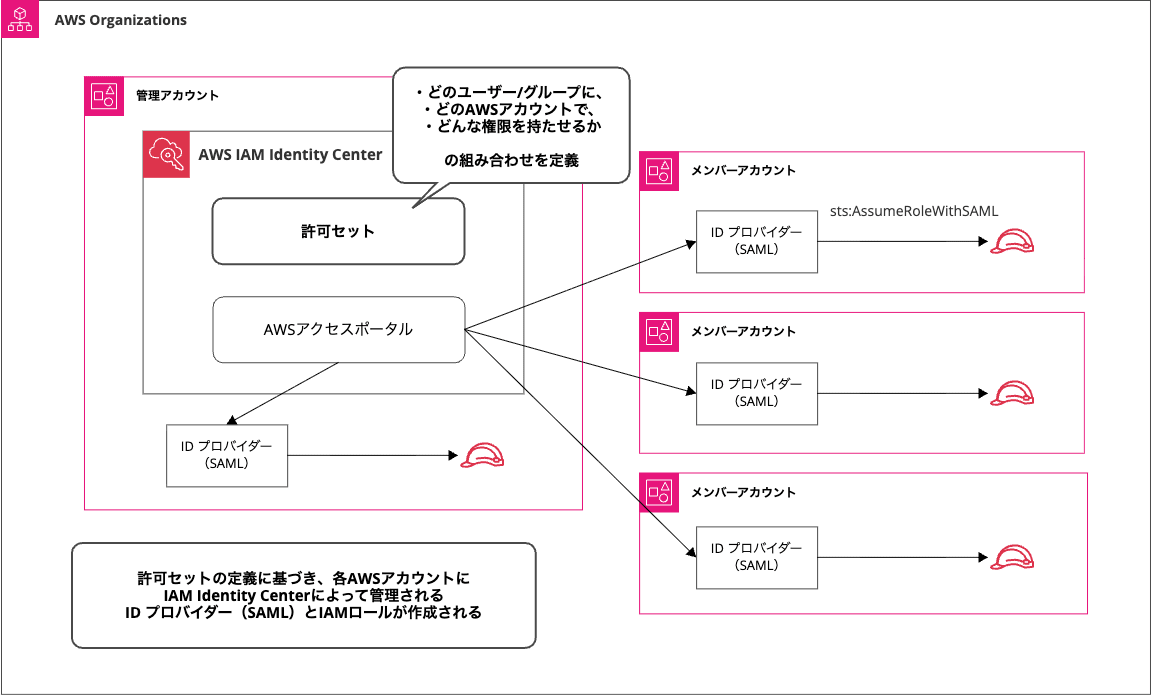
On the IAM Identity Center management account, you use a "permission set" to define the following combination.
- IAM Identity Center users/groups
- AWS account
- Permissions (identity-based policies, etc.)
According to that combination, IAM roles and identity providers are automatically created in each account in AWS Organizations.
For example, an automatically created IAM role looks like this. It isn't shown in the image, but the identity-based policy attached to this IAM role (which can be checked from the "Permissions" tab in the image) is the one defined in the permission set.
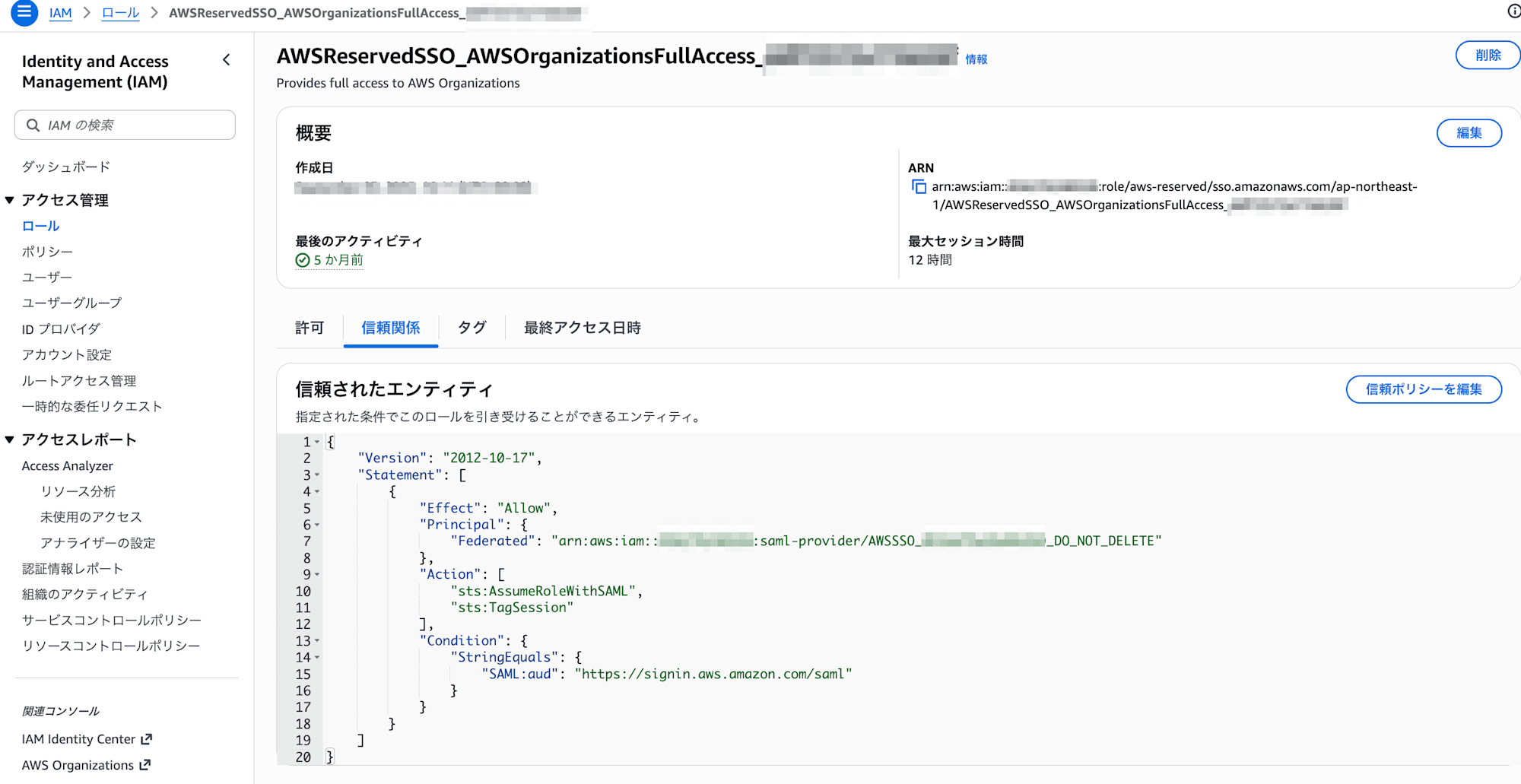
👆 The trust policy allows sts:AssumeRoleWithSAML from the identity provider (SAML).
That identity provider is also created automatically, and you can check it like this.
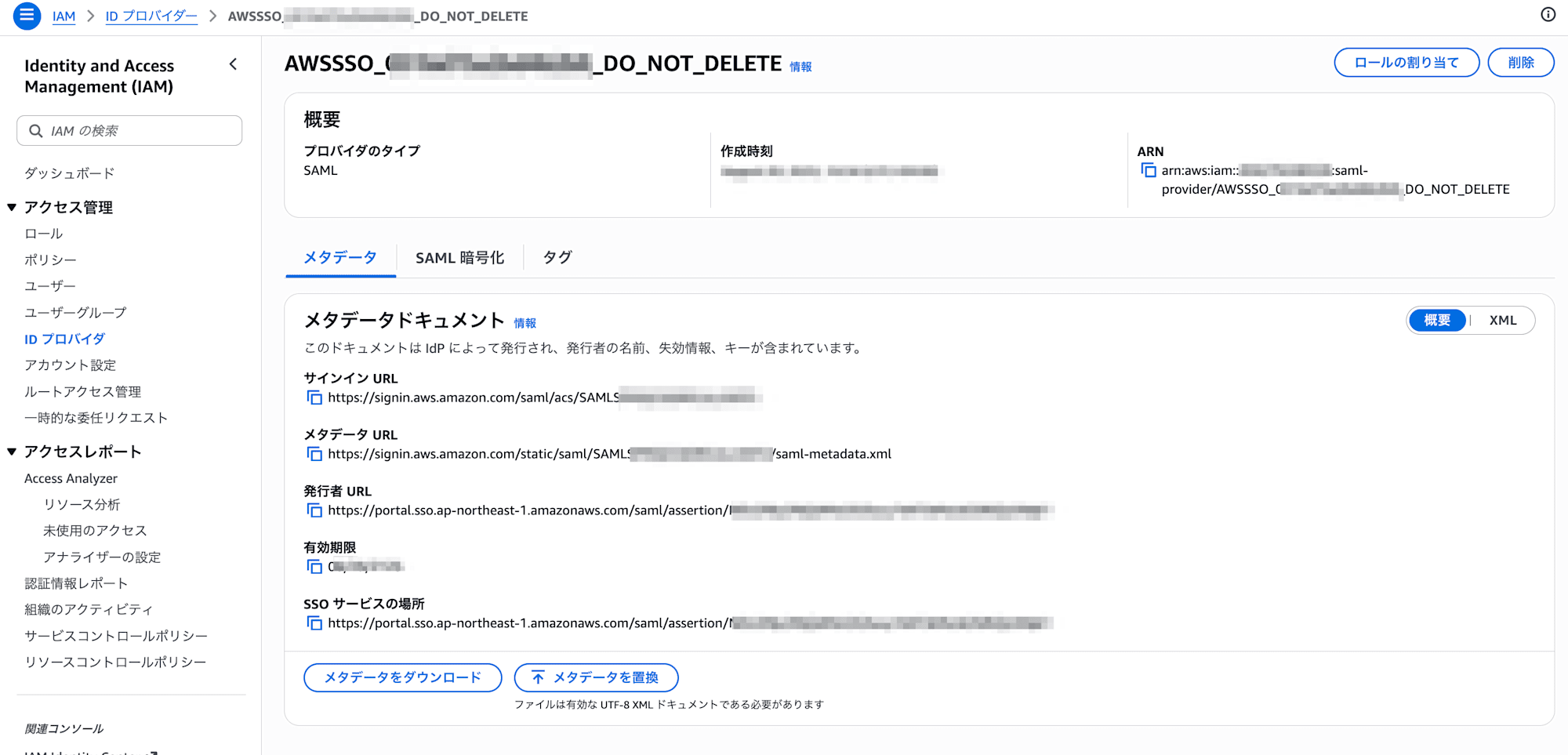
Both the IAM role and the identity provider are named in a way that evokes AWS SSO (the former name of IAM Identity Center).
Basically one identity provider is created per AWS account, while multiple IAM roles are created according to the permission set definitions.
Exception: Access to external AWS accounts as a SAML 2.0 application
The "access to AWS accounts" we just saw assumed access within the same AWS Organizations. Using "access to applications," you can also achieve access to accounts outside AWS Organizations.
I mentioned earlier that SAML 2.0 applications have several predefined catalogs, and one of them is "External AWS Account."
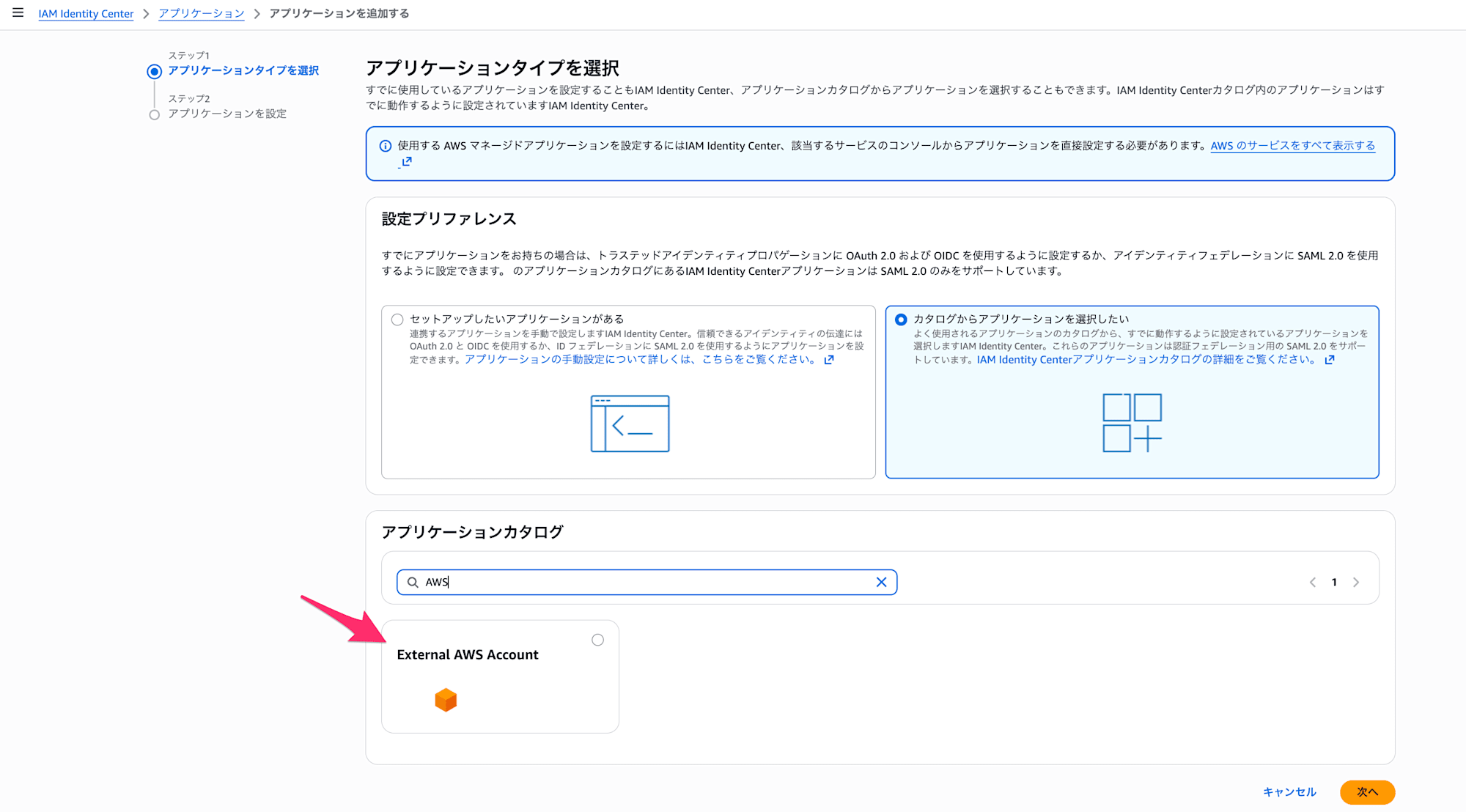
For details, the following is a detailed blog, although it is also from the AWS SSO era under the old name.
Note that this method does not support permission management using permission sets.
IAM Identity Center organization instances and account instances
Now we come to the topic closest to the main point of this blog. I touched on it in the summary at the beginning, but when enabling IAM Identity Center, you specify one of the following instances.
- Organization instance
- Account instance
The latter is a relatively new concept. IAM Identity Center used to require the use of AWS Organizations, but in November 2023 it became available even for a single account. At that time, the concept of the account instance appeared, and the previous instance came to be distinguished as the organization instance.
Here is the blog from that time. The differences in how the account instance and organization instance screens look are also a useful reference.
The instances that can be created for each type of AWS account are as follows.
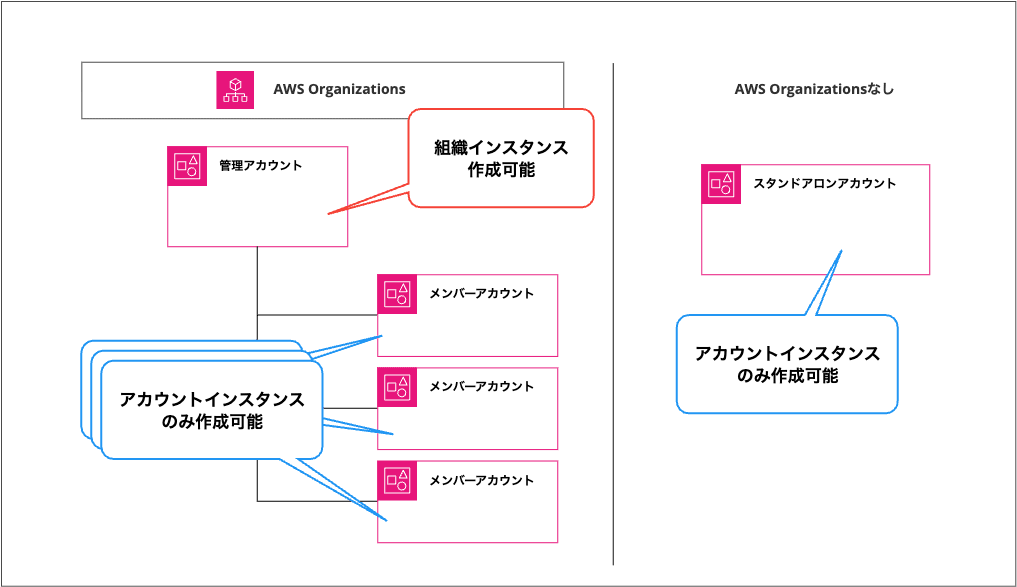
An organization instance can only be created in the AWS Organizations management account.
The differences between organization instances and account instances are summarized on the following page.
With an organization instance, you can use all features of IAM Identity Center. What you can and cannot do with an account instance is summarized as follows.
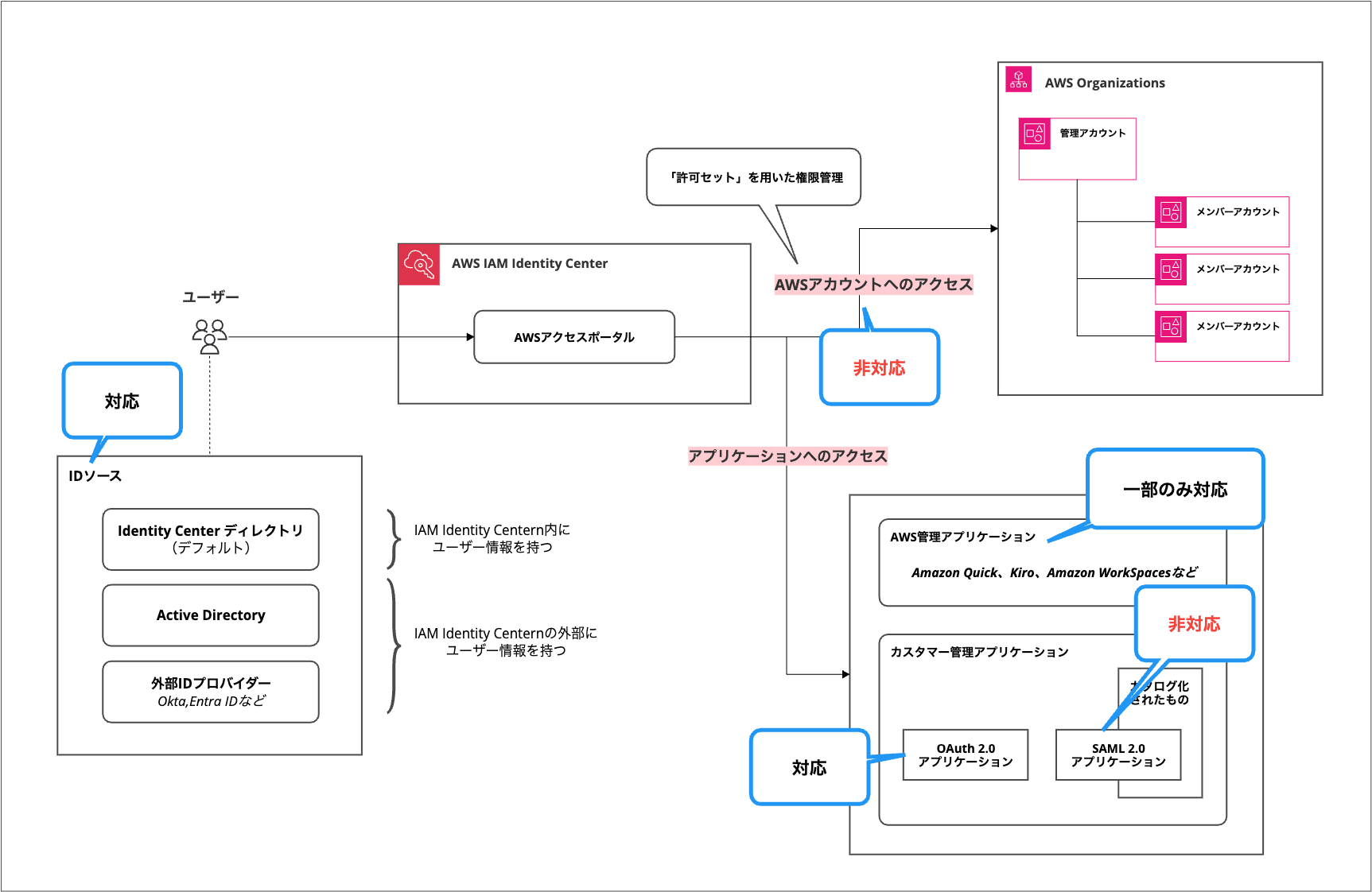
In other words, the only things you can do with an account instance are the following.
- User management using an identity source
- Access to some AWS managed applications
- You can check the support status below
- Access to OAuth 2.0 applications
Neither "access to AWS accounts" nor access to SAML 2.0 applications can be done with an account instance.
Account instances are intended for trying out access to some AWS managed applications or for use in limited cases.
Can you use IAM Identity Center without AWS Organizations? (Summary repeated)
-
There are broadly two types of access through IAM Identity Center
- Access to AWS accounts
- Access to applications
-
When enabling IAM Identity Center, you must specify one of the following
- Organization instance
- Account instance (introduced in November 2023)
-
The types of IAM Identity Center instances that can be created for each account type are as follows
Account type Organization instance Account instance AWS Organizations management account ● ● AWS Organizations member account - ● Standalone account - ● -
An organization instance is required for access to AWS accounts
To sum up, you can use IAM Identity Center without AWS Organizations, but for "access to AWS accounts," which is what most people want to do, you need an AWS Organizations management account.
Conclusion
I summarized various information from the angle of whether AWS IAM Identity Center can be used without AWS Organizations.
I think what many people want to do with IAM Identity Center is "access to AWS accounts," so the main thing I wanted to say is that you can't do that.
If you can't use an AWS Organizations management account but want to manage access to multiple AWS accounts, the following blog may be helpful.
The easiest to adopt is "switching roles from an IAM user," but if you already use an identity provider, introducing single sign-on via SAML access is also an option. If you can use an IAM Identity Center organization instance, you can achieve simpler access, but if that is difficult, it is also fine to devise and use your own SAML access.
That's all from Chiba Yuki (@batchicchi).

