
Without vector DB, I tried semantic search on 60,000 Developers.IO articles using NumPy and Bedrock

This page has been translated by machine translation. View original
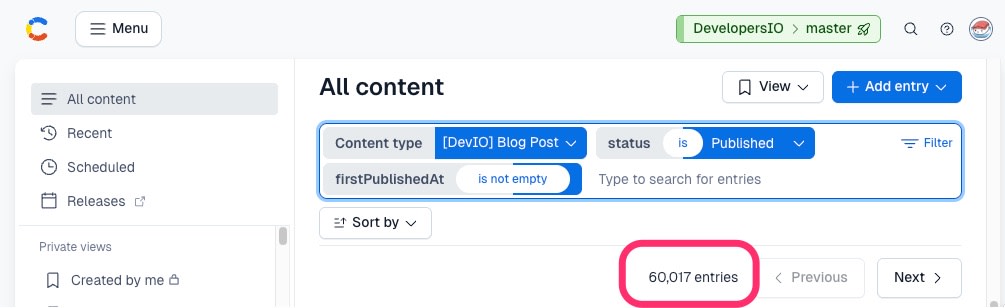
On February 13, 2026, the number of published blog articles on DevelopersIO finally exceeded 60,000.
To make this vast amount of technical information more accessible, we implemented semantic search and related article search using vector search.
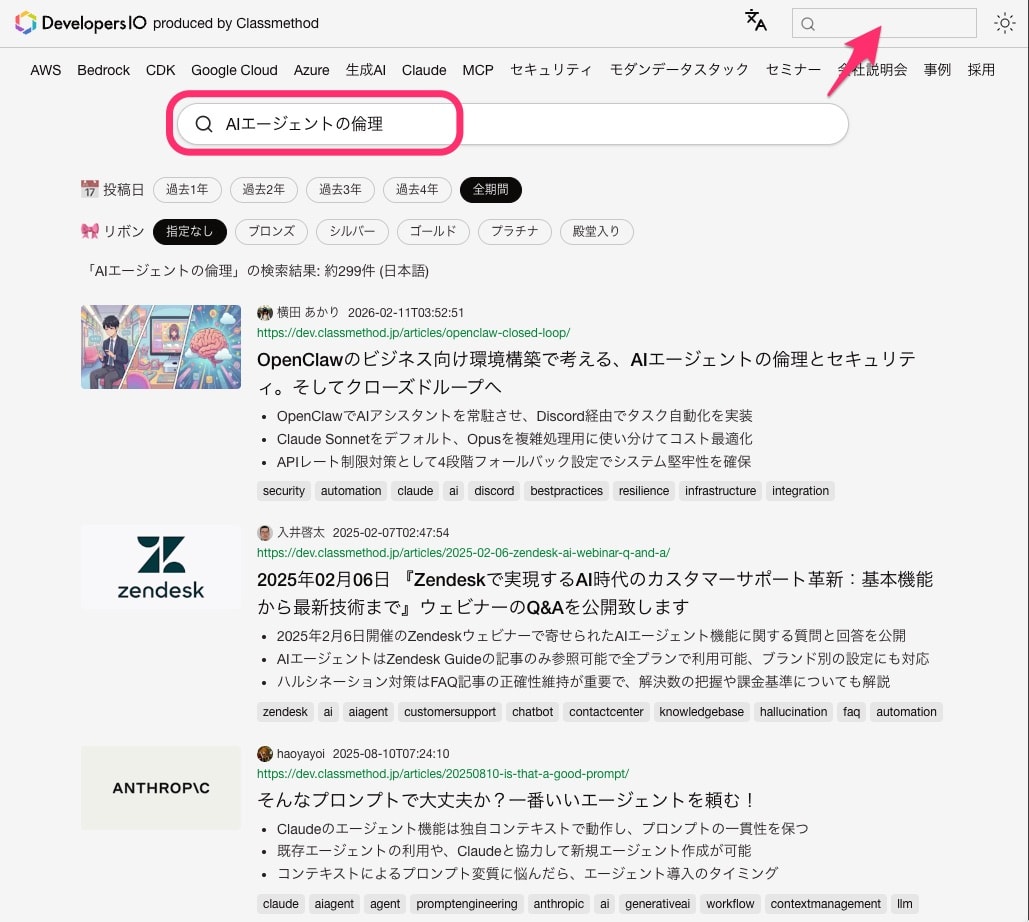
The unique feature is implementing semantic search for 60,000 articles using "NumPy" and "Bedrock" without a dedicated vector database. Additionally, we adopted a multi-model configuration that automatically switches between Bedrock Nova 2 and Titan V2 embedding models depending on the query language.
This article introduces everything from the data generation pipeline to search API implementation and the reasoning behind our technology choices.
Overall Architecture
The system is divided into two major parts.
The AWS services we are using are as follows:
| Component | Technology |
|---|---|
| Search API | ECS Fargate (FastAPI) |
| Vector Data Store | Amazon DSQL / Amazon S3 (NumPy format) |
| Article Metadata Store | Amazon DSQL / Amazon S3 (JSON format) |
| Search Query Vectorization | Bedrock Nova 2 Embeddings / Bedrock Titan V2 Embeddings |
| AI Summary Generation | Bedrock Claude Haiku 4.5 |
| CDN | CloudFront |
Data Generation Pipeline
AI Summary Generation
First, AI generates Japanese and English summaries from the article text. These summaries are used as input for vectorization.
| Item | Value |
|---|---|
| Model | Claude Haiku 4.5 (Bedrock) |
| Processing Method | On-demand (incremental/regeneration) / Batch Inference (initial) |
| Input | Contentful's content (body), excerpt, and title |
| Output | Japanese summary (summary), English summary (summary_en), English title (title_en) |
We processed approximately 60,000 articles with a success rate of over 99.9%.
For the initial batch processing, we utilized Bedrock Batch Inference.
When selecting the summary model, we conducted comparative verification with higher-tier models.
| Model | Evaluation | Reason for Selection |
|---|---|---|
| Claude Sonnet 4.5 | Highest quality summarization, complex context understanding | While providing the highest quality summaries, the difference with Haiku 4.5 was minimal for our summarization task |
| Claude Haiku 4.5 | Fast, economical, sufficient quality | Based on comparison testing with Sonnet 4.5, the technical term extraction and summary accuracy were determined to be sufficient to support the search infrastructure. Selected |
Being able to achieve search accuracy comparable to higher-tier models with a faster and more economical model was a significant cost advantage.
Embedding Model Selection — Multi-model Configuration with Nova 2 and Titan V2
We adopted two embedding models from Amazon Bedrock, using them according to specific needs.
| Model | Model ID | Dimensions | Region | Use |
|---|---|---|---|---|
| Nova 2 Multimodal Embeddings | amazon.nova-2-multimodal-embeddings-v1:0 |
1024 | us-east-1 | Japanese search, related articles |
| Titan Text Embeddings V2 | amazon.titan-embed-text-v2:0 |
1024 | ap-northeast-1 | Short text/English search |
We also conducted search accuracy comparisons between embedding models.
There were three reasons for adopting Bedrock's embedding models:
-
Quality: While OSS models (such as multilingual-e5-large) scored higher in overall benchmarks, our semantic search prioritizes scenarios where users input vague "problems" in natural language over keyword matching. After evaluating intent understanding and robustness against spelling variations, we determined Nova 2 was most suitable.
-
Cost: Bedrock batch inference fees are comparable to EC2 instance costs, and considering that no GPU infrastructure management is required, Bedrock was advantageous.
-
Real-time vectorization for search queries: When vectorizing search terms at request time, model loading time and cold starts would be challenges if hosting models on EC2 or Lambda. With the Bedrock API, vectorization is possible with stable latency without these issues.
The reason for adopting Titan V2 for English search is that its embedding quality for English text is equal to or better than Nova 2, and being available in the Tokyo region gives it a latency advantage.
※As of February 2026, Nova 2 Embeddings is offered in regions such as US East (N. Virginia), so Japanese search calls the API cross-region. Titan V2 is available in the Tokyo region.
Automatic Model Selection Based on Query Language
The search API automatically switches models and indexes based on the user's input query.
| Query Example | Model | Index |
|---|---|---|
AWSのベストプラクティス (Japanese) |
Nova 2 | nova/ja-s |
AWS Lambda best practices (English/short text) |
Titan V2 | titan/en-s |
Queries containing Japanese text are processed with Nova 2, while queries with English words or short phrases are processed with Titan V2.
Currently, we distinguish between these two models, but in the future, we plan to optimize search accuracy with multiple models including Cohere Embed.
For related article search, we consistently use nova/en-s (Nova index based on English summaries) regardless of language. Since all articles have English summaries, we can calculate similarity between articles without language barriers.
The input text for vectorization is the combined title and summary (when building the index). For searches, the user's input query is vectorized as is.
Indexes are managed with a "model/summary type" key structure.
| Index Key | Model | Input Text | Purpose |
|---|---|---|---|
nova/ja-s |
Nova 2 | Japanese title + Japanese summary (short) | Japanese semantic search |
nova/en-s |
Nova 2 | English title + English summary | Related article search |
titan/en-s |
Titan V2 | English title + English summary | English semantic search |
# nova/ja-s (Japanese articles only, short summary)
text = f"{article title}\n{Japanese summary (1 sentence)}"

# nova/en-s, titan/en-s (English-translated summaries for all articles)
text = f"{English title}\n{English summary}"
For the Japanese search index nova/ja-s, we use a short one-sentence summary (about 200 characters) instead of a three-bullet-point summary. It was confirmed that short summaries resulted in better semantic proximity to search queries, improving search accuracy.
Vector Data Storage — Three Complementary Roles
Vectorized data is stored in three places according to purpose.
Bedrock (Vectorization)
  ├── Amazon S3 Vectors (Vector DB, for native vector search)
  └── Amazon DSQL (blogpost_vectors table, BYTEA format)
        ↓ Regular export
      S3 (NumPy format: vectors.npy + index_map.json.gz)
| Storage | Role |
|---|---|
| Amazon S3 Vectors | For model evaluation and backup |
| Amazon DSQL | Primary vector data storage (BYTEA), differential management, multilingual management |
| Amazon S3 (NumPy) | High-speed read cache for API searches (loaded into ECS memory) |
Amazon S3 Vectors
Initially, we planned to use S3 Vectors for semantic search as well. However, while it has filtering capabilities, the maximum number of retrievable items per query is limited to 100, which was insufficient for text search on an index of about 60,000 articles.
Currently, S3 Vectors is used as an inexpensive environment for evaluating model performance and characteristics, and also serves as a backup for vector data.
Amazon DSQL
The primary (master) vector data is stored in Amazon DSQL. It handles differential management and centrally manages indexes for multiple models and languages. DSQL's distributed write performance and strong consistency across multiple regions make it highly reliable as a foundation for maintaining accurate data.
Amazon DSQL is PostgreSQL compatible but does not currently support vector search extensions like pgvector. Therefore, vector data is stored in binary form as the BYTEA type.
CREATE TABLE blogpost_vectors (
  article_id VARCHAR(50) NOT NULL,
  language   VARCHAR(10) NOT NULL,
  vector     BYTEA NOT NULL,        -- 1024 dimensions × float32 = 4,096 bytes
  updated_at TIMESTAMP NOT NULL DEFAULT NOW(),
  PRIMARY KEY (article_id, language)
);
A 1024-dimensional float32 vector becomes a 4,096-byte binary, which is significantly more storage-efficient compared to JSON format (where numbers are represented as text). Date management with updated_at enables differential exports, and including the language column in the composite primary key allows multiple language indexes to be managed in a single table.
When exporting to NumPy, we only retrieve records that have had their updated_at updated since the last export, and merge the differences into the existing .npy matrix. This eliminates the need to scan all 60,000 entries every time, and can be completed in seconds for differences of tens to hundreds of records.
The initial full export process flow is as follows:
- Retrieve all vectors by index from DSQL (batch size of 2,000 articles)
- Restore BYTEA using
np.frombuffer(bytes, dtype=np.float32) - Construct a (N, 1024) matrix with
np.stack() - Upload to S3 as
vectors.npy+index_map.json.gz
S3 NumPy Format
We adopted NumPy, Python's representative numerical calculation library, as a means of performing vector search and similarity calculations in Python. We prepared an export process that converts vector data stored in DSQL into NumPy arrays and saves them in .npy format on S3.
my-vector-index/
  ├── nova/
  │   ├── ja-s/
  │   │   ├── vectors.npy          # shape: (56910, 1024), float32, 223MB
  │   │   └── index_map.json.gz    # {"article_id": array_index, ...}
  │   └── en-s/
  │       ├── vectors.npy          # shape: (60008, 1024), float32, 245MB
  │       └── index_map.json.gz
  └── titan/
      └── en-s/
          ├── vectors.npy          # shape: (60008, 1024), float32, 246MB
          └── index_map.json.gz
The ECS task downloads three indexes specified by the environment variable ACTIVE_INDEXES from S3 at startup, making them immediately searchable with np.load().
Search API Implementation
Data Loading at Startup
When the ECS task starts, it preloads vector data for three indexes from S3 into memory.
# ACTIVE_INDEXES = "nova/ja-s,nova/en-s,titan/en-s"
for index_key in active_indexes:
    matrix = np.load(f'/tmp/vectors_{index_key}.npy', mmap_mode='r')
    norms = np.linalg.norm(matrix, axis=1, keepdims=True)
    normalized = (matrix / norms).astype(np.float32)
At startup, the L2 norm of all vectors is calculated, and a normalized matrix is retained. Since the inner product of normalized vectors equals their cosine similarity, a simple matrix product (dot product) is sufficient during search.
| Index | Count | File Size | Purpose |
|---|---|---|---|
| nova/ja-s | 56,910 items | 223MB | Japanese search |
| nova/en-s | 60,008 items | 245MB | Related articles |
| titan/en-s | 60,008 items | 246MB | English search |
The three indexes use about 750MB of memory in total.
Cosine Similarity Search
The search term is vectorized using the appropriate Bedrock model (Nova 2 or Titan V2) based on the query language, and similarity with all article vectors in the corresponding index is calculated in batch using NumPy matrix operations.
q_norm = query_vector / np.linalg.norm(query_vector)
similarities = normalized @ q_norm              # Calculate all similarities with a single matrix product
distances = 1.0 - similarities                  # Convert to cosine distance (closer to 0 means more similar)
top_indices = np.argpartition(distances, top_k)[:top_k]  # Quickly select top K
top_indices = top_indices[np.argsort(distances[top_indices])]  # Sort by distance
The matrix product of approximately 60,000 entries × 1024 dimensions completes in a few milliseconds.
Compound Search — Pre-filter Method
When specific conditions such as author or tag are specified, we first limit the target articles, then calculate similarities only for the limited set of articles.
All article vectors (60,000 items)
  ↓ Pre-filter by author, tags, etc.
Target article vectors (e.g.: 500 items)
  ↓ Extract only targets for matrix product
Sort by similarity → Return results
With the typical vector DB approach of "retrieving the top 100 items in similarity order and then filtering" (post-filter), the filtered results can be extremely limited (in the worst case, 0 items). By adopting our approach (pre-filter), articles that would be missed by post-filtering are reliably found, and the computation is reduced in proportion to the number of target items.
Implementation Example:
# 1. Extract article IDs that match conditions from metadata
candidate_ids = get_filtered_article_ids(author="<author_id>", tag="AWS")

# 2. Convert article IDs to row indices in the NumPy array
indices = []
valid_ids = []
for cid in candidate_ids:
    idx = id_to_idx.get(cid)
    if idx is not None:
        indices.append(idx)
        valid_ids.append(cid)

# 3. Slice only target rows for matrix product (avoiding full calculation)
similarities = normalized[indices] @ q_norm
distances = 1.0 - similarities

# 4. Sort by distance and return results
order = np.argsort(distances)
results = [{'key': valid_ids[i], 'distance': float(distances[i])} for i in order]
Related Article Search
This is for displaying "related articles" on article detail pages. Instead of a search term, it uses the vector of a reference article.
| Search Method | Description |
|---|---|
tags |
Calculate similarity based on common AI tags × relevance_score. With time decay |
vector |
Cosine similarity between reference article vector and all article vectors |
hybrid |
Weighted average of tag score (40%) + vector score (60%) |
author+vector |
Vector similarity calculation limited to articles by the same author |
Data Update Flow
Hourly Incremental Update
Contentful (Article Update)
  → Webhook → Step Functions
    → AI Summary Generation (Claude Haiku 4.5)
    → Vectorization (Nova 2 / Titan V2 Embeddings)
    → DSQL Write + S3 Vectors Registration
    → NumPy Export (S3)
Background Updates on ECS
Since ECS tasks may run for extended periods, we implemented a mechanism to detect and reflect S3 data changes in the background.
| Target | Check Interval | Detection Method |
|---|---|---|
| S3 Cache (master-data) | 10 minutes | head_object LastModified |
| S3 Cache (delta/differential update data) | 10 minutes | head_object LastModified |
| Vector Data (vectors.npy) | 1 hour | head_object LastModified |
Updates atomically replace the reference to global variables. By completely building new data in the background before switching references, processes handling requests continue to safely use the old data, while new requests instantly reference the new data.
Health Check
The health check (GET /health) confirms the loading status of cache and vector data.
// Normal (200)
{"status": "ok", "cache_ready": true, "vectors_ready": true}

// Not loaded (503)
{"status": "degraded", "cache_ready": false, "vectors_ready": false,
 "missing_keys": ["meta_by_id", ...],
 "missing_vectors": ["nova/ja-s", "nova/en-s", "titan/en-s"]}
A 503 response is judged unhealthy by the ECS health check and excluded from traffic.
Performance
| Metric | Value |
|---|---|
| Semantic Search - Japanese (TTFB) | 380ms |
| Semantic Search - English (TTFB) | 204ms |
| Related Articles - Vector Search (TTFB) | 36ms |
| Memory Usage | ~2,200MB (cache + vectors×3) |
※Measured from CloudShell in Tokyo region
Breaking down Japanese search (380ms), the cost of NumPy calculations themselves is minimal.
| Processing Step | Approximate Time | Notes |
|---|---|---|
| Query Vectorization (Bedrock API) | ~350ms | Includes cross-region call RTT |
| NumPy Similarity Calculation (60,000 items) | < 10ms | Advantage of in-memory matrix products |
| Metadata Joining & Formatting | ~20ms | |
| Total (TTFB) | ~380ms |
English search (204ms) has lower latency than Japanese search because it calls Titan V2 in the Tokyo region rather than cross-region Nova 2. Related article search (36ms) is fast because it only involves in-memory operations with pre-vectorized data. When Nova 2 becomes available in the Tokyo region, Japanese search latency should improve as well.
Technical Points
Why Not Use a Dedicated Vector Database?
DevelopersIO's search infrastructure has evolved gradually. In the past, we built and operated Amazon Elasticsearch Service (now OpenSearch) and used fully-managed search SaaS.
While powerful search SaaS is very useful, considering our operational requirements for "frequent index reconstruction" against "billing systems based on record count," there was room for optimization of costs and operational simplicity.
When designing this semantic search, we focused on the data scale of "approximately 60,000 articles (only a few hundred MB even with 1024 dimensions)." We determined that loading this as NumPy arrays in memory on existing Fargate was the simplest and most reasonable approach, rather than putting it into a potentially costly dedicated vector DB or external SaaS.
The specific benefits of not using a dedicated DB are:
- Simple and free index updates: Atomic updates (switching without service downtime) are completed simply by downloading a new
.npyfrom S3 and replacing the Python variable. There's no need to worry about additional costs due to temporary record increases, as with SaaS - Startup speed and scaling safety: While Amazon Aurora DSQL is an innovative service for ultra-scalable distributed writing and multi-region consistency, loading a single binary (
.npy) from S3 with memory mapping is faster for bulk loading thousands of records at ECS task startup due to lack of protocol overhead. This architecture prevents concentrated full SELECTs to the database during task proliferation from auto-scaling, allowing DSQL to focus on its core responsibility of "maintaining accurate data and differential management" - Sufficient performance: Even holding three indexes fits in memory (~750MB), and calculating all 60,000 items with NumPy matrix products completes in a few milliseconds. Matrix operations on local CPU cache with NumPy minimize latency more than inserting queries to a dedicated DB (network RTT)
- Flexibility in model selection: Since indexes are managed with a "model/summary type" key structure, adding new embedding models or summary formats is easy. The index in use can be switched just by changing environment variables
- Minimizing infrastructure operations: Data stores are only S3 and DSQL, which we're already using. We avoided adding operational components or failure points from a new dedicated vector DB
Even if the number of articles grows to hundreds of thousands, we can handle it by increasing resources or splitting tasks by language, ensuring future scalability.
Reference: Estimated Monthly Cost
Estimated costs assuming 10,000 searches per day and 1,000 article updates per month:
| Component | Monthly Cost |
|---|---|
| Fargate Spot 2 tasks (1vCPU / 4GB) | ~$28 |
| Bedrock (Search Vectorization + AI Summary + Article Vectorization) | ~$6 |
| S3 / DSQL | ~$2 |
| Total | ~$36 |
Since we're piggybacking on existing frontend containers, the additional cost is just for increased memory, effectively around $10 per month.
Efficiency Through Pre-filtering
Since S3 Vectors limits the number of retrievable items to a maximum of 100, filtering from vector search results of 100 items made it difficult to get expected results when narrowing down by author or tag.
We also considered splitting indexes by period or language, but this was unlikely to significantly improve performance limits while potentially complicating operations.
So we adopted the in-memory NumPy approach on Fargate with a pre-filter method that first limits target articles by metadata before vector calculation. This allows searching all articles matching filter conditions without omissions, and the calculation volume is reduced in proportion to the number of candidates. Fargate usage costs are also sufficiently economical, making this a practical choice.
In-memory Full-text Search — Used in Conjunction with Semantic Search
After implementing semantic search, we received requests for "full-text search as well." Vector search is based on semantic similarity, so searching for "Lambda" doesn't necessarily rank articles with "Lambda" in the title at the top. For use cases searching for specific service or technology names, direct text matching is expected.
This is where the S3 cache data already expanded in memory proved valuable. Article metadata (title) and AI summaries (English title, Japanese summary, English summary) are all held in memory for pre-filtering vector searches. By repurposing this data for partial matching searches, we implemented full-text search without additional infrastructure costs or DB queries.
Three-layer Merging of Search Results:
When the search word is a single word, text match results are displayed above vector search results.
| Priority | Match Target | Score | Sort |
|---|---|---|---|
| 1 | Title (Japanese / English) | 100 | Descending publication date |
| 2 | Summary (Japanese / English) | 99 | Descending publication date |
| 3 | Vector Search (Semantic) | Based on similarity | By similarity |
if _is_single_word(q):
    title_ids, summary_ids = _text_match_ids(q, meta_by_id, summary_by_id, lang)
    # Merge in order: Title match → Summary match → Vector search results
Partial match searches against titles and summaries of about 60,000 articles complete in about 5-15ms using Python's string in operation (C implementation). No additional API calls to Bedrock occur.
Repurposing data already loaded in memory for another purpose is a simple approach, but being able to implement "combined semantic and full-text search" without additional cost is a secondary benefit of this architecture.
Summary
In this article, we introduced a configuration that implements semantic search and related article search for approximately 60,000 articles without using a dedicated vector database.
We believe this architecture is a rational conclusion at this point that balances "minimizing management costs" with "execution performance" for the data scale. By combining existing S3 and ECS(Fargate) with newly adopted DSQL, we achieved additional monthly costs of around $36 and low latency of around 36ms for related article searches.
The multi-model configuration that automatically switches between Nova 2 and Titan V2 based on query language achieves optimal search accuracy for each language, while adding or switching indexes requires only changing environment variables.
For vectors with 1024 dimensions and up to hundreds of thousands of entries, NumPy calculations on Fargate scale sufficiently well. It was a significant advantage to build a practical search infrastructure without increasing failure points or fixed costs, by combining familiar AWS service building blocks.
We hope this helps in building your own practical search infrastructure.
On the other hand, at last year's AWS re:Invent 2025 (DAT441, etc.), there were mentions of native vector search and generative AI support in the future roadmap for Amazon Aurora DSQL.
We look forward to the evolution of DSQL, and when native vector search is released, we'd like to try comparing it with our NumPy logic and check the cost and performance differences.