
Pitfalls Encountered When Updating the Vertex AI RAG Engine Knowledge Base — GCS Upload Alone Does Not Sync

This page has been translated by machine translation. View original
Introduction
I've been running a chatbot knowledge base (KB) using Vertex AI RAG Engine. When I needed to bulk update, consolidate, and delete hundreds of articles to improve the KB content, I thought "just upload to GCS and call import_files, done" — but I ran into unexpected behavior repeatedly.
In this article, I'll share what you need to know about the sync mechanism when updating a knowledge base with Vertex AI RAG Engine, the pitfalls I actually encountered, and the operational script design I ultimately settled on.
Architecture
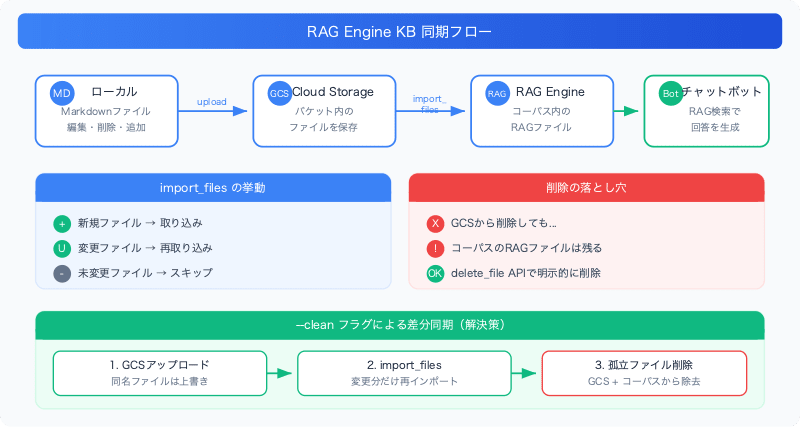
The setup is simple.
- Knowledge base articles (Markdown files) managed locally
- Uploaded to a GCS bucket
- Ingested into the corpus via Vertex AI RAG Engine's
import_files - Chatbot performs RAG search against the corpus
The update flow is "edit locally → upload to GCS → import to corpus," with no need to redeploy the bot itself.
Pitfall 1: import_files only re-ingests changed files
In the first update, I uploaded about 170 files to GCS and ran import_files. The result was "Imported 7 files."
I panicked, but this was normal behavior. import_files skips a file when all three of the following conditions are met:
- The file was previously imported
- The file content has not changed
- The chunking configuration has not changed
In other words, only files whose content has changed are re-ingested. Skip logic similar to AWS S3 sync is applied, so there's no need to re-import everything from scratch every time.
Pitfall 2: Deleted files don't disappear from the corpus
This was the biggest trap I fell into.
In this round of work, I deleted about 140 files due to consolidating duplicate articles and removing outdated ones. I deleted the files from GCS and ran import_files. However, the bot's responses didn't improve.
Upon investigation, I found that hundreds of RAG files were still in the corpus. import_files only handles "add and update" — it does not perform any deletions.
Even if you delete a file from GCS, the index (RAG file) in the corpus remains. Old article fragments were hitting in RAG search, causing the bot to return inaccurate responses.
To remove deleted files from the corpus, you need to explicitly call delete_file via the RAG Engine API.
Pitfall 3: Bulk deletion hits API quota limits
I thought "let's just delete everything from the corpus and re-import," so I tried to bulk-delete over 300 RAG files. The result was a RESOURCE_EXHAUSTED error.
Vertex AI RAG Engine has a quota for VertexRagDataService requests per minute per region, and looping through delete_file hits the limit quickly.
The countermeasure was to add retry logic with backoff:
for i, f in enumerate(files_to_delete):
    for attempt in range(3):
        try:
            rag.delete_file(name=f.name)
            break
        except Exception:  # ResourceExhausted etc., exception type varies by SDK version
            wait = 30 * (attempt + 1)
            time.sleep(wait)
However, the "delete everything → re-import" approach itself was wrong.
Pitfall 4: Successful GCS export ≠ successful corpus import
This was an issue I encountered while running automated sync (periodically executing Drive → GCS → corpus via Cloud Scheduler).
I had designed the sync logic as "export only changed files → run import if there were exports."
# Export (change detection)
for doc in drive_docs:
    if gcs_modified_time != doc["modifiedTime"]:
        export_to_gcs(doc)
        exported += 1

# Import (only if there were exports)
if exported > 0:
    client.rag.import_files(...)  # ← What if this fails?
The problem is cases where export succeeds but import fails. Since the files exist in GCS and their metadata is updated, the next sync run judges them as "no changes." As a result, the import is never retried, and a permanent divergence occurs where files exist in GCS but not in the corpus.
What actually happened was a case where the SDK (agentplatform v1.160.0) threw a ValueError during bucket ownership checks (caused by the Cloud Resource Manager API not being enabled; see the migration article for details). 15 files existed only in GCS and had not been ingested into the corpus for several weeks.
Fix: Added a check to the sync logic that "compares the list of files in the corpus with the list of files in GCS and runs import if there are differences."
needs_import = exported > 0
if not needs_import:
    corpus_names = list_corpus_display_names()  # All file names in the corpus
    missing = gcs_blob_names - corpus_names
    if missing:
        needs_import = True

if needs_import:
    client.rag.import_files(...)
Export and import are separate processes, and the design must assume that only one of them may succeed.
Final Design: --clean flag to sync only differences
Full deletion is slow and hits quota limits. There's no point in deleting and re-importing files that haven't changed.
The approach I ultimately settled on is comparing the local file list against GCS/corpus and deleting only files that no longer exist locally.
def sync_deletions(corpus_name, bucket_name, project_id):
    """Delete files from GCS and corpus that no longer exist locally"""
    local_files = {f.name for f in KB_DIR.glob("*.md")}

    # Delete orphaned files from GCS
    blobs = list(bucket.list_blobs(prefix="kb_articles/"))
    orphaned_blobs = [b for b in blobs if b.name.removeprefix("kb_articles/") not in local_files]
    if orphaned_blobs:
        bucket.delete_blobs(orphaned_blobs)

    # Delete orphaned RAG files from corpus
    rag_files = list(rag.list_files(corpus_name=corpus_name))
    orphaned_rag = [f for f in rag_files if f.display_name not in local_files]
    for f in orphaned_rag:
        rag.delete_file(name=f.name)  # Retry logic omitted
With this:
- GCS upload: Files with the same name are overwritten (changed files get updated)
import_files: Only changed files are re-imported (unchanged files are skipped)--clean: Only files that no longer exist locally are deleted from GCS/corpus
The entire execution is a single command:
python scripts/upload_kb.py \
  --project YOUR_PROJECT_ID \
  --bucket YOUR_BUCKET_NAME \
  --corpus YOUR_CORPUS_ID \
  --clean
Sync Mechanism Summary
| Operation | GCS | RAG Corpus |
|---|---|---|
| File content change | Overwritten on upload | import_files automatically re-ingests |
| New file added | Added on upload | import_files ingests it |
| File deleted | Not automatically removed | Not automatically removed |
| Chunking configuration change | No effect | import_files re-ingests |
Key point: import_files handles additions and updates only. Deletions must always be performed explicitly.
Workflow for Large-Scale KB Updates
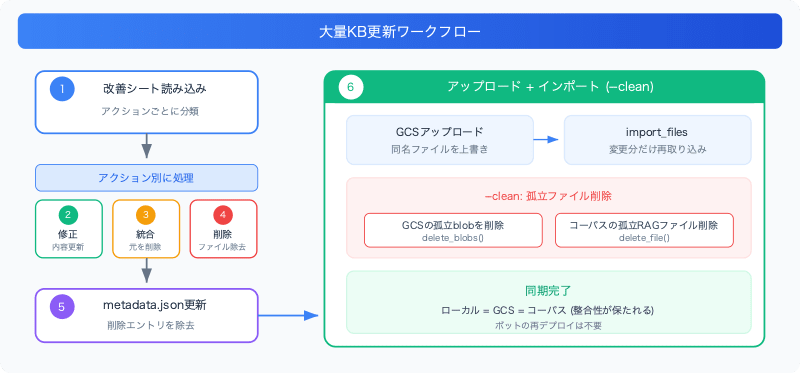
In actual operations, improvement content (fixes, consolidations, deletions) arrived from the client in an Excel sheet, and the workflow was to apply everything in bulk. Approximately 300 changes were processed in the following steps:
- Load the Excel sheet and classify by action (fix/consolidate/delete)
- Fix: Reflect title and corresponding content in Markdown files
- Consolidate: Update the target file and delete the source files
- Delete: Remove unnecessary files
- Update metadata.json: Remove entries for deleted files
- Upload + Import: Run with
--clean
If the source articles of a consolidation remain, old fragmentary responses surface in RAG search, burying the detailed, consolidated responses. Using --clean to reliably remove orphaned files is critical.
Summary
Key points for operating a knowledge base with Vertex AI RAG Engine:
import_filesis smart — it only re-ingests changed files, so there's no need to import everything every time- Deletion is the one thing that isn't automated — files deleted from GCS remain in the corpus. Explicit deletion via the
delete_fileAPI is required - Watch out for quota limits on bulk deletion — retry + backoff is essential. Differential deletion is faster and safer than delete-all + re-import
- When consolidating articles, don't forget to delete the source articles — old fragments rank high in RAG search and degrade response quality
The assumption that "uploading to GCS syncs everything" is an especially easy trap to fall into if you're used to AWS S3 integrations with other services. Keeping in mind that the RAG Engine index maintains its own independent state will make operations much smoother.
