I investigated the conditions under which "CSV (for FAQ data)" is semantically searched in Vertex AI Search

This page has been translated by machine translation. View original
Background
After putting FAQ data into a Vertex AI Search structured data store (CSV) and searching it, I found that the search accuracy was poor, and appropriate results were not obtained with differently phrased queries.
For example, when searching for "Is creating multiple accounts a problem?", I wanted it to match an FAQ that says "Is it against the terms of service for one person to have multiple accounts?", but it didn't match.
When I checked the search API response, I saw semanticState: DISABLED returned. It appeared that semantic search was disabled, and only keyword matching was being performed.
To solve this problem, I verified several approaches.
Test Environment
- Enterprise edition: Enabled (
SEARCH_TIER_ENTERPRISE,SEARCH_ADD_ON_LLM) - API: Discovery Engine v1alpha
- Data: FAQ data (48 items, title/question/answer)
Test 1: Structured Data Store (CSV)
Procedure
In the console's data store creation screen, there's an option for "CSV (for FAQ data)".
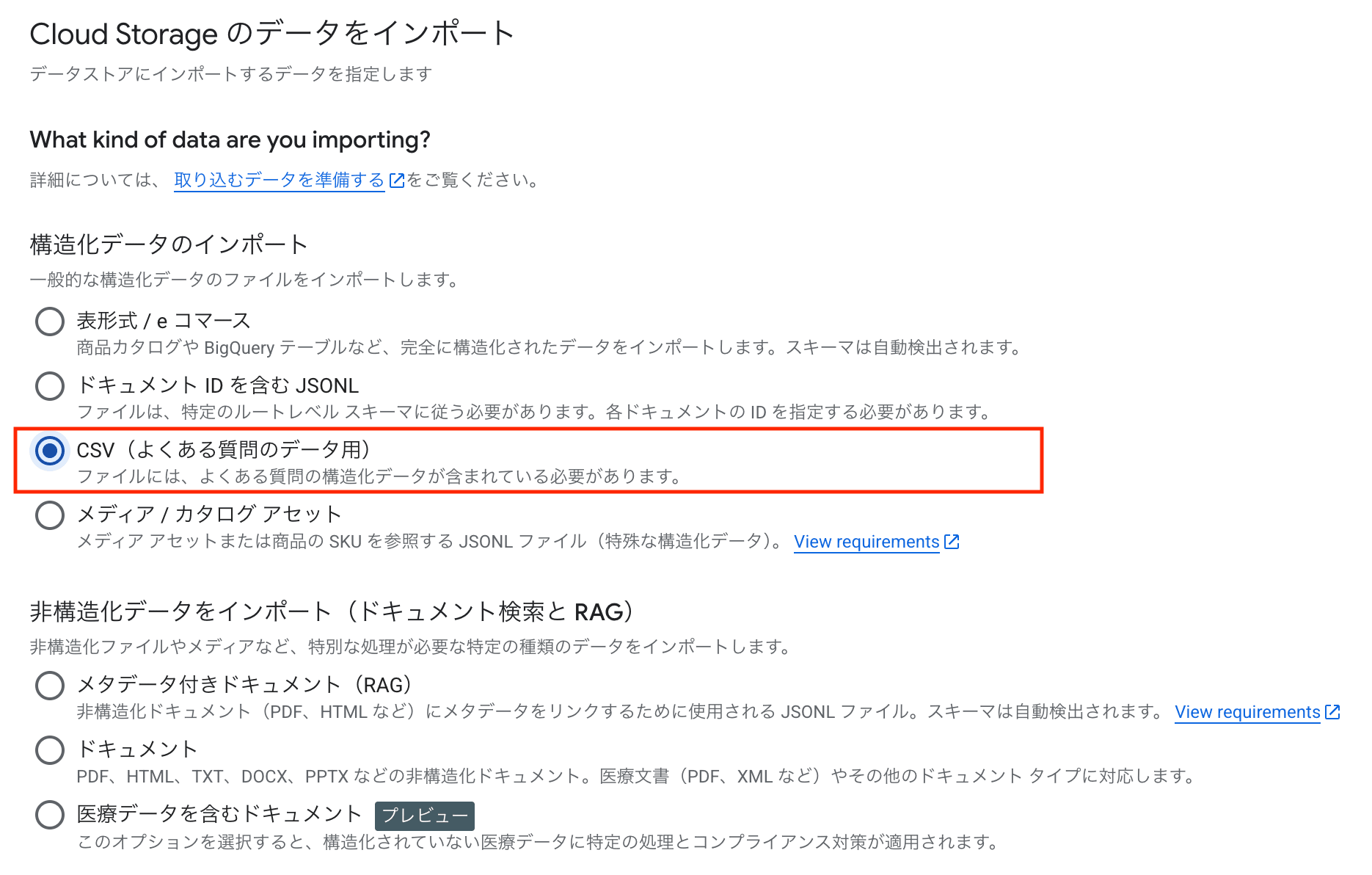
I used this to import a CSV from Cloud Storage as a structured data store. The CSV had 3 columns: title, question, answer.
title,answer,question
Multiple account usage,We request one account per person...,Is it against the terms of service for one person to have multiple accounts?
WAF Blocking,Your IP address may have been incorrectly identified by the threat detection service...,My submissions were blocked after posting consecutively...
...(48 items total)
The created data store had the following configuration:
{
  "name": "projects/{PROJECT_NUMBER}/locations/global/collections/default_collection/dataStores/{DATA_STORE_ID}",
  "displayName": "faq-csv-structured",
  "industryVertical": "GENERIC",
  "createTime": "2026-03-13T08:17:53.671221Z",
  "solutionTypes": [
    "SOLUTION_TYPE_SEARCH"
  ],
  "defaultSchemaId": "default_schema",
  "languageInfo": {
    "languageCode": "ja",
    "normalizedLanguageCode": "ja",
    "language": "ja"
  },
  "billingEstimation": {
    "structuredDataSize": "26472",
    "structuredDataUpdateTime": "2026-03-16T04:56:45.813085130Z"
  },
  "documentProcessingConfig": {
    "name": "projects/{PROJECT_NUMBER}/locations/global/collections/default_collection/dataStores/{DATA_STORE_ID}/documentProcessingConfig",
    "defaultParsingConfig": {
      "layoutParsingConfig": {}
    }
  },
  "servingConfigDataStore": {},
  "naturalLanguageQueryUnderstandingConfig": {
    "mode": "ENABLED"
  },
  "federatedSearchConfig": {}
}
industryVertical: GENERIC— A general industry category, not specialized for media, healthcare, etc.solutionTypes: SOLUTION_TYPE_SEARCH— Data store for search purposesnaturalLanguageQueryUnderstandingConfig: ENABLED— Natural language query interpretation feature is enabled. (However, this does not enable semantic search)
The schema automatically defined three fields corresponding to the CSV columns. The keyPropertyMapping was set with FAQ CSV-specific title, question, answer.
{
  "structSchema": {
    "$schema": "https://json-schema.org/draft/2020-12/schema",
    "type": "object",
    "properties": {
      "title": {
        "type": "string",
        "keyPropertyMapping": "title",
        "retrievable": true
      },
      "question": {
        "type": "string",
        "keyPropertyMapping": "question",
        "retrievable": true
      },
      "answer": {
        "type": "string",
        "keyPropertyMapping": "answer",
        "retrievable": true
      }
    }
  },
  "fieldConfigs": [
    {"fieldPath": "title", "fieldType": "STRING", "keyPropertyType": "TITLE"},
    {"fieldPath": "question", "fieldType": "STRING", "keyPropertyType": "QUESTION"},
    {"fieldPath": "answer", "fieldType": "STRING", "keyPropertyType": "ANSWER"}
  ]
}
Search Request
I sent a normal search request specifying this structured data store.
$ curl -X POST \
  -H "Authorization: Bearer $(gcloud auth print-access-token)" \
  -H "Content-Type: application/json" \
  "https://discoveryengine.googleapis.com/v1alpha/projects/{PROJECT_NUMBER}/locations/global/collections/default_collection/engines/{ENGINE_ID}/servingConfigs/default_search:search" \
  -d '{
    "query": "Is creating multiple accounts a problem?",
    "dataStoreSpecs": [{
      "dataStore": "projects/{PROJECT_NUMBER}/locations/global/collections/default_collection/dataStores/{DATA_STORE_ID}"
    }]
  }'
{
  "attributionToken": "...",
  "guidedSearchResult": {},
  "summary": {},
  "queryExpansionInfo": {},
  "semanticState": "DISABLED"
}
semanticState: DISABLED was returned. Even with Enterprise edition enabled, semantic search was not active.
While researching, I found an interesting statement in the Dialogflow CX documentation:
Reference: Dialogflow CX - Data store agents
Note: CSV files can also be imported as unstructured content. (...) The matching requirements are less strict compared to FAQ CSV data stores, and answers may be rewritten by the agent, not necessarily returned verbatim.
This suggests that the same CSV data may behave differently depending on how it's imported (FAQ structured vs. unstructured).
Based on this, I decided to proceed with testing by importing the CSV as an unstructured data store rather than putting it directly into a structured data store.
Test 2: Unstructured Data Store (HTML Conversion)
Procedure
This time, I imported it as an unstructured "document".
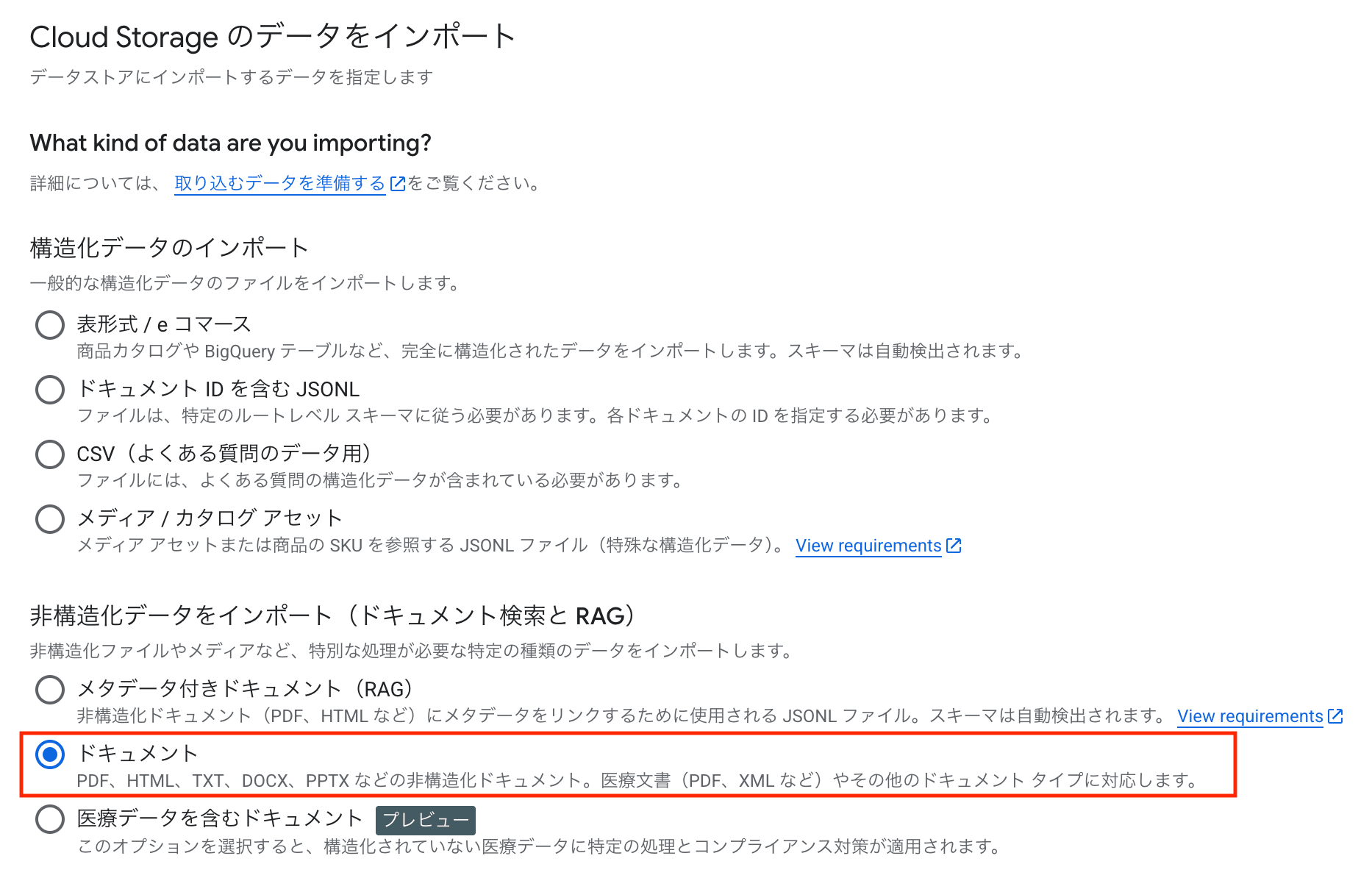
I converted each row of the CSV (48 items) into individual HTML files.
<!DOCTYPE html>
<html>
<head><title>Multiple account usage</title></head>
<body>
  <h1>Multiple account usage</h1>
  <h2>Question</h2>
  <p>Is it against the terms of service for one person to have multiple accounts?</p>
  <h2>Answer</h2>
  <p>...</p>
</body>
</html>
I uploaded the HTML files to a GCS bucket, created an unstructured data store (Cloud Storage) from the console, and connected it to an engine.
The created data store had the following configuration:
{
  "name": "projects/{PROJECT_NUMBER}/locations/global/collections/default_collection/dataStores/{DATA_STORE_ID}",
  "displayName": "faq-html-unstructured",
  "industryVertical": "GENERIC",
  "createTime": "2026-03-16T01:22:14.863267Z",
  "solutionTypes": [
    "SOLUTION_TYPE_SEARCH"
  ],
  "contentConfig": "CONTENT_REQUIRED",
  "defaultSchemaId": "default_schema",
  "billingEstimation": {
    "unstructuredDataSize": "34337",
    "unstructuredDataUpdateTime": "2026-03-16T02:40:36.968677615Z"
  },
  "documentProcessingConfig": {
    "name": "projects/{PROJECT_NUMBER}/locations/global/collections/default_collection/dataStores/{DATA_STORE_ID}/documentProcessingConfig",
    "chunkingConfig": {
      "layoutBasedChunkingConfig": {
        "chunkSize": 500
      }
    },
    "defaultParsingConfig": {
      "layoutParsingConfig": {}
    }
  },
  "servingConfigDataStore": {}
}
contentConfig: CONTENT_REQUIRED— Content is required for unstructured data stores. This setting wasn't present in the structured data store from Test 1chunkingConfig— Layout-based chunking is enabled (chunk size 500). In unstructured data stores, documents are automatically divided into chunkslayoutParsingConfig— Layout parser is enabled. It analyzes the HTML structure and reflects it in the index
Search Request
I searched with the same query as in Test 1.
$ curl -s -X POST \
  -H "Authorization: Bearer $(gcloud auth print-access-token)" \
  -H "Content-Type: application/json" \
  "https://discoveryengine.googleapis.com/v1alpha/projects/{PROJECT_NUMBER}/locations/global/collections/default_collection/engines/{ENGINE_ID}/servingConfigs/default_search:search" \
  -d '{
    "query": "Is creating multiple accounts a problem?",
    "dataStoreSpecs": [{
      "dataStore": "projects/{PROJECT_NUMBER}/locations/global/collections/default_collection/dataStores/{DATA_STORE_ID}"
    }]
  }'
{
  "results": [
    {
      "id": "a72d4a6a75ef09d25ad8d011f0c9cc33",
      "document": {
        "name": "projects/{PROJECT_NUMBER}/locations/global/collections/default_collection/dataStores/{DATA_STORE_ID}/branches/0/documents/a72d4a6a75ef09d25ad8d011f0c9cc33",
        "id": "a72d4a6a75ef09d25ad8d011f0c9cc33",
        "derivedStructData": {
          "link": "gs://{BUCKET}/faq_html/037.html",
          "title": "Multiple account usage",
          "snippets": [
            {
              "snippet_status": "SUCCESS",
              "snippet": "... <b>account</b> and want to create a company <b>account</b>. Is it against the terms of service for one person to have <b>multiple accounts</b>? ## Answer Having <b>multiple accounts</b> is not a <b>problem</b> in terms of the agreement. However, later ..."
            }
          ]
        }
      },
      "modelScores": {
        "relevance_score": { "values": [1] }
      },
      "rankSignals": {
        "keywordSimilarityScore": 3.2140481,
        "relevanceScore": 0.99168247,
        "semanticSimilarityScore": 0.81432873,
        "topicalityRank": 1,
        "documentAge": 492680.63,
        "boostingFactor": 0,
        "defaultRank": 1
      }
    },
    ...
  ],
  "totalSize": 3,
  "attributionToken": "...",
  "guidedSearchResult": {},
  "summary": {},
  "queryExpansionInfo": {},
  "semanticState": "ENABLED"
}
semanticState: ENABLED was activated.
The #1 result "Multiple account usage" had semanticSimilarityScore: 0.814 and relevance_score: 1 (highest score), showing that it matched well despite the different phrasing of the query. Simply changing to an unstructured data store enabled semantic search for queries that previously returned no results in Test 1.
This is the simplest solution, but I also tried one more approach.
Test 3: Structured Data Store with Custom Embeddings
According to the official documentation, including custom embeddings in structured data enables vector search. I tested whether this method would also enable semanticState: ENABLED.
Reference: Bring your own embeddings
Procedure
- Generated embeddings (768 dimensions) for each FAQ document (question + answer) using the
gemini-embedding-001model - Created a JSONL file containing the embeddings
{"id": "faq-001", "structData": {"title": "...", "question": "...", "answer": "...", "embedding_vector": [0.1, 0.2, ...]}}
- Created a data store via API (
contentConfig: NO_CONTENT) - Set
keyPropertyMapping: "embedding_vector"anddimension: 768for theembedding_vectorfield in the schema - Imported the data (48 items successful)
- Connected to an engine
The created data store had the following configuration:
{
  "name": "projects/{PROJECT_NUMBER}/locations/global/collections/default_collection/dataStores/{DATA_STORE_ID}",
  "displayName": "faq-custom-embeddings",
  "industryVertical": "GENERIC",
  "createTime": "2026-03-16T04:14:49.765248Z",
  "solutionTypes": [
    "SOLUTION_TYPE_SEARCH"
  ],
  "contentConfig": "NO_CONTENT",
  "defaultSchemaId": "default_schema",
  "billingEstimation": {
    "structuredDataSize": "829736",
    "structuredDataUpdateTime": "2026-03-16T04:56:45.813085130Z"
  },
  "servingConfigDataStore": {},
  "naturalLanguageQueryUnderstandingConfig": {
    "mode": "ENABLED"
  }
}
The schema was as follows:
{
  "structSchema": {
    "$schema": "https://json-schema.org/draft/2020-12/schema",
    "type": "object",
    "properties": {
      "title": {
        "type": "string",
        "retrievable": true,
        "keyPropertyMapping": "title"
      },
      "question": {
        "type": "string",
        "retrievable": true
      },
      "answer": {
        "type": "string",
        "retrievable": true
      },
      "embedding_vector": {
        "type": "array",
        "items": { "type": "number" },
        "keyPropertyMapping": "embedding_vector",
        "dimension": 768
      }
    }
  },
  "fieldConfigs": [
    {"fieldPath": "embedding_vector", "fieldType": "NUMBER", "keyPropertyType": "EMBEDDING_VECTOR"},
    {"fieldPath": "title", "fieldType": "STRING", "keyPropertyType": "TITLE"},
    {"fieldPath": "question", "fieldType": "STRING"},
    {"fieldPath": "answer", "fieldType": "STRING"}
  ]
}
contentConfig: NO_CONTENT— Necessary for importing documents with onlystructData. Import errors occur withCONTENT_REQUIREDembedding_vectorfield set withkeyPropertyMapping: "embedding_vector"anddimension: 768. This setting can't be added when existing documents are present, so it needs to be set right after data store creation (before import)- Unlike Test 1,
questionandanswerdon't havekeyPropertyMappingset. This is because it's created as a normal structured data store, not as an FAQ CSV
Search Request
Following the official documentation, I tried passing the query's embedding vector via embeddingSpec in the search request and reflecting vector similarity in ranking using ranking_expression.
$ curl -s -X POST \
  -H "Authorization: Bearer $(gcloud auth print-access-token)" \
  -H "Content-Type: application/json" \
  "https://discoveryengine.googleapis.com/v1alpha/projects/{PROJECT_NUMBER}/locations/global/collections/default_collection/engines/{ENGINE_ID}/servingConfigs/default_search:search" \
  -d '{
    "query": "Is creating multiple accounts a problem?",
    "dataStoreSpecs": [{
      "dataStore": "projects/{PROJECT_NUMBER}/locations/global/collections/default_collection/dataStores/{DATA_STORE_ID}"
    }],
    "embeddingSpec": {
      "embeddingVectors": [{
        "fieldPath": "embedding_vector",
        "vector": [0.028, 0.003, -0.016, ...]
      }]
    },
    "ranking_expression": "0.5 * relevance_score + 0.5 * dotProduct(embedding_vector)"
  }'
{
  "results": [
    {
      "id": "faq-037",
      "document": {
        "name": "projects/{PROJECT_NUMBER}/locations/global/collections/default_collection/dataStores/{DATA_STORE_ID}/branches/0/documents/faq-037",
        "id": "faq-037",
        "structData": {
          "title": "Multiple account usage",
          "question": "I want to create a company account separate from my personal account. Is it against the terms of service for one person to have multiple accounts?",
          "answer": "Having multiple accounts is not a problem in terms of the agreement. However, you cannot migrate articles between accounts later."
        },
        "derivedStructData": {
          "snippets": [
            {
              "snippet_status": "NO_SNIPPET_AVAILABLE",
              "snippet": "No snippet is available for this page."
            }
          ]
        }
      },
      "modelScores": {
        "dotProduct(embedding_vector)": { "values": [0.8300950527191162] }
      },
      "rankSignals": {
        "keywordSimilarityScore": 2.3365948,
        "topicalityRank": 1,
        "defaultRank": 1
      }
    },
    ...
  ],
  "totalSize": 48,
  "attributionToken": "...",
  "nextPageToken": "...",
  "guidedSearchResult": {},
  "summary": {},
  "queryExpansionInfo": {},
  "semanticState": "ENABLED"
}
semanticState: ENABLED was activated.
- #1: Multiple account usage (dotProduct: 0.830)
- #2: Account freezing/unfreezing (dotProduct: 0.608)
- #3: Account deletion/withdrawal (dotProduct: 0.605)
All 48 items were searchable, and semantic search functioned correctly.
Notes on Using Custom Embeddings
Here are some points I noticed during testing:
- You need to generate and pass the query's embedding vector with each search request. It won't be enabled with just a normal search request
- Use
dotProduct(field_name)inranking_expressionto reflect in ranking - The schema's
keyPropertyMapping: "embedding_vector"cannot be added when existing documents are present. It needs to be set right after data store creation (before import) - Embedding dimensions must be in the range of 1-768. Since
gemini-embedding-001is 3072 dimensions by default, you need to specifyoutput_dimensionality: 768to stay within the limit
Why Do We Need to Pass the Query Vector Ourselves?
With custom embeddings, the vectors on the data side are generated by a model of the user's choice. Vector similarity search assumes that both the data side and query side are generated with the same model and settings, so it wouldn't make sense for Vertex AI Search to auto-generate the query vector with its internal model. Therefore, users need to generate the query vector using the same model and pass it via embeddingSpec.
With unstructured data stores, on the other hand, Vertex AI Search automatically generates embeddings for both the data and query sides using the same internal model, so users don't need to be aware of embeddings.
Side Note: Cases Where Semantic Search is Enabled for Structured Data Stores in Blended Search
So far, I've tested with engines connected to a single data store, but I'd like to share one more interesting behavior.
In a blended search engine (connected to multiple data stores), searching all data stores without specifying dataStoreSpecs returns semanticState: ENABLED and even matches content from structured data stores.
| Condition | semanticState |
|---|---|
Blended search engine without dataStoreSpecs (searching all data stores) |
ENABLED |
Same engine with dataStoreSpecs specifying only the CSV structured data store |
DISABLED |
It appears that semantic search is spreading to structured data stores when searched together with data stores that support semantic search, such as website (Advanced indexing) data stores. However, simply adding a website data store with 0 documents didn't enable it, so the presence of a data store with indexed documents seems necessary.
I'm not sure if this behavior is by design or if it's just the search mode of the entire engine changing. Since it reverts to DISABLED when filtering to just the structured data store with dataStoreSpecs, it doesn't seem like semantic search is being enabled for the structured data store itself. For practical purposes, I think the methods summarized in the table below are more reliable.
Summary
Here's a summary of the test results:
| Data Store Type | semanticState |
|---|---|
Structured data store (without searchable: true) |
DISABLED |
Structured data store (with searchable: true) |
ENABLED |
| Structured + custom embeddings | ENABLED |
| Unstructured data store (HTML) | ENABLED |
Blended search (without dataStoreSpecs) |
ENABLED |
I found that in structured data stores, semantic search is disabled if there's no field with searchable: true in the schema.
Using an unstructured data store (HTML conversion) is also effective for enabling semantic search. While it takes effort to convert CSV to HTML, once converted, semantic search is enabled with normal search requests.
On the other hand, the custom embeddings method has the advantage of letting you freely choose the embedding model, but it requires generating and sending the query vector with each search, making the application implementation more complex.
The blended search method without specifying dataStoreSpecs is convenient, but since it reverts to DISABLED when specifying just the structured data store, it can't be used when you want to narrow down the target data stores.