Deciding WAF Rules Based on "What You Are Protecting": Designing and Implementing Protection Profiles

This page has been translated by machine translation. View original
Introduction
Hello, I'm Yotsuyan from Classmethod Security, where we develop security services.
This is a bit sudden, but how do you choose your WAF rules?
Most people probably choose by the attack they want to stop: "I want to stop SQL injection, so this rule," "XSS is scary too, so this one as well." But when you think about it, what really matters is "what are we protecting?"
So, within the system we built to automate AWS WAF operations, we created a feature called "Protection Profile." It collects the configuration of the software running behind the WAF and builds rules to match it.
In this article, I'll briefly cover the following three points.
- Why a protection profile is needed in the first place
- How we implemented it using Amazon Inspector
- Where we got stuck during development
I hope this is helpful for anyone who wants to combine Inspector and WAF, or who struggles with choosing WAF rules.
Why a protection profile is needed
With generic rule sets alone, it's hard to get rules that fit what you're protecting exactly. There are four main reasons.
1. Lots of irrelevant rules, yet the crucial ones are missing
Generic rules like the AWS managed rules are designed to stop a wide variety of attacks "reasonably well." As a result, inspections meant for apps unrelated to your own site get applied.
Conversely, attacks that exploit vulnerabilities in specific products can slip through. Take the Next.js middleware authorization bypass (CVE-2025-29927), for example. Just by adding a single specific header, the request looks perfectly ordinary. Generic rules won't stop this.
2. WAF capacity is limited
An AWS WAF Web ACL has a capacity limit called WCU (Web ACL Capacity Units). You can't just load every rule you can think of. To decide what to prioritize, you need to know what you're protecting. Knowing what you protect is the foundation of security.
3. Irrelevant rules only cause false positives
Rules for products you don't use do nothing to stop attacks. All that remains is the risk that "legitimate requests might be blocked by mistake." Also, even for attacks unrelated to the site you're operating, looking only at the WAF, you can't always tell whether you need to respond to them. If a large volume of requests from a scanner generates critical events, operations won't hold up.
4. Filling the gap until patches are applied
Between the time a vulnerability is disclosed and the time you apply the fix, verification and coordination inevitably take time. Temporarily protecting that gap with a WAF is what's called "virtual patching." But if you don't know which version of which product is running, you can't decide which rules to apply either.
We also thought, "Why not have users write down their configuration?" In fact, in the first implementation, we had users enter versions by hand. However, the information goes stale with every update, and how people write versions varies from person to person. In the end, we abandoned this approach. We also tried to find clues from the logs being output.
Don't ask people for the configuration; fetch it from the actual environment. This became our starting point.
The idea behind the protection profile
A protection profile summarizes, for each Web ACL, "what is running behind it." Its contents look like this.
| Item | Example | Where it comes from |
|---|---|---|
| Stack (product / framework) | WordPress, Next.js, Django, nginx | Determined from package names. Users can also choose it |
| Packages and versions | next 14.1.0, log4j-core 2.14.1 | Amazon Inspector (findings and SBOM) |
| Unfixed CVEs | CVE-2025-29927 | Amazon Inspector findings |
Based on this profile, we choose three kinds of rules.
- Preventive rules: Rules that are useful regardless of version. They check for things like exposed configuration files, access to debug screens or admin screens that must not be public, and attack syntax that almost never appears in normal requests. They are chosen to match the stack, and those common to every environment are applied to all.
- Vulnerability rules: Rules dedicated to specific CVEs. They are applied only when Inspector tells us that "that CVE is still unfixed" or "a vulnerable version of the package is installed." They are not applied just because the stack matches.
- Emergency rules: Rules distributed afterward in response to newly discovered vulnerabilities. They have a target (CVE, package version range, stack) and are delivered only to environments whose profile matches.
The current catalog has 51 preventive rules and 13 vulnerability rules. It supports 49 stacks (Laravel, Rails, ASP.NET, Next.js, Nuxt, Django, Jenkins, GitLab, Movable Type, IIS, and more). Incidentally, we check in tests that "every stack has at least one preventive rule."
Rules are first introduced in Count (detection only). After confirming there are no false positives, we switch them to Block. Settings that users have chosen per rule are never overwritten automatically, even when the profile is updated.
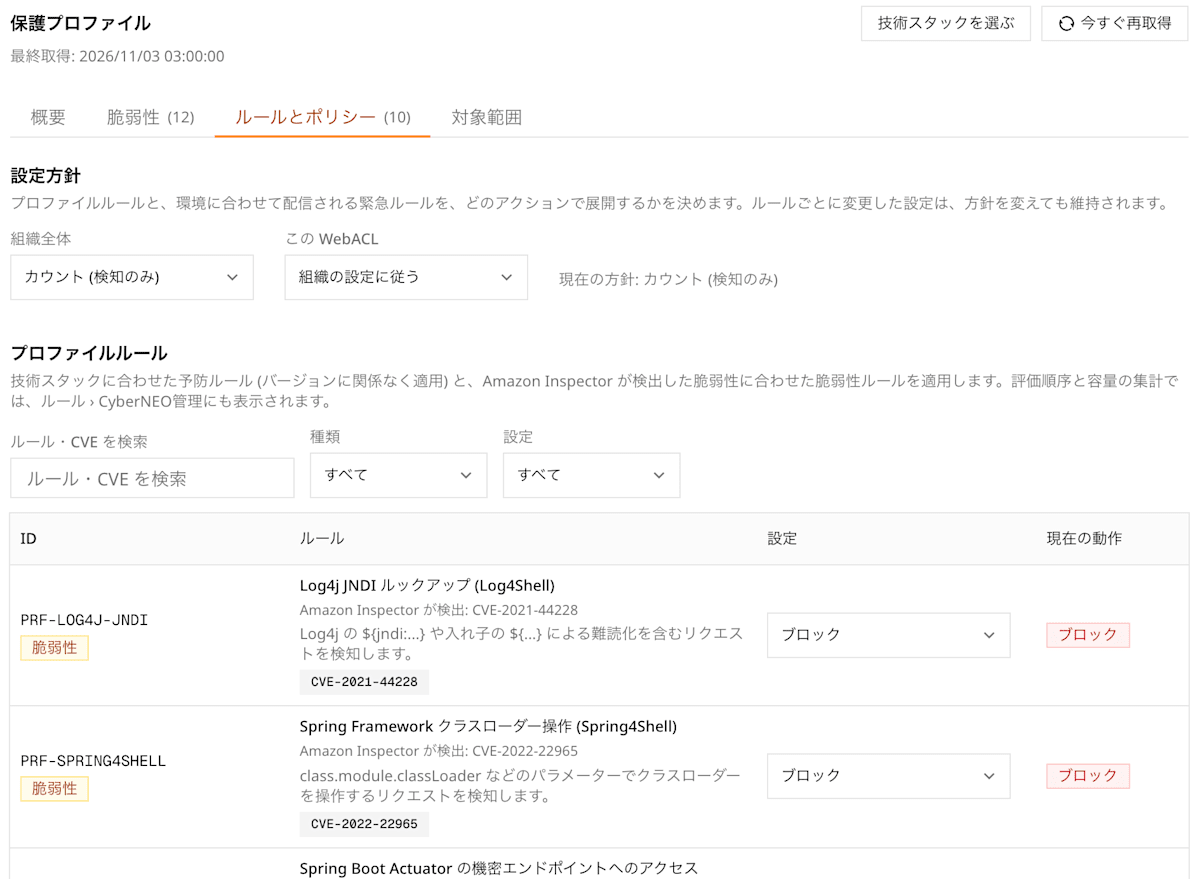
Rules and policies: Vulnerability rules are selected to match the CVEs Inspector found, and you can choose Block / Count for each rule
In addition, for each CVE that Inspector found, we show "how well it is protected by WAF" in four categories.
- Block: A rule that stops that CVE is running in Block
- Count: A rule exists, but it's still being observed in Count
- Out of WAF scope: Vulnerabilities that can't be protected by WAF in the first place, such as kernel ones
- Unsupported: Should be protectable by WAF, but there's no rule
If "Unsupported" remains, you consider either rushing the patch or adding a rule.
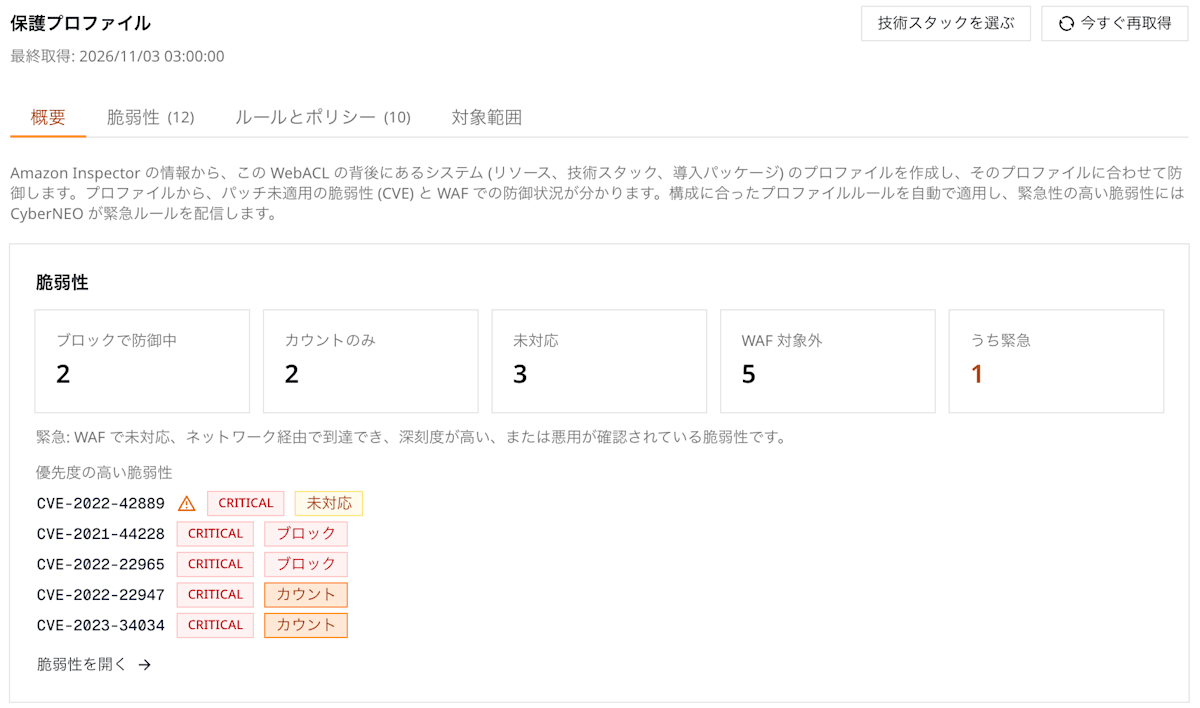
Overview: Displays the protection status of each CVE in four categories
How we implemented it with Amazon Inspector
Here's the overall flow.
1. Trace the resources behind the Web ACL
Inspector reports vulnerabilities per EC2 instance, container image, or Lambda function. WAF, on the other hand, operates per Web ACL. So we start by connecting these two.
- If the Web ACL is attached to an ALB, we pick up the targets from that ALB's target groups.
- If it's attached to CloudFront, we trace the origins to find the ALB, and pick up the targets from there.
- Targets are one of EC2, ECS tasks, or Lambda. For ECS, we identify the container image from the running task.
2. Fetch the findings
For the resources we found, we fetch from Inspector's findings the package vulnerabilities that are still ACTIVE. This tells us the "unfixed CVEs" and the "versions of vulnerable packages."
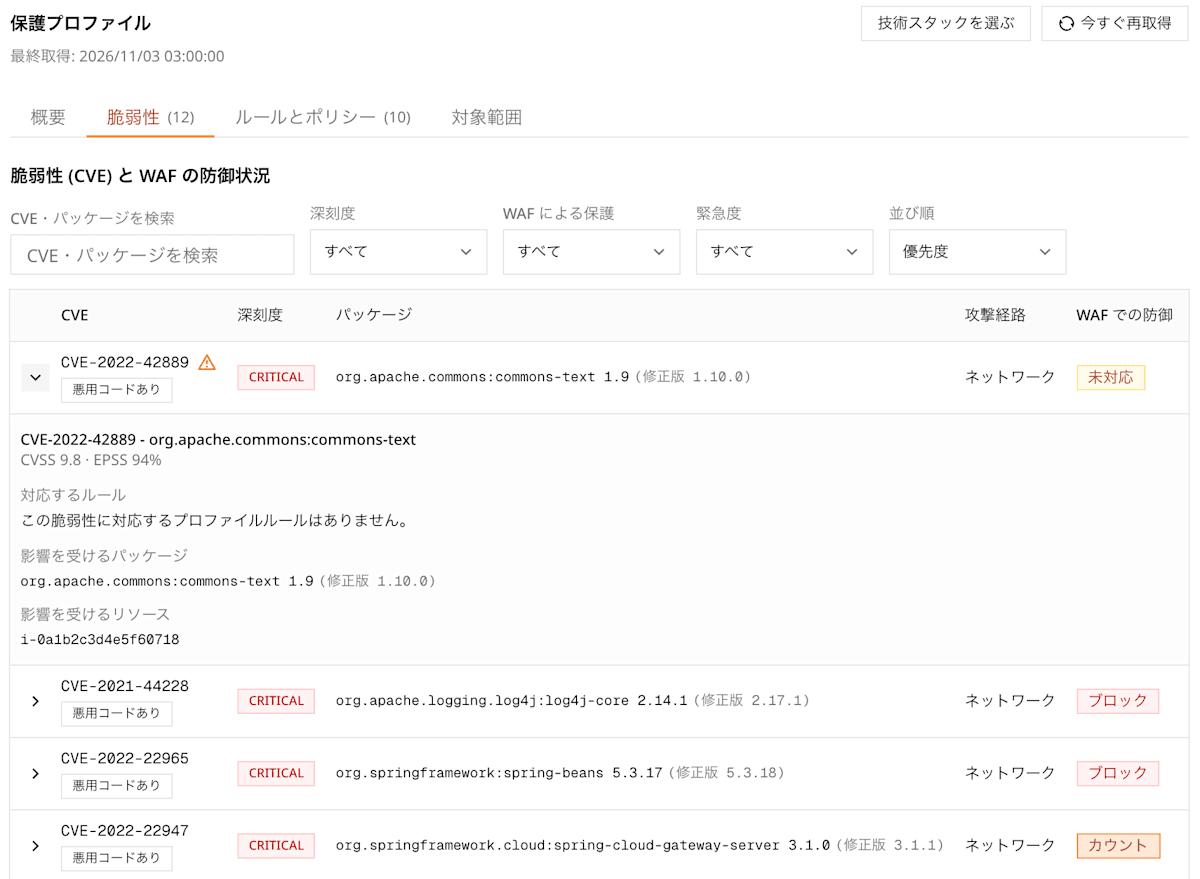
Vulnerabilities: For each CVE, shows the affected packages and resources, and whether a corresponding rule exists
3. Use the SBOM to learn about "packages without vulnerabilities" too
Here there's one problem. Only packages with vulnerabilities appear in the findings. For example, if nginx has no unfixed CVEs, we can't even tell from the findings that "nginx is running." That's a problem when we want to determine the stack.
So we decided to ingest all packages using Inspector's SBOM export (CycloneDX format).
- Once a day, we call
CreateSbomExportand have it written out to an S3 bucket in the user's account. - Every 15 minutes, we ingest files that have finished being written. Old data is replaced generation by generation.
- Exports that haven't finished after 6 hours are given up on and aborted.
In our test environment, the stacks identifiable from findings alone were four: django, nextjs, nodejs, and python. After adding the SBOM, nginx also became visible, and the total number of packages came to 763.
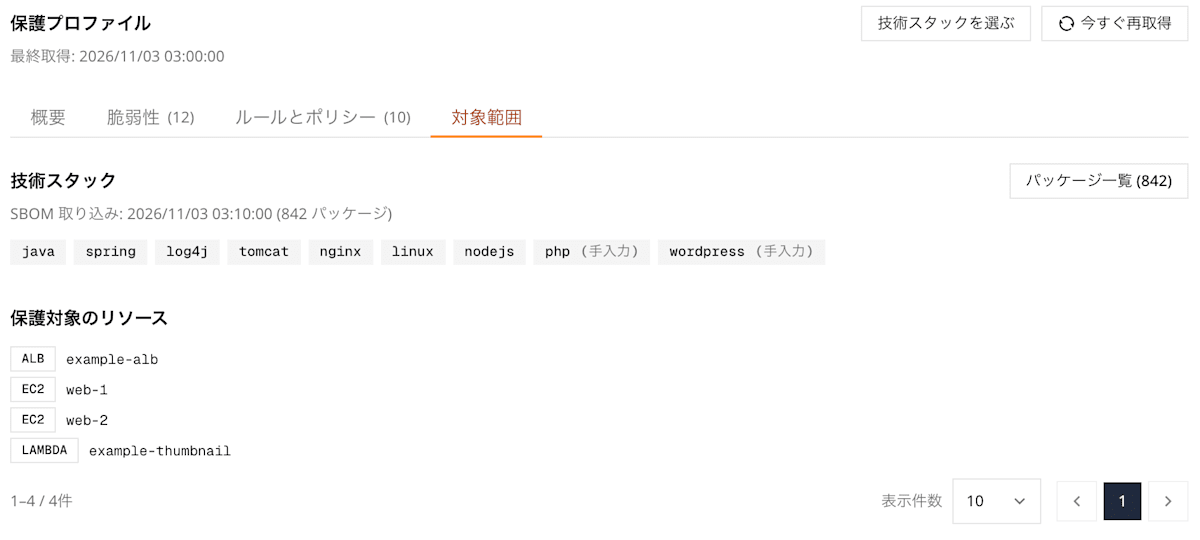
Scope: Resources traced behind the Web ACL and the technology stacks determined from the SBOM
4. Determine the stack from packages and select rules
We determine the stack using a mapping table of package names to stacks. After that, we just select the preventive rules that match the stack and the vulnerability rules that match the CVEs in the findings. Emergency rules are selected only when the target CVE or version range matches the profile.
5. Fit within capacity and deploy
The selected rules share the Web ACL's capacity with the existing rules. When capacity is insufficient, we remove rules starting from the lowest priority. The priority order is "emergency → vulnerability → preventive → common preventive." Removed rules are shown on screen as "not applied due to insufficient capacity." We wanted to avoid rules disappearing without anyone noticing.
6. Read-only permissions
We ask users to create a role in their account with permissions only to read Inspector, ELB, CloudFront, and ECS. Even if some step lacks permissions, we don't fail the whole process. We record "where and what was missing" and build the profile from whatever could be obtained.
The profile is updated once a day. If you apply a patch and the CVE disappears, the vulnerability rule is removed too, and if a new CVE appears, rules are added.
Where we got stuck in development
From here, I'll honestly write about the points where we stumbled during development.
If the CloudFront origin is a custom domain, we can't trace what's behind it
At first, we only traced to the ALB when the origin's domain was *.elb.amazonaws.com. In practice, though, there are a great many setups where a custom domain like origin.example.com points to the ALB. In those cases, we ended up with the sad situation of an empty profile.
So we made it traceable in the following three patterns.
- CNAME: We query DNS and check whether the canonical name matches an ALB's name.
- Route 53 alias: This is the tricky one; an alias doesn't return a CNAME, only IP addresses. So we determine the IP address's region from
ip-ranges.jsonand match it against the IP addresses of ALBs in that region. - VPC origin: With
cloudfront:GetVpcOrigin, we can directly obtain the ARN of the ALB or EC2 instance.
Note that we don't investigate AWS endpoints such as S3 or API Gateway. We also limit the number of origins for name resolution to 20 per run.
SBOMs can only be exported to a bucket in the same region
At first, we thought, "We'll just collect the SBOMs of all regions into one bucket in the Tokyo region." But when we tried to export resources in N. Virginia, it failed with S3's AuthorizationHeaderMalformed. Looking into it, we found that Inspector can only write to a bucket in the same region as the export source.
In the end, we changed to creating a bucket and a KMS key per region. We prepared a small CloudFormation template for each region, and regions without a bucket are displayed as "unsupported region" rather than raising an error.
Furthermore, the actual exported files had a different shape than expected. metadata.component contained the OS name (AMAZON_LINUX_2023) rather than the resource, and the resource ID was in metadata.properties. We also rebuilt the test samples to match the real shape.
Inspector doesn't find the packages
We deliberately installed old packages on a test EC2 instance, but detections stayed at 0. This troubled us quite a bit. There were two causes.
- The first scan ran before the installation via user data had finished. We ended up waiting several hours until the next scan.
- By default, EC2 language package scanning only looked at fixed paths (such as
/usr/lib/python3.9and/usr/lib/node_modules). Packages placed in custom directories weren't seen (the paths to scan can be added in the settings).
When we put the packages back in the standard paths and rescanned, 41 findings appeared within minutes. It's worth remembering that Inspector isn't something where "everything is visible immediately after you install it."
OS packages can't be compared by version range
When specifying the target of an emergency rule by version range, for language packages like npm or PyPI, we can decide by comparing against the SBOM's version.
However, for OS packages like deb and rpm, fixes are sometimes backported. Even if the version number looks old, it may already be fixed. So for OS packages, we decided not to compare by range and instead judge by the CVEs that Inspector reports.
The screen was full of "Unsupported"
When I looked at the protection status after release, "Unsupported" lined up one after another and I panicked. Looking at the contents, they were all CVEs of OS packages such as sssd, ssm-agent, sqlite, and Perl modules. These are scored with the attack vector "Network" (AV:N), so they had ended up in Unsupported. But these aren't things you protect by putting a WAF in front; they're things you fix with OS updates.
So we decided that "something is a WAF target only when that package is part of the app." Specifically, that means language packages, or packages that serve or run the web, such as httpd, nginx, php, tomcat, and nodejs. Everything else is classified as "Out of WAF scope."
Even if the numbers are correct, a screen that leaves the viewer thinking "so, what should I do?" is meaningless. This was a good lesson.
Messing up the WCU estimate
We also messed up in the capacity calculation. When we added up the WCU of the user-created rules one by one, 23 rules came to a large estimate of 440 WCU. As a result, all of the profile's rules were dropped for "insufficient capacity." This was of course in the test environment.
The actual WCU is much smaller when you estimate the rules together. So we fixed it to estimate the entire set of rules as one unit with CheckCapacity.
Also, because we decided the number of rules to remove all at once when capacity was insufficient, we were removing more than necessary. Now we re-estimate every time we remove one.
Measures to avoid false positives
The profile's rules are added without users being aware of it. That's exactly why we really want to avoid false positives.
- For every rule in the catalog, we use a simulator to confirm that it "matches attack samples" and "does not match normal requests." The simulator was built to mimic AWS WAF's transformation processing. In fact, during this work, we found a rule that had mishandled path normalization (
NORMALIZE_PATH). - When determining the stack from package names, short names like
next,vue, andrailsare matched exactly. With partial matching,nextcloudwould be treated as Next.js. - When introducing rules, we always start with Count, and the switch to Block is done gradually.
Summary
The protection profile is a mechanism for choosing WAF rules not from "the attacks you want to stop" but from "what you're protecting." To recap the key points:
- Don't ask people for the configuration; fetch it from Amazon Inspector findings and the SBOM
- Divide rules into three kinds: "preventive," "vulnerability," and "emergency"
- Distribute capacity by priority. Rules that were removed, or things WAF can't protect, are shown on screen rather than hidden
What surprised me after building it was that the rules themselves weren't what took the most time. The effort went into the part connecting the Web ACL and Inspector: resolving CloudFront origins, per-region SBOMs, Inspector's scan scope, and so on. Both Inspector and WAF are managed services, but tying the two together as "the same environment" required more steady, painstaking work than I expected.
WAF is not a substitute for patches. Even so, I think that a WAF placed with an understanding of what is running can buy you time safely until patches are applied. Regarding the recently talked-about PHP vulnerabilities (PHP2Shell, CVE-2026-109618 / CVE-2026-109619), I imagine many of you felt the same.
