
The Big Picture of How It Works: What You Should Know Before Implementing Web Push

This page has been translated by machine translation. View original
When you decide to add notifications to a web app and start looking into Web Push, terms like Service Worker, endpoint, VAPID, and p256dh all show up at once. You can get it working by following a library's sample, but you tend to move forward without really understanding what each piece is for, or what you should implement and where.
This article is for engineers who have web app development experience but are new to Web Push. It summarizes the big picture of how it works before you get into implementation. It starts with the players and the rough flow, then goes through signing and encryption and the subscription and sending flows in order, and finally applies them to a React SPA plus Web API setup to sort out what to write where. It covers conventional Web Push that uses a Service Worker.
The specifications and official documents were researched as of November 9, 2026. I have written only what I could confirm, and where I could not confirm something, I say so on the spot.
1. The big picture
What is Web Push?
Web Push is a mechanism where a website sends a message from the server side to the user's browser, and the browser displays it as an OS notification. On a Mac, it is a banner that appears at the top right of the screen as in the image below; on an iPhone, it appears on the lock screen or in Notification Center. It looks the same as a native app's notification.
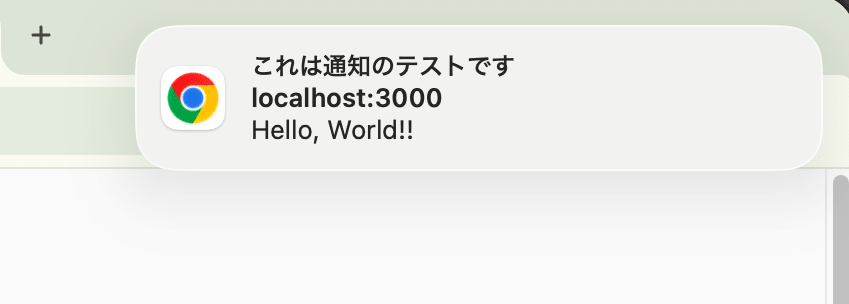
What displays it is the browser or the OS, not the page, so it appears even if the site's tab is not open.
Why does it reach the intended browser?
You can probably imagine that three parties cooperate to deliver a notification: your server, a push delivery service, and the user's browser. What is less clear is the next part: out of all the browsers in the world, how does the delivery service target a specific browser?
The answer lies in the endpoint that the browser receives as a result of first "subscribing" to the delivery service.
- When the user allows notifications, the browser makes an arrangement with the delivery service: "receive notifications for this site." This is called a subscription
- The delivery service issues an endpoint, a URL dedicated to this subscription, and returns it to the browser. The delivery service remembers internally which browser this endpoint belongs to
- The browser passes the endpoint to your server. Your server stores the endpoint linked to the user who was logged in at the time. The endpoint itself contains no user information, so this linking is your server's job
- When you want to send a notification, your server retrieves the target user's endpoint and sends the notification to that URL over HTTP
- The delivery service identifies the corresponding browser from the endpoint and delivers it over the connection it maintains with the browser
In other words, "which browser it reaches" is determined by which endpoint your server sends to, and "which browser an endpoint is" is known by the delivery service. This is the division of labor. What your server holds is a "user → endpoint" mapping, and what the delivery service holds is an "endpoint → browser" mapping.
The connection between the browser and the delivery service is maintained independently of any page, so step ⑤ arrives even when the page is closed. Polling and WebSocket are communication "between your server and the page," so the difference is that they end when the page is closed.
Also, in ③ the browser passes along, together with the endpoint, keys for encrypting the body. I cover keys in chapter 3.
This mechanism is defined by two specifications. The API the browser provides to the page (subscribe() in ①–③ and the shape of the subscription information) is the W3C Push API, and the HTTP that your server sends to the delivery service (how to send in ④) is IETF RFC 8030. The route from the delivery service to the browser (⑤) is not constrained by either specification and is an implementation of each browser vendor. In the following chapters, we look at this flow in more detail, step by step.
- Reference: Push API \- W3C
- Reference: RFC 8030: Generic Event Delivery Using HTTP Push
2. Opening up the browser
The "user's browser" in the diagram in chapter 1 is actually split into three parts: the Push receiving mechanism the browser itself has, the JavaScript running on that site's page, and the Service Worker. Keeping the same layout as in chapter 1, let's open up the browser box and redraw it.
The three colored items are the code you write as your web app. Everything else is the browser itself and the browser vendor's services, which you do not touch.
- The page's JavaScript. Triggered by a user action, it calls the browser's
subscribe()to start a subscription. It is also this code that sends the returned endpoint to your server. It is not involved in communication between the browser and the delivery service - The Push receiving mechanism (the browser itself). This is what actually talks to the delivery service. It creates the subscription, maintains the connection with the delivery service, and decrypts arriving messages and hands them to the Service Worker. It keeps running even after the page is closed
- The Service Worker. It receives the arriving message, displays a notification, and opens the page when the notification is tapped. It is not the Service Worker but the Push receiving mechanism that holds the connection to the delivery service
- Your server. It stores endpoints linked to users and issues HTTP requests to the delivery service when sending notifications
- The push delivery service. It issues endpoints and delivers messages arriving from your server to the browser corresponding to the endpoint
I wrote "Push receiving mechanism" as the browser itself, but depending on the environment, the OS takes on this role. In Chrome on Mac, Chrome itself connects to the delivery service. On iPhone, the OS maintains the same APNs connection as native apps, and Safari maps it to the Web Push subscription. Notes for using it on iPhone are covered in chapter 7.
Supplement: What is a Service Worker?
A Service Worker is JavaScript that the browser runs separately from the page. Ordinary JavaScript ends when you close the tab, but a Service Worker is registered for a site (origin), and even when no tab is open, it starts up when the browser hands it an event, does its processing, and stops again when finished. It cannot touch the DOM and communicates with pages via messages. It was originally created for offline support and cache control, and Web Push borrows this property of "being able to run code even without a page."
The reason it is needed for Web Push is simple: when a notification arrives while the page is closed, some code must run somewhere to display the notification and decide the URL to open when it is tapped. When the Push receiving mechanism receives a message from the delivery service, it starts that site's Service Worker and passes it a push event. The Service Worker displays the notification there, and when the user taps the notification, it is called with a notificationclick event and opens the page.
- Reference: Service Workers \- W3C
3. Notifications are signed and encrypted
Before looking at subscribing and sending in detail, let's cover the mechanisms that apply to the whole thing. In the diagram in chapter 1, your server simply sends a notification to the delivery service, and the delivery service simply delivers it to the browser. That alone would cause two problems.
- Anyone who knows the endpoint could send notifications to that browser
- The delivery service could read the entire body of the notification
Web Push prevents the former with a signing mechanism called VAPID, and the latter with an encryption mechanism called Message Encryption. Each is defined in a separate RFC, and they use separate keys.
| Mechanism | What it prevents | Who creates the key | What the key is used for |
|---|---|---|---|
| VAPID (RFC 8292) | Anyone other than you sending notifications | You (one pair shared by all users) | Your server signs, and the delivery service verifies |
| Message Encryption (RFC 8291) | The delivery service reading the body | The browser (per subscription) | Your server encrypts, and the browser decrypts |
For both mechanisms, the exchange of keys is done at subscription time, and the keys are used at sending time. After seeing in sections 3.1 and 3.2 where each key travels, section 3.3 checks where in the actual HTTP request being sent the signing and encryption are applied.
3.1 VAPID: verifying who sent it
Before deploying, you create one VAPID key pair. The private key is placed only on your server, and the public key is written in the page's JavaScript.
- At subscription time. The page's JavaScript passes the public key to
subscribe(), and the browser delivers it to the delivery service. The delivery service remembers the endpoint it issues linked to this public key - At sending time. Your server sends to the endpoint with a signature made with the private key and the public key attached. The delivery service checks whether the public key is the same as the one registered at subscription time and whether the signature is correct
Anyone can know the public key, but only your server, which holds the private key, can create the signature. Therefore, even if the endpoint leaks, others cannot send notifications to it.
However, what VAPID guarantees is only that "the sender is your server." The delivery service cannot tell whether that endpoint truly belongs to the user you want to notify, which depends on whether the "user → endpoint" mapping stored on your server is correct.
3.2 Message Encryption: only the destination browser can read the body
Here the browser creates the keys, which is the opposite direction from VAPID. At subscription time, the browser gives your server the "right to encrypt and write messages addressed to itself," and keeps the right to read them for itself.
- At subscription time. The browser creates a key pair for each subscription and passes the public key (
p256dh), together withauth, which acts like a passphrase, to your server. The private key never leaves the browser - At sending time. Your server encrypts the body with
p256dhandauthand sends it. The delivery service carries it without being able to read the contents - At receiving time. The browser decrypts it with its own private key and
auth
auth is a value known only to the browser and your server, and is mixed in when the encryption key is created. Since the public key is a value that is assumed to be fine to make public, it is enough to think of this as a separate value kept secret.
Note that what encryption can hide is only the body. "Which server sent to which browser, and when" is visible to the delivery service.
- Reference: RFC 8291: Message Encryption for Web Push
- Reference: RFC 8188: Encrypted Content-Encoding for HTTP
3.3 What is inside the request that gets sent
VAPID from section 3.1 and Message Encryption from section 3.2 are applied at different places within the single HTTP POST that your server sends to the endpoint. Let's look at the outgoing request at sending time to confirm what we've covered so far.
POST /fcm/send/dU5-cS8TRNY:APA91b... HTTP/1.1
Host: fcm.googleapis.com

# ── VAPID (RFC 8292): verified by the delivery service. Rejected if tampered with ──
Authorization: vapid t=<JWT:aud・exp・sub をVAPID秘密鍵で署名>, k=<VAPID公開鍵>

# ── Delivery instructions (RFC 8030): read by the delivery service ──
TTL: 86400
Content-Encoding: aes128gcm

# ── Message Encryption (RFC 8291): the delivery service cannot read it. Only the destination browser can decrypt ──
<p256dhとauthで暗号化された本文>
- Authorization header: What VAPID signs is a JWT containing the destination (
aud), the expiration (exp), and the contact (sub). The delivery service verifies this to confirm the sender. The body of the notification is not covered by this signature - body: The notification body is encrypted and placed here. The delivery service cannot read the contents, and only the destination browser can decrypt it. If it has been tampered with along the way, decryption on the browser side fails
Signing and encryption are separate operations applied at separate places, so the delivery service never decrypts the body using the VAPID key. If you use a library such as web-push for Node.js, the library assembles this request.
- Reference: web\-push \- npm
4. Looking at subscription in detail
This looks in detail at ① to ③ in chapter 1, from the user pressing a button until the subscription information is stored on your server. The key exchange covered in chapter 3 also all happens within this.
The route is as shown in the diagram. The following three points are worth keeping in mind for implementation.
- Complete Service Worker registration first. It is the Service Worker that receives messages after the page is closed, so the subscription is created tied to the Service Worker registration
- Start the subscription from a user action. Subscribing requires notification permission. Safari requires that the subscription request be made within a user action such as a button click
- You pass two things to
subscribe().userVisibleOnly: trueis a promise that "a notification will always be displayed upon receipt," and it is required in Chrome.applicationServerKeyis the VAPID public key from section 3.1, which the specification allows you to omit, but which is effectively required in Chrome
The contents of the subscription information (PushSubscription) returned from the browser are as follows.
| Value | Contents | Used for |
|---|---|---|
endpoint |
The destination URL issued by the delivery service | The destination your server POSTs notifications to |
expirationTime |
The subscription's expiration. null in Chrome |
If there is an expiration, re-subscribe before then |
keys.p256dh |
The public key of the key pair the browser created | Encrypting the body. Appeared in section 3.2 |
keys.auth |
The 16-byte passphrase the browser created | Same as above |
The important thing here is that the subscription information contains no information about who the user is. All it contains is the destination and encryption information. The Push API specifies that no one other than the delivery service should be able to extract user information from the endpoint. That is why linking the user known from the login session to the subscription and storing it is your server's job.
4.1 endpoint: a destination issued per subscription
The endpoint is not a destination shared by all browsers. It is a URL that the delivery service of the subscribing browser issues for each individual subscription. When you subscribe in Chrome, it looks like this.
https://fcm.googleapis.com/fcm/send/dU5-cS8TRNY:APA91bFPsN-cAs8L...(長いランダム文字列)
The host part is determined by which delivery service issued it. For Chrome it is fcm.googleapis.com, and for iPhone it is under *.push.apple.com. The long random string that follows serves as a token for the delivery service to tell "which subscription this is addressed to." Your server does not need to interpret its contents; if you simply POST to the stored URL as is, the delivery service that issued the URL delivers it to the corresponding browser.
Because it is a token, the endpoint has a different value for each subscription.
- Even for the same user, subscribing in Chrome on Mac and on iPhone creates two separate endpoints
- Even in the same browser, re-subscribing changes it to a new endpoint
For this reason, your server stores endpoints so that it can hold multiple per user, and when a subscription is made again, it updates to the new endpoint.
5. Looking at sending through display in detail
This covers ④ and ⑤ in chapter 1, from your server deciding "I want to send a notification to this user" until the user taps the notification.
The route is as shown in the diagram. The following four points are worth keeping in mind for implementation.
- 201 means "we've accepted it," not "we've delivered it." You specify the maximum time the delivery service holds the message with the TTL header. If the browser is offline, it holds the message for that time and delivers it when the browser reconnects
- Neither delivery nor prompt delivery is guaranteed. For the route from the delivery service to the browser, RFC 8030 describes a method using HTTP/2 as one example, but browsers are not obliged to follow it, and in practice Chrome uses FCM and Safari uses APNs, both vendor-specific routes
- Subscriptions can expire. Sending to an expired subscription returns 404 or 410, so your server deletes that subscription
- Always display a notification in the push event. This is because you subscribed with
userVisibleOnly: true. Safari revokes notification permission for sites that do not display a notification immediately after receipt
event.data contains the plaintext after the browser has decrypted it. You do not need to write decryption code in the Service Worker.
- Reference: RFC 8030 Section 5: Requesting Push Message Delivery
- Reference: How push works \- web.dev
6. Applying it to a React SPA and Web API
Let's apply the mechanisms so far to a common setup. As an example, consider a setup with a React SPA and a separately running Web API.
| Where | What to write | Related chapter |
|---|---|---|
| React component | On button click, register the Service Worker, pass the VAPID public key, and call subscribe(). Send the returned subscription information to the API |
Chapter 4 |
public/sw.js |
Display the notification in the push event, and open the page in the notificationclick event |
Chapter 5 |
POST /api/push-subscriptions |
Store the logged-in user and the subscription information in the table | Chapter 4 |
| Notification sending process | Called from the process you want to notify about, such as "a comment was added." Retrieve the target user's subscription information from the table, encrypt and sign, and POST to the endpoint. Delete rows for which 404 or 410 is returned | Chapters 3 and 5 |
| Configuration | Put the VAPID public key in the frontend's environment variables and the private key in the Web API's secrets | Section 3.1 |
There are three points about the setup.
- Keep the Service Worker out of the React bundle and make it a separate file. A Service Worker is a script that runs separately from the page, and its scope is determined by the location of the registered file. If you place it at
public/sw.jsand serve it from the site root, the entire site is in scope - Let the table hold multiple rows per user. As in section 4.1, this is because the endpoint changes per browser and each time a user re-subscribes
- Leave encryption and signing in the sending process to a library. In Node.js, something like
web-pushhandles it. With Chrome on Mac, as long as you use VAPID, there is also no work of creating an account or project on Google's side
If you design it so that the notification body carries only something like "There is something new" and the page opened from the notification fetches the detailed content from the API, you don't have to worry about how to handle the body. On the page side, you can check login state and viewing permissions as usual.
- Reference: Subscribing a user \- web.dev
- Reference: When to use HTTPS for local development \- web.dev
7. Notes for using it on iPhone
The mechanisms so far follow the same standard on iPhone as well. The delivery service is Apple's (the endpoint is under *.push.apple.com), but what it accepts is the same Web Push standard, so your server's code doesn't change. However, you need to pay attention to the conditions for getting started.
It works only in web apps added to the Home Screen. On iPhone, Web Push is available only to web apps added to the Home Screen via Safari, and iOS 16.4 or later is required. Notification permission is also requested starting from a user action, such as a button click inside that app. You cannot subscribe in a regular Safari tab, so for iPhone you need guidance telling users to add the app to the Home Screen.
You need HTTPS to try it out. Mac browsers treat http://localhost as a secure origin as an exception, so during development you can try both Service Workers and Push over HTTP. On the other hand, if you connect from an iPhone to your Mac using a LAN IP address such as http://192.168.x.x:3000, that isn't localhost, so it does not become a secure origin. To try it on an iPhone, you either make it trust a self-signed certificate or prepare HTTPS with a proper certificate using a tunneling service or the like.
- Reference: Sending web push notifications in web apps and browsers \- Apple Developer
- Reference: Web Push for Web Apps on iOS and iPadOS \- WebKit
- Reference: When to use HTTPS for local development \- web.dev
Supplement: Differences from APNs for native apps
APNs is also used when sending notifications to native iPhone apps, but that is a completely different method, which uses authentication keys issued by Apple and sends to APNs's own API. Web Push also uses Apple's APNs mechanism for delivery to the device, but the entry point visible from your server is an endpoint that follows the Web Push standard. The names are the same so they are easy to confuse, but when implementing Web Push you don't need to read the APNs documentation for native apps.
Supplement: Declarative Web Push
The conventional Service Worker is boilerplate code that just displays a notification on the push event and opens a URL on tap. Even so, you have to put it on your own origin and write it yourself. As an answer to this state of "boilerplate that you write yourself every time," WebKit introduced Declarative Web Push, which allows subscribing and displaying notifications without a Service Worker, in iOS 18.4, iPadOS 18.4, and Safari 18.4. If you make the payload a specified JSON format, the browser displays the notification directly. WebKit explains that messages in this format are handled by the conventional Service Worker method in browsers that do not support it. Since this article covers the conventional method, I'll add just one note: it cannot be said that "a Service Worker is required for all Web Push."
- Reference: Meet Declarative Web Push \- WebKit
- Reference: Safari 18.4 Release Notes \- Apple Developer
Summary
- Notifications arrive even when the page is closed because the browser itself (the OS on iPhone) maintains the connection with the delivery service, starts the Service Worker with the arriving message, and displays the notification
- Notifications are covered by VAPID signing and Message Encryption. Even if the endpoint leaks, others cannot send, and the delivery service cannot read the body. Both sets of keys are exchanged at subscription time
- The endpoint is a destination URL that the delivery service issues per subscription, and it changes per browser and each time a user re-subscribes. The only thing linking users to subscriptions is your server
- What you write yourself is three things: the frontend that creates subscriptions, the Service Worker that shows notifications, and the API that stores subscriptions and sends. The sending code is common regardless of the delivery service, and on iPhone a web app added to the Home Screen is a prerequisite
Closing
Following Web Push along its specifications, the boundary between what is defined by the Web Push standard and what browser vendors build on their own became clear. Sending from your server to the delivery service, signing, and encryption are unified by the standard, while delivery from the delivery service to the browser is a per-vendor implementation. Once you can see this boundary, you can design by separating what is the responsibility of your own code from what is left to the browser and delivery service.
I hope this blog is helpful to someone.
References
- Push API \- W3C
- RFC 8030: Generic Event Delivery Using HTTP Push
- RFC 8291: Message Encryption for Web Push
- RFC 8292: Voluntary Application Server Identification (VAPID) for Web Push
- Push notifications overview \- web.dev
- Web Push for Web Apps on iOS and iPadOS \- WebKit
- Sending web push notifications in web apps and browsers \- Apple Developer