
I want you to check out WebMCP because it's hot right now

This page has been translated by machine translation. View original
This is Suenaga from the Retail App Co-Creation Department.
Everyone, are you familiar with WebMCP?
WebMCP is a proposed web standard designed to make website functionality easier for AI agents to handle. When WebMCP was first announced, I brushed it off thinking "oh, it's just another MCP-related thing."
MCP is useful, but it requires not only developers to prepare an MCP Server, but also users to register connection destinations and handle authentication. While it's not difficult for engineers, telling general users to "please set up MCP first" is quite a high barrier.
Also, being a lazy engineer myself, it's a hassle to install MCPs one by one when I don't even know how much I'll actually use them. Even though I developed my own MCP(*), I had barely used it.
Meanwhile, I recently had an opportunity to think about "agent accessibility." Just like web accessibility for humans, the idea is to create a state where services are easy for AI agents to understand and operate.
In that context, I recalled that WebMCP existed, took another look at it, and realized it was absolutely amazing.
So, let me walk you through just how exciting WebMCP is, step by step.
Browser Use Is Already Quite Powerful
Before getting to WebMCP, let me say a few words about the current state of Browser Use.
Browser Use is, as the name suggests, a feature that allows AI agents to operate a web browser. Thanks to recent advances in AI, it has become quite powerful.
AI agents can not only read web pages and provide answers, but can also click buttons, fill in forms, and navigate across multiple pages. For example, if you ask "where can I change this setting?", instead of just explaining the steps in text, it can actually navigate directly to the settings screen for you.
In the past, you would ask the AI for operating instructions and then operate the screen yourself while reading the response. Now, "if you already know that much, just go ahead and do it" is starting to become a reality.
Below is a demonstration of Browser Use operating slides. The example happens to use slides, but in everyday use I have it handle tedious tasks like service configuration changes in their entirety.
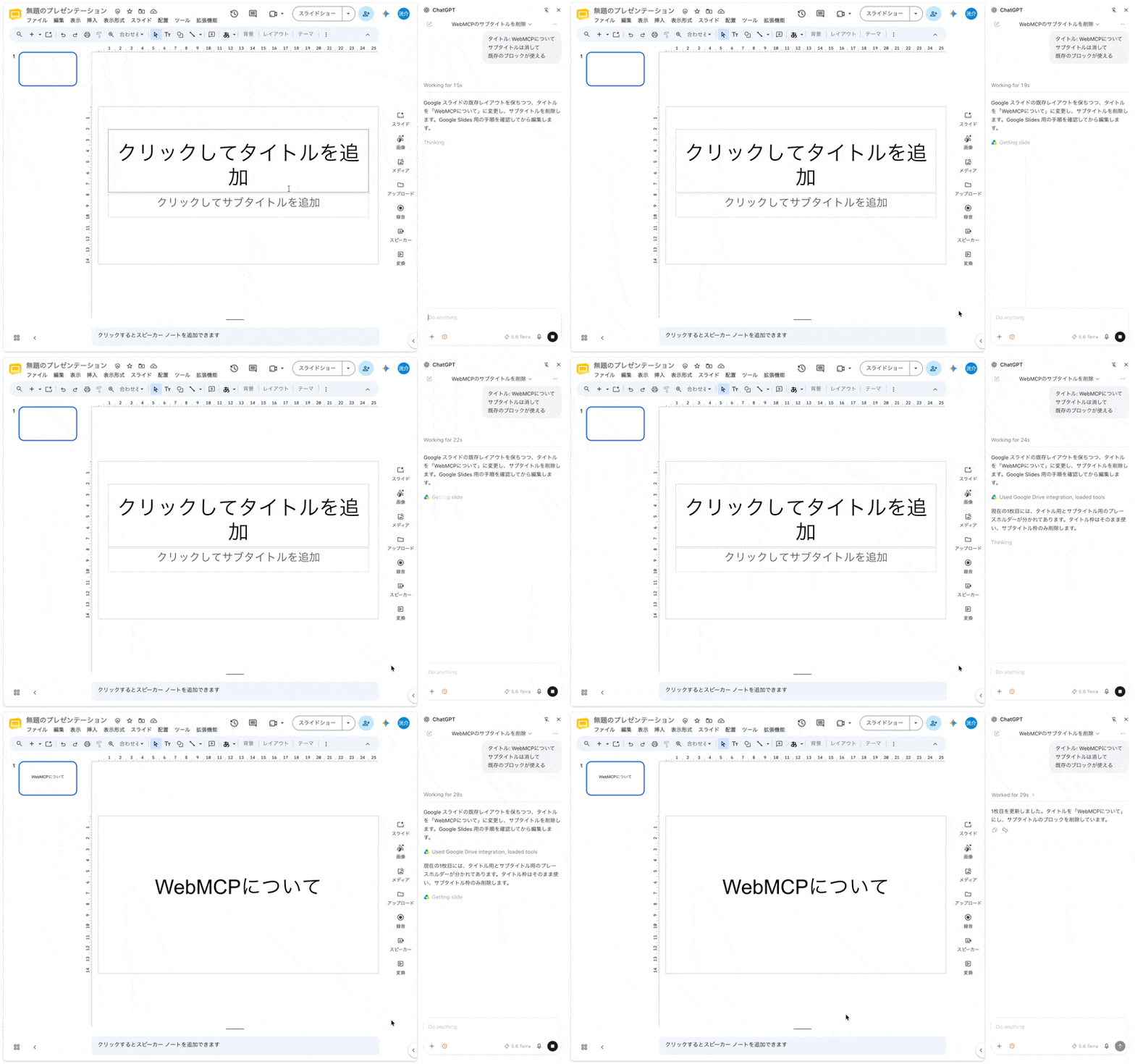
However, with Browser Use without WebMCP, the AI infers from screenshots and page structure information "what does this button do" and "in what order should things be entered." While it can operate sites that don't support WebMCP, it can get confused with complex screens or forms with many similar fields. If the UI changes, operations that previously succeeded may start failing.
WebMCP is a mechanism for the site to pass structured operation methods to these browser agents.
What Is WebMCP
If you want to skip the technical details for now, feel free to skip ahead to "Humans and AI Can Use the Same Screen."
WebMCP is a Web API that allows websites to expose their functionality as structured "tools" to AI agents within the browser. The specification is being discussed in the W3C Web Machine Learning Community Group, but as of the time of writing it is not yet an official web standard — it is currently at the Draft Community Group Report stage.
WebMCP has both a declarative API and an imperative API, but it's easier to see them in action, so let me first show you a simplified form of the tool exposed to the Agent.
{
  "name": "register_user",
  "description": "Register a user",
  "inputSchema": {
    "type": "object",
    "properties": {
      "name": { "type": "string" }
    },
    "required": ["name"]
  }
}
If you've ever created MCP or agent Tools before, this shape should look familiar.
Now, as I mentioned, WebMCP has two APIs. Let me define the same register_user using each.
Declarative API
<form
  toolname="register_user"
  tooldescription="Register a user"
>
  <label for="name">Name</label>
  <input id="name" name="name" required>

  <button type="submit">Register</button>
</form>
Imperative API
document.modelContext.registerTool({
  name: "register_user",
  description: "Register a user",
  inputSchema: {
    type: "object",
    properties: {
      name: { type: "string" }
    },
    required: ["name"]
  },
  execute: ({ name }) => registerUser(name)
});
The syntax is different, but both expose the tool to the Agent from the browser as a structured Tool like the one introduced earlier.
The declarative API works by adding attributes to existing HTML forms. The browser generates the Tool's input schema from the form's structure. When the Tool is called, the passed arguments are reflected in the corresponding form.
The imperative API, on the other hand, lets the implementer directly define not only the Tool's schema but also the processing when the Tool is called via execute. It allows for more flexible processing, such as calling existing JavaScript functions or changing the application's state.
By defining these Tools, instead of the AI looking at the screen and guessing "this select box is probably the expense category," the site can explicitly provide the Tool name, description, and required input fields.
The Agent can then select the appropriate Tool from that information and execute the operation defined by the site via the browser.
Humans and AI Can Use the Same Screen
One of the great appeals of WebMCP that I feel is that even when Tools are exposed for Agents, the human-facing UI can remain as-is.
For example, even if an Agent is handling form input or slide editing, the results can be reflected in the screen you normally use. Humans can review the results, make manual corrections if necessary, and then hand off the continuation to the Agent again.
Also, information that would be difficult for an Agent to infer from the screen alone can be passed from the site in a structured way. For example, the current subscription plan, input rules, and the impact of operations can be returned as Tool descriptions or execution results.
In other words, with WebMCP, rather than preparing separate UIs for humans and separate Tools for Agents, both humans and Agents can operate the same web app state.
I Built Three Demos
To make this easier to visualize, I created three demos using WebMCP. In all of them, the AI's operation results are reflected on the screen so that a human can review them at the end.
Note that in my environment at the time of writing, I have only confirmed operation within the Browser inside Codex. Since WebMCP itself and its compatible clients are still evolving, behavior may vary depending on your environment.
It failed to work with the ChatGPT Chrome extension and Gemini in Chrome.
Codex can be downloaded here.
From Codex, you can select the browser from the right sidebar and open the relevant site.
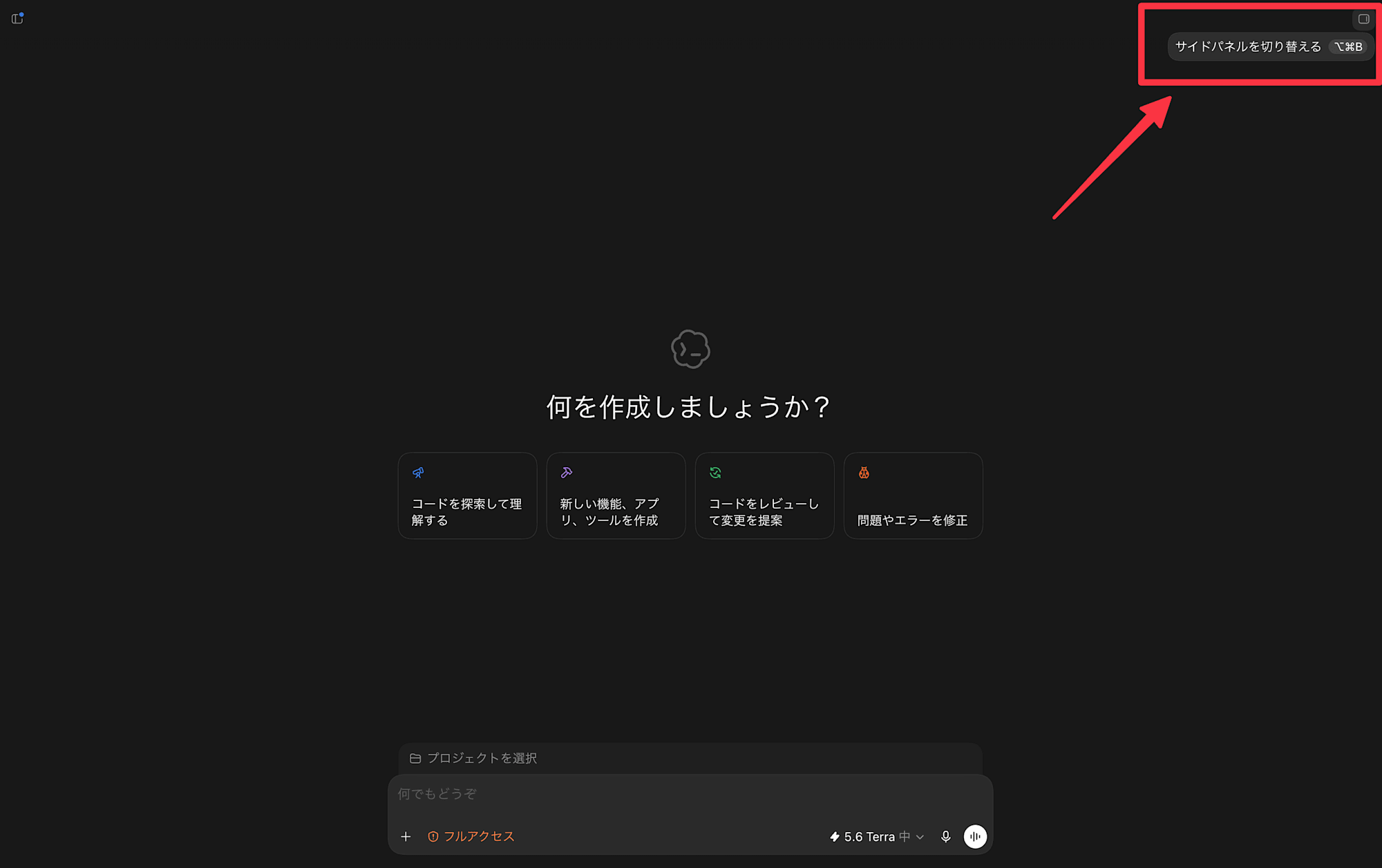
The three demos introduced here can actually be run locally. Some of the code is also published on GitHub so you can run them locally as well.
Kiroku: Expense Claim Site
Demo link: https://kiroku-webmcp.suekou.workers.dev
Kiroku is a demo based on the familiar internal expense claim process.
Filing claims is genuinely tedious. I'd love to have AI handle all of it, but the final review still needs to be done by a human.
First, open Kiroku in Codex, and depending on your screen size, you'll find example prompts on the right or bottom — just copy and paste one to try it out.
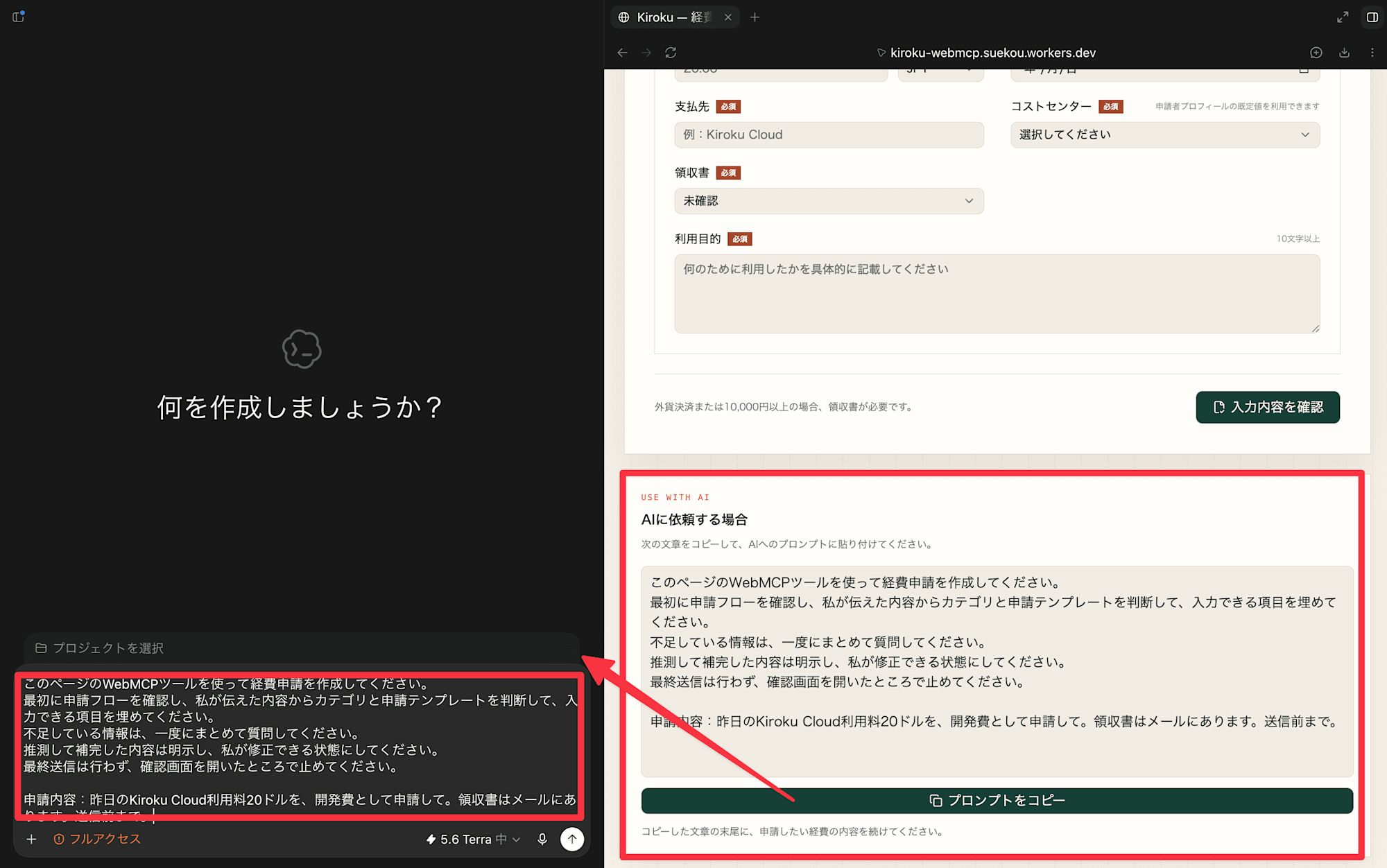
The Agent will interpret the WebMCP and automatically fill in what it can, and ask about anything it's missing.
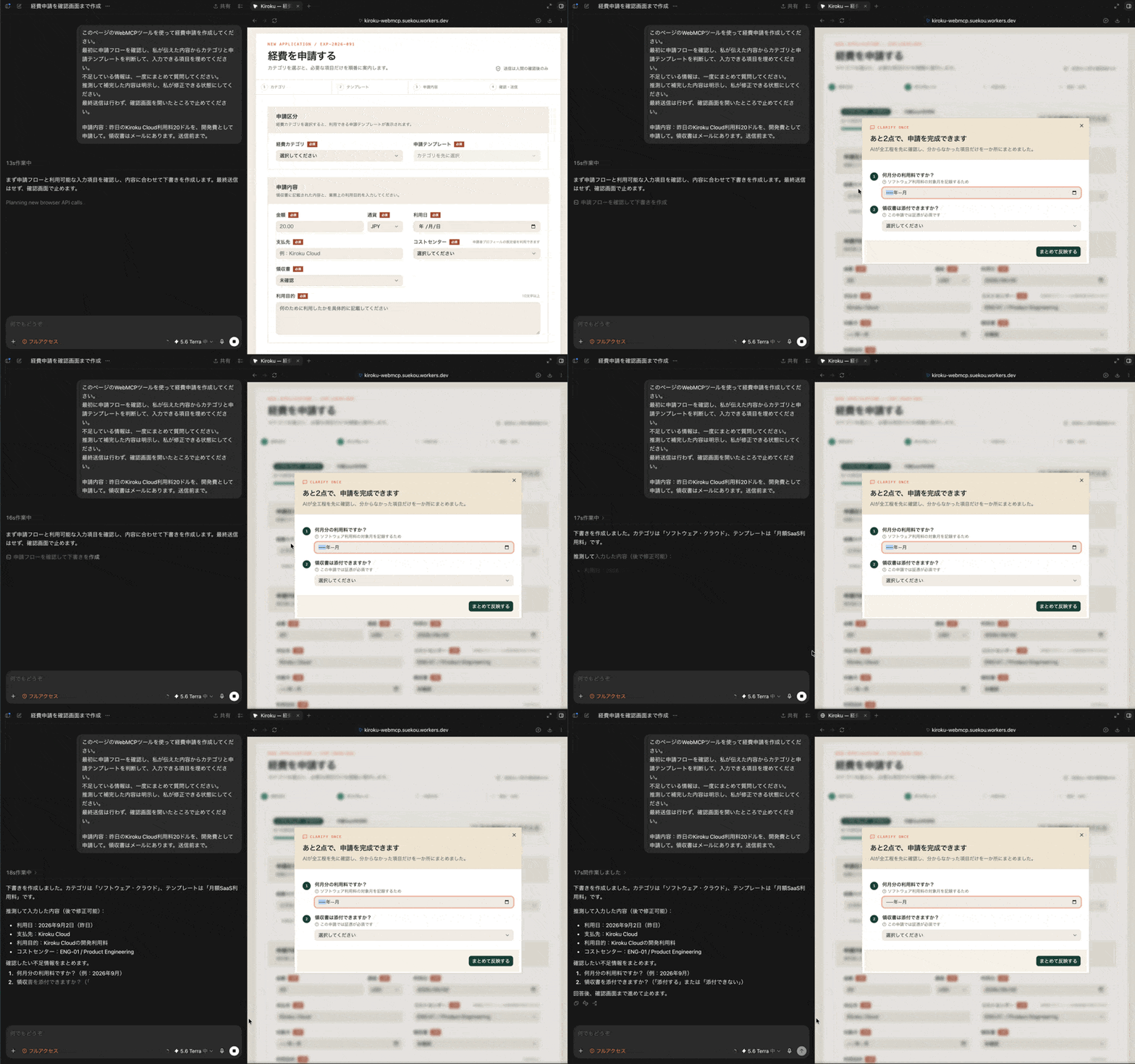
By the way, this demo app has a small trick to help the Agent understand the available options more efficiently. Since it's similar to MCP, the knowledge I've built up applies directly, which makes it fun to work with.
RelayDesk: Fictional SaaS
Demo link: https://relaydesk-webmcp.suekou.workers.dev
RelayDesk is a fictional SaaS admin screen.
For questions like "where is this setting?" or "can I use this feature with my current plan?", it checks the current subscription status and help information, then guides you to the relevant settings screen. For operations with significant impact, such as plan changes, it stops at the confirmation screen and leaves the final decision to the human.
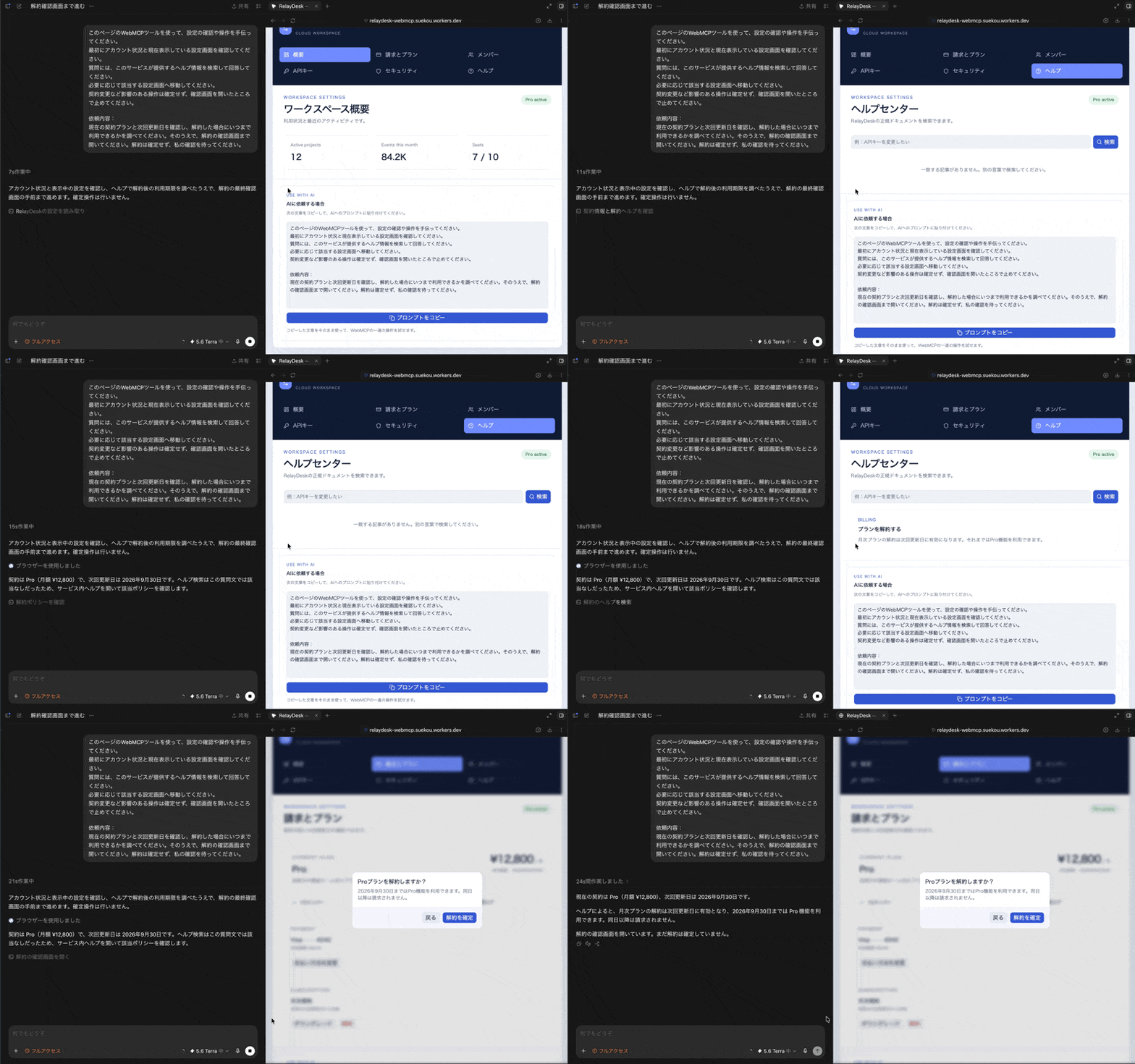
In actual work, searching for "where to configure something" often takes surprisingly more time than the operation itself. Rather than just searching help articles and explaining the steps, being guided directly to the relevant screen would make things considerably easier.
Deckhand: Slides Edited Together by AI and Human
Demo link: https://deckhand-webmcp.suekou.workers.dev
Deckhand is a demo where humans and AI edit the same slides together.
Rather than having AI generate an entire slide deck in one go and be done with it, operations such as adding pages, editing elements, alignment, and theme changes are exposed as tools. The idea is a back-and-forth where AI creates something, a human fixes the details, and then the AI takes over again based on those corrections.
I'd love to see something like this added as a feature in Google Slides.
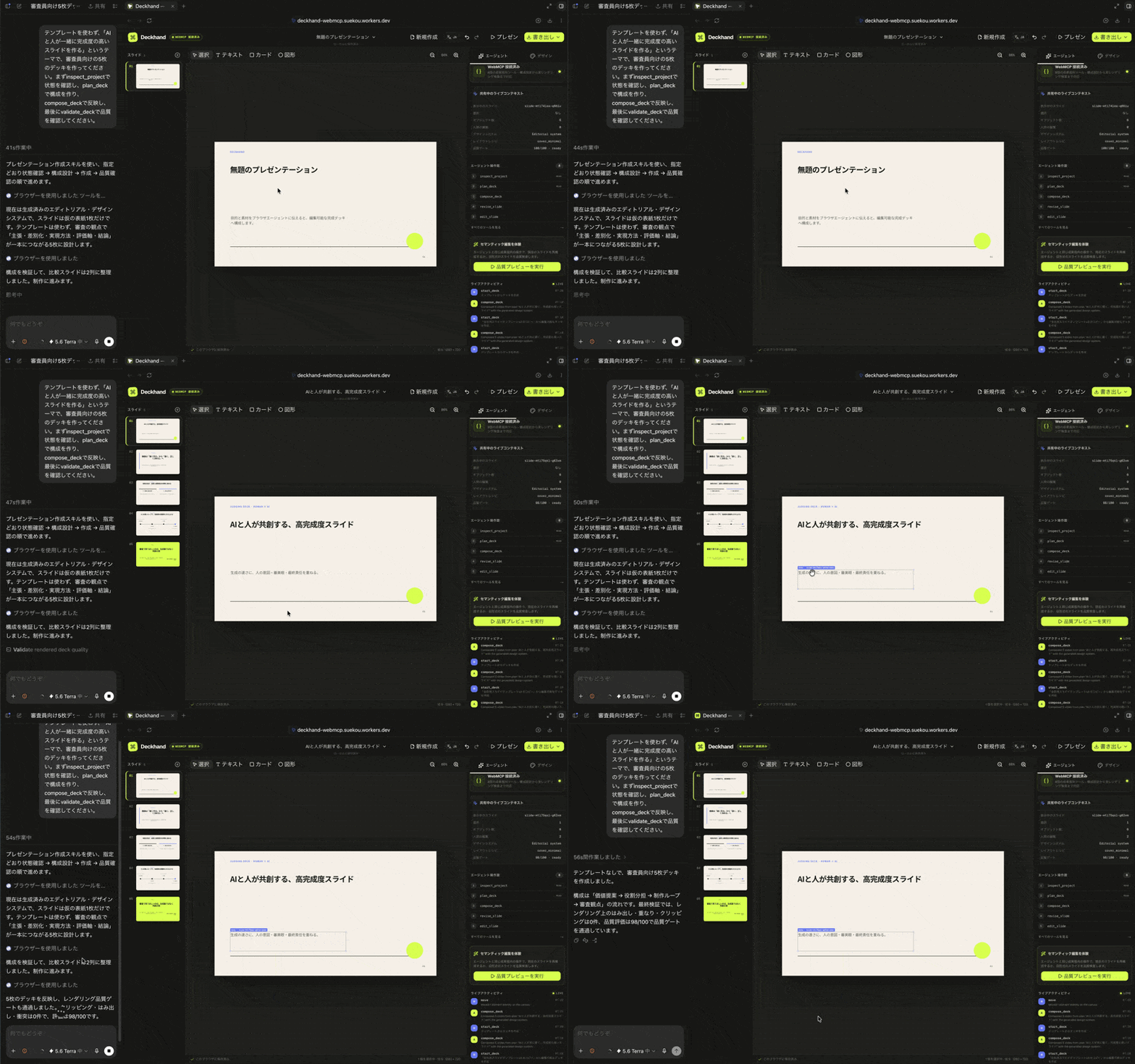
This one is published on GitHub.
The Role of Chatbots May Change Somewhat
Gemini in Chrome not only allows you to interact with AI in a side panel within the browser, but also offers a preview of auto browse for actions like form input. Additionally, options for operating existing browsers from AI, such as ChatGPT's browser integration and Claude for Chrome, are also growing. While availability by region, plan, and supported features varies, the experience of working together with AI inside the browser is expanding.
As this trend progresses, it may become possible to transfer some of the roles that service-specific chatbots have played to the browser agent that users use every day.
On the service side, instead of "teaching a dedicated chatbot all the possible operations," you can expose "what can be done on this screen" via WebMCP. Users can ask their chosen AI questions and have it operate things directly. Depending on the configuration, it may also be possible to have users utilize the AI they have subscribed to, without the service side bearing all the costs of the conversational UI and LLM usage.
Of course, this doesn't mean chatbots become unnecessary. When a service needs to guarantee its own support quality, or when processing needs to happen without a page being open, traditional chatbots, MCP, and APIs are more appropriate. However, for use cases like guiding users to settings or assisting with input, I think the compatibility is quite good.
Security and Accuracy Challenges
While WebMCP makes it easier for Agents to operate websites, how much to trust the Tools a site exposes will become important.
The Agent is given the Tool's name, description, and input/output schema, but the Tool definition does not guarantee what kind of processing is actually happening behind the scenes.
For example, a site mimicking a legitimate one could expose a plausible-sounding Tool like:
check_subscription
"Check current subscription status"
It's possible for a site to be built to look authentic not just visually, but even in the Tools it exposes to Agents.
Also, prompt injection — where malicious instructions are embedded in Tool descriptions or execution results to manipulate the Agent's judgment — is also a concern.
WebMCP has mechanisms for conveying the Origin and nature of Tools to the Agent, but that alone doesn't guarantee safety. For high-impact operations like purchases, deletions, and cancellations, it will be important to consider "how much authority to grant to the Agent," such as requiring human confirmation.
Additionally, even on legitimate sites, there is no guarantee the Agent will always select the intended Tool.
When Tools such as:
cancel_subscription
pause_subscription
downgrade_subscription
exist, how a request like "I want to pause billing for a while" is interpreted may vary depending on the Agent.
For this reason, in addition to traditional UI testing, evaluations that include the Agent — such as "can it select the appropriate Tool from this request?" and "can it confirm before executing in ambiguous cases?" — will likely become necessary.
In Closing
Personally, I think that if WebMCP becomes widespread as a web standard in the future, it will end up being used on a very large number of sites.
Above all, the prospect of being able to hand off tedious tasks we do in browsers every day — like filing claims, changing settings, submitting inquiries, and gathering information — to an Agent is extremely appealing.
When browser agents become commonplace, WebMCP, which teaches agents how to operate websites, may become an important technology.
I'm really excited to see where this all goes.
See you 👋
